
Vibe Coding course · lesson 10 of 26
- 1What Is Vibe Coding? A Beginner's Guide
- 2The Vibe Coder Mindset: Build Small, Check Often
- 3Choosing Your Vibe Coding Tool: A Beginner's Guide
- 4Set Up Your Workspace for Vibe Coding
- 5Your First Vibe-Coded App in 30 Minutes
- 6From Idea to MVP: Plan a Small First Version
- 7Spec-Driven Development: Give AI a Clear Plan to Build From
- 8Mockups and Examples as Input: Show AI What You Mean
- 9Choose a Tech Stack: Pick Tools You Can Keep Using
- 10Prompts That Build Things: Give AI a Clear Task
- 11Context Documents: Give AI Lasting Project Instructions
- 12Managing Context and Sessions: Keep AI on the Right Task
- 13Set Standards Early and Review AI Output
- 14Build the Skeleton: Start the BookmarkBox App
- 15Add Data and a Database: Save Real Bookmarks
- 16Add Accounts Safely: Sign In and Protect Each User's Data
- 17Design and Polish: Improve the App One Pass at a Time
- 18Version Control with AI: Keep a Safe History of Your Work
- 19Debugging with AI: Find the Cause Before You Fix It
- 20Test by Default: Make Sure Each Feature Keeps Working
- 21Refactor and Keep Your Code Healthy
- 22Security for Vibe Coders: Protect Your App and Its Users
- 23Deploy Your App: Put BookmarkBox Online
- 24Monitor and Maintain Your App After Launch
- 25Where Vibe Coding Stops: Know When to Change Your Approach
- 26Capstone: Ship a Project from Idea to Production
After this lesson, you will be able to write a build prompt with a clear goal, relevant project context, boundaries and a way to check the result. A prompt cannot guarantee a perfect first answer, but a focused request gives you something easier to review and improve.
You have chosen a stack for BookmarkBox in Choose a tech stack. Now we will ask an AI to implement one small feature from its spec.
Give the prompt a clear shape
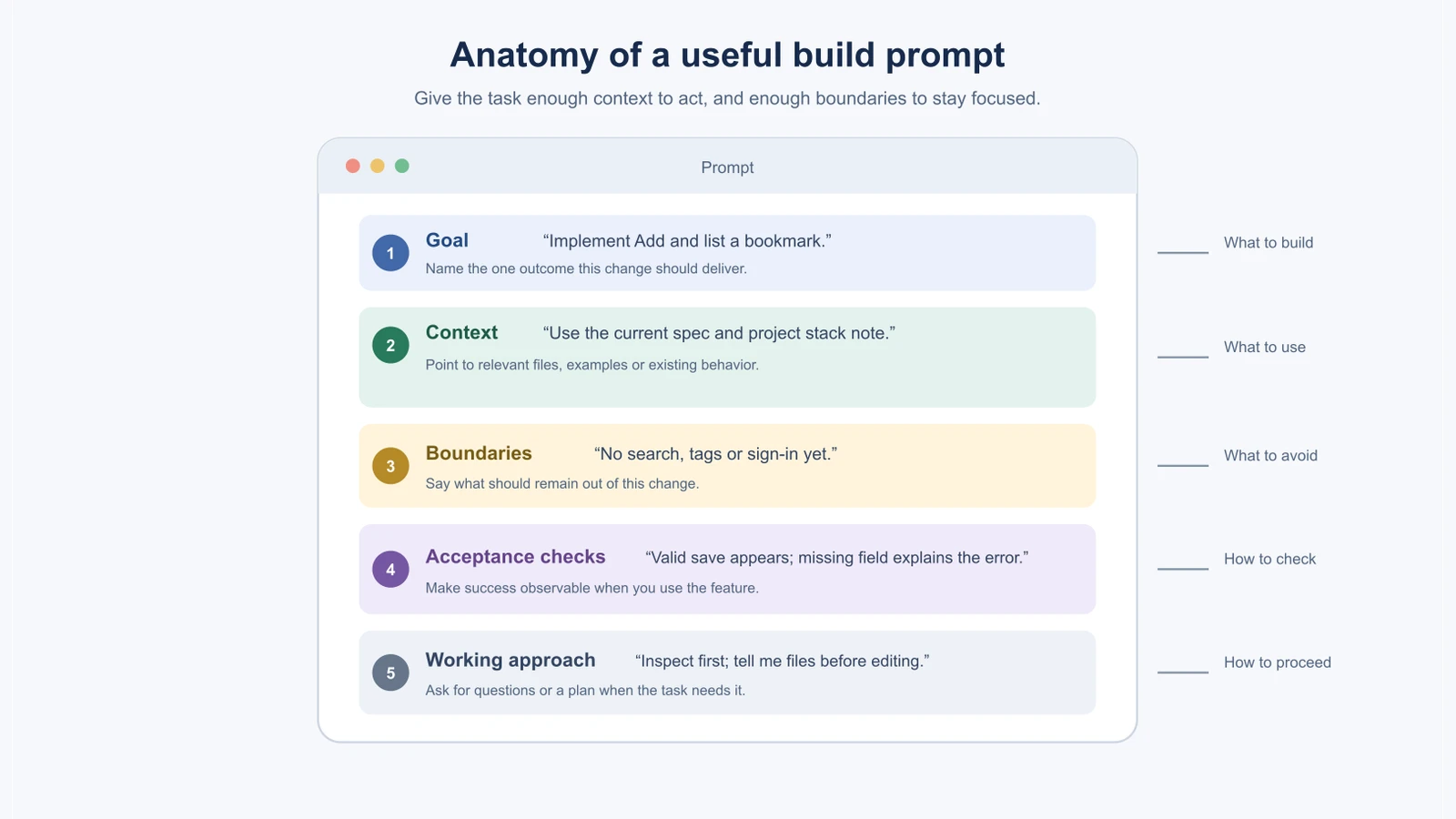
Before writing, decide what one useful result would be. A prompt can be short or detailed, depending on the task, but these parts make a good checklist:
- Goal: What should change for the person using the app?
- Context: Which spec, files, examples or existing behavior should the AI use?
- Boundaries: What should stay out of this task? Which project conventions should it follow?
- Acceptance checks: What observable result will tell you the feature works?
- Working approach: Should it inspect first, ask questions, propose a plan, or make the change now?
You do not need to paste every section into every prompt. A one-line typo fix may need only the file and correction. A feature that changes data should include its behavior, constraints and checks.
Compare a vague and a specific request
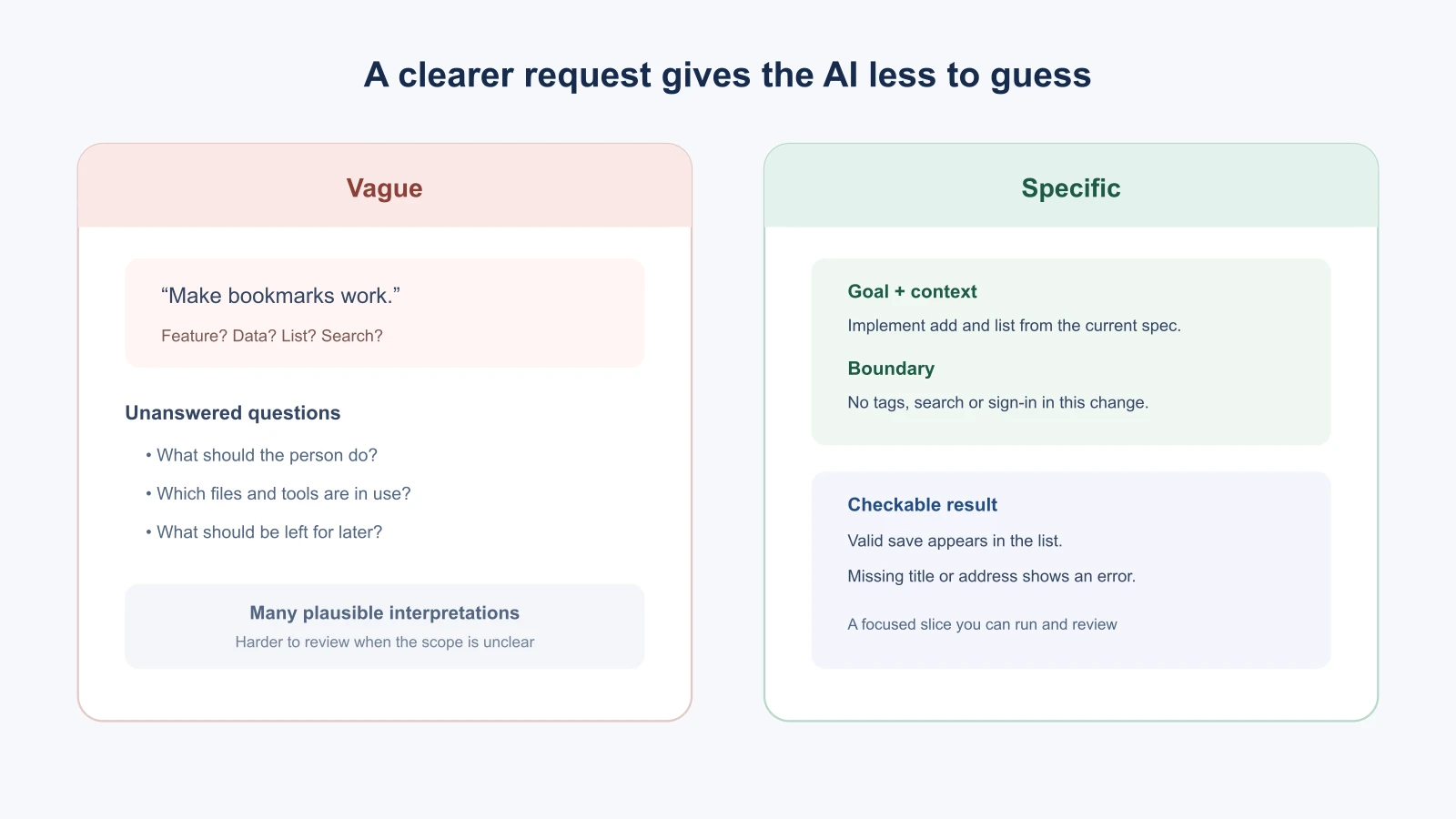
“Make bookmarks work” is easy to type, but it does not say what “work” means. The AI has to guess whether to make a form, save to a database, add tags, build search, or do all of those at once.
This request is narrower:
1Implement the “Add and list a bookmark” feature from the current BookmarkBox spec.
2
3Inspect the existing project first and follow its Next.js App Router, TypeScript and Tailwind CSS setup. The form must accept a title and web address. A valid save adds the bookmark to the visible list. If either value is missing, show a clear message and do not add it.
4
5Do not add sign-in, tags, search, web page fetching or a new database library. Do not change unrelated pages.
6
7Before editing, tell me which files you plan to change. When finished, summarize the behavior and list the checks you ran. Stop and ask if the spec conflicts with the current code.
The second request gives the AI a defined slice of work and gives you a way to review it. It is still your job to read the changes, run the app and confirm that the behavior matches the spec.
Work on one task at a time
Keep one prompt focused on one feature or one coherent change. “Add bookmarks, sign-in, search, tags and a browser extension” bundles several features with different data and security needs. If the result is wrong, it will also be harder to tell which part caused the problem.
For larger work, ask for a short plan first. Review the steps, resolve unclear choices, then ask the AI to implement the first small slice. After you check that slice, continue. This keeps decisions visible and makes it easier to stop when the plan goes off course.
Include the context that matters
Tell the AI what is already true. Point to the current spec, the relevant screen, the project stack note, an error message or a sample record. If the tool can read files, give it useful paths or ask it to find the relevant files before editing. In the previous lesson, the stack note established Next.js, TypeScript and Tailwind CSS for BookmarkBox; referencing it helps avoid an unnecessary tool switch.
Give examples when a format or result could be interpreted in several ways. For example, include two sample bookmark titles and addresses if the display format matters. Use made-up data when real data is not needed. If you attach a mockup, explain what it shows and how it relates to the spec, as described in Mockups and examples as input.
Say what should not happen
Boundaries prevent a small change from turning into a broad redesign. State important exclusions: “Do not add search yet,” “Keep the existing navigation,” or “Do not install a new package unless you explain why.” Be specific about things you care about; a long list of generic prohibitions can bury the request.
You can also use role framing, such as “Act as a careful reviewer of this feature spec.” It can remind the AI what perspective to take, but the role does not give it special knowledge. The concrete task, relevant context and checks do the useful work.
Ask for thinking you can review
For an uncertain feature, ask the AI to explore options before it edits: “List two approaches, note the tradeoffs and assumptions, then recommend one.” For a code change, ask it to inspect the files and give a short plan first. You can see and question that output.
You do not need to ask for a long private reasoning transcript. Ask for the useful parts you can evaluate: assumptions, evidence from the project, options, a concise rationale and a proposed next step. For a straightforward edit, skip the planning step and be direct.
Adapt the prompt to the tool
Some coding tools have separate modes for asking questions, planning and editing; others use one conversation or command. Learn what your tool can see and whether it can edit files or run commands, then make the working approach explicit. The Cursor modes guide, for example, describes modes for autonomous work, read-only exploration and custom workflows. These product details can change, so check current docs for the tool you use.
For deeper examples, see Claude Code prompting patterns and Prompting for AI agents. The interfaces differ, but the core habit is the same: give a clear task, useful context and a result you can inspect.
Prompt patterns worth keeping
A few request shapes work across many tools and tasks. Keep them nearby and adapt the wording.
- Plan first. “Inspect the project and propose a short plan. Do not edit files yet.” Use it when a task touches several parts of the app.
- Options and tradeoffs. “Give me two ways to do this, with the tradeoffs of each, and recommend one.” Use it when you are not sure what the best approach is.
- Tests first. “Write a test for this behavior and show me that it fails before you change the code.” This connects to Test by default.
- Check your own work. “Compare your changes with the spec's acceptance checks and tell me which ones you verified and how.”
- Ask before assuming. “If anything in the request is unclear, ask me up to three questions before you start.”
- Explain simply. “Explain this change as if I have not seen this code before. Point to the files.”
Prompts for different jobs
The same parts of a good prompt appear in different mixes depending on the job:
| Job | What to include | A useful opening |
|---|---|---|
| New feature | The spec, acceptance checks, what is out of scope | “Implement the feature described in…” |
| Fixing a bug | Steps to reproduce, expected and actual behavior, the full error, recent changes | “I can reproduce this problem. First explain the likely causes…” |
| Cleaning up code | The behavior that must stay the same, the checks that protect it, one specific friction | “Without changing behavior, make this easier to maintain by…” |
| Understanding code | The file or flow you are curious about | “Explain how a click on Save reaches the database. Point to the files.” |
| Reviewing a change | The spec and the diff | “Review this change against the spec. List anything missing or unrelated.” |
After the first reply
A prompt is the start of a conversation. How you respond to the first answer matters as much as the first request. A few useful follow-ups:
- “You changed files I did not mention. Explain why each one needed to change.”
- “What did you assume that I did not tell you?”
- “Show me the exact commands you ran and what they printed.”
- “Undo the change to
package.json. I do not want a new package for this.”
If the answer is off, ask yourself whether the prompt left something unclear. Often the fastest fix is to improve the request, such as adding a missing boundary, and run it again, instead of arguing with the result across many messages.
A prompt you can reuse
Here is a template. Replace the parts in brackets. Delete any part that does not apply to a small task.
1Goal: [what should be different for the person using the app]
2
3Context: Read [spec or file]. The project uses [stack]. Follow the existing patterns.
4
5Boundaries: Do not [thing you do not want]. Do not add dependencies without asking.
6
7Checks: This works when [two or three things you can observe].
8
9Approach: First [inspect / propose a plan / ask questions]. Wait for my approval before editing. When you finish, list the files you changed and what you verified.
Over time, you will adjust the template to match how you and your tool work best. Save the versions that work well, ideally in your project's context document, so you can reuse them.
Mistakes beginners make
- Asking for the whole product at once. Split it into features that can be reviewed independently.
- Leaving out the existing project. Tell the AI what files, spec or stack to use, or ask it to inspect first.
- Using “make it better” as the only direction. Describe the outcome you want to see.
- Forgetting boundaries. Say which tempting extras are out of scope for this change.
- Treating a plan as proof. A plausible plan still needs your review, and the implementation still needs checking.
- Copying the same template for every tool. Match the request to the tool's actual context and permissions.
Recap and try it yourself
A useful build prompt names the goal, points to the right context, keeps the scope clear and gives you an observable way to review the result. Use a planning prompt when a task is uncertain or broad; for a simple change, a concise direct request is enough.
Try it: choose one feature from your app idea and write a prompt that names the goal, one relevant reference, one boundary and two checks. Ask the AI to explain any assumptions before it writes code. In Context documents, you will learn how to save project instructions so you do not have to repeat them in every prompt.