
An agent's system prompt is its standing orders. It is read at every step of the loop, from the first tool call to the final answer, and it shapes every decision in between. A good one makes the agent careful, focused and predictable. A weak one leaves the agent guessing, and a model that guesses will sometimes guess wrong. In this lesson you will learn what goes into an agent prompt, the writing habits that work best, special instructions that matter only for agents, and how to test a prompt change instead of trusting your feeling about it. You will also learn what prompts cannot do, which is just as important.
What an agent prompt is for
In a chat, a prompt asks for one answer. In an agent, the system prompt sets up the whole job. It tells the agent who it is working for, what it may and may not do, how to use its tools, and what a good result looks like. The user's request then arrives inside that frame.
Anthropic's guidance gives the right mental picture: think of the model as a brilliant but new employee who lacks context on your norms and workflows. The more precisely you explain what you want, the better the result. The documentation's key test is worth memorizing:
Show your prompt to a colleague with minimal context on the task and ask them to follow it. If they would be confused, the model will be too.
The anatomy of an agent prompt
Most good agent prompts have the same few parts. You do not need all of them every time, but it helps to know what each one is for.
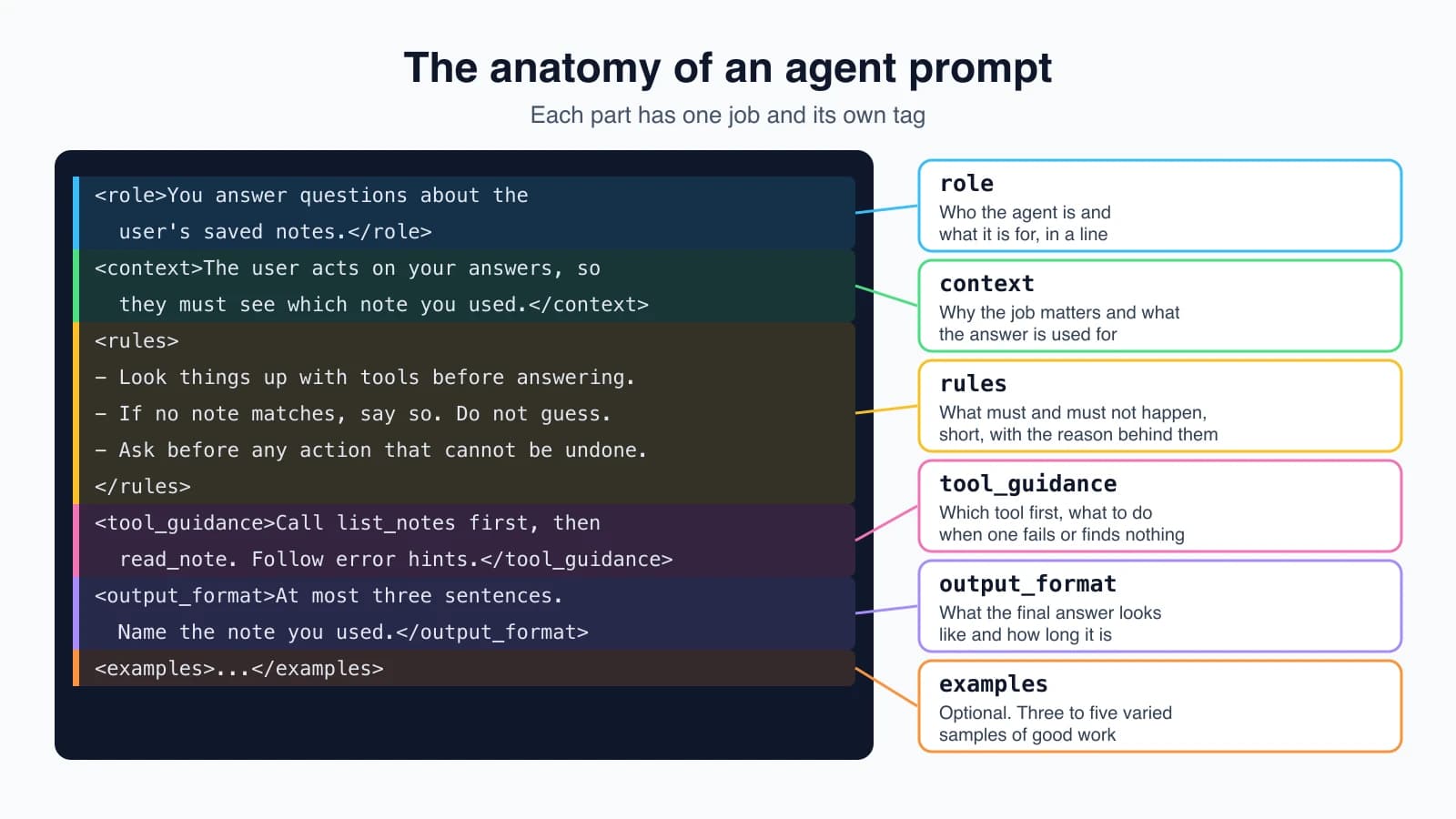
- Role. One sentence on who the agent is and what it is for. Anthropic notes that even a single sentence in the system prompt focuses behavior and tone.
- Context. The situation and the reason behind the job: who the users are, what they do with the answer, why it matters.
- Rules. What must and must not happen, written as short, separate items.
- Tool guidance. When to use which tool, in what order, and what to do when a tool fails or returns nothing.
- Output format. What the final answer looks like and how long it should be.
- Examples. A few samples of good work, when the format or tone is hard to describe.
Wrapping each part in its own tag helps the model tell the parts apart. Anthropic's advice is to use XML tags with consistent, descriptive names such as <instructions>, <context> and <input>, which reduces misreading when a prompt mixes instructions, background and data. Here is a prompt for the notes agent from earlier lessons:
1<role>
2You answer questions about the user's saved notes.
3</role>
4
5<context>
6The notes are small text files. The user will act on your answers, for example by
7paying a bill on a date you give, so they need to see which note you used.
8</context>
9
10<rules>
11- Look things up with your tools before answering. Never answer from memory about
12  what a note says.
13- If no note matches, say so. Do not guess.
14- Ask the user before any action that cannot be undone.
15</rules>
16
17<tool_guidance>
18Call list_notes first, then search_notes or read_note. If a tool returns an error,
19read the message and try the correction it suggests.
20</tool_guidance>
21
22<output_format>
23At most three sentences. Name the note you used.
24</output_format>
It is short, specific and each line has a job. Notice that the context line gives a reason, and the next section explains why that matters.
Writing habits that work
These come straight from Anthropic's prompting guidance, and they apply to agents as much as to chats.
Be clear and direct
Claude responds well to explicit instructions. If you want more than the bare task, ask for it. The documentation's example: "Create an analytics dashboard" gets a basic result, while adding "Include as many relevant features and interactions as possible. Go beyond the basics" gets a fuller one. Do not rely on the model to infer what you left unsaid. Use numbered steps when order or completeness matters.
Give reasons, not only rules
A rule with no reason is brittle. A rule with a reason lets the model handle cases you did not foresee. Anthropic's example: "NEVER use ellipses" works less well than "Your response will be read aloud by a text-to-speech engine, so never use ellipses since the text-to-speech engine will not know how to pronounce them." The model can generalize from the explanation, for example by also avoiding other symbols a speech engine would stumble on. For agents, that means writing why a rule exists: "Ask before deleting, because deleted notes cannot be recovered."
Use a few good examples
Examples are one of the most reliable ways to steer format, tone and structure. The guidance for making them useful:
- Relevant. They mirror your real use.
- Diverse. They cover edge cases and vary enough that the model does not pick up an accidental pattern.
- Structured. Put them in
<example>tags, several inside<examples>, so they are not mistaken for instructions.
Anthropic suggests three to five examples for best results. For an agent, a good example might show a short exchange where it looks up a note, answers briefly, and names the source.
Put long material first, the question last
When a prompt includes long documents, Anthropic advises placing them near the top, above the instructions and the question. Their tests found that putting the query at the end can improve response quality by as much as 30 percent, especially with complex, multi-document inputs. Wrap each document in its own tags with the source named, so the model can tell them apart. This ties to Context engineering, where we go deeper on what to put in the window.
Instructions that matter for agents
Chat prompts rarely need these. Agent prompts often do.
Say whether to act or to advise
Claude's latest models follow instructions precisely. Anthropic's documentation warns that if you write "Can you suggest some changes to improve this function?", the model will sometimes just suggest them, even if you wanted the change made. If you want action, say so: "Change this function to improve its performance."
You can also set a default for the whole agent. To make it more willing to act, the documentation offers this kind of instruction:
1<default_to_action>
2By default, implement changes rather than only suggesting them. If the user's intent is
3unclear, infer the most useful likely action and proceed, using tools to discover any
4missing details instead of guessing.
5</default_to_action>
And for an agent that should be careful, the reverse:
1<do_not_act_before_instructions>
2Do not change anything unless clearly instructed to. When the user's intent is
3ambiguous, default to providing information and recommendations rather than taking
4action.
5</do_not_act_before_instructions>
Pick one on purpose. An agent that reads, searches and summarizes can lean toward acting. An agent with write access should lean toward asking.
Define what needs a check
For agents that can change things, tell the model how to weigh risk. Anthropic's example guidance says to encourage local, reversible actions such as editing files or running tests, and to ask the user before actions that are hard to reverse, that affect shared systems, or that could be destructive. It lists examples: deleting files or branches, force-pushing, sending messages, modifying shared infrastructure. It adds a line worth copying for any agent: when you meet an obstacle, do not use a destructive action as a shortcut, such as bypassing a safety check or discarding unfamiliar files that may be someone's work in progress.
Make it check before it claims
A common agent failure is answering from imagination. The documentation's fix for coding agents works for any agent: never speculate about something you have not opened, and look at the relevant source before answering. In prompt form: "If the user asks about a note, read the note before answering." The model grounds its answer in what the tools returned, in line with Anthropic's advice that an agent should check its progress against real results from the environment at each step.
Keep it from overbuilding
Some models tend to do more than was asked. Anthropic's guidance for this is to state the scope: only make changes directly requested or clearly necessary, and do not add features, refactoring or abstractions beyond the task. The same idea applies outside code. "Answer the question. Do not reorganize the user's notes" prevents a helpful but unwanted tidy-up.
Say how much to report
Many recent models write briefly and may skip a summary after tool calls, moving straight to the next action. (Anthropic notes that Claude Opus 5 is an exception, with longer default replies, so ask for conciseness there instead.) If you want to see what happened, ask for it: "After completing a task that involves tool use, provide a quick summary of the work you've done." Also, show the plan. Anthropic's agent guide lists transparency as a core principle and recommends that agents explicitly show their planning steps.
Tell it about parallel calls
The latest models call independent tools in parallel by default, and you can steer this. To encourage it, instruct the model to call independent tools together and to call dependent ones in order, never guessing missing values. To reduce it, tell the model to run operations one after another. This is useful if parallel calls strain a rate limit, as in Errors, retries and rate limits.
Plan for long jobs
For tasks that outlast one context window, Anthropic recommends giving the agent a way to keep state outside its head: structured files for things like test status, plain-text progress notes, and version control for checkpoints, with instructions to make incremental progress. A fresh context can then start by reading those files. The next lessons, Short-term and long-term memory and Maintaining agent memory, build on this.
Do not shout
Older prompts often used capital letters and "CRITICAL: you MUST" to force tool use. Anthropic's documentation notes that some recent models respond strongly to the system prompt, so loud language can now cause the opposite problem, overuse. The fix it suggests is normal wording: "Use this tool when..." The same page says that where a technique names a particular model, you should treat it as measured on that model and re-check it against your own tests before relying on it elsewhere.
What prompts cannot do
A prompt is a request. The model usually follows it, and usually is not always. So there is a line you should draw:
- Put preferences in the prompt: tone, format, how to approach a task, when to ask.
- Put guarantees in code: a step limit, a spending cap, an allowlist of recipients, approval before sending, input validation, read-only database access.
"Never delete a note" in a prompt is a hope. Not providing a delete tool, or requiring approval in your loop, is a guarantee. The safest design uses both: the prompt tells the model what you want, and the code makes sure the worst cases cannot happen, as in Common agent tools. The same applies to stopping. Anthropic's guide suggests stopping conditions such as a cap on iterations, and that belongs in your loop, not in the instructions.
Build prompts in pieces, and test them
Writing a prompt as one long string makes it hard to change one part at a time. A tiny helper turns named sections into tagged blocks, skips empty ones, and keeps the order you wrote:
1def tag(name, body):
2    return f"<{name}>\n{body}\n</{name}>"
3
4
5def build_prompt(**sections):
6    parts = []
7    for name, body in sections.items():
8        if not body:
9            continue
10        if isinstance(body, (list, tuple)):
11            body = "\n".join(f"- {item}" for item in body)
12        parts.append(tag(name, body))
13    return "\n\n".join(parts)
Call it with keyword arguments, where a list becomes bullet points:
1SYSTEM = build_prompt(
2    role="You answer questions about the user's saved notes.",
3    context="The user acts on your answers, so they need to see which note you used.",
4    rules=[
5        "Look things up with your tools before answering.",
6        "If no note matches, say so. Do not guess.",
7    ],
8    output_format="At most three sentences. Name the note you used.",
9)
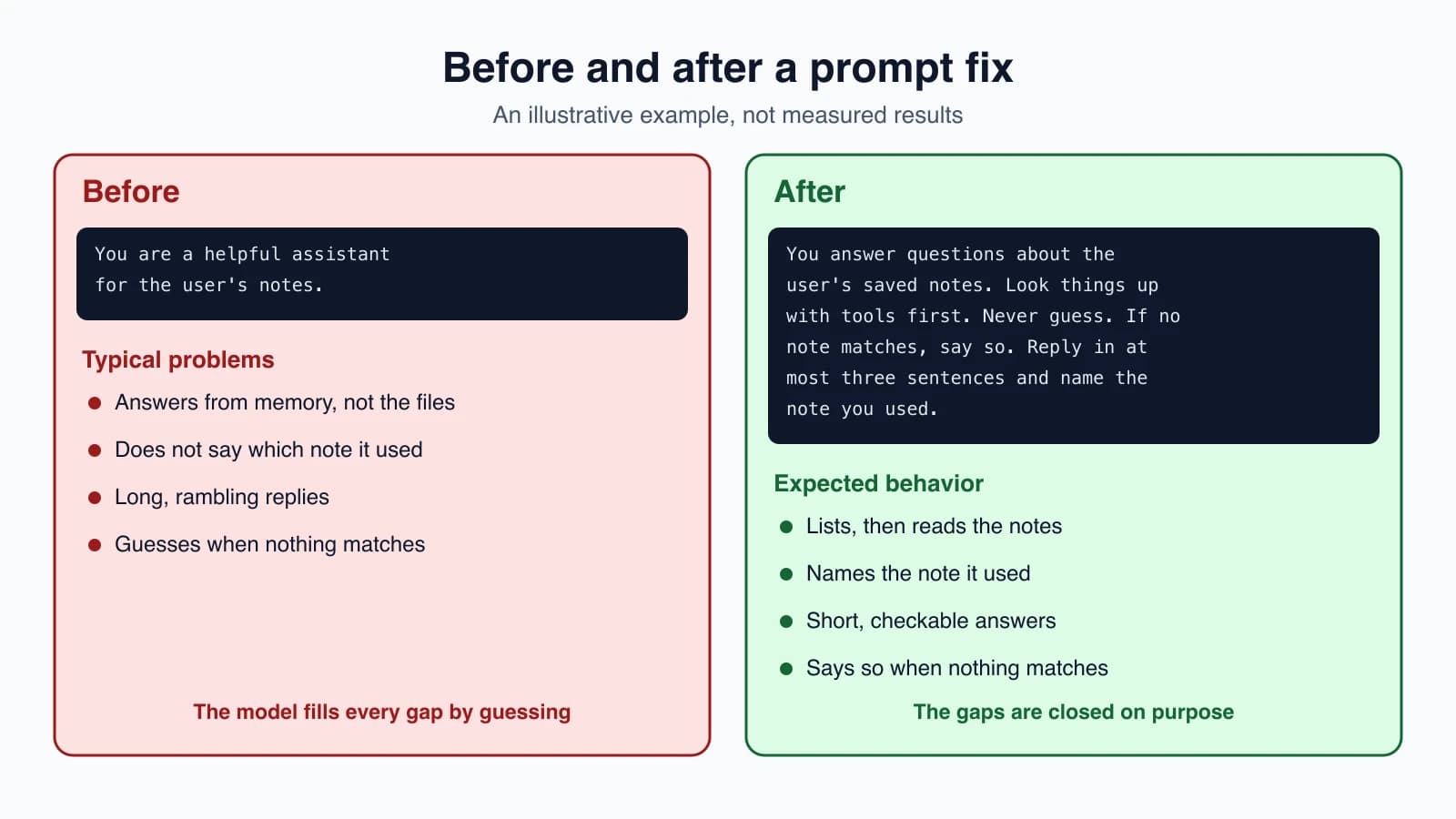
Now the more important habit: change one thing, then measure. Take the task list from Designing tools that work, run each version of the prompt over it, and compare:
1def compare(prompts, tasks, run):
2    scores = {}
3    for label, prompt in prompts.items():
4        passed = sum(t["expect"].lower() in run(prompt, t["q"]).lower() for t in tasks)
5        scores[label] = f"{passed}/{len(tasks)}"
6    return scores
Here run(prompt, question) is your agent, started with that system prompt, returning its final answer. Pass it a dictionary of labeled prompts, such as {"before": OLD, "after": NEW}, and a few tasks with expected answers, and it reports how many each prompt passed. Nothing about this is fancy, and it replaces "this feels better" with a number. Anthropic's engineers describe the payoff in their multi-agent research write-up: starting with about 20 test queries, they saw a single prompt change take the success rate from around 30 percent to around 80 percent. Small tests reveal big effects, early on.
A few cautions when you test:
- Test on several tasks, including awkward ones, not a single favorite.
- Read transcripts, not only scores. A passing answer reached by a strange route is a warning.
- Keep a few tasks aside and check them only at the end, so you do not tune the prompt to the test.
- Re-test when the model changes. A prompt tuned for one model may behave differently on another.
Mistakes beginners make
- A one-line prompt for a complex job. "You help with notes" leaves almost everything open.
- Rules without reasons. The model cannot extend a rule it does not understand.
- Mixing instructions and data with no separators. Use tags.
- Vague action words. "Can you suggest" may get a suggestion when you wanted a change.
- Shouting. Capitals and "MUST" can cause overuse on newer models.
- Putting guarantees in the prompt. Anything that must never happen belongs in code.
- Piling on rules until they conflict. Every line should earn its place.
- No examples when the format is hard to describe.
- Changing five things at once, so you cannot tell which one helped.
- Trusting a feeling instead of running the same tasks before and after.
Quick recap
- The system prompt is the agent's standing orders, read at every step. Write it for a smart new colleague with no background.
- A good agent prompt has a role, context, rules, tool guidance, an output format and, when useful, examples, each in its own tag.
- Be explicit, give reasons for rules, use three to five relevant and varied examples, and put long documents first and the question last.
- For agents, say whether to act or advise, which actions need a check, to look things up before claiming, to stay within scope, how much to report and how to handle parallel calls.
- Use normal wording, not shouting, and re-check model-specific advice on your own tasks.
- Prompts express preferences. Guarantees belong in code.
- Build prompts from named sections, change one thing at a time, and measure each change on the same tasks.
Try it yourself
Take the notes agent and write three versions of its system prompt: a one-line version, a version with a role and rules, and a full version with context, tool guidance and an output format. Write five questions with expected answers, including one that no note can answer. Run each prompt over the questions with the compare function and note the scores and the average number of tool calls. Then add one reason to a rule, for example "Ask before deleting, because deleted notes cannot be recovered", and see whether any behavior changes.
Next lesson: Context engineering.