
A language model starts every call with a blank slate. As you learned in How LLMs work, each request is stateless, and anything the agent "remembers" is something your code put back into the prompt. So memory in an agent is not a feature of the model. It is a design you build: what to keep, where to keep it, and when to bring it back. In this lesson you will learn the main kinds of memory, where each one can live, how Claude's memory tool works, how to build a safe handler for it, and when remembering does more harm than good. The next lesson covers keeping memory healthy over time.
Two horizons: short-term and long-term
The simplest split is by how long the memory lasts.
Short-term memory is what the agent can see right now: the conversation so far, the tool results from this run, and any notes it keeps in the current context. It lives in the context window, so it is fast and always available, and it disappears when the run ends or when you trim it. Everything in Context engineering is about managing short-term memory.
Long-term memory survives beyond the run. It lives outside the model, in files or databases that your code reads and writes, and it is brought into the context only when needed. This is what lets an agent recall that a customer prefers email, or continue a project it started yesterday.
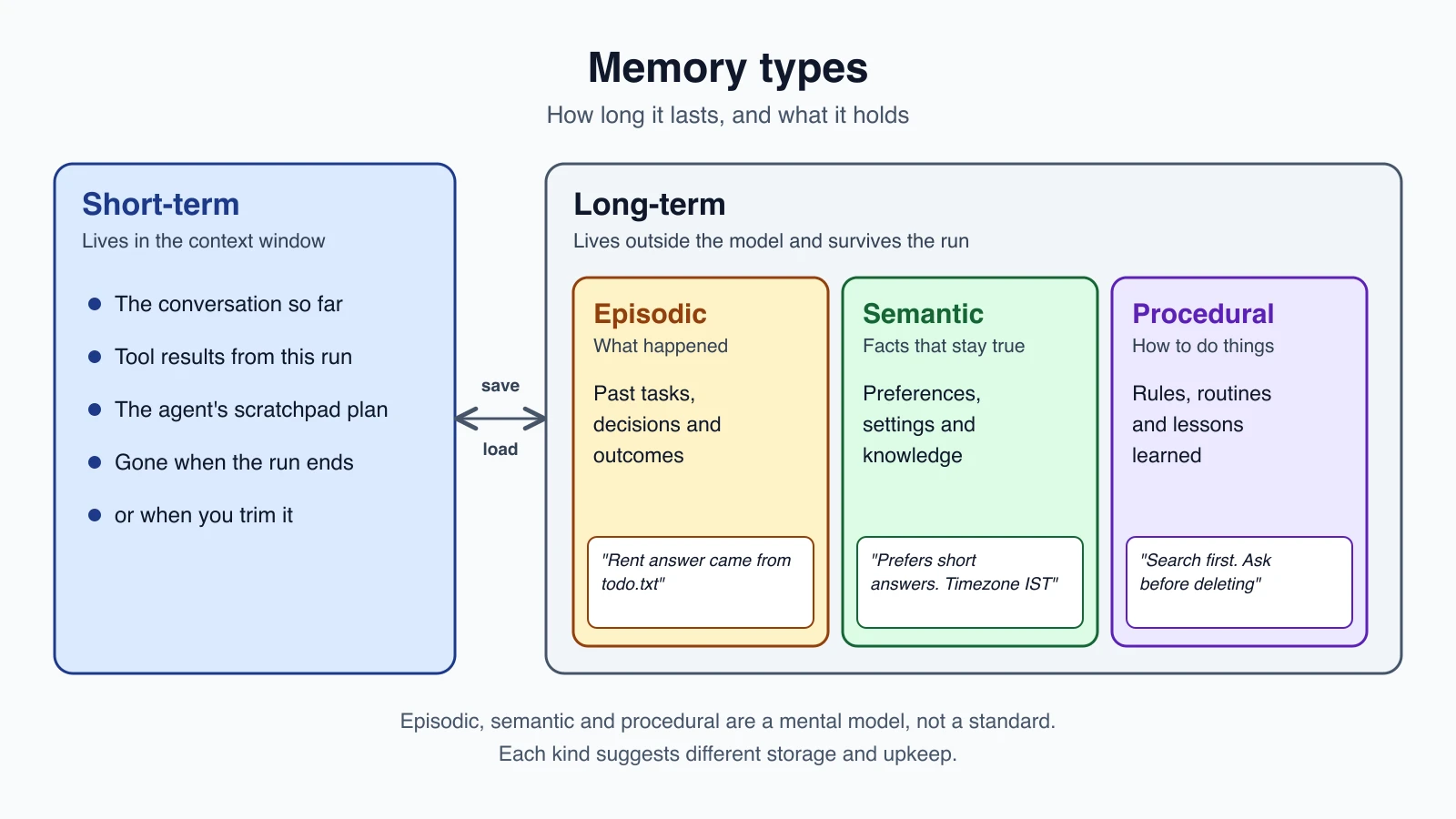
Three kinds of long-term memory
Researchers often borrow words from human memory to describe what an agent stores. These three categories are a useful mental model, not a standard, and real systems mix them freely.
| Kind | What it holds | Example for the notes agent |
|---|---|---|
| Episodic | What happened: past tasks, decisions, outcomes | "Last week the user asked about rent. The answer came from todo.txt." |
| Semantic | Facts and preferences that stay true | "The user prefers short answers. The user's timezone is IST." |
| Procedural | How to do things: rules, routines, lessons learned | "Always search before reading. Ask before deleting." |
You have already seen all three in practice. A progress log is episodic memory. A file of project rules that a coding agent reads at the start, such as the CLAUDE.md file Anthropic mentions for Claude Code, is procedural and semantic memory loaded up front. A note that says "Acme Corp prefers email follow-ups" is a semantic fact.
Why bother with the categories? Because they suggest different storage and different upkeep. Facts need to stay accurate. Episodes can usually be summarized and aged out. Procedures should be reviewed by a person, because they change how the agent behaves.
Where memory lives
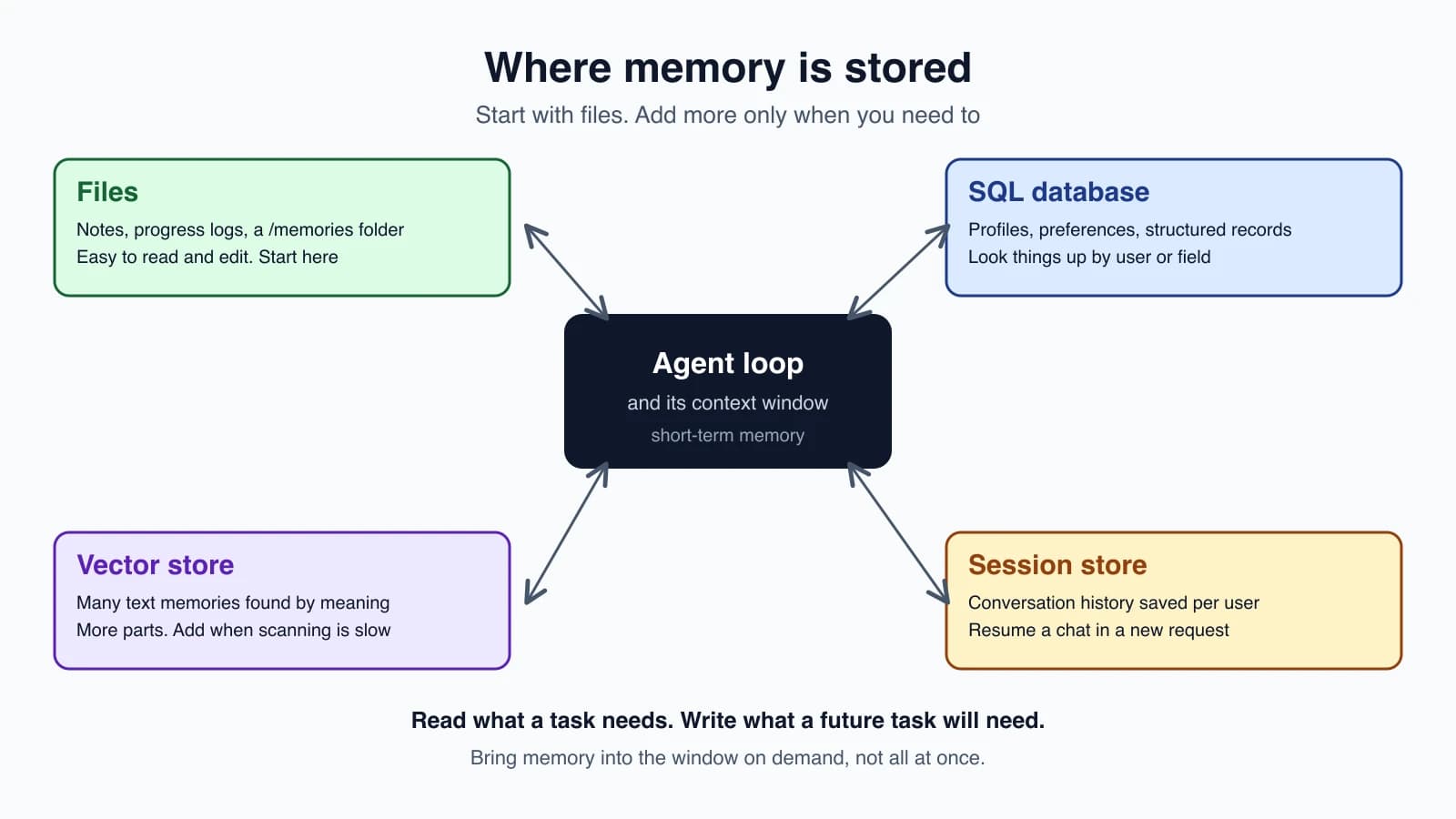
There is no single best store. Pick the simplest one that fits what you are storing.
| Store | Good for | Weak at |
|---|---|---|
| Files (notes, logs, a memory folder) | Small to medium memory, human-readable notes, progress logs, anything a person may want to read or edit | Searching across thousands of items |
| A SQL database | Structured records: user profiles, preferences, settings, history you query by field | Fuzzy, meaning-based lookup |
| A vector database | Many text memories found by meaning, not exact words | More moving parts, and results need checking |
| A session store (database or cache) | Saving and restoring a conversation per user, so a new request continues the old one | Not meant for knowledge that lasts for years |
Here is how to choose. Start with files. A memory folder is easy to build, easy to read and easy to debug. Move to a database when you need to look things up by user or field. Add a vector store when you have so many memories that the agent cannot scan them and must search by meaning, which is the subject of RAG and vector databases.
Short-term memory in practice
Most beginners only need two habits:
- Resend the history you need. Because calls are stateless, your loop keeps a
messageslist and sends it each time. To continue a conversation across requests, save that list per user in your session store and load it next time. - Keep it trimmed. Old tool results and stale turns waste space. Use the trimming and summarizing techniques from the last lesson.
A scratchpad is another form of short-term memory: the model's own working notes inside a run, such as a plan or a list of steps done. They help during the run and can be thrown away afterwards, unless you decide something in them deserves to be saved.
Long-term memory with Claude's memory tool
Claude has a built-in way to use a memory folder. Anthropic's memory tool lets Claude store and retrieve information across conversations in a directory of files. It is a client-side tool: Claude only requests operations, and your application runs them against storage you control.
How it works, from Anthropic's documentation:
- You add one entry to your tools:
{"type": "memory_20250818", "name": "memory"}. That is the entire configuration, with no schema to write. - When the tool is present, the API adds a short instruction to the system prompt automatically. In essence: always view your memory directory before doing anything else, record progress as you go, and assume your context might be reset at any moment, so anything not recorded is lost.
- Claude checks
/memoriesbefore starting a task, and reads whichever files look relevant. - As it works, Claude creates and updates files under
/memories. - Your code maps the
/memoriespath onto real storage, such as a folder per user or rows in a database.
Claude uses six commands: view, create, str_replace, insert, delete and rename. Your handler must support them all, because Claude may call any of them. The Python SDK also ships a ready-made local-folder version, BetaLocalFilesystemMemoryTool, which is the quickest way to try the tool. Building a small handler yourself is the best way to see what it does, and it makes one important safety job impossible to miss.
A memory handler you can read in one sitting
This version stores files in a local folder named memory_store. It returns the message formats that Anthropic's documentation recommends, and it returns every problem as text so Claude can recover:
1import shutil
2from pathlib import Path
3
4ROOT = Path("memory_store").resolve()
5ROOT.mkdir(exist_ok=True)
6
7
8class MemoryProblem(Exception):
9    pass
10
11
12def real_path(path):
13    if path != "/memories" and not path.startswith("/memories/"):
14        raise MemoryProblem(f"The path {path} does not exist. Please provide a valid path.")
15    target = (ROOT / path[len("/memories"):].lstrip("/")).resolve()
16    if target != ROOT and ROOT not in target.parents:
17        raise MemoryProblem(f"The path {path} does not exist. Please provide a valid path.")
18    return target
19
20
21def size_text(target):
22    if target.is_dir():
23        total = sum(f.stat().st_size for f in target.rglob("*") if f.is_file())
24    else:
25        total = target.stat().st_size
26    return f"{total / 1024:.1f}K"
27
28
29def view(path, view_range=None):
30    target = real_path(path)
31    if not target.exists():
32        raise MemoryProblem(f"The path {path} does not exist. Please provide a valid path.")
33    if target.is_dir():
34        lines = [f"{size_text(target)}\t{path}"]
35        for item in sorted(target.rglob("*")):
36            rel = item.relative_to(target)
37            if len(rel.parts) <= 2 and not any(p.startswith(".") for p in rel.parts):
38                lines.append(f"{size_text(item)}\t{path.rstrip('/')}/{rel.as_posix()}")
39        return f"Here're the files and directories up to 2 levels deep in {path}, excluding hidden items and node_modules:\n" + "\n".join(lines)
40    text_lines = target.read_text().split("\n")
41    start, end = view_range or [1, len(text_lines)]
42    end = len(text_lines) if end == -1 else end
43    numbered = [f"{n:6d}\t{text_lines[n - 1]}" for n in range(start, min(end, len(text_lines)) + 1)]
44    return f"Here's the content of {path} with line numbers:\n" + "\n".join(numbered)
45
46
47def create(path, file_text):
48    target = real_path(path)
49    if target.exists():
50        raise MemoryProblem(f"Error: File {path} already exists")
51    target.parent.mkdir(parents=True, exist_ok=True)
52    target.write_text(file_text)
53    return f"File created successfully at: {path}"
54
55
56def str_replace(path, old_str, new_str=""):
57    target = real_path(path)
58    if not target.is_file():
59        raise MemoryProblem(f"Error: The path {path} does not exist. Please provide a valid path.")
60    text = target.read_text()
61    count = text.count(old_str)
62    if count == 0:
63        raise MemoryProblem(f"No replacement was performed, old_str `{old_str}` did not appear verbatim in {path}.")
64    if count > 1:
65        raise MemoryProblem(f"No replacement was performed. Multiple occurrences of old_str `{old_str}`. Please ensure it is unique")
66    target.write_text(text.replace(old_str, new_str))
67    return "The memory file has been edited."
68
69
70def insert(path, insert_line, insert_text):
71    target = real_path(path)
72    if not target.is_file():
73        raise MemoryProblem(f"Error: The path {path} does not exist")
74    lines = target.read_text().split("\n")
75    if not 0 <= insert_line <= len(lines):
76        raise MemoryProblem(f"Error: Invalid `insert_line` parameter: {insert_line}. It should be within the range of lines of the file: [0, {len(lines)}]")
77    lines.insert(insert_line, insert_text.rstrip("\n"))
78    target.write_text("\n".join(lines))
79    return f"The file {path} has been edited."
80
81
82def delete(path):
83    target = real_path(path)
84    if target == ROOT:
85        raise MemoryProblem("Error: The /memories directory itself cannot be deleted")
86    if not target.exists():
87        raise MemoryProblem(f"Error: The path {path} does not exist")
88    shutil.rmtree(target) if target.is_dir() else target.unlink()
89    return f"Successfully deleted {path}"
90
91
92def rename(old_path, new_path):
93    src, dst = real_path(old_path), real_path(new_path)
94    if src == ROOT:
95        raise MemoryProblem("Error: The /memories directory itself cannot be renamed")
96    if not src.exists():
97        raise MemoryProblem(f"Error: The path {old_path} does not exist")
98    if dst.exists():
99        raise MemoryProblem(f"Error: The destination {new_path} already exists")
100    dst.parent.mkdir(parents=True, exist_ok=True)
101    src.rename(dst)
102    return f"Successfully renamed {old_path} to {new_path}"
103
104
105COMMANDS = {"view": view, "create": create, "str_replace": str_replace, "insert": insert, "delete": delete, "rename": rename}
106
107
108def handle_memory(inputs):
109    args = dict(inputs)
110    command = COMMANDS.get(args.pop("command", None))
111    if command is None:
112        return "Error: unknown memory command", True
113    try:
114        return command(**args), False
115    except MemoryProblem as e:
116        return str(e), True
117    except TypeError as e:
118        return f"Error: bad arguments ({e})", True
The structure is the same as the tools you have built before. Each command is a function. handle_memory looks up the command, calls it, and returns a pair of the result text and an error flag, which is the same (text, is_error) shape from Errors, retries and rate limits.
The most important function: real_path
Look at real_path again. It is the safety gate, and every command passes through it.
Claude sends paths such as /memories/clients/acme.txt. Your handler turns that into a real location on disk. If it does this carelessly, a path like /memories/../../secrets.env can climb out of the folder and read or overwrite files elsewhere on your machine. Anthropic's documentation warns that your implementation must validate every path in every command to prevent this attack, called path traversal.
real_path does two checks. First, the path must be exactly /memories or start with /memories/. That rejects look-alikes such as /memoriesX/a. Second, it resolves the full real path, following any .. parts, and confirms the result is still inside the memory folder. Anthropic suggests the same approach: resolve to the canonical form and verify it stays within the memory directory, using your language's built-in path tools.
The code is tested against traversal attempts, including /memories/../secret.env and /memories/clients/../../secret.env. The tests confirm that every one is refused and that the outside file is untouched. Do the same for your own handler. A security check you have not tried to break is only a hope.
Two other details follow the documentation. delete and rename refuse to touch the /memories folder itself, because Claude's tool description tells it that it cannot. And create refuses to overwrite an existing file, which is the reference behavior, though overwriting is also a valid choice.
Wiring it into your loop
Add the memory tool to your tools list, and send its calls to the handler. In the loop from Build your first agent, the change is small:
1TOOLS = [*YOUR_TOOLS, {"type": "memory_20250818", "name": "memory"}]
2
3# inside the loop, for each tool_use block:
4if block.name == "memory":
5    output, is_error = handle_memory(block.input)
6else:
7    output, is_error = run_tool(block.name, block.input)
Everything else stays the same. Run the agent twice. In the first run, tell it something worth keeping, such as "Acme Corp prefers email follow-ups." In the second run, a new process with an empty message list, ask how to contact Acme and watch it view /memories first.
When memory helps and when it hurts
Memory is not free, and more is not better.
It helps when:
- the agent works on the same project over many sessions,
- user preferences should carry over,
- lessons from past mistakes would prevent the same ones,
- a long task would otherwise overflow the context window.
It hurts when:
- Facts go stale. A remembered address or price that changed is worse than none, because the agent trusts it. Memory needs a way to be corrected and aged, which the next lesson covers.
- Wrong facts persist. If the agent once wrote something mistaken, it may repeat it forever.
- Memory clutter fills the context. Loading everything every time brings back the problem you were solving.
- Privacy is at stake. Stored personal details are a liability. Anthropic's documentation says Claude usually refuses to write sensitive information to memory, and advises adding your own validation that strips sensitive data before your handler writes a file.
- Untrusted content is saved. If the agent reads a web page or an email that contains planted instructions and then writes them into memory, those instructions can steer every later session. Treat anything that came from outside as data, and review what gets stored, as discussed in Prompt injection and tool sandboxing.
Anthropic's documentation names a few safeguards that fit your handler: track file sizes and cap how large a file can grow, consider capping how many characters view returns and let Claude page through the rest with view_range, and periodically delete memory files that have not been used in a long time.
A pattern for long projects
For work that spans many sessions, Anthropic describes a deliberate setup rather than writing memory ad hoc. The first session creates the memory files before real work starts: a progress log, a checklist of the work to do, and a pointer to any setup script. Every later session opens by reading those files, which restores the project state without re-exploring everything, and ends by updating the progress log with what was finished and what remains. The key rule is to work on one item at a time and mark it done only after checking that it really works, so the log stays truthful.
Mistakes beginners make
- Thinking the model remembers. Calls are stateless. Memory is something you build.
- Saving everything. Store what a future run will need, not a transcript of everything.
- One giant memory file that is loaded every time. Organize it into small, named files.
- No path checks in a memory handler. Validate every path in every command.
- Storing sensitive details without a plan to protect or remove them.
- Never correcting or aging memories, so stale facts pile up.
- Saving content from untrusted sources straight into memory.
- Using a vector database first. Files and a table are simpler and often enough.
- Mixing facts, history and rules in one place, which makes upkeep hard.
- Not testing the handler's error paths, such as a missing file or a duplicate match.
Quick recap
- Models are stateless. Memory is what your code saves and puts back.
- Short-term memory lives in the context window. Long-term memory lives outside it and survives the run.
- Long-term memory can be episodic (what happened), semantic (facts and preferences) or procedural (how to do things), a mental model that suggests different upkeep for each.
- Start with files, move to a database for structured records, and add a vector store only when searching by meaning is needed.
- Claude's memory tool is client-side. Claude requests six file commands on
/memories, and your handler runs them. - Validate every path to prevent path traversal, and test the handler against attacks.
- Memory can go stale, repeat mistakes, clutter the context, leak private data or carry planted instructions, so cap it, review it and expire it.
Try it yourself
Copy the handler into a file and run the tests described above on your own machine: create a file, view it, replace some text, and try the traversal paths from the lesson. Then wire it into the notes agent as shown, run it once with a fact to remember, and run it again in a fresh process to see it recall the fact. Finally, write down three things your agent should never store in memory, and decide where in the handler you would stop them.
Next lesson: Maintaining agent memory.