
In the last lesson you learned that the model is the brain of an agent. You do not need to know how to build one from scratch, but you do need a working picture of how it behaves, because almost every design choice in an agent comes back to a few facts about language models. This lesson gives you those facts: what tokens are, how a model produces a reply, what a context window is and why it fills up, and what embeddings do. After it you will be able to explain why long agent runs cost more, why the same prompt can give different answers, and where an agent's memory really lives.
What a language model does
A large language model, or LLM, is a program trained on a huge amount of text to predict what text comes next. That one skill turns out to be very powerful. If you ask it a question, the most likely continuation of your text is an answer. If you give it instructions and a document, the most likely continuation is a summary.
Under the hood, models like Claude use a design called a transformer. You do not need the math. The idea to remember is attention: when the model works out the next piece of text, it can weigh which earlier parts of the input matter most. That is how it connects a pronoun to the right name, or an instruction at the top of a prompt to a detail at the bottom.
Two consequences matter for agents:
- The model does not look facts up. It writes from patterns learned in training. It can sound sure and still be wrong, which is why agents need tools and checks, not just a good model.
- It only knows what is in front of it. A model remembers nothing between calls on its own. Whatever you want it to know, you send.
Tokens
Models do not read letters or whole words. They read tokens, which are small chunks of text. A token can be a whole common word, part of a rarer word, a piece of punctuation, or a space.
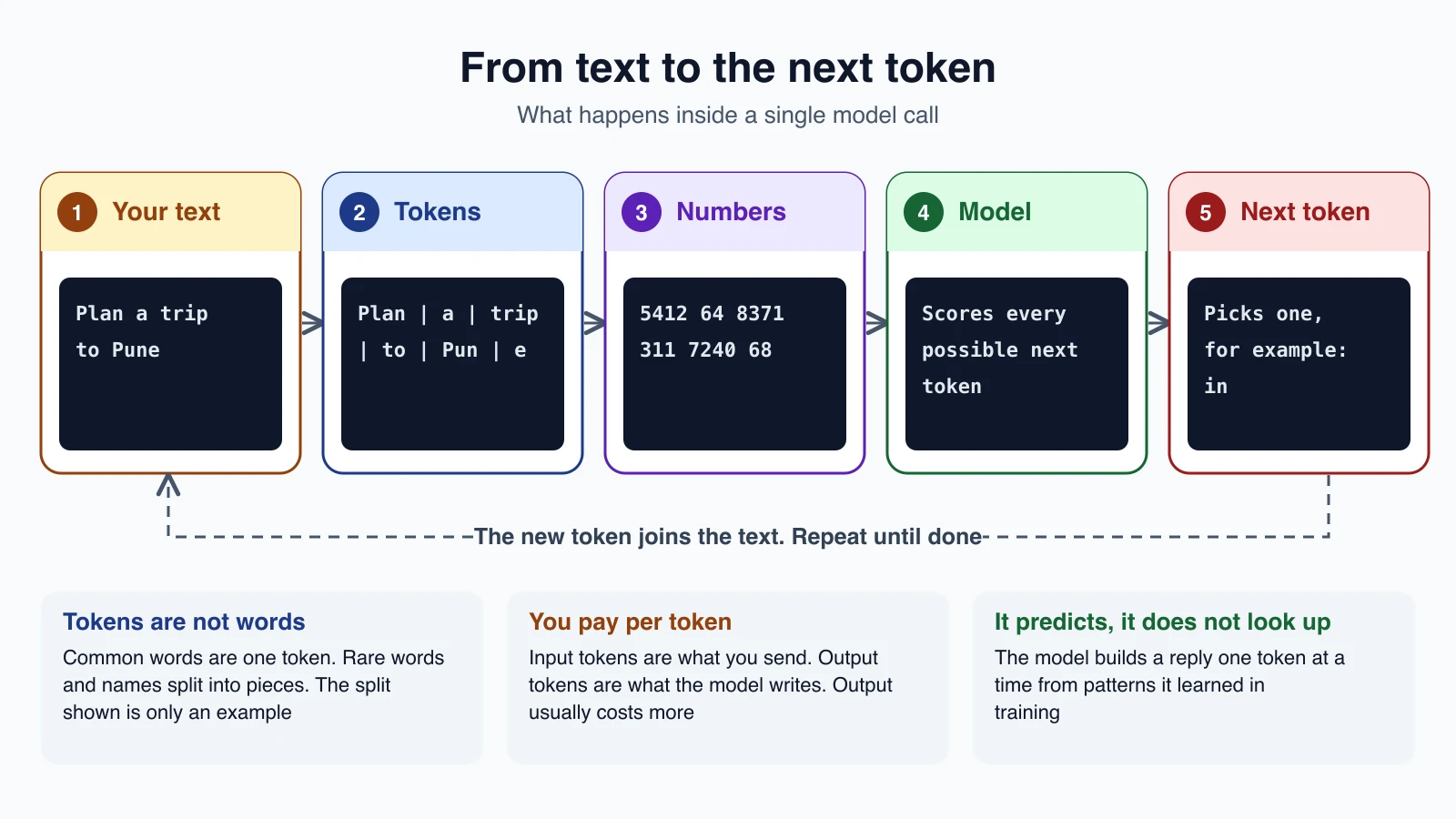
For example, a sentence such as "Plan a trip to Pune" might be split into pieces like Plan, a, trip, to, Pun and e. The split in the diagram is only an illustration. Each model has its own tokenizer, the part that decides where to cut, so the same text can become a different number of tokens on different models. Anthropic notes, for instance, that Claude models from 4.7 onward use a newer tokenizer that produces roughly 30 percent more tokens for the same text than earlier ones. When you change models, count again instead of assuming.
A rough rule of thumb is that a token is about three to four characters of English text, but code, numbers and other languages often split into more tokens. Treat any rule as a guess and measure when it matters.
Why tokens matter to you
- They are the unit of cost. You pay for input tokens (what you send) and output tokens (what the model writes). Output tokens usually cost more.
- They are the unit of limits. Rate limits, maximum output length and the context window are all counted in tokens.
- They decide speed. More tokens to read and more tokens to write means a slower answer.
Count tokens before you send
You can ask the API how many tokens a request will use, without running it. With Claude's token counting endpoint, in Python:
1import anthropic
2
3client = anthropic.Anthropic()
4
5response = client.messages.count_tokens(
6    model="claude-opus-5-5",
7    system="You are a scientist",
8    messages=[{"role": "user", "content": "Hello, Claude"}],
9)
10
11print(response.input_tokens)
The count is an estimate and can differ slightly from the real usage. It includes the system prompt, tool definitions and any images or documents. It works for client tools, but not for requests that use server tools such as web search. After a real request, the response also reports the actual tokens in its usage field, which is the number to trust for cost.
How a reply is generated
The model creates its answer one token at a time, as the diagram shows:
- It reads all the input tokens.
- It scores every possible next token.
- It picks one. How strictly it picks the top score is a setting you can adjust, which the next lesson covers in Choosing and configuring a model.
- That token is added to the text, and the process repeats until the model decides to stop or it hits the output limit.
This is why replies stream out word by word, and why the same prompt can give slightly different answers on different runs. It also explains a limit you will meet often: the model can write only a certain number of tokens in one reply, set by a parameter called max_tokens.
The context window
The context window is everything the model can see at once, including its own reply. Think of it as the model's working memory, or a desk of fixed size: only what fits on the desk can be used.
Here is the part that surprises beginners. A model call is stateless. The API does not remember your last request. To continue a conversation, your program sends the whole history again, every time. So a conversation is really a growing list of messages that you resend.
For an agent, this matters a lot, because each step of the loop is one more call that carries everything so far.
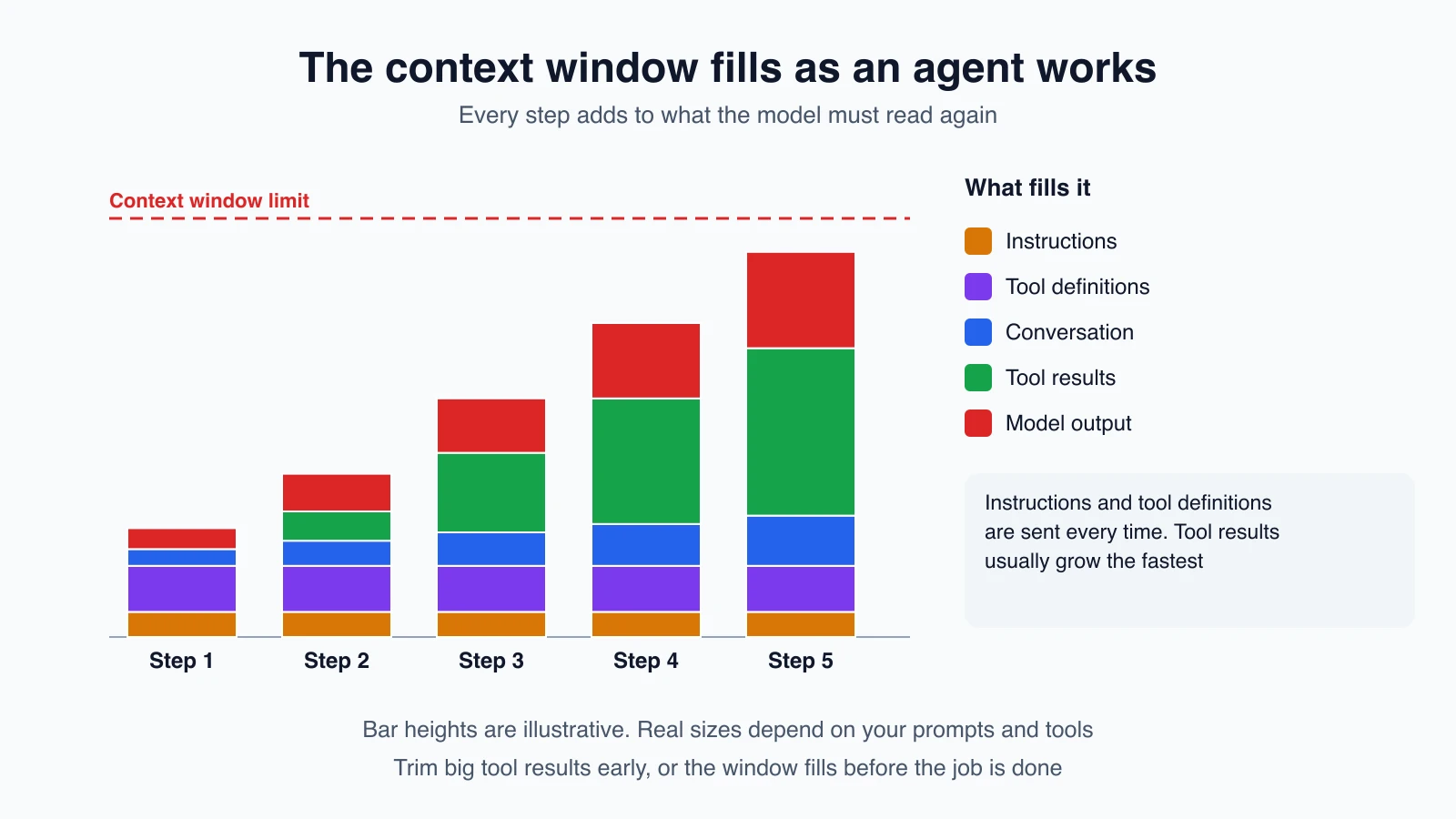
What counts toward the window:
- the system prompt (your instructions),
- every message in the conversation, including tool results, images and documents,
- the tool definitions you send,
- the model's output for the turn, including any thinking it does before answering.
The size of the window depends on the model. Anthropic's documentation lists a window of up to 1 million tokens for its current models, with a single reply able to run up to 128,000 tokens, and 200,000 tokens for some older ones. Check the model's page for the number you will actually have. Bigger is not automatically better, for a reason covered next.
Context rot
Anthropic's documentation warns that as the number of tokens grows, the model's accuracy and recall degrade, an effect it calls context rot. A model with a huge window can still lose track of a detail buried in the middle of a long input. So the goal is not to fill the window. It is to put the right information in it. This idea has its own lesson, Context engineering.
What happens when the window fills
- If the input alone is longer than the window, the API returns an error saying the prompt is too long.
- On newer Claude models, if the input plus the reply you allow would exceed the window, the request is accepted, but generation stops early with a stop reason of
model_context_window_exceeded. - To keep a long run going, you can summarize older parts of the conversation. Claude offers server-side compaction (in beta at the time of writing) that does this for you, and you can also clear old tool results yourself. Both are covered later in the course.
Caching can lower what you pay for repeated content, such as a long, unchanging system prompt, but cached text still takes up room in the window. It changes the price, not the limit.
Why long agent runs cost more
Put the facts together. An agent that takes 20 steps does not make 20 small calls. It makes 20 calls, each one carrying the whole growing conversation. The tool results are often the biggest part: a search that returns pages of text, or a file read that returns thousands of lines. By step 20 the model is rereading a very long history on every call.
That is why two habits pay off early in agent design:
- Keep tool results short. Return what the model needs, not everything.
- Set a step limit. A runaway loop gets expensive fast.
Embeddings
One more idea will appear when you reach memory and retrieval. An embedding is a list of numbers that represents the meaning of a piece of text. Texts with similar meaning get lists that are close to each other, and texts with different meaning end up far apart. You can measure the closeness with a simple calculation such as the dot product or cosine similarity.
This lets a program search by meaning. If you embed a set of documents and then embed a question, the documents whose numbers are closest to the question's numbers are the most relevant. That is the basis of retrieval, which you will build in RAG and vector databases.
Two practical points:
- Embeddings come from embedding models, not from chat models. Anthropic does not offer its own embedding model. Its documentation points to Voyage AI as one provider, and you are free to compare others.
- An embedding is not a summary. It is a compact fingerprint used for matching. You still send the real text to the chat model.
Here is a small example in the style of the Voyage documentation. It embeds a few documents and finds the one closest to a question. You need a Voyage API key to run it, so treat it as optional reading for now:
1import numpy as np
2import voyageai
3
4vo = voyageai.Client()
5
6documents = [
7    "Photosynthesis in plants converts light energy into glucose.",
8    "Apple's conference call is scheduled for Thursday at 2:00 p.m. PT.",
9    "Shakespeare's works, like Hamlet, endure in literature.",
10]
11
12doc_vectors = vo.embed(documents, model="voyage-4", input_type="document").embeddings
13query_vector = vo.embed(["When is Apple's call?"], model="voyage-4", input_type="query").embeddings[0]
14
15scores = np.dot(doc_vectors, query_vector)
16print(documents[int(np.argmax(scores))])
It prints the sentence about the Apple call, because that text is closest in meaning to the question, even though the words are not identical.
What this means for building agents
| Fact about LLMs | What to do about it |
|---|---|
| Each call is stateless | Send the history you need on every call |
| Everything in the window costs tokens | Keep instructions, tools and results lean |
| Accuracy can drop in very long contexts | Curate the context, do not just fill it |
| The model predicts, it does not look up | Give it tools and ways to check |
| Output is generated token by token | Set max_tokens and expect small differences between runs |
| Embeddings capture meaning | Use them to find relevant text, then pass that text to the model |
Mistakes beginners make
- Thinking the model remembers. It does not. If it needs to know something, it must be in the request.
- Ignoring token counts. A prompt that seems short can include a lot of hidden tokens from tools and history.
- Pasting everything into the prompt. More text means higher cost and can make answers worse.
- Assuming one tokenizer. Counts differ between models, so measure with the model you plan to use.
- Trusting fluent answers. A confident reply is not a correct one. Verify with tools or tests.
- Confusing embeddings with chat models. They are different tools for different jobs.
Quick recap
- An LLM predicts the next token, one at a time, from patterns learned in training.
- Tokens are the unit of reading, cost and limits. Count them with the model you will use.
- A model call is stateless, so every step of an agent resends the whole history.
- The context window holds the system prompt, tools, messages, tool results and the reply, and it fills up as an agent works. Very long contexts can reduce accuracy.
- Embeddings turn text into numbers so you can search by meaning, and they come from embedding models.
Try it yourself
If you have an API key, run the token counting snippet above and note the number. Then change the user message to a long paragraph and count again, and add a made-up tool definition to see how much it adds. If you do not have a key yet, take any paragraph of text and estimate its token count by dividing its characters by four, then compare it with a free online tokenizer. Finally, write down three things an agent you might build would need in its context window, and one thing you would deliberately leave out.
Next lesson: Choosing and configuring a model.