
You have probably used an AI chatbot: you type a question, and it types an answer. An AI agent goes further. You give it a goal, and it works out the steps, uses tools to carry them out, looks at what happened, and keeps going until the job is done. This lesson is the start of a course on building agents, and it assumes nothing. After it you will be able to say what an agent is, tell it apart from a chatbot and a workflow, name its parts, and judge whether a task needs one at all.
A simple example first
Say you ask a chatbot: "Why are my tests failing?" It can only guess from what you paste into the chat. It cannot run anything.
Now give the same request to an agent that can run commands and read files. It does something like this:
- It runs your tests to see which ones fail.
- It reads the error messages.
- It searches your code for the file that causes the error.
- It opens that file and reads it.
- It edits the code to fix the problem.
- It runs the tests again to check.
Nobody told it these steps. It chose each one, based on what the last step showed. If the tests still fail at step 6, it goes around again with the new information. That choosing, acting and checking is what makes it an agent.
The tool Claude Code works this way, and you can read the Claude Code course for a close look at a real agent. In this course you will learn how to build agents like it yourself.
The definition
Here is a definition you can hold on to:
An AI agent is a system where a language model decides its own steps and uses tools to act on the world, repeating until a goal is reached or a limit is hit.
A few words in that sentence need unpacking.
- Language model (often called an LLM, for large language model) is the AI that reads and writes text. It is the "brain" of the agent. The next lesson explains how it works.
- Tools are things the model can ask your program to do: search the web, run code, read a file, call an API, send an email. Without tools, a model can only talk.
- Decides its own steps is the key part. In a normal program, a developer writes every step in advance. In an agent, the model chooses what to do next while it runs.
- Repeating means a loop. The agent does not answer once and stop. You will study this loop in The agent loop.
Chatbot, workflow and agent
These three get mixed up a lot, and the differences matter when you decide what to build.
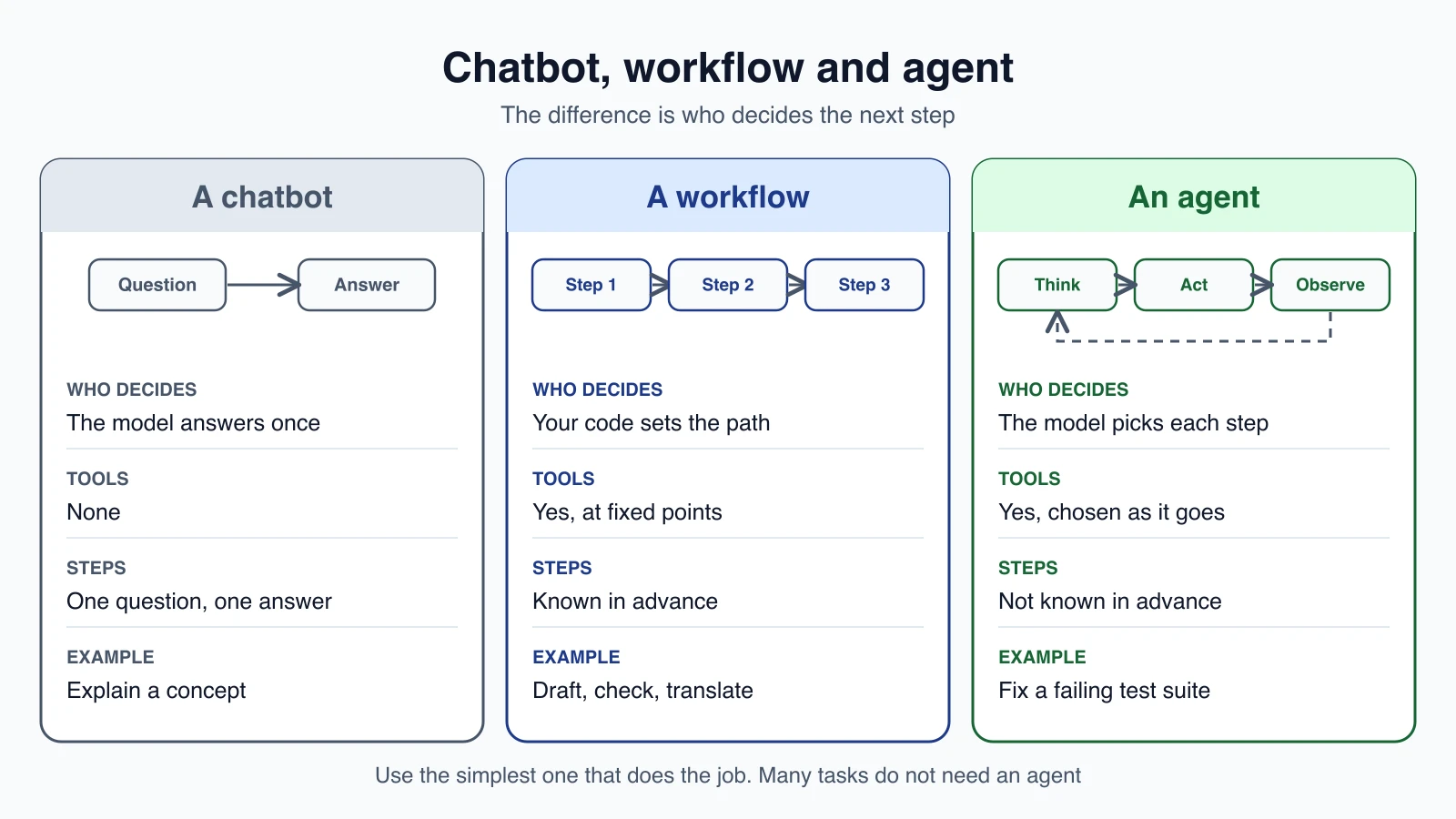
A chatbot answers one message at a time. It may be very good at it, but it does not take actions. There is no loop and no tools.
A workflow uses a language model inside steps that your code controls. For example: step 1 drafts an email, step 2 checks the tone, step 3 translates it. The path is fixed. The model fills in each step, but it does not choose the route.
An agent puts the model in control of the route. It decides which tool to use, in what order, and when it is finished.
Anthropic, the company that makes Claude, describes the split in just this way in its guide "Building effective agents". Both workflows and agents count as "agentic systems". In a workflow, models and tools follow predefined code paths. In an agent, the model directs its own process and tool use.
Neither is better in every case. A workflow is more predictable, cheaper and easier to test. An agent is more flexible. Workflows or agents is a whole lesson on choosing between them.
The parts of an agent
Every agent, from a small script to a big product, is made of the same few pieces.
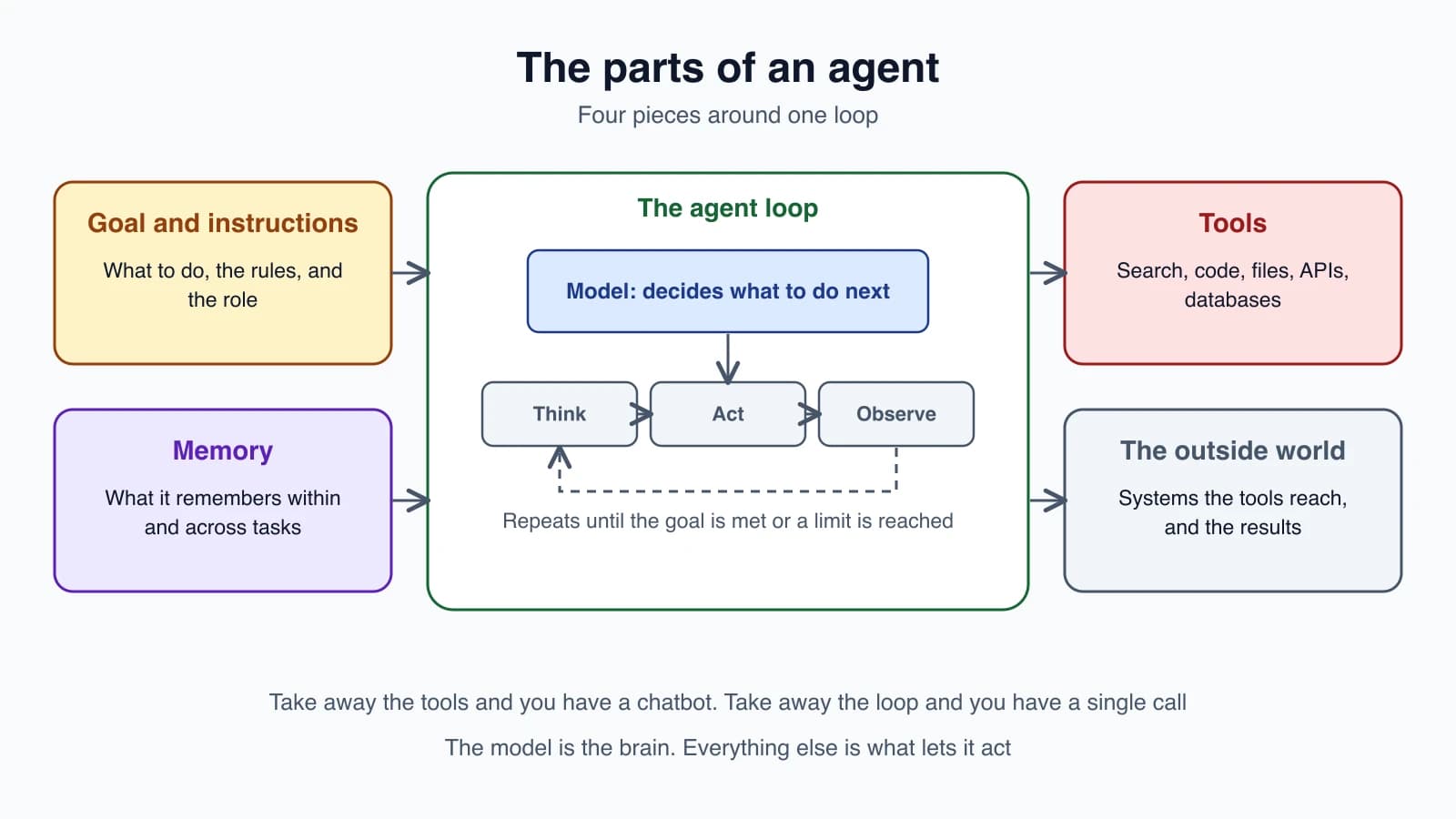
1. The model. It reads everything it has been given and decides what to do next: call a tool, ask you a question, or give a final answer.
2. Goal and instructions. This is what you want done, plus the rules and the role the agent should play. It is often called the system prompt. For example: "You are a support agent for an online shop. Be polite. Never promise a refund without checking the order."
3. Tools. The actions the agent can take. Each tool has a name, a description and the inputs it needs. The model reads the descriptions to decide which tool fits.
4. Memory. What the agent knows while it works. Short-term memory is the running conversation, including what the tools returned. Long-term memory is anything stored outside the conversation so the agent can use it later.
Around all four sits the loop: think, act, observe, repeat.
One useful way to remember this: take away the tools, and you have a chatbot. Take away the loop, and you have a single model call.
How an agent works, in plain code
Here is the idea written as simple pseudocode. You do not need to run it. Just notice how short the core is.
1messages = [goal and instructions, the user's request]
2
3repeat up to 10 times:
4    reply = ask the model what to do, given messages and the list of tools
5
6    if the reply is a final answer:
7        show it and stop
8
9    if the reply asks for a tool:
10        result = run that tool
11        add the tool request and its result to messages
That is the whole shape. The model gets the conversation so far. If it wants a tool, your program runs the tool and adds the result to the conversation. The model then sees that result and decides again. The "up to 10 times" is a safety limit, because a loop with no end can run forever and cost a lot. In a later lesson you will turn this pseudocode into a working program.
One thing is worth stating clearly. The model never runs the tool itself. It only asks for it, in a structured message that says which tool and with what inputs. Your program does the actual work and reports back. This is what keeps you in control: you decide which tools exist and what they are allowed to do.
What agents are used for
Agents fit tasks where the steps are not known in advance, and where each step depends on what the last one showed. Common examples:
- Personal assistants. Manage a calendar, draft replies, book meetings, look things up.
- Code generation and repair. Write or fix code, run tests, read the failures, and try again. Coding agents work well because tests give a clear pass or fail.
- Data analysis. Load a file, run queries, make a chart, notice something odd and dig into it.
- Web research and scraping. Search, open pages, pull out facts, and combine them into a report.
- Customer support. Read a question, look up the order, check the policy, and take an action such as a refund, with a person approving when needed.
- Game characters. Non-player characters that pursue goals instead of following a script.
Notice what these share: a measurable goal, tools to reach it, and a way to tell if it worked.
When not to use an agent
The most useful skill in this field is knowing when an agent is the wrong choice. Agents trade speed and cost for flexibility. Each step is another call to the model, and the model decides its own path, so a mistake early on can carry through the rest. Anthropic's advice is to find the simplest solution that works and add complexity only when you need it, which may mean not building an agent at all.
Before you reach for one, ask:
- Could a single model call do it? Often a good prompt, with a few examples or some retrieved text, is enough.
- Are the steps known? If you can write them down, a workflow is cheaper and easier to test.
- How costly is a mistake? If an error is hard to undo, such as sending money or deleting data, put a human check in front of it.
- Can you tell whether it worked? If you cannot measure success, you cannot improve the agent.
What you should know first
You do not need to be an AI expert. You will get the most from this course if you are comfortable with these basics:
- Reading and writing a little Python. The examples use it, and nothing needs advanced skills.
- What an API is. A way for one program to ask another for something over the internet.
- JSON. The text format APIs use to pass structured data, such as
{"city": "Pune"}. - A terminal and Git. Running commands and saving your work.
If one of these is new, a short tutorial before the next lesson is enough.
Mistakes beginners make
- Calling everything an agent. A fixed three-step prompt chain is a workflow. The name matters, because the two need different testing.
- Starting with an agent when a prompt would do. Try the simple version first.
- Giving the agent too many tools too soon. More tools means more ways to choose wrong. Start with one or two.
- Having no stop limit. Always set a maximum number of steps.
- Trusting it without checking. The model can be confident and wrong. Build in a way to verify the result.
Quick recap
- An AI agent is a system where a language model decides its own steps, uses tools to act, and repeats until the goal is met or a limit is reached.
- A chatbot answers once. A workflow follows steps your code sets. An agent chooses the steps itself.
- Every agent has a model, instructions, tools and memory, all inside a loop.
- The model asks for a tool, and your program runs it. You stay in control.
- Agents suit open-ended tasks with a clear goal. For simple or well-defined tasks, a single call or a workflow is better.
Try it yourself
Take five tasks from your own work or hobbies, such as "summarize this article", "book a flight that fits my calendar", "fix a bug in my app", "translate 100 product descriptions" and "answer questions about my notes". For each one, decide whether it needs a single model call, a workflow or an agent, and write one sentence of reasoning. Then check your answers against the four questions in the section on when not to use an agent.
Next lesson: How LLMs work, for agent builders.