
Everything an agent does comes back to one pattern: a loop. The model looks at the situation, decides what to do, asks for a tool, your program runs it, and the result goes back to the model for the next decision. In this lesson you will learn each part of that loop, trace a real task through it turn by turn, and write the loop yourself in a short piece of Python. After it you will understand why agents can handle open-ended tasks, what makes a loop stop, and which limits protect you from a loop that never ends.
The idea in one picture
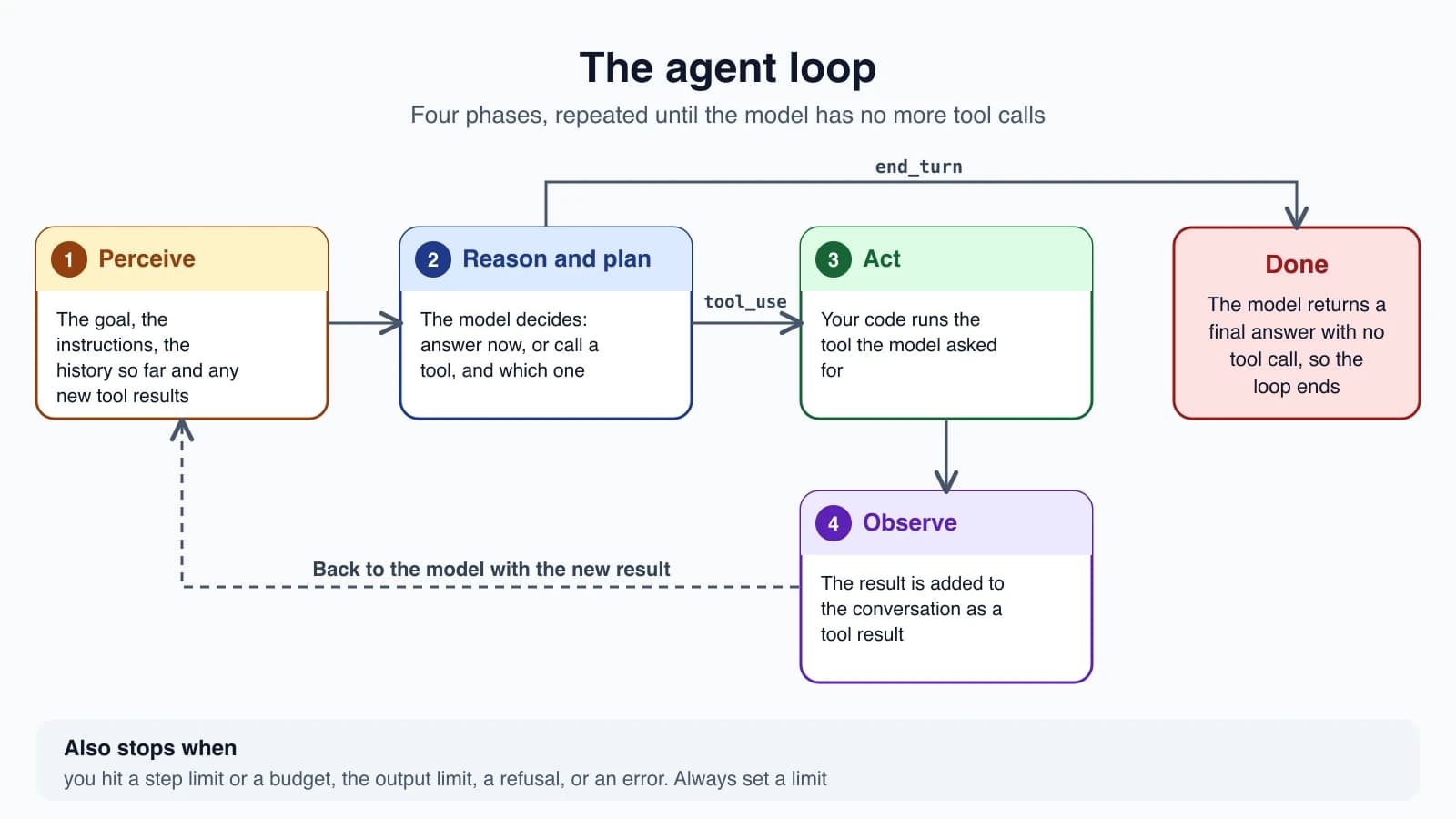
The roadmap many learners follow describes four phases, and they match what happens in real code:
- Perceive. The model receives its input: your goal, the instructions, the conversation so far, and the results of any earlier tools.
- Reason and plan. The model decides what to do next. It might answer, or it might call a tool, and it picks which one and with what inputs.
- Act. Your program runs the tool the model asked for. The model never runs it itself.
- Observe. The tool's result is added to the conversation, and the loop goes back to step 1 with the new information.
When the model answers with no tool call, the loop ends. That is the exit. Everything else is a repeat.
Who does what
It helps to be exact about who is responsible for each step, because this is where beginners get confused.
- The model only reads text and writes text. When it wants a tool, it writes a structured request that names the tool and gives its inputs as JSON.
- Your program is the loop. It sends the conversation to the model, reads the reply, runs any requested tool, and sends the result back.
Anthropic's documentation describes this as a contract: you specify what operations exist and what shape their inputs and outputs take, and the model decides when and how to call them. The model "never runs anything on its own". It emits a request, and your code carries it out.
This split is what keeps you in control. If you do not provide a tool, the model cannot use it. If you decide a request is not allowed, you can refuse it, and the model simply receives your refusal as the result.
One task, traced
Here is the loop in action. The request is: "Fix the failing tests in auth.ts." This trace follows the example in the Claude Agent SDK documentation.
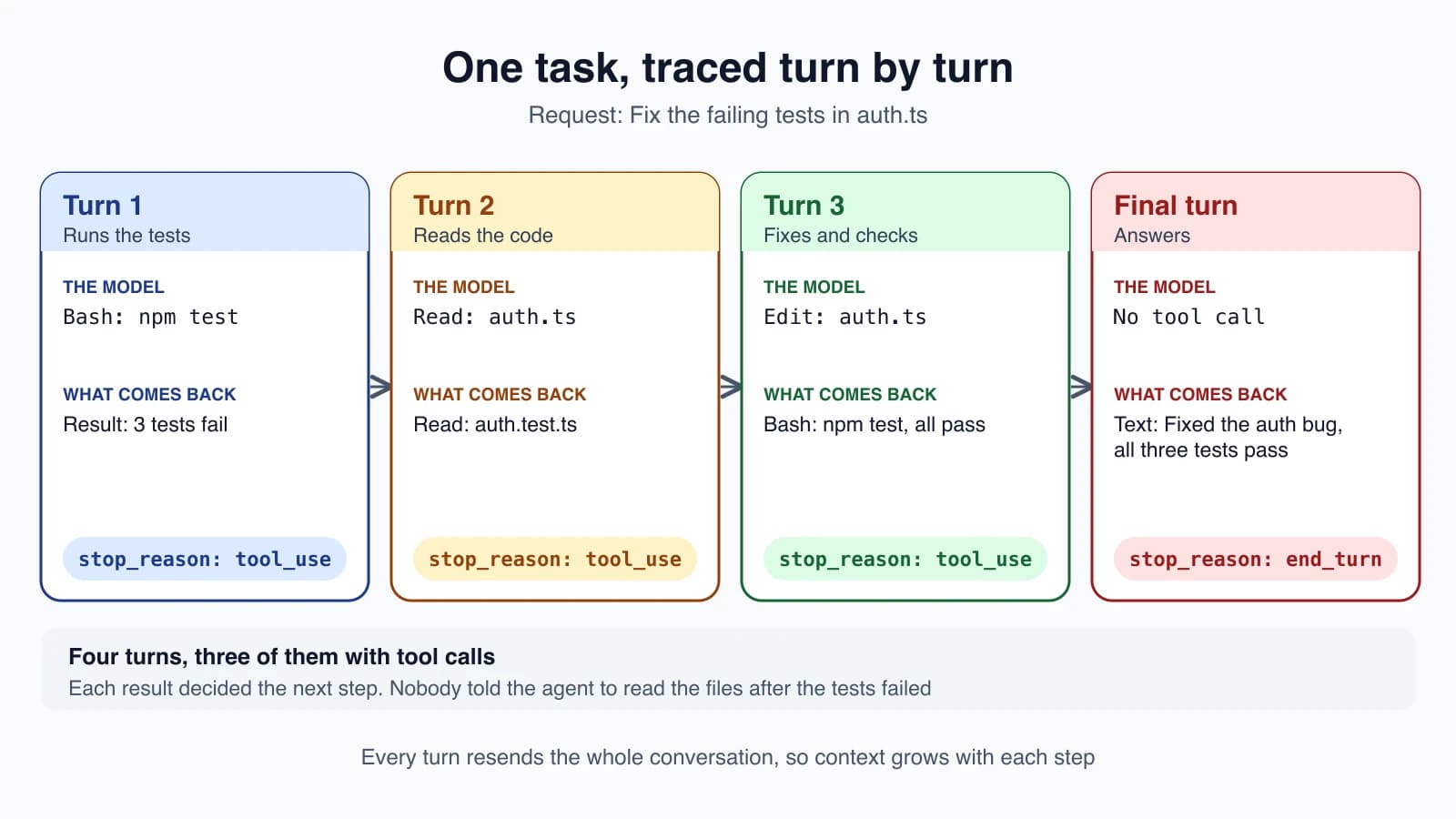
- Turn 1. The model calls a shell tool to run
npm test. The result comes back: three tests fail. - Turn 2. Having seen the failures, it reads
auth.tsandauth.test.ts. - Turn 3. It edits
auth.tsto fix the bug, then runsnpm testagain. All three tests pass. - Final turn. It writes a short message: the bug is fixed and all three tests pass. There is no tool call, so the loop ends.
Notice a few things:
- A turn is one pass through the loop: the model produces output, and if that output asks for tools, your program runs them and the results feed the next turn.
- Nobody told the agent to read the code after the tests failed. The test output led it there. That is what "the model decides its own steps" means.
- A simple question such as "what files are here?" might take two or three turns. A big job such as refactoring a module can take dozens.
The loop in code
The loop is short. Anthropic's tool-use documentation describes the canonical shape as a while loop keyed on the stop reason: keep going while the model says tool_use, and exit on anything else.
Here is a small, complete version in Python. It gives the model one pretend tool and lets it use it:
1import anthropic
2
3client = anthropic.Anthropic()
4
5tools = [
6    {
7        "name": "get_weather",
8        "description": "Get the current weather for a given location.",
9        "input_schema": {
10            "type": "object",
11            "properties": {
12                "location": {
13                    "type": "string",
14                    "description": "City and state, e.g. San Francisco, CA",
15                }
16            },
17            "required": ["location"],
18        },
19    }
20]
21
22
23def run_tool(name, args):
24    if name == "get_weather":
25        return "15 degrees Celsius, partly cloudy"
26    return f"Unknown tool: {name}"
27
28
29messages = [{"role": "user", "content": "What's the weather in San Francisco?"}]
30
31for _ in range(10):
32    response = client.messages.create(
33        model="claude-opus-5-5",
34        max_tokens=1024,
35        tools=tools,
36        messages=messages,
37    )
38    messages.append({"role": "assistant", "content": response.content})
39
40    if response.stop_reason != "tool_use":
41        break
42
43    results = []
44    for block in response.content:
45        if block.type == "tool_use":
46            output = run_tool(block.name, block.input)
47            results.append(
48                {"type": "tool_result", "tool_use_id": block.id, "content": output}
49            )
50    messages.append({"role": "user", "content": results})
51
52answer = next((b.text for b in response.content if b.type == "text"), "Stopped at the step limit")
53print(answer)
Walk through it:
for _ in range(10)is the step limit. The loop can run at most ten times. You will see why this matters below.- The request sends the whole conversation and the tool list, as you learned in How LLMs work. The call is stateless, so
messagescarries everything. - The reply is appended to
messagesexactly as received. This matters: if the model produced extra blocks, such as thinking, they must go back unchanged. stop_reason != "tool_use"is the exit.end_turnmeans a final answer. Other values, such asmax_tokensorrefusal, also leave the loop, and a real agent should handle them (see Choosing and configuring a model).- For each tool request, the code runs the tool and builds a
tool_resultblock that carries the sametool_use_id, so the model can match each result to its request. - The results go back as a user message, and the loop repeats.
This is the whole pattern. Real agents add more tools, better error handling and logging, but the skeleton does not change. You will turn it into a full program in Build your first agent.
What ends the loop
A loop needs more than one way out, because the model not finishing is a real risk. These are the exits you should plan for:
| Exit | How it shows up | What to do |
|---|---|---|
| The model is done | Stop reason end_turn, no tool call | Use the answer |
| Step limit reached | Your counter runs out | Report that it did not finish, or resume with a higher limit |
| Budget reached | You track cost and stop | Stop and report the spend |
| Output limit | Stop reason max_tokens | Raise the limit or ask it to continue |
| Refusal | Stop reason refusal | Surface it to the user |
| An error | An exception from the API or a tool | Retry or fail clearly |
| A human stops it | A cancel button or a keystroke | Stop cleanly |
You do not have to build every one of these by hand. The Claude Agent SDK, which runs the same loop that powers Claude Code, gives you two of the most important as options: max_turns caps the number of turns, and max_budget_usd stops the loop when estimated spend reaches a threshold. When one is hit, the final result carries a subtype such as error_max_turns or error_max_budget_usd instead of success, so your code can tell a finished task from a stopped one.
The documentation's advice is that without limits, the loop runs until the model finishes on its own, which is fine for well-scoped tasks but can run long on open-ended ones like "improve this codebase". Setting a limit is a good default for any agent you ship. Note that the budget check happens after each response arrives, so spend can go a little over the cap. Leave some headroom.
More than one tool call at a time
A single model reply can contain several tool requests. If the model wants the weather in two cities, it can ask for both at once. Your code should run all of them and return all the results together, each with its own tool_use_id, as the loop above does.
Running them one by one is always safe. Running them at the same time can be faster, but only when they do not interfere. The Agent SDK's rule of thumb is a good one to copy: tools that only read, such as reading a file or searching, can run concurrently, while tools that change things, such as editing a file or running a command, should run one after another to avoid conflicts.
When the model is not allowed to act
Your loop is also where you enforce rules. Before you run a tool, you can check whether it is allowed. If it is not, you do not run it. You return a result that says so, for example "That action is not permitted", and send it back like any other result.
The model reads that message and usually tries another approach or tells the user it cannot proceed. The Agent SDK works the same way: when a tool is denied, Claude receives a rejection message as the tool result. You will use this idea for approvals in Human in the loop and for safety in Prompt injection and tool sandboxing.
Tools that run on the server
Not every tool needs your loop. Some providers run certain tools themselves. In Claude's API, web search, web fetch and code execution are server tools: Anthropic runs them, and you never build a tool_result for them. A single request may trigger several searches before the reply comes back.
That server-side loop has an iteration cap. If the model is still working when it hits the cap, the response arrives with the stop reason pause_turn. The work is not finished, and you send the conversation back, including the paused reply, to let the model continue. Your own loop needs one extra branch for it.
What the loop does to your context
Every turn adds to the conversation: the model's reply, then the tool result. The next call carries all of it again. So a long loop has a growing context, and large tool results are the usual cause, as the diagram in How LLMs work showed. Two habits help from the start:
- Return only what the model needs. A tool that returns the last 20 log lines is better than one that returns the whole file.
- Watch the step count. If an agent takes far more steps than you expected, something is wrong: a tool is failing, or the model is stuck repeating itself.
The same loop powers real products. The Claude Code lesson on the agent loop shows how a coding agent uses it with a rich set of tools.
Mistakes beginners make
- No step limit. A loop that cannot end can run up a large bill. Always cap it.
- Forgetting to append the model's reply. The model then loses track of what it asked for, and the next call fails or confuses it.
- Sending back the wrong
tool_use_id. Each result must match its request. - Treating every non-
tool_usestop as success. Amax_tokensorrefusalstop is not a finished answer. - Returning huge tool results. They fill the context and slow every later step.
- Running state-changing tools in parallel. Two edits at once can collide.
- Not logging each step. When an agent misbehaves, the sequence of tool calls is your best clue.
Quick recap
- The agent loop has four phases: perceive, reason and plan, act, observe. The model asks for tools and your code runs them.
- A turn is one pass through the loop. The loop continues while the stop reason is
tool_useand ends on a final answer. - The model decides its own steps based on what each result shows.
- A loop needs limits: a step cap, a budget, and handling for output limits, refusals and errors.
- One reply can request several tools. Reads can run together, but changes should run in order.
- You can refuse a tool call by returning a message instead of running it.
- Context grows every turn, so keep tool results small.
Try it yourself
Take the loop code above and think through it before you run anything. Write down, in order, the messages that would be in messages after the first tool call finishes, including who sent each one. Then add a second pretend tool, such as get_time, and decide what the model might do if you ask "What is the weather and the local time in San Francisco?" Would it call both tools in one reply or in separate turns? If you have an API key, run it and check your guess by printing response.stop_reason and the tool names at each step.
Next lesson: Workflows or agents: when to use which.