
An agent that can send emails, issue refunds or change files can also send the wrong email, issue the wrong refund and change the wrong file. A person who is placed in the right spots catches those mistakes before they reach the real world. Placed in the wrong spots, the same person becomes a bottleneck who clicks "yes" without reading. This lesson shows where a human belongs in an agent's workflow, how to build an approval gate in tested Python, and how to design reviews that people can actually do well.
Why keep a person involved
Anthropic's guide to building effective agents says agents can pause for human feedback at checkpoints or when they hit a blocker, and that strong agent uses include meaningful human oversight. It adds that for coding, human review stays essential even when automated tests pass. It also recommends testing in a sandbox with guardrails.
The reasons are practical:
- Models make mistakes, and some mistakes cannot be undone: a sent email, a deleted file, a payment.
- Models misread situations. The agent may be missing context that only you have.
- Some decisions belong to people: spending money, speaking for your company, anything with legal or safety weight.
- Trust is earned gradually. You can loosen approvals as an agent proves itself, and tighten them after a failure.
The goal is not to review everything. It is to review the few actions that matter, with enough information to decide well.
Where approvals go
The simplest way to decide is by risk. Ask two questions of each tool: can the action be undone, and does it affect anything outside the agent's sandbox?
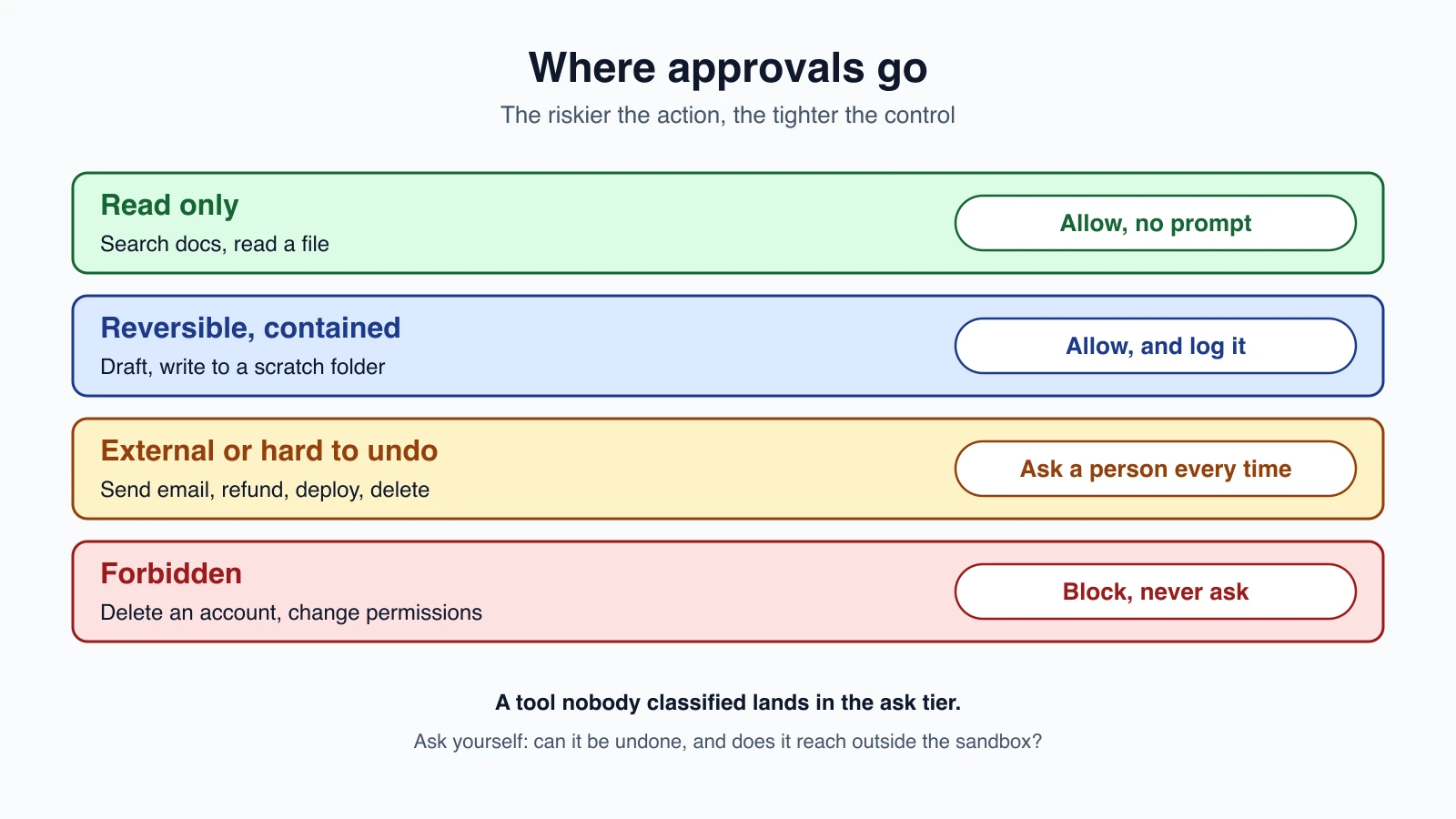
| Tier | Examples | What to do |
|---|---|---|
| Read only | Search docs, read a file, look up an order | Allow without asking |
| Reversible, contained | Write to a scratch folder, draft an email, edit a copy | Allow, and keep a log |
| External or hard to undo | Send an email, issue a refund, deploy, delete, spend money | Ask a person every time |
| Forbidden | Delete an account, change permissions, anything outside the task | Block, and never ask |
This matches the thinking in Common agent tools: the riskier the tool, the tighter its control. Give each tool the least access that gets the job done.
Anything you did not classify should land in the ask tier, not the allow tier. New tools are risky until you decide otherwise.
A real example: Claude Code
Claude Code applies this idea to a coding agent. By default it asks before running most shell commands and before editing files, with a built-in set of read-only commands and file reads inside the working directory needing no approval. You can change this with permission modes. Per its documentation, default prompts on first use of each tool, acceptEdits auto-accepts file edits in the working directory, plan lets it explore without editing, and bypassPermissions skips prompts except for a small set of actions no mode auto-approves.
You can also write rules. Claude Code evaluates them in a fixed order, deny, then ask, then allow, and the first match wins. A broad deny rule beats a narrower allow rule, so an allow cannot carve an exception out of a deny. That ordering is a good habit for your own agents, and the code below uses it. For a hands-on view, see Claude Code Plan Mode: Think Before You Build.
Patterns for involving a person
- Approval gate. Before a risky action, stop and ask. The most common pattern, and the one built below.
- Plan approval. Show the plan from a planner-executor design before anything runs. It is cheaper to fix a plan than a half-finished job.
- Checkpoint. Pause at natural points, such as after research and before writing, to ask "is this the right direction?"
- Escalation. When the agent is stuck or unsure, let it ask a question instead of guessing. Give it a way to say "I need a person".
- After-the-fact review. For low-risk actions, let the agent proceed but record what it did, and have a person review samples. This needs an audit log.
- Review loop with a person as evaluator. See Self-critique and evaluator-optimizer, where a person is one kind of evaluator.
The approval flow
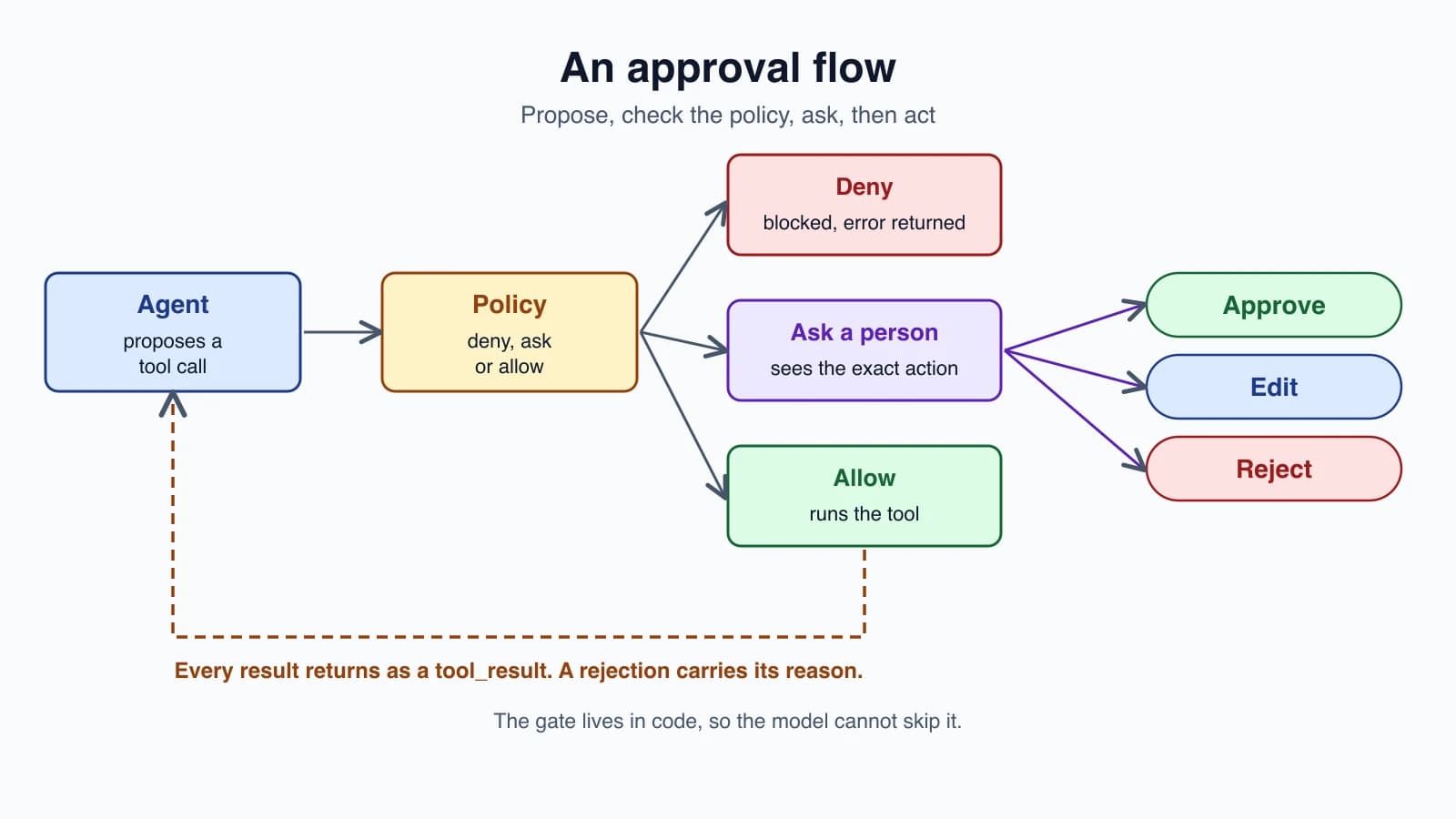
Walk through what happens when the agent wants to run a tool:
- The model proposes a tool call, with a name and input.
- A policy looks up the tool. Deny blocks it, allow runs it, and ask goes to a person.
- The person sees the exact action and chooses: approve, edit the input, or reject with a reason.
- Approve runs it. Edit runs the changed version. Reject skips it.
- The outcome goes back to the model as a
tool_result. A rejection is sent withis_errorset and the reason, so the agent can adapt, such as trying a smaller refund or asking a question.
The model does not "get stuck" on a rejection. It reads the reason, as with any other tool error in Errors, retries and rate limits, and chooses what to do next.
The code
1import json
2
3POLICY = {
4    "deny": {"delete_account"},
5    "ask": {"send_email", "issue_refund", "write_file"},
6    "allow": {"read_file", "search_docs"},
7}
8
9
10def decide(name, policy=POLICY):
11    """Same order as most permission systems: deny, then ask, then allow. Unknown tools ask."""
12    for verdict in ("deny", "ask", "allow"):
13        if name in policy[verdict]:
14            return verdict
15    return "ask"
16
17
18def describe(call):
19    """Show the person the exact action, not a summary of intent."""
20    return f"{call['name']}({json.dumps(call['input'], sort_keys=True)})"
21
22
23def result(call, content, is_error=False):
24    return {"type": "tool_result", "tool_use_id": call["id"], "content": content, "is_error": is_error}
25
26
27def run_with_approval(calls, tools, ask_human, policy=POLICY, max_prompts=5):
28    """ask_human(text) returns ("approve",), ("reject", reason) or ("edit", new_input)."""
29    results, audit, prompts = [], [], 0
30    for call in calls:
31        verdict = decide(call["name"], policy)
32        entry = {"action": describe(call), "verdict": verdict}
33        if verdict == "deny":
34            results.append(result(call, "Blocked by policy. Do not retry this tool.", True))
35        elif verdict == "ask":
36            if prompts >= max_prompts:
37                entry["outcome"] = "paused"
38                audit.append(entry)
39                return {"status": "paused", "results": results, "audit": audit}
40            prompts += 1
41            answer = ask_human(entry["action"])
42            entry["outcome"] = answer[0]
43            if answer[0] == "reject":
44                results.append(result(call, f"The user rejected this action: {answer[1]}", True))
45            elif answer[0] == "edit":
46                call = {**call, "input": answer[1]}
47                entry["action"] = describe(call)
48                results.append(result(call, tools[call["name"]](call["input"])))
49            else:
50                results.append(result(call, tools[call["name"]](call["input"])))
51        else:
52            results.append(result(call, tools[call["name"]](call["input"])))
53        audit.append(entry)
54    return {"status": "done", "results": results, "audit": audit}
The tests use stand-in tools and a scripted human, so they run without the API.
How it works
decidelooks up the tool in order: deny, ask, allow. A tool in no list gets ask. If a name is in more than one list, the stricter one wins.describeturns a call into text that includes the tool name and its full, sorted input. The person approves what will actually run, not a summary the model wrote.run_with_approvalhandles each call. Denied calls never run and never reach the person. Asked calls go toask_human, which returns approve, reject with a reason, or edit with new input.- With an edit, the changed input is what runs, and the audit log records the edited action.
- Each result is a
tool_resultblock that carries thetool_use_id, so the model can match it to its request. - The
auditlist records every action, its verdict and its outcome, which gives you the after-the-fact review trail. max_promptsis a budget on interruptions. Past it, the run pauses instead of nagging.
Wiring it into the loop
This small function shows one turn of an agent with the gate in place.
1from gate import run_with_approval
2
3MODEL = "claude-haiku-5-5"
4
5
6def agent_turn(client, messages, tool_schemas, tools, ask_human):
7    reply = client.messages.create(model=MODEL, max_tokens=1024, tools=tool_schemas, messages=messages)
8    calls = [{"id": b.id, "name": b.name, "input": b.input} for b in reply.content if b.type == "tool_use"]
9    if not calls:
10        return "done", reply
11    outcome = run_with_approval(calls, tools, ask_human)
12    if outcome["status"] == "paused":
13        # every tool_use needs a tool_result, so a half-finished turn is not sent back to the API
14        return "paused", outcome
15    messages.append({"role": "assistant", "content": reply.content})
16    messages.append({"role": "user", "content": outcome["results"]})
17    return "continue", outcome
One detail matters. The API expects a result for every tool call the model made. If the gate pauses halfway through a turn, the function does not send a half-finished turn back. It returns the paused state so you can save it, ask the person later, and resume. Plan for this if approvals can take minutes or hours, as a human reply might.
Design reviews people can do
A gate is only as good as the review behind it. Make approvals easy to do well:
- Show the real action. Tool, target, amount and recipient, in plain terms. Not "the agent wants to continue".
- Show the consequence. "Sends to 1,240 customers" is better than "send_email".
- Show what changed, such as a diff for an edit.
- Make the safe answer the default, and make "no" as easy as "yes".
- Allow editing, because the right answer is often "yes, but smaller".
- Ask for a reason on rejection, and feed it back to the agent.
- Give enough context to decide without opening five other tabs.
- Batch low-risk approvals where you can, but never batch away a high-risk one.
Approval fatigue
If every action asks, people stop reading and approve everything. This is a well-known weakness of permission prompts, and it can be worse than no prompt, because it creates a false sense of safety. To avoid it:
- Allow the truly safe actions, so prompts are rare and meaningful.
- Keep a prompt budget, as
max_promptsdoes, and treat a high prompt rate as a design bug to fix. - Do not cache a broad approval. "Yes to this refund" is not "yes to all refunds". Narrow, per-action approvals are safer.
Things that go wrong
- The person approves a summary, not the action. Show the exact input.
- The action changes after approval. Run exactly what was shown. The code runs the approved or edited input and nothing else.
- Approval fatigue. Too many prompts, so people stop reading.
- Everything unclassified is allowed. Default new tools to ask.
- Hostile text shaping the request. An agent that read a malicious web page may propose a harmful action with a friendly explanation. Showing the raw action helps. See Prompt injection and tool sandboxing.
- No audit trail, so you cannot tell later what was approved.
- A gate in the prompt only. "Always ask before sending" in the system prompt is a request to the model, not a control. Enforce the gate in code, where the model cannot skip it.
- No answer path. If the person is away, the run must wait or stop safely, not proceed.
Point 7 deserves emphasis. A model usually follows an instruction like "ask first", but usually is not a guarantee. A gate in your code does not depend on the model's cooperation.
Mistakes beginners make
- Asking about everything, including harmless reads.
- Asking about nothing, because "the model will be careful".
- Relying on the prompt instead of a gate in code.
- Showing vague descriptions of the action.
- No edit option, forcing yes or no.
- Dropping the rejection reason instead of returning it to the agent.
- Caching broad approvals.
- Sending a half-finished tool turn to the API after a pause.
- No audit log.
- Never revisiting the policy as the agent proves itself or fails.
Quick recap
- Put a person where actions are external, costly or hard to undo. Let the safe, reversible ones run.
- Sort tools into tiers: read, contained write, external or irreversible, forbidden. Unknown tools ask.
- Evaluate rules in the order deny, ask, allow, as Claude Code does.
- An approval gate shows the exact action, and the person can approve, edit or reject. A rejection reason goes back to the agent as a tool error.
- Enforce gates in code, not in the prompt.
- Avoid approval fatigue with few, meaningful prompts and per-action approvals.
- Keep an audit log, and plan for approvals that arrive later by saving paused state.
Try it yourself
Take an agent you have in mind, such as a support assistant, and list its tools. Put each one in a tier, and write the policy dict. Run a scripted conversation through run_with_approval where the scripted person approves, edits and rejects, then read the audit log. Raise the number of risky calls past max_prompts and check that the run pauses. Finally, write the exact text a person would see for the riskiest tool, and ask whether a stranger could decide from it alone.
Next lesson: Testing AI agents.