
Once you can define a tool, the next question is which tools to give an agent. A handful of types show up again and again: searching the web, running code, querying a database, calling an API, reading and writing files, sending messages. Each one makes the agent more useful, and each one also makes a mistake more costly. This lesson walks through the common types, shows what each is for, and, most importantly, what permission each needs and what guard to put around it. After it you will be able to look at any tool and say how risky it is and how to make it safer.
Who runs the tool
First, a distinction from earlier lessons that matters for safety. Some tools run in your code, and some run on the provider's side. Anthropic's tool reference lists both kinds:
| Tool | Where it runs | What it does |
|---|---|---|
| Web search | Anthropic's servers | Searches the web and returns results with citations |
| Web fetch | Anthropic's servers | Reads the content of a given web page or PDF |
| Code execution | Anthropic's servers | Runs Python and Bash in a sandboxed container |
| Memory, bash, text editor | Your application | Anthropic defines the schema, your code does the work |
| Computer use, browser use | Your application | Controls a screen or a browser |
| Your own tools | Your application | Anything you write |
For a server tool, you add one entry to the tools list and the provider does the rest. You never write a handler or send back a result for it. For a client tool, whether Anthropic defines the schema or you do, your code runs the action, which means your code decides what is allowed. The rest of this lesson is mostly about that second group, because that is where your safety decisions live.
A way to think about risk
Do not rank tools by how impressive they are. Rank them by the worst thing that could happen when the model misuses one. Five families cover almost everything, from lowest risk to highest.
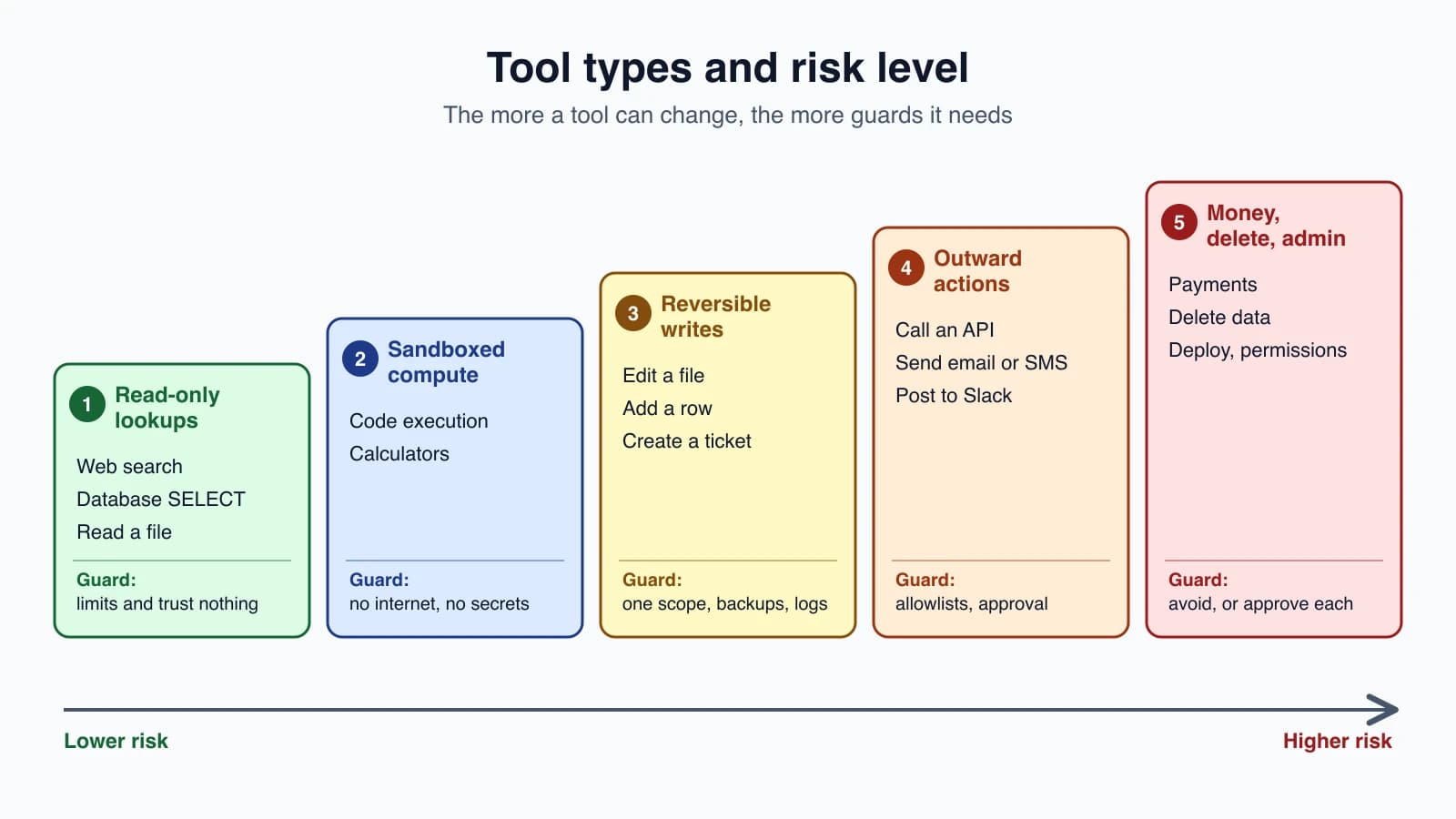
The more a tool can change, and the harder the change is to undo, the more guards it needs. We will go through the families in that order.
Family 1: Read-only lookups
These tools fetch information and change nothing. They are the safest, so they are where most agents start.
Web search
Web search lets an agent answer questions that depend on current information, such as recent events, prices or changing facts. In Claude's API it is a server tool. You add it to the request and Anthropic runs the searches:
1response = client.messages.create(
2    model="claude-opus-5-5",
3    max_tokens=1024,
4    messages=[{"role": "user", "content": "What's the weather in NYC?"}],
5    tools=[{"type": "web_search_20250305", "name": "web_search", "max_uses": 5}],
6)
Things worth knowing from Anthropic's documentation:
max_usescaps the number of searches in one request. Simple questions usually need one to three, and comparison questions can use ten or more. If the model asks for more than the cap, the search result is an error with the codemax_uses_exceeded.- Domain controls. Use
allowed_domainsto restrict results to sites you trust, orblocked_domainsto exclude some. You can use one or the other, not both. - Citations are always on. The response includes the source URL and title for what the model used. If you show the output to users, show the citations too.
- Cost. Searches are billed per search, at $10 per 1,000 on the Claude API at the time of writing, on top of the tokens the results use. Failed searches are not billed. Check the pricing page for current numbers.
- Errors arrive inside a normal reply. A failed search still returns a 200, with an error object where the results would be. Your loop should not treat a 200 as proof the search worked.
There is also a web fetch tool that reads a specific page or PDF you point the model to.
The risk is not what the tool does but what it brings back. A web page can contain text that looks like instructions. Anthropic's documentation warns that tool results often carry content from sources you do not control, such as web pages and emails, and that an attacker could use this to try to redirect the model. This is called prompt injection, and Prompt injection and tool sandboxing covers it fully. For now, remember that anything a read-only tool returns is data, not a command, and that this matters more as you give the agent other tools.
Database queries
A database tool lets an agent answer questions like "how many orders did we get last week?" It is also the classic example of a tool that is safe only if you set it up carefully.
The strongest guard is not in your code at all. It is the database account. Give the tool a database user that can only read, and ideally only the tables the agent needs. Then even a badly written query cannot change anything. Add checks in your code as a second layer and as a way to give the model clear messages. Here is a version using Python's built-in SQLite module, which opens the file in read-only mode:
1import sqlite3
2
3DB_PATH = "shop.db"
4MAX_ROWS = 50
5
6
7def run_query(sql):
8    if not sql.strip().lower().startswith("select"):
9        raise ToolError("Only SELECT queries are allowed. Rewrite the request as a SELECT.")
10    con = sqlite3.connect(f"file:{DB_PATH}?mode=ro", uri=True)
11    try:
12        cur = con.execute(sql)
13        rows = cur.fetchmany(MAX_ROWS + 1)
14        columns = [d[0] for d in cur.description]
15    except sqlite3.Error as e:
16        raise ToolError(f"SQL error: {e}. Check the table and column names.")
17    finally:
18        con.close()
19    lines = [", ".join(columns)] + [", ".join(str(v) for v in row) for row in rows[:MAX_ROWS]]
20    if len(rows) > MAX_ROWS:
21        lines.append(f"[Showing the first {MAX_ROWS} rows. Add a WHERE or LIMIT to narrow the query.]")
22 return "\n".join(lines)(ToolError is the exception from Errors, retries and rate limits.)
Look at the layers:
mode=roopens the database read-only, so a write is refused by the database itself, whatever the model writes. This is the real protection. Thestartswith("select")check is only a friendly first message, and it also blocks harmless queries that start withWITH, so it is a shortcut, not a security boundary.- A row limit keeps one careless
SELECT *from filling the context window, and the notice tells the model how to narrow the query, as in Designing tools that work. - A readable SQL error lets the model fix its own query.
Two more habits for databases: describe the tables and columns in the tool description so the model does not guess, and never let one tool run both reads and writes through the same free-form query.
Family 2: Computation in a sandbox
Models make arithmetic and data-processing mistakes when they try to do the work in their head. A code execution tool lets the agent write a small program and run it instead.
In Claude's API, code execution is a server tool. Anthropic's documentation describes it as running Python and Bash in a sandboxed container where the model can also create and edit files:
1response = client.messages.create(
2    model="claude-opus-5-5",
3    max_tokens=4096,
4    messages=[{"role": "user", "content": "Use the code execution tool to calculate the mean and standard deviation of [1, 2, 3, 4, 5, 6, 7, 8, 9, 10]"}],
5    tools=[{"type": "code_execution_20250825", "name": "code_execution"}],
6)
The safety comes from where the code runs. The container is isolated from your systems, and the documentation states that it has no internet access, so the model cannot download packages while running and the code cannot reach your other services. Each request starts in a new container unless you pass an earlier container's id back. Billing is by container time, tracked apart from tokens. The documentation lists a monthly free allowance and an hourly rate beyond it, and notes that code execution is free when it is used together with newer versions of web search or web fetch. Check the current pricing before you plan around any of it.
If you run model-written code on your own machine instead, you take on the sandbox yourself. Running it directly in your own process, or with your own credentials in reach, hands the model everything you can do. If you must run it yourself, use a container or a locked-down environment with no secrets, no network and strict limits on time and memory.
Family 3: Reversible writes
Now the agent changes something, but the change can be undone: writing or editing a file, adding a database row, creating a ticket, adding a calendar event. The aim is to keep the damage small and fixable.
- Confine the scope. A file tool should work inside one folder, as the notes tools do by checking that the resolved path sits inside
NOTES. Never accept a path you have not checked. - Make changes recoverable. Keep a copy before overwriting, use version control, or soft-delete rows by marking them instead of removing them.
- Prefer small, specific tools such as
add_noteover a general "write anything" tool. - Log every change with what was changed, by which run, and when. A log turns a mystery into a short investigation.
- Offer a dry run where it makes sense, so the agent or a person can see what a change would do before it happens.
Family 4: Outward actions
This is where the agent reaches beyond your own data: calling APIs, sending an email, posting to Slack, sending an SMS. The effect leaves your system and often cannot be taken back. A sent email stays sent.
Three guards matter most.
Allowlists. Decide in advance where the agent may reach. For HTTP requests, check the address before making the call:
1from urllib.parse import urlparse
2
3ALLOWED_HOSTS = {"api.example.com"}
4
5
6def check_url(url):
7    parts = urlparse(url)
8    if parts.scheme != "https" or parts.hostname not in ALLOWED_HOSTS:
9        raise ToolError(f"Only https requests to {sorted(ALLOWED_HOSTS)} are allowed.")
This accepts only secure requests to hosts you named. It correctly rejects look-alikes such as api.example.com.evil.com, because it compares the whole host name and not a part of it. A real request tool also needs a timeout, a cap on the size of the response, and a decision about redirects, since a redirect can send a request to a host that was not on your list. The same idea applies to email recipients and Slack channels: a short list the agent may contact, and nothing else.
Approval for actions that cannot be undone. Before an outward action runs, ask a person. A small gate in your tool runner does it:
1NEEDS_APPROVAL = {"send_email", "delete_file"}
2
3
4def approved(name, args):
5    print(f"The agent wants to run {name} with {args}")
6    return input("Allow? [y/N] ").strip().lower() == "y"
7
8
9def gate(name, args):
10    if name in NEEDS_APPROVAL and not approved(name, args):
11        return "The user declined this action. Do not retry it. Ask what to do instead.", True
12    return None
In your loop, call gate before running a tool. If it returns a result, send that back to the model as the tool result, and the model learns the action was refused without any exception. A command-line prompt is the simplest version. Real products use buttons, review queues or messages to a manager, and Human in the loop covers them.
Limits. Cap how many emails or API calls one run can make, so a loop gone wrong cannot send a hundred messages. Counting calls per run is a few lines of code and worth adding early.
Credentials deserve a note here. Your API keys and tokens belong in your code or environment, where the tool uses them. They should never be in the prompt or in a tool result, because anything the model can see, it can repeat. Give each tool its own narrowly scoped credential, so a leak or a misuse of one tool does not open the others.
Family 5: Money, deletion and administration
Payments, deleting data, deploying code, changing permissions, closing accounts. The rule for beginners is simple: do not give an agent these tools until you have a strong reason, a tested approval step and a way to recover. Many useful agents never need them. When you do need one, require approval for every use, give it separate credentials with the smallest possible limits, and log everything.
The permission map
The same idea runs through every family, and it is called least privilege: give each tool only the access it needs to do its job, and nothing more.
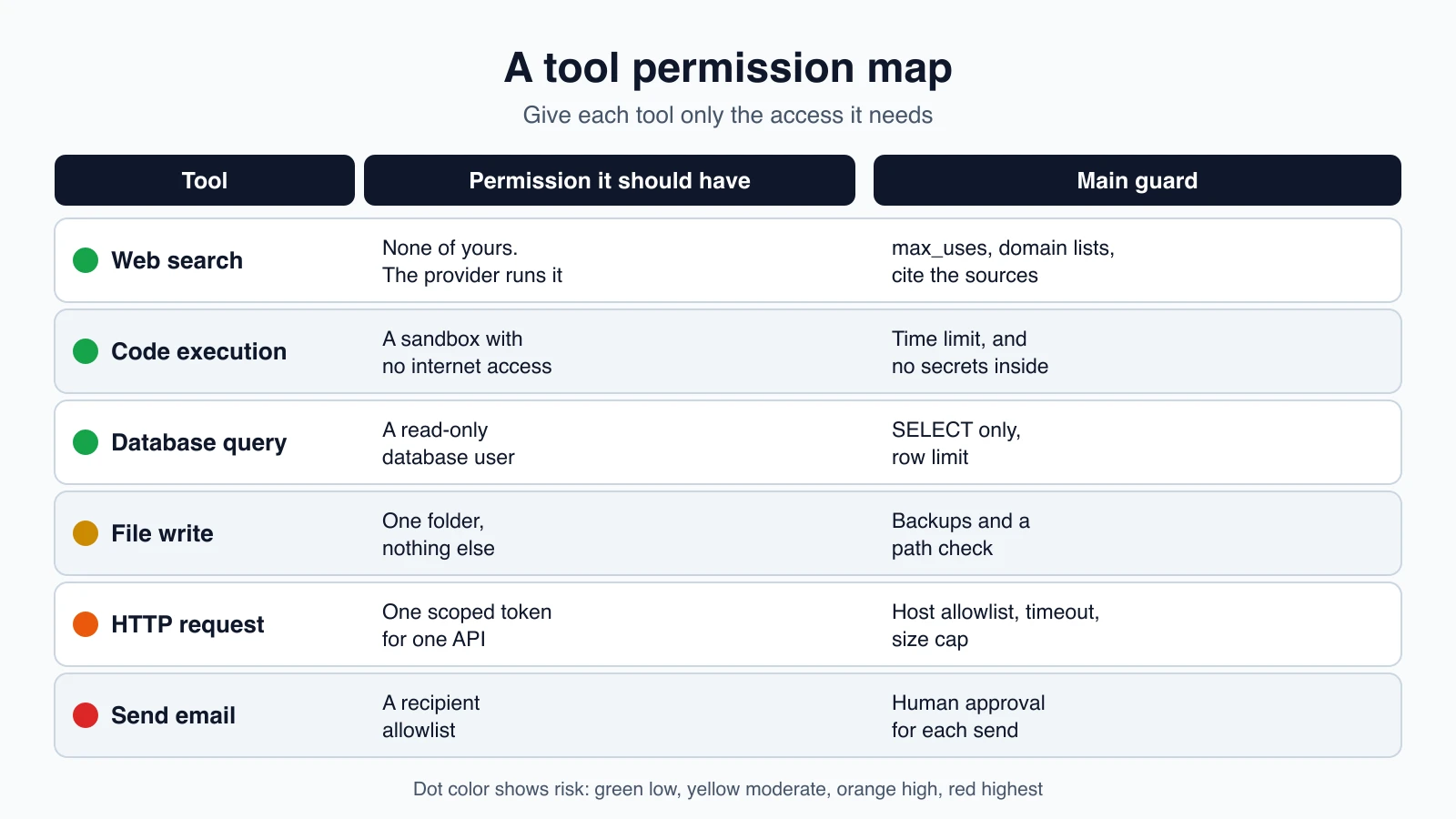
| Tool | Permission it should have | Guard |
|---|---|---|
| Web search | None of yours, the provider runs it | max_uses, domain lists, cite sources |
| Code execution | A sandbox with no internet access | Time limit, no secrets inside |
| Database query | A read-only database user | SELECT only, row limit |
| File write | One folder | Backups, path check |
| HTTP request | One scoped token for one API | Host allowlist, timeout, size cap |
| Send email | A recipient allowlist | Human approval for each send |
A few rules sit underneath the table:
- Start read-only. Add write tools one at a time, after the read-only ones work.
- Separate credentials per tool. One shared admin key for everything defeats the point.
- Limit the blast radius. Row limits, call caps, size caps and time limits keep a mistake small.
- Ask before the irreversible. If you cannot undo it, a person approves it.
- Treat tool output as data. Text from the web, email or files is not a command.
- Log every call. You will want the record, and so will anyone who audits the agent.
Mistakes beginners make
- Giving a first agent write or send access before the read-only version works.
- One powerful database account for everything. Use a read-only user for read tools.
- A free-form "run any SQL" or "run any command" tool with no limits.
- Trusting what a web page says. Content from the web is data, not an instruction.
- Running model-written code on your own machine with your own credentials in reach.
- Secrets in prompts or tool results. Keep credentials in code and scope each one.
- No approval step for sending or deleting.
- No caps. One loop gone wrong should not be able to send a hundred emails or run a thousand searches.
- Not logging tool calls.
- Believing a 200 means success. Some tools report errors inside a normal reply.
Quick recap
- Tools come in families, from read-only lookups to computation in a sandbox, reversible writes, outward actions, and money, deletion or administration. Risk rises down that list.
- Server tools such as web search and code execution run on the provider's side. Client tools run in your code, and your code decides what is allowed.
- Web search needs
max_uses, domain lists and citations, and its results are untrusted data. - Database tools should use a read-only account, a row limit and readable errors.
- Code execution is safest in a sandbox with no internet access and no secrets.
- Outward actions need allowlists, call caps and human approval for anything you cannot undo.
- Use least privilege: the smallest permission, a separate credential and a clear guard for every tool.
Try it yourself
List every tool an agent you want to build would need, and place each in one of the five families. For each, fill in a row of the permission map: what access it needs, and what guard goes around it. Cross out any tool in the last two families that you could do without. Then add the check_url function and the gate function to the notes agent from Build your first agent, add a tool named send_email that only prints what it would send, and confirm that declining the approval prompt sends the model a refusal and not a crash.
Next lesson: Computer use and web browsing.