
Everything an agent can do is described to it in words. The model never sees your Python functions. It sees a short description of each tool and a list of the inputs it takes, and it decides what to call from that alone. A clear definition gets the right tool called with the right inputs. A vague one gets wrong guesses. This lesson shows you how to write a good definition, how to check the inputs the model sends back, and how to get structured, machine-readable output when you need it. It starts the tools module, so the next lessons build on it.
The anatomy of a tool definition
Here is a complete definition for a notes search tool, the kind you might add to the agent from Build your first agent:
1SEARCH_NOTES = {
2    "name": "search_notes",
3    "description": (
4        "Searches the user's saved notes and returns the file names of notes that "
5        "match. Use it when the user asks which notes mention a word or topic, "
6        "before reading any file. It does not return the note text, so call "
7        "read_file on a result to see what it says. Matching ignores upper and "
8        "lower case and looks for the exact words, not for similar meanings."
9    ),
10    "input_schema": {
11        "type": "object",
12        "properties": {
13            "query": {
14                "type": "string",
15                "description": "The word or short phrase to look for, for example 'deadline'",
16            },
17            "max_results": {
18                "type": "integer",
19                "description": "How many file names to return at most. Defaults to 5.",
20            },
21            "scope": {
22                "type": "string",
23                "enum": ["titles", "contents"],
24                "description": "Search only file names ('titles') or the text inside ('contents'). Defaults to 'contents'.",
25            },
26        },
27        "required": ["query"],
28        "additionalProperties": False,
29    },
30    "input_examples": [
31        {"query": "deadline"},
32        {"query": "rent", "scope": "titles", "max_results": 3},
33    ],
34}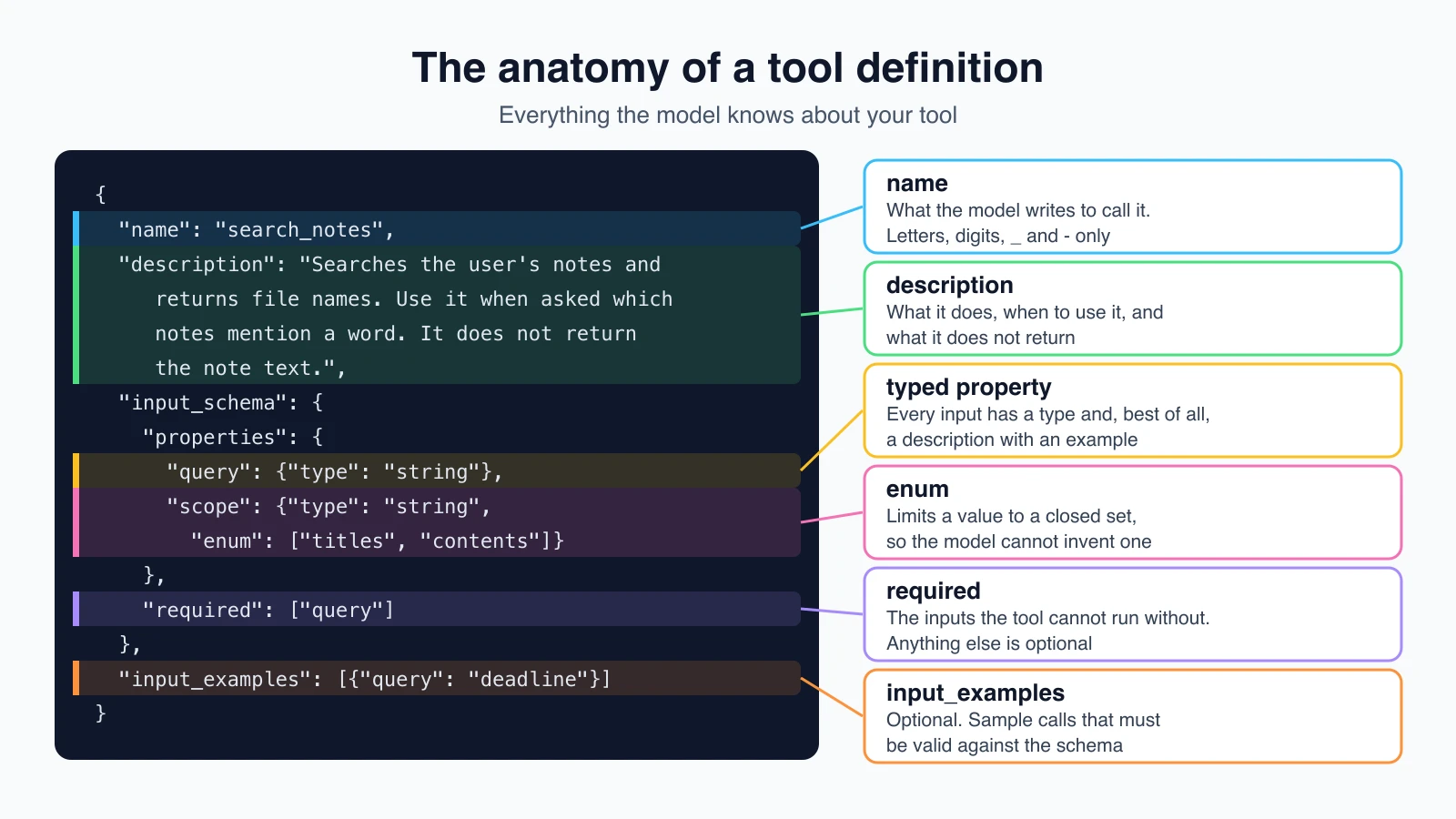
Each part has a job. These are the fields Anthropic documents for a tool you define yourself:
| Field | What it is |
|---|---|
name | What the model writes to call the tool. It must match ^[a-zA-Z0-9_-]{1,128}$. |
description | Plain text on what the tool does, when to use it and how it behaves. |
input_schema | A JSON Schema object describing the inputs. |
input_examples | Optional. Example inputs that show the model how to call the tool. |
strict | Optional. Makes the model's inputs always match the schema. Covered below. |
Behind the scenes, the API turns your definitions into part of the prompt the model reads. So everything you write here costs tokens, on every call, and every word either helps the model or confuses it.
The description matters most
Anthropic's documentation calls detailed descriptions "by far the most important factor in tool performance". It asks you to explain:
- what the tool does,
- when it should be used, and when it should not,
- what each parameter means and how it changes the behavior,
- limits and caveats, such as what the tool does not return.
It suggests at least three or four sentences for each tool, and more for complex ones. Look back at the search_notes description. It names what it returns, says when to use it, says what it does not return and points to the tool that does, and states how matching works. Each sentence prevents a mistake.
Compare two versions:
| Poor | Good |
|---|---|
"Searches notes." | The four-sentence description above |
| Model may guess the tool returns note text, then answer without reading any file | Model knows it gets file names only and calls read_file next |
Model may pass a sentence like "what do I owe on my rent" as query | Model sees "word or short phrase" and an example, and passes rent |
The same documentation gives a tip about asking for explanations. If you add a parameter that asks the model why it is calling a tool, ask for a short explanation. A parameter that asks for step-by-step reasoning can cause a refusal.
Writing the input schema
The input_schema uses JSON Schema, a standard format for describing data. For tools you mostly need a few pieces:
typefor each property:string,integer,number,boolean,arrayorobject.descriptionfor each property. Say what it means and what a good value looks like, with an example.required, the list of properties the tool cannot run without. Anything not listed is optional.enumwhen only certain values make sense. Thescopeproperty above allows exactly two values, so the model cannot invent a third.additionalProperties: false, so extra, made-up inputs are not allowed. Strict mode needs it.
A few habits keep schemas easy for the model:
- Keep inputs few and plain. Three well-described parameters beat ten vague ones.
- Use an enum for a closed set instead of describing the allowed words in prose.
- Say the default in the description when a parameter is optional.
- Use formats the model knows, such as an ISO date like
2026-06-01, and say so.
Examples with input_examples
For tools with nested objects, optional inputs or format-sensitive values, add input_examples. Anthropic's documentation says each example must be valid against the schema, or the request returns a 400 error, and that examples add tokens: roughly 20 to 50 for simple ones and 100 to 200 for complex nested ones. They are not supported for server tools such as web search.
Clear descriptions come first. Reach for examples when a description alone leaves the format unclear.
Names, and how many tools
Three practical rules, all from Anthropic's guidance:
- Namespace names when tools span services.
github_list_prsandslack_send_messagestay unambiguous as your list grows. - Fewer, more capable tools beat many tiny ones. Rather than
create_pr,review_prandmerge_pr, you can use one tool with anactionparameter. Fewer choices means fewer wrong choices. - Return only what the model needs. Give semantic, stable identifiers such as slugs, and skip fields that do nothing for the next step. Large tool results fill the context window, as you saw in How LLMs work. The next lesson, Designing tools that work, goes much deeper on all of this.
Checking what the model sends back
A good definition makes mistakes unlikely. It does not make them impossible. Without extra help, the model can send "2" where you wanted 2, leave out a required input, or pick a value that is not in your enum. Your tool function then fails in a confusing way, or worse, runs with a bad value.
There are two defenses, and you can use both.
Defense 1: validate in your own code
Check the arguments before you run the tool. If they are wrong, return a clear error with is_error set, so the model can fix the call. This is the same idea as in Errors, retries and rate limits.
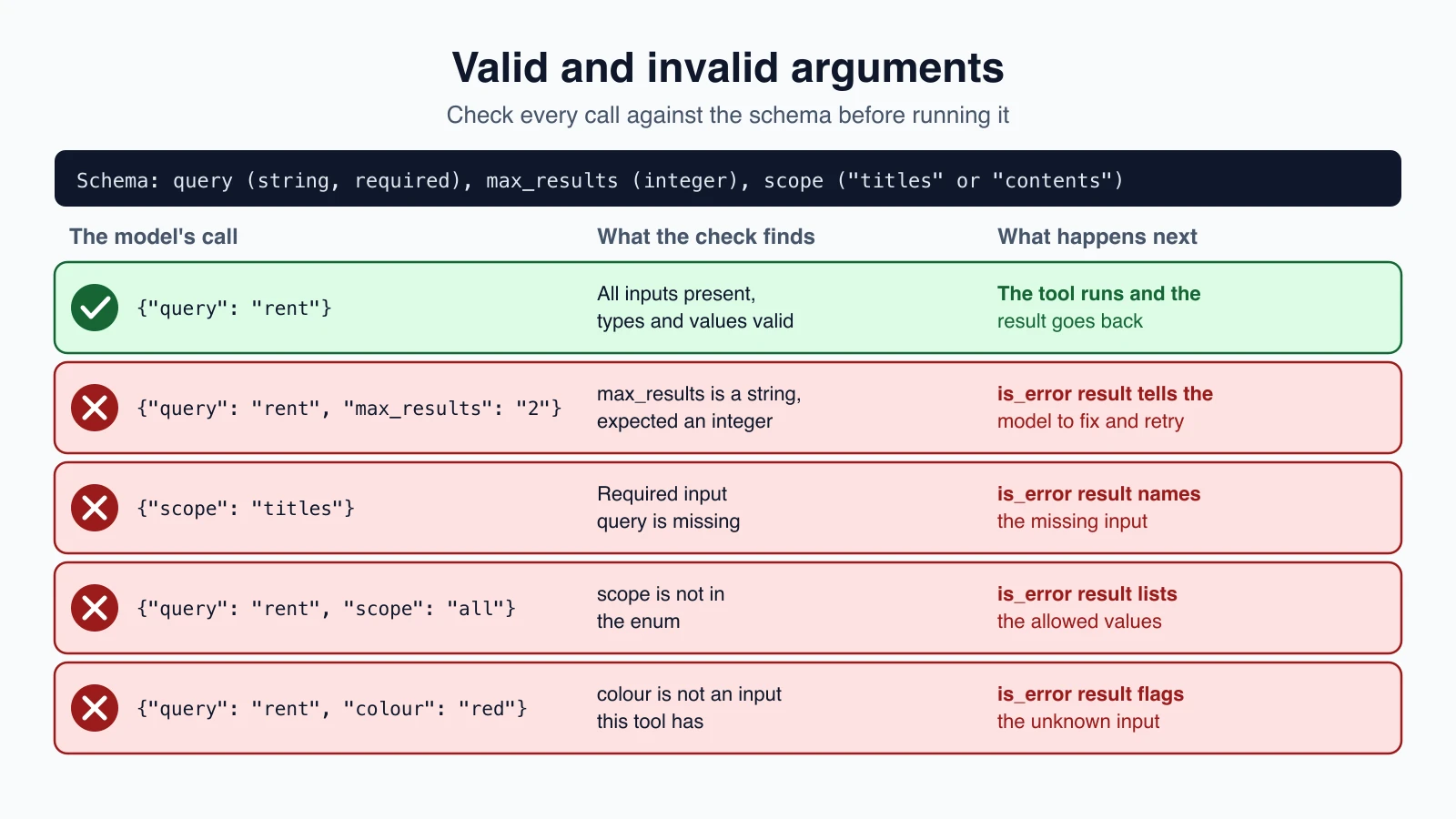
A small hand-written checker is enough for simple schemas:
1TYPES = {"string": str, "integer": int, "number": (int, float), "boolean": bool}
2
3
4def check_args(schema, args):
5    problems = []
6    props = schema.get("properties", {})
7    for name in schema.get("required", []):
8        if name not in args:
9            problems.append(f"missing required input '{name}'")
10    for name, value in args.items():
11        spec = props.get(name)
12        if spec is None:
13            problems.append(f"unknown input '{name}'")
14            continue
15        wrong_bool = isinstance(value, bool) and spec["type"] != "boolean"
16        if wrong_bool or not isinstance(value, TYPES[spec["type"]]):
17            problems.append(f"'{name}' must be of type {spec['type']}, got {type(value).__name__}")
18        elif "enum" in spec and value not in spec["enum"]:
19            problems.append(f"'{name}' must be one of {spec['enum']}, got {value!r}")
20    return problems
Notice the wrong_bool line. In Python, True counts as an integer, so without it a boolean would pass as a number. Edge cases like this are why, for complex schemas, you should use a real JSON Schema library such as jsonschema instead of growing this function. The point here is the pattern.
Now the tool function and the dispatcher, which checks first and runs second:
1def search_notes(query, max_results=5, scope="contents"):
2    hits = []
3    for p in sorted(NOTES.iterdir()):
4        if not p.is_file():
5            continue
6        text = p.name if scope == "titles" else p.read_text()
7        if query.lower() in text.lower():
8            hits.append(p.name)
9    return "\n".join(hits[:max_results]) or "No notes matched."
10
11
12HANDLERS = {"search_notes": search_notes}
13TOOLS = [SEARCH_NOTES]
14TOOLS_BY_NAME = {t["name"]: t for t in TOOLS}
15
16
17def run_tool(name, args):
18    tool = TOOLS_BY_NAME.get(name)
19    if tool is None:
20        return f"Unknown tool: {name}", True
21    problems = check_args(tool["input_schema"], args)
22    if problems:
23        return "Invalid input: " + "; ".join(problems) + ". Fix these and call the tool again.", True
24    try:
25        return HANDLERS[name](**args), False
26    except Exception as e:
27        return f"{type(e).__name__}: {e}", True
This run_tool returns the same (text, is_error) pair as the one in the last lesson, so it drops straight into that loop. Two things are worth noting. The error message lists every problem at once, so the model can fix them in a single retry, and it ends with an instruction. Second, the model's inputs are passed to the function as keyword arguments with **args, which is safe only because the check ran first. Skip the check and a made-up input name becomes a Python crash.
A test is cheap and catches mistakes early. Run it on your own examples, which must also pass the check:
1for example in SEARCH_NOTES["input_examples"]:
2    assert check_args(SEARCH_NOTES["input_schema"], example) == []
3assert check_args(SEARCH_NOTES["input_schema"], {"query": "x", "max_results": "2"})
Defense 2: strict mode
Claude's API can prevent bad inputs instead of reporting them. Setting strict: true on a tool definition constrains the model's output so that tool inputs always match your schema. Anthropic's documentation gives an example of why it matters: a booking tool that needs passengers: int might otherwise receive "two" or "2", while strict mode always returns 2. Strict mode also guarantees the tool name is valid.
1SEARCH_NOTES["strict"] = TrueSome rules apply:
- Use
additionalProperties: falseon objects, and list required properties. - Only a subset of JSON Schema is supported. Numeric limits such as
minimumandmaximum, string limits such asminLength, and recursive schemas are not allowed, and unsupported features return a 400 error. - Strict tools are limited to 20 per request.
Strict mode removes type mistakes. It does not remove meaning mistakes. A date can be a perfectly formatted string and still be in the past, and a file name can be a valid string for a file that does not exist. Keep the checks that depend on your data, such as the file lookup in read_file.
Forcing a tool call, and its limits
The tool_choice setting controls whether the model calls tools:
auto(the default): the model decides.any: it must call one of your tools.tool: it must call the named tool.none: it may not call tools.
There is an important catch. Anthropic's documentation lists models that do not accept forced tool use. On Claude Opus 5.5, Sonnet 5.5, Fable 5.1 and Mythos 5.1, any and tool return a 400 error, and so do they with manual extended thinking turned on. The recommended alternatives are auto combined with strict tool use, to keep inputs valid, or structured outputs, to get a fixed response shape. Prompting still influences which tool auto picks. Check the page for your model before you rely on forcing.
Structured output: when the answer is the data
Sometimes you do not want a chat reply. You want JSON your program can read: a list of tasks, a classification, a form filled in from an email. You have already seen one route, a tool whose inputs are the data you want. Claude's API also has a direct feature, structured outputs, that makes the reply itself match a JSON Schema.
With the Python SDK and the Pydantic library, you describe the shape as a class and ask for it back:
1from pydantic import BaseModel
2from anthropic import Anthropic
3
4
5class NoteSummary(BaseModel):
6    title: str
7    has_deadline: bool
8    deadline_text: str
9
10
11client = Anthropic()
12response = client.messages.parse(
13    model="claude-opus-5-5",
14    max_tokens=1024,
15    messages=[{"role": "user", "content": "Summarize this note: Pay rent by the 5th"}],
16    output_format=NoteSummary,
17)
18print(response.parsed_output)
The helper sends your schema as output_config.format, checks the result, and gives you a NoteSummary object in parsed_output. Without Pydantic, you pass the schema yourself:
1response = client.messages.create(
2    model="claude-opus-5-5",
3    max_tokens=1024,
4    messages=[{"role": "user", "content": "Summarize this note: Pay rent by the 5th"}],
5    output_config={
6        "format": {
7            "type": "json_schema",
8            "schema": {
9                "type": "object",
10                "properties": {
11                    "title": {"type": "string"},
12                    "has_deadline": {"type": "boolean"},
13                    "deadline_text": {"type": "string"},
14                },
15                "required": ["title", "has_deadline", "deadline_text"],
16                "additionalProperties": False,
17            },
18        }
19    },
20)
The reply is then a text block containing JSON you can load with json.loads.
Two cases to handle, from Anthropic's documentation. If the stop reason is refusal, the output may not match your schema, because the refusal takes priority. If it is max_tokens, the output may be cut off and invalid, so retry with a higher limit. It also notes that string values from an enum can differ from your schema in capitalization, so compare them without regard to case.
The two features do different jobs and can be used together:
| Structured outputs | Strict tool use | |
|---|---|---|
| Controls | The format of the model's reply text | The model's tool name and inputs |
| Use it when | Your program consumes the final answer | The model must call your functions correctly |
| Set with | output_config.format | strict: true on a tool |
For an agent, a common pattern is strict tools while it works, and structured output for the final answer, so the next program in your pipeline gets clean data.
Other providers offer the same ideas under different names, as you saw in Function calling across providers. OpenAI's strict mode, for example, asks for additionalProperties set to false and every property listed as required, so a schema that works for one provider may need small changes for another.
Mistakes beginners make
- One-line descriptions. The description is the main control you have. Write three or four sentences.
- Describing parameters by name only. Add a
descriptionand an example value to each. - Too many tools or too many inputs. Merge related actions and trim parameters.
- Overlapping tools whose descriptions do not say when to use which.
- Trusting the arguments. Validate them, or use strict mode, before running anything.
- Using
**argswithout checking. A made-up input name becomes a crash or worse. - Assuming strict mode checks meaning. It checks types. You still check the data.
- Forcing tool use on a model that rejects it. Check the model's page first.
- Returning huge tool results. Trim to what the next step needs.
- Examples that do not match the schema. The API rejects them.
Quick recap
- The model sees only the name, description and input schema of a tool. Write them carefully.
- A good description says what the tool does, when to use it and when not, what each input means, and what it does not return.
- Use JSON Schema types,
required,enumandadditionalProperties: false, and addinput_examplesfor tricky formats. - Namespace names, prefer fewer capable tools, and return only high-signal results.
- Validate model-produced arguments before running a tool, and return failures with
is_error. Or turn onstrict: trueto guarantee the types. - Forced tool use is not available on every model. Use
autowith strict mode, or structured outputs. - For machine-readable final answers, use structured outputs with
output_config.formator the Pydantic helper.
Try it yourself
Add search_notes to your notes agent. Copy the definition, the check_args function and the dispatcher, and run your agent with the question "Which notes mention rent?" Then try breaking it: change the description to the poor one-liner and note whether the agent still reads files after searching. Add a max_results example that passes a string and confirm the error message comes back to the model. Finally, write a Pydantic class for a task with a title and a due date, and decide which of its fields the model might fill wrongly.
Next lesson: Designing tools that work.