
When an agent behaves badly, the first instinct is to rewrite the prompt. Often the better move is to fix the tools. Anthropic's engineers noted, while building their coding agent for the SWE-bench benchmark, that they spent more time optimizing the tools than the overall prompt. This lesson shows what "optimizing a tool" means in practice: choosing the right set of tools, naming and describing them, deciding what they return, making mistakes hard to make, and measuring the result with a simple loop. After it you will be able to look at a weak tool and say exactly what is wrong with it.
Tools are an interface for a model
You already know how a user interface works. A good one makes the right action obvious and the wrong one hard. Anthropic uses the term agent-computer interface, or ACI, for the same idea aimed at a model: the tools, their names, their descriptions and their results are the screen the agent works on.
There is one big difference from ordinary programming. A normal function is a contract between two deterministic systems. Give it the same input and you get the same output, and the caller always reads the documentation. A tool is a contract between your code and a model that may use it in different ways each time, may misread it, and may skip the documentation entirely. Tools for agents should be designed for that reader, not for a programmer.
Two questions guide everything in this lesson:
- If I were the model, with only this name, description and result, would I know what to do?
- How much of my limited context does this tool use up?
Choose the right tools
The obvious way to build tools is to wrap every endpoint of an existing API. It is usually the wrong way. Anthropic's guidance is that tools should fit the way an agent works, and an agent has limited context.
Take a contacts example from their article. A list_contacts tool that returns every contact forces the agent to read them all, one by one, like someone reading a phone book from the first page. A search_contacts tool that returns only matches is far better. Two more patterns from the same guidance:
- Combine steps that always go together. Rather than separate
list_users,list_eventsandcreate_eventtools, a singleschedule_eventtool can find availability and book the meeting. Aget_customer_contexttool can gather a customer's recent details in one call. - Prefer searching to reading everything. A
search_logstool that returns relevant lines beats aread_logstool that returns the whole log.
Do not go too far the other way. Too many tools, or tools with overlapping jobs, distract the agent and make it unsure which to pick. A short list of distinct, purposeful tools is the target, and each tool should have one clear reason to exist.
Name things clearly
Names are the first thing the model reads. Anthropic's advice:
- Group related tools under a shared prefix that names the service or resource, such as
asana_searchandasana_projects_search. This keeps a long list navigable. The article notes that prefix versus suffix naming can matter, and that the best choice varies by model, so test it. - Use unambiguous parameter names.
user_idis better thanuser, which could be a name, an email or an id.
Treat names as part of the instructions. A tool called process tells the model nothing. A tool called search_notes tells it nearly everything.
Write descriptions for a new hire
Anthropic suggests describing your tool the way you would explain it to a new person on your team, and treating the documentation like a good docstring for a junior developer. The important part is to make implicit knowledge explicit. What you know without thinking about it, the model does not:
- the format of a query, with an example,
- special terms your team uses,
- how one kind of record relates to another,
- what the tool does not do.
Tool definitions and structured output covered the mechanics. The design lesson here is a test: read your description as if you had never seen the tool. If a part of it would make you ask a question, answer that question in the text.
The article gives a small example of how much this matters. Claude kept adding "2025" to web search queries, which skewed the results toward that year. The cause was not the model's reasoning. It was a gap in the tool description, and fixing the description fixed the behavior. Small wording changes to descriptions produced large gains in their tests.
Return results the model can use
What a tool returns is as much a part of the design as what it accepts. Three habits help.
Return meaning, not bookkeeping. Prefer fields a model can reason about, such as a name, a file type or a title, over low-level values such as a UUID or a MIME type. Anthropic reports that resolving opaque identifiers into readable language improved retrieval precision and reduced made-up answers. When a follow-up call does need an id, include it, but do not make it the only thing in the result.
Offer short and long versions. Add a response_format parameter with values like concise and detailed, so the agent chooses how much it needs. In the Slack example from the article, a detailed response was 206 tokens and a concise one was 72, about a third of the size. The detailed version still carried the ids needed for later calls.
Cap what comes back. Use pagination, filters, ranges and truncation, each with sensible defaults. The article notes that Claude Code limits tool responses to 25,000 tokens by default. When you cut a result short, say so, and tell the agent what to do next, for example to run several narrow searches instead of one broad one. A silent cut-off leaves the model thinking it saw everything.
Here is the idea in code. This version of the notes tools returns a trimmed file, says clearly when it trimmed it, and offers two result formats for search:
1def read_file(name, max_chars=2000):
2    path = (NOTES / name).resolve()
3    if path.parent != NOTES or not path.is_file():
4        close = difflib.get_close_matches(name, note_names(), n=3)
5        hint = f" Did you mean: {', '.join(close)}?" if close else " Call list_files to see the names."
6        raise ToolError(f"There is no file called '{name}'.{hint}")
7    text = path.read_text()
8    if len(text) <= max_chars:
9        return text
10    return (
11        text[:max_chars]
12        + f"\n[Truncated: showed {max_chars} of {len(text)} characters. "
13        "Pass a larger max_chars, or use search_notes to find the part you need.]"
14    )
15
16
17def search_notes(query, response_format="concise"):
18    lines = []
19    for name in note_names():
20        for number, line in enumerate((NOTES / name).read_text().splitlines(), 1):
21            if query.lower() in line.lower():
22                lines.append((name, number, line))
23    if not lines:
24        return "No notes matched. Try a shorter or different word."
25    if response_format == "detailed":
26        return "\n".join(f"{n}:{i}: {text[:120]}" for n, i, text in lines)
27 return "\n".join(sorted({n for n, _, _ in lines}))(note_names() is the sorted list of file names in the notes folder, and ToolError is the exception from Errors, retries and rate limits. The code uses the standard difflib module.)
Read the details:
- The error message does the agent's thinking for it. A typo such as
todo.txgets the reply "Did you mean: todo.txt?", and an unknown name points tolist_files. Compare that with a bare "file not found" or a Python traceback, which tells the model nothing it can act on. Anthropic's advice is the same: make errors actionable and show what correct input looks like. - The truncation notice states how much was shown, how much exists, and two ways forward.
- The empty result is a sentence that suggests a next step, not an empty string the model might misread.
- The concise format returns only file names, which is usually all the agent needs to choose what to read.
And the matching definitions, written with the new-hire test in mind:
1SEARCH_NOTES = {
2    "name": "search_notes",
3    "description": (
4        "Finds notes that contain a word or short phrase, ignoring upper and lower "
5        "case. Use it before reading files when the user asks which notes mention "
6        "something. With response_format 'concise' (the default) it returns only "
7        "file names. With 'detailed' it returns file name, line number and the "
8        "matching line, which is longer, so use it only when you need the text."
9    ),
10    "input_schema": {
11        "type": "object",
12        "properties": {
13            "query": {"type": "string", "description": "A word or short phrase, for example 'deadline'"},
14            "response_format": {
15                "type": "string",
16                "enum": ["concise", "detailed"],
17                "description": "'concise' for file names only (default), 'detailed' for matching lines",
18            },
19        },
20        "required": ["query"],
21    },
22}
Make mistakes hard to make
Anthropic borrows a word from manufacturing, poka-yoke, meaning mistake-proofing. The advice is to change the tool's arguments so that mistakes are harder to make.
Their example is worth remembering. While building the SWE-bench agent, they found the model made mistakes with relative file paths once the agent had moved out of the starting directory. Rather than add more warnings to the prompt, they changed the tool to always require absolute paths. After that, the model used the method without errors. The fix was in the tool, and it removed the whole category of mistake.
Ways to apply the same thinking:
- Use an enum when the choices are known, as
response_formatdoes above. - Require the unambiguous form of a value, such as a full path, an ISO date or an id plus a name.
- Split risky actions from safe ones. A tool that reads and a tool that deletes should not share one name with a mode switch.
- Put limits in the tool, not only in the prompt. The notes tools refuse any path outside the notes folder, however the model asks.
- Validate inputs and return a clear error when something is wrong, as shown in the last lesson.
Prompts ask the model to be careful. A well-designed tool does not depend on it.
Format and effort: a few smaller tips
From the appendix to Anthropic's agent guide, three suggestions about the shape of what the model reads and writes:
- Give the model enough room to think before it commits to an answer.
- Keep formats close to text the model has seen naturally on the internet.
- Avoid formats with heavy bookkeeping, such as asking the model to keep an exact count of thousands of lines.
The article on writing tools adds that the structure of a response, whether JSON, XML or Markdown, can affect performance, and that the right choice depends on your tasks, so measure it.
Test and improve your tools
You cannot tell whether a tool is good by reading it. You find out by watching an agent use it. Anthropic describes a loop you can follow on any project.
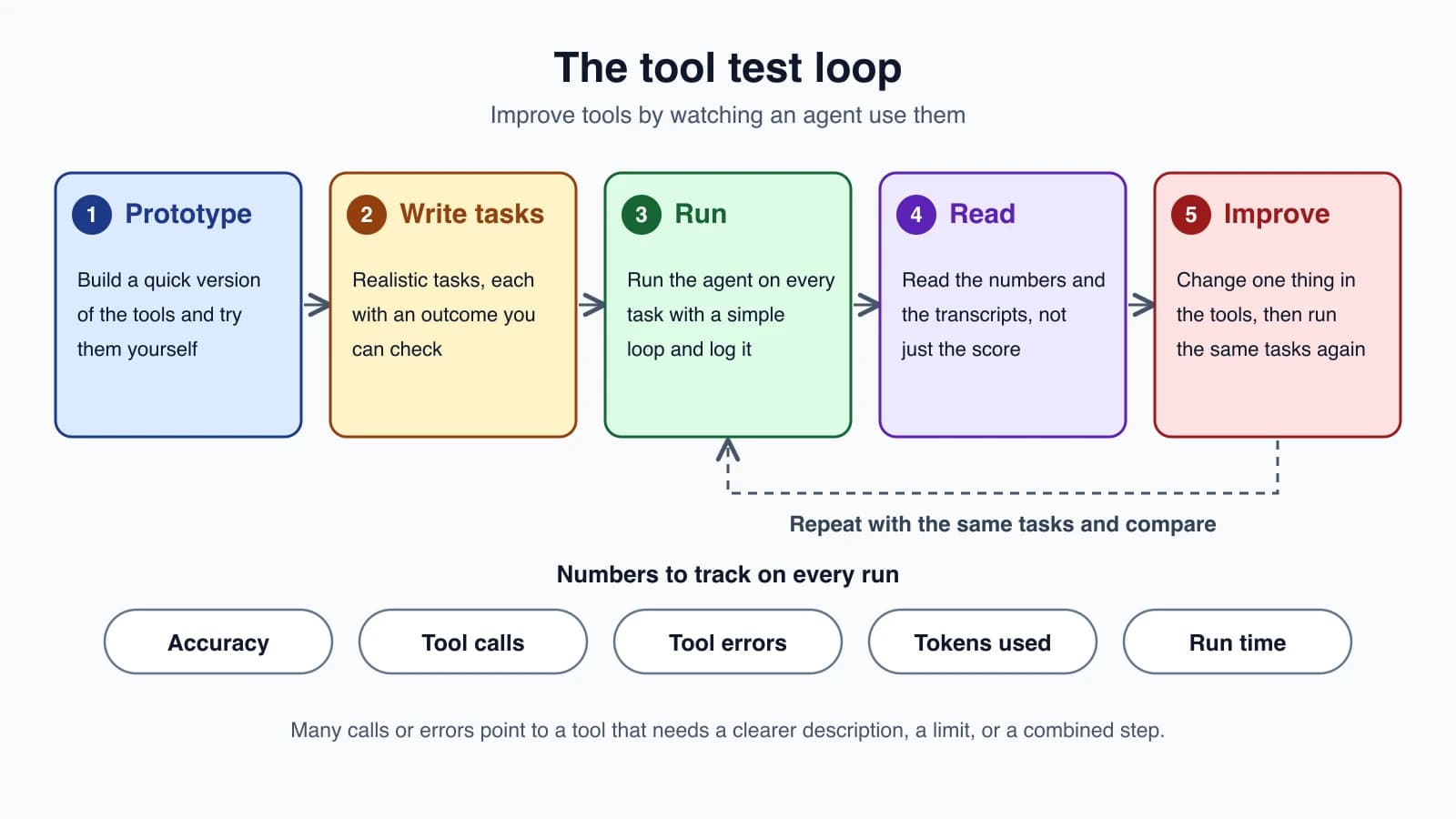
- Prototype. Build a quick version of the tools and try them yourself.
- Write tasks. Make realistic tasks, each with an outcome you can check. Strong tasks need several tool calls and use real data. Weak tasks are single lookups that any tool design passes. Check outcomes with an exact match or an LLM judge, but avoid checks so strict that a correct answer fails over a formatting difference.
- Run the agent programmatically with a simple loop, one run per task.
- Read the results. Look at the numbers, and also read the transcripts, including what the agent did not say.
- Improve the tools and run the same tasks again.
The numbers worth collecting, from the article: accuracy, total tool calls, tool errors, token use, and run time. What they tell you:
| What you see | What it often means |
|---|---|
| Many repeated or redundant calls | Pagination or limits need tuning, or two tools could be one |
| Many invalid-input errors | The description or examples are unclear |
| Calls that return huge results | The tool needs filters, truncation or a concise format |
| Many calls to find one fact | A search or combined tool is missing |
| The wrong tool chosen often | Descriptions overlap, or names are vague |
A tiny harness is enough to start. It runs each task, checks the answer, and reports the numbers. It expects your run_agent to return a record with the answer and the counts:
1TASKS = [
2    {"q": "Which notes mention rent?", "expect": "todo.txt"},
3    {"q": "What time is the dentist?", "expect": "3pm"},
4]
5
6
7def evaluate(run_agent, tasks=TASKS):
8    rows = []
9    for t in tasks:
10        result = run_agent(t["q"])
11        ok = t["expect"].lower() in result["answer"].lower()
12        rows.append({"q": t["q"], "ok": ok, "calls": result["calls"], "errors": result["errors"]})
13    n = len(rows)
14    print(f"accuracy {sum(r['ok'] for r in rows)}/{n}")
15    print(f"tool calls per task {sum(r['calls'] for r in rows) / n:.1f}")
16    print(f"tool errors {sum(r['errors'] for r in rows)}")
17    return rows
To feed it, change the loop from Errors, retries and rate limits so that it counts tool calls and error results as it goes and returns a dictionary such as {"answer": ..., "calls": 3, "errors": 1} at every exit. Run evaluate before a change and after it, with the same tasks, and compare. If a rewritten description lowers the number of calls and errors without hurting accuracy, keep it.
Anthropic also describes using an agent to help: paste the evaluation transcripts into Claude Code and ask it to propose improvements to the tools and their descriptions. They used held-out tasks to avoid fitting the tools to the test set, and report that tools improved this way beat their hand-written versions. You can do a small version of the same thing. Keep a few tasks aside and check them only at the end.
This loop is the seed of the quality module. Testing AI agents and Evaluating AI agents extend it to whole agents, not just tools.
A weak tool and a strong one
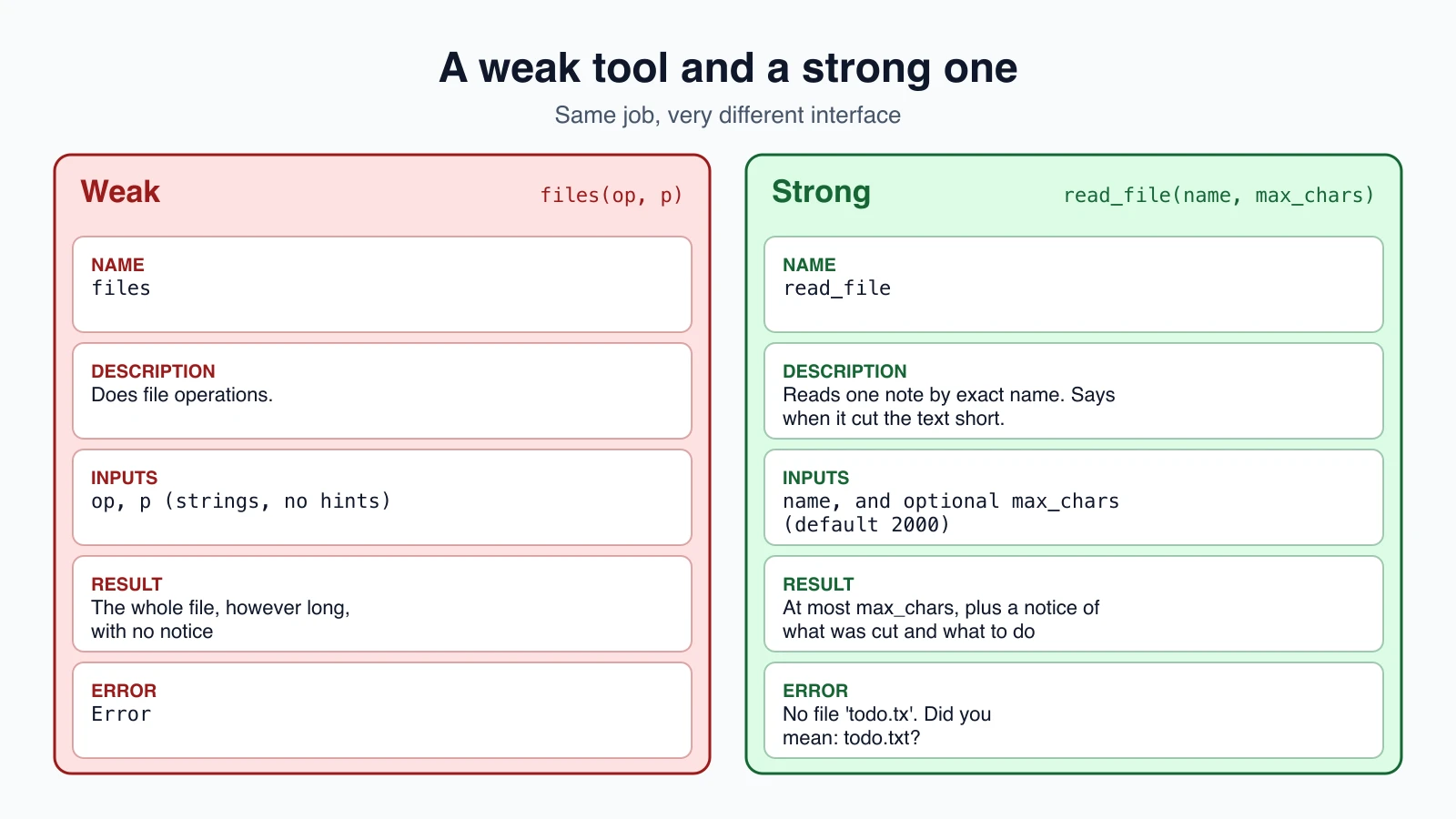
Here is the contrast in one place:
| Weak | Strong | |
|---|---|---|
| Name | files | read_file |
| Description | "Does file operations." | What it reads, which names to use, what happens with long files |
| Inputs | op, p | name, and an optional max_chars |
| Result | The whole file, however long | At most max_chars, with a truncation notice |
| Error | "Error" | "There is no file called 'todo.tx'. Did you mean: todo.txt?" |
| Overlap | One tool does reading, writing and deleting by op | One job per tool |
Every row is a decision you made about the interface, and none of them needed a better model.
Mistakes beginners make
- Wrapping every API endpoint as a tool. Design for the task, not for the API.
- Overlapping tools. If two descriptions could both fit a request, the agent will flip between them.
- Cryptic names and parameters.
p,opanddatagive the model nothing. - Returning everything. Large results waste context and slow every later step.
- Silent truncation. Say what was cut and what to do about it.
- Opaque ids and codes with no readable context beside them.
- Unhelpful errors. "Failed" does not help the model recover.
- Fixing tool problems with prompt warnings. Change the tool so the mistake cannot happen.
- Judging tools by reading them. Run real tasks and read the transcripts.
- Changing five things at once. Change one thing, rerun the same tasks, and compare.
Quick recap
- Tools are the agent's interface. Their names, descriptions and results are all the model has to go on.
- Choose a small set of distinct tools shaped around tasks, not around API endpoints. Combine steps that go together and prefer search to read-everything.
- Name tools and parameters unambiguously, and describe them as you would for a new team member, with the implicit context written out.
- Return meaningful, short results. Offer concise and detailed formats, cap the size, and say clearly when you truncate.
- Write errors that say what went wrong and what to try next.
- Make mistakes hard to make, for example by requiring unambiguous values, instead of adding prompt warnings.
- Improve tools with a loop: realistic tasks with checks, run, read transcripts and metrics, change one thing, run again.
Try it yourself
Pick one tool from an agent you have built or from this course. Write down what a model would have to guess from its name, description and result. Then rewrite it using this lesson: a clearer name, a new-hire description, a size limit with a truncation notice, and an error message with a suggestion. Write three tasks with expected answers for the agent, run them before and after, and compare the number of tool calls and errors. If the numbers did not improve, read a transcript to find out why.
Next lesson: Common agent tools.