
Testing an agent feels strange at first. The model gives a different answer each time, calls cost money, and a test that depends on a live model can fail for reasons that have nothing to do with your code. The way through is to test in layers. Most of an agent is ordinary code that behaves the same every time, and ordinary tests handle it well. Only a thin layer at the top involves the model's judgment, and that layer needs a different tool, covered in Evaluating AI agents. This lesson builds the lower layers in tested Python with pytest.
What can and cannot be tested the usual way
Split an agent into the parts you control and the part you do not:
- Your code: the tool functions, input checks, the loop, error handling, step limits, how results are packaged. This is deterministic. A normal test gives a clear pass or fail.
- The model's choices: which tool it picks, how it words an answer, whether it solves the task. This varies, and costs money to run.
The trick is to take the model out of the first group of tests. If you replace the model with a script of prepared replies, you can test everything around it, fast, free and the same every time.
The testing pyramid for agents
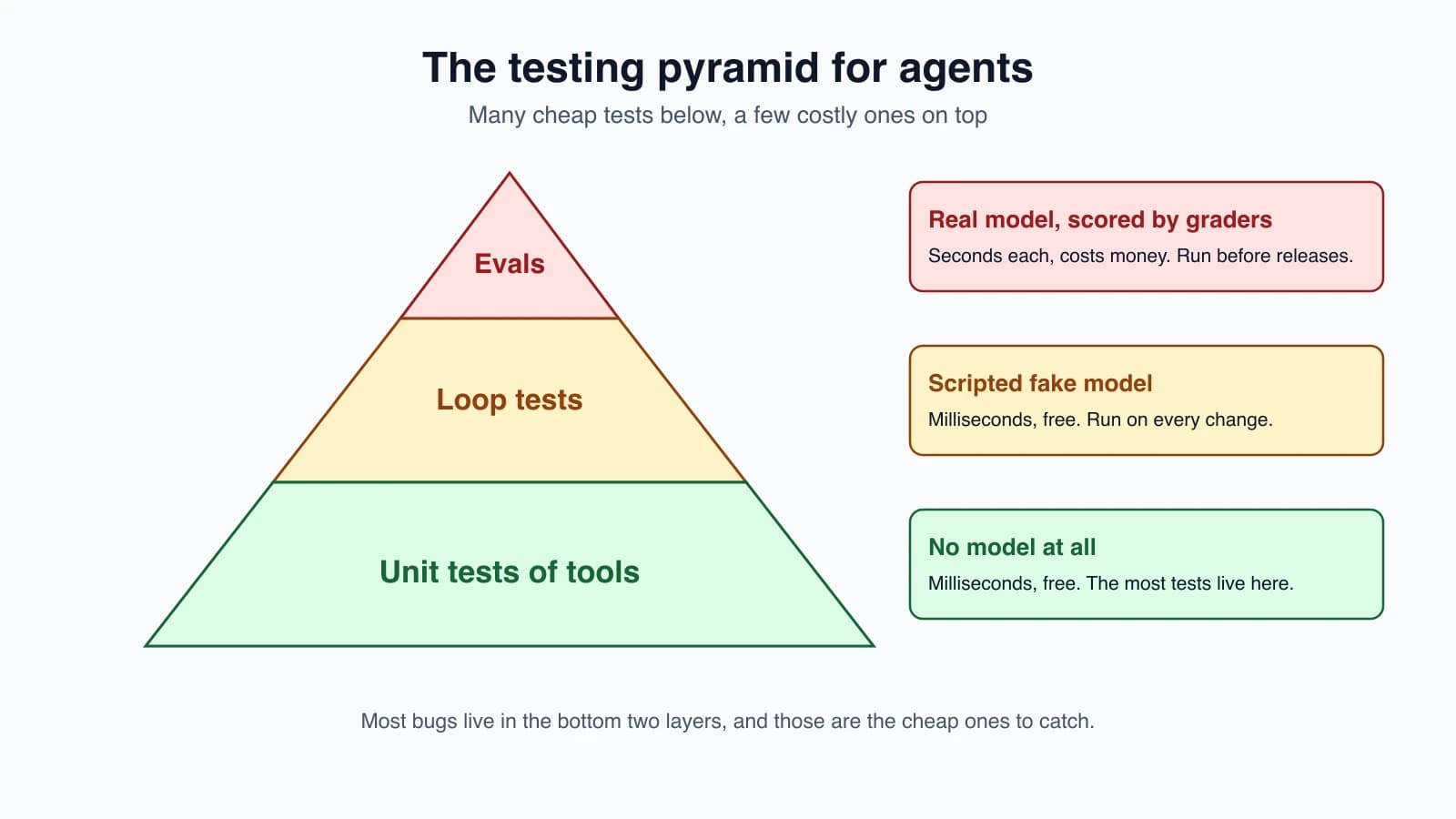
| Layer | What it tests | Uses the real model? | Speed and cost | How many |
|---|---|---|---|---|
| Unit tests | One tool, one helper, one parser | No | Milliseconds, free | Many |
| Loop tests | The agent loop with a scripted model | No | Milliseconds, free | A good number |
| Evaluations | Whether the agent does the job well | Yes | Seconds, costs money | A small, chosen set |
Most of your bugs live in the bottom two layers, which is lucky, because those are the cheap ones. Run them on every change. Run evaluations less often, such as before a release.
Layer 1: unit test the tools
A tool is a plain function, so test it like one. Cover the normal case, the edges and the bad inputs, because the model will eventually send bad inputs. Good tool tests check:
- A normal call returns the expected result.
- Missing or wrongly typed arguments raise a clear error.
- Edge values, such as empty strings, zero and very large numbers, behave sensibly.
- Errors carry a message the model can act on, as in Designing tools that work.
You do not need the model for any of this.
Layer 2: test the loop with a fake model
Here is the agent we will test. It is small on purpose: it calls the model, runs any tools the model asks for, sends the results back, and stops when the model answers or the step limit is reached.
1MODEL = "claude-haiku-5-5"
2
3
4def run_agent(client, tools, task, max_steps=5):
5    messages = [{"role": "user", "content": task}]
6    for step in range(1, max_steps + 1):
7        reply = client.messages.create(model=MODEL, max_tokens=1024, messages=messages)
8        calls = [b for b in reply.content if b.type == "tool_use"]
9        if not calls:
10            return {"status": "done", "answer": "".join(b.text for b in reply.content if b.type == "text"), "steps": step}
11        results = []
12        for call in calls:
13            try:
14                results.append({"type": "tool_result", "tool_use_id": call.id, "content": str(tools[call.name](**call.input))})
15            except Exception as exc:
16                results.append({"type": "tool_result", "tool_use_id": call.id, "content": f"{type(exc).__name__}: {exc}", "is_error": True})
17        messages.append({"role": "assistant", "content": reply.content})
18        messages.append({"role": "user", "content": results})
19    return {"status": "max_steps", "answer": None, "steps": max_steps}
To test it without the API, we need a stand-in for the client: a scripted fake. It plays back replies you prepared, and records what the agent sent.
1import copy
2from types import SimpleNamespace as NS
3
4
5def text(t):
6    return NS(content=[NS(type="text", text=t)], stop_reason="end_turn")
7
8
9def tool_call(id, name, **input):
10    return NS(content=[NS(type="tool_use", id=id, name=name, input=input)], stop_reason="tool_use")
11
12
13class ScriptedClient:
14    """Plays back prepared replies and records what the agent sent."""
15
16    def __init__(self, *replies):
17        self.messages = self
18        self.replies = list(replies)
19        self.calls = []
20
21    def create(self, **kwargs):
22        if not self.replies:
23            raise AssertionError("the agent made more model calls than the test scripted")
24        self.calls.append(copy.deepcopy(kwargs))  # the agent keeps mutating its message list
25        return self.replies.pop(0)
26
27    def assert_finished(self):
28        assert not self.replies, f"{len(self.replies)} scripted replies were never used"
Three details in the fake are worth noticing:
- It copies what it records. The agent keeps adding to its message list. Without the copy, every recorded call would show the final list, and your test would check the wrong thing.
- It fails when asked for too many replies. If the agent makes a model call the test did not expect, the test fails loudly. That catches loops that run too long.
assert_finishedfails if replies are left over. That catches an agent that stopped too early.
The tests
1import pytest
2from agent import run_agent
3from fakes import ScriptedClient, text, tool_call
4
5
6def add(a, b):
7    return a + b
8
9
10TOOLS = {"add": add}
11
12
13def test_tool_alone():
14    assert add(2, 3) == 5
15    with pytest.raises(TypeError):
16        add(1)
17
18
19def test_answers_without_tools():
20    c = ScriptedClient(text("Hello"))
21    assert run_agent(c, TOOLS, "hi") == {"status": "done", "answer": "Hello", "steps": 1}
22    c.assert_finished()
23
24
25def test_one_tool_round_trip():
26    c = ScriptedClient(tool_call("t1", "add", a=2, b=3), text("The sum is 5"))
27    out = run_agent(c, TOOLS, "2+3?")
28    assert out == {"status": "done", "answer": "The sum is 5", "steps": 2}
29    sent = c.calls[1]["messages"]
30    assert [m["role"] for m in sent] == ["user", "assistant", "user"]
31    assert sent[2]["content"] == [{"type": "tool_result", "tool_use_id": "t1", "content": "5"}]
32    c.assert_finished()
33
34
35def test_tool_error_goes_back_to_the_model():
36    c = ScriptedClient(tool_call("t1", "add", a=1), text("Sorry, I could not add that"))
37    out = run_agent(c, TOOLS, "add")
38    result = c.calls[1]["messages"][2]["content"][0]
39    assert result["is_error"] is True and result["tool_use_id"] == "t1" and "TypeError" in result["content"]
40    assert out["status"] == "done"
41
42
43def test_unknown_tool_is_an_error_result_not_a_crash():
44    c = ScriptedClient(tool_call("t1", "delete_everything"), text("I cannot do that"))
45    run_agent(c, TOOLS, "go")
46    assert c.calls[1]["messages"][2]["content"][0]["is_error"] is True
47
48
49def test_stops_at_max_steps():
50    c = ScriptedClient(*[tool_call(f"t{i}", "add", a=1, b=1) for i in range(10)])
51    out = run_agent(c, TOOLS, "loop", max_steps=3)
52    assert out == {"status": "max_steps", "answer": None, "steps": 3} and len(c.calls) == 3
53
54
55def test_extra_model_call_is_caught():
56    c = ScriptedClient(tool_call("t1", "add", a=1, b=1))
57    with pytest.raises(AssertionError, match="more model calls"):
58        run_agent(c, TOOLS, "x", max_steps=3)
59
60
61def test_unused_script_is_caught():
62    c = ScriptedClient(text("done"), text("never used"))
63    run_agent(c, TOOLS, "x")
64    with pytest.raises(AssertionError, match="never used"):
65        c.assert_finished()
66
67
68def test_parallel_tool_calls():
69    from types import SimpleNamespace as NS
70    two = NS(content=[NS(type="tool_use", id="a", name="add", input={"a": 1, "b": 1}), NS(type="tool_use", id="b", name="add", input={"a": 2, "b": 2})])
71    c = ScriptedClient(two, text("2 and 4"))
72    run_agent(c, TOOLS, "x")
73    assert [r["tool_use_id"] for r in c.calls[1]["messages"][2]["content"]] == ["a", "b"]
Read the list of test names as a description of the agent's behavior:
- It answers directly when no tool is needed.
- It sends a tool result back with the right
tool_use_id, in the right message order. - A tool that raises an error produces an
is_errorresult and the loop continues, so the model can recover. - An unknown tool name becomes an error result, not a crash.
- The loop stops at
max_steps. - Several tool calls in one reply each get their own result.
These tests cover the rules from Build your first agent and Errors, retries and rate limits, and they run in a hundredth of a second.
Do the tests catch real bugs?
A test that never fails is worthless. A quick check is to break the code on purpose and see whether the tests notice. I did this with three changes to the agent: removing the is_error flag, allowing one extra step, and sending the wrong tool_use_id. In each case, at least one test failed (two, one and three tests respectively). Try this on your own code. It is called mutation testing when you automate it, and doing it by hand is still worth the minute.
Check what you send, not only what you get
The fake model gives you something real tests rarely have: a record of every request. Use it to check the contract between your code and the API:
- Messages alternate in a valid order.
- Every
tool_usehas a matchingtool_resultwith the same id. - A tool error sets
is_error. - Tool results are not oversized.
These are exactly the mistakes that cause 400 errors from a live API, and you can catch them without calling it.
Record and replay
A hand-written script is clear, but it only contains the situations you imagined. To test against something closer to reality, record a real run once, save the replies, and replay them in tests.
The Python SDK's response objects are Pydantic models, so a saved reply can be written to a file with model_dump(). Confirm that on your SDK version, and load the saved data back into objects like the ones the fake builds. Then a replay test runs the whole loop against real model output, with no network and no cost.
Points to keep in mind:
- Recorded replies go stale when you change prompts or tools, because the model would now answer differently. Re-record when that happens.
- Scrub secrets and personal data before saving a recording into your repository.
- A replay proves your code handles that reply. It does not prove the model would still say it.
Handling non-determinism
Some tests must involve the live model. Here is how to keep them honest:
- Check properties, not exact words. "The answer contains the order number" is a stable check. "The answer equals this exact sentence" is not.
- Check the outcome, not the path. Did the refund exist in the database? Not: did the agent call tools in one fixed order. Anthropic's guide to agent evaluations makes the same point: grade what the agent produced, not the route it took, so valid creative solutions are not penalized.
- Run several trials. One pass proves little. A 75 percent success rate across three trials means all three pass only about 42 percent of the time, a figure Anthropic's evaluation guide uses to explain why consistency matters. Evaluating AI agents goes further.
- Lower the randomness where you can, with a low temperature if the model you use allows it, but do not count on it to give identical output every time.
- Keep live tests out of your normal run. Mark them so a plain
pytestskips them, and run them on purpose. - Never let a flaky test sit. A test that fails now and then teaches the team to ignore failures. Fix it, fix the check, or move it to the evaluation layer.
Test the guardrails too
The safety parts of an agent are code, so test them as code:
- A denied tool never runs, and an approval gate asks when it should, as in Human-in-the-loop agents.
- A path-traversal input such as
../../secretis refused. - A tool result that contains hostile text does not change the agent's permissions. See Prompt injection and tool sandboxing.
- A retry stops after its limit.
A guardrail with no test is a guess.
Where ordinary tests stop
Loop tests tell you the agent's machinery works. They cannot tell you whether the model picks the right tool for a vague request, or writes a good answer. That needs real model calls and scoring, which is the job of evaluations. The two layers support each other: when an evaluation shows a failure, reproduce it in a loop test with a scripted reply so it stays fixed.
Mistakes beginners make
- Testing only with the live model. Slow, costly and flaky.
- Testing only with mocks and never checking real behavior.
- A fake that never fails, so extra or missing model calls go unnoticed.
- Recording a mutable list and checking the wrong state.
- Asserting exact wording of model output.
- Grading the path instead of the outcome.
- Skipping bad-input tests for tools.
- Leaving flaky tests in place.
- Leaving guardrails untested.
- Never checking that the tests can fail.
Quick recap
- Split the agent into code you control and the model you do not. Test the first part like any code.
- Use a pyramid: many unit tests of tools, a good number of loop tests with a scripted fake model, and a small set of evaluations on the real model.
- A scripted fake lets you test the loop, the error handling and the step limit in milliseconds, for free.
- Check the requests your code sends: message order, matching ids,
is_errorflags. - Record and replay gives real replies without cost, but recordings go stale and must be scrubbed.
- With a live model, check properties and outcomes, run several trials, and do not keep flaky tests.
- Test guardrails as code, and break your code on purpose to prove the tests can fail.
Try it yourself
Copy the agent and the fake into a folder, install pytest, and run the tests. Then add a tool that returns a very long string, and write a test that checks the agent truncates it before sending it back. Next, write a loop test for a scenario you invented, such as the model calling the same tool three times with the same input, and decide what the agent should do. Finally, break the agent on purpose in two ways and confirm your tests fail.
Next lesson: Evaluating AI agents.