
So far, every tool in this course was written by you and wired into your own loop. That works, but it does not scale. If ten different AI applications each want to read your calendar, search your files and query your database, each one needs its own custom code for each system. The Model Context Protocol, or MCP, is an attempt to fix that with a shared standard. In this lesson you will learn what MCP is, who the players are, what a server can offer, what the messages look like, how an agent actually uses MCP tools, and when it is worth using. The next lesson builds a server, so this one gives you the concepts first.
The idea: one standard connector
The MCP documentation describes MCP as an open-source standard for connecting AI applications to external systems. AI applications such as Claude or ChatGPT can use it to reach data sources like local files and databases, tools like search engines and calculators, and workflows like specialized prompts.
The documentation's own comparison is a good one: think of MCP like a USB-C port for AI applications. Before a shared port, every device had its own plug. With one, any device can connect to any other that speaks the standard. MCP aims to do the same for AI apps and the systems around them.
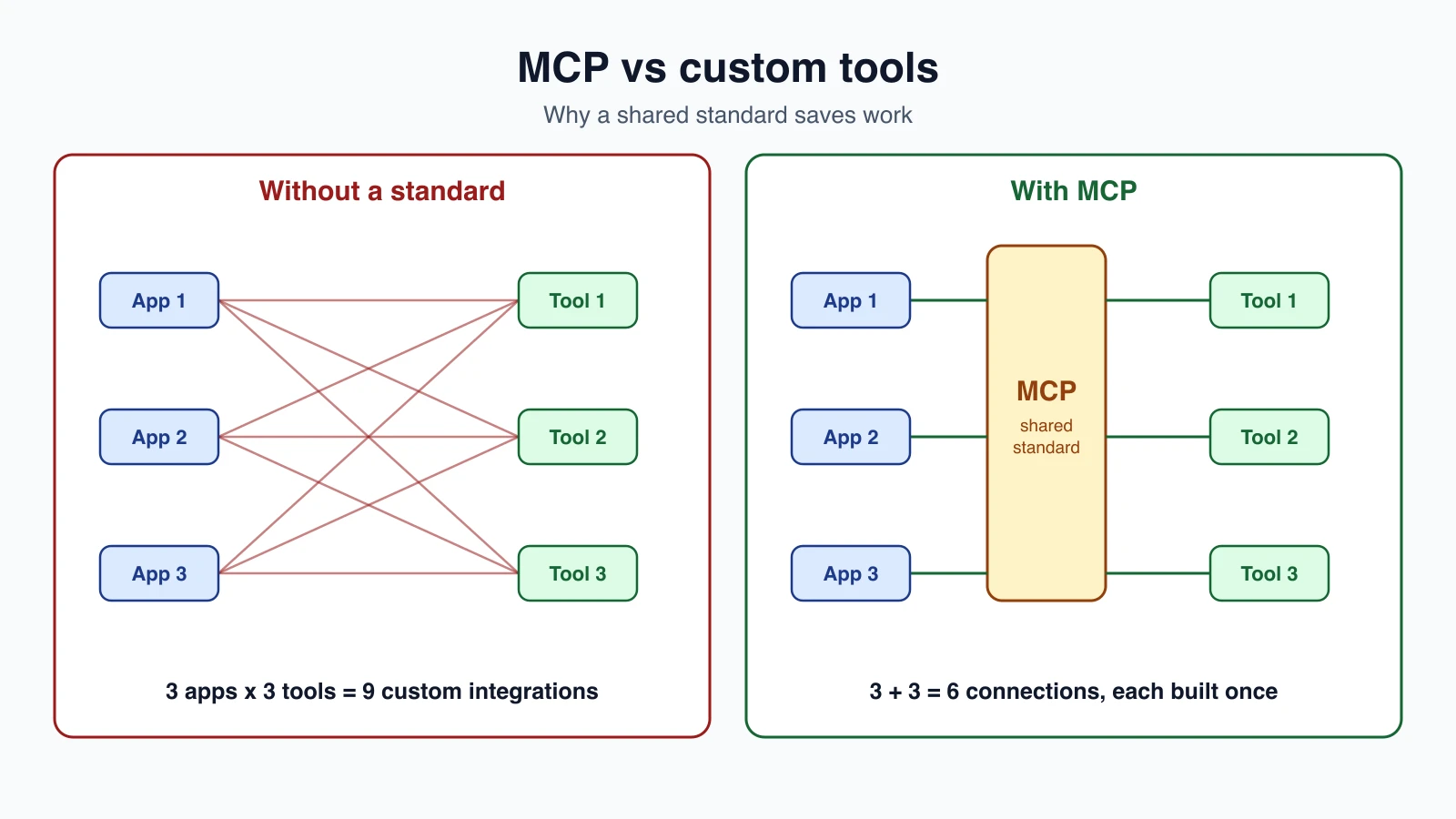
The picture shows the point. Without a standard, every application needs its own connection to every tool. With a standard, each application learns MCP once, each tool exposes MCP once, and everything fits together. The documentation lists three groups who gain:
- Developers spend less time and effort building or integrating with an AI application.
- AI applications and agents get access to an ecosystem of data sources, tools and apps.
- End users get more capable assistants that can use their data and take actions for them, when they allow it.
The documentation lists many clients that support MCP, including Claude, ChatGPT, Visual Studio Code and Cursor, so a server written once can work in many places.
One scope note from the docs is worth remembering. MCP is only the protocol for exchanging context. It does not say how an AI application uses language models or manages the context it receives. The agent loop, the model and the prompts stay yours.
The three participants
MCP uses a client-server design with three roles:
- MCP host. The AI application, such as Claude Code or Claude Desktop. It coordinates everything.
- MCP client. A part of the host that keeps one connection to one server and fetches context from it.
- MCP server. A program that provides context to clients.
The host creates one client for each server, and each client keeps its own dedicated connection. The documentation's example is Visual Studio Code acting as a host. Connect it to a Sentry server and it creates a client for that connection. Connect it to a file system server and it creates a second client.
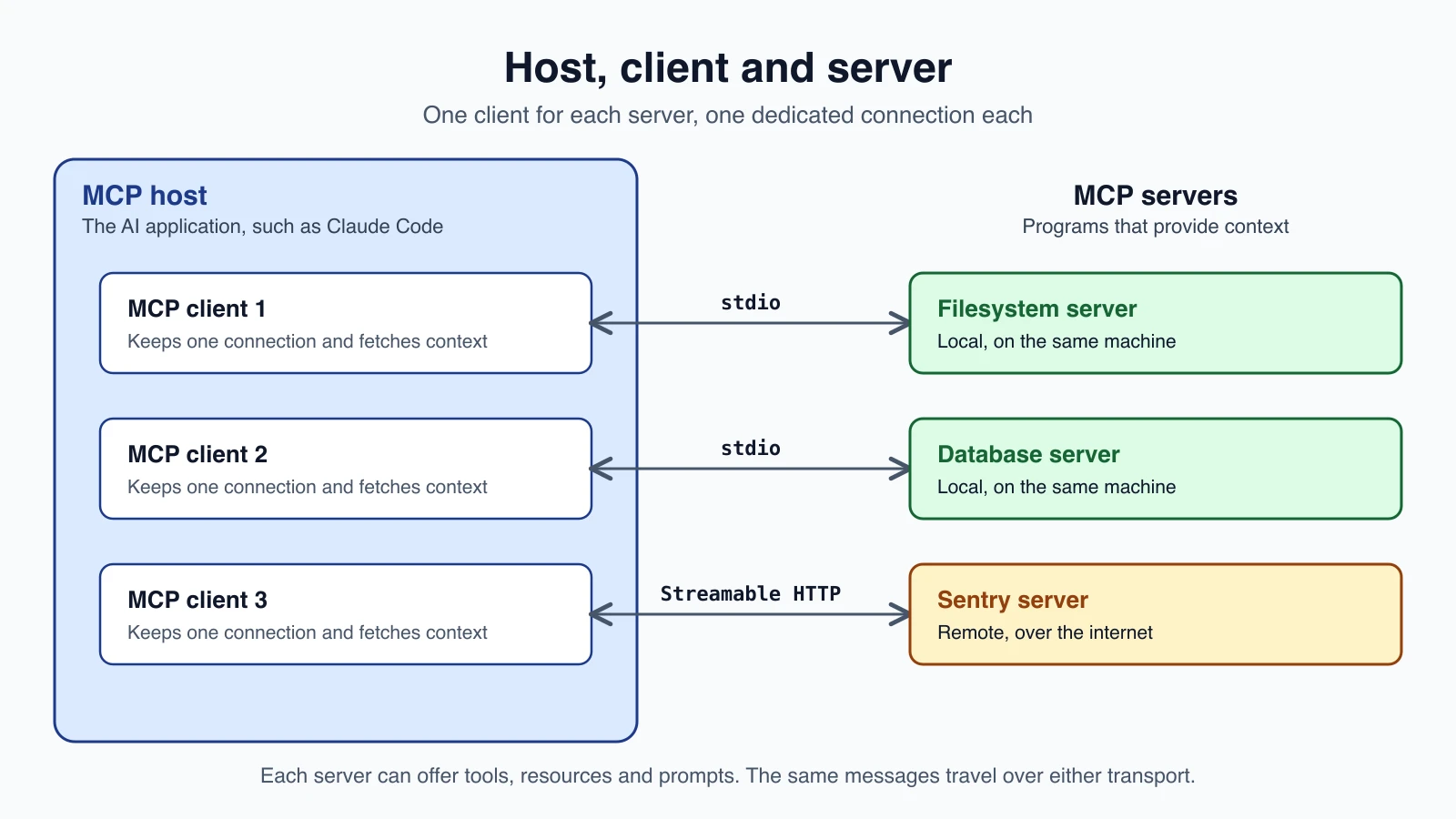
"Server" here means a program that serves context, wherever it runs:
- A local server runs on your own machine and uses the stdio transport. The file system server that Claude Desktop launches is an example. A local server typically serves a single client.
- A remote server runs elsewhere, such as the Sentry server hosted on Sentry's platform, and uses the Streamable HTTP transport. A remote server typically serves many clients.
Two layers
MCP has two layers, and it helps to keep them apart.
The data layer is the inner layer. It defines the messages and what they mean, using JSON-RPC 2.0. It covers discovery, the things a server can offer, and utilities such as notifications.
The transport layer is the outer layer. It defines how the messages travel, including connection setup, framing and authorization. Two transports exist:
- Stdio uses the standard input and output streams between processes on the same machine. It has no network overhead.
- Streamable HTTP uses HTTP POST for client-to-server messages, with optional Server-Sent Events for streaming. It supports remote servers and standard HTTP authentication such as bearer tokens and API keys. The documentation recommends OAuth for obtaining tokens.
The same JSON-RPC messages travel over either transport. So a server's features do not change when it moves from running on your laptop to running on the internet. Only the way you reach it changes.
What a server can offer: primitives
The most important idea in MCP is the primitive, a type of thing that can be shared. A server can expose three:
| Primitive | What it is | Examples |
|---|---|---|
| Tools | Functions the AI application can call to do something | File operations, API calls, database queries |
| Resources | Data that gives the model context | File contents, database records, API responses |
| Prompts | Reusable templates that structure interactions | System prompts, few-shot examples |
Each kind has methods to discover it (tools/list, resources/list, prompts/list), to retrieve it (*/get), and for tools, to run it (tools/call). Because the client lists what exists instead of having it hard-coded, a server's offerings can change.
The documentation gives a database server as an example. It could expose a tool for running queries, a resource that holds the table layout, and a prompt with worked examples of how to ask. Together they give a model everything it needs to work with that database.
A useful way to separate them: tools act, resources inform, and prompts guide. For agents, tools get the most attention, since they are what the model calls in its loop, and everything you learned in Tool definitions and structured output applies to an MCP tool just as it does to one you wrote.
What clients can offer
MCP also defines features the client side can provide to servers. The current documentation lists elicitation, which lets a server ask the user for more information or for confirmation of an action. It also lists sampling (a server asking the host's model for a completion) and logging as deprecated as of protocol version 2026-07-28, and recommends that new work talk to model providers directly. Protocols evolve, so check the version your SDK targets.
What the messages look like
You will rarely write these by hand because SDKs do it for you, but seeing them makes the idea concrete. Messages are JSON-RPC 2.0, and a request names a method.
The client first learns what a server can do with server/discover. The server replies with its supported versions and capabilities, such as whether it offers tools and resources. In the current protocol version, MCP is stateless: every request carries the protocol version and the client's capabilities, so a server can process each one on its own without remembering earlier requests. Older articles may describe a different startup handshake, so check the version your SDK uses.
Next, the client asks for the tool list with tools/list. Trimmed from the documentation's example, a server might answer like this:
1{
2  "jsonrpc": "2.0",
3  "id": 2,
4  "result": {
5    "tools": [
6      {
7        "name": "weather_current",
8        "title": "Weather Information",
9        "description": "Get current weather information for any location worldwide",
10        "inputSchema": {
11          "type": "object",
12          "properties": {
13            "location": {"type": "string", "description": "City name, address, or coordinates"},
14            "units": {"type": "string", "enum": ["metric", "imperial", "kelvin"], "default": "metric"}
15          },
16          "required": ["location"]
17        }
18      }
19    ]
20  }
21}
Notice how familiar it is. A name, a description and a JSON Schema for the inputs, here called inputSchema. It is the same shape as the tool definitions you wrote, which is not an accident.
When the model decides to use it, the host sends a tools/call request:
1{
2  "jsonrpc": "2.0",
3  "id": 3,
4  "method": "tools/call",
5  "params": {
6    "name": "weather_current",
7    "arguments": {"location": "San Francisco", "units": "imperial"}
8  }
9}
and the server replies with a content array, which can hold text, images and other types:
1{
2  "jsonrpc": "2.0",
3  "id": 3,
4  "result": {
5    "content": [
6      {"type": "text", "text": "Current weather in San Francisco: 68°F, partly cloudy"}
7    ]
8  }
9}
(The real messages also carry _meta fields with the protocol version and client details. They are left out here to keep the shape visible.)
Servers can also send notifications, messages that need no reply, such as "my tool list has changed". They are opt-in: the client subscribes to the kinds it wants, and the documentation notes they are best effort, so a client should not rely on them alone for fresh data.
How an agent uses MCP tools
The model never speaks MCP. It still sees ordinary tool definitions and writes ordinary tool calls, exactly as in Function calling across providers. The host sits in the middle. It lists the tools on each connected server, merges them into one registry, shows them to the model, and when the model asks for one, routes the call to the right server and passes the answer back.
Here is that bridging idea in a few lines. The two formats differ in one detail, the name of the schema field, inputSchema in MCP and input_schema in Claude's API:
1def mcp_to_claude(tool):
2    return {
3        "name": tool["name"],
4        "description": tool.get("description", ""),
5        "input_schema": tool["inputSchema"],
6    }
7
8
9def result_text(result):
10    return "\n".join(c["text"] for c in result["content"] if c["type"] == "text")
11
12
13def route(tool_name, servers):
14    for server in servers:
15        if tool_name in server["tools"]:
16            return server
17    raise KeyError(tool_name)
mcp_to_claude turns a listed MCP tool into a Claude tool definition. route finds which connected server owns a tool name, which is why tool names need to be unique across servers, and why namespacing, as covered in Designing tools that work, matters even more here. result_text flattens the server's content array into text for a tool_result. A real host adds error handling and handles non-text content, but this is the skeleton, and the loop around it is the one you already wrote.
Skipping the client with Claude's MCP connector
You do not have to build the client yourself. Claude's API has an MCP connector that connects to MCP servers directly from the Messages API. You describe the server and add an mcp_toolset entry that points at it:
1response = client.beta.messages.create(
2    model="claude-opus-5-5",
3    max_tokens=1000,
4    messages=[{"role": "user", "content": "What tools do you have available?"}],
5    mcp_servers=[
6        {
7            "type": "url",
8            "url": "https://example-server.modelcontextprotocol.io/sse",
9            "name": "example-mcp",
10            "authorization_token": "YOUR_TOKEN",
11        }
12    ],
13    tools=[{"type": "mcp_toolset", "mcp_server_name": "example-mcp"}],
14    betas=["mcp-client-2025-11-20"],
15)
Things to know from Anthropic's documentation, which marks the feature as beta:
- Only tool calls are supported. Of everything MCP can do, the connector handles tools, not resources or prompts.
- The server must be reachable over HTTPS from the internet. It supports Streamable HTTP and SSE. A local stdio server cannot be connected directly.
- Authentication is an OAuth token in
authorization_token, if the server needs one. - You can choose which tools to allow. The
mcp_toolsetentry takes adefault_configand per-toolconfigs, so you can enable all tools, allow only some, or block some. - Several servers can be connected in one request, and each server name is referenced by exactly one toolset.
That allow and block control is more than a convenience, as the security section below explains.
MCP or your own tools?
MCP is not always the answer. Here is a simple way to choose:
| Situation | Better choice |
|---|---|
| A small agent with a few tools that only you use | Your own tools, in your own code |
| A capability that many applications should share, such as access to a company system | An MCP server |
| You want to use a tool someone else already built | An existing MCP server |
| A tool needs custom approval, logging or limits tied tightly to your loop | Your own tool, or an MCP server you control |
| You are learning how tools work | Your own tools first |
MCP gives you reuse and an ecosystem. It costs you an extra moving part, a server to run, a protocol to learn and more places for things to go wrong. The advice from Workflows or agents applies here too: use the simplest thing that works. If an agent has three tools that only it needs, a few functions in your own file are simpler than three servers.
Security: a server is code you are trusting
Connecting an MCP server means trusting code and text you did not write. The server's tool descriptions go into your model's prompt, and its tool results go into the conversation. The MCP documentation points to a dedicated security best practices page, and the habits from Common agent tools apply directly:
- Use servers you trust, and prefer ones from the original service or a source you can check.
- Enable only the tools you need. The connector's allow and block settings exist for this. A server may offer a dozen tools while your agent needs two.
- Apply least privilege. Give the server's credentials the smallest permissions, and use a separate token for each server.
- Ask a person before consequential actions, even when the tool came from a server, as covered in Human in the loop.
- Treat tool descriptions and results as untrusted data, because they can contain text aimed at your model, as explained in Prompt injection and tool sandboxing.
- Keep secrets out of the model's context, and in the transport settings where they belong.
Mistakes beginners make
- Confusing the roles. The host is the app, a client is one connection, and a server provides context.
- Thinking the model speaks MCP. It sees normal tools. The host does the translating.
- Using MCP for everything. A few local functions may be simpler.
- Connecting every server and enabling every tool. More tools mean more confusion and more risk.
- Duplicate tool names across servers. Namespace them.
- Assuming the connector supports all of MCP. It supports tool calls only, to remote HTTPS servers.
- Trusting a server blindly. Read what it does, and limit what it can do.
- Mixing up transports. Stdio is for local processes, Streamable HTTP for remote servers.
- Following an old tutorial without checking which protocol version it describes.
Quick recap
- MCP is an open standard that connects AI applications to external systems, like a shared port for AI apps.
- A host runs one client per server. A server provides context and can be local (stdio) or remote (Streamable HTTP).
- The data layer uses JSON-RPC 2.0, and the transport layer carries it.
- Servers offer tools (act), resources (inform) and prompts (guide), discovered with
*/listmethods, and tools run withtools/call. - The model sees ordinary tool definitions. The host merges the tools from all servers, routes calls and returns results.
- Claude's MCP connector can use remote HTTPS servers from the Messages API, supporting tool calls only, with tool allow and block settings.
- Use MCP for shared, reusable capabilities. Use your own tools for small, private ones.
- A server is code you trust: enable few tools, limit permissions and keep humans in the loop.
Try it yourself
Take the three tools from your notes agent and imagine them as an MCP server. Write down, for each, whether it is a tool, a resource or a prompt in MCP terms (a list of note names could be a resource, searching could be a tool). Then write the tools/list entry for search_notes as JSON, using inputSchema, and run it through the mcp_to_claude function above to confirm it turns into a valid Claude tool definition. Finally, pick a real MCP server you might use and list the tools you would allow and the ones you would block.
Next lesson: Build and deploy an MCP server.