
An agent does not fail only because the model is weak or the prompt is poor. Often it fails because of what is in front of the model at that moment: too much, too little, or the wrong things. Every step of the loop, the model sees whatever you put into its context window and nothing else. Deciding what that is, step after step, is a skill of its own, and Anthropic's engineers call it context engineering. In this lesson you will learn what it is, why a bigger window is not a free pass, and the techniques that keep an agent sharp during long jobs: lean tools, just-in-time loading, trimming old results, compaction, notes and sub-agents.
From prompt engineering to context engineering
In Prompting for agents you wrote the instructions. Anthropic describes prompt engineering as writing and organizing those instructions, especially the system prompt. Context engineering is the broader job: curating all the tokens that reach the model on a call, including the system prompt, the tool definitions, the data you load and the whole message history. It is also repeated. For an agent, you make the decision again on every turn, because every turn can add new tool results that compete for space.
Why context is a limited resource
Recall from How LLMs work that models lose accuracy as the context grows, an effect Anthropic calls context rot. Anthropic's explanation is that each new token draws on a finite attention budget. A transformer relates every token to every other token, so the number of relationships grows quickly with length, and models have mostly seen shorter sequences in training. The decline is gradual, not a cliff, which is why it is easy to miss.
The practical rule that follows from this is Anthropic's own: find the smallest set of high-signal tokens that gives the model the best chance of doing the right thing. A larger window is useful headroom, but it does not make every token equally valuable.
What fills the window
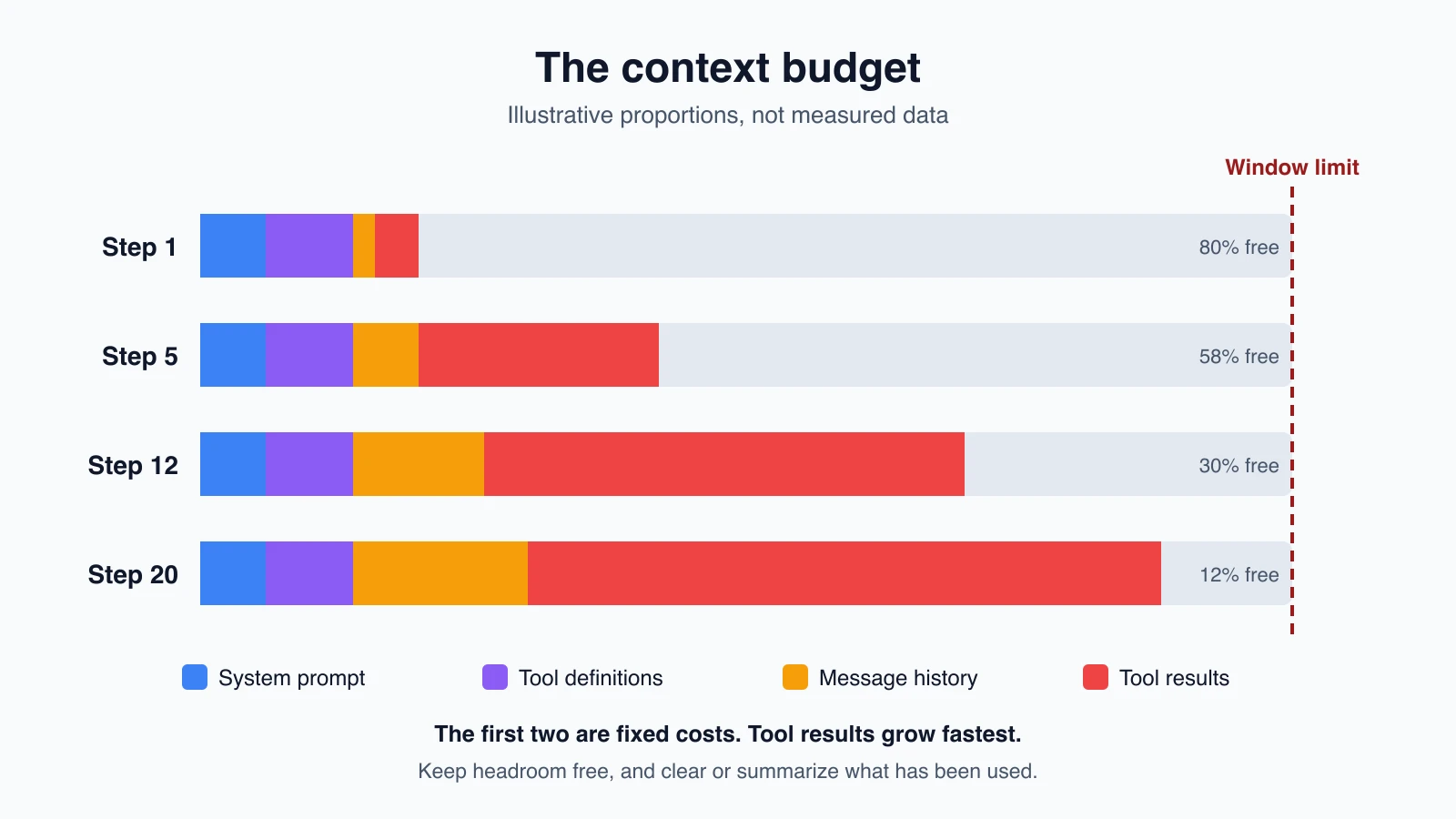
On each call, these compete for the same space:
- The system prompt, which stays the same every step.
- Tool definitions, which also repeat every step. Every tool you add costs tokens on every call.
- Message history, the growing record of what the user asked and what the agent did.
- Tool results, which are usually the biggest and fastest-growing part.
- Anything you load, such as documents, files or retrieved passages.
The first two are fixed costs you control by design. The last three grow as the agent works, so they are where context engineering happens during a run.
Keep the fixed parts lean
The system prompt at the right altitude. Anthropic describes two ways to get a prompt wrong. One is brittle, hard-coded if-then logic that tries to cover every case. The other is vague guidance that assumes the model shares your background. The target sits between them: specific enough to guide behavior and flexible enough to give the model good judgment. Anthropic's practical advice is to start with a minimal prompt on the best model you have, run it, and add instructions and examples to fix the failures you actually see. Minimal does not mean short. It means that every line is there for a reason.
Few, distinct tools. Anthropic's guidance is that tools should be self-contained, clearly described and efficient with tokens, and that overlapping tools cause confusion. Its test is a good one: if a human cannot say which tool to use in a situation, an agent cannot either. Designing tools that work covers this in detail, including concise result formats and truncation.
Canonical examples, not a pile of rules. A small set of diverse, representative examples works better than a long list of edge-case rules. Examples are worth many words, so choose them with care.
Order matters. As the prompting lesson noted, long documents go near the top and the question near the end.
Load data just in time
Should an agent get all the information it might need before it starts, or fetch it as it goes? Anthropic describes both:
- Up front. Retrieve relevant material before the model runs, for example by embedding search. This is what RAG and vector databases covers.
- Just in time. The agent keeps lightweight references, such as file paths, saved queries or links, and loads the data itself, using tools, when it needs it.
Just-in-time loading keeps the window small and mirrors how a person works: you do not memorize a library, you know where the books are. Anthropic points to Claude Code as an example. To analyze a large database, it writes targeted queries and uses commands such as head and tail, without ever loading the whole data set into context.
Two details help this work:
- Metadata gives clues. A file called
tests/test_notes.pysuggests a different purpose thansrc/notes.py. Folder names, file names and timestamps help an agent decide what is worth opening. - Disclose progressively. The agent explores layer by layer, opening only what it needs, and builds an understanding step by step.
There is a cost. Exploring at run time is slower than having data ready, and an agent with poor guidance can waste context wandering. For some domains, Anthropic suggests a hybrid. Claude Code loads certain files, such as a CLAUDE.md of project rules, up front, and uses search tools like glob and grep to find the rest as needed. Its general advice applies here too: do the simplest thing that works.
The notes agent already works this way. It does not paste every note into the prompt. It lists names and reads files on request, which is why a max_chars limit and a "narrow your search" hint matter.
Keep a long job inside the window
A job that runs for dozens of steps will fill any window eventually. Four techniques, from lightest to heaviest, handle this.
1. Clear old tool results
Once the agent has used a tool result and moved on, the raw output is often dead weight. Anthropic calls clearing it the lightest form of compaction: remove the raw results of tool calls made deep in the history, and keep the record that the calls happened.
You can do it yourself with a small function. It replaces the content of older tool results with a short placeholder, keeps the most recent few, and leaves every tool_use_id in place so the conversation stays valid:
1import copy
2import json
3
4PLACEHOLDER = "[Old tool result removed to save space. Call the tool again if you need it.]"
5
6
7def rough_tokens(messages):
8    return len(json.dumps(messages)) // 4
9
10
11def trim_old_tool_results(messages, keep=3):
12    spots = [
13        (i, j)
14        for i, m in enumerate(messages)
15        if isinstance(m["content"], list)
16        for j, block in enumerate(m["content"])
17        if isinstance(block, dict) and block.get("type") == "tool_result"
18    ]
19    for i, j in spots[: max(0, len(spots) - keep)]:
20        messages[i]["content"][j]["content"] = PLACEHOLDER
21    return messages
22
23
24def view_for_model(messages, limit=30000, keep=3):
25    if rough_tokens(messages) <= limit:
26        return messages
27    return trim_old_tool_results(copy.deepcopy(messages), keep)
Walk through it:
rough_tokensis a crude estimate, about one token per four characters of the JSON text. It is good enough to decide when to trim. For an exact figure, use the token counting call from the earlier lesson.trim_old_tool_resultsfinds every tool result, then blanks all but the lastkeep. Themax(0, ...)guards against a negative slice when there are fewer results thankeep. Without it, a short conversation would be trimmed by mistake.view_for_modelreturns a trimmed copy when the history is too big. Your full history stays untouched, so you can still log, debug and audit everything. In your loop, sendview_for_model(messages)to the API instead ofmessages.
If a trimmed result is needed again, the placeholder tells the model to call the tool again, which is a cheap fix for a rare need.
Claude's API can also do this on its side. Context editing is a beta feature, enabled with a beta header, that clears old tool results (and optionally old thinking blocks) on the server before the prompt reaches the model. Your application keeps the full history. From Anthropic's documentation:
1response = client.beta.messages.create(
2    model="claude-opus-5-5",
3    max_tokens=4096,
4    messages=messages,
5    tools=tools,
6    betas=["context-management-2025-06-27"],
7    context_management={
8        "edits": [
9            {
10                "type": "clear_tool_uses_20250919",
11                "trigger": {"type": "input_tokens", "value": 30000},
12                "keep": {"type": "tool_uses", "value": 3},
13                "clear_at_least": {"type": "input_tokens", "value": 5000},
14                "exclude_tools": ["web_search"],
15            }
16        ]
17    },
18)
The settings mean: start clearing when the input passes 30,000 tokens, keep the three most recent tool uses, clear at least 5,000 tokens each time so it is worth the cost, and never clear results from web_search. By default clearing starts at 100,000 input tokens and keeps three tool uses, and only results are cleared, so the model still sees that each call happened. One trade-off: clearing changes the earlier part of the prompt, which invalidates cached prefixes, so clear_at_least exists to make each clearing worth that cost. The response reports what was removed in context_management.applied_edits. The documentation also says that for most uses, server-side compaction, below, is the main strategy.
2. Compaction
When the history itself is too long, compaction replaces the old turns with a summary and continues from it. Anthropic describes how Claude Code does it: it keeps architectural decisions and unresolved bugs, drops redundant output, and carries on with the summary plus the five most recently opened files. The tuning advice is to aim for high recall first, so you do not lose something important, and then trim for precision.
Claude's API offers server-side compaction in beta: Claude writes the summary on the server, so you write no summarizing code. The documentation describes two modes. With on-demand compaction, your application decides when to compact by sending a request. With compaction at a token threshold, the API compacts when input reaches a limit you set. The details of these features are changing, so read the current documentation before you build on them. You can also write your own summarizer: ask the model to summarize the early history, and replace it with that summary message.
Summaries lose detail, which is the cost. A good summary prompt asks the model to keep decisions made, open problems, the current goal and important facts, and to drop repeated tool output.
3. Structured notes outside the window
An agent can write what it learns to a file and read it back later, so it does not have to hold everything in context. Anthropic's examples include Claude Code writing to-do lists and a NOTES.md file, and a Claude agent playing a video game that kept tallies of its progress, maps of what it had explored and strategy notes, then picked up from them after its context was reset. This works well for iterative work with clear milestones. The next two lessons, Short-term and long-term memory and Maintaining agent memory, build this idea out.
4. Sub-agents with clean contexts
A lead agent can hand a focused subtask to a sub-agent that starts with a fresh, empty context. The sub-agent may read and search heavily, then returns only a condensed summary to the lead, often 1,000 to 2,000 tokens in Anthropic's description. The lead's context stays small while the detailed work happens elsewhere. This helped on complex research tasks, and Orchestrator-workers and multi-agent systems covers it.
Which one to use
Anthropic's rule of thumb:
| Situation | Technique |
|---|---|
| Long back-and-forth conversation | Compaction |
| Iterative work with clear milestones | Structured notes |
| Parallel research or exploration | Sub-agents with clean contexts |
| Bulky tool output that has already been used | Clear old tool results |
They combine well. Many agents clear old results first, compact when that is not enough, and keep notes for anything that must survive.
What to keep, summarize or drop
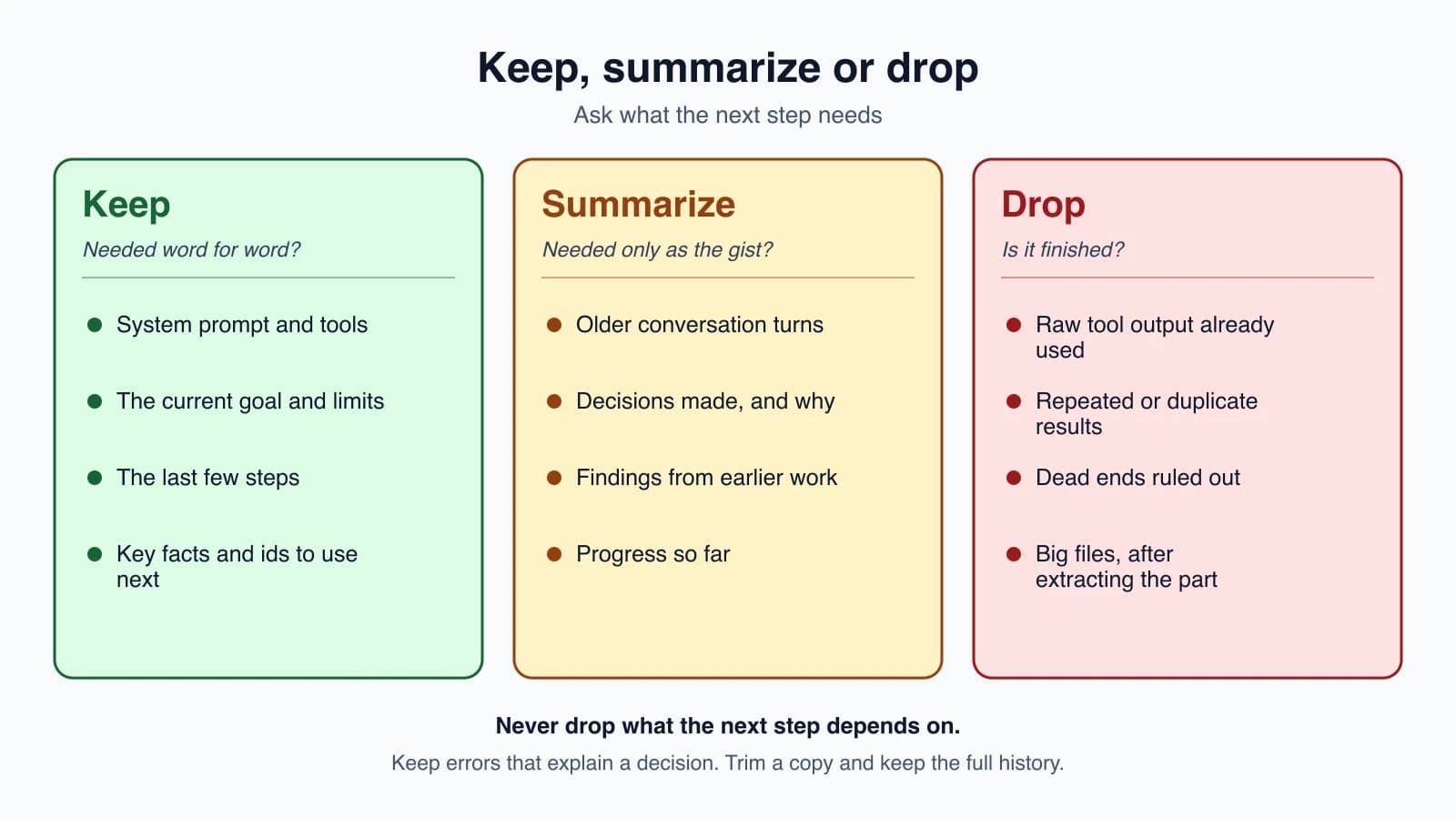
When you decide what to do with a piece of context, ask three questions: Will the next step need it word for word? Will it need only the gist? Or is it finished?
| Keep as it is | Summarize | Drop |
|---|---|---|
| System prompt and tool definitions | Older conversation turns | Raw tool output that has been used |
| The current goal and constraints | Decisions made and why | Repeated or duplicate results |
| The last few steps | Findings from earlier research | Dead ends that were ruled out |
| Key facts the next step needs | Progress so far | Large files after the relevant part is extracted |
Two cautions. Never drop what the next step depends on, such as an id or a file name the agent is about to use. And keep errors that explain a decision, because a summary that says "tried X" without why may send the agent back to X.
Measure it
Context engineering is easy to feel and hard to prove, so measure. Log the token count at each step and watch where it jumps, because a single large tool result is usually the cause. Track cost and the number of steps before and after a change, and run your task set as in Designing tools that work. A change that shrinks context but drops accuracy is not an improvement.
Mistakes beginners make
- Treating the window as free storage. More tokens means more cost, more delay and sometimes worse answers.
- Loading everything up front when the agent could fetch what it needs.
- Leaving huge tool results in history long after they were used.
- Too many overlapping tools, which cost tokens and confuse the model.
- Over-trimming, and dropping something the next step needed.
- Summaries that lose decisions and open problems.
- Deleting your own record. Trim a copy for the model and keep the full history for debugging.
- Trimming in a way that breaks the pairing between tool requests and results. Keep every id.
- Never measuring token use per step.
- Relying on a feature you have not read about. Compaction and context editing are in beta, so check the current documentation.
Quick recap
- Context engineering is curating everything the model sees on each call, again and again, not only writing a prompt.
- Context is limited. Accuracy falls as it grows, so aim for the smallest set of high-signal tokens.
- Keep fixed parts lean: a system prompt at the right altitude, few distinct tools and a few canonical examples.
- Prefer just-in-time loading: hold lightweight references and fetch data with tools, or mix both for stable material.
- For long jobs, clear old tool results, compact the history, keep notes outside the window, or delegate to sub-agents with clean contexts.
- Decide for each piece what to keep, summarize or drop, and never drop what the next step needs.
- Trim a copy for the model, keep the full history, and measure the effect.
Try it yourself
Run your notes agent on a task that needs many reads, and print rough_tokens(messages) after every step. Find the step where it jumps, and note which tool result caused it. Add view_for_model to the loop with a low limit, such as 2,000, and compare the final token count, the number of steps and whether the answer is still right. Then write the summary prompt you would use to compact the history: list the facts, decisions and open problems you would insist it keep.
Next lesson: Short-term and long-term memory.