
A model only knows what it was trained on and what you put in its context. It has never seen your company's handbook, last week's tickets or the notes on your laptop. Retrieval-augmented generation, or RAG, is the standard answer: when a question arrives, search your documents, pick the most relevant passages, and put them in the prompt along with the question. The model then answers from real text instead of from memory. This lesson explains the parts of a RAG system, the choices that decide whether it works, and a way to measure it. In the next lesson you will assemble these parts into a working agent.
Do you need RAG at all?
Start with a question that saves many people a lot of work. Anthropic's article on contextual retrieval puts it plainly: if your knowledge base is smaller than about 200,000 tokens, roughly 500 pages, you may not need RAG. You can put the whole thing in the prompt, and prompt caching makes that faster and cheaper on repeat calls. No search system to build, no retrieval mistakes.
RAG earns its place when the material is too big for one prompt, when it changes often, or when you want the agent to pull in only a small relevant slice to keep the context lean, as in Context engineering. Here is how the options compare:
| Approach | Best for | Weak at |
|---|---|---|
| Put it all in the prompt (long context) | Small knowledge bases, a few documents | Large or fast-changing collections, cost per call |
| RAG | Large collections, facts that change, answers that must point to a source | Needs a pipeline, and retrieval can miss |
| Fine-tuning | Changing a model's style or behavior | Keeping facts fresh and traceable |
Fine-tuning changes how a model behaves. RAG supplies facts at question time, and you can update them by editing a document. For knowledge that changes, RAG is usually the better fit.
The RAG pipeline
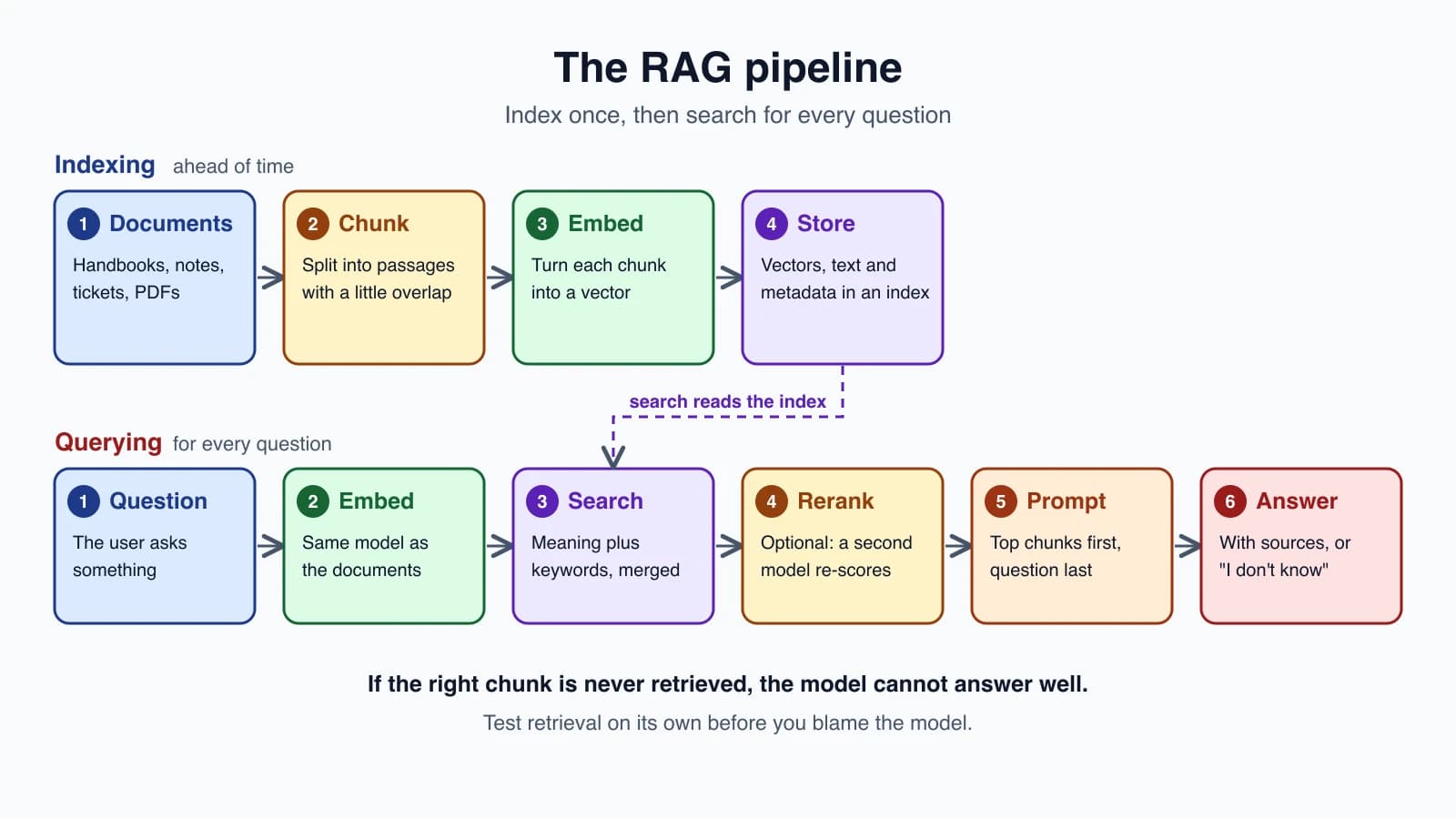
A RAG system has two phases.
Indexing happens ahead of time:
- Collect the documents.
- Chunk each one into smaller passages.
- Embed each chunk into a list of numbers that captures its meaning.
- Store the chunks, their vectors and some metadata (source, section, date) in an index.
Querying happens for every question:
- Embed the question the same way.
- Search the index for the closest chunks.
- Rerank them, optionally, for better accuracy.
- Prompt: place the top few chunks in the prompt with the question.
- Answer, citing which chunks were used.
Each step is a place where quality can be won or lost, and the rest of the lesson takes them in order.
Embeddings and vector search
You met embeddings in How LLMs work: a list of numbers that represents the meaning of a text, where similar meanings land close together. Anthropic does not offer its own embedding model. Its documentation points to Voyage AI, and advises you to compare several providers for your use case.
The documentation's quickstart shows the whole idea in a few lines. You embed your documents, embed the query, compare, and take the closest:
1import numpy as np
2import voyageai
3
4vo = voyageai.Client()
5
6documents = [
7    "Photosynthesis in plants converts light energy into glucose and produces essential oxygen.",
8    "Apple's conference call to discuss fourth fiscal quarter results is scheduled for Thursday, November 2, 2023 at 2:00 p.m. PT.",
9    "Shakespeare's works, like 'Hamlet', endure in literature.",
10]
11
12doc_embds = vo.embed(documents, model="voyage-4", input_type="document").embeddings
13
14query = "When is Apple's conference call scheduled?"
15query_embd = vo.embed([query], model="voyage-4", input_type="query").embeddings[0]
16
17similarities = np.dot(doc_embds, query_embd)
18print(documents[np.argmax(similarities)])
A few details from the documentation worth keeping:
- Always set
input_typeto"document"for the texts you index and"query"for the question. The documentation says not to omit it for retrieval, because specifying it produces better vectors for search. - Dot product equals cosine similarity for these embeddings, because they are normalized to length 1, and the dot product is quicker to compute.
- Model choice is a trade-off. The documentation recommends
voyage-4-largefor best quality,voyage-4-litefor lowest latency and cost, andvoyage-4for balance, with specialized models for code, law and finance. Names change, so check the current list. - The same model must embed both documents and queries. Vectors from different models are not comparable.
What a vector database adds
The code above compares the query against every document, which is fine for a few thousand chunks. A vector database is a store built for this job at scale. It keeps vectors with their metadata, finds nearest neighbors quickly without scanning everything (usually by an approximate search), filters by metadata such as source or date, and supports adding and deleting entries. Many options exist, from extensions to ordinary databases to dedicated services.
A sensible path: begin with a plain list of vectors in memory, like the code in this lesson. Move to a vector database when the collection grows beyond what you can scan quickly, or when you need filtering and updates across many users. Choosing the tool is a smaller decision than getting chunking and retrieval quality right.
Chunking
Documents are split into chunks because a whole book is too much to embed as one vector and too much to put in a prompt. Chunking is where many RAG systems quietly fail. Anthropic's article notes that chunk size, boundaries and overlap all affect retrieval performance.
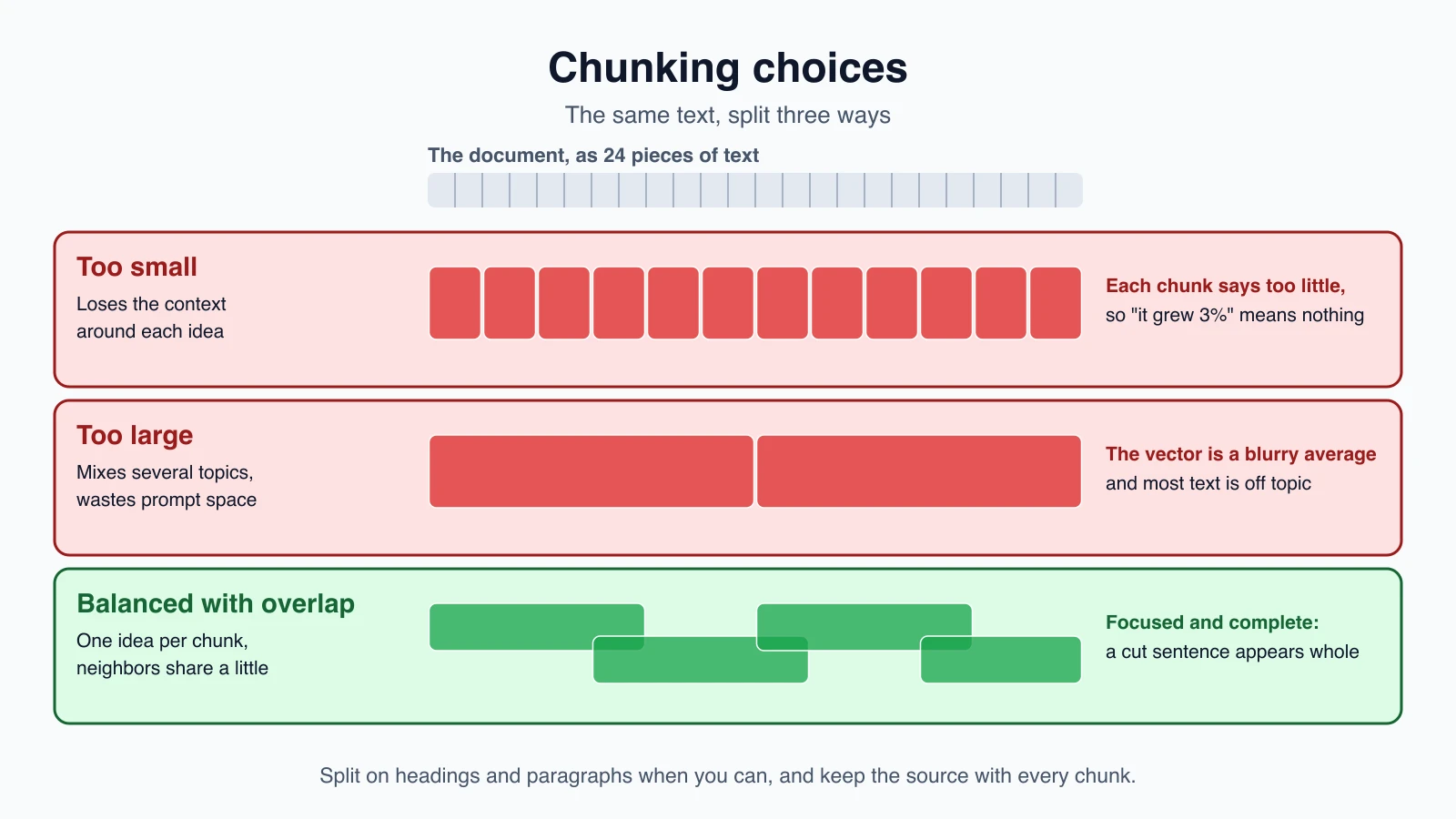
- Too small, and a chunk loses the context it needs. A sentence like "It grew by 3 percent" says nothing without knowing what grew.
- Too large, and a chunk covers several topics, so its vector is a blurry average and most of its text is irrelevant to any one question. It also uses up prompt space.
- In between, with overlap, each chunk carries one idea, and neighbors share a few words so that a sentence cut at a boundary still appears whole in one of them.
Better still, split on the document's own structure, such as headings and paragraphs, and fall back to size only when a section is very long. Keep the source and section title with every chunk as metadata, so you can cite it later. Here is a simple word-based chunker with overlap:
1import math
2import re
3import zlib
4from collections import Counter
5
6
7def tokens(text):
8    return re.findall(r"[a-z0-9]+(?:-[a-z0-9]+)*", text.lower())
9
10
11def chunk_words(text, size=120, overlap=20):
12    words = text.split()
13    step = size - overlap
14    return [" ".join(words[i : i + size]) for i in range(0, max(len(words) - overlap, 1), step)]
15
16
17def bm25_scores(query, docs, k1=1.5, b=0.75):
18    doc_tokens = [tokens(d) for d in docs]
19    avg_len = sum(len(t) for t in doc_tokens) / len(docs)
20    df = Counter(w for t in doc_tokens for w in set(t))
21    scores = []
22    for t in doc_tokens:
23        tf, score = Counter(t), 0.0
24        for w in set(tokens(query)):
25            if w in tf:
26                idf = math.log(1 + (len(docs) - df[w] + 0.5) / (df[w] + 0.5))
27                score += idf * tf[w] * (k1 + 1) / (tf[w] + k1 * (1 - b + b * len(t) / avg_len))
28        scores.append(score)
29    return scores
30
31
32def toy_embed(text, dim=64):
33    v = [0.0] * dim
34    for w in tokens(text):
35        v[zlib.crc32(w.encode()) % dim] += 1.0
36    norm = math.sqrt(sum(x * x for x in v)) or 1.0
37    return [x / norm for x in v]
38
39
40def rank_by(scores):
41    return sorted(range(len(scores)), key=lambda i: scores[i], reverse=True)
42
43
44def vector_scores(query, vectors, embed=toy_embed):
45    q = embed(query)
46    return [sum(a * b for a, b in zip(q, v)) for v in vectors]
47
48
49def rrf(rankings, k=60):
50    fused = {}
51    for ranking in rankings:
52        for rank, idx in enumerate(ranking, 1):
53            fused[idx] = fused.get(idx, 0.0) + 1 / (k + rank)
54    return sorted(fused, key=fused.get, reverse=True)
55
56
57def hybrid_search(query, chunks, vectors, embed=toy_embed, k=3):
58    keyword = rank_by(bm25_scores(query, chunks))
59    meaning = rank_by(vector_scores(query, vectors, embed))
60    return rrf([keyword, meaning])[:k]
61
62
63def recall_at_k(results, relevant, k):
64    hits = sum(1 for got, want in zip(results, relevant) if want in got[:k])
65    return hits / len(relevant)
chunk_words slides a window of size words forward by size - overlap words each time, so adjacent chunks share overlap words and the last chunk always reaches the end of the text. The tests confirm both properties: every word lands in some chunk, and each pair of neighbors shares exactly the overlap.
Keyword search, and why you want both
Embeddings find meaning, but they can miss exact matches. Anthropic's article gives the example of an error code such as "TS-999": a semantic search may return general error-handling text, while a keyword search finds the exact code. The standard keyword method is BM25, which scores a chunk higher when it contains the query's words, counts rare words as more important than common ones, and adjusts for chunk length. bm25_scores above is a compact version.
The article's recommendation is hybrid retrieval: run both searches, merge the rankings, remove duplicates and pass the best chunks on. A simple, robust way to merge is reciprocal rank fusion. Each chunk earns 1 / (k + rank) from every list it appears in, and the scores are added. A chunk that ranks well in both lists rises to the top, and no score scaling is needed, because only ranks are used. The constant 60 is a commonly used default.
hybrid_search combines them. In the tests, the query "what does TS-999 mean" puts the chunk containing the exact code first, because the keyword side ranks it first and the fusion keeps it there. The toy_embed function in the code is only a stand-in that hashes words into a small vector, so you can run everything without an API key. It has no sense of meaning, such as that "refund" and "money back" are related. In a real system, replace embed with a call to an embedding model like the Voyage snippet above.
Make chunks self-explanatory: contextual retrieval
The "grew by 3 percent" problem has a fix that Anthropic calls contextual retrieval. Before indexing, each chunk gets a short note that situates it within its document, such as which company and which quarter it is about. Anthropic's example asks a model to read the whole document and the chunk and write a succinct context of about 50 to 100 tokens, answering only with that context. The note is added to the front of the chunk before it is embedded and before the keyword index is built.
Anthropic reports its results on its own test sets, measured as the failure rate of finding the right chunk in the top 20 results. The baseline failure rate was 5.7 percent:
| Technique | Failure rate | Reduction |
|---|---|---|
| Contextual embeddings | 3.7% | 35% |
| Plus contextual keyword search | 2.9% | 49% |
| Plus reranking | 1.9% | 67% |
These figures come from Anthropic's datasets, so measure on yours. The article also notes that sending 20 chunks to the model performed better than 10 or 5.
The cost is one model call per chunk, at index time. Prompt caching lets the document be loaded once instead of with every chunk, and Anthropic estimated about $1.02 per million document tokens, under its stated assumptions about chunk and document size. Treat that as a rough guide.
Reranking
Search returns candidates quickly but not perfectly. A reranker is a second model that reads the query together with each candidate and scores how relevant it really is. Anthropic's setup retrieved a broad set of 150 candidates, reranked them, and kept the top 20. Reranking improves accuracy and shrinks what the model must read, and it adds some delay. Voyage AI, mentioned earlier, also offers rerankers, and the article used Cohere's.
Measure retrieval before you blame the model
When a RAG answer is wrong, the cause is usually that the right chunk was never retrieved, not that the model reasoned badly. So test retrieval on its own, with a small set of questions and, for each, the chunk that holds the answer. The standard measure is recall at k: of your questions, how many had the right chunk among the top k results? Anthropic's failure rate above is simply 1 minus recall at 20.
recall_at_k computes it, given the list of results for each question and the id of the right chunk for each. Use it to compare choices: chunk size, with and without keyword search, with and without reranking, different values of k. As elsewhere in this course, change one thing and measure again.
Using retrieved chunks in the prompt
Once you have the top chunks, the prompt matters. From Prompting for agents: put the documents first and the question last, wrap each chunk in tags with its source, and tell the model how to behave:
1<documents>
2  <document index="1">
3    <source>handbook.md, Refunds</source>
4    <document_content>Refunds are issued within 14 days of purchase...</document_content>
5  </document>
6</documents>
7
8<rules>
9- Answer only from the documents above.
10- Name the source of each fact you use.
11- If the documents do not contain the answer, say so.
12</rules>
13
14Question: How long do refunds take?
The last rule is important. Without it, a model with no good chunks will often answer from memory and sound sure. And remember the warning from Common agent tools: retrieved text is data, not instructions. A document in your index may contain text meant to steer the model, so keep the instructions outside the documents and never treat what they say as a command.
Mistakes beginners make
- Building RAG for a small knowledge base that would fit in the prompt.
- Chunks that are too small or too large. Aim for one idea, with some overlap.
- Skipping metadata, so answers cannot cite a source.
- Mixing embedding models for documents and queries.
- Forgetting
input_typewhen using Voyage embeddings for retrieval. - Embeddings only, so exact codes and names are missed. Add keyword search.
- Passing too few chunks. More candidates, reranked, often beat the top three.
- Blaming the model without checking whether retrieval found the right chunk.
- No "say you don't know" rule, so the model answers from memory.
- Treating retrieved text as trusted instructions.
Quick recap
- RAG searches your documents at question time and puts the best passages in the prompt, so the model answers from real text.
- If your knowledge base is under about 200,000 tokens, consider putting it all in the prompt with caching, and skip RAG.
- The pipeline is chunk, embed, store, then embed the query, search, rerank and prompt.
- Embed documents and queries with the same model, and set
input_typefor Voyage embeddings. - A vector database stores vectors with metadata and searches them fast at scale, but a plain list is enough to start.
- Chunk by structure with a little overlap, and keep source metadata.
- Combine meaning search with keyword search (BM25) and merge with reciprocal rank fusion.
- Contextual retrieval and reranking cut failed retrievals sharply in Anthropic's tests. Measure on your own data with recall at k.
- Put chunks first and the question last, cite sources, and tell the model to say when the documents do not answer.
Try it yourself
Take five or six of your own documents, split them with chunk_words, and write ten questions with the chunk that answers each. Run hybrid_search with the toy embedding and measure recall_at_k at 1, 3 and 5. Then try keyword search alone, vector search alone and both, and note which questions each one misses. If you have a Voyage API key, swap in real embeddings and see how the numbers change.
Next lesson: Build a RAG agent.