
Two ideas sit underneath almost every modern agent. The first is that a model does better on hard problems when it works through them in steps instead of blurting out an answer. The second is that an agent does better when it checks its thinking against the real world by taking an action and looking at the result. The first idea is called chain of thought. The second, combined with the first, is called ReAct, short for reasoning and acting. In this lesson you will learn what each one is, see the pattern as a trace, build a working ReAct loop from scratch in about 65 lines, see how Claude builds this thinking in, and learn where reasoning stops being reliable.
Chain of thought
A chain of thought is a series of intermediate reasoning steps written out before the final answer. The idea was popularized by a 2022 research paper, Chain-of-Thought Prompting Elicits Reasoning in Large Language Models, by Jason Wei and colleagues. Its finding was that showing a large model a few worked examples with step-by-step reasoning made it reason better on arithmetic, commonsense and symbolic problems. The paper reports that this ability emerges in sufficiently large models.
You can see the difference on a small problem. Asha buys 7 pens at 12 rupees each and pays with a 100 rupee note. What change should she get?
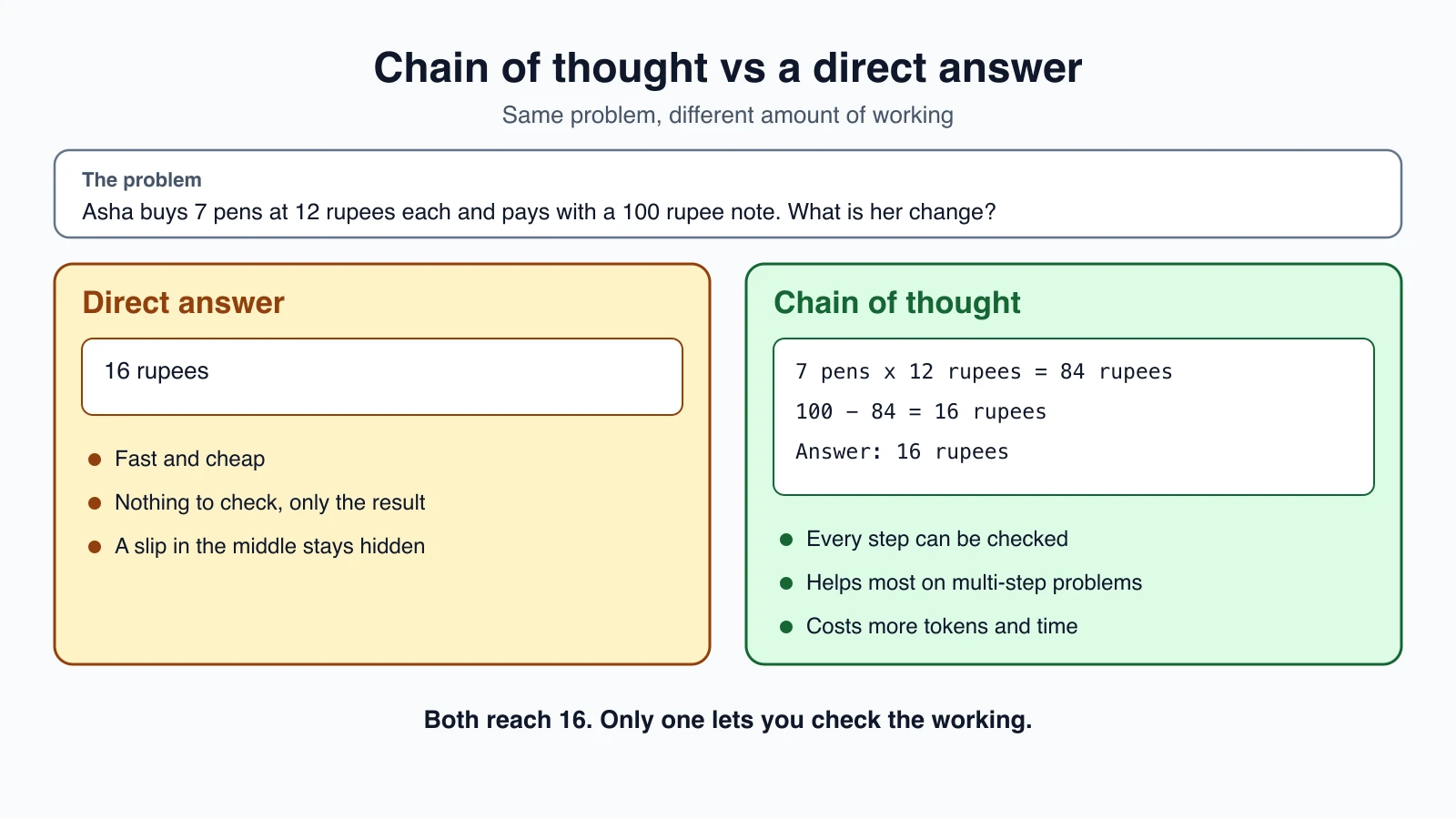
Both reach 16. The difference is what you can check. The second version shows its working, so a wrong step is easy to spot, and writing the steps gives the model a chance to make each one correctly instead of jumping to the end. For a problem this small the gain is tiny. On multi-step problems, where an early slip ruins everything after it, working step by step is what helps.
Chain of thought has two limits that lead directly to ReAct. The reasoning lives only in the model's head. It cannot look anything up, and it cannot check a calculation against a calculator. If one step is wrong, the later steps build on the mistake, which the ReAct paper describes as hallucination and error propagation.
ReAct: reasoning that acts
The ReAct pattern comes from the paper ReAct: Synergizing Reasoning and Acting in Language Models by Shunyu Yao and colleagues. Its idea is to have the model produce reasoning and actions interleaved. In the paper's words, reasoning traces help the model induce, track and update action plans and handle exceptions, while the actions let it gather information from outside sources such as a knowledge base or an environment. On interactive decision-making benchmarks, the paper reports that with only one or two examples in the prompt, ReAct beat imitation learning and reinforcement learning methods by absolute success-rate gains of 34 percent on ALFWorld and 10 percent on WebShop.
The pattern is a loop of three things:
- Thought: the model reasons about what it knows and what to do next.
- Action: it calls a tool.
- Observation: the tool's result comes back, and the next thought starts from it.
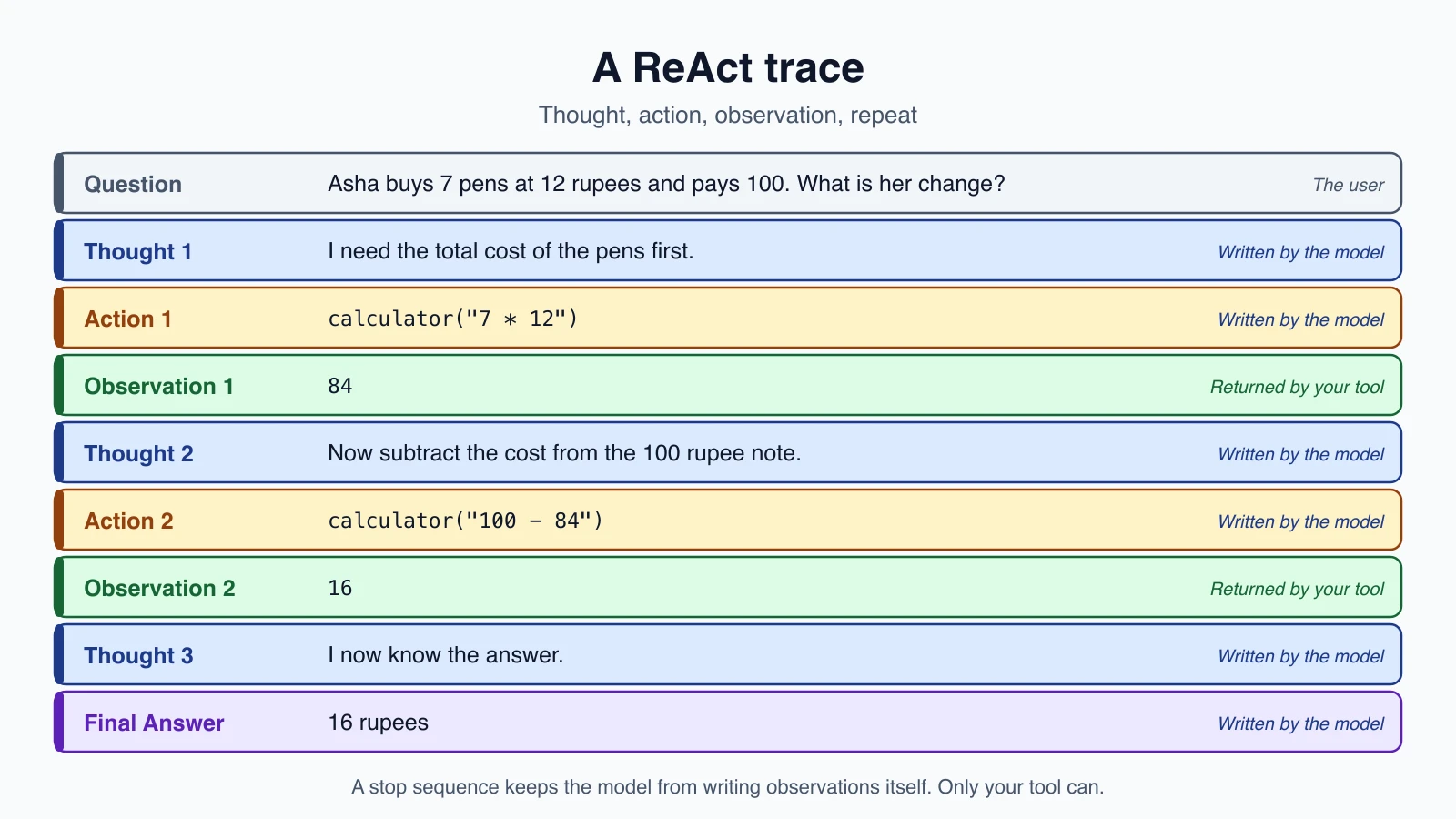
If this looks familiar, it should. It is the agent loop from The agent loop, described from the model's point of view. In Claude's API, the mapping is direct:
| ReAct | In the tool-use API |
|---|---|
| Thought | The text the model writes before a tool call, or its thinking block |
| Action | A tool_use block |
| Observation | Your tool_result block |
| Final answer | A reply with no tool call |
So when you built the agent in Build your first agent, you built a ReAct agent without calling it that. The pattern's value is the mental model: every step should be a reasoned decision based on what the last observation showed, not a blind guess.
Build ReAct from scratch
Modern tool calling hides the pattern. To see it plainly, here is the original form, where the model writes its steps as text in a fixed format and your code parses them. This is the style used before models had native tool calling, and it is still useful for understanding and for models without it. The whole program, with a safe calculator tool, is below:
1import ast
2import operator
3import re
4
5OPS = {ast.Add: operator.add, ast.Sub: operator.sub, ast.Mult: operator.mul, ast.Div: operator.truediv}
6
7PROMPT = """Answer the question. You can use these tools:
8{tools}
9
10Use this format exactly:
11Thought: what you are thinking
12Action: the tool name
13Action Input: the input for the tool
14Observation: (written by the system, never by you)
15... (repeat Thought, Action, Action Input and Observation as needed)
16Thought: I now know the answer
17Final Answer: the answer
18
19Question: {question}
20"""
21
22FINAL = re.compile(r"Final Answer:\s*(.+)", re.S)
23ACTION = re.compile(r"Action:\s*(.+)\nAction Input:\s*(.+)")
24
25
26def calculator(expression):
27    """Evaluate arithmetic with + - * / such as 7 * 12."""
28
29    def ev(node):
30        if isinstance(node, ast.Constant) and type(node.value) in (int, float):
31            return node.value
32        if isinstance(node, ast.BinOp) and type(node.op) in OPS:
33            return OPS[type(node.op)](ev(node.left), ev(node.right))
34        if isinstance(node, ast.UnaryOp) and isinstance(node.op, ast.USub):
35            return -ev(node.operand)
36        raise ValueError("only numbers and + - * / are allowed")
37
38    return str(ev(ast.parse(expression, mode="eval").body))
39
40
41def parse_step(text):
42    final = FINAL.search(text)
43    if final:
44        return "final", final.group(1).strip()
45    action = ACTION.search(text)
46    if action:
47        return "action", (action.group(1).strip(), action.group(2).strip())
48    return "invalid", text
49
50
51def react(llm, tools, question, max_steps=6):
52    listing = "\n".join(f"- {name}: {fn.__doc__}" for name, fn in tools.items())
53    prompt = PROMPT.format(tools=listing, question=question)
54    for _ in range(max_steps):
55        text = llm(prompt, stop=["\nObservation:"])
56        kind, value = parse_step(text)
57        if kind == "final":
58            return value
59        if kind == "invalid":
60            observation = "Format error. Reply with Thought, Action and Action Input, or a Final Answer."
61        else:
62            name, arg = value
63            try:
64                observation = tools[name](arg) if name in tools else f"Unknown tool: {name}"
65            except Exception as e:
66                observation = f"Error: {e}"
67        prompt += f"{text}\nObservation: {observation[:1000]}\n"
68    return "Stopped: step limit reached"
Walk through it:
- The prompt tells the model the tools and the exact format: Thought, Action, Action Input, then Observation, repeating, and ending with Final Answer.
reactkeeps one growing prompt. Each step it asks the model for its next move, parses it, runs the tool, and appends the thought, the action and the observation to the prompt, so the model sees everything that happened.parse_stepfinds either a Final Answer or an Action with its input. Anything else is "invalid".- Failures become observations. An invalid reply, an unknown tool, or a tool that raises an error does not crash the loop. The error text goes back as the observation, and the model can correct itself, the same idea as
is_errorin Errors, retries and rate limits. - Observations are cut to 1,000 characters, so one huge result cannot flood the context, as in Context engineering.
max_stepsends a loop that never finishes.
The most important line: the stop sequence
Look at llm(prompt, stop=["\nObservation:"]). The prompt tells the model "Observation: (written by the system, never by you)", but a model may still write one. If it does, it invents a tool result and carries on with a made-up world, which is the exact hallucination ReAct is meant to prevent. The stop sequence makes it physically impossible. The model's output is cut off just before it would write "Observation:", so the only observation in the prompt is the one your tool produced. Claude's API supports stop sequences with the stop_sequences parameter, and when one is hit the stop reason is stop_sequence.
A function that connects the loop to Claude looks like this:
1def claude_llm(prompt, stop):
2    response = client.messages.create(
3        model=MODEL,
4        max_tokens=500,
5        stop_sequences=stop,
6        messages=[{"role": "user", "content": prompt}],
7    )
8    return next(b.text for b in response.content if b.type == "text")
Then call react(claude_llm, {"calculator": calculator}, "Asha buys 7 pens at 12 rupees and pays 100. What is her change?").
The calculator, and a safety lesson
The calculator does not use Python's eval. Running text that a model wrote, with eval, would let it run anything. Instead the code parses the expression into a syntax tree and evaluates only numbers and the four operators. Everything else raises an error, and the tests check this: calls such as __import__('os'), 2 ** 999, abs(3) and True + 1 are all refused. Power is left out on purpose, since a huge exponent can freeze the program. Whenever a tool runs something the model wrote, assume the model will eventually send something you did not expect.
Why not do this in production?
The text format is brittle. The model might write "Action Input" in a slightly different way, add extra text or forget a line, and the regular expressions miss it. Text parsing also mixes data and control: a tool result that contains the words "Final Answer:" could confuse the parser. Native tool calling avoids both problems, because actions arrive as structured blocks with validated inputs, as covered in Tool definitions and structured output. Use the native form for real systems, and keep the from-scratch version as a way to understand what is happening.
Reasoning built into Claude
Today's models do the thinking step natively. Anthropic's documentation describes Claude's thinking as adaptive: on each request, the model decides whether to think and how much. A simple question may get no thinking at all, and a multi-step problem triggers deeper reasoning. You turn it on with a thinking setting, and you steer it mostly with the effort setting:
1response = client.messages.create(
2    model="claude-opus-5-5",
3    max_tokens=4096,
4    thinking={"type": "adaptive"},
5    output_config={"effort": "medium"},
6    tools=tools,
7    messages=messages,
8)
Several facts from the documentation matter for agents:
- Thinking interleaves with tool use automatically. Claude can think between tool calls, evaluating each result before deciding what to do next. No special header is needed. This is ReAct, with the thought step built in.
- It may skip thinking. In a tool loop, the first request after new user input usually carries most of the reasoning, and follow-up requests that only process tool results can skip it. Do not write code that assumes every assistant turn starts with a thinking block.
- Pass thinking blocks back unchanged. During tool use they carry the reasoning behind the tool calls. The loop you wrote appends
response.contentas received, which does this. - Effort is the main control. Levels from
lowtomaxset how readily and how deeply the model thinks. The documentation advises lowering effort before trying to steer with wording. It also says that changing effort between requests invalidates the prompt cache, so pick one setting per conversation. - Thinking costs tokens. Thinking tokens are billed as output tokens, and they count toward
max_tokens. A cap sized for a short answer is often too small once the model starts thinking, so leave room. The response reports the reasoning share inusage.output_tokens_details.thinking_tokens. - You may see a summary, not the raw thoughts. The
displaysetting chooses summarized or omitted thinking, and billing is the same either way. - Settings vary by model. For example, some current models always think and reject turning it off. Check the thinking documentation for the model you use.
To look at an agent's reasoning while debugging, print the thinking, text and tool calls of each reply as a trace:
1def trace(content):
2    lines = []
3    for block in content:
4        if block.type == "thinking":
5            lines.append(f"Thinking: {block.thinking}")
6        elif block.type == "text":
7            lines.append(f"Thought: {block.text}")
8        elif block.type == "tool_use":
9            lines.append(f"Action: {block.name}({block.input})")
10    return lines
Call it on each response in your loop and log the lines. When an agent goes wrong, this trace is how you find out which step went astray.
The think tool
Before built-in interleaved thinking, Anthropic described a think tool: a tool with one string input, thought, that does nothing except record the thought. Calling it gives the model a place to pause in the middle of a task and check whether it has what it needs, for example after reading tool results in a task with detailed policies. Anthropic's later update says that in most cases extended thinking is recommended over a dedicated think tool. The tool still illustrates the idea, and may suit a model or setting without thinking, but try the built-in thinking first.
When to use which
| Situation | Use |
|---|---|
| Simple lookup or one-step answer | No explicit reasoning. Lower the effort |
| A multi-step problem with no tools | Thinking, or step-by-step instructions in the prompt |
| A task that needs tools and facts | A tool-use loop (ReAct) with thinking between calls |
| Policy-heavy or high-stakes steps | Higher effort, and a check on each action |
| A model without built-in thinking | Ask for steps in the prompt, or a ReAct text format with stop sequences |
The limits of reasoning
Visible reasoning is useful and imperfect.
- It can be wrong and sound right. A fluent chain of thought can contain a bad step. That is why the ReAct paper pairs reasoning with actions that check it. Verify facts and calculations with tools, as the calculator does.
- A trace is evidence, not proof. Treat the reasoning as a helpful record of what the model was doing, but check the result, not just the explanation.
- Errors compound. A wrong observation or an early wrong thought can steer every later step.
- Loops happen. An agent can repeat the same thought and action. Keep step limits and watch for repeated calls.
- It costs time and money. More thinking means more tokens and more delay. Match the effort to the task.
- Longer is not always better. Over-thinking simple requests wastes effort. Measure the effect on your own tasks.
- Reasoning does not replace guards. A well-reasoned bad action is still a bad action. Keep approvals and limits in code.
Mistakes beginners make
- Letting the model write its own observations. Use a stop sequence, or native tool calling.
- Running model-written text with
eval. Parse and allow only what you expect. - Parsing free text with fragile patterns in production. Use structured tool calls.
- Crashing on format errors. Return them as observations and let the model retry.
- No step limit, so a stuck loop runs on.
- Assuming every turn has a thinking block.
- Dropping thinking blocks between tool calls. Pass them back unchanged.
- Setting
max_tokenstoo low for thinking plus the answer. - Changing effort mid-conversation and losing the prompt cache.
- Trusting the explanation without checking the answer.
Quick recap
- Chain of thought means working through intermediate steps before answering. It helps on multi-step problems and makes the work checkable.
- ReAct interleaves thought, action and observation. Reasoning plans and revises, and actions bring in real information.
- The agent loop you already built is ReAct: thought is the text or thinking, action is a
tool_use, observation is atool_result. - In a from-scratch ReAct loop, use a stop sequence so the model cannot invent observations, turn errors into observations, and never
evalmodel output. - Claude's adaptive thinking reasons between tool calls automatically. Steer it with
effort, leave room inmax_tokens, and pass thinking blocks back unchanged. - Reasoning can be wrong and sound right. Verify with tools, keep limits, and measure cost.
Try it yourself
Run the from-scratch ReAct loop with a scripted llm function, as in the tests, and watch the prompt grow after each step. Then change the script so the model writes an unknown tool name, and see the observation it gets back. Add a second tool, such as a lookup of a few facts in a dictionary, and write a question that needs both tools. If you have an API key, run the same question through claude_llm, and then through a native tool-use loop with thinking set to adaptive, and compare the traces from trace.
Next lesson: Planner-executor, DAG agents and tree of thought.