
Every agent starts with a decision you make before writing any loop: which model will be the brain, and how will you set it up? A good choice can make an agent faster, cheaper and more reliable. A poor one can make a simple task slow or expensive. After this lesson you will know the settings that shape a model's output, how a reply knows when to stop, what "reasoning" models do, how to choose between models and between open and closed ones, why streaming matters, how to estimate cost, and when fine-tuning is worth considering. It builds on the facts about tokens and context in How LLMs work.
Generation controls
When a model writes its next token, it first scores every possible token, as you saw in the last lesson. Generation controls decide how the final pick is made from those scores. These are the ones you will see in most providers' documentation.
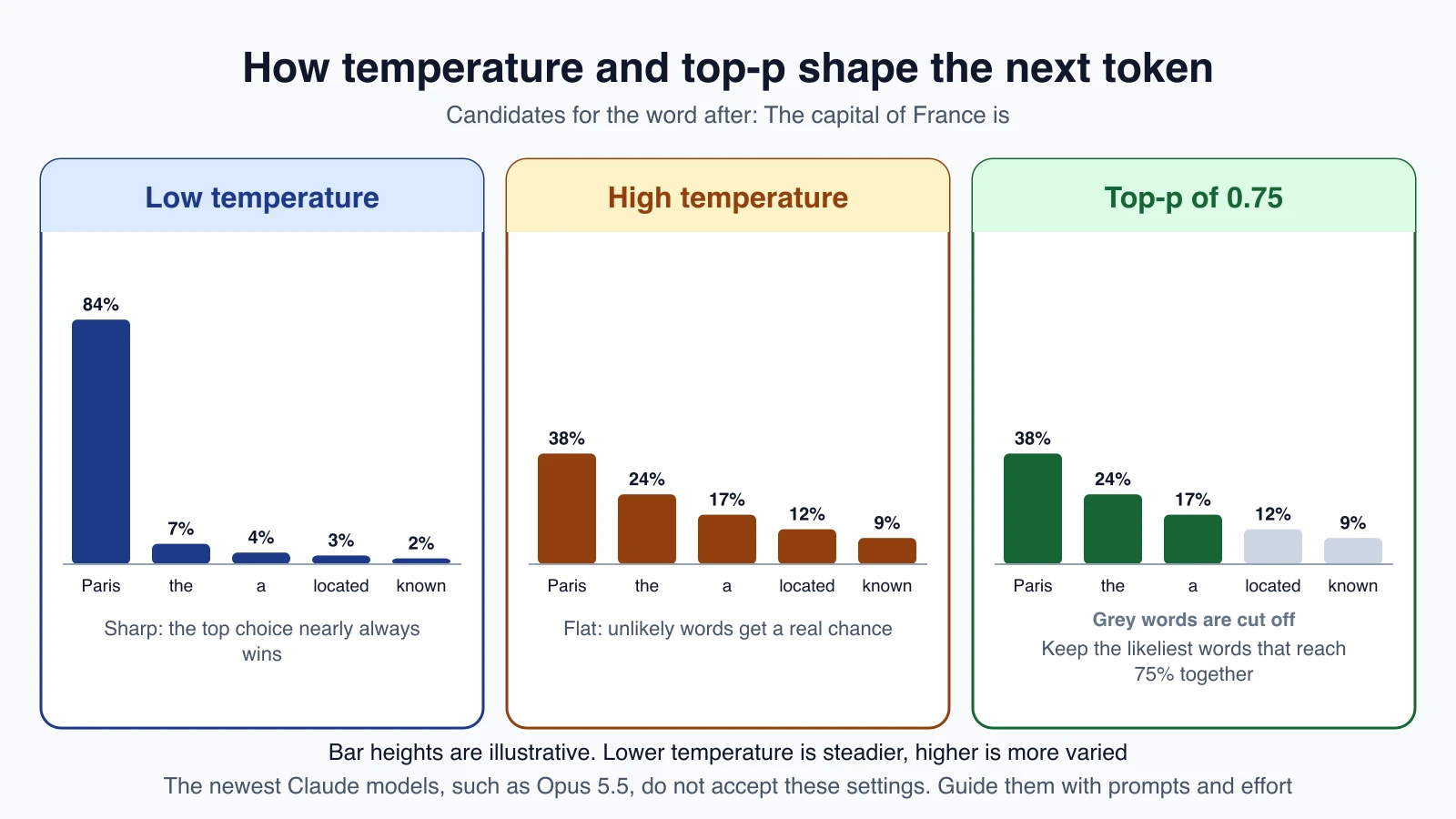
Temperature controls how random the pick is. A low temperature makes the model choose the most likely token almost every time, so answers are steadier and more repeatable. A high temperature gives less likely tokens a real chance, so answers vary more and feel more creative. Many tools describe it as a number from 0 to 1 or 0 to 2.
Top-p (also called nucleus sampling) keeps only the most likely tokens whose probabilities add up to a chosen amount, such as 0.9, and ignores the rest. It trims the long tail of unlikely words. Top-k is a similar idea: keep only the k most likely tokens.
Frequency and presence penalties appear in some providers' APIs. They discourage the model from repeating words it has already used. A frequency penalty grows with each repeat. A presence penalty applies once a word has appeared at all.
Stopping criteria tell the model when to end. You will meet these below.
What agents usually want
For an agent that calls tools, steady behavior is usually better than creative behavior. A tool call has to match a schema exactly, and a random detour in the middle of a plan costs time and money. So when a provider lets you set temperature, agent builders often choose a low value for tool-calling steps and a higher one only for writing tasks such as brainstorming.
An important change on the newest Claude models
Not every model lets you set these any more. Anthropic's migration guide for Claude Opus 5.5 tells developers to leave out temperature, top_p and top_k, and to steer behavior with prompting instead. On some recent models, sending them returns an error. The guide also notes that a temperature of 0 never guaranteed identical outputs on earlier models either.
What does that mean for you?
- Do not rely on temperature for determinism. Even where it exists, the same prompt can produce different outputs.
- Learn the idea anyway. Other providers and many open models still use these settings, and the concept helps you read any model's documentation.
- On models that drop them, use better tools: clear instructions (see Prompting for agents), structured output, and the effort setting described below.
Always check the page for the exact model you use, because supported parameters change between versions.
How a reply knows when to stop
An agent loop depends on knowing why the model stopped. Every response carries a stop reason. In Claude's API the main ones are:
| Stop reason | Meaning | What your agent does |
|---|---|---|
end_turn | The model reached a natural end | Treat the reply as the final answer |
tool_use | The model wants to call a tool | Run the tool and send the result back |
max_tokens | It hit the output limit you set | The reply may be cut off, so continue or raise the limit |
stop_sequence | It produced one of your stop strings | Handle it as you planned |
pause_turn | A long turn was paused | Send the reply back to let it continue |
refusal | A safety system stopped the output | Handle or report it |
model_context_window_exceeded | The context window ran out | Shorten the context |
The first two are the engine of the agent loop: keep going while the stop reason is tool_use, and finish when it is end_turn.
Two settings shape stopping:
max_tokensis the most the model may write in one reply. It is required in Claude's API. Set it high enough that answers are not cut off, but not so high that a runaway reply is costly.- Stop sequences are strings that end the reply the moment the model writes them. They are rarely needed with modern models but are useful when you need output to end at a marker.
Reasoning models and effort
Some models can think before they answer. They spend extra tokens working through a problem, checking steps and changing approach, then give the final reply. This helps with hard problems, such as tricky bugs or multi-step plans, because a model that answers in one pass has to get everything right the first time.
Thinking costs tokens. Thinking tokens count toward max_tokens and are billed as output tokens, so more thinking means more cost and more waiting.
Claude handles this with two ideas:
- Adaptive thinking. The model decides how much to think, based on the request. On Claude Opus 5.5 this is always on and cannot be turned off.
- Effort. A setting that tells the model how much work to put in. The levels are
low,medium,high,xhighandmax. Lower effort is cheaper and faster, and higher effort is more thorough. On Opus 5.5 the default ismedium, and effort is the main control for how deeply the model thinks.
You set it on the request, for example in Python:
1import anthropic
2
3client = anthropic.Anthropic()
4
5response = client.messages.create(
6    model="claude-opus-5-5",
7    max_tokens=2048,
8    messages=[
9        {
10            "role": "user",
11            "content": "Analyze the trade-offs between microservices and monolithic architectures",
12        }
13    ],
14    output_config={"effort": "medium"},
15)
16
17for block in response.content:
18    if block.type == "text":
19        print(block.text)
The loop over blocks is there because a reply can contain more than one kind of block. When thinking is on, a thinking block can come first, so you pick out the text blocks by their type.
A practical way to use effort: start at the default, check quality on your own examples, and then try a level lower for routine steps and a level higher only where results fall short. The Claude Code lesson on models and effort shows the same idea in a coding tool.
Choosing a model
Providers sell a family of models at different sizes. Bigger ones are generally more capable, slower and more expensive. Smaller ones are faster and cheaper. The art is matching the model to the step.
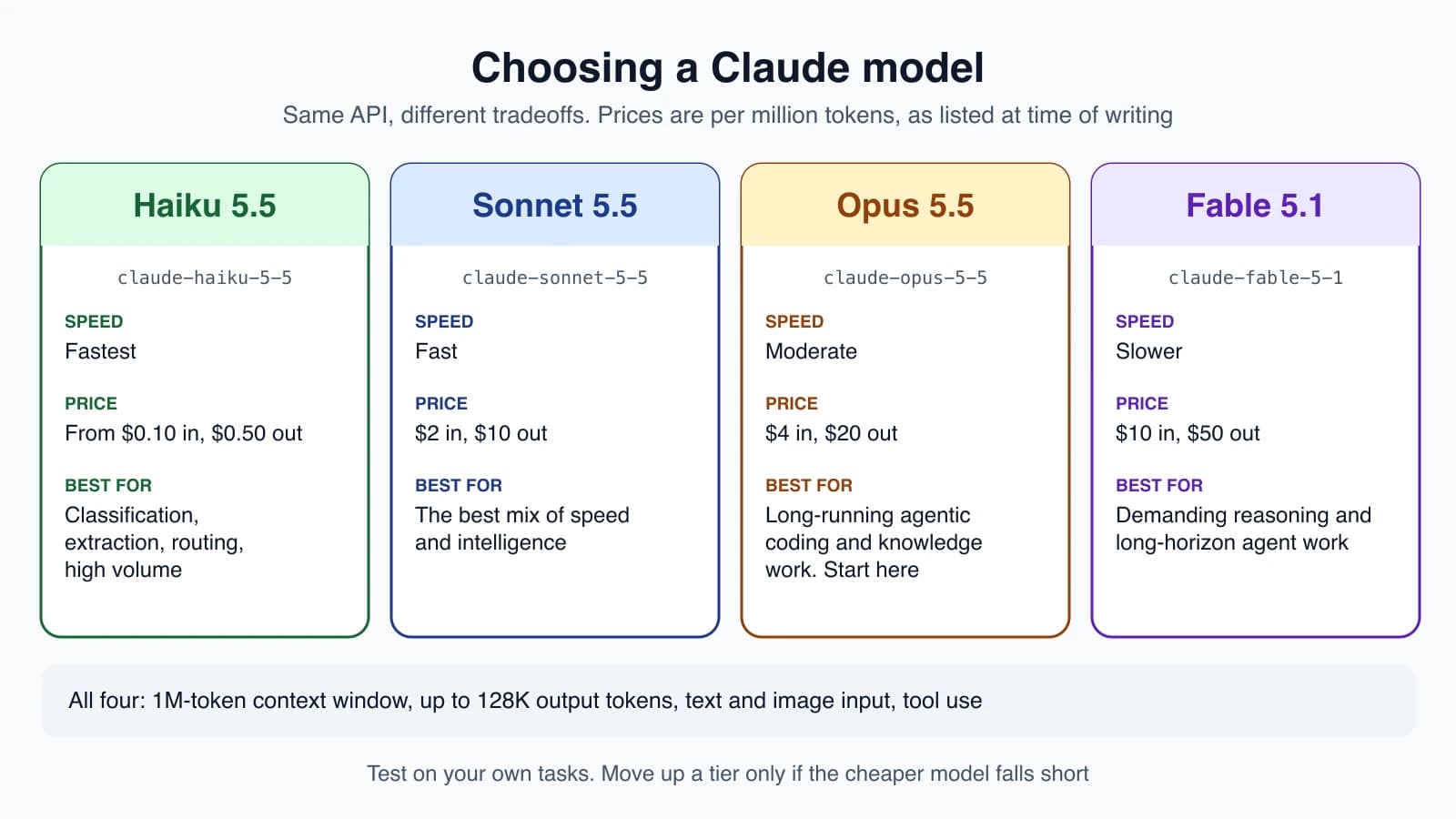
Anthropic's documentation describes the current lineup like this:
| Model | Speed | Price per million tokens (input, output) | Described as |
|---|---|---|---|
| Claude Haiku 5.5 | Fastest | from $0.10, from $0.50 | High-volume, latency-sensitive work such as classification, extraction and routing |
| Claude Sonnet 5.5 | Fast | $2, $10 | The best combination of speed and intelligence |
| Claude Opus 5.5 | Moderate | $4, $20 | Long-running agentic coding and knowledge work |
| Claude Fable 5.1 | Slower | $10, $50 | Demanding reasoning and long-horizon agent work |
Prices and models change, so treat this table as a snapshot and check the pricing page before you budget. All four have a 1 million token context window and can write up to 128 thousand tokens in one reply.
The documentation's advice is to start with Claude Opus 5.5 for most workloads, and to move to Fable 5.1 only when your own tests on Opus at higher effort still fall short.
Mix models inside one agent
You are not limited to one model. A common design uses a stronger model to plan or make hard decisions, and a smaller, faster one for easy repeated steps such as sorting messages or pulling out fields. Anthropic's agent guidance describes sending simple questions to smaller, cheaper models and hard ones to more capable models as a standard routing pattern, which you will build in Chaining, routing and parallelization.
Test, do not guess
Model rankings on public leaderboards are a starting point only. The best model for your agent is the one that does your task well at a cost you accept. Pick a small set of realistic tasks, run them on two or three models, and compare quality, speed and cost. You will learn to do this properly in Evaluating agents.
Open or closed models
Models differ in how you get them.
- Closed-weight models are used only through the provider's API. Claude, the GPT family and Gemini are examples. You send text in and get text back. The provider runs and updates the model.
- Open-weight models publish their trained weights, so you can download and run them yourself. Examples are model families such as Llama, Mistral and Qwen. Be careful with the term: "open weight" means you can get the weights, which is not always the same as open source. Each model has a licence that says what you may do with it, including whether you can use it commercially.
| Closed (API) | Open weights (self-hosted) | |
|---|---|---|
| Setup | An API key and a few lines of code | You need hardware and software to serve the model |
| Top capability | Usually the strongest models | Often a step behind the strongest closed models |
| Cost model | Pay per token | Pay for servers, with low cost per token at high volume |
| Privacy and control | Data goes to a provider, under its terms | Data can stay on your own machines |
| Maintenance | The provider updates it | You update, scale and secure it |
For learning and for most first agents, an API model is the simplest path. Open models make sense when you must keep data in-house, need to run offline, or have enough volume to justify the operations work.
Streaming
By default, an API call waits until the whole reply is ready. With streaming, the server sends pieces as soon as they are produced, so the user sees text appear word by word instead of waiting. For a long answer the total time is the same, but the wait before anything appears drops sharply.
Here is the basic Python pattern for Claude:
1import anthropic
2
3client = anthropic.Anthropic()
4
5with client.messages.stream(
6    model="claude-opus-5-5",
7    max_tokens=1024,
8    messages=[{"role": "user", "content": "Hello"}],
9) as stream:
10    for text in stream.text_stream:
11        print(text, end="", flush=True)
For agents, streaming helps in two ways: you can show progress while a step runs, and you can stop early if it goes the wrong way. One caution: when the model calls a tool, the arguments arrive in pieces as partial JSON. Do not run the tool until you have received the complete tool request.
Pricing in practice
Because you pay for input and output tokens, you can estimate an agent's cost with simple arithmetic. Say you use Claude Opus 5.5 at $4 per million input tokens and $20 per million output tokens. A run that sends 200,000 input tokens in total across all its steps, and writes 10,000 output tokens, costs:
- Input: 200,000 ÷ 1,000,000 × $4 = $0.80
- Output: 10,000 ÷ 1,000,000 × $20 = $0.20
- Total: about $1.00
Two things surprise beginners. First, input usually dominates in an agent, because every step resends the growing history, as you saw in the last lesson. Second, there are levers to pull. The documentation lists a 50 percent discount for batch requests that can wait, and a much lower price for tokens read from the prompt cache, such as a long system prompt that does not change. You will use these in Cost and latency.
Fine-tuning or prompt engineering
Fine-tuning means training a model further on your own examples so it changes its behavior. Prompt engineering means getting the behavior you want by changing the instructions and context you send. They are not rivals, but you should try them in a sensible order:
- Improve the prompt. Be specific, add context, give examples. This is cheap and fast to test.
- Add retrieval. If the problem is missing knowledge, fetch the facts and put them in the context, using the methods in RAG and vector databases.
- Add tools. If the agent needs to act or check something, give it a tool.
- Consider fine-tuning last. It can help with a fixed style, a strict output format or a narrow task done at huge scale. It needs good data, time and upkeep, and it is a poor way to teach a model fresh facts, which retrieval handles better.
Most agent problems are solved by the first three steps.
Putting it together
A sensible starting setup for a first agent:
- A mid-to-strong model, such as the one your provider recommends for agents.
- A moderate effort level, adjusted after testing.
max_tokensset high enough to avoid cut-off answers.- Streaming on if people watch the output.
- Tool calls steady and checked, with no reliance on temperature for determinism.
- A cheaper model for simple steps, added once the basic agent works.
Mistakes beginners make
- Always using the biggest model. It is slower and costs more. Match the model to the step.
- Relying on temperature 0 for exact repeats. It does not guarantee identical output, and some models do not accept it at all.
- Setting
max_tokenstoo low. Replies get cut off and the loop breaks on amax_tokensstop. - Ignoring the stop reason. Your loop must react to
tool_useandend_turndifferently. - Running a tool on a half-streamed request. Wait for the whole tool call.
- Fine-tuning too early. Better prompts, retrieval and tools solve most problems first.
- Trusting a price table that is out of date. Check the current pricing page.
Quick recap
- Generation controls such as temperature and top-p change how the next token is picked. The newest Claude models ask you to omit them and rely on prompting and effort.
- The stop reason tells your loop what to do next:
tool_usemeans run a tool,end_turnmeans you are done. - Reasoning models think before they answer. Effort sets how much, and thinking tokens cost money.
- Choose models by testing on your own tasks, and mix big and small models in one agent.
- Closed models are simplest. Open weights give control at the cost of operating them.
- Streaming cuts the wait. Estimate cost from input and output tokens, and expect input to dominate.
- Try prompts, retrieval and tools before you fine-tune.
Try it yourself
Pick one task you would give an agent, such as sorting support emails by urgency. Write down which model you would start with and why. Then work out its cost for 1,000 emails if each uses 800 input tokens and 100 output tokens, at a price you look up on your provider's pricing page. Finally, decide which step of a longer version of this task could use a smaller, cheaper model, and write one sentence explaining your choice.
Next lesson: The agent loop.