
Claude Code lets you change three things that affect every answer: which AI model does the work, how hard it thinks, and how quickly it responds. After this lesson you will know what each one does, how to change it, and what to pick for common jobs. You will also know what each choice costs, because the stronger settings use more of your plan or more money.
A note before we start. Model names and defaults change often. Everything here matches the official documentation as of November 2026. When in doubt, type /model inside Claude Code and it shows what is available to you right now.
Three dials, not one
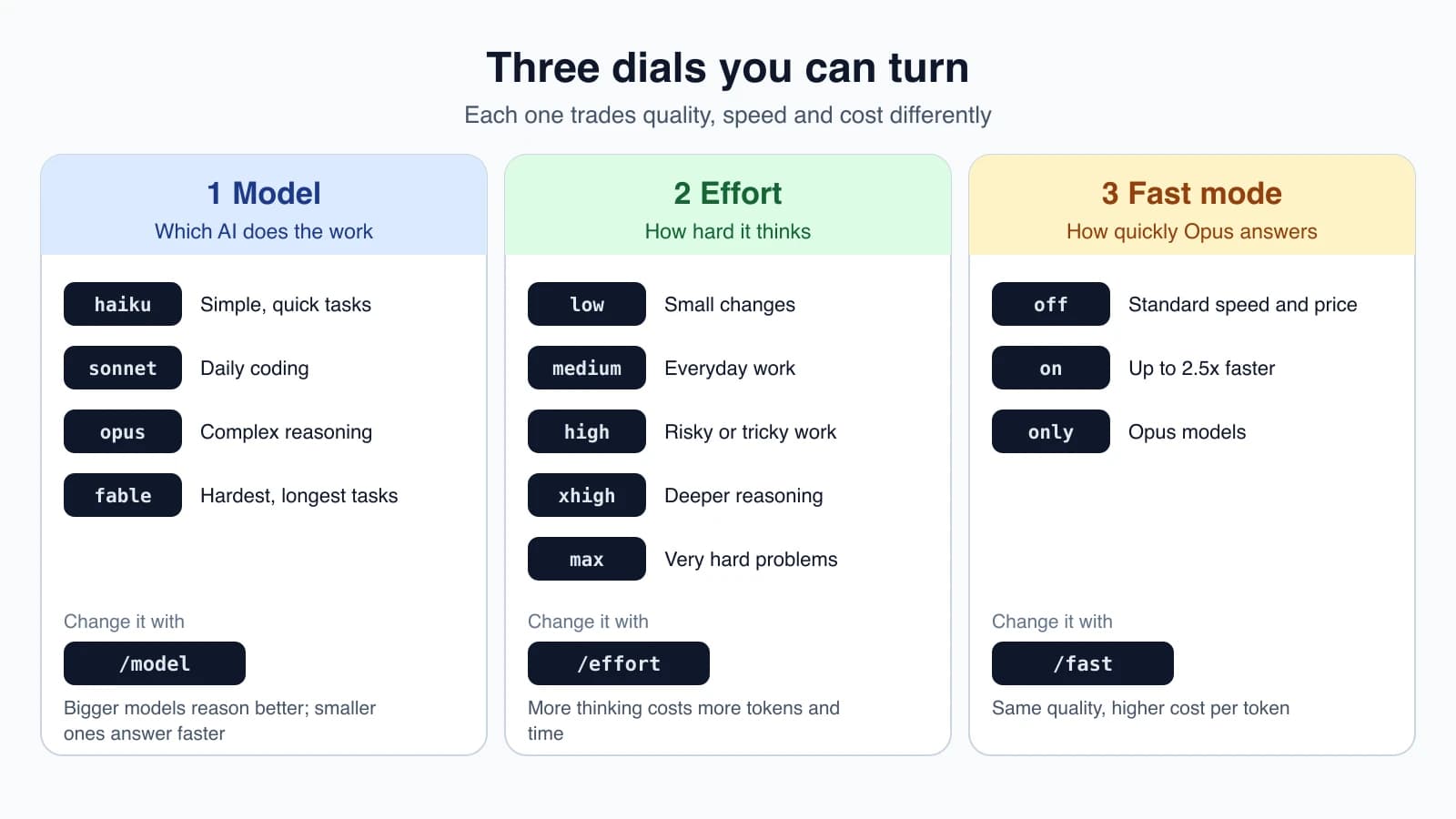
Think of them as separate dials. The model is which brain you use. Effort is how long that brain thinks before answering. Fast mode is a speed upgrade for Opus models. You can set each one on its own.
Dial 1: the model
A model is the AI that reads your request and writes the answer. Anthropic makes several, and they trade strength against speed and cost. Larger models reason better about hard problems. Smaller ones answer faster.
Claude Code gives you short names, called aliases, so you do not need to remember version numbers:
| Alias | What it is for |
|---|---|
haiku | A fast, efficient model for simple tasks |
sonnet | The latest Sonnet, for daily coding |
opus | The latest Opus, for complex reasoning |
fable | The Fable model, for your hardest and longest-running tasks |
best | Whichever is strongest for you: Fable where available, otherwise Opus |
opusplan | Opus while planning, then Sonnet while carrying out the plan |
default | Removes your override and goes back to the standard model for your account |
On the Anthropic API, opus, sonnet and haiku currently point to Opus 5.5, Sonnet 5.5 and Haiku 5.5. fable points to Fable 5.1. Fable is never the default on any plan, so you have to choose it yourself. If you use Claude Code through Amazon Bedrock, Google Cloud or Microsoft Foundry, the aliases can point to older versions.
For Pro, Max, Ultra, Team, Enterprise and API accounts, the default model is Opus 5.5. Your organization can set a different default, and if it does, that one wins.
How to switch models
Inside a session, type:
1/modelThat opens a picker. You can also name a model directly:
1/model sonnetIn the picker, Enter switches the model and saves your choice as the default for future sessions. Pressing s instead switches for the current session only.
To pick a model when you start Claude Code, use a flag:
1claude --model opusThat choice applies only to the session you launched. Claude Code also reads the ANTHROPIC_MODEL environment variable and a model field in your settings file, and the order of priority is: the /model command, then --model, then the environment variable, then settings. On a Mac you can switch models without clearing what you typed by pressing Option + P (Alt + P on Windows and Linux).
Dial 2: effort
Effort controls how much the model thinks before and during each step. Low effort answers fast and does less reasoning. High effort thinks longer, which helps on hard problems but takes more time and uses more tokens. A token is a small chunk of text, and tokens are what you are billed for.
The levels, from lightest to heaviest, are low, medium, high, xhigh and max. The documentation suggests this:
lowfor quick exchanges and small changesmediumfor everyday work with a clear scopehighwhen verification matters or edge cases are likelyxhighfor deeper reasoning at a higher token costmaxfor hard problems, though it can show diminishing returns and may overthink
The default is medium on Opus 5.5, Sonnet 5.5 and Haiku 5.5, and high on most other models.
How to change effort
1/effortThis opens a slider. You can also set a level directly, or clear your saved choice:
1/effort xhigh
2/effort auto
Or set it at launch:
1claude --effort highIn the /model picker, the left and right arrow keys move an effort slider too. A new level takes effect from your next message.
One-off deep thinking
If you only need extra thought for a single question, put the word ultrathink anywhere in your prompt. It asks for deeper reasoning for that turn only, so you do not need to change your settings.
Extended thinking
Models can also think in a separate step before they reply, called extended thinking. On Opus 5.5, Sonnet 5.5, Haiku 5.5 and the Fable models it is always on, and the model decides how much to do at each step based on your effort level. You cannot turn it off there, and Option + T has no effect on those models. Thinking tokens are billed even when the reasoning is hidden from view. Press Ctrl + O to open verbose mode if you want to read the reasoning.
Dial 3: fast mode
Fast mode makes Claude Opus answer up to 2.5 times faster, at a higher price per token. It is not a different model. You get the same quality and the same abilities, with quicker replies.
Turn it on with:
1/fastPress Space to toggle and Enter to confirm. You will see a small ↯ icon beside the prompt while it is on. Option + O (Alt + O on Windows and Linux) toggles it too. Run /fast again to turn it off.
Things to know before you use it:
- It only works on Opus. It is not available on Sonnet or Haiku. If you turn it on while using another model, Claude Code switches you to Opus.
- It costs more. On Opus 5.5 the fast mode price is $8 per million input tokens and $40 per million output tokens.
- Subscription plans need usage credits. On Pro, Max, Ultra, Team and Enterprise, fast mode is billed through usage credits and does not count against your plan's included usage. Until credits are turned on,
/fastsays "Fast mode requires usage credits". - Team and Enterprise need an Owner to enable it first. It is off by default for those organizations.
- It is not available through Bedrock, Google Cloud, Microsoft Foundry or Claude Platform on AWS.
- Turn it on at the start of a session. The first time you enable it mid-conversation, you pay the fast price for everything already said. Later switches add more cost, because fast and standard speed keep separate caches.
Use fast mode when you are waiting on every answer, such as live debugging or quick back-and-forth edits. Skip it for long jobs that run on their own, where speed matters less than cost.
Fast mode and effort are different tools. Fast mode keeps the same quality and costs more. Lower effort answers faster by thinking less, which can hurt quality on hard tasks. You can combine fast mode with a lower effort for maximum speed on simple work.
Starting points for common jobs
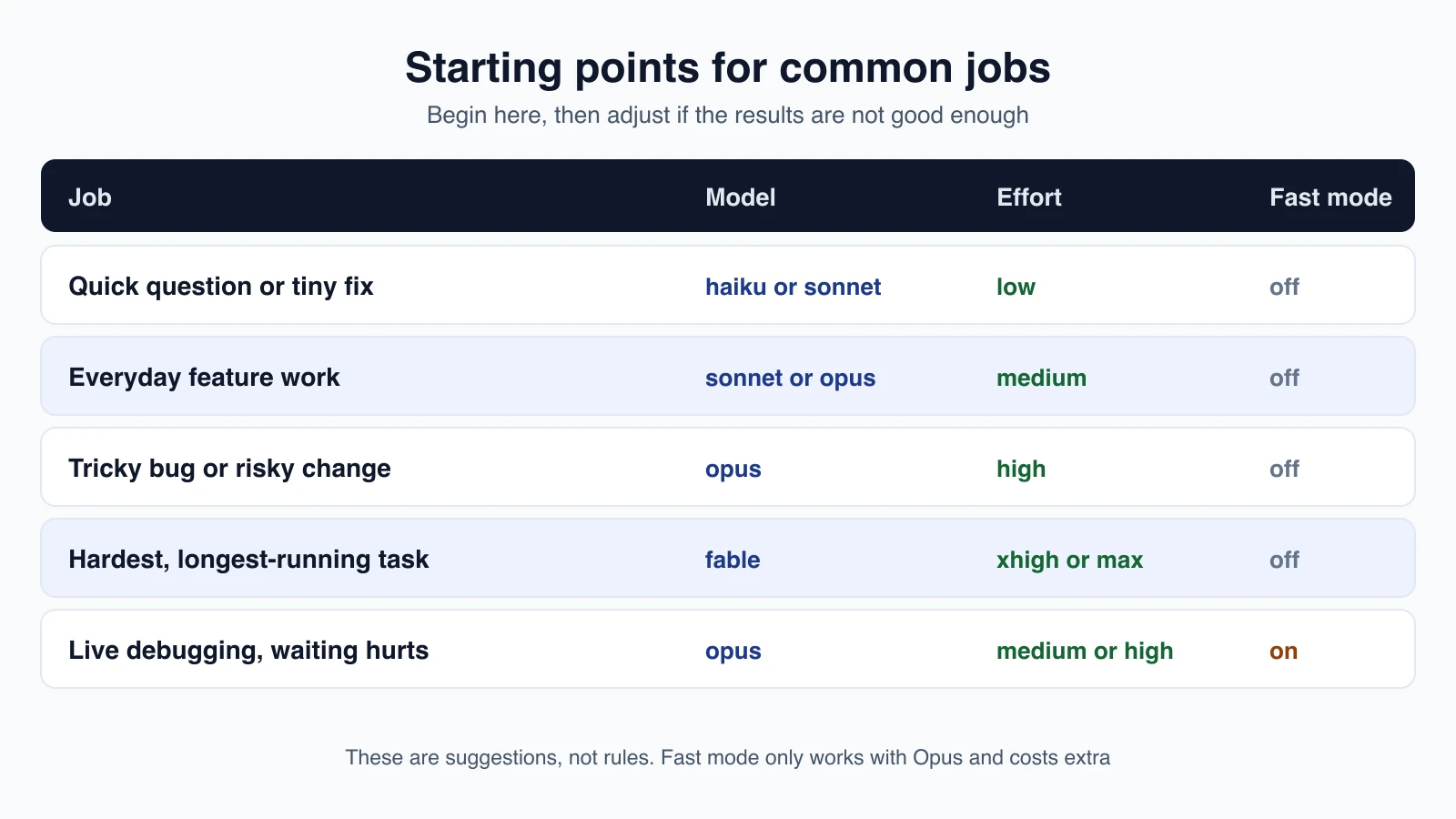
These are starting points that follow the guidance above, not strict rules. If a result is poor, raise the effort or switch to a stronger model before you rewrite the prompt. If you are paying for answers you do not need, go the other way.
A bigger memory: the context window
Every model has a context window, which is how much text it can keep in mind at once, measured in tokens. Fable 5.1, Sonnet 5 and later, Haiku 5.5 and Opus 4.7 and later all have a 1 million token window with no extra setup. Older Opus and Sonnet 4.6 models need a [1m] suffix, as in /model opus[1m]. Lesson 9 shows how to manage the context window so long conversations stay on track.
Mistakes beginners make
- Using the strongest settings for everything. Maximum effort on a one-line fix wastes time and tokens.
- Using the weakest settings for hard problems. If Claude keeps missing the point on a tricky bug, raise the effort or move up a model before you retry.
- Switching fast mode on and off all day. Each switch resets the cache and can raise the bill. Choose at the start of a session.
- Expecting fast mode on Sonnet or Haiku. It only works on Opus.
- Forgetting that
/modelsaves your choice. PressingEnterin the picker changes your default. Pressswhen you only want a change for the current session.
Quick recap
- Three dials: the model (
/model), effort (/effort) and fast mode (/fast). haikuis for simple tasks,sonnetfor daily coding,opusfor complex reasoning andfablefor the hardest work.- Effort runs from
lowtomax. Medium suits everyday work, andultrathinkgives one extra-deep turn. - Fast mode is Opus only, answers up to 2.5 times faster, and costs more per token.
- Start moderate and raise settings only when the results need it.
Try it yourself
In your practice folder, start Claude Code and run /model to see which models your plan offers. Ask a simple question such as "what files are in this folder?" on sonnet at low effort, then ask something harder, such as "suggest three ways to improve this project", after switching to opus at high effort. Compare the depth of the two answers and how long each took. If your plan allows it, try /fast for one question and notice the ↯ icon.
Next lesson: how the agent loop works, including tools and context.