
A chatbot call costs a little. An agent run can cost many times more, because the agent makes many calls, and each call carries everything that came before it. Costs that look tiny in a demo become real money at scale, and slow runs frustrate the people waiting on them. This lesson shows where the money and time go, and the levers that bring both down, in the order that usually pays off. It includes tested Python for tracking cost and enforcing a budget. The rule throughout: change one thing, and measure that quality did not drop.
Where the cost comes from
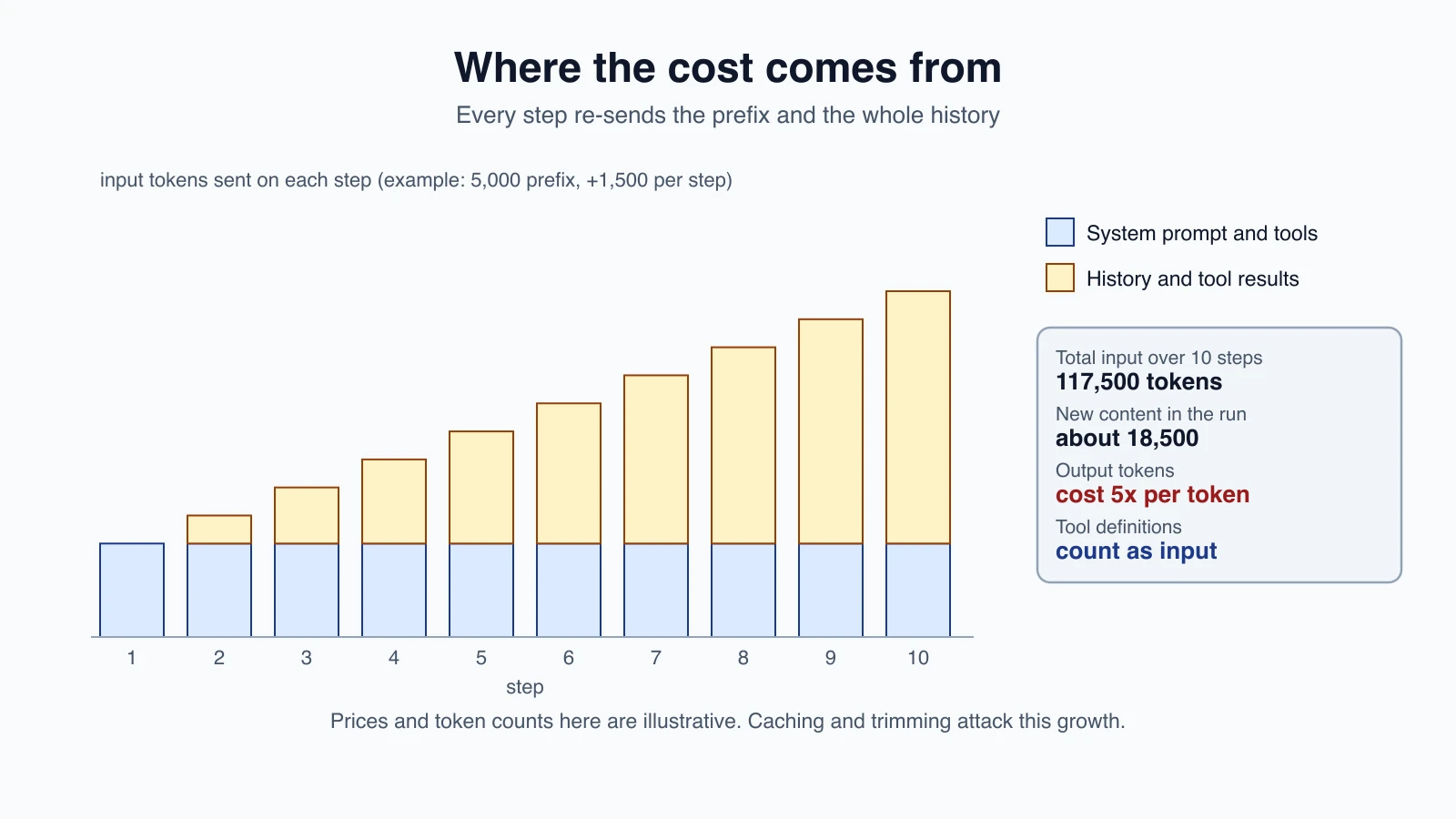
Model APIs charge by tokens, separately for input and output. For an agent, a few facts matter:
- Every step re-sends the history. The model has no memory between calls, so each call includes the system prompt, the tool definitions, all earlier messages and all earlier tool results. Input grows with every step.
- Output tokens cost more per token than input tokens. In Anthropic's current price list, output is five times the input price on the models below. Thinking tokens are billed as output.
- Tools add tokens. Anthropic's pricing page says tool use is priced on the total input tokens, including the
toolsparameter (names, descriptions and schemas), thetool_useandtool_resultblocks, plus a special system prompt that is added automatically when tools are present. Server-side tools such as web search can add usage-based charges. - Retries and loops cost money too. A runaway loop is the most expensive bug an agent can have.
An example with numbers
Take a run of 10 steps. A fixed prefix of 5,000 tokens (system prompt and tools), and each step adds 1,500 tokens of history. Each step also writes 300 output tokens. The input on each step is 5,000, 6,500, 8,000, and so on, up to 18,500, for a total of 117,500 input tokens across the run, even though the real new content was only about 18,500.
With the Sonnet 5.5 prices in the table below, the code in this lesson estimates this run at about $0.265 without caching and $0.086 with caching, around a third. The numbers are illustrative, from the code and the listed prices, not from a live run.
Current prices
Prices change often, so treat this table as a snapshot, and check Anthropic's pricing page before you plan. These are from the pricing page as read while writing this lesson, in US dollars per million tokens (MTok):
| Model | Input | Output | Cache read | 5-minute cache write |
|---|---|---|---|---|
| Claude Haiku 5.5 (prompts up to 100,000 tokens) | $0.10 | $0.50 | $0.01 | $0.125 |
| Claude Sonnet 5.5 | $2 | $10 | $0.10 | $2.50 |
| Claude Opus 5.5 | $4 | $20 | $0.20 | $5 |
| Claude Fable 5.1 | $10 | $50 | $0.25 | $12.50 |
Haiku 5.5 has a higher price tier for prompts over 100,000 tokens. A one-hour cache write costs twice the base input price. The Batch API gives a 50 percent discount on both input and output. Cache and batch discounts stack.
The levers, in order
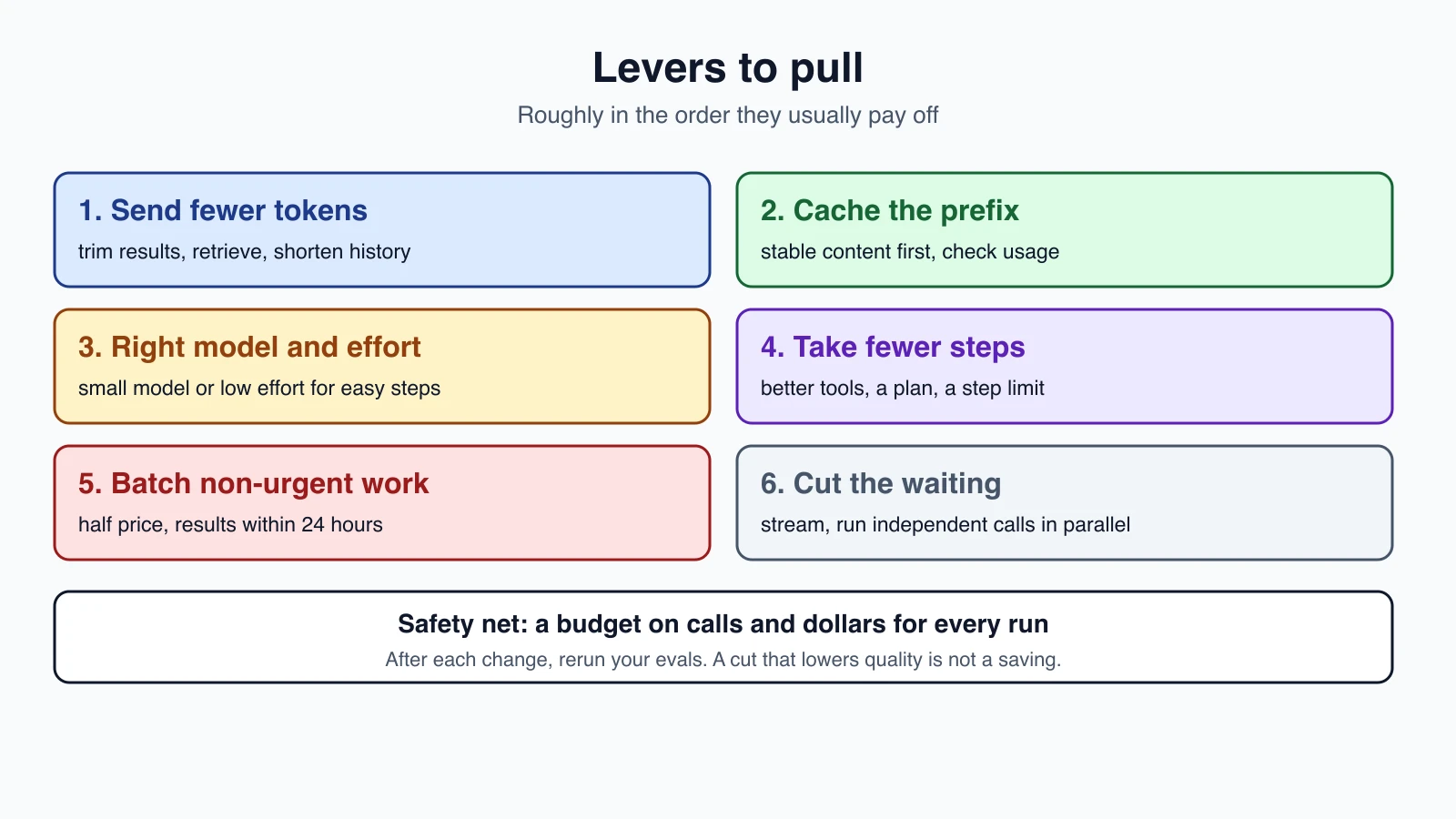
1. Send fewer tokens
The cheapest token is the one you do not send.
- Trim tool results. Return the fields the model needs, not the whole record. See Designing tools that work.
- Retrieve, do not dump. Pull the relevant passages, as in RAG and vector databases.
- Manage the history. Drop or summarize old tool results, as in Context engineering.
- Keep tool definitions tight, and load only the tools a task needs.
- Cap output with
max_tokensand with instructions to be brief where brevity is fine.
2. Cache the stable prefix
Prompt caching lets the API reuse the start of a prompt that has not changed, at a fraction of the price. From Anthropic's documentation:
- You turn it on with
cache_control, either as a top-level field for automatic caching or on individual blocks as explicit breakpoints. Up to four explicit breakpoints are allowed per request. - A cache write costs more than normal input: 1.25 times the base input price for the default five-minute cache, and 2 times for the optional one-hour cache.
- A cache read is much cheaper: 0.1 times the base price for most models, 0.05 times for Opus 5.5 and Sonnet 5.5, and 0.025 times for Fable 5.1.
- The default lifetime is five minutes, and each use refreshes it at no extra cost. You can ask for one hour.
- The order of the prompt is tools, then system, then messages. A change at one level invalidates that level and every level after it. Matching must be exact.
- A prompt shorter than the model's minimum is simply not cached, with no error. For the models in the table, the documented minimum is 512 tokens.
- The response
usageblock tells you what happened:cache_creation_input_tokens,cache_read_input_tokensandinput_tokens. If the first two are both zero, nothing was cached.
For agents, this fits well. The tools and system prompt never change, and the history only grows at the end, so each step can read what the last step wrote and pay full price only for the new part. Two habits help:
- Put stable content first, and new content last.
- Avoid editing earlier messages. Trimming or rewriting old history changes the prefix and invalidates the cache from that point on, so weigh the saving from trimming against the saving from caching.
Caching has a break-even point. A write costs more than a plain call, so a prompt used once loses money, and the tests show this. A prompt reused across several steps gains. Check the hit rate in your logs, as in Observability and tracing.
3. Use the right model and effort for each step
Not every step needs the most capable model. Route easy work to a smaller one, as in Chaining, routing and parallelization, and use a small model for workers, as in Orchestrator-workers and multi-agent systems. In the table, Sonnet 5.5 costs about twenty times what Haiku 5.5 does per input token. Test the cheaper model on your own tasks before you rely on it.
The effort setting controls how many tokens Claude spends. You set it with output_config.effort. Anthropic's documentation lists the levels low, medium, high, xhigh and max, where low gives significant token savings with some loss in capability and suits simpler tasks and subagents. Lower effort also means fewer and terser tool calls. The default level varies by model: medium for Opus 5.5 and Haiku 5.5, and high for most others. Support for each level also varies by model, so check the documentation for yours.
4. Take fewer steps
Every step costs a full model call. Fewer steps mean less cost and less waiting.
- Better tools let the agent finish in fewer calls.
- A plan can remove wandering, as in Planner-executor, DAG agents and tree of thought.
- A step limit stops loops, as in The agent loop.
- A workflow can replace an agent where the steps are known in advance.
5. Batch what is not urgent
The Message Batches API runs requests asynchronously at half the price. Anthropic's documentation says a batch is limited to 100,000 requests or 256 MB, most batches finish within an hour, a batch expires if it is not done within 24 hours, and results stay available for 29 days. It supports tool use. It fits work nobody is waiting on, such as running your evals overnight, as in Evaluating AI agents, or processing a pile of documents. Because batches can take longer than five minutes, the documentation suggests the one-hour cache for shared context.
A batch is a single request per item, so it suits a single call per task. A multi-step agent that must see each result before its next step cannot be one batch request.
6. Cut the waiting
Cost and latency are related but different. To reduce waiting:
- Stream the response, so the user sees text as it arrives. The total time is the same, but it feels much faster.
- Run independent calls in parallel, as in Chaining, routing and parallelization. Parallel calls cut waiting, not tokens.
- Use smaller models and lower effort for steps that do not need more.
- Generate less. Output tokens take time to produce, so shorter answers arrive sooner.
- Cache long prompts, since caching can also reduce processing time.
- Mind rate limits. A burst of parallel calls can hit them, as in Errors, retries and rate limits.
7. Set budgets
All of the above lowers the usual cost. A budget limits the worst case. Give every run a maximum number of model calls and a maximum spend, and stop it cleanly when it passes one.
The code
This code turns a response's usage block into dollars, adds up a run, enforces a budget, and estimates a run with and without caching.
1# Dollars per million tokens (input, output), and the cache-read multiplier, as listed on
2# Anthropic's pricing page when this lesson was written. Prices change: check the page.
3PRICES = {
4    "claude-haiku-5-5": {"input": 0.10, "output": 0.50, "read": 0.10, "max_prompt": 100_000},  # a higher tier applies above 100k
5    "claude-sonnet-5-5": {"input": 2.00, "output": 10.00, "read": 0.05},
6    "claude-opus-5-5": {"input": 4.00, "output": 20.00, "read": 0.05},
7}
8WRITE = {"5m": 1.25, "1h": 2.0}
9BATCH = 0.5
10
11
12class BudgetExceeded(Exception):
13    pass
14
15
16def tokens(usage, name):
17    return getattr(usage, name, 0) or 0
18
19
20def call_cost(usage, model, batch=False, ttl="5m"):
21    """Cost in dollars of one response, from its usage block."""
22    p = PRICES[model]
23    fresh, written, read = tokens(usage, "input_tokens"), tokens(usage, "cache_creation_input_tokens"), tokens(usage, "cache_read_input_tokens")
24    if fresh + written + read > p.get("max_prompt", float("inf")):
25        raise ValueError("this prompt falls in a price tier the table does not model")
26    per_token = p["input"] / 1e6
27    dollars = (fresh + written * WRITE[ttl] + read * p["read"]) * per_token + tokens(usage, "output_tokens") * p["output"] / 1e6
28    return dollars * (BATCH if batch else 1)
29
30
31class RunCost:
32    """Add up the cost of every model call in one run, and stop it when a limit is passed."""
33
34    def __init__(self, model, max_dollars=None, max_calls=None, **opts):
35        self.model, self.max_dollars, self.max_calls, self.opts = model, max_dollars, max_calls, opts
36        self.dollars, self.calls, self.fresh, self.read = 0.0, 0, 0, 0
37
38    def add(self, usage):
39        self.dollars += call_cost(usage, self.model, **self.opts)
40        self.calls += 1
41        self.fresh += tokens(usage, "input_tokens") + tokens(usage, "cache_creation_input_tokens")
42        self.read += tokens(usage, "cache_read_input_tokens")
43        if self.max_calls is not None and self.calls > self.max_calls:
44            raise BudgetExceeded(f"more than {self.max_calls} model calls")
45        if self.max_dollars is not None and self.dollars > self.max_dollars:
46            raise BudgetExceeded(f"spent ${self.dollars:.4f}, the limit is ${self.max_dollars}")
47
48    def cache_hit_rate(self):
49        total = self.fresh + self.read
50        return self.read / total if total else 0.0
51
52
53def input_per_step(prefix, growth, steps):
54    """Input tokens sent on each step when the whole history is re-sent: a fixed prefix plus what has piled up."""
55    return [prefix + growth * i for i in range(steps)]
56
57
58def run_cost_estimate(model, prefix, growth, steps, output=300, cached=False):
59    """Estimate a run. With caching, each step reads what the last step sent and pays full price for the new part."""
60    total, previous = 0.0, 0
61    for sent in input_per_step(prefix, growth, steps):
62        usage = type("U", (), {"output_tokens": output})()
63        if cached:
64            usage.cache_read_input_tokens, usage.cache_creation_input_tokens = previous, sent - previous
65        else:
66            usage.input_tokens = sent
67        total += call_cost(usage, model)
68        previous = sent
69    return total
How it works:
PRICESholds the numbers from the table. It is data, so updating a price is a one-line change. A comment in the code says to check the pricing page.call_costreads the four counters inusage, prices fresh input, cache writes and cache reads separately, adds output, and applies the batch discount if asked. A missing orNonecounter counts as zero. For Haiku 5.5 it refuses prompts over 100,000 tokens, because the higher tier is not modelled, rather than quietly returning a wrong number.RunCostadds up the cost of every call in one run, tracks the share of input that was read from the cache, and raisesBudgetExceededas soon as the dollar limit or the call limit is passed.run_cost_estimatebuilds the example above. With caching, each step reads what the previous step sent and pays the write price only for the new part.
To use RunCost, call run_cost.add(response.usage) after each model call in your agent loop. The exception stops the loop, and your code can return a partial result.
The tests
1from types import SimpleNamespace as U
2import pytest
3from cost import *
4
5S = "claude-sonnet-5-5"
6
7def test_plain_call_cost():
8    assert call_cost(U(input_tokens=100_000, output_tokens=1_000), S) == pytest.approx(0.20 + 0.01)
9
10def test_cache_write_and_read_prices():
11    assert call_cost(U(cache_creation_input_tokens=100_000, output_tokens=0), S) == pytest.approx(100_000 * 2.5 / 1e6)
12    assert call_cost(U(cache_creation_input_tokens=100_000, output_tokens=0), S, ttl="1h") == pytest.approx(100_000 * 4 / 1e6)
13    assert call_cost(U(cache_read_input_tokens=100_000, output_tokens=0), S) == pytest.approx(100_000 * 0.1 / 1e6)
14
15def test_batch_halves_everything_and_none_fields_are_zero():
16    u = U(input_tokens=1000, output_tokens=500, cache_read_input_tokens=None)
17    assert call_cost(u, S, batch=True) == pytest.approx(call_cost(u, S) / 2)
18
19def test_unmodelled_tier_is_refused():
20    with pytest.raises(ValueError):
21        call_cost(U(input_tokens=100_001, output_tokens=1), "claude-haiku-5-5")
22
23def test_run_cost_totals_and_hit_rate():
24    r = RunCost(S)
25    r.add(U(cache_creation_input_tokens=1000, input_tokens=0, output_tokens=0))
26    r.add(U(cache_read_input_tokens=1000, input_tokens=200, output_tokens=100))
27    assert r.calls == 2 and r.cache_hit_rate() == pytest.approx(1000 / 2200)
28    assert r.dollars == pytest.approx(1000 * 2.5 / 1e6 + (1000 * 0.1 + 200 * 2) / 1e6 + 100 * 10 / 1e6)
29    assert RunCost(S).cache_hit_rate() == 0.0
30
31def test_budget_stops_the_run():
32    r = RunCost(S, max_dollars=0.0035)   # each call below costs $0.002, so the second one passes the limit
33    with pytest.raises(BudgetExceeded, match="limit"):
34        for _ in range(10): r.add(U(input_tokens=1000, output_tokens=0))
35    assert r.calls == 2   # stopped as soon as the limit was passed, not after ten calls
36    r = RunCost(S, max_calls=2); r.add(U(input_tokens=1, output_tokens=0)); r.add(U(input_tokens=1, output_tokens=0))
37    with pytest.raises(BudgetExceeded, match="model calls"): r.add(U(input_tokens=1, output_tokens=0))
38
39def test_input_grows_each_step():
40    assert input_per_step(5000, 1000, 4) == [5000, 6000, 7000, 8000]
41
42def test_caching_pays_off_over_a_run():
43    plain = run_cost_estimate(S, 5000, 1000, 10)
44    cached = run_cost_estimate(S, 5000, 1000, 10, cached=True)
45    assert cached < plain
46    assert run_cost_estimate(S, 5000, 1000, 1, cached=True) > run_cost_estimate(S, 5000, 1000, 1)   # one call: the write premium is a loss
They use a stand-in usage object, so no API is needed. They check each price rule by hand-worked numbers, that a one-call prompt loses money with caching, and that the budget stops the run on the call that crosses the limit.
I broke the code nine ways to check the tests notice. Eight were caught at once. One survived: the dollar-budget check could be loosened to double the limit, because my first budget test was too loose and passed either way. I changed the test so that the second call is the one that crosses the limit, and the loosened version now fails. A budget test must check when the run stops, not only that it stops.
Measure the right thing
- Cost per successful task, not cost per call. A cheaper agent that fails more often costs more per success.
- Cost and latency percentiles, not only averages. See Observability and tracing.
- Quality alongside cost. After every change, rerun your evals. A cut that lowers accuracy is not a saving.
- Cache hit rate, and what you get back from
usage. - Alerts when cost per run rises sharply.
Mistakes beginners make
- Optimizing before measuring, so effort goes to the wrong place.
- Ignoring that history is re-sent every step.
- Caching a prompt that changes every call.
- Putting changing content at the start of the prompt, which breaks the cache.
- Never checking
usageto see whether the cache worked. - Using the biggest model for every step.
- No step limit or budget.
- Cutting tokens and cutting quality, without re-running evals.
- Trying to batch a step-by-step agent.
- Trusting an old price table.
Quick recap
- An agent's cost multiplies with its steps, because each call re-sends the system prompt, the tools, the history and the tool results.
- Output tokens cost more than input tokens, and tools add input tokens.
- Levers, roughly in order: send fewer tokens, cache the stable prefix, pick the right model and effort, take fewer steps, batch non-urgent work, cut waiting with streaming and parallel calls, and set budgets.
- Caching writes cost more than normal input and reads cost much less, so it pays when a prefix is reused. Keep stable content first, and check
usage. - The Batch API halves the price for work that can wait.
- Streaming and parallel calls reduce waiting, not tokens.
- Measure cost per successful task and rerun your evals after every change.
- Prices change, so check the current pricing page.
Try it yourself
Take an agent loop you have and log the usage of every call. Feed those numbers to RunCost and print the cost per run. Then turn on caching, run again, and compare the cache hit rate and the cost. Add a budget of a few cents and trigger it on purpose with a loop that never ends. Finally, change your model to a smaller one for one step and rerun your evals, to see whether quality held.
Next lesson: Agent frameworks compared.