
AI Agents course · lesson 33 of 36
- 1What Is an AI Agent? A Beginner's Guide to How Agents Work
- 2How LLMs Work: Tokens, Context Windows and Embeddings for Agent Builders
- 3Choosing and Configuring a Model for Your AI Agent
- 4The Agent Loop Explained: Perceive, Reason, Act, Observe
- 5Workflows or Agents? How to Decide What to Build
- 6Build Your First AI Agent From Scratch in Python
- 7Function Calling Across Providers: Claude, OpenAI and Gemini
- 8Errors, Retries and Rate Limits: Keep Your AI Agent From Crashing
- 9How to Write Tool Definitions and Get Structured Output From an AI Agent
- 10Designing Tools That Work: How to Make an AI Agent Better by Fixing Its Tools
- 11Common AI Agent Tools: Web Search, Code Execution, Databases, APIs and Email
- 12Computer Use and Web Browsing Agents: How They Work and When to Avoid Them
- 13MCP Explained: The Model Context Protocol for AI Agents
- 14Build and Deploy an MCP Server in Python
- 15Prompting for Agents: How to Write System Prompts an AI Agent Can Follow
- 16Context Engineering for AI Agents: What to Put in the Context Window
- 17AI Agent Memory: Short-Term vs Long-Term, and Where Each Lives
- 18Maintaining Agent Memory: Updating, Summarizing, Retrieving and Forgetting
- 19RAG and Vector Databases Explained: How Agents Search Your Documents
- 20Build a RAG Agent in Python That Answers From Your Documents With Citations
- 21ReAct and Chain of Thought: How AI Agents Reason and Act
- 22Planner-Executor, DAG Agents and Tree of Thought: Planning Architectures Explained
- 23Self-Critique and Evaluator-Optimizer: Improve Agent Output with a Review Loop
- 24Chaining, Routing and Parallelization: Three Core Workflow Patterns for AI Agents
- 25Orchestrator-Workers and Multi-Agent Systems: When to Use More Than One Agent
- 26Human-in-the-Loop Agents: Approval Gates, Checkpoints and Safe Oversight
- 27Testing AI Agents: Unit Tests, Mocked Models and Handling Non-Determinism
- 28Evaluating AI Agents: Evals, Graders, Metrics and pass@k
- 29Observability and Tracing for AI Agents: See What Your Agent Did and Why
- 30Prompt Injection and Tool Sandboxing: Protect AI Agents from Hostile Input
- 31Privacy, Bias and Red Teaming: Responsible Practices for AI Agents
- 32Agent Cost and Latency: Make AI Agents Cheaper and Faster Without Losing Quality
- 33AI Agent Frameworks Compared: Build Directly or Use LangGraph, CrewAI, the Agents SDKs and More
- 34Deploying AI Agents: Hosting, Queues, State, Secrets and Safe Releases
- 35Walkthrough: Build a Customer Support Agent with Tools, Approvals, Guardrails and Evals
- 36Walkthrough: Build a Research Agent with Parallel Workers, Citations and Source Checking
By now you have built agents with plain Python and a model API. At some point you will meet frameworks, libraries that promise to give you the loop, the tools, the memory and the multi-agent plumbing ready-made. Some will save you real time. Others will hide what your agent is doing behind layers you did not ask for. This lesson helps you decide. First you will read a small framework, so you know what the common parts are. Then you will compare the main options, using what their own documentation says, and finish with a way to choose and a way to avoid being stuck.
A warning before the comparison. This field changes fast. While I checked documentation for this lesson, the pages for LangGraph, Pydantic AI, LlamaIndex and Google's ADK each redirected to a new address, which shows how quickly things move. Treat every statement about a framework here as a snapshot, and check the current documentation before you commit.
What a framework does: a 64-line example
Most agent frameworks offer the same handful of ideas. Here they are in about 64 lines of Python, on top of the Claude API:
- Tools from typed functions. Write a normal function with type hints and a docstring, and the library builds the JSON schema the model needs.
- An agent object, bundling instructions, tools and settings.
- The run loop, which you wrote by hand in Build your first agent.
- Handoffs, which let one agent pass the conversation to another.
- Guardrails, checks that run before the model sees the input.
- A trace, a list of what happened.
1import inspect
2from dataclasses import dataclass, field
3
4MODEL = "claude-haiku-5-5"
5JSON_TYPES = {int: "integer", float: "number", str: "string", bool: "boolean"}
6
7
8def tool(fn):
9    """Turn a typed Python function into a tool definition. This is most of what 'define a tool' means in a framework."""
10    params = inspect.signature(fn).parameters
11    fn.schema = {
12        "name": fn.__name__,
13        "description": (inspect.getdoc(fn) or "").split("\n")[0],
14        "input_schema": {
15            "type": "object",
16            "properties": {n: {"type": JSON_TYPES[p.annotation]} for n, p in params.items()},
17            "required": [n for n, p in params.items() if p.default is p.empty],
18        },
19    }
20    return fn
21
22
23@dataclass
24class Agent:
25    name: str
26    instructions: str
27    tools: list = field(default_factory=list)
28    handoffs: list = field(default_factory=list)     # other Agents this one may pass the conversation to
29    guardrails: list = field(default_factory=list)   # each takes the task text and returns None or a reason to refuse
30
31
32def run(client, agent, task, max_steps=6, trace=None):
33    log = trace if trace is not None else []
34    for check in agent.guardrails:
35        reason = check(task)
36        if reason:
37            log.append(("blocked", agent.name, reason))
38            return {"status": "blocked", "answer": reason, "agent": agent.name}
39    messages = [{"role": "user", "content": task}]
40    for step in range(max_steps):
41        handoff_tools = [{"name": f"handoff_to_{a.name}", "description": f"Pass the conversation to {a.name}.",
42                          "input_schema": {"type": "object", "properties": {}}} for a in agent.handoffs]
43        reply = client.messages.create(model=MODEL, max_tokens=1024, system=agent.instructions,
44                                       tools=[t.schema for t in agent.tools] + handoff_tools, messages=messages)
45        log.append(("model", agent.name, step))
46        calls = [b for b in reply.content if b.type == "tool_use"]
47        if not calls:
48            return {"status": "done", "answer": "".join(b.text for b in reply.content if b.type == "text"), "agent": agent.name}
49        results = []
50        for c in calls:
51            target = next((a for a in agent.handoffs if f"handoff_to_{a.name}" == c.name), None)
52            if target:
53                log.append(("handoff", agent.name, target.name))
54                agent, out = target, f"Handed off to {target.name}."
55            else:
56                fn = next((t for t in agent.tools if t.__name__ == c.name), None)
57                try:
58                    out = str(fn(**c.input)) if fn else f"unknown tool {c.name}"
59                except Exception as exc:
60                    out = f"{type(exc).__name__}: {exc}"
61                log.append(("tool", agent.name, c.name))
62            results.append({"type": "tool_result", "tool_use_id": c.id, "content": out})
63        messages += [{"role": "assistant", "content": reply.content}, {"role": "user", "content": results}]
64    return {"status": "max_steps", "answer": None, "agent": agent.name}
How it works
toolreads the function's signature and docstring. Parameters with no default becomerequired. The function stays a plain function you can call and test.Agentis a data object. Handoffs are other agents it may pass control to.runfirst applies guardrails, so a blocked task never costs a model call. Then it loops: call the model, run any tools, send the results back. A handoff is exposed to the model as a tool namedhandoff_to_<name>. When the model calls it, the loop switches to that agent's instructions and tools and keeps the conversation going.- The trace is a list of events, enough to see which agent did what.
The tests
1from types import SimpleNamespace as NS
2from mini import *
3
4class C:
5    def __init__(s, *r): s.messages = s; s.r = list(r); s.calls = []
6    def create(s, **k): s.calls.append(k); return s.r.pop(0)
7text = lambda t: NS(content=[NS(type="text", text=t)])
8call = lambda i, n, **a: NS(content=[NS(type="tool_use", id=i, name=n, input=a)])
9
10@tool
11def add(a: int, b: int = 0) -> int:
12    """Add two numbers.
13
14    More detail that is not part of the description."""
15    return a + b
16
17def test_tool_schema_from_a_typed_function():
18    assert add.schema == {"name": "add", "description": "Add two numbers.",
19                          "input_schema": {"type": "object", "properties": {"a": {"type": "integer"}, "b": {"type": "integer"}}, "required": ["a"]}}
20    assert add(2, 3) == 5   # still a plain function
21
22def test_loop_with_a_tool_and_trace():
23    a = Agent("helper", "Be brief.", tools=[add]); log = []
24    c = C(call("t1", "add", a=2, b=3), text("5"))
25    out = run(c, a, "2+3?", trace=log)
26    assert out == {"status": "done", "answer": "5", "agent": "helper"}
27    assert log == [("model", "helper", 0), ("tool", "helper", "add"), ("model", "helper", 1)]
28    assert c.calls[0]["system"] == "Be brief." and c.calls[0]["tools"] == [add.schema]
29    assert c.calls[1]["messages"][2]["content"][0] == {"type": "tool_result", "tool_use_id": "t1", "content": "5"}
30
31def test_tool_error_and_unknown_tool_go_back_to_the_model():
32    c = C(call("t1", "add"), call("t2", "nope"), text("ok"))
33    run(c, Agent("h", "x", tools=[add]), "go")
34    assert "TypeError" in c.calls[1]["messages"][2]["content"][0]["content"]
35    assert c.calls[2]["messages"][4]["content"][0]["content"] == "unknown tool nope"
36
37def test_handoff_switches_instructions_and_tools():
38    billing = Agent("billing", "You handle billing.", tools=[add])
39    triage = Agent("triage", "You route requests.", handoffs=[billing])
40    log = []
41    c = C(call("t1", "handoff_to_billing"), call("t2", "add", a=1, b=1), text("done"))
42    out = run(c, triage, "refund please", trace=log)
43    assert out["agent"] == "billing" and out["status"] == "done"
44    assert c.calls[0]["system"] == "You route requests." and c.calls[0]["tools"][0]["name"] == "handoff_to_billing"
45    assert c.calls[1]["system"] == "You handle billing." and c.calls[1]["tools"] == [add.schema]
46    assert ("handoff", "triage", "billing") in log
47
48def test_guardrail_blocks_before_any_model_call():
49    no_secrets = lambda t: "Please do not paste passwords." if "password" in t else None
50    c = C(); log = []
51    out = run(c, Agent("h", "x", guardrails=[no_secrets]), "my password is hunter2", trace=log)
52    assert out == {"status": "blocked", "answer": "Please do not paste passwords.", "agent": "h"} and c.calls == [] and log == [("blocked", "h", "Please do not paste passwords.")]
53    assert run(C(text("hi")), Agent("h", "x", guardrails=[no_secrets]), "hello")["status"] == "done"
54
55def test_max_steps():
56    c = C(*[call(f"t{i}", "add", a=1) for i in range(5)])
57    assert run(c, Agent("h", "x", tools=[add]), "loop", max_steps=3)["status"] == "max_steps" and len(c.calls) == 3
They use a fake client with scripted replies, as in Testing AI agents, so no API key is needed. I broke the library eight ways, for example by ignoring the guardrail, not switching agents on a handoff, and skipping the tool log, and each change made at least one test fail.
What this sketch leaves out
Real frameworks add the hard parts: streaming, saving and resuming state, durable execution that survives crashes, richer tracing, approval flows, many model providers, and deployment. This sketch has no streaming, no persistence, no concurrency, no retries and a very simple type mapping. Its purpose is to show that the core is small, so that when you read a framework you can tell the parts you need from the parts you do not.
What a framework costs
Anthropic's guide to building effective agents, which this course has followed, makes two warnings about frameworks. They can add layers that hide the prompts and responses, which makes debugging harder, and they can tempt you into more complexity than the task needs. Its advice is to start by using the model's API directly, since many patterns take only a few lines, and to understand what a framework does underneath if you use one.
In practice the costs are:
- Hidden prompts. The framework may add its own instructions, and you may not see them unless you look at traces.
- A learning curve for its concepts, on top of the model's.
- Churn. APIs and even documentation sites move, as noted above.
- Lock-in. Your agent is written in its vocabulary.
- Harder debugging, with extra layers between your code and the API call.
- Weight. Dependencies, and sometimes a runtime or a service.
And the benefits, when they are real:
- Speed on the basics.
- Built-in solutions for hard problems: durable execution, human approval, memory, tracing.
- A shared vocabulary with other people who use it.
- Integrations with models, vector databases and tools.
The question is never "framework or not" in general. It is whether this framework solves a problem you actually have at a price you accept.
The landscape
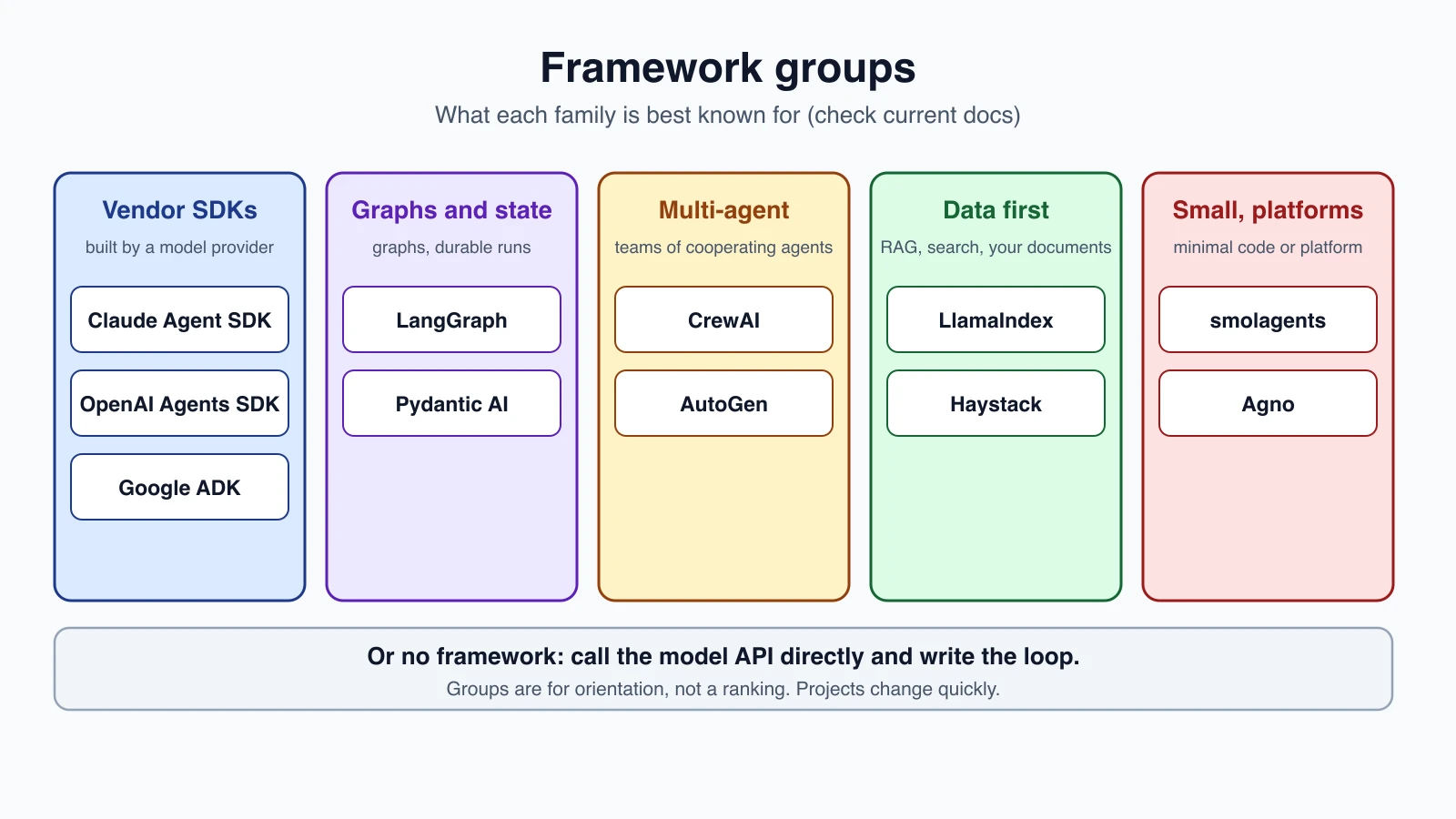
The table summarizes what each project's own documentation says, as read for this lesson. It is not a ranking. The languages column lists what the page I read mentions, and some projects may offer more.
| Framework | Languages | What its documentation says | Notes |
|---|---|---|---|
| No framework (the model API directly) | Any | You write the tool loop yourself, or use the client SDK's beta tool runner, per Anthropic's SDK docs | Most control. Start here |
| Claude Agent SDK | Python, TypeScript | Gives you the tools, agent loop and context management that power Claude Code, as a library. Includes built-in tools, hooks, subagents, MCP, permissions and sessions | It runs the Claude Code binary, so it suits agents that work with files and commands. Anthropic's terms apply |
| OpenAI Agents SDK | Python | A lightweight package with few abstractions. Agents, handoffs (and agents as tools), guardrails, sessions and tracing | Uses the Responses API by default for OpenAI models. Supports other providers through its models layer and third-party adapters |
| LangGraph | Python | A low-level orchestration framework and runtime for long-running, stateful agents, built around a graph. Durable execution, human-in-the-loop, memory | Works with LangChain but does not require it. Traced with LangSmith |
| CrewAI | Python | Open source. Flows define steps, state and event-driven logic. Crews are teams of role-playing agents that collaborate on tasks | Role-based multi-agent style |
| AutoGen | Python | Layers: Core (event-driven), AgentChat (conversational agents) and Extensions. Studio is a no-code UI | See the note below on its status |
| Google ADK | Python, TypeScript, Go, Java, Kotlin | Open source. Simple LLM agents and template workflows (sequential, loop, parallel). Graph-based workflows are new in ADK 2.0 | Model-agnostic, with easy Gemini access and adapters for other providers |
| Pydantic AI | Python | Type-safe agents. Validates outputs against your declared type. Dependency injection. Durable execution on engines such as Temporal, DBOS and Prefect. MCP support | Model-agnostic: switch providers with a string |
| smolagents (Hugging Face) | Python | Agent logic fits in roughly a thousand lines. CodeAgent writes its actions as code. Also supports ordinary tool-calling agents | Sandboxed execution options include Modal, Blaxel, E2B and Docker. Model-agnostic, and can use MCP tools |
| LlamaIndex | Python | A toolkit for LLM agents over your own data, centered on retrieval-augmented generation. Agents, event-driven Workflows, and the hosted LlamaParse for documents | Strongest when your problem is your documents |
| Haystack | Python | Build apps from components wired into pipelines. Focused on RAG, search and agents | Pipelines are predictable, while agents let the model steer |
| Agno | Not stated on the page I read | A "self-driving agent platform": agents, teams, workflows, memory, knowledge and the AgentOS runtime | A larger platform, not only a library |
Two other points worth knowing:
- Hosted agents. Some vendors run the agent for you. Anthropic's Managed Agents, for example, is a hosted agent harness that runs the loop in a managed cloud sandbox, or in a self-hosted one. As noted in Function calling across providers, hosting saves code and ties you to one vendor.
- Wrappers. Several of these can use others' tools. smolagents can use tools from MCP servers and from LangChain.
A note on AutoGen: its documentation page I read said nothing about its status. Several third-party sources I found state that AutoGen is in maintenance mode and that Microsoft Agent Framework is its successor, and a community fork called AG2 exists. I could not confirm this on an official Microsoft page, so check the official repository before you start a new project with it.
LangChain is not in the table because its documentation was not among the pages I read for this lesson. The LangGraph documentation states that LangGraph works with LangChain but does not require it.
How to choose
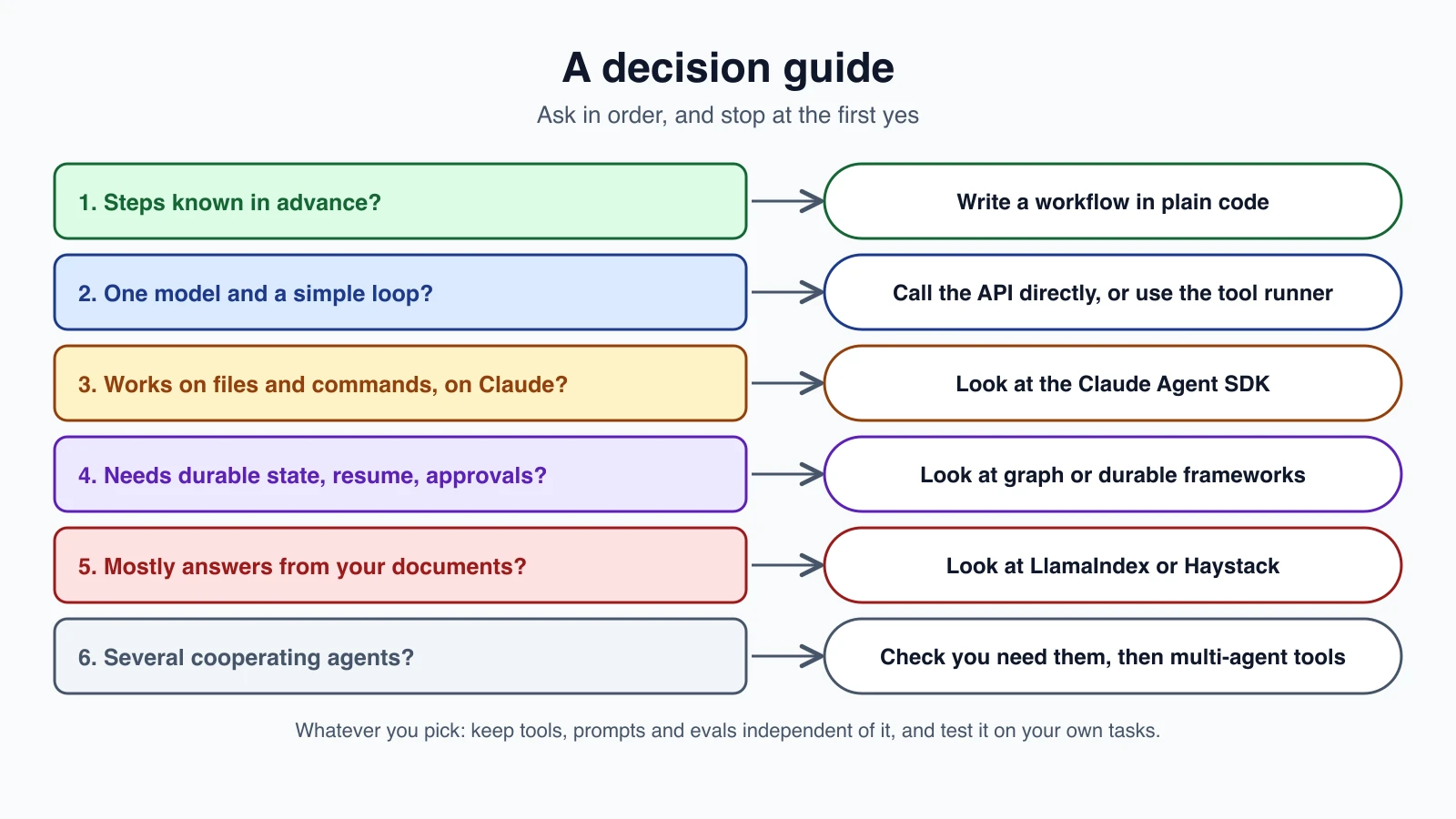
Work through these questions in order:
- Are the steps known in advance? Write a workflow in plain code. See Chaining, routing and parallelization. You do not need a framework for a chain with a gate.
- Do you need one model and a simple tool loop? Call the API directly. You already have the code from this course. The client SDK's tool runner can drive the loop if you want less code.
- Does the agent work on files and commands, and does it run on Claude? The Claude Agent SDK gives you that harness without writing it.
- Do you need state that survives crashes, resumable runs and approvals? These are hard to build well. Look at frameworks that offer durable execution, such as LangGraph or Pydantic AI with a durable engine, or at hosted agents.
- Is the job mostly answering from your own documents? LlamaIndex or Haystack are built around that. Compare with building it yourself, as in Build a RAG agent.
- Do you want several cooperating agents? First read Orchestrator-workers and multi-agent systems and check that you need more than one. Then look at CrewAI, AutoGen, ADK or the OpenAI Agents SDK handoffs.
- Do you need to work across several languages or model providers? Check the language list and provider support in the table first.
A checklist for any framework
Before you adopt one, check:
- Can I see every prompt and API call it makes? If not, treat it with caution.
- Can I swap the model or provider without rewriting the agent?
- Can I test it with a fake model, as in Testing AI agents?
- How does it handle errors, retries, rate limits and step limits?
- Does it support human approval, as in Human-in-the-loop agents?
- Can I trace it, with its own tools or with OpenTelemetry-style tracing, as in Observability and tracing?
- How active is the project, and how often do breaking changes arrive?
- What is the license, and what are the terms?
- What is the escape hatch when I need something it does not support?
- What does it cost to leave later?
Try before you adopt
Build the same small agent three ways: your own loop, the framework, and perhaps a second framework. Run your eval set against each, as in Evaluating AI agents. Compare quality, lines of code, readability of traces, cost and the time it took to find a bug. A framework that is not clearly better on your tasks is not worth its weight.
Staying free to leave
You can use a framework and still avoid lock-in:
- Keep tools as plain functions, with the framework adapter on top. Then they work anywhere, as the sketch above shows.
- Keep prompts in your own files, not inside framework objects.
- Keep your evals and test set outside the framework, so you can compare options fairly.
- Wrap the framework behind a small interface of your own:
run(task) -> result. Then the rest of your app does not depend on it. - Pin versions, and read the changelog before you upgrade.
- Read the source, or at least the trace, of what it sends to the model.
Mistakes beginners make
- Starting with a framework before building a loop by hand.
- Choosing by popularity and not by the problem.
- Not looking at the prompts the framework sends.
- Using a multi-agent framework for a single-agent task.
- Rewriting everything in the framework's style, so leaving becomes impossible.
- Not pinning versions, and being surprised by breaking changes.
- Trusting a comparison article as current, including this one. Check the documentation.
- Comparing frameworks on features and not on your own evals.
- Ignoring the project's status, maintenance and terms.
- Adopting a heavy platform for a small job.
Quick recap
- The core of an agent framework is small: typed tools, an agent object, a loop, handoffs, guardrails and a trace. You can read all of that in 64 lines.
- Real frameworks add the hard parts: streaming, durable state, approvals, tracing and deployment.
- Frameworks cost you visibility, simplicity and portability. They can pay back in speed and built-in solutions.
- The landscape includes vendor SDKs (Claude Agent SDK, OpenAI Agents SDK, Google ADK), graph and state frameworks (LangGraph, Pydantic AI), multi-agent frameworks (CrewAI, AutoGen), data-first ones (LlamaIndex, Haystack), small libraries (smolagents) and platforms (Agno).
- Choose by your problem: known steps need a workflow, a simple loop needs the API, durable state needs a durable framework, and document answering suits data-first tools.
- Test frameworks on your own evals, and keep tools, prompts and tests independent so you can leave.
- Everything here is a snapshot. Check the current documentation.
Try it yourself
Take the agent you built earlier and move its tools onto the @tool decorator from the sketch. Then run it with run, add a guardrail, and add a handoff to a second agent. Next, install one framework from the table, rebuild the same agent in it, and run your eval set against both. Write down what was easier, what was harder, and what you could not see.
Next lesson: Deploying AI agents.