
Vibe Coding course · lesson 16 of 26
- 1What Is Vibe Coding? A Beginner's Guide
- 2The Vibe Coder Mindset: Build Small, Check Often
- 3Choosing Your Vibe Coding Tool: A Beginner's Guide
- 4Set Up Your Workspace for Vibe Coding
- 5Your First Vibe-Coded App in 30 Minutes
- 6From Idea to MVP: Plan a Small First Version
- 7Spec-Driven Development: Give AI a Clear Plan to Build From
- 8Mockups and Examples as Input: Show AI What You Mean
- 9Choose a Tech Stack: Pick Tools You Can Keep Using
- 10Prompts That Build Things: Give AI a Clear Task
- 11Context Documents: Give AI Lasting Project Instructions
- 12Managing Context and Sessions: Keep AI on the Right Task
- 13Set Standards Early and Review AI Output
- 14Build the Skeleton: Start the BookmarkBox App
- 15Add Data and a Database: Save Real Bookmarks
- 16Add Accounts Safely: Sign In and Protect Each User's Data
- 17Design and Polish: Improve the App One Pass at a Time
- 18Version Control with AI: Keep a Safe History of Your Work
- 19Debugging with AI: Find the Cause Before You Fix It
- 20Test by Default: Make Sure Each Feature Keeps Working
- 21Refactor and Keep Your Code Healthy
- 22Security for Vibe Coders: Protect Your App and Its Users
- 23Deploy Your App: Put BookmarkBox Online
- 24Monitor and Maintain Your App After Launch
- 25Where Vibe Coding Stops: Know When to Change Your Approach
- 26Capstone: Ship a Project from Idea to Production
After this lesson, you will be able to explain how sign-in differs from access control, use an authentication library instead of inventing your own password system, and check that BookmarkBox keeps each person's bookmarks private. A sign-in screen is only one part of account security; the server must check ownership whenever it reads or changes private data.
In Add data and a database, you added persistent bookmarks. Now we will connect each record to a signed-in person and protect every operation.
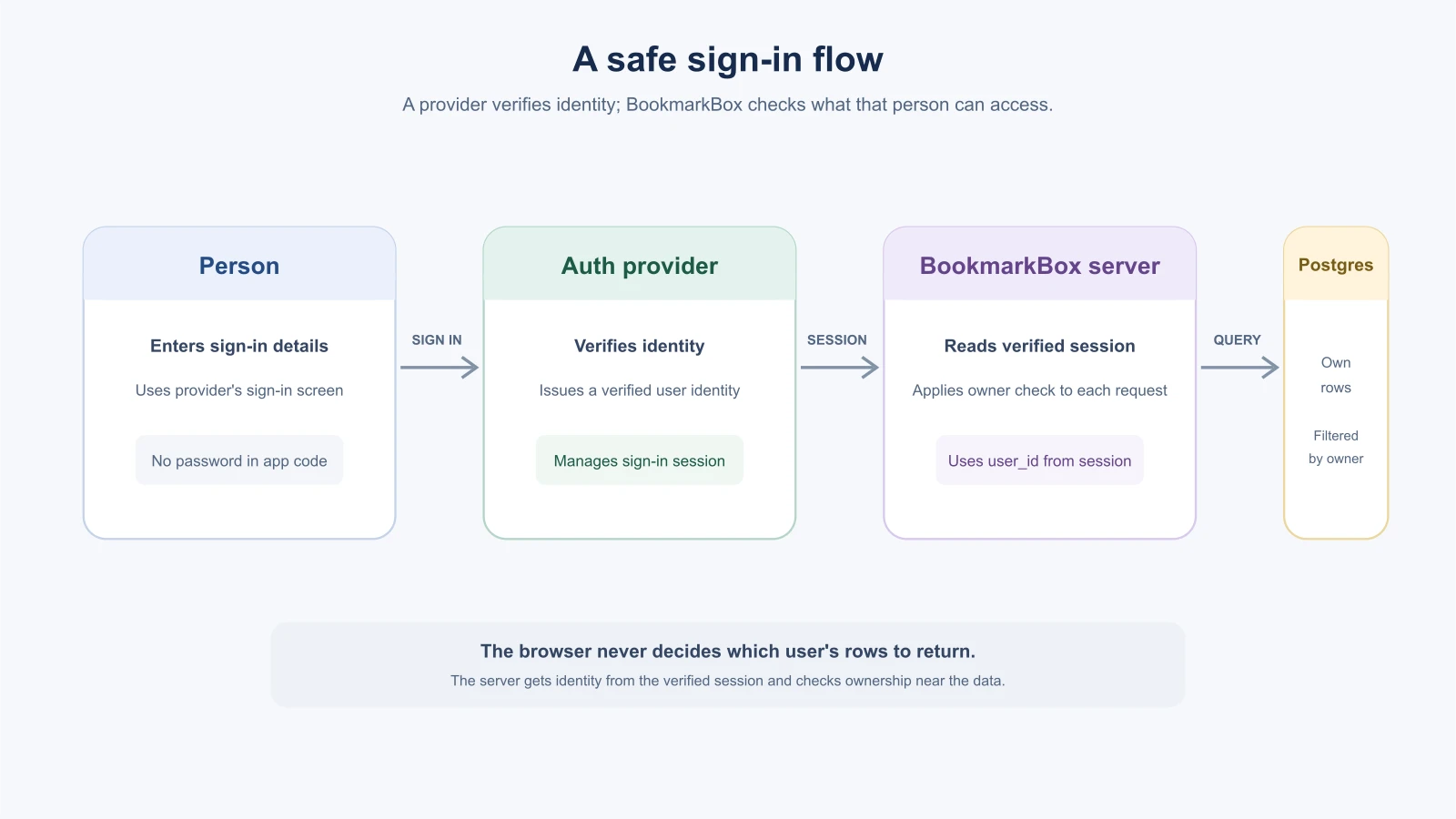
Authentication is not authorization
Authentication checks who a person is. Signing in with a password or a trusted identity provider is one way to do that. Authorization checks what that person is allowed to see or change. A valid sign-in does not automatically give a person access to every bookmark in the database.
A session is the app's way of recognizing a person across requests after they sign in. Often the browser keeps a protected session cookie and sends it back to the server. The server or authentication library checks that session and identifies the signed-in user. The app should not trust a user ID supplied by a form or browser request as proof of identity.
Next.js's current authentication guide separates authentication, session management and authorization, and recommends using an authentication library for security and simplicity. It lists compatible options such as Auth0, Better Auth, Clerk, Auth.js and Supabase. The right choice depends on your project and deployment, so compare current documentation and capabilities before committing. (Next.js authentication guide).
Use a maintained library or provider
Authentication has many details: password storage, email verification, password resets, session expiration, secure cookies and possibly multi-factor authentication. Building each piece yourself creates more code to get right and maintain. Use a maintained auth library or service for the sign-in flow, and let your app use its verified user identity.
Before asking an AI to install one, ask it to compare a short list of current options for the project's Next.js version, data store and hosting. Check whether you can use the provider with your database, how user IDs are represented, what settings and secrets it needs, and how you would export or move your user data later. Decide which features your app actually needs. Do not add social sign-in, organizations or role systems just because the provider offers them.
For BookmarkBox, the goal is small: a person can create an account, sign in and see their own saved links. Store the stable user ID from the auth provider in the app's user record, then associate each bookmark with that user. Do not store a password in the bookmarks table.
Check ownership on every data operation
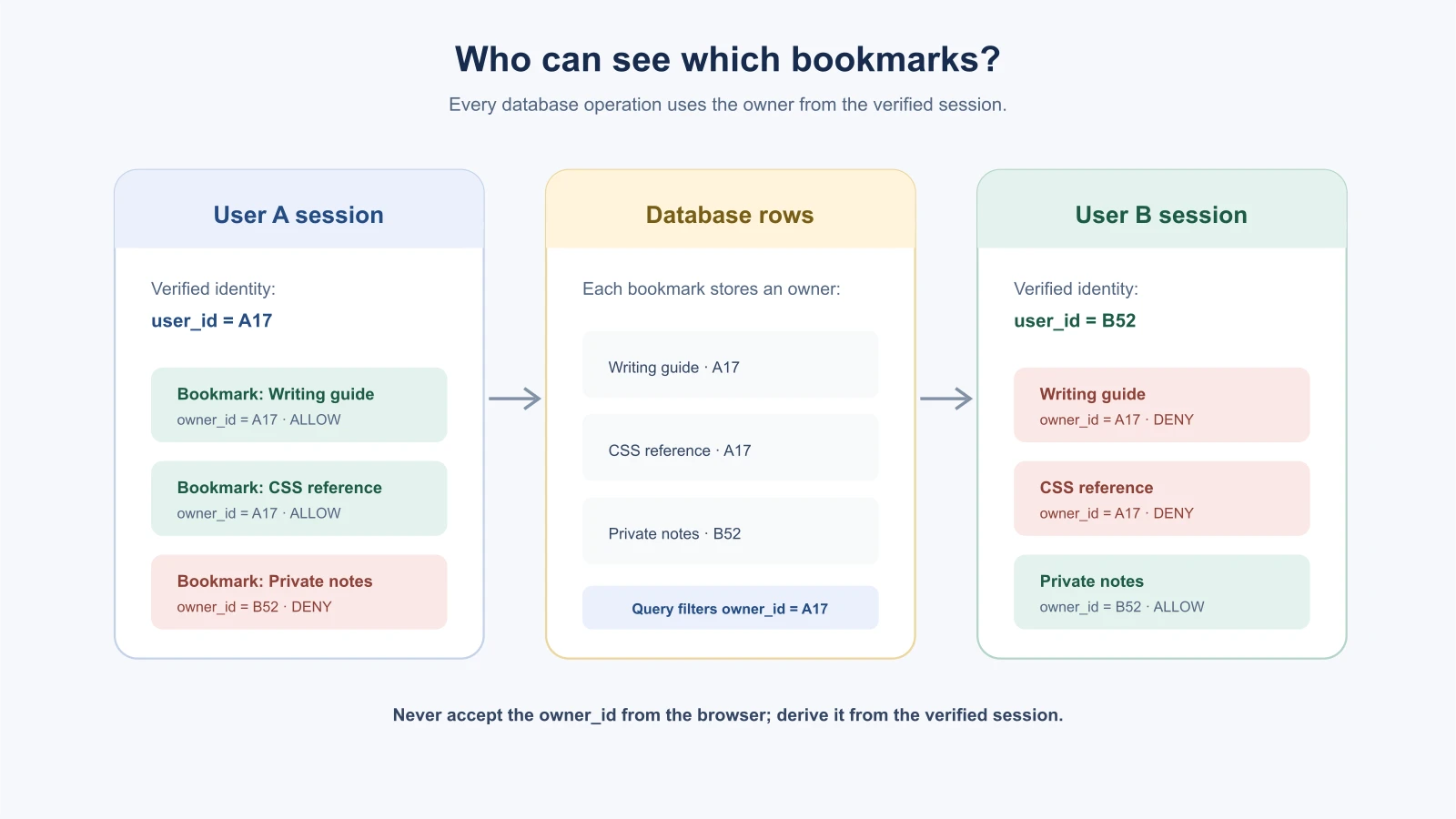
Add an owner field such as user_id to each bookmark. On every read, create, update or delete, get the identity from the verified session on the server. Then make the database operation use that identity:
1Read bookmarks where user_id matches the signed-in user's ID.
2Create a bookmark with user_id set from the signed-in session.
3Update or delete only a bookmark whose ID and user_id both match.
This is the core rule: derive ownership from the verified session, not from a hidden form field, URL parameter or client-side state. A user can edit a request in the browser, so hiding another person's bookmark button or page link is not an access check.
The Next.js guide recommends putting authorization close to data access, and warns against relying only on route-level or layout checks. A user can sometimes call a server action or route handler directly, so those operations need their own authorization check. (Next.js authorization guidance).
Keep secrets and sessions private
Auth providers give you secret keys or connection values for the server. Store them in environment variables, such as .env.local during development and your host's secret settings after deployment. Keep .env.local out of Git and never use a NEXT_PUBLIC_ prefix for a secret. Public client keys are different from secret server keys; follow the provider's current instructions to know which is which.
Let the library manage session cookies and their secure options. Do not put a password or a long-lived secret in browser storage. Make sure sign-out ends the session, and understand how session expiry and account recovery work for the library you choose.
Ask AI to plan before changing auth
Authentication affects the database, server actions, pages and deployment settings. Ask the AI to inspect the project and produce a plan before it installs packages or edits files:
1We are adding accounts to BookmarkBox. Read the current project instructions and inspect the database schema, bookmark queries and server actions.
2
3Recommend a maintained authentication library or provider compatible with this Next.js project. Check its current official docs. Explain how sign-in, sessions and user IDs will work, which environment variables are needed, and what database changes are required.
4
5Plan how every bookmark read, create, update and delete will use the verified session's user ID. Do not trust a user ID from the client. Include checks for a signed-out request and for one user trying to access another user's bookmark. Do not install packages or edit files until I review the plan.
Review the proposal carefully. Check the provider's official setup instructions, ask the AI to explain any new configuration, and implement in small steps. The provider manages identity; your app still owns the authorization rule that protects each bookmark.
Test the boundaries, not just the sign-in button
After the feature is built, test more than whether the login page appears. Use two separate test accounts and check:
- A signed-out visitor cannot read, add, change or remove a private bookmark.
- User A can add and see User A's bookmark.
- User B cannot see User A's bookmark.
- Changing a bookmark ID in a URL or request does not expose or change another person's record.
- Directly calling a route or server action without a valid session is rejected.
- Signing out ends access, and signing back in restores only that account's records.
Use test accounts and sample data, not someone else's real account. Ask the AI to explain which server-side check protects each case and where the related data query applies the owner filter. The Common agent tools lesson explains least privilege: give a tool or identity only the access it needs. The same idea applies here: each account should receive access only to its own bookmarks.
What sign-in looks like to a person
It helps to picture the flow from the user's point of view before you look at any code. A typical flow looks like this:
- A visitor opens BookmarkBox and sees a sign-in option.
- They choose it and are taken to the authentication provider's sign-in screen, or to a form your library supplies.
- They prove who they are, for example with a password or an account from another service.
- The provider tells your app who they are, and your app starts a session.
- They land back in BookmarkBox and see their own bookmarks.
- When they sign out, the session ends and the private pages are no longer available.
Each step is a place where something can go wrong: a redirect address that is not configured, a session that does not end, or a page that forgets to check who is asking. Walking through the flow yourself, with a test account, shows you where each piece lives.
A test plan for ownership
The earlier list of boundary tests is a good start. Here it is as a table you can fill in with a real app and two test accounts.
| Test | Expected result |
|---|---|
| Signed out, open the bookmarks page | You are sent to sign in, or you see no private data |
| Signed in as A, add a bookmark | It appears in A's list |
| Signed in as B, open the list | A's bookmark is not shown |
| As B, change a bookmark's ID in a request or URL to A's | The app refuses, or shows nothing |
| As B, try to delete A's bookmark directly | It is refused and A's bookmark is still there |
| Signed out, call the save or delete action directly | It is refused |
| Sign out, then press the browser's back button | Private data is not shown again |
| Sign back in as A | A's bookmarks are all still there |
Run each test, mark pass or fail, and fix failures before you add more features. Ask the AI to name the server-side check that protects each row, and then look for that check in the code yourself.
Mistakes beginners make
- Writing a password system from scratch. Use a maintained authentication library or provider.
- Treating sign-in as data protection. Check authorization on every read and change.
- Trusting a user ID from the browser. Derive identity from the verified server-side session.
- Protecting only the page. Server actions and route handlers must check access too.
- Testing with one account only. Use two accounts to check that data stays separate.
- Putting secret keys in client code or Git. Keep them in server environment settings.
Recap and try it yourself
Authentication identifies a person; authorization decides what they can access. Use a maintained library for sign-in and sessions, then enforce ownership on the server for every bookmark operation. Test both signed-out access and attempts to reach another user's data.
Try it: draw two user accounts and three bookmark rows, then mark who owns each row. Write one sentence describing how the app will decide whether User A can read a row. Ask an AI to challenge the rule with a changed URL and a direct server request. In Design and polish, you will improve the app's visual states after its main behavior is in place.