
Vibe Coding course · lesson 2 of 26
- 1What Is Vibe Coding? A Beginner's Guide
- 2The Vibe Coder Mindset: Build Small, Check Often
- 3Choosing Your Vibe Coding Tool: A Beginner's Guide
- 4Set Up Your Workspace for Vibe Coding
- 5Your First Vibe-Coded App in 30 Minutes
- 6From Idea to MVP: Plan a Small First Version
- 7Spec-Driven Development: Give AI a Clear Plan to Build From
- 8Mockups and Examples as Input: Show AI What You Mean
- 9Choose a Tech Stack: Pick Tools You Can Keep Using
- 10Prompts That Build Things: Give AI a Clear Task
- 11Context Documents: Give AI Lasting Project Instructions
- 12Managing Context and Sessions: Keep AI on the Right Task
- 13Set Standards Early and Review AI Output
- 14Build the Skeleton: Start the BookmarkBox App
- 15Add Data and a Database: Save Real Bookmarks
- 16Add Accounts Safely: Sign In and Protect Each User's Data
- 17Design and Polish: Improve the App One Pass at a Time
- 18Version Control with AI: Keep a Safe History of Your Work
- 19Debugging with AI: Find the Cause Before You Fix It
- 20Test by Default: Make Sure Each Feature Keeps Working
- 21Refactor and Keep Your Code Healthy
- 22Security for Vibe Coders: Protect Your App and Its Users
- 23Deploy Your App: Put BookmarkBox Online
- 24Monitor and Maintain Your App After Launch
- 25Where Vibe Coding Stops: Know When to Change Your Approach
- 26Capstone: Ship a Project from Idea to Production
After this lesson, you will have a simple routine for working with an AI coding tool: describe one small change, try it, check what happened and decide what to do next. You will also know when to pause and ask for help. These habits matter more than finding a perfect prompt.
In What Is Vibe Coding?, we described vibe coding as guiding an AI while it builds software. Here is the part to keep in mind: the AI can produce changes quickly, but you are still the person choosing the goal and deciding whether the result is good enough.
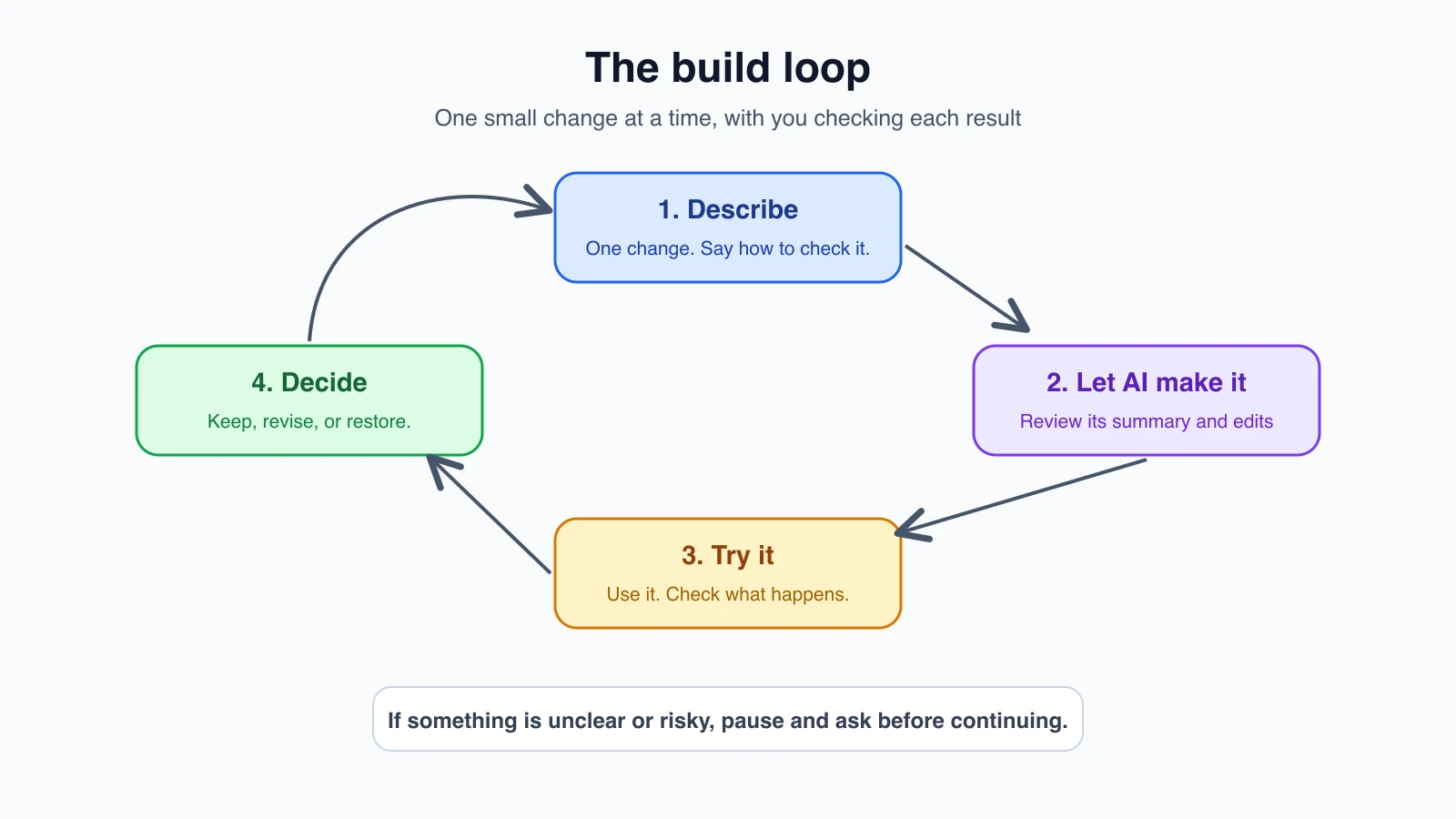
You are the product owner and reviewer
You do not need to write every line of code to be responsible for an app. You do need to decide what problem it solves, who it is for and what counts as working. In software teams, someone who makes those product decisions is often called a product owner. For your own project, that person is you.
The AI can offer options, write code and explain its choices. It cannot know whether it has misunderstood your priorities unless you check. A screen may look polished but save the wrong information. A feature may work for you but expose another user's data. Your responsibility is to check the things that affect the people using the app.
That does not mean you must inspect every technical detail alone. You can ask the AI to explain a change, use tests to check behavior, and ask an experienced developer to review higher-risk work. The important part is to treat the AI's output as a proposal that needs evidence before you rely on it.
Four habits that keep you in control
1. Work in small steps
Ask for one clear change at a time. Instead of “Build my whole reading app,” start with “Create a page that shows three sample books with their titles and authors.” When that works, ask for the next piece.
Small steps make mistakes easier to spot. If one request changes the page, the database and sign-in all at once, you will have a harder time finding the cause when something breaks. A small change gives you a clear question: did this specific thing work?
2. Try the result yourself
Do not stop when the AI says it is finished. Open the app and use the feature the way a real person would. If it added a “Mark as read” button, click it. Refresh the page. Check whether the state still makes sense. Try a book with a long title and an empty list.
This is verification: checking that a result behaves as expected. A successful build or a confident explanation is useful, but neither proves that the feature works for your needs. Later, in Test by default, you will learn how to make some of these checks repeatable.
3. Understand what changed
You do not have to become a programmer before you can build something. But when the AI changes your project, ask it to explain which files it touched and what each change does. Look at the before-and-after comparison, often called a diff, if your tool shows one.
If the explanation is unclear, ask a narrower question: “What happens when I click this button?” or “Where is this information saved?” If the answer still does not make sense and the change affects accounts, payments, private information or public access, pause. Ask someone who understands that area to review it before you continue.
4. Keep a way back
Save a known working version before trying a risky change. A version control tool such as Git records changes so you can compare them or return to an earlier state. You will learn the basics in Version control with AI.
For now, use a simple rule: when a feature works, save a checkpoint before asking for a large change. If the next change goes wrong, you have a clear place to return to. The AI may offer an undo feature, but a saved project history gives you another way to recover.
Stay in the decision loop
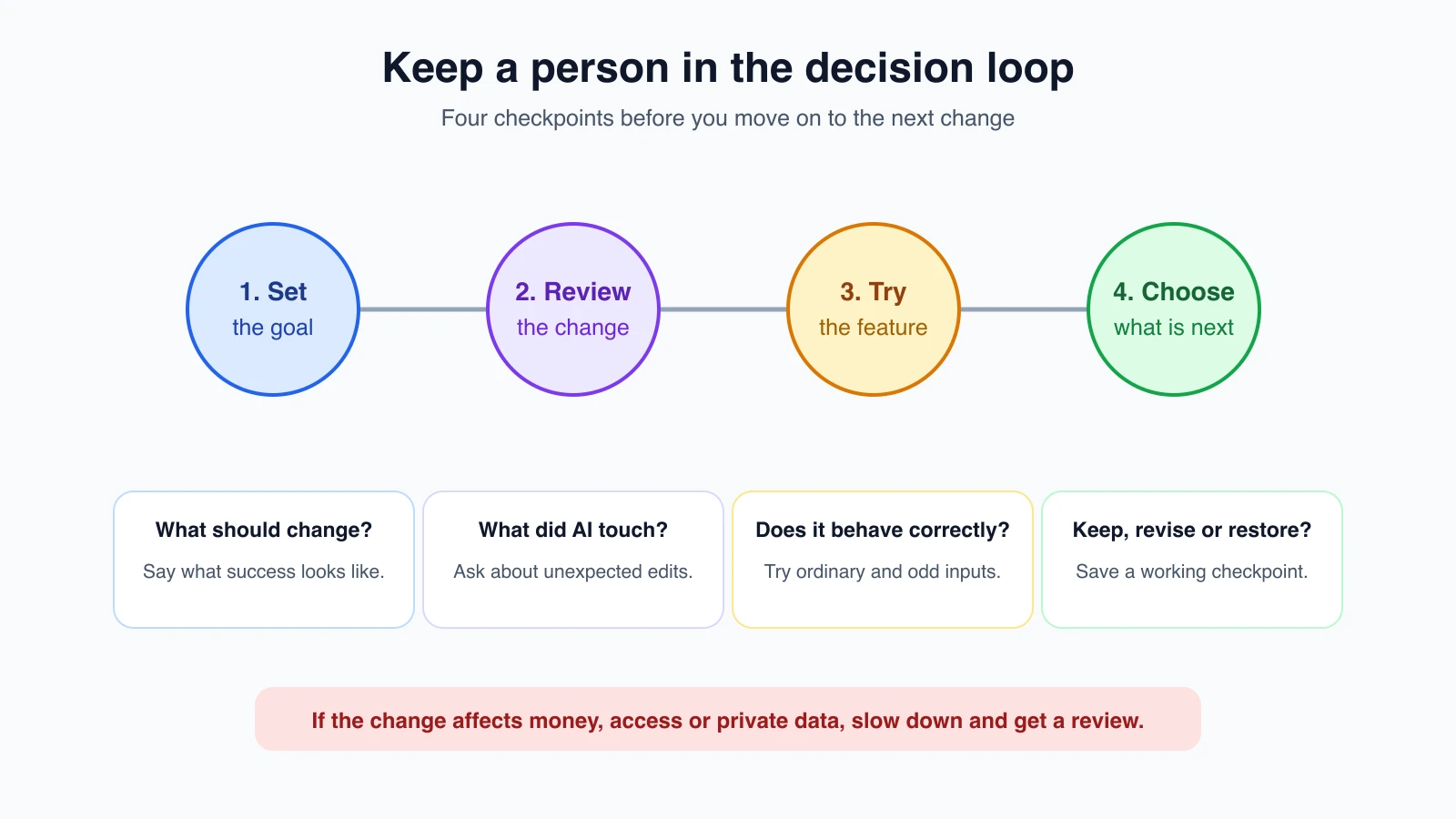
Think of each change as a short conversation with checkpoints:
- Set the goal. Say what should change and how you will recognize success.
- Review the proposal. Read the summary and ask about anything unexpected.
- Try it. Run the app and check the behavior, including a few edge cases.
- Choose what happens next. Keep the change, ask for a fix, or restore the last working version.
This kind of human oversight is useful even when the tool can act on its own. In the AI Agents course, you can see how approvals and human checks fit into more autonomous systems.
When to slow down
Some changes deserve more care than others. Slow down when a feature handles passwords, payments, private messages, personal information or access to someone else's account. Also pause when the tool proposes adding a new service or dependency you did not ask for, when you do not understand a change, or when the app behaves differently after an edit.
You can ask the AI to explain risks or suggest checks, but do not treat its reassurance as proof. For important systems, get a qualified person to review the design and the finished work. The AI can help prepare questions and summarize the code; the decision to trust it should rest on checks you can actually make.
The same request, two mindsets
Here is an illustrative example, not a real transcript. Two people ask an AI tool for the same thing: "Add a way for people to sign in to my reading list." The tool replies that it has finished.
| Step | Person A | Person B |
|---|---|---|
| After the reply | Reads “done” and moves on to the next feature | Reads the summary and asks which files changed and why |
| Checking | Opens the sign-in page once and sees that it loads | Signs in, signs out, refreshes, and tries a wrong password |
| Edge cases | Does not try any | Tries two accounts to see whether one person can see the other's books |
| Saving | Keeps working in the same project state | Saves a Git checkpoint once it behaves as expected |
| Later | Finds a problem three features later and cannot tell which change caused it | Knows which small change introduced the problem and can go back to the checkpoint |
Both people used the same tool and the same request. The difference is the loop around it. Person B spent a few extra minutes and kept the project understandable. You do not need special skills to work like Person B. You need the habit of asking “how will I know this works?” before you accept a change.
Deciding how closely to review
Not every change needs the same attention. A simple way to decide is to ask what could go wrong and who would be affected.
| Kind of change | Examples | How closely to review |
|---|---|---|
| Low risk | Changing a color, fixing a typo, rearranging a page | Look at the result on screen and make sure nothing else moved |
| Medium risk | A new form, a feature that saves data, a change that touches several files | Read the file list and a summary of the changes, try the normal case and a few unusual inputs, and add a check you can repeat |
| High risk | Accounts, payments, private or personal information, deleting data, anything other people rely on | Ask for a plan first, review the changes with someone who understands the area, test carefully, and get expert review before real users depend on it |
If you are not sure which row a change belongs in, treat it as the higher one. Slowing down on a low-risk change costs little. Moving fast on a high-risk change can cost a lot.
A first-week routine
If you want a gentle way to practice these habits, try this over your first week with an AI coding tool:
- Pick a tiny project that nobody depends on, such as a reading list or a tip calculator.
- Write the goal and a check before you ask for anything: “Show three sample books. I can tell it works when I can see each title and author.”
- Make one request and read the summary before you open the app.
- Try the result the way a person would, including one unusual case.
- Save a checkpoint when it works, even if you are only saving a copy of the folder at first.
- Write one sentence about what surprised you. After a few days, those sentences show you where your instructions were unclear.
The aim is not speed. It is building a rhythm you can keep as the projects get bigger.
Mistakes beginners make
- Sending a long list of features in one request. Split the work into steps you can try one by one.
- Trusting “done” without opening the app. Test the feature yourself and try more than the happy path.
- Approving changes you cannot explain. Ask what changed, why, and which parts of the app are affected.
- Making several changes before saving a checkpoint. Save a working version so you can recover if a later edit causes trouble.
- Using an experiment with real users too soon. Check privacy, security and reliability before people depend on it.
Recap and try it yourself
The useful vibe coder does not need to know every line of code. They do build in small steps, try each result, ask what changed and keep a way back. You set the goal and remain responsible for deciding whether the app is ready to use.
Try this: take the app idea you wrote down at the end of What is vibe coding?. Turn it into one small request with a check you can perform yourself. For example: “Show three sample books on a page. I can tell it works when I can see each title and author.” In Choosing your tools, you will compare the kinds of AI tools that can help you build it.