
Vibe Coding course · lesson 23 of 26
- 1What Is Vibe Coding? A Beginner's Guide
- 2The Vibe Coder Mindset: Build Small, Check Often
- 3Choosing Your Vibe Coding Tool: A Beginner's Guide
- 4Set Up Your Workspace for Vibe Coding
- 5Your First Vibe-Coded App in 30 Minutes
- 6From Idea to MVP: Plan a Small First Version
- 7Spec-Driven Development: Give AI a Clear Plan to Build From
- 8Mockups and Examples as Input: Show AI What You Mean
- 9Choose a Tech Stack: Pick Tools You Can Keep Using
- 10Prompts That Build Things: Give AI a Clear Task
- 11Context Documents: Give AI Lasting Project Instructions
- 12Managing Context and Sessions: Keep AI on the Right Task
- 13Set Standards Early and Review AI Output
- 14Build the Skeleton: Start the BookmarkBox App
- 15Add Data and a Database: Save Real Bookmarks
- 16Add Accounts Safely: Sign In and Protect Each User's Data
- 17Design and Polish: Improve the App One Pass at a Time
- 18Version Control with AI: Keep a Safe History of Your Work
- 19Debugging with AI: Find the Cause Before You Fix It
- 20Test by Default: Make Sure Each Feature Keeps Working
- 21Refactor and Keep Your Code Healthy
- 22Security for Vibe Coders: Protect Your App and Its Users
- 23Deploy Your App: Put BookmarkBox Online
- 24Monitor and Maintain Your App After Launch
- 25Where Vibe Coding Stops: Know When to Change Your Approach
- 26Capstone: Ship a Project from Idea to Production
So far, BookmarkBox has run on your own computer. Deployment means building and running the app on a hosting service so other people can open it. The public version is called production. Before sending people there, you want to confirm that the code, database connection and production settings work together.
In Security for vibe coders, you learned to keep credentials private and check user access on the server. Those habits matter during deployment too: a working local .env.local file does not automatically configure the hosted app.
Choose where the app will run
A hosting provider runs your app on internet-connected computers and manages some of the surrounding infrastructure. BookmarkBox uses Next.js, so the course uses Vercel as its example. Other providers can host Next.js too, but their setup, limits and terminology differ. Check the current docs for the host and framework you choose.
For Vercel, a beginner-friendly path is to connect the Git repository. Vercel can build a deployment from the repository and use the production branch, often main, for the live site. Pushes to other branches can get preview deployments with their own URLs. Review the current Vercel Git deployment guide before connecting your account.
Before starting, make sure the app runs locally, the changes are committed, the relevant tests pass, and you have reviewed the diff. Deployment does not replace those checks. It gives the app a new environment where configuration and integrations may behave differently.
Deploy a preview first
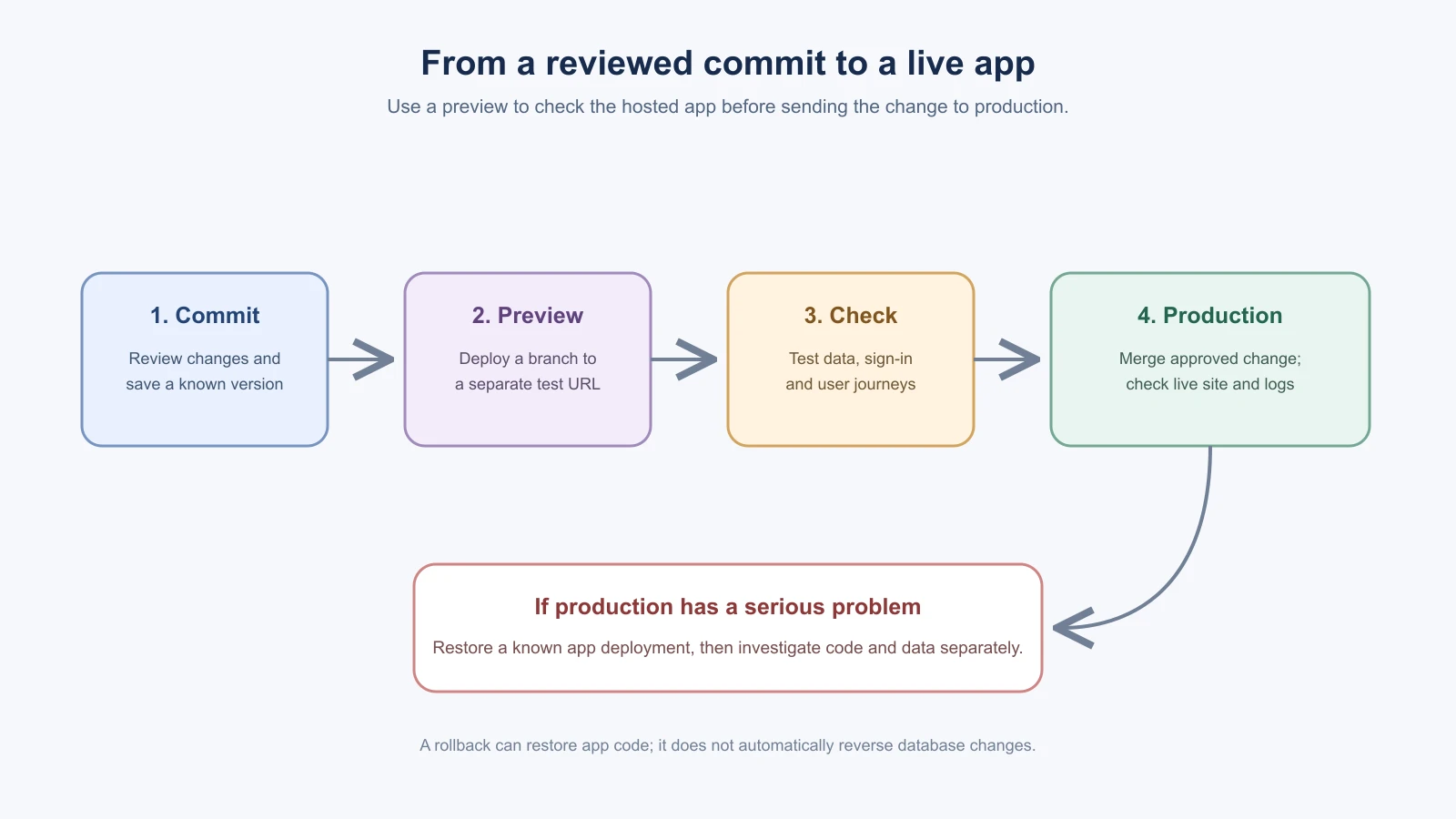
A preview deployment is a hosted copy for checking a branch or change before it becomes the live production version. A typical first deployment looks like this:
- Push your project to a Git host such as GitHub.
- Create a Vercel project and import the repository.
- Confirm the project root and framework settings match the app.
- Add the environment variables required to build and run it.
- Deploy a non-production branch or use the generated preview.
- Open the preview URL and check the main flows before merging the reviewed change into the production branch.
Vercel creates preview deployments for branches and production deployments from the configured production branch. Exact buttons and defaults can change, so follow the current dashboard and docs rather than relying on an old screenshot.
Set production values outside the code
The hosted app needs its own configuration. Add required values in the host's project settings for the correct environment. BookmarkBox may need a production DATABASE_URL from its Postgres provider, an authentication secret and provider callback settings. Use the actual variable names your app expects; do not guess them. The earlier database lesson explains why the connection belongs on the server.
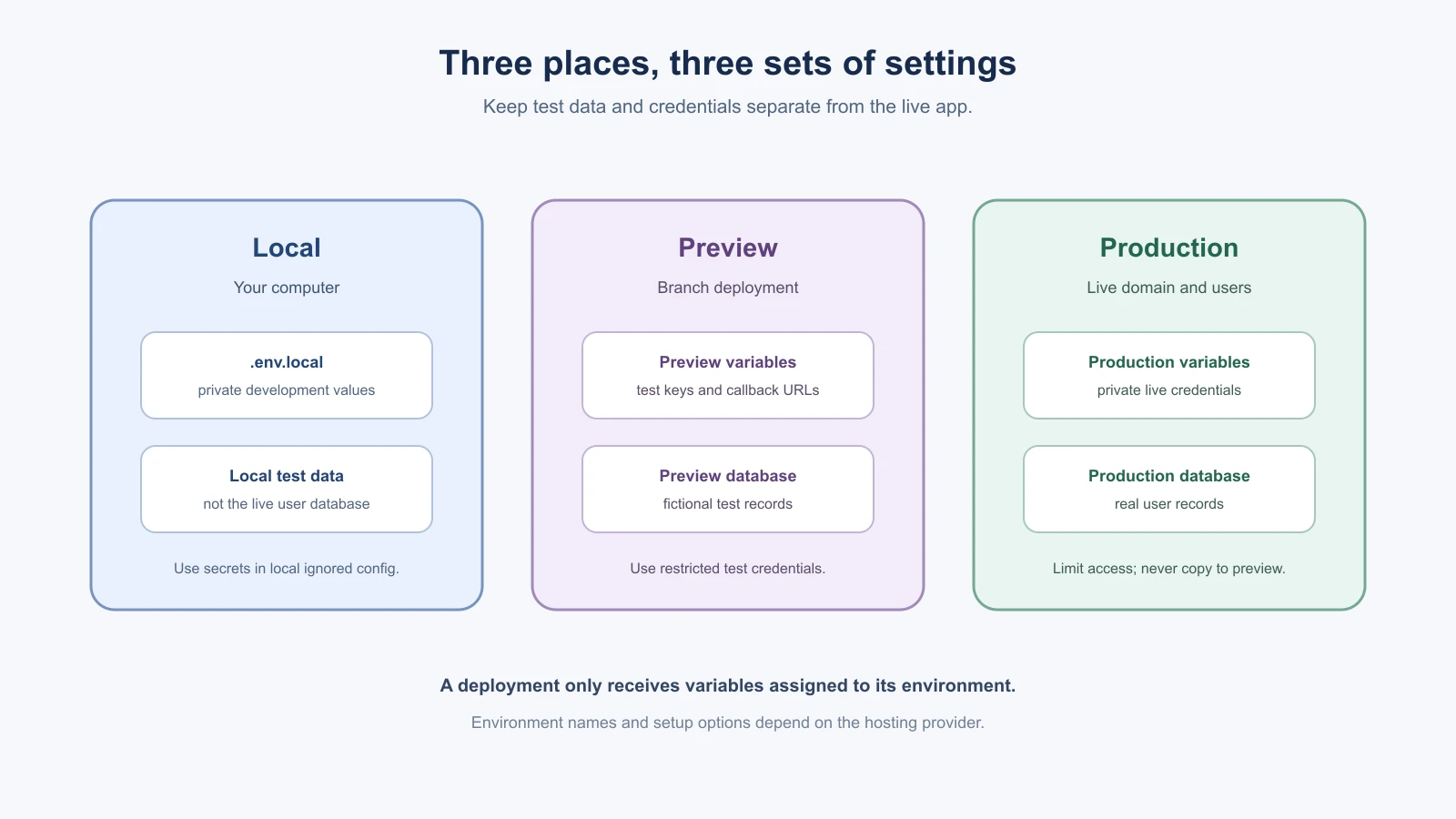
Production and preview should normally use separate database credentials or databases. This keeps test records from mixing with real production records. Do not copy a production database password into a preview environment just because it is convenient. If a preview needs a database, use test data and an appropriately restricted credential.
For Next.js, variables prefixed with NEXT_PUBLIC_ are exposed to browser code. Never put a private key or database URL under that prefix. Vercel lets a project assign variables to Development, Preview and Production, and changes apply to new deployments. Read the current Vercel environment variable guide and Next.js environment variable guide for exact behavior.
Some apps need a database migration before new code can use a changed schema. Check what the migration changes and when it runs. A safe rollout should avoid leaving old code unable to work with the database during deployment or rollback. If you are unsure, pause and ask an experienced developer to review the migration plan before applying it to production.
Check the preview like a user
Do not stop at “the build succeeded.” A successful build means the host built the code; it does not confirm that every feature works with real environment settings. Use fictional or test data and check:
- The home page loads and layout works at phone and desktop sizes.
- Sign-in and sign-out work, if the app uses accounts.
- A person can save a bookmark, refresh, and still see it.
- A person can remove their own bookmark.
- One test account cannot view or remove another account's bookmark.
- Empty, invalid and error states make sense.
- The browser console and hosting logs do not show new errors or leaked secrets.
If authentication uses callback or redirect URLs, configure the preview and production addresses with the authentication provider as required. A local URL in provider settings may not work for the hosted app. Read the provider's current docs and never loosen access rules to make a preview pass.
Connect a custom domain
The host's generated URL is enough to test a project. A domain is the address people type, such as bookmarkbox.example. You can connect a domain you already own or register one with a domain provider. The hosting dashboard shows the DNS records to add. DNS changes can take time to appear everywhere, so follow the provider's status and instructions rather than repeatedly changing records.
After connecting the domain, check the exact HTTPS address, sign-in redirect, and main bookmark flows again. Add the final production domain to any auth provider's allowed callback list. Do not put the custom domain on a preview environment unless that is intentional.
Keep a short recovery plan
Before a production change, know how to get the previous working version back. With Git-based Vercel deployments, you can inspect a previous production deployment and use the dashboard's rollback option when appropriate. A rollback changes which app deployment serves traffic; it does not automatically undo data already written to the database. It also may not rebuild environment variables. Read Vercel's current instant rollback guide and verify what it will restore for your project.
If a deploy breaks a key flow, write down what users see, check the logs, and stop making unrelated changes. Roll back to a known working deployment if that is the safer immediate recovery, then fix the issue on a branch and preview it before shipping again. For a database migration or changed credentials, use a recovery plan that accounts for those separately.
A simple release checklist
- The code is committed, reviewed and has passed its project checks.
- Required variables are set for the right environment and remain private.
- Preview uses suitable test data and does not expose production credentials.
- The preview's main user journeys and access rules work.
- The production database and any migration plan are understood.
- You know where to check logs and how to restore a previous app deployment.
- The production domain and auth redirects point to the intended site.
Vercel provides Local, Preview and Production environments, each of which can have its own configuration. Seeing these as separate places helps explain why “works on my computer” is only one part of shipping. The next lesson, Monitor and maintain, covers the checks that help you notice problems after launch.
What to do in the first hour after release
A release is not finished when the deployment turns green. Spend a little time watching the live app while the change is fresh:
- Open the live site and repeat the main journey with a test account.
- Check the logs for new errors from the new deployment.
- Try the one thing that changed, and one thing that did not, to make sure nothing else broke.
- Keep your recovery plan handy, including how to restore the previous deployment.
- Note what you checked and anything unexpected, so the next release is easier.
If you find a serious problem, restoring the previous deployment first and investigating second is often the calmer choice.
Mistakes beginners make
- Treating a successful build as a working app. Try the preview like a user before you release.
- Copying production secrets into preview. Use test data and restricted credentials for each environment.
- Putting a private value under a browser-visible prefix. In Next.js,
NEXT_PUBLIC_exposes a value to browser code. - Forgetting callback URLs. Add the preview and production addresses wherever your sign-in provider requires them.
- Assuming a rollback undoes data changes. A rollback changes which app version is live, so plan database recovery separately.
Recap and try it yourself
Deploy a preview first, keep local, preview and production settings separate, check the main flows as a user, then release and keep a short recovery plan.
Try it: deploy a practice app to a preview using test values only. Walk through the preview checks and the release checklist in this lesson, and write down how you would restore the previous version. In Monitor and maintain, you will set up the checks that help you notice problems after launch.