
Vibe Coding course · lesson 9 of 26
- 1What Is Vibe Coding? A Beginner's Guide
- 2The Vibe Coder Mindset: Build Small, Check Often
- 3Choosing Your Vibe Coding Tool: A Beginner's Guide
- 4Set Up Your Workspace for Vibe Coding
- 5Your First Vibe-Coded App in 30 Minutes
- 6From Idea to MVP: Plan a Small First Version
- 7Spec-Driven Development: Give AI a Clear Plan to Build From
- 8Mockups and Examples as Input: Show AI What You Mean
- 9Choose a Tech Stack: Pick Tools You Can Keep Using
- 10Prompts That Build Things: Give AI a Clear Task
- 11Context Documents: Give AI Lasting Project Instructions
- 12Managing Context and Sessions: Keep AI on the Right Task
- 13Set Standards Early and Review AI Output
- 14Build the Skeleton: Start the BookmarkBox App
- 15Add Data and a Database: Save Real Bookmarks
- 16Add Accounts Safely: Sign In and Protect Each User's Data
- 17Design and Polish: Improve the App One Pass at a Time
- 18Version Control with AI: Keep a Safe History of Your Work
- 19Debugging with AI: Find the Cause Before You Fix It
- 20Test by Default: Make Sure Each Feature Keeps Working
- 21Refactor and Keep Your Code Healthy
- 22Security for Vibe Coders: Protect Your App and Its Users
- 23Deploy Your App: Put BookmarkBox Online
- 24Monitor and Maintain Your App After Launch
- 25Where Vibe Coding Stops: Know When to Change Your Approach
- 26Capstone: Ship a Project from Idea to Production
After this lesson, you will be able to name the main parts of a web app's tech stack, choose tools that fit your project and experience, and write down your choices so an AI does not keep switching approaches. For our running project, BookmarkBox, we will use Next.js, TypeScript, Tailwind CSS, Postgres and Vercel. This is a practical course choice, not a claim that one stack is best for every app.
In Mockups and examples as input, you used references to clarify what the app should look like. Now we will choose the technologies that will run it.
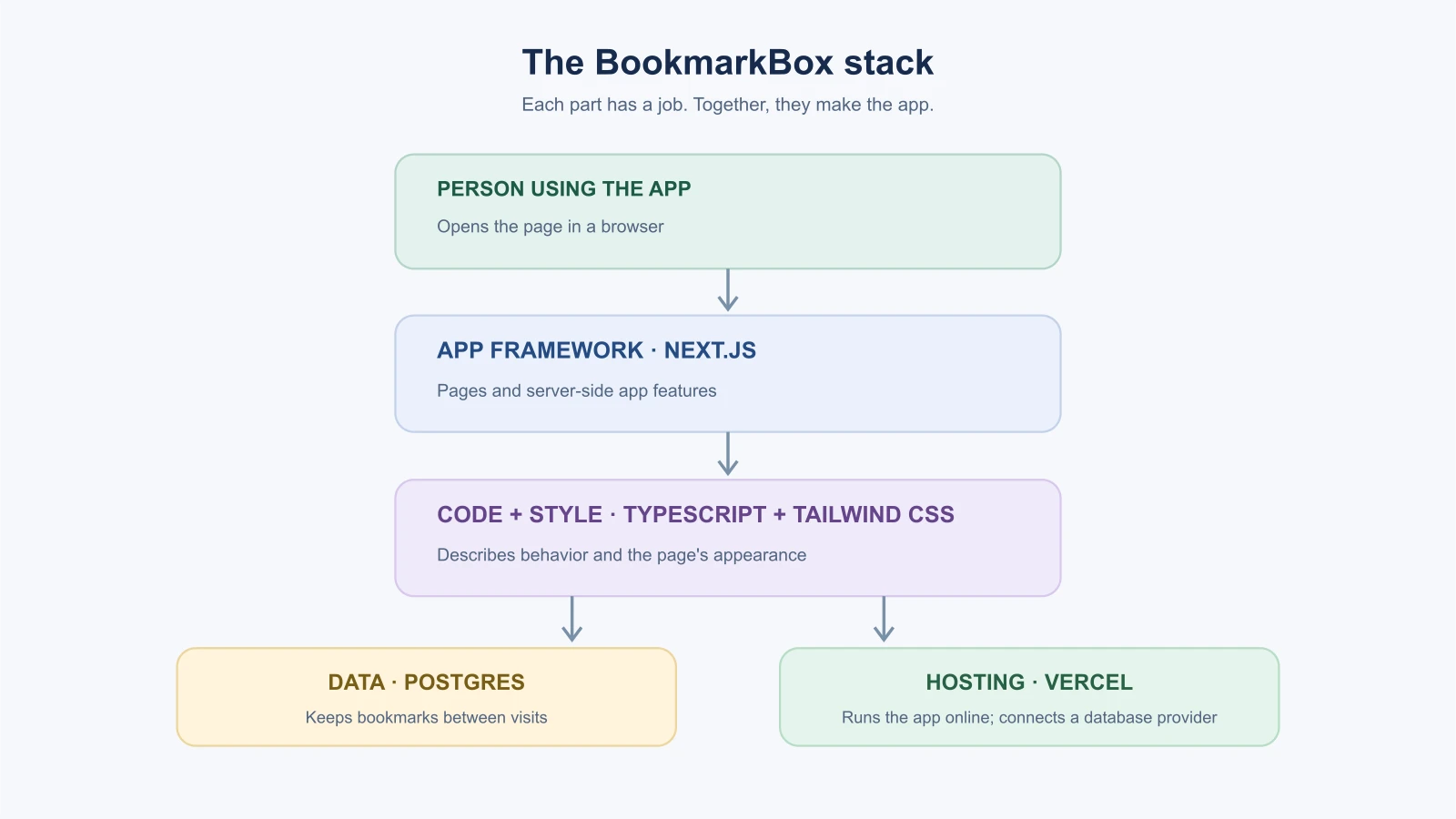
What is a tech stack?
A tech stack is the set of technologies that work together to make an app. A web app commonly has a front end, the screens and controls a person uses, and a back end, the server-side work that handles requests and data. It may also use a database to store information and a hosting service to make the app available on the internet.
The names can sound like a shopping list. It helps to connect each one to a job:
| Part | What it does | BookmarkBox choice |
|---|---|---|
| App framework | Organizes pages and the work behind them | Next.js |
| Programming language | Describes the app's behavior | TypeScript, which builds on JavaScript |
| Styling | Controls layout, color and spacing | Tailwind CSS |
| Database | Stores bookmarks and, later, account-related data | Postgres |
| Hosting | Runs the app and serves it to visitors | Vercel |
| Authentication | Checks who a person is when accounts are added | Choose a maintained provider or library in the accounts lesson |
These parts have to fit together, but you do not need to compare every tool on the market. Start with the needs of your app and your ability to understand and maintain the result.
Why familiar tools are a good starting point
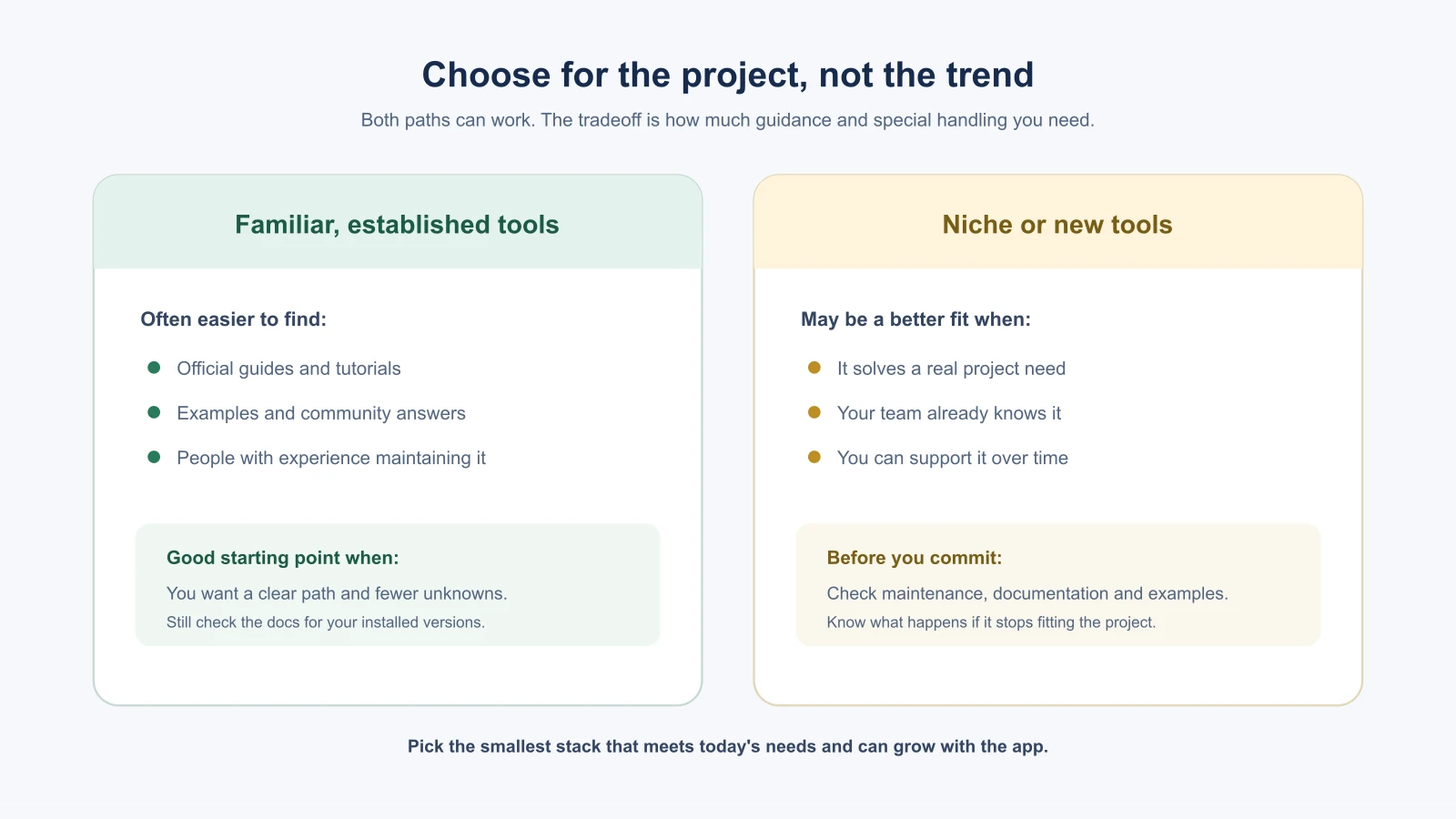
Popular, established technologies tend to have more learning material, examples and community answers available. An AI tool may also produce patterns it has encountered often. That can make a familiar stack a reasonable starting point, but it does not make generated code correct or current. Ask the AI to use the versions and documentation for your actual project, then review what it changes.
A new or niche technology can still be the right choice when it solves a real problem for you. But if you cannot find clear documentation or explain why the project needs it, adding it creates another thing to learn and maintain. Keep the stack small until a requirement gives you a reason to add something.
Why this course uses this stack
BookmarkBox grows from a simple page into an app with saved data, accounts and deployment. The stack is chosen to give the course one connected path:
- Next.js provides the app structure for pages and server-side features. Its App Router documentation covers pages, layouts, data, forms and deployment. You can use other frameworks for other projects; the course uses this one so later examples build on the same app.
- TypeScript adds checks for the kinds of values code expects, such as a bookmark's title and address. These checks can catch some mistakes before the app runs, but they do not prove the whole app is bug-free. It builds on JavaScript, so it is useful to learn JavaScript fundamentals alongside it.
- Tailwind CSS lets you style elements with utility classes in your markup. That gives the AI a consistent styling approach for this course. It is still CSS underneath, and plain CSS or another styling system can be a better fit for a different team.
- Postgres is a relational database: it stores structured records in tables and can connect related records. It gives BookmarkBox a real place to keep users' bookmarks as the app grows beyond one browser.
- Vercel hosts the Next.js app and connects with external Postgres providers. Vercel's docs state that the old Vercel Postgres product is no longer available for new projects; a new project uses a provider integration from its Marketplace. Database products and hosting options change, so confirm the current setup when you reach that step.
The current official docs describe the Next.js App Router, TypeScript's type checking, Tailwind utility classes, and Postgres integrations on Vercel. Documentation checked November 3, 2026. Frameworks, integrations and setup steps can change; use the docs that match the versions you install.
Authentication is listed separately because accounts add security decisions of their own. When we reach that feature, we will choose a maintained provider or library and learn how to protect each person's data. Do not build your own password system just to complete the stack diagram.
A simpler path for a small experiment
Not every idea needs an account system and a database on day one. If you are making a throwaway calculator or a personal prototype, a single-page app that keeps data in the browser may be enough. Browser storage is simple, but it generally stays in that browser and is not a shared, backed-up database. It is a poor fit when people need to sign in, share data across devices, or rely on server-side access rules.
You can also use a hosted app builder for a prototype instead of choosing every layer yourself. If the project later needs features the builder cannot support, you may need to export or rebuild parts of it. Choose based on what you want to learn and how much control the finished app needs.
Write your choices down
Record the stack in a short project note or context file that your coding tool can read. Include the reason for each choice and a few boundaries. For example:
1Project: BookmarkBox
2
3- Use Next.js with the App Router and TypeScript.
4- Use Tailwind CSS for styling. Keep styles consistent with the project's existing patterns.
5- Use Postgres for persistent bookmark data when we add the database.
6- Deploy the app on Vercel. Choose a Postgres provider through its current integrations when that phase begins.
7- Do not add another framework, database, component library or styling system without explaining why it is needed.
8- Before using a package or API, check the installed version and its current documentation.
The note is a guide, not a substitute for reading the project. Ask the AI to inspect the existing files before it edits them, especially when you join a project that already has a stack. If the project has established conventions, understand those before suggesting a rewrite.
Questions to ask before accepting a stack suggestion
AI tools will often suggest a stack when you describe an app. Before you accept one, ask a few questions, and check the answers against official documentation.
- Is it popular enough that I can find help? Look for current guides, examples and community answers.
- Is it maintained? Check recent releases and whether the documentation matches the version you will install.
- Can I run and deploy it myself? Make sure you understand where the code and data will live.
- Does it need services I have not thought about, such as a database host or an authentication provider, and what do they cost?
- Can I leave later? Check whether you can export your data and move to another service.
- Do I need all of it? A simpler stack is easier to understand and review.
If the AI cannot answer these questions clearly, or recommends something unfamiliar without a reason, ask for a simpler alternative and compare the two.
Mistakes beginners make
- Choosing tools because they are trending. Start from what the app needs and what you can maintain.
- Adding several overlapping tools. Use one clear approach for each job until a real requirement calls for more.
- Assuming a popular stack means correct output. Check the code and use documentation for the versions in the project.
- Treating TypeScript as a guarantee. It catches some value mismatches; it does not test every behavior or security rule.
- Putting off the reason for a database. Decide whether people need data to persist, sync or belong to individual accounts.
- Letting the AI switch tools mid-project. Keep the stack note visible and ask it to explain any proposed change.
Recap and try it yourself
A tech stack is a set of connected tools for building, storing and running an app. Choose a small, familiar set that fits the project, understand each tool's job, and write the decisions down. For BookmarkBox, the course uses Next.js, TypeScript, Tailwind CSS, Postgres and Vercel, with authentication chosen when accounts become part of the build.
Try it: write a one-line stack note for an app you want to build. Name its front end, where data lives and where it will run. For each choice, write one reason and one question you still need to answer. In Prompts that build things, you will turn project context into clear build requests.