
AI Product Builders course · lesson 7 of 25
- 1The AI Product-Building Loop: From Idea to Improvement
- 2Define the Problem Before You Choose a Solution
- 3Check the Idea Before You Build
- 4App Anatomy for Non-Engineers: What Happens Behind a Screen
- 5Scope the First Version: Choose What to Build Now
- 6Choose a Tech Stack That Fits Your Constraints
- 7Choose a Prototype Tool for Your Product and Team
- 8Build a Clickable Prototype in One Focused Flow
- 9Test a Prototype with Real People
- 10Decide Whether to Keep, Change, or Stop
- 11Move from a Prototype to Real Code
- 12Work with an AI Coding Tool on One Clear Task
- 13Learn the Web Basics Behind Your App
- 14Connect a Database Without Losing Control of Your Data
- 15Tell a Small Fix from a Structural Change
- 16Run a Refinement Loop That Keeps the Product Useful
- 17Make an AI-Built Product Easier to Use
- 18Review and Check Changes Before They Reach the Team
- 19Test an AI-Built Product in Layers
- 20Work with a Team and Stakeholders
- 21Choose Where to Deploy Your Product
- 22Go Live: A Launch Checklist for Your Product
- 23Measure and Improve Your Product After Launch
- 24Add an AI Feature to Your Product Carefully
- 25Capstone: Take a Product Idea to Launch
After this lesson, you will be able to choose a tool for a specific prototype, compare what it gives you with what your team needs to manage, and check the important details before you start. You will not need to find one tool that is best for every project.
We will use ToolShelf, the fictional neighbourhood tool-sharing idea from earlier lessons. The first-version job is to let a neighbour find a listing, ask its owner to borrow it, and see the owner’s response. ToolShelf has no real users or tested product. We will use it to make a tool choice, not to claim that any platform has built a validated product.
Choose the kind of prototype first
A prototype is a model of a product experience that helps you explore an idea or learn from a test. It can be a set of linked screens, a working app with sample data, or something in between. A prototype can look realistic without being ready for real accounts, private information, payments, or public use.
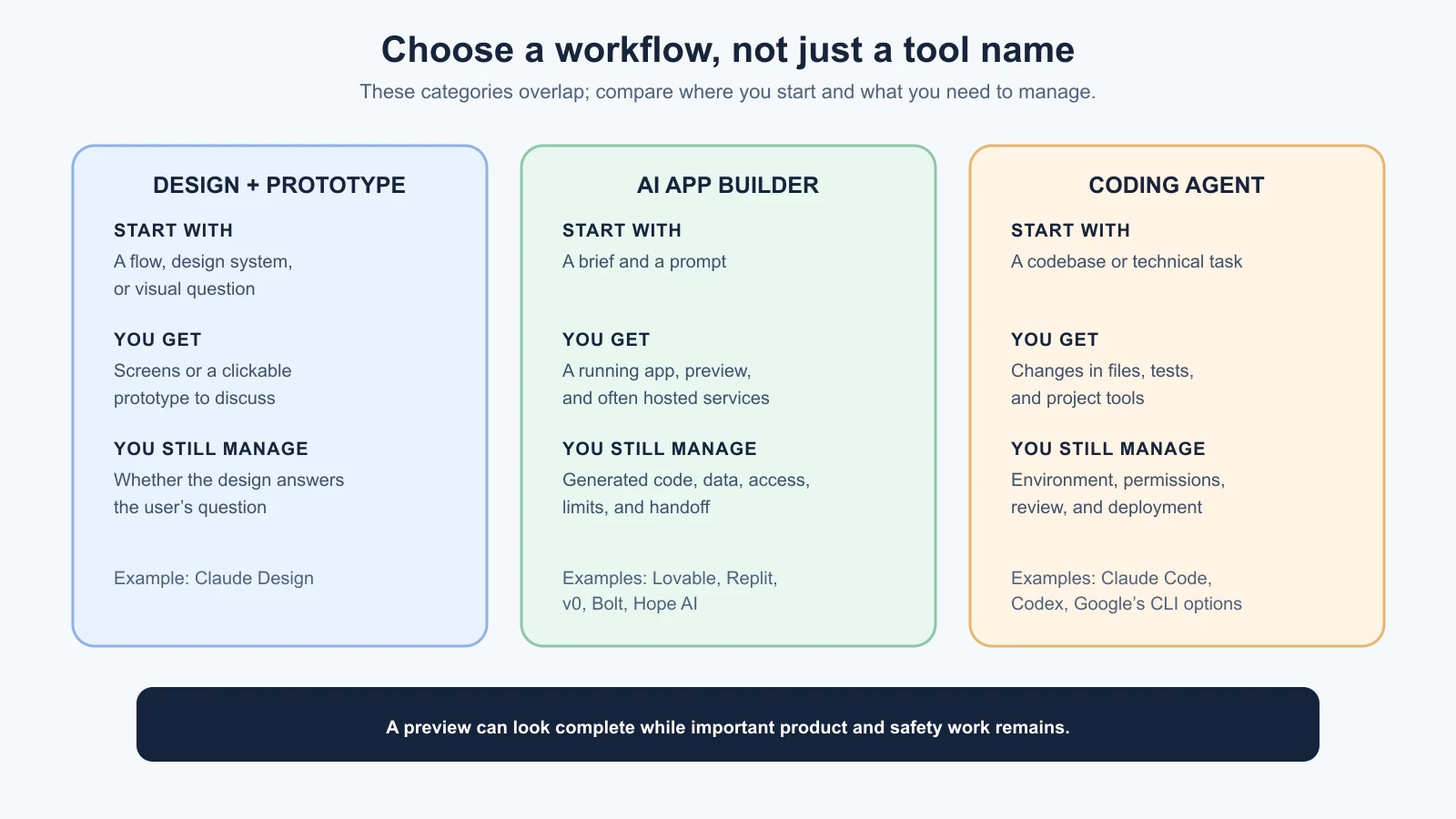
The word “tool” can describe quite different workflows. A design and prototype tool helps you shape and share an experience. An AI app builder uses prompts and visual or code editing to create a working application. A coding agent works with source code, often in a project folder or repository, and can help implement or change the product. Some tools now overlap these categories. Use the category as a way to ask how you will work, not as a rigid label.
Start by asking what someone needs to do with the prototype:
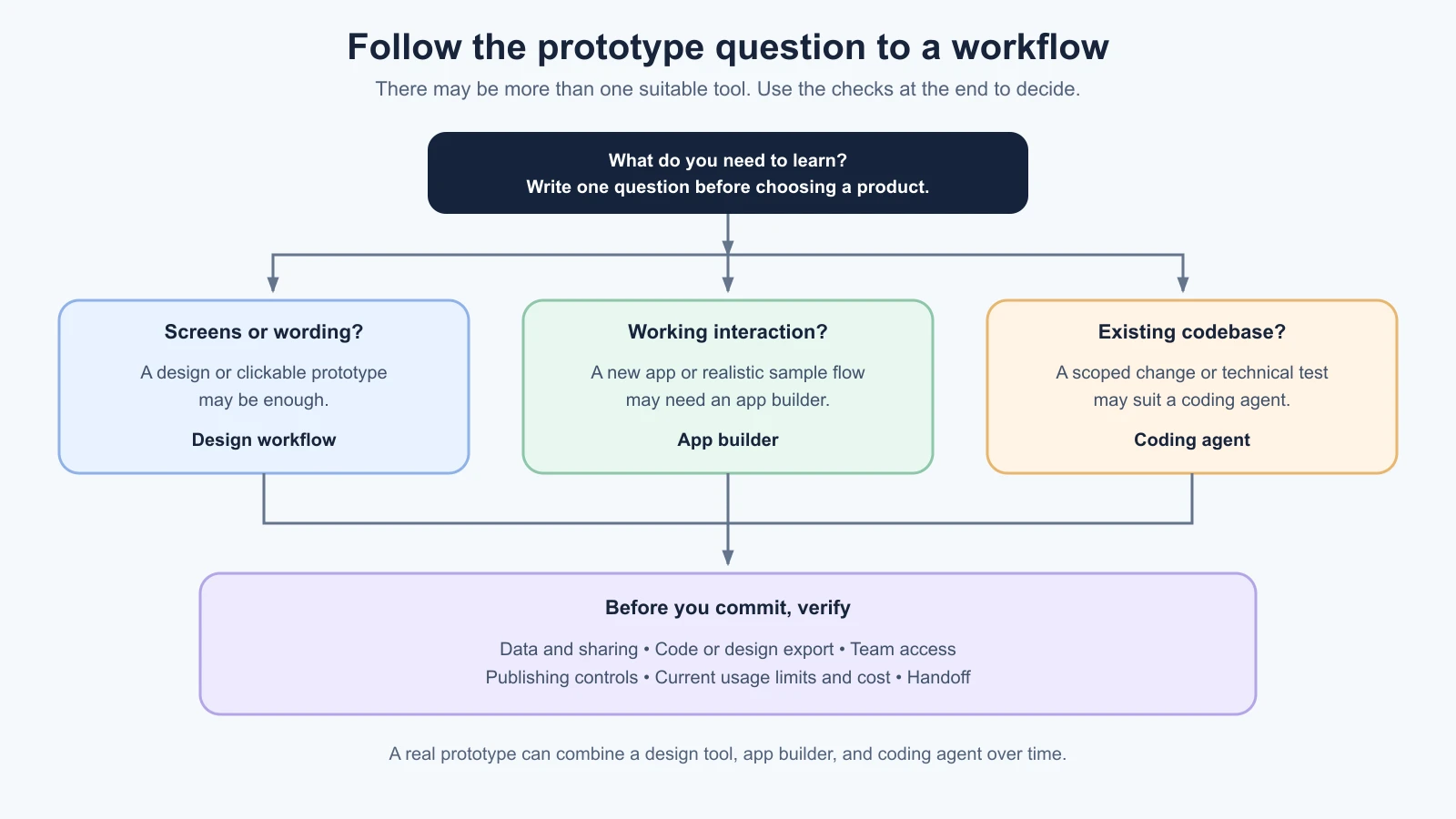
- Explore screen layout or test the wording of a flow: a design tool or clickable prototype may be enough.
- Try a realistic flow with sample data: an app builder can create a working web experience without setting up every part yourself.
- Change an existing codebase or test a technical approach: a coding agent can work against files, commands, and project rules that already exist.
- Show a design that follows an established component system: look for a workflow that can use your design files or reusable components.
If you only need to learn whether people understand a sequence of screens, a connected database can be unnecessary. If you need to observe how people handle errors or a status change, a more interactive prototype may teach you more. Pick enough functionality to answer the question you have, then stop adding machinery.
What the named tools are designed to do
The tools below were checked against official docs on 4 November 2026. Features, access, plans, limits, and prices can change. Treat these descriptions as an orientation, then check the linked current docs before creating an account, inviting teammates, entering data, or paying.
AI app builders
Lovable generates and edits web apps from prompts. Its current documentation describes a built-in backend with database, authentication, storage, functions, and hosting. A project can connect to GitHub for code backup and two-way sync, or on paid plans download a codebase copy. Those are useful handoff paths, but moving backend data and services to another provider takes additional steps. Its documentation also says that a built-in backend’s data region cannot be changed or moved after that backend is enabled. For a project with region requirements, decide and verify the data location before creating a backend.
Replit combines an online development workspace with Replit Agent. Its Git workflow supports importing a GitHub repository, branches, commits, and visual diffs; published applications use Replit’s deployment options. This can suit someone who wants the builder, editable code, and development environment together. Replit’s current publishing documentation says published apps are hosted in the United States, with European Union hosting available by request for Enterprise customers. Plan features and costs can depend on credits, deployment type, and usage, so inspect the current billing and publishing docs rather than assuming that a working preview and an always-on deployment cost the same.
v0 began with interface generation and now documents a fuller project workflow, including an editor, previews, GitHub integration, and publishing to Vercel. Its documented stack includes Next.js, React, TypeScript, Tailwind CSS, and shadcn/ui. A GitHub-connected project can use branches and pull requests; a project without GitHub can publish through its connected Vercel project. This is a fit to investigate if those frameworks and a Vercel handoff make sense for your team. Check current plan and usage limits because v0 charges through plan credits and model usage.
Bolt builds web applications in a browser-based environment, with support for JavaScript frameworks, direct code editing, GitHub, and hosting through Bolt Cloud. Its documentation describes a built-in backend and publishing to a bolt.host address, with additional options depending on plan. Usage is token-based, and Bolt says project files are included as context, so larger projects can use more tokens per request. Check the current limits and test how a normal edit in your own project affects usage before estimating a month of work.
Hope AI by Bit Cloud is a component-oriented app-building workflow. Bit Cloud’s documentation describes prompting with design files or repository context, reviewing generated changes, then releasing apps and publishing components as packages. It is worth investigating when a team already wants to organize software as reusable components and use Bit Cloud’s architecture. That is a more specific workflow than a general-purpose web page generator. The roadmap simply names “Hope”; I found Bit Cloud’s official Hope AI docs but could not independently confirm that this is the exact product the roadmap author intended.
A design and prototype tool
Claude Design is an Anthropic Labs product for creating and refining visual work, including designs and interactive prototypes. Its announcement describes starting from a prompt, uploaded files, a website, or a codebase; refining designs with comments and direct edits; sharing within an organization; and exporting a standalone HTML file or a handoff bundle for Claude Code. It can be useful when the learning question is about a flow or design and you do not need to operate a real backend. A design or HTML export does not, by itself, supply production identity, data storage, permissions, or hosting. Availability and subscription limits depend on the current Claude plan and organization settings, so check Anthropic’s current information.
Coding agents
Claude Code works with a software project through a terminal and related development workflows. It can inspect and edit project files and run approved commands. It is useful when you have a repository, need a code change that fits its conventions, or want to keep the project’s existing framework and infrastructure. You remain responsible for reviewing the diff and deciding which commands or changes to accept. Pricing depends on the account or API route used; verify the current access terms for your situation.
Codex is OpenAI’s coding agent for writing, reviewing, and debugging software. OpenAI’s official docs describe using Codex in an IDE, terminal, web or mobile surface, or through software development workflows. The environment and control available depend on which surface you choose. Use it to work on a real codebase or implement a scoped technical experiment; it is not automatically a hosting provider for the app you are making. Check the current official OpenAI documentation for supported surfaces, account access, and usage terms.
Gemini CLI needs a time-sensitive note. As checked on 4 November 2026, Google’s official Gemini CLI repository says the CLI remains available for Gemini Code Assist Standard and Enterprise workflows and certain paid API or Vertex credentials. The repository also says individual free, Google AI Pro, and Ultra access moved to Antigravity CLI on 18 June 2026. If an older guide recommends Gemini CLI for an individual account, check Google’s current tool and account documentation before following it. Choose the coding agent that is available to you and works with your repository; do not select by an old tool list alone.
These descriptions are not a quality ranking. An app builder may provide quick previews and hosted services, while a coding agent can work with code under your team’s control. Either can produce incomplete work. A polished preview does not prove that the user journey is correct, that private data is protected, or that the result can be maintained.
Match the tool to your question
Write a short prototype brief before signing up. Use your scope and stack constraints from scoping the first version and the stack decision note. Include:
- What you need to learn: one question, such as whether a person can tell what happens after sending a request.
- Who will try it: the kind of person whose experience matters, not a fabricated persona or a list of everyone who might use the service.
- The task: what you will ask that person to do.
- The parts to show: the smallest set of screens or interactions needed for that task.
- What can stay fake: listings, accounts, responses, or other data that are not needed to answer the question.
- The handoff: where the work should go after the test, if it continues. This could be a design file, a code repository, a team’s app platform, or a decision to stop.
For a first ToolShelf prototype, the question might be: “Can a neighbour find a drill and understand what to enter to request it?” The test could show a sample listing, a detail screen, a request form, and a confirmation. Names, listings, and responses can be fictional. There is no need to collect real addresses, store actual account details, or connect payments to learn whether the request steps make sense.
If a static or clickable design is enough, Claude Design could be one candidate to evaluate. If the test needs a working form and status update, compare app builders that let you create that interaction. If ToolShelf already had a repository and the test required a targeted code change, a coding agent might be more appropriate. These are examples of matching workflow to question, not endorsements of a particular provider.
Check control, publishing, data, and cost
Before choosing, compare the details that will matter during and after the prototype:
| Check | What to find out |
|---|---|
| Code and files | Can you download or sync the generated code? Can someone open it outside the platform? Which parts still depend on the provider? |
| Data and region | Where do prototype data and files live? Which services receive them? Can the project use fictional data only? Can an existing region choice be changed later? |
| Preview and publishing | Is the preview private? Does a published link become public? Can you restrict access or remove the project after a session? What is the difference between preview and production? |
| Version control | Is there GitHub or another repository connection? Does the tool support branches and pull requests, or only snapshots? Who can access the connected repository? |
| Team access | Are collaboration and role controls available on the plan you can use? Who owns the project and its credits? Can an invited person publish or change integrations? |
| Cost and limits | How does the service measure usage: credits, tokens, model calls, deployment usage, or seats? What pauses when a limit is reached? Are hosting and databases charged separately? |
| Exit and handoff | Can you export the design, code, and data? What will need to be recreated? Can the next tool or developer work from the files you receive? |
For example, Lovable’s official documentation explains both two-way GitHub sync and a separate built-in backend. It notes that moving that backend to another provider involves exporting and restoring the database, moving files and code, and setting up authentication and external services again. That detail does not make Lovable a bad choice. It means you should include backend migration in the handoff discussion if portability is important.
Publishing deserves special care. “Publish” usually means that a link becomes reachable somewhere, not that the result is ready for real users. A prototype may lack privacy safeguards, rate limits, robust backups, accessibility review, or support procedures. Keep real personal or confidential data out unless you have checked the platform and have approval to use it. Use the provider’s sharing controls, label sample data clearly, and remove access when the test is over.
Prices, credits, quotas, and plan features change. They may also differ by billing period, currency, region, account type, and team size. As of 4 November 2026, the official pricing and plan pages for Lovable, Replit, v0, and Bolt were reviewed for how each exposes its current plans and usage model. Rather than treating a price screenshot as a permanent comparison, check the live plan page and estimate one typical build session, one collaborator, and the cost of keeping a prototype available for the time you need it. Do the same for Claude Design and the coding agent you plan to use.
A decision guide for ToolShelf
Use these questions in order:
- Can a screen sequence answer the question? If yes, choose a design or clickable-prototype workflow. Do not add a backend just to make the prototype sound more real.
- Do you need a working interaction? If yes, shortlist app builders that support the interaction and data behavior you want to observe. Decide whether sample data is enough.
- Are you continuing an existing codebase? If yes, check whether a builder can safely work with that repository; otherwise consider a coding agent or local developer workflow that can inspect the project directly.
- Does the team need a specific design system, repository process, or deployment provider? Treat that requirement as a filter, and confirm it against current documentation.
- Can you meet the data and access requirements? If not, do not put sensitive information into the tool. Choose a safer prototype setup or use entirely fictional data.
- Can you hand off or stop cleanly? Know how to save, export, revoke access, and delete the project or its test data when the work is done.
Record your choice in a small note:
1# Prototype tool choice
2
3Learning question:
4Prototype brief:
5Tool and workflow:
6Why this fits the question:
7What will stay fictional or out of scope:
8Data location and sharing settings checked:
9Code/design export and handoff checked:
10Plan, usage limits, and expected cost checked on:
11What would make us change tools:
The prototype should be just realistic enough for the learning question. The next lesson shows how to turn the brief into a small clickable experience with a few screens, sample data, and one main path.
Sources
- Lovable built-in backend and GitHub sync, current docs checked 4 November 2026: describes hosted backend features, project-region behavior, export, and GitHub sync. Also see Lovable plans and pricing for the current credit and workspace model.
- Replit version control, publishing documentation, and plans and pricing, checked 4 November 2026: GitHub, branches, checkpoints, deployment options, region, and usage questions.
- v0 FAQ, GitHub integration, and pricing, checked 4 November 2026: project workflow, GitHub, publishing, and current plan usage model.
- Bolt introduction, quick start, and pricing, checked 4 November 2026: browser-based build workflow, integrations, publishing, and token usage.
- Introducing Claude Design, Anthropic, 17 April 2026: visual prototyping, collaboration, export, and Claude Code handoff.
- Bit Cloud Quick Start and Hope AI coding patterns, checked 4 November 2026: component-oriented creation, review, and release workflow.
- Claude Code overview and OpenAI Docs: Code generation and Codex, checked 4 November 2026: coding-agent workflows and supported interfaces.
- Google Gemini CLI repository, checked 4 November 2026: current availability and the June 2026 transition of individual access to Antigravity CLI.
- This lesson’s decision guide and ToolShelf example are course teaching aids, not independent product evaluations. Product descriptions and plan details are time-sensitive.
Mistakes beginners make
- Choosing from a feature list instead of a learning question. Decide what you need to observe, then pick the simplest workflow that can show it.
- Assuming a published prototype is production-ready. A link that opens does not establish security, accessibility, recovery, or support readiness.
- Putting real user data into a prototype by default. Use fictional examples unless you have checked data handling and have permission for the data you plan to enter.
- Ignoring the handoff. Check how to export or transfer the work before a team invests heavily in a provider-specific workflow.
- Comparing plan names without comparing usage. Look at credits, model calls, deployment costs, seats, limits, and what happens when the allowance runs out.
- Assuming app builders and coding agents are interchangeable. They can overlap, but the setup, control, and operating work differ.
- Following an old tool recommendation. Product names, account availability, and plan features change; check official documentation when you are ready to use a tool.
- Building more than the prototype needs. Keep the test focused on one path so the feedback can answer a clear question.
Recap and try it yourself
Choose a prototype tool by deciding what you need to learn, whether a screen sequence or a working interaction can answer it, and how the team will review, share, and hand off the result. Compare app builders, design tools, and coding agents by workflow and control. Check current code export, data location, publishing, collaboration, pricing, and usage limits before you commit. Tool names and plans change; your decision criteria should stay connected to the user job.
Try it: use your scope document to write one learning question and one task a person could try. Sketch the smallest screens or interactions needed. Decide what data can stay fictional. Compare one design tool, one app builder, and one coding agent against the same brief. Check each tool’s official documentation for data, sharing, export, publishing, access, and current usage limits. Record your choice and one condition that would make you reconsider it. Next, you will build a clickable prototype from that brief.