
AI Product Builders course · lesson 23 of 25
- 1The AI Product-Building Loop: From Idea to Improvement
- 2Define the Problem Before You Choose a Solution
- 3Check the Idea Before You Build
- 4App Anatomy for Non-Engineers: What Happens Behind a Screen
- 5Scope the First Version: Choose What to Build Now
- 6Choose a Tech Stack That Fits Your Constraints
- 7Choose a Prototype Tool for Your Product and Team
- 8Build a Clickable Prototype in One Focused Flow
- 9Test a Prototype with Real People
- 10Decide Whether to Keep, Change, or Stop
- 11Move from a Prototype to Real Code
- 12Work with an AI Coding Tool on One Clear Task
- 13Learn the Web Basics Behind Your App
- 14Connect a Database Without Losing Control of Your Data
- 15Tell a Small Fix from a Structural Change
- 16Run a Refinement Loop That Keeps the Product Useful
- 17Make an AI-Built Product Easier to Use
- 18Review and Check Changes Before They Reach the Team
- 19Test an AI-Built Product in Layers
- 20Work with a Team and Stakeholders
- 21Choose Where to Deploy Your Product
- 22Go Live: A Launch Checklist for Your Product
- 23Measure and Improve Your Product After Launch
- 24Add an AI Feature to Your Product Carefully
- 25Capstone: Take a Product Idea to Launch
After this lesson, you will be able to choose a few measures that answer a product question, combine them with user feedback and support reports, review costs in context, and record a useful next step in a weekly product note.
We will keep using ToolShelf, the fictional neighbourhood tool-sharing product. It has no real users, analytics, support tickets, or costs. The examples show how to plan a review; they are not results from a real service. The refinement loop explains how to select and check one improvement. This lesson focuses on where post-launch signals come from and how to decide what they mean. For logs, backups, dependency updates, and operational monitoring, see Vibe Coding's Monitor and Maintain Your App.
Start with a question, not a dashboard
After launch, a team can see many kinds of information: product events, support messages, user interviews, failed requests, invoices, and service logs. More data does not automatically make a better decision. Start with a question the product team needs to answer.
For example, the ToolShelf team might ask: “Can a borrower submit a request and understand that the owner still needs to approve it?” That question has two parts. The team could measure whether requests are submitted successfully, and it could ask people what they think the pending message means. A service log might reveal a failed save, but it cannot explain whether the status wording is clear. A user comment might reveal confusion, but it cannot tell the team how often the save endpoint fails. Each signal is evidence about a different part of the question.
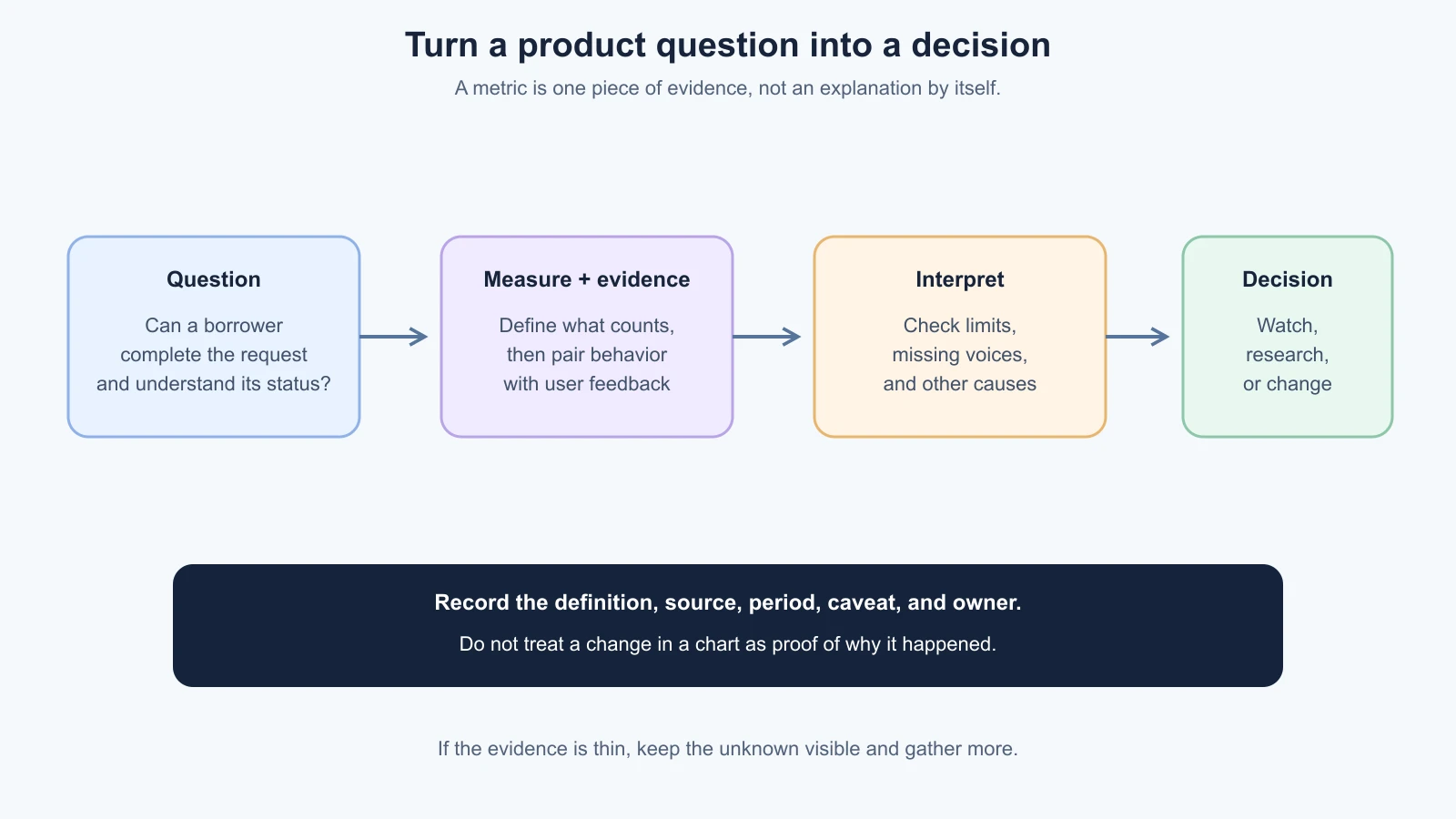
For each measure, define:
- Question: What uncertainty should this help answer?
- Measure: What count, rate, time, or cost will be observed?
- Definition: What is included in the numerator and denominator, or what unit is counted?
- Source: Which product event, support system, interview, or bill provides the information?
- Interpretation limit: What can this measure not tell us?
- Decision: What might the team do if the signal changes?
If nobody knows what decision a number might influence, pause before instrumenting it. A chart that is easy to collect can still create work without helping a user or the product. Keep measures small enough that a person can review them regularly and explain what they mean.
Choose measures connected to the user outcome
A metric is a measure used to understand a product question or goal. A vanity metric is a number that may look impressive but does not show whether the product is solving its intended problem. Downloads, page views, registered accounts, and total events can be useful in context. On their own, they do not tell you that someone completed a useful task or received value.
For ToolShelf, the number of account registrations would not by itself show that neighbours successfully borrowed tools. More relevant questions might include:
- Can a person find a suitable listing and send a valid request?
- Do owners see requests and make a decision?
- How many attempted requests fail, and at which step?
- Do borrowers understand whether a request is pending, approved, or rejected?
- Are people able to complete a handoff safely and as expected?
- Is the service costing more to support than the product can sustain?
These questions might lead to a completion measure, a failed-request count, a support category, or a short user test. No single metric covers the whole product. Choose a primary measure for the decision at hand, then pair it with a guardrail or another signal that can reveal an unintended consequence. If the team improves request completion by making the status less clear, a higher completion rate may hide a worse user experience.
A rate needs a clear denominator. “Completion rate” should describe which attempts count as eligible and what counts as complete. If some people abandon before the event can be recorded, state that gap. Counts and rates can be misleading when the group is very small, the release changed mid-period, or the tracking definition changed. Show the period, data source, and count behind a rate. Avoid presenting a precise percentage as certainty when the available observations are sparse.
Measures also need to reflect the product's purpose. A tool-sharing service may have seasonal patterns: people might request garden equipment more often in one period and ladders in another. A product used occasionally to solve an important problem should not necessarily aim to maximize daily visits. A person who borrows a tool, returns it, and has no further need may have succeeded without becoming a frequent visitor.
The GOV.UK Service Manual recommends combining performance metrics with user research for government services. Its four mandatory performance indicators apply to central government services, not to every product. The transferable lesson for a small team is to define success for its own user need and use more than one kind of evidence.
Use a few kinds of evidence together
Think of post-launch evidence in a few practical groups:
| Evidence | What it can show | What it may not show |
|---|---|---|
| Product behavior measure | Whether a defined step was recorded, such as a valid request being submitted | Why someone abandoned or whether the wording made sense |
| Support request | A person experienced a problem, question, or unmet expectation | How common the issue is among everyone using the product |
| User conversation or task | How a person understands the flow and what they expected | How often the same problem occurs across the full population |
| Operational signal | Whether the service is available, slow, or returning errors | Whether the product solves the right user problem |
| Cost record | What the team paid for hosting, storage, support, or other services | Whether the spend produced enough user value by itself |
Pair sources where the question needs them. If a completion measure changes, inspect the path and ask people about the step where the change occurred. If support requests mention a status message, compare the reports with the exact product copy and the recorded request state. If a service log shows failed submissions, look at the user-visible behavior and a safe reproduction rather than assuming the issue is fixed when the error rate falls.
Product analytics can help show patterns across interactions, but it is not the same as user research. Analytics records behavior according to the events the team chose to track. User research lets a person describe what they are trying to do and gives the team a chance to observe context. A feedback form gathers optional, reactive comments from people who choose to respond. These methods can work together, but each has gaps and selection effects.
For a government-service context, the GOV.UK guidance on measuring service success says teams should not rely only on digital analytics and describes combining measures with usability research. Use that as context for the broader method, not as a prescribed checklist for a commercial product.
Collect only the information that helps answer the question
Before adding analytics or a feedback form, write down what events and fields you need. Avoid sending names, email addresses, addresses, private message text, or user-entered content into analytics when an aggregate count or non-identifying event will answer the question. Avoid putting personal information in URLs, page titles, and error messages. Logs and third-party services may keep or process data outside the main product database, so include them in the data map.
For example, to learn whether a request flow fails, the team might need an event such as “request submission failed,” a broad error category, and a timestamp. It may not need the requester's email address or the private message body. To learn if the status is understandable, a short task-based conversation may reveal more than adding a detailed clickstream. Choose the least intrusive method that can answer the question.
Tell users what information the product collects and why, and check what notice or choices apply. Requirements depend on jurisdiction, data, users, and the tools involved. Get qualified privacy or legal advice for decisions that affect real people. This is awareness guidance, not legal advice. The GOV.UK guide to collecting personal information is written for government services, but its practical warning against unnecessary collection is useful to discuss with a qualified adviser in other settings too.
Set an access and retention rule for support messages, analytics records, exports, and logs. Give access only to the people who need it. If you use an AI assistant to group support feedback, follow the product's data handling rules, remove identifying details where appropriate, and check that the summary reflects the source accurately. Never paste an entire private support conversation into a public or unapproved tool just to save time.
Treat support requests as signals, not a vote
Support messages reveal that a person took the time to report something. That makes them valuable, but the people who contact support may not represent everyone using the product. Some people leave quietly, use a workaround, or never find the contact link. One severe access or data issue may deserve attention even if it is reported only once. A large number of similar questions can indicate confusing wording or missing information, but it still needs investigation.
For each report, record the product situation in a consistent way:
- What was the person trying to do?
- What did they expect, and what happened instead?
- Which product area or step was involved?
- Is the report about a failure, a question, an access barrier, or a suggested feature?
- What evidence is available, and what is still unknown?
- Who will respond, investigate, or decide the next step?
Group related requests by the underlying problem, not only by the person's suggested fix. Several people asking for a text message might actually need a dependable way to know that an owner responded. The team can investigate notification expectations before selecting a channel or adding a feature. Do not dismiss one report because it is an edge case, and do not treat every request as a commitment to build.
The GOV.UK Service Manual's support guidance describes using support feedback to improve a public service and treating enquiries as possible faults. That guidance is for government services; a small team can adapt the idea by linking support categories with a person who can investigate product behavior.
Close the loop with the person when appropriate. A short reply can explain what the team knows, ask for a missing detail, or say when it will follow up. Do not promise a fix date before the team has assessed the work. If a report exposes a serious privacy, safety, or access issue, use the incident process from the launch checklist and involve the right specialist.
Review running costs alongside product activity
Costs are part of whether a product can continue to serve people. Review hosting, database, file storage, email, analytics, support, payment processing, and AI services if the product uses them. The deployment lesson explains the common cost shapes and why current pricing should be checked in provider documentation.
Look at actual usage and the bill over a consistent period. Ask what changed: more people, more activity per person, larger files, a background job that did not stop, a new paid service, or a price or plan change. Compare the cost with the product task being completed, not just with total account sign-ups. If it is useful and the data is reliable, a rough cost per completed task can show a trend. It does not prove that the task is valuable or that one user caused the cost. Include fixed costs and note missing services so that the calculation is not mistaken for a complete unit-economics analysis.
Set a budget owner and decide what happens if usage moves beyond the expected range. A budget alert is an opportunity to investigate; it does not explain the cause. Read the usage breakdown, look at recent product or infrastructure changes, and decide whether to optimize, limit an expensive action, change a provider, or accept the cost because the user value justifies it. Do not abruptly remove an important service without considering what happens to its users and data.
The purpose of cost review is to make an informed product decision. A low-cost service that fails the main user task is not a good outcome. A higher cost may be justified if it provides needed availability, data protection, or support. Record what the team knows and what remains uncertain rather than treating cost as a simple score.
Write a weekly product note
A short review makes the work repeatable without building a dashboard for every question. Use a regular cadence that fits how often people use the product. A team with a few early users might review every week; a low-traffic product might need a longer period before a measure is informative. Do not interpret silence as success.
Copy and adapt this template:
1# Weekly product note
2Product and review period:
3People in the review:
4
5## Question we are trying to answer
6
7## Measures
8| Measure and definition | Source and period | Observed value or unavailable | Limit or caveat |
9| --- | --- | --- | --- |
10|  |  |  |  |
11
12## User and support signals
13- Pattern or useful report:
14- Who may not be represented:
15- Privacy or access considerations:
16
17## Operational and cost context
18- Relevant reliability signal:
19- Cost change and possible explanation:
20- What we have not verified:
21
22## Interpretation
23- What seems to be happening:
24- What is observation versus interpretation:
25- What other cause could explain the signal:
26
27## Decision and next step
28- Keep watching, research, change, pause, or stop:
29- Owner:
30- Evidence needed and next review date:
31- Backlog item or incident link:
The note separates an observed value from interpretation. If a measure was not collected, write “unavailable” rather than estimating it. If the data definition changed, mark the date because the new value may not be comparable with the old one. Keep private user details in the approved system with appropriate access controls; the note should contain a summary and link, not a copy of someone's personal message.
Turn a signal into the next decision
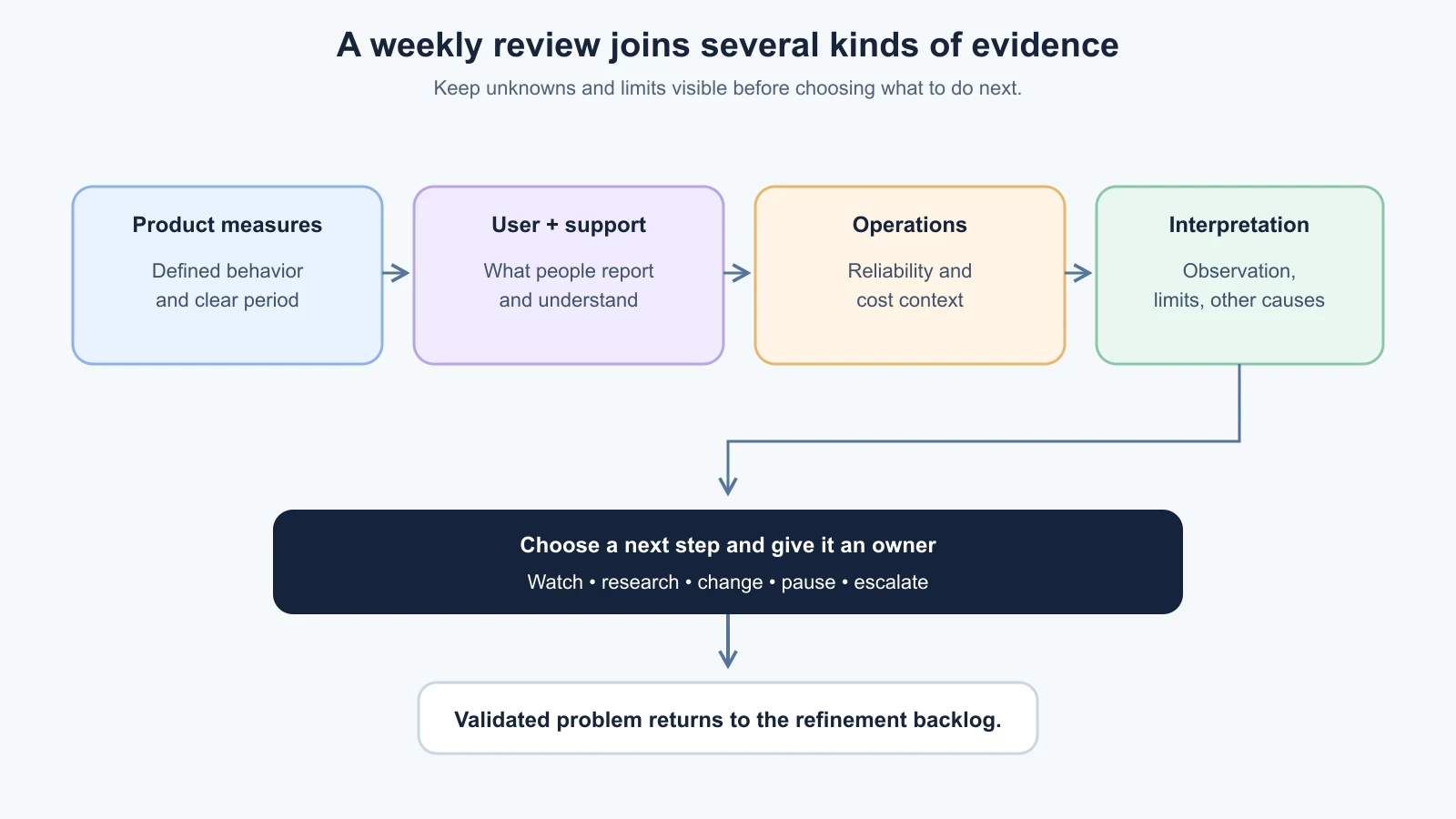
After the review, choose among a small set of actions:
- Keep watching: the signal is too sparse or uncertain to justify a change yet.
- Research: ask people, inspect the flow, or gather missing data to understand the cause.
- Change: write one clear outcome and a check, then add it to the refinement backlog.
- Pause or stop: the product or feature is not producing enough value, or the risk is not acceptable.
- Escalate: a reliability, security, privacy, or safety issue needs a responsible specialist or incident process.
Imagine that a ToolShelf weekly note eventually records that several support contacts ask whether a request is already approved. That is an illustrative future scenario, not an actual result. The team should check the relevant product rule, review the wording and status behavior, and consider asking people to describe what they believe happened. If the evidence points to a confusing status, the team can create a backlog item to clarify the message, then check whether the updated flow is understood. If the request was never saved, the right response would instead involve the technical failure and its operational handling.
Feed only the validated product problem into the backlog. Keep raw support details in the approved support system, link to evidence appropriately, and name the person responsible for the next action. The loop restarts from a new question, not from a chart that looks interesting.
Further reading
- The refinement loop, for prioritizing a specific change and comparing its result.
- Go Live: A Launch Checklist, for data, support, and launch ownership.
- Vibe Coding's Monitor and Maintain Your App, for service health, logs, backups, dependencies, and maintenance routines.
- Measuring the success of your service, GOV.UK Service Manual. It describes performance data alongside user research in a government-service context.
- Set up and manage user support, GOV.UK Service Manual. It covers connecting support information with service improvements in a government context.
- Collecting personal information from users, GOV.UK Service Manual. It offers government-service guidance on minimizing collection and checking with a data protection or legal adviser.
Mistakes beginners make
- Tracking a number without a question. Decide what action the measure could inform before adding it.
- Using registrations or traffic as proof of value. Connect activity to the task the product exists to help people complete.
- Reading a metric as an explanation. A measure can show where something changed; talk to users or inspect the flow to understand why.
- Ignoring who is missing from the data. People who do not complete the task or contact support may be invisible in your reports.
- Treating a support suggestion as a requirement. Investigate the underlying need and decide with the evidence.
- Collecting personal information because analytics makes it easy. Use only what answers the product question and follow qualified privacy guidance.
- Reporting precise rates from sparse data. Include counts, period, definition, and uncertainty.
- Looking only at total cost. Check which services or behaviors changed and whether the cost is connected to a valuable user outcome.
- Letting the note become a dashboard transcript. Record the question, evidence, caveats, decision, owner, and next review.
- Making a change and skipping the follow-up check. Add the expected evidence and review date when the team selects the work.
Recap and try it yourself
Choose a product question before choosing a metric. Define the measure, source, period, and limits. Combine product behavior with user research, feedback, support reports, operational information, and costs where relevant. Collect only the data you need, treat support as evidence rather than a vote, and record an action with an owner in a weekly product note. Feed the validated problem into the refinement backlog.
Try it: choose a practice product and write one question you need to answer after launch. Name one measure, what it counts, where it comes from, and one thing it cannot explain. Add one kind of user or support evidence, one cost or operational context, and the privacy question you would resolve before collecting it. Fill in the weekly note with unknowns left visible, then name who would choose the next step.