
AI Product Builders course · lesson 19 of 25
- 1The AI Product-Building Loop: From Idea to Improvement
- 2Define the Problem Before You Choose a Solution
- 3Check the Idea Before You Build
- 4App Anatomy for Non-Engineers: What Happens Behind a Screen
- 5Scope the First Version: Choose What to Build Now
- 6Choose a Tech Stack That Fits Your Constraints
- 7Choose a Prototype Tool for Your Product and Team
- 8Build a Clickable Prototype in One Focused Flow
- 9Test a Prototype with Real People
- 10Decide Whether to Keep, Change, or Stop
- 11Move from a Prototype to Real Code
- 12Work with an AI Coding Tool on One Clear Task
- 13Learn the Web Basics Behind Your App
- 14Connect a Database Without Losing Control of Your Data
- 15Tell a Small Fix from a Structural Change
- 16Run a Refinement Loop That Keeps the Product Useful
- 17Make an AI-Built Product Easier to Use
- 18Review and Check Changes Before They Reach the Team
- 19Test an AI-Built Product in Layers
- 20Work with a Team and Stakeholders
- 21Choose Where to Deploy Your Product
- 22Go Live: A Launch Checklist for Your Product
- 23Measure and Improve Your Product After Launch
- 24Add an AI Feature to Your Product Carefully
- 25Capstone: Take a Product Idea to Launch
After this lesson, you will be able to turn a feature's user needs into a small test plan, choose between unit, integration, end-to-end, and user testing, and review whether an AI-written test checks the behavior you actually care about.
We will use ToolShelf, the fictional tool-sharing product from earlier lessons. It has no real code, users, or test results. The examples are plans you can adapt to your own project. The earlier change management and CI lesson showed how a team can run checks before a change is merged. Here we will decide what evidence those checks should produce. For the coding workflow and test-first mechanics, see Test by Default.
Start with a product risk
Testing is a way to gather evidence about a product behavior. A test might be automated, performed by a person, or supported by both. A passing test means that a particular check observed the expected result in the conditions it ran. It does not prove the whole product is correct or useful.
Start with a user action and the result that should follow. In ToolShelf, a borrower submits a request to borrow a tool. The product rule says that the owner must approve it before it is reserved. That rule creates several risks:
- A request might look like a confirmed reservation when it is only pending.
- A request without a tool, date, or requester might be accepted.
- The request may appear on screen but fail to reach the server or database.
- A person may not understand what happens after submitting it.
- Private contact information might appear to someone who should not see it.
These are different problems. A single green test result cannot answer all of them. A function test might check that a missing date is rejected. A test connecting the form to the save handler might check that valid input creates a pending request. A browser test might follow the main screen flow. A person trying the flow can tell you whether the status language is clear. Access rules may need a separate test that signs in as different roles and checks what each can see.
Testing should follow the behavior and its consequences. A decorative heading has little data risk. A change to who can read a request has a higher consequence if it fails. For a small team, write down the few failures that would matter most before deciding how much automation to add.
Four ways to check behavior
Each test type gives a different kind of evidence. Names vary across tools, and the boundaries are not universal. Use these plain-language descriptions as a planning guide rather than a strict taxonomy.
| Test type | What it checks | ToolShelf example | What it may miss |
|---|---|---|---|
| Unit | One small rule or piece of logic in isolation | A date rule rejects a request for a day when the tool is unavailable | Whether the form sends that date to the rule correctly |
| Integration | Two or more parts working together | The request handler validates input and saves a pending request through the data layer | Whether a borrower can find and understand the form in the browser |
| End to end (E2E) | A complete product journey through the app, often in a browser | A borrower opens a tool page, submits a request, and sees the pending status | Whether the words are clear to different people, or every rare data case |
| User test | A person attempts a task or responds to a concept while you observe | Someone tries to request a tool and explains what they think will happen next | Whether every input edge case or permission rule is safe |
An end-to-end test, often shortened to E2E, checks a journey across connected parts of an app. It may use a browser, a test account, and a controlled test database. An integration test connects a smaller set of pieces, such as an API handler and a test database. A unit test keeps one small behavior separate from the rest of the application, which makes failures easier to locate.
Think of these as different camera angles on the same feature. The unit test zooms in on a rule. The integration test checks a connection. The E2E test follows a path. The user test observes whether the product makes sense to someone. A pyramid diagram often shows more small tests than complete journeys, but the shape is only a rough planning aid. A project should choose checks that it can keep accurate and useful.
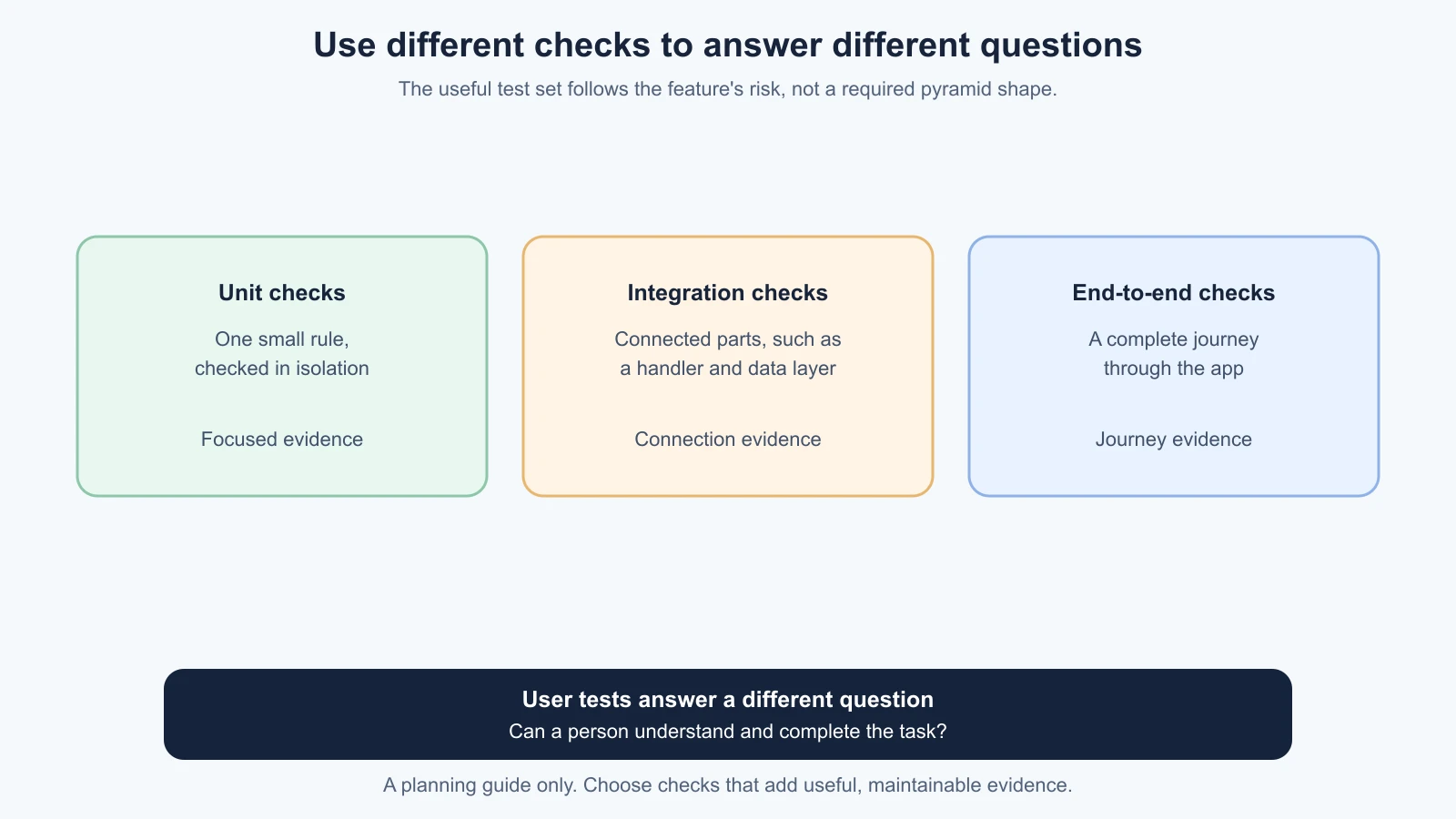
Do not add every test type to every requirement. The question is what uncertainty remains after one check. If a pure date calculation can be tested in isolation, a full browser journey just to repeat that calculation might be slow and harder to diagnose. If the concern is whether the borrower can complete the flow, a unit test is too narrow. Use more than one layer when their evidence answers different questions.
Choose tests for one feature
Suppose ToolShelf is adding the request flow. First write its expected behavior in language a reviewer and a test participant could understand:
When an available tool is requested for a valid date, save a request with pending status. Tell the borrower that the owner still needs to approve it. Do not mark the tool as reserved until approval.
This description gives the team a starting point, but it is not yet a complete test plan. Ask what needs to be true, what could go wrong, and which check could reveal the problem. A small plan might include:
- A unit test for required fields and valid request dates.
- An integration test that confirms valid input creates a pending request and invalid input is not saved.
- A permission check that confirms a borrower cannot approve their own request and an unrelated user cannot read private request details.
- One E2E journey from tool page to the visible pending status.
- A user test in which someone tries the flow and describes what they think has happened and what they expect next.
This set is a starting point for this feature, not a claim that it catches every defect. If a prototype or released product has different behavior, update the plan to match the real scope. Keep the test data fictional and the test environment separate from live user data. A test that accidentally sends a real owner a request or changes a production record can create real consequences.
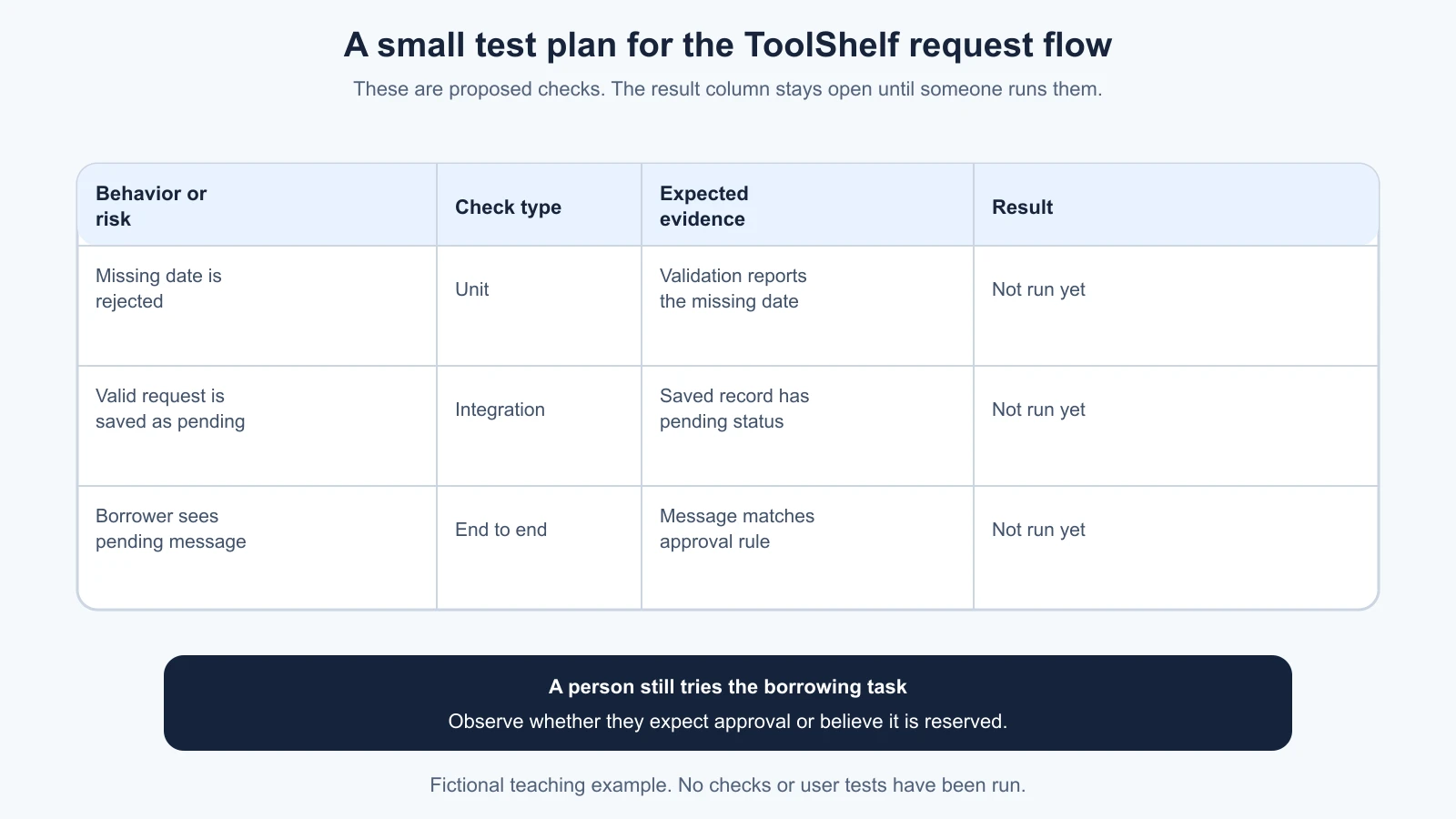
The small table below shows how to record purpose and evidence. It deliberately has a result column left open. The examples are proposed checks, not completed tests.
A test plan you can reuse
Use this template to plan one feature. Keep each row narrow enough that someone can tell what was checked and what happened. For a very small change, one or two rows may be enough. For a high-impact data or access change, name the roles, failure conditions, and recovery checks more carefully.
1## Feature and decision
2Feature:
3User need or product rule:
4What stays unchanged:
5
6## Risks and checks
7| Behavior or risk | Test type | Setup or test data | Expected evidence | Result and follow-up |
8| --- | --- | --- | --- | --- |
9|  |  |  |  | Not run yet |
10
11## User feedback
12Task for the participant:
13What I will observe:
14What I will ask afterward:
15Consent and privacy plan:
16
17## Review
18Commands or environment used:
19Checks that passed, failed, or did not run:
20Known gaps:
21Who decides whether the evidence is enough:
The “what stays unchanged” line helps prevent a test plan from shrinking the feature into a single happy path. For ToolShelf, the owner approval rule remains unchanged while the borrower-facing request text changes. The plan should cover the pending state, not just a successful button click.
Test data should let you repeat a check safely. Use a fake tool, fake borrower, fake owner, and dates you control. For access checks, create separate accounts or role fixtures in a test environment. Avoid copying real personal details into a prompt, screenshot, log, or test fixture. If you rely on a third-party payment, email, or mapping service, decide whether the test should use a documented sandbox, a controlled mock, or a manual check. The right choice depends on the integration and the project's security requirements.
Check that an AI-written test is meaningful
An AI tool can turn a written requirement into a test outline or draft test code. It can also misread a rule, invent a route or database field, test a trivial detail, or write an assertion that always succeeds. Treat the test as a proposal and inspect it before trusting its result.
Read the test in this order:
- Name the behavior. Can you describe the user-facing or product rule in one sentence?
- Check the setup. Does the test use the right role, data, and state? Is the tool available or already requested?
- Follow the action. Does the test actually trigger the behavior, or does it only call a helper unrelated to the user's path?
- Inspect the assertion. Does it check the expected result and a meaningful failure case? Is the expected value consistent with the product rule?
- Look for shortcuts. Does it skip the important code, mock the behavior being tested, accept any result, or disable validation?
- Read the report. Which command ran? Which tests passed, failed, were skipped, or were not run?
Consider the ToolShelf status rule. A weak test might check only that the page contains a “Request” button. That tells us very little about submission. Another weak test might check that a save function was called while overlooking whether it saved the correct status. A more useful integration check would submit valid request details and inspect the saved record or returned response to confirm it is pending. A separate E2E check can confirm that the borrower sees language that matches that state. A user test can reveal whether the wording leads a person to expect an immediate reservation.
If the AI proposes many tests, ask it to map each one to a requirement and explain what the test would fail to catch. Remove duplicate checks when they add no new evidence. If it proposes a new test framework or a new mock setup, ask what the project already uses and why the addition is needed. Test code is code too: review the diff, the fixtures, and any permissions or environment variables it introduces.
User testing belongs in the plan
Automated tests can confirm defined outputs under controlled conditions. They cannot determine whether a person recognizes the right next step, understands a warning, or trusts the status message. A short task-based user test complements code checks. It is not a satisfaction survey and it does not replace unit, integration, or E2E checks.
For the fictional request flow, give a participant a scenario such as: “You would like to borrow this drill for Saturday. Please show me what you would do.” Let them explore without coaching. Observe where they pause, what they click, and what they believe happened. If they submit the request, ask them to explain what they think happens next. Do not imply that the owner has approved it. Record observations separately from your interpretation, and ask permission before recording. The prototype testing lesson covers a test script and observation notes in more detail.
A test with a few people can expose confusing language or a missing step, but it does not represent every user. Do not turn one person's preference into a universal rule. Look for patterns, check who participated, and decide whether a finding needs more evidence. If the test concerns disability access, include suitable participants and assistive technology where possible; an automated accessibility scan or a non-disabled teammate tabbing once cannot stand in for that experience.
If the product handles personal or sensitive information, plan what participants will see and what you will retain. Use test accounts and fictional data where possible. Explain the task and any observation or recording in plain language, get consent, and avoid collecting details you do not need. Follow the project's privacy process and seek qualified advice for legal requirements. This lesson is about product testing, not legal guidance.
Make failures useful
A failed check is evidence that something needs attention, but it does not always mean the feature code is wrong. The test may use stale assumptions, a service may be unavailable, test data may leak between runs, or the environment may differ from the one the test expects. Read the expected and actual result, identify which behavior the test exercised, and reproduce the issue before changing the application.
If a test is flaky, it passes sometimes and fails other times without a relevant code change. Do not repeatedly rerun it until a pass appears. Look for timing assumptions, shared state, reliance on a network service, or data left behind by another test. The Playwright guidance recommends isolated tests and checks against user-visible behavior. Its web-first assertions wait for the expected page state rather than reading it once too early. Adapt those practices to the test tool and setup your project uses.
When a test fails because the requirement changed, update the product decision, test, and implementation together. Do not simply change the expected value because the AI says that is easier. Record which checks did not run, and leave important gaps visible to the reviewer. A green dashboard with a skipped permission check is not equivalent to a green dashboard where the permission check ran.
A reasonable small-team routine
For a feature with user-visible behavior, a team can use this sequence:
- Agree on the behavior and the risks before asking AI to implement it.
- Ask for a proposed test list tied to those behaviors, including one failure case and the relevant user task.
- Review the list and choose the smallest checks that provide different evidence.
- Review test setup and test code. Confirm that a test can detect the missing behavior it claims to check.
- Run the project's documented checks and a manual or user check when the risk calls for one.
- Record exact commands and results, including what did not run, in the pull request or test plan.
- Ask the product or technical owner whether the remaining evidence is enough for this change.
The sequence is intentionally small. It connects a feature decision to evidence without requiring a large formal quality process. As the product grows, the team may add checks for data migration, performance, browser support, monitoring, or security. Choose those because they address a real product risk, then keep them owned and repeatable.
Further reading
- Test by Default, for test-first coding, keeping regression checks, and reviewing test behavior.
- Test the prototype with real people, for task scripts, observation, and consent.
- The Next.js testing guide describes testing approaches and tools for Next.js projects. Check the guide for the version your project uses.
- Vitest: Writing Tests explains test cases and assertions; its mocking guide describes fakes and mock cleanup.
- Playwright best practices covers user-visible behavior, test isolation, controlled test data, and assertions. These are tool-specific recommendations, not a complete product test strategy.
Mistakes beginners make
- Using only one kind of check. Match the test to the uncertainty. A unit test cannot show that a person understands the flow.
- Writing tests around the implementation instead of the behavior. Check the product rule and visible outcome, not a detail that can change without affecting the user.
- Trusting an AI-generated test because it passes. Read its setup, action, assertion, and report. Confirm it can catch the failure you care about.
- Mocking away the part that might fail. A mock can isolate a test, but it cannot prove that the real pieces connect.
- Using real user or production data in routine tests. Use isolated, fictional test data and environments.
- Treating a skipped check as a pass. State what ran and what did not.
- Rerunning a flaky test until it turns green. Find the timing, shared state, or dependency that makes the result unreliable.
- Believing a successful browser test proves the feature is usable. Ask a person to try the task when understanding or confidence is part of the requirement.
- Claiming broad coverage from a tiny sample. Record who participated and what the evidence can and cannot support.
Recap and try it yourself
Unit tests check small rules, integration tests check connections, E2E tests follow a complete product journey, and user tests show how real people interpret a task. Choose each check because it answers a different question. Tie tests to the product risks, review AI-written tests for meaningful assertions, and record the checks that did not run as clearly as the ones that passed.
Try it: choose one feature in a practice project and write a one-sentence product rule. List one likely failure, then fill in the test-plan template with the check type, test data, expected evidence, and result. Ask an AI tool to propose tests mapped to the rule, without editing the project. Review the proposal: which tests check a real behavior, which repeat each other, and what would still require a person to try the feature?