
AI Product Builders course · lesson 1 of 25
- 1The AI Product-Building Loop: From Idea to Improvement
- 2Define the Problem Before You Choose a Solution
- 3Check the Idea Before You Build
- 4App Anatomy for Non-Engineers: What Happens Behind a Screen
- 5Scope the First Version: Choose What to Build Now
- 6Choose a Tech Stack That Fits Your Constraints
- 7Choose a Prototype Tool for Your Product and Team
- 8Build a Clickable Prototype in One Focused Flow
- 9Test a Prototype with Real People
- 10Decide Whether to Keep, Change, or Stop
- 11Move from a Prototype to Real Code
- 12Work with an AI Coding Tool on One Clear Task
- 13Learn the Web Basics Behind Your App
- 14Connect a Database Without Losing Control of Your Data
- 15Tell a Small Fix from a Structural Change
- 16Run a Refinement Loop That Keeps the Product Useful
- 17Make an AI-Built Product Easier to Use
- 18Review and Check Changes Before They Reach the Team
- 19Test an AI-Built Product in Layers
- 20Work with a Team and Stakeholders
- 21Choose Where to Deploy Your Product
- 22Go Live: A Launch Checklist for Your Product
- 23Measure and Improve Your Product After Launch
- 24Add an AI Feature to Your Product Carefully
- 25Capstone: Take a Product Idea to Launch
After this lesson, you will be able to describe the five stages of an AI-assisted product cycle, choose a small first lap, and tell which decisions still need your judgment. We will use ToolShelf, a fictional service for neighbours who lend and borrow tools. Its story is invented to make the process concrete; it is not based on interviews or real product results.
A product is more than a working screen
Imagine that you have an idea for an app. You can describe it to an AI tool and get a polished-looking screen in minutes. That can be a useful start, but a screen alone does not tell you whether anyone needs the product, whether the main task works, whether people can use it, or whether it is safe to put online.
A product is a service or thing people use to get a job done. A digital product may include screens, server logic, stored data, sign-in, support, and the processes that keep it running. Some products are small. A calculator can be useful with one screen and no account. A neighbourhood lending service needs more: people, tools, availability, and a way to coordinate a handoff.
AI tools can help you explore options, draft copy, make a prototype, generate code, explain errors, and organize feedback. They can make it cheaper to try an idea. They cannot establish that your assumptions are true just by producing a convincing answer. You still need evidence from people, clear choices about what to build, and checks that the result behaves as promised.
That is why this course treats product building as a loop. You move from a problem toward a release, observe what happens, and use what you learn to choose the next change. The loop makes room for AI at every stage while keeping a person responsible for the decisions.
The five stages
The roadmap for this course groups product work into five stages: Prototyping, Generation, Refinement, Collaboration, and Deployment. Before the first stage, you define the problem, audience, scope, and constraints. The stages then repeat as the product changes. This is the structure used by the AI Product Builder roadmap.
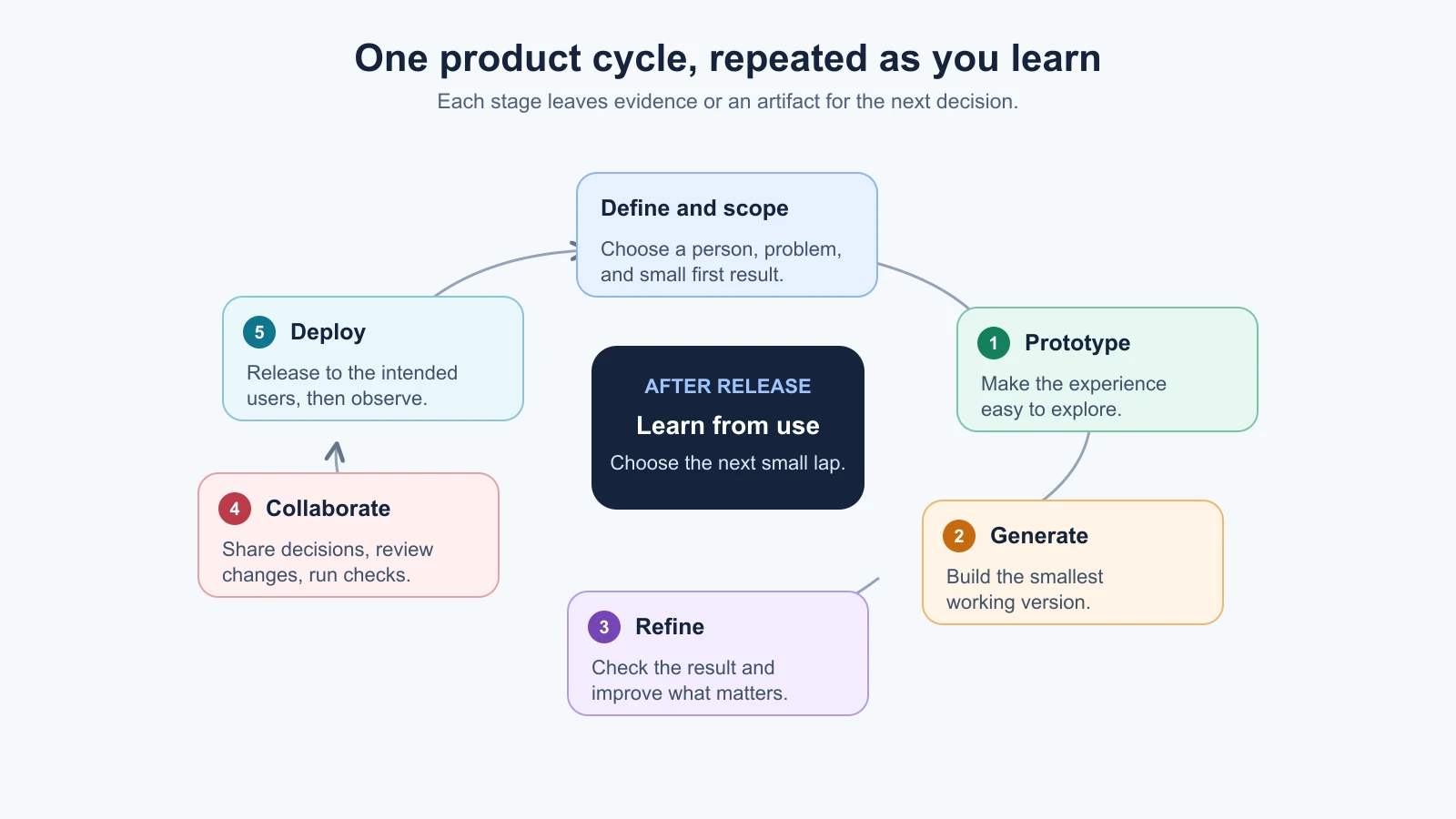
Here is what each stage means in plain language:
- Define and scope: Decide whose problem you are addressing, what they do today, and what a small first version must do. Write down what is outside that first version too.
- Prototype: Make a quick model of the experience so you can explore a flow or ask someone to try it. A prototype can use pretend data and unfinished screens.
- Generate: Turn the reviewed idea into a working product. This may mean writing code with an AI assistant, continuing in an app builder, or moving from a prototype into a code repository.
- Refine: Compare the product with the need and the acceptance checks. Fix confusing steps, missing states, defects, or one worthwhile next feature.
- Collaborate: Coordinate the people and tools involved. Share the scope and decisions, review changes, and run checks before combining work. A solo builder still collaborates with future users, reviewers, and service providers.
- Deploy: Make the product available to its intended users, with the basic setup and recovery plan in place. Deployment is a stage in the roadmap's product cycle, though defining and scoping comes before its five numbered stages.
After a release, look at what people actually do and where they get stuck. That evidence can send you back to the problem, scope, or prototype, or it can point to a focused improvement. A loop does not mean that every idea deserves another lap. It means that the next decision is informed by what happened in the last one.
ToolShelf takes one small lap
Suppose a few neighbours say they would like to borrow tools from each other. ToolShelf is our fictional example for learning the process. We do not yet know how common this need is, what tools people would share, or whether they would feel comfortable lending them. Those are questions to investigate, not facts to fill in with a plausible story.
Define and scope: The first draft of the idea might be “an app for borrowing things.” That could include tools, books, camping gear, or almost anything else. For a first lap, narrow it: “Help people in one neighbourhood list a tool they are willing to lend and ask its owner about borrowing it.” The scope might include a list, a detail page, and a request form. Payments, delivery, ratings, and multiple neighbourhoods can wait. The problem brief and scope document arrive in later lessons.
Prototype: Sketch the path from seeing a drill to asking its owner to borrow it. The prototype could show three screens: a list, a tool page, and a request confirmation. The tool owner and availability can be sample data. The purpose is to see whether the flow is understandable, not to make a functioning lending network.
Generate: If the flow seems clear enough to build, choose a tool and make the smallest working version. An AI app builder might create the first screens; a coding agent might help implement a reviewed task in a repository. In either case, the person building ToolShelf decides whether the generated result matches the agreed scope and checks what the tool changed.
Refine: Try the flow with a few people who resemble the intended users. If they cannot tell whether a request has been sent, that is a concrete issue to fix. If they ask for delivery, record the idea, but do not silently add it to the first version. A useful refinement responds to observed evidence and keeps the original goal visible.
Collaborate: If a designer, developer, or neighbourhood organizer is involved, share the prototype, scope, and decisions. Ask for review before merging changes. If you are working alone, write those decisions down so a future collaborator or your future self can understand why the first version is limited.
Deploy: Once the basic checks pass, make the small version available to the people who agreed to try it. Decide where it runs, what data it stores, who can access it, and how you would pause or roll back a broken release. Later lessons cover those technical and operational decisions.
Then observe what happens. Do people find a tool? Do owners respond? Does the request flow work on a phone? We have no real ToolShelf results to report, so these questions stay open. A real builder would use actual observations to choose the next lap.
What AI can help with, and what you own
AI can speed up pieces of work across the cycle. You might ask it to turn an idea into interview questions, list assumptions, create a prototype outline, explain a code change, draft test cases, or summarize notes you are allowed to share. Its output is a starting point that you inspect.
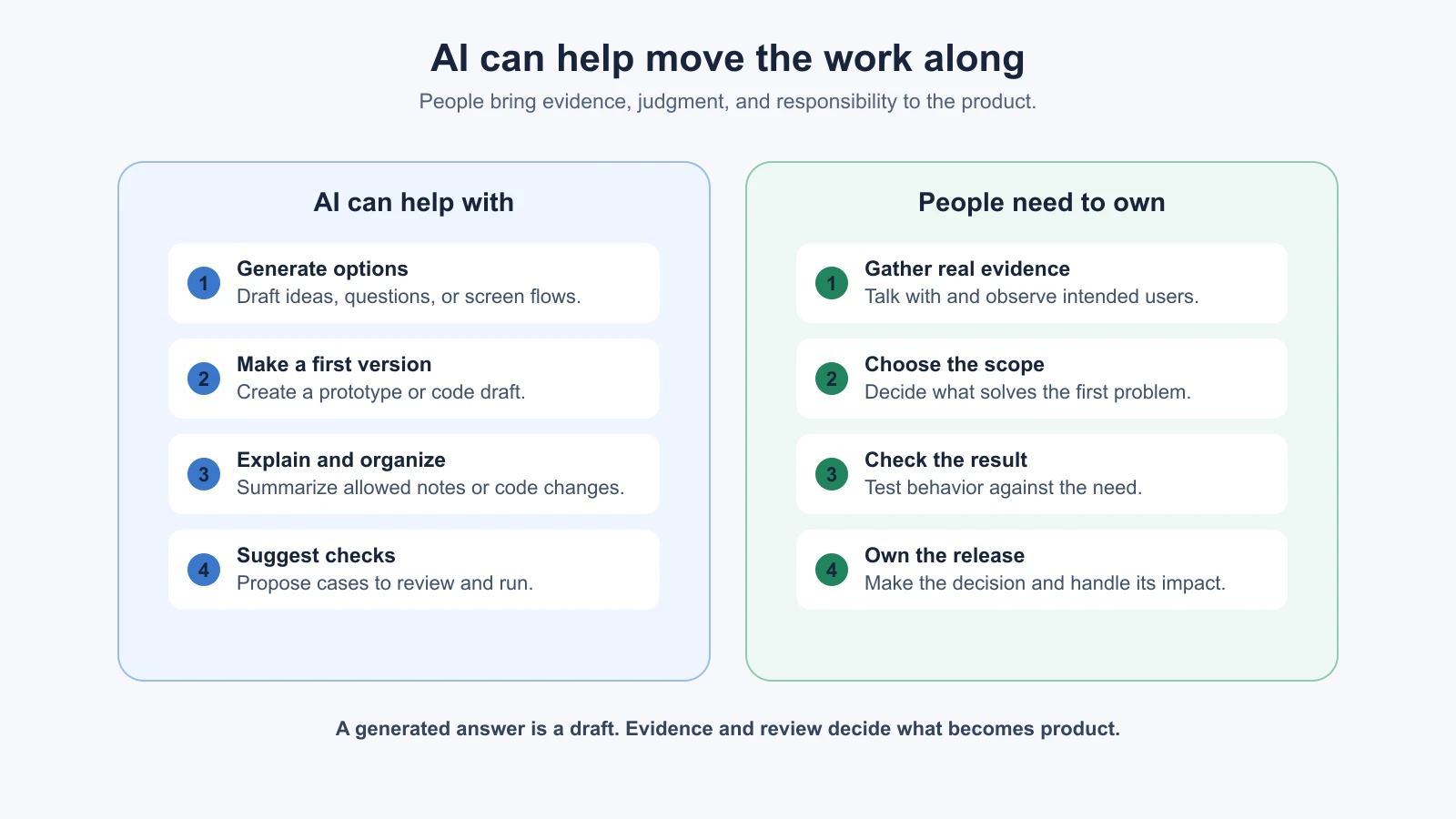
The distinction matters because a fluent answer can still rest on a guess. If you ask an AI to summarize interviews, it can organize what you provide; it cannot turn a few comments into proof that a whole market wants the product. If it generates a prototype, the prototype proves that a screen can be made; it does not prove that the flow is useful. If it writes tests, you still need to check that the tests cover the behavior you care about.
Keep a simple record of what is known, assumed, and still unanswered. For ToolShelf, “the request form includes a date” could be a product decision. “Neighbours will lend expensive equipment to people they do not know” is an assumption until you investigate it. Marking the difference helps prevent an AI-generated suggestion from quietly becoming a product requirement.
People also remain responsible for consequential choices: which users to serve, what data to collect, who can see it, whether a feature is safe to release, and how to respond when it fails. AI can help you compare options and explain trade-offs. The owner of the product makes the call and is accountable for checking the result.
This does not mean you must understand every line of generated code before you can learn. It does mean you should know what you are asking the product to do, test the main path, review the changes at a level you can manage, and get qualified help when the risks exceed your experience. The Vibe Coding course's introduction covers the building habits that support this work.
Choose a first lap small enough to finish
Your first lap should answer one useful question, not build every feature you can imagine. Start with one group of people, one job they need done, and one path through the product. Make a short list of what the first version will do and what can wait.
For a personal reading-list idea, the first lap might be: add a link, see saved links, and open one again. Sharing, recommendations, browser extensions, and automatic summaries might be later questions. For ToolShelf, the first lap could explore whether people can find an item and send a clear request. It need not include payments or delivery.
A small lap makes feedback easier to interpret. If you change the audience, add five features, switch tools, and redesign the flow together, a result will be hard to explain. If you test one main path and record what happened, you have a clearer next decision. You do not need a rigid project plan; you need enough structure to see what you tried.
Before you begin, write down four things:
- Who is it for? Name the people you want to help as specifically as you can.
- What are they trying to do? Describe the task in everyday words.
- What is the smallest useful result? Pick one path you can demonstrate and check.
- What would you need to learn? List the assumptions or questions that could change your plan.
These notes are provisional. If evidence changes your understanding, update them. A product process is useful when it helps you change direction deliberately, not when it forces you to defend the first idea.
Mistakes beginners make
- Starting with the tool instead of the need. A builder can produce a page before you know who needs it. Begin with the person and task.
- Treating a prototype as proof. A convincing mock-up only shows one possible design. Put it in front of people and observe what they can do with it.
- Making the first version too broad. Every extra feature adds decisions and checks. Keep one main job in view.
- Repeating AI suggestions as user evidence. Label suggestions as suggestions. Use real observations to support claims about users.
- Skipping the review between stages. A prototype should be understandable before you build around it; a change should be checked before you release it.
- Assuming launch is the finish line. A release gives you a chance to learn from actual use. It does not guarantee that the product is useful or complete.
Recap and try it yourself
Product building with AI is a cycle: define and scope a real problem, prototype a possible experience, generate a working version, refine it with checks and feedback, collaborate through review, and deploy it for the people it is meant to serve. Then use what you learn to decide whether to repeat the cycle, change direction, or stop. AI can help produce and organize work at each stage; people supply evidence, make decisions, and take responsibility for the release.
Try it: write one sentence naming a group of people and a task they may need help with. List one thing you know, one assumption you would need to check, and one small result you could prototype. Keep the feature ideas that do not support that result in a “later” list. Next, you will turn the idea into a problem statement a stranger can understand and test.
Sources
- AI Product Builder roadmap, which supplies the cycle structure used in this course.
- Building effective agents, Anthropic, for the narrower point that adding AI-agent complexity should be justified by the task. This lesson's product-cycle explanation and ToolShelf example are course teaching material, not claims from that article.