
AI Product Builders course · lesson 6 of 25
- 1The AI Product-Building Loop: From Idea to Improvement
- 2Define the Problem Before You Choose a Solution
- 3Check the Idea Before You Build
- 4App Anatomy for Non-Engineers: What Happens Behind a Screen
- 5Scope the First Version: Choose What to Build Now
- 6Choose a Tech Stack That Fits Your Constraints
- 7Choose a Prototype Tool for Your Product and Team
- 8Build a Clickable Prototype in One Focused Flow
- 9Test a Prototype with Real People
- 10Decide Whether to Keep, Change, or Stop
- 11Move from a Prototype to Real Code
- 12Work with an AI Coding Tool on One Clear Task
- 13Learn the Web Basics Behind Your App
- 14Connect a Database Without Losing Control of Your Data
- 15Tell a Small Fix from a Structural Change
- 16Run a Refinement Loop That Keeps the Product Useful
- 17Make an AI-Built Product Easier to Use
- 18Review and Check Changes Before They Reach the Team
- 19Test an AI-Built Product in Layers
- 20Work with a Team and Stakeholders
- 21Choose Where to Deploy Your Product
- 22Go Live: A Launch Checklist for Your Product
- 23Measure and Improve Your Product After Launch
- 24Add an AI Feature to Your Product Carefully
- 25Capstone: Take a Product Idea to Launch
After this lesson, you will be able to name the constraints that should shape a technology choice, compare a few stack options against them, and record a decision you can revisit. A good stack is one your team can use to deliver the product’s first job and keep it working. It is not a prize for choosing the trendiest tools.
We will use ToolShelf, the fictional neighbourhood tool-sharing service from earlier lessons. The example does not claim that real neighbours want the product or that a particular stack has been tested for it. First, look back at the scope for ToolShelf’s first version: one path for a neighbour to find a listing, request a tool, and see the owner’s response.
A stack is a set of choices
A technology stack is the collection of technologies used to build and run a product. It can include the language and framework for the interface, server code, database, sign-in, file storage, hosting, and tools for building and monitoring the app.
You do not have to select every part independently. A managed platform may bundle several jobs into one service. For example, Supabase describes its platform as a PostgreSQL database foundation with authentication, storage, realtime features, and edge functions. That can reduce setup work, while also making it important to understand what the service manages and what you would need to change if your requirements or provider changed.
The choices interact. A framework affects where the app can run. A database affects how data is structured and queried. A hosting provider affects which features are available and how much infrastructure your team operates. A stack that looks simple in a diagram can still require decisions about backups, access, monitoring, and support.
The goal is not to find one stack that is best for every product. The goal is to select a reasonable starting point for this product, this team, this stage, and these constraints.
Write down constraints before comparing tools
A constraint is a condition that limits or shapes your options. Write down the conditions that actually matter before you ask an AI assistant or search the web for a stack recommendation.
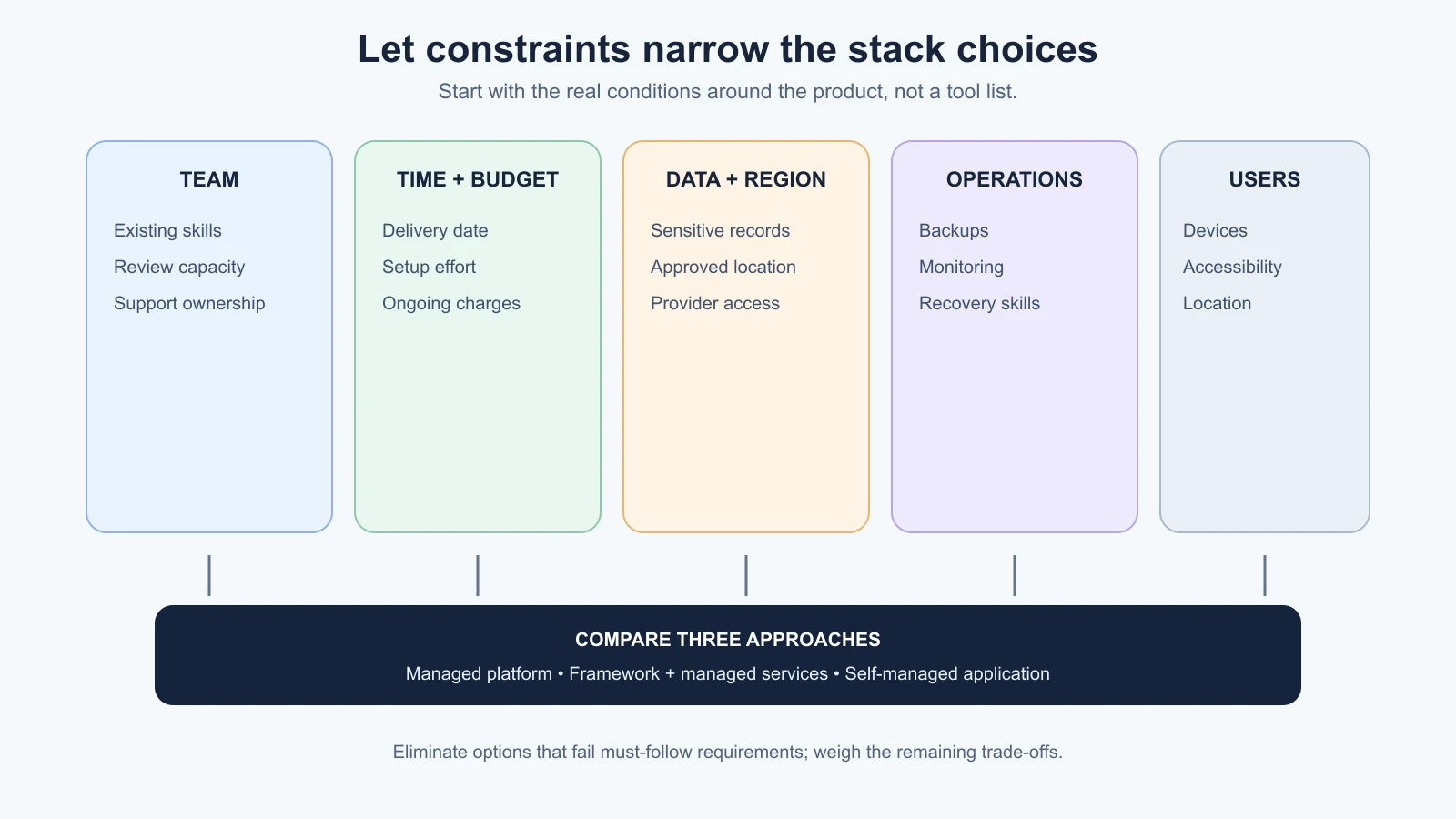
Consider these areas:
- Team skills: What can the people involved already build, review, and support? A familiar tool may be a better first choice than a theoretically elegant one no one can operate.
- Time: When do you need a prototype, a pilot, or a reliable service? A short deadline may favor managed services and familiar patterns, but it does not make testing or privacy checks optional.
- Budget: Include setup and ongoing costs. Hosting, database usage, email, file storage, monitoring, support, and paid seats can all contribute. Check current pricing and limits directly before committing because plans change.
- Data sensitivity: What personal, financial, health, business, or otherwise confidential information will the product handle? Identify who may access it and which services will process or store it.
- Users and region: Where are users located? Do they have device, language, connectivity, accessibility, or latency needs? Are there legal, contractual, or organizational rules about where data may be processed or stored? Get qualified advice when those requirements are unclear.
- Operating capacity: Who will deploy updates, monitor failures, restore data, and respond to support requests? A service can make infrastructure easier to start and still leave operational responsibilities with your team.
- Existing systems: Do you need to connect to an organization’s identity provider, database, payment system, or approved cloud account? Existing contracts and policies can be real constraints.
- Portability: If you change provider, can you export the code and data, and can the team run the app somewhere else? What would need to be rewritten or reconfigured?
Separate must-follow constraints from preferences. “We must store this type of data in an approved region” may be a binding requirement. “We would prefer a familiar language” is important, but it is a preference to weigh alongside other factors. Do not guess at legal or regulatory obligations; document the question and get appropriate guidance.
Compare patterns, not brand lists
It helps to compare common patterns without turning the lesson into a tool ranking. Here are three broad ways a small web product might be assembled:
| Pattern | What it can look like | What to examine |
|---|---|---|
| Managed app platform | A hosted builder or platform that combines interface, server functions, data, and deployment | Can you export the code and data? What does it manage? Can it support the user journey, access rules, and regions you need? What are the current limits and exit steps? |
| Web framework plus managed services | A framework such as Next.js, a managed database such as PostgreSQL through Supabase, and a hosting service | Which provider-specific features are in use? Who manages identity, backups, and updates? Does the host support the framework features you rely on? |
| More self-managed application | A framework or server app, a database, and infrastructure configured by your team | Does anyone have the skills and time to maintain it? Who handles patching, backups, monitoring, scaling, and incident response? |
These are starting patterns, not exact recipes. A framework such as Next.js can run as a Node.js server, in a Docker container, as a static export with limited feature support, or through platform adapters. The official documentation says feature support varies by deployment approach and provider. That is why a choice of framework and a choice of host should be checked together, especially when the app needs server-side features.
For data, a relational database such as PostgreSQL stores records in tables with defined columns and relationships. This can fit information such as users, listings, and borrowing requests, where one request points to a user and a listing. Other data models can fit other needs. The important choice is how the product needs to store, find, connect, and protect its information, not which database name is fashionable.
Why familiar stacks can help with AI tools
AI coding tools often produce code in common languages and frameworks, and widely used technologies tend to have documentation, examples, and developer communities that are easier to find. That can make generated suggestions easier to compare with official guidance and easier for a human reviewer to recognize.
Familiarity is not a guarantee of correctness. A model can use an outdated API, invent a setting, combine incompatible versions, or produce code that works in a demo but misses access control or error handling. Ask it to name the framework version and the assumptions it used. Check important details in the current official documentation, run the relevant checks, and review the change against your scope.
When a tool suggests a stack, give it the constraints and ask for a short comparison, including what each option makes easier, what your team would need to operate, known portability questions, and which facts require current verification. Do not ask it to pick “the best stack” without context. The answer can sound certain while optimizing for assumptions you did not state.
Build it, buy it, or combine both
Build means your team implements and operates the capability. Buy means you use an existing product or service, often through a subscription or API. A hybrid approach combines existing services for common capabilities with custom work for the parts that make your product useful.
For ToolShelf, a team might use a managed sign-in service and database while building its own listing and request flow. Another team could use a general app builder to test the whole journey. Those are options to compare, not recommendations for a real product. The right answer depends on the constraints and on who can inspect and support the result.
Use a few questions for each capability:
- Is this capability central to the product’s distinctive user job, or is it a common supporting need?
- Does an existing service meet the functional, security, region, accessibility, and support requirements?
- What data would the provider receive, and under what terms?
- How would failure affect the user’s main task?
- What would it cost to operate, including paid plans, usage, staff time, and a possible migration?
- Can the team test, monitor, and recover it?
Buying can save implementation effort, but it does not remove the need to understand provider limits, data handling, or failure behavior. Building can give you more control, but it also gives you more responsibility for maintenance and support. Do not build a replacement for a mature service merely to avoid one subscription, and do not outsource a sensitive capability without understanding what the provider does with the data.
Look for lock-in before you depend on it
Vendor lock-in is the effort or cost involved in moving away from a provider. Some dependence can be a sensible trade: a managed feature may save time and reduce the amount of infrastructure your team must handle. The risk is accepting that trade without knowing its boundaries.
Check portability in separate parts:
- Application code: Can you access and export the source code? Does it use open standards or provider-specific APIs?
- Data: Can you export a complete copy in a usable format? Can you restore that copy elsewhere? A download is not a practical exit plan until you have checked what it contains and whether you can use it.
- Identity: How are user accounts and credentials handled? Account migration may be more complex than copying profile rows.
- Files: Can you export uploads and preserve their references, permissions, and metadata?
- Configuration: Can you reproduce environment settings, domains, and integrations outside the provider?
- Operations: Can another host run the application’s required features? Does the team know how to deploy, monitor, and recover it there?
For example, the Next.js deployment guide documents Node.js server and Docker options in addition to static export and platform adapters. A Node server or container can create hosting choices, but portability still depends on your code, database, identity provider, storage, and platform-specific features. Supabase’s documentation recommends regular data exports for free-tier projects and describes backup behavior by plan; those details can change, so verify current documentation and practice a restore for your own project.
Avoid “we can migrate later” as the whole plan. Write one sentence about what you could export today, what would need to be rebuilt, and who would do that work. You do not have to eliminate every dependency. You should understand the exit cost well enough to accept it knowingly.
Fill in a decision table
The following is a fictional ToolShelf comparison. It demonstrates how to expose trade-offs; it is not a benchmark or a claim about named providers. Real teams should replace the entries with current facts from their own requirements and official documentation.
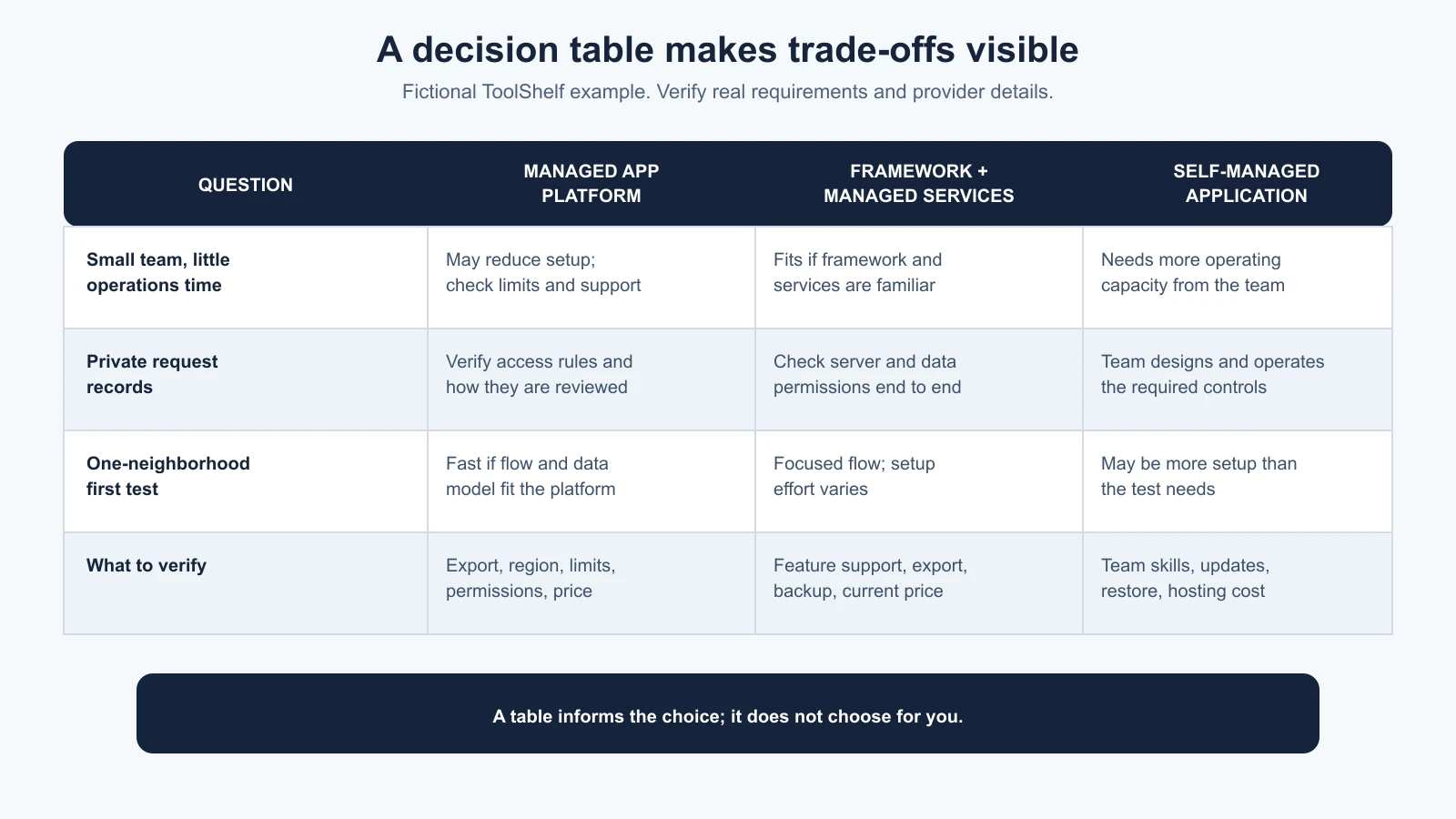
| Constraint or question | Managed app platform | Framework plus managed services | Self-managed application |
|---|---|---|---|
| Small team with limited operations time | May reduce setup, but inspect limits and support | Could be manageable if the team knows the framework and providers | Likely needs the most operating capacity |
| Need a private request flow | Verify role and record-level permissions can be enforced and reviewed | Check server and database access rules end to end | Team owns the design and operation of those controls |
| Need to test one neighborhood first | Could be fast if the flow and data model fit | Can support a focused first version; setup effort varies | May be more infrastructure than the first test needs |
| Change hosting later | Depends on code export and platform-specific features | Check host support and provider-specific integrations | More control, but migration still takes skilled work |
| What to verify next | Export, data location, permissions, pricing, and limits | Framework feature support, database export, backup, and pricing | Team skills, security updates, restore process, and hosting cost |
Notice what the table does not do: it does not produce a winner by adding up arbitrary points. If a requirement is mandatory, such as an approved data region, one option that fails it can be eliminated. For other factors, discuss trade-offs and record why the team chose the remaining option.
A compact stack decision note
Use this template after you have a first-version scope and a list of constraints. It is a course aid, not a formal architecture standard.
1# Stack decision
2
3Product and version:
4Decision owner and date:
5
6## User job and first-version scope
7[Link to the scope document and summarize the main path.]
8
9## Must-follow constraints
10- [Requirement and its source or owner]
11
12## Preferences
13- [Team familiarity, delivery time, workflow, or other preference]
14
15## Options considered
16- [Pattern or stack, with current docs checked]
17
18## Decision and reason
19[What we chose and which constraints it meets.]
20
21## Build, buy, or combine
22[Which capabilities we own and which services we use.]
23
24## Data and provider questions
25[What data moves where, who can access it, and current terms/limits.]
26
27## Portability and recovery
28[How to export code/data, restore a backup, and what migration would require.]
29
30## Open questions and review date
31[What we still need to verify, and when to revisit the decision.]
Keep the note proportional. A small prototype may need only a brief record of the main choice and its biggest risks. A product with sensitive data, contractual obligations, or critical operations needs deeper review from people qualified to assess those areas.
Sources
- Deploying a Next.js application, Next.js documentation, updated 25 March 2026: deployment options include Node.js, Docker, static export, and platform adapters, with differing feature support.
- Supabase database overview, Supabase documentation, updated 29 June 2026: describes the Postgres database and the Auth, Storage, Realtime, and Edge Functions capabilities built around it.
- Supabase database backups, Supabase documentation, updated 29 October 2026: describes plan-specific backup behavior and recommends regular exports for free-tier projects. Check the current plan details before relying on them.
- PostgreSQL tutorial: concepts, PostgreSQL documentation: introduces relational data organized in tables, rows, and columns.
- The ToolShelf comparison, decision note, and build-versus-buy questions are course teaching aids, not vendor evaluations or official standards.
Mistakes beginners make
- Starting with a favorite tool. Begin with the user job, team, and constraints; then compare suitable options.
- Treating “popular” as “right.” Popular tools still have limits and operating costs that may not fit your product.
- Assuming AI-generated code makes a stack easy to maintain. You still need someone who can review, update, and recover it.
- Counting only the initial price. Include usage, support, staff time, data transfer, and possible migration work.
- Calling a data download portability. Check whether the exported data can be restored and used elsewhere.
- Ignoring the host until deployment. Framework features and hosting capabilities need to fit together.
- Building every supporting capability yourself. Build what matters to your user job; compare existing services for the rest.
- Treating a decision as permanent. Record assumptions and a review point so new evidence can change the choice deliberately.
Recap and try it yourself
Choose a stack by writing down your team’s skills, time, budget, data needs, user locations, operating capacity, existing systems, and portability requirements. Compare a few patterns against those constraints. Decide which capabilities to build, buy, or combine, and check current provider documentation for features, data export, regions, backup behavior, and pricing. AI can help organize the comparison, but a person must verify the details and own the decision.
Try it: take the first-version scope for your own idea and write down three must-follow constraints and three preferences. Compare a managed platform, a framework with managed services, and a more self-managed option. For each, name one thing to verify in current documentation and one person or skill needed to operate it. Record a provisional choice and what evidence would make you revisit it. Next, we will choose a prototype tool for the product and the people building it.