
AI Product Builders course · lesson 20 of 25
- 1The AI Product-Building Loop: From Idea to Improvement
- 2Define the Problem Before You Choose a Solution
- 3Check the Idea Before You Build
- 4App Anatomy for Non-Engineers: What Happens Behind a Screen
- 5Scope the First Version: Choose What to Build Now
- 6Choose a Tech Stack That Fits Your Constraints
- 7Choose a Prototype Tool for Your Product and Team
- 8Build a Clickable Prototype in One Focused Flow
- 9Test a Prototype with Real People
- 10Decide Whether to Keep, Change, or Stop
- 11Move from a Prototype to Real Code
- 12Work with an AI Coding Tool on One Clear Task
- 13Learn the Web Basics Behind Your App
- 14Connect a Database Without Losing Control of Your Data
- 15Tell a Small Fix from a Structural Change
- 16Run a Refinement Loop That Keeps the Product Useful
- 17Make an AI-Built Product Easier to Use
- 18Review and Check Changes Before They Reach the Team
- 19Test an AI-Built Product in Layers
- 20Work with a Team and Stakeholders
- 21Choose Where to Deploy Your Product
- 22Go Live: A Launch Checklist for Your Product
- 23Measure and Improve Your Product After Launch
- 24Add an AI Feature to Your Product Carefully
- 25Capstone: Take a Product Idea to Launch
After this lesson, you will be able to keep a small product team aligned with shared documents, hand work between roles, review AI-assisted changes you did not request, run a useful demo, and decide who has authority to approve a change.
We will keep using ToolShelf, the fictional neighbourhood tool-sharing product. It has no real team or project records. The examples show formats you can adapt. In Change Management and CI, we looked at how a team reviews and merges a code change. In Testing an AI-Built Product, we planned evidence for one feature. Here we will make sure people share the same product intent before and after those steps.
Treat alignment as a shared record
A product team may include a product manager, designer, engineer, researcher, operations teammate, subject specialist, or someone who will use or fund the product. A small team may combine several of these responsibilities in one person. A stakeholder is someone who is affected by the product or has a meaningful interest in its direction. They may not be involved in daily implementation, but they still need enough context to respond to decisions that affect them.
When people work from different assumptions, they can each do reasonable work that does not fit together. A designer may think an owner approves a tool request before it becomes reserved. An engineer may understand “request” to mean an immediate reservation. A stakeholder may think the first release includes payments. If those decisions only live in separate conversations, the team can discover the mismatch late.
Alignment does not require a large process. It requires a small set of current, findable records that answer: What are we building? What have we decided? What remains open? What changed? Who decides the next question? The scope lesson already separated the first release from later ideas. Here we will connect that product scope to design, implementation, review, and stakeholder communication.
Keep a few shared documents current
For a small project, a short folder of plain text documents may be enough. Choose a clear place the team can access and point people to the current versions. A practical starting set is:
- Product brief or scope: the user, need, first-release goal, constraints, non-goals, and how success will be checked.
- Decision log: the decision, date, owner, evidence or reason, and what the team will revisit if circumstances change.
- Design or behavior notes: screen sketches, states, important wording, and references to the agreed behavior.
- Technical context: the existing stack, useful commands, repository conventions, and where current specs live.
- Work item or change request: the task, its owner, links to the relevant product decision, review status, and checks.
- Demo or release note: what is ready to show, what is incomplete, and what feedback the team needs.
These documents do different jobs. A scope note captures product boundaries. A decision log explains a choice that might otherwise be reopened. Technical context helps someone work in an existing codebase. A task asks for a specific piece of work. Do not copy a whole brief into every prompt or keep competing versions in different tools. Point to the source of truth and update it when the decision changes.
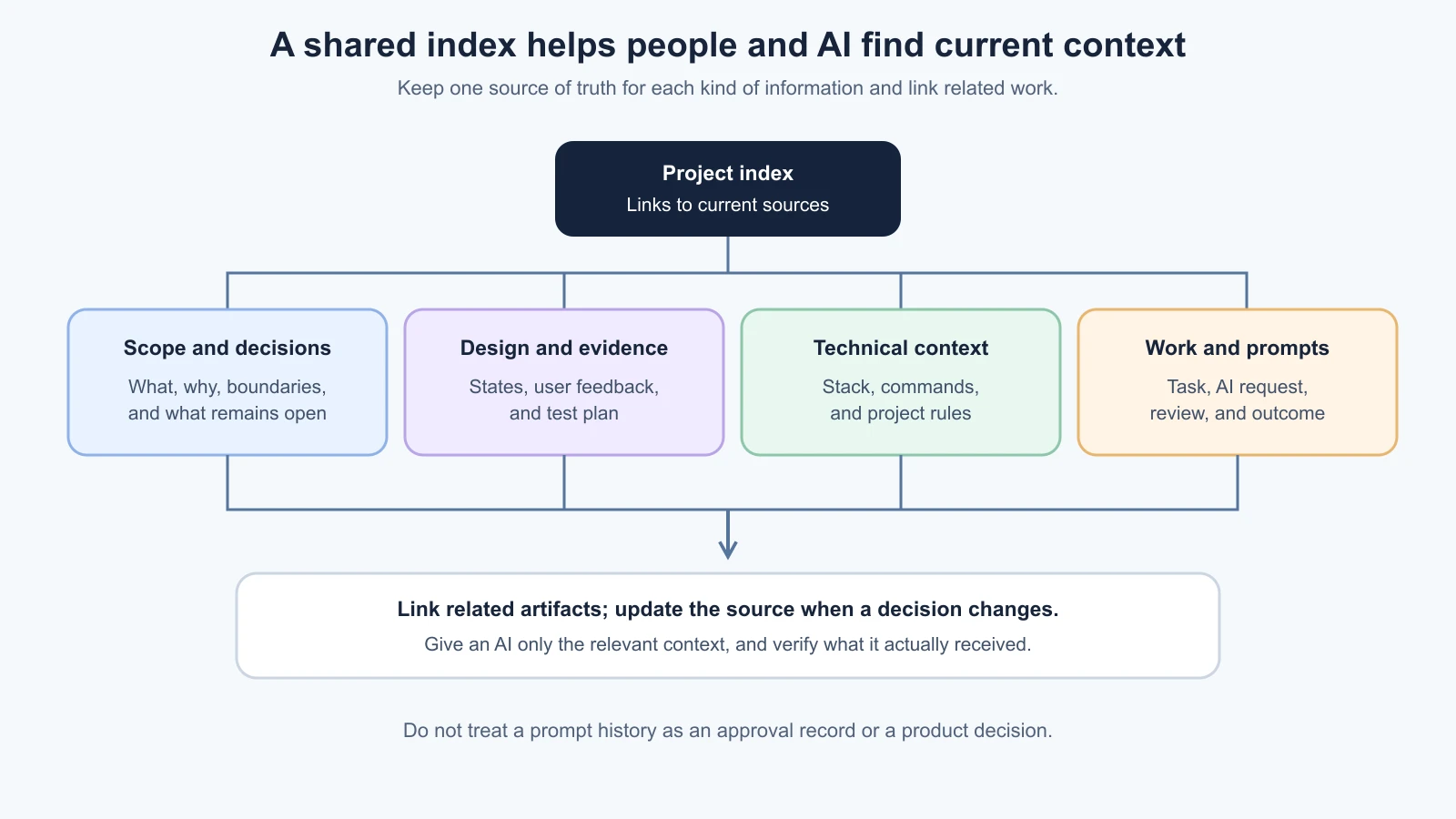
An AI assistant can use project documents only when they are available in its context. Some coding tools read designated context files automatically; others require you to attach a file or mention it in a prompt. Check the tool's current instructions and verify what it actually read. A document sitting in a repository does not guarantee that a tool loaded it. For tool-specific context files, see Context Documents.
Give the AI the smallest current context that is relevant to the task. For a request status change, that may be the request-flow decision, the affected screen state, and a project rule about testing. It usually does not need every meeting note from the last year. Keep private customer data, credentials, and sensitive personnel discussions out of prompts and shared project files unless the team has an approved process for them.
Make decisions easy to find and revisit
A decision log prevents a resolved question from appearing new every week. It is not a transcript of every discussion. Record decisions that affect behavior, scope, data, permissions, cost, or a later handoff. Include the alternative considered if it helps explain the choice.
For example, a ToolShelf decision could read:
1## Tool requests stay pending until the owner approves
2- Date: 4 November 2026
3- Owner: Product lead
4- Decision: Submitting a request does not reserve the tool. The owner must approve it.
5- Reason: The first release should not promise availability before the owner responds.
6- Evidence: Current product rule agreed by the product and operations leads.
7- Affected work: Request form wording, request status, owner review flow.
8- Revisit if: The team changes the borrowing agreement or adds automatic availability rules.
This is a fictional example, not a report of a real ToolShelf meeting. In a real project, record actual evidence and the actual person responsible. If the choice is still open, label it as an open question and name who will resolve it. Do not let an AI-generated summary convert a suggestion into an approved decision.
The record should make it possible for a new teammate to understand why the product behaves as it does. Link the decision to the scope, design, or issue it affects. If the decision changes, update the record and tell the people whose work depends on it. Old decisions can remain useful history, but mark them superseded and link to the current choice so an AI or teammate does not follow an obsolete rule.
Hand work over with an outcome and a next step
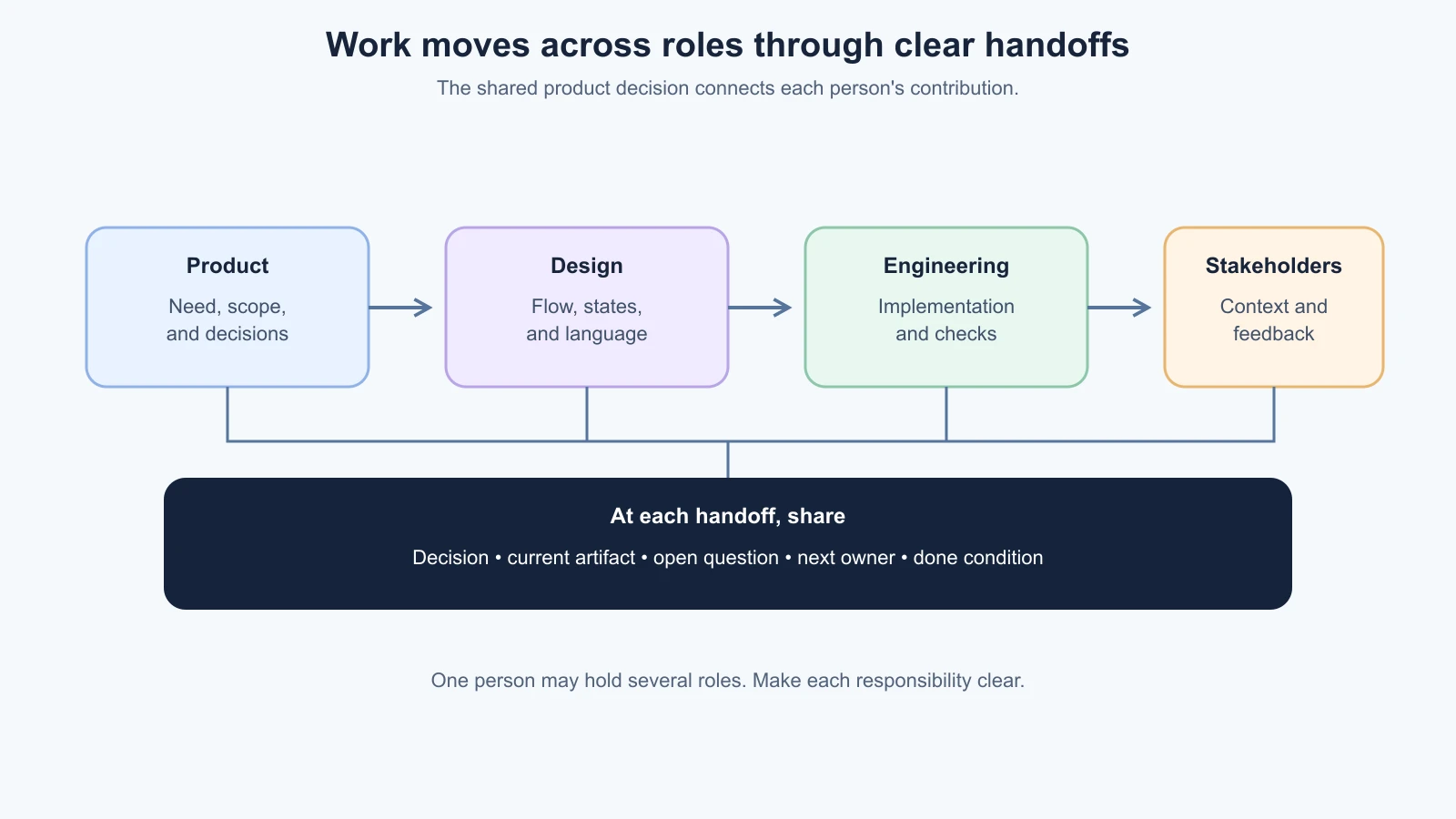
A handoff happens when one person or role passes work to another. “The design is ready” is not enough if the developer cannot tell which states are final, what remains undecided, or how the work should behave on a narrow screen. “I made the API” is not enough if the product owner does not know which user scenario it supports or what still needs review.
A useful handoff tells the next person:
- What user need or product decision this work supports.
- What is ready and what is still provisional.
- Where to find the current spec, design, code, or evidence.
- Which assumptions were made and which decisions are still open.
- What the next person should do or decide.
- How to tell when that step is complete.
For the ToolShelf request flow, a designer can hand off a screen with the pending, approved, rejected, loading, and error states named. The handoff can point to the decision that says the request remains pending until owner approval. An engineer can then confirm which states exist in the current app, ask about gaps, and provide a preview or pull request for review. The product owner can check whether the implementation matches the agreed behavior rather than infer intent from the visual layout alone.
Use a short handoff note:
1## Handoff
2- From / to:
3- User need or decision:
4- Ready to use:
5- Still open or provisional:
6- Links to current source files:
7- Assumptions and risks:
8- Next action and owner:
9- Done when:
Keep it proportionate. A one-line copy update may need only a link and a note about what changed. A change to sign-in, data access, or a core journey needs enough detail to route review to the right person. If a handoff reveals an unresolved product question, pause that part of the implementation and get a decision instead of asking the AI to guess.
Review work you did not prompt
On a team, you may review AI-assisted code or design created by another person. You do not have the original conversation, so the prompt is not a reliable specification. Review the shared product decision, the change itself, and its evidence.
Start by asking the author for a short explanation: What user behavior was intended to change? Which files or screens changed? What did the AI assume? Which checks ran? What remains uncertain? Then compare that explanation with the diff, preview, or prototype. Check for changes outside the task, new dependencies, permission changes, data changes, and text or behavior that contradicts the current decision. Ask the author to walk through unfamiliar areas rather than accepting an AI summary as proof.
If the change is hard to review, ask for a smaller slice, a clearer demo, or a decision record. If you notice a product disagreement, describe the exact user consequence and point to the evidence or decision that frames it. “I don't like this” does not show what should change. “The screen says the tool is reserved, but the current rule says it stays pending until the owner approves. Which behavior are we choosing?” makes the conflict discussable.
The reviewer does not have to be the person who made the original prompt, but they do need enough context to assess the work. Route specialized questions to the appropriate owner: for example, an engineer for a data migration, a designer or accessibility specialist for an interaction, and a product or operations owner for the user promise. One person can hold multiple roles, but the responsibility should still be named.
Use demos to answer a question
A demo is a short showing of work to invite feedback or make a decision. It can be a live walkthrough, a recorded clip, or a preview link. A useful demo is not a performance where the builder tries to hide every rough edge. It makes clear what is ready, what is fictional or incomplete, and what question the team needs to answer.
Before a ToolShelf demo, the presenter could say: “This preview shows the borrower submitting a request. We need to confirm whether the pending message makes it clear that the owner still has to approve it. The owner review screen is not part of this preview.” That gives stakeholders a focused way to respond. It also prevents them from assuming the demo includes real notifications or a working reservation database.
After showing the flow, ask questions that reveal the decision needed: “What would you expect to happen after this?” or “Which part does not match the borrowing process?” Record observations, suggestions, and decisions separately. A suggestion from one stakeholder is valuable input, but it does not automatically change scope. Name who owns the decision and when the team will respond. If a demo feedback session includes people representing affected users, follow the consent and privacy practices in the prototype testing lesson.
Send a brief follow-up with the preview, what was shown, feedback heard, decisions made, open questions, and owners. That gives absent teammates a useful record without requiring them to interpret a recording or a long chat thread. Do not present a prototype as a production feature, or a mock result as evidence from a real user.
Decide who can approve what
Many small teams do not need a complex approval chart. They do need to know who can make which decision. A designer may own layout details inside an agreed flow. An engineer may choose an implementation pattern within the stack. A product owner may approve scope or a user-facing behavior. A privacy, security, legal, or operations specialist may need to review a change that affects their area. The names vary; make responsibility explicit.
For each type of decision, distinguish:
- Input: who should be consulted because they have relevant experience or are affected.
- Recommendation: who has compared options and proposes a path.
- Approval: who is authorized to decide or accept the risk.
- Implementation: who carries out the decision and reports what happened.
These can be the same person on a small project. When they differ, say so. A demo attendee is not necessarily the approver. A senior stakeholder's preference may matter, but the team should still record how it fits the user need, evidence, and constraints. If two people have equal authority and disagree, agree on a decision owner or a time-bounded test rather than quietly implementing both interpretations.
When the evidence is uncertain, make the next step explicit. The team could test the riskiest assumption with a prototype, compare two messages with representative users, or document a reversible choice and the signal that would prompt a review. Do not call a disagreement “resolved” because the room fell quiet. Record the decision, its owner, the evidence, and any condition for revisiting it.
Keep prompts and decisions findable
Saving every chat can make it harder to find the important information. Keep durable product decisions in the decision log, stable project facts in technical context, and task-specific instructions in the work item or prompt history. Link them where they meet. A useful prompt record can note its task, date, tool or model if the team needs that detail, input files, and the resulting change or review. Do not store secrets or private user information in a prompt archive.
For example, a work item can link to the ToolShelf pending-request decision, the design states, and the pull request. A short prompt summary can say that an AI was asked to change only the confirmation message, not reservation logic. The PR then records which files changed and which checks ran. This creates a traceable path without treating the prompt itself as an approval record.
Avoid copying prompts into a shared file just to make them look official. Prompts are instructions to a tool; the reviewed spec and decision log describe what the team decided. If a prompt reveals a useful durable convention, propose a concise update to the project context file and review it with the team. See Context Documents for how to keep that guidance short and current.
Further reading
- Scope the first version, for product boundaries and non-goals.
- Change management and CI, for pull request reviews and shared branch rules.
- Testing an AI-built product, for matching evidence to product risks.
- Vibe Coding's Context Documents and Spec-Driven Development, for tool context and feature specifications.
Mistakes beginners make
- Treating conversation as the only record. Put important decisions where the team can find and update them.
- Keeping two documents that claim to be current. Choose a source of truth and link to it.
- Assuming the AI has read every project file. Check the tool's context and state the sources the task depends on.
- Handing off a screen or code change without its open questions. Say what is ready, what is provisional, and who takes the next step.
- Reviewing only the summary. Read the change and the evidence, especially for work you did not prompt.
- Turning every demo comment into scope. Record suggestions separately and let the authorized owner decide what changes.
- Leaving approval authority implicit. Name the person responsible for product, technical, and specialist decisions.
- Treating silence as agreement. Capture the decision or keep the question open with an owner and date.
- Saving private details in shared prompts or notes. Follow the team's data handling rules and use fictional or minimized examples when possible.
Recap and try it yourself
A small team stays aligned when it shares a current scope, decisions, design and technical context, and clear work items. Good handoffs identify what is ready and what remains open. Review AI work against the product decision and the actual change. Use demos to answer a focused question, name who approves each kind of decision, and record evidence and disagreements so people can find them later.
Try it: choose a feature in a practice project. Write one decision-log entry, one handoff note, and a two-sentence demo introduction that says what is ready and what feedback you need. Ask an AI tool to summarize the current decision and list what remains open, using only documents you provide. Check the summary against those documents and correct any suggestion it presents as a settled decision.