
Forward Deployed Engineer course · lesson 19 of 24
- 1What Is a Forward Deployed Engineer?
- 2A Day in the Life of a Forward Deployed Engineer
- 3FDE Career Paths, Tiers, and Interview Gates
- 4Build Your Forward Deployed Engineer Skill Map
- 5Requirements Gathering with a Customer
- 6Discovery, Scoping, and Sequencing Customer Work
- 7Audit Customer Data Before You Build
- 8Enterprise Workflow, Business Value, and ROI
- 9Choosing an AI Approach for a Customer
- 10Build a Working Prototype Fast
- 11Integration Engineering and the Last Mile
- 12Working Safely with Legacy Systems
- 13Data Pipelines for AI Features
- 14Evals as Acceptance Criteria
- 15Debugging Agent Logic and Observability
- 16Deploying in the Customer's Cloud
- 17Cost, Latency and Inference Choices
- 18Security, Privacy and AI Governance
- 19Stakeholders and Communication
- 20Technical Writing for Handoff
- 21UAT, Go-Live, and Day 2 Operations
- 22Executive Reporting and Proving ROI
- 23The Product Feedback Loop
- 24Capstone: Run an Engagement End to End
After this lesson, you will be able to map the people who affect or are affected by a customer engagement, choose the right information for executives, users, and IT, and write a weekly update that makes decisions and risks visible. NorthPort Freight is fictional; the roles and events in the examples are illustrative.
A customer engagement can be technically on track while the people who need to use, approve, or support the result have different ideas about what is happening. An executive may expect a production date. Dispatchers may think they are reviewing a prototype. IT may be waiting for a network approval no one has requested. The FDE helps make these expectations visible early, then keeps the conversation anchored to evidence and decisions.
A stakeholder is a person or group that has an interest in, a role in, or is affected by the work. Stakeholder engagement means learning what matters to those people and planning how to involve them. The Association for Project Management describes it as identifying and analyzing stakeholders, then planning and carrying out engagement. A map is only a working aid; it does not replace a conversation with the people represented on it.
Map people, roles, and decisions
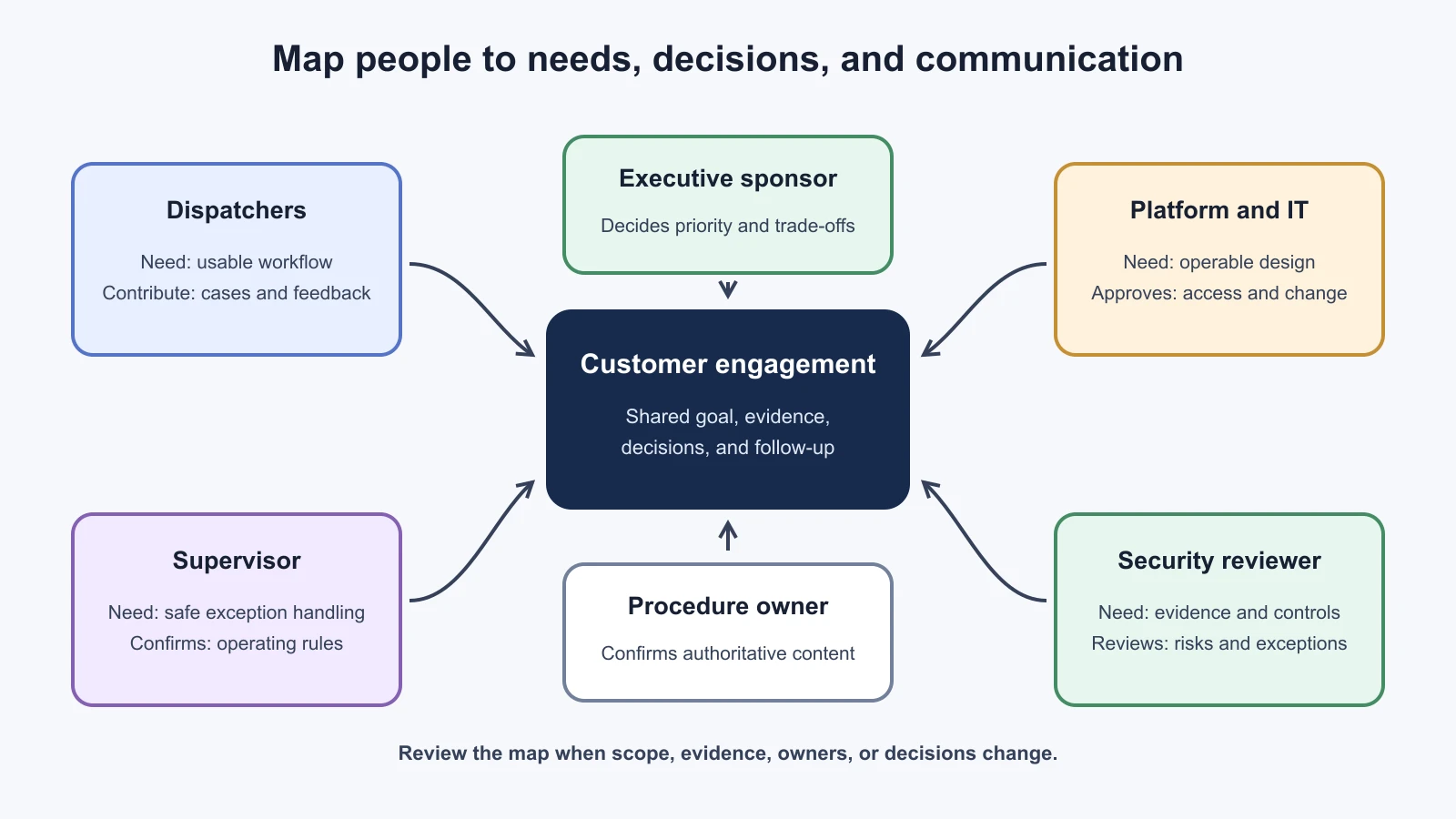
Begin with the workflow, not an organization chart. For the fictional NorthPort dispatch assistant, the affected people may include dispatchers answering exception questions, supervisors reviewing escalations, operations leaders accountable for delivery performance, IT staff who run identity and networks, security reviewers, data owners, procurement, and an executive sponsor. A vendor contact may own a model service or support commitment. Some people will use the product every shift; others may only be needed for an approval or incident.
Ask who performs the task today, who feels the problem, who can approve a change, who owns the data and systems, who will operate the result, and who can stop a release. Include support staff and people whose work changes even if they never use the interface. GOV.UK's user research guidance recommends learning about the full range of users and people who provide or support a service. A senior stakeholder's view is useful, but it is not a substitute for observing or speaking with the people who do the work.
Use the map to answer practical questions: Who must attend the next workflow review? Who can confirm that a procedure is authoritative? Who approves network access? Who decides whether an acceptance criterion blocks launch? Who is on call after handoff? If two people believe they own the same decision, resolve the boundary before that decision is urgent.
Power and interest can help sort an initial list, but do not use a high-influence label to silence people with little formal authority. A dispatcher may not approve budgets but may discover that a proposed answer interrupts the work. Consider impact on the person, expertise, decision rights, availability, and ability to raise a risk. Update the map when the scope changes or new evidence reveals another affected group.
| Stakeholder or role | What they care about | Decision or contribution | Preferred contact and cadence |
|---|---|---|---|
| Executive sponsor | Outcome, business priority, schedule, material risks | Resolves priority or funding trade-offs; confirms executive acceptance | Short weekly summary, plus decision requests as needed |
| Dispatch supervisor | Safe workflow, exception handling, team readiness | Confirms operating rules and review process | Working session each week; escalate workflow changes promptly |
| Dispatchers | Clear answers, source visibility, time in the task | Try realistic cases and report where the experience fails | Short demos and feedback sessions during normal shift hours |
| IT platform owner | Architecture, access, deployment, support burden | Approves environment, identity, networking, and run ownership | Technical working session for each dependency or change |
| Data or procedure owner | Source authority, freshness, permissions | Confirms approved content and update process | Review at ingestion changes and before acceptance testing |
| Security or privacy reviewer | Data handling, threats, access, vendor terms | Reviews controls and outstanding exceptions | Scheduled review with written evidence and open questions |
These are example roles, not a claim that NorthPort has particular employees. Use names only in the customer's approved project records. A stakeholder map often includes contact details, influence, or concerns, so keep it in the agreed workspace and share it only with people who need it.
Match the message to the decision
The same update does not serve every reader. Share enough context for the reader to act, and make the requested action easy to find. GOV.UK guidance on working with policy and delivery stakeholders notes that people may use different terminology or be unfamiliar with each other's methods. Explain the work in words the reader uses, and check that the message means the same thing to both sides.
Executives need the outcome and the decision. Start with the customer goal, what changed, whether the current plan is at risk, and the decision or support needed. Include one or two measures only when the measurement is understood. If a deployment is waiting on a network approval, say what that blocks and when the approval is needed to protect the schedule. Put implementation detail in an attachment or offer to discuss it. Do not hide a material risk below a long list of completed tasks.
Users need to see how the change affects their work. Use their vocabulary and a real workflow example. Show what is already working, what is mocked, what needs review, and what feedback you want. Ask neutral questions such as, "At this point in the shift, what would you do next?" instead of, "Do you like the new screen?" A user may identify missing context or a safety concern that does not appear in an executive demo. Make time for different shifts and roles where their needs differ.
IT needs enough detail to operate and approve the system. Explain the components, data paths, identities, network dependencies, change window, monitoring, and rollback plan. Share version numbers, relevant logs, and test evidence in approved systems. State which team owns each boundary. If an item is not yet known, call it out and name who is checking it. A statement such as "the API is ready" is not actionable if the platform team still needs a route, role, or certificate.
Use a short pre-read when the meeting needs a decision. State the context, choices, trade-offs, recommendation if requested, decision owner, and deadline. After the meeting, record what was decided, who owns follow-up, and when it is due. Silence in a meeting is not approval. If the decision changes scope, acceptance criteria, or release timing, update the shared plan and notify affected groups.
Set expectations and report bad news early
At the start of an engagement, agree how often the team will meet, where the current plan lives, how quickly people should respond to a decision request, and which channel is used for urgent issues. Agree who can approve scope changes, accept a risk, and authorize release. Ask which customer holidays, shift patterns, change freezes, or procurement steps affect timing. Do not promise a delivery date before the dependencies and approval path are understood.
Expectation setting is an ongoing activity. When a prototype becomes a production candidate, say what changed: operational controls, data approvals, support ownership, and acceptance checks may still be outstanding. When a feature is mocked, label it during the demo and in follow-up notes. When estimates depend on customer access or an external approval, state that dependency. This lets the customer make a plan based on the actual state instead of a polished slide.
Raise a problem as soon as it may change the customer's choices. A useful update states what happened, what evidence is available, what is still uncertain, who or what may be affected, what is being done now, and what decision is needed. Avoid blame while the cause is unclear. Avoid vague language such as "a small delay" if the impact is not yet known. Give a time for the next update even when investigation is still underway.
For example: "The staging deployment did not start because the service identity cannot read the approved procedure index. We have confirmed the role assignment is missing; the platform owner is reviewing the requested scope. The dispatcher review planned for Thursday may move if access is not restored by Wednesday noon. Can the platform owner confirm the approval path today? I will send the next status at 16:00." These details are fictional. The useful structure is the specific blocker, confirmed evidence, impact, action, ask, and next update.
Do not wait for certainty before communicating material risk. Separate the observation from the suspected cause. If you later learn the cause was different, correct the record clearly. GOV.UK's agile governance guidance recommends evidence-based decisions and escalation when the team lacks authority. It also emphasizes knowing the boundaries of the team's decision-making and who is accountable for helping outside those boundaries.
Disagree with evidence and a clear alternative
Disagreement is part of customer work. A customer may ask for a broader data export, a launch before user testing, or an integration the team believes will fail under the stated constraints. First make sure you understand the reason behind the request. The requester may have a deadline, policy, or operational concern that has not been shared. Restate the shared goal and the constraint before arguing for a different approach.
Use evidence that is relevant to the decision: a user observation, an acceptance test, a trace, a dependency, a cost assumption, or an approval requirement. Say what the evidence shows and where its limits are. Then offer a feasible option or a small test that could resolve the disagreement. For instance, if dispatchers and the sponsor disagree about how much explanation belongs in an answer, test two versions with representative users and assess them against the same acceptance criteria.
Keep a decision record for material choices. Capture the question, options considered, evidence, decision owner, decision, date, consequences, and conditions that would trigger a review. This is especially useful when a decision changes scope or transfers a risk to another team. A record does not make the decision correct; it helps everyone understand what was agreed and why.
Escalate when the choice is outside your authority, when a commitment is at risk, when owners cannot resolve a dependency, or when there is a credible security, privacy, safety, or operational concern. Follow the customer's incident process for urgent events rather than waiting for the weekly meeting. Include the responsible owner and the decision needed. Escalation should make the issue easier to resolve, not serve as a threat or a way to avoid routine discussion.
Run a useful weekly customer update
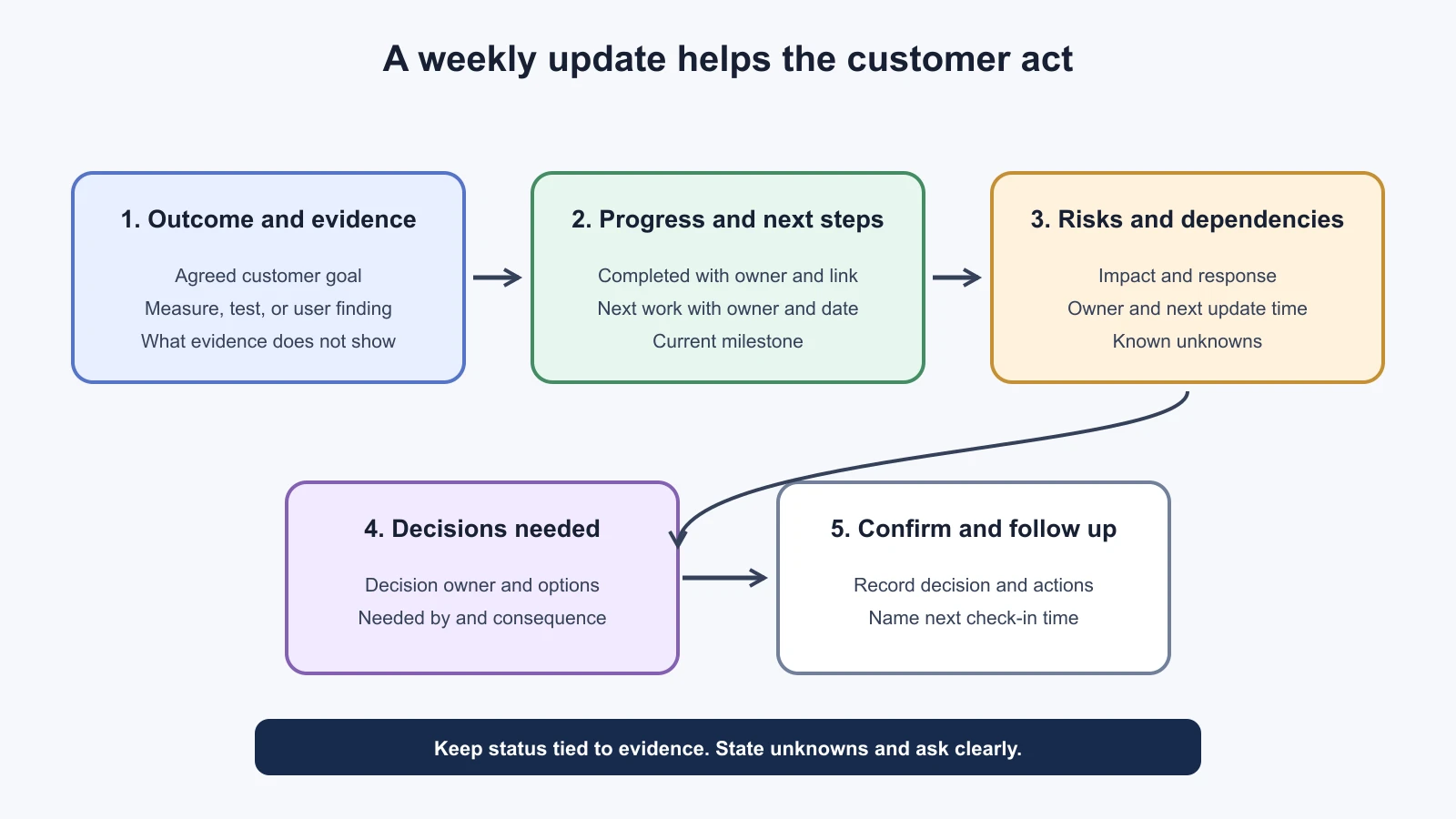
A weekly update is a short written record of progress, evidence, plans, risks, and decisions. It should stand on its own for someone who missed the meeting. Send it on the agreed day and store it in the shared location. Keep the same structure so readers can compare one week with another, but change the content to reflect what happened. A table of completed tickets alone does not explain whether the customer goal is closer or what help is needed.
Use a status label only with a definition. For example, "on track" might mean the next milestone still has an owner and no unresolved dependency is forecast to block it. If a customer uses formal red/amber/green status, agree the criteria for each color and who can set it. Do not use green to soften bad news. A concise, honest amber status is more useful than a reassuring label contradicted by the details.
Weekly customer update template
1Engagement: [customer and workstream]
2Reporting period: [start date to end date]
3Prepared by: [owner]
4Overall status: [status and one-sentence reason]
5
6Customer outcome
7- Goal: [the agreed outcome this work supports]
8- Evidence this week: [measure, user observation, test, or decision]
9- What the evidence does not tell us: [known limitation, if relevant]
10
11Completed
12- [deliverable or decision] | [evidence or link] | [owner]
13
14Next period
15- [planned work] | [owner] | [expected date]
16
17Risks and issues
18- [item] | [customer impact] | [response] | [owner] | [next update]
19
20Decisions needed
21- [decision] | [decision owner] | [options or recommendation] | [needed by]
22
23Dependencies and changes
24- [customer or third-party dependency] | [owner] | [date or status]
25- [scope, assumption, or timeline change] | [approval or follow-up]
26
27Next check-in: [date and time]
Fill the template with what the reader needs to act. If nothing was completed, say why and what happens next. Link to the source evidence instead of pasting sensitive data into a broad email. If there is no decision request, state "No decision needed this week" so a reader knows the section was considered. Keep confidential technical details in the approved channel and provide a suitable summary to wider stakeholders.
Mistakes beginners make
Only mapping senior decision-makers. Executives and sponsors may approve funding, but the people who use, operate, or support the system can reveal different risks and requirements.
Fix: Include affected users, support teams, technical owners, data owners, approvers, and people who can stop or operate the service. Check the map with the customer.
Sending the same technical update to every audience. A long trace description may not help an executive decide, while a one-line status may not give IT enough to approve a change.
Fix: Keep the evidence consistent and tailor the level of detail, terminology, and requested action to the reader.
Waiting to report a blocker until there is a complete fix. The customer may lose options while the team investigates, and a dependent team may not know its work is at risk.
Fix: Share confirmed facts, likely impact, what is unknown, current owner, and the next update time. Correct the account if new evidence changes it.
Treating a meeting as a decision record. People can leave with different interpretations of what was agreed or who owns the next action.
Fix: Write down the decision, owner, date, consequences, and follow-up in the shared project record.
Recap and try it yourself
Map people around the work they do, the impact they experience, the decisions they own, and the communication they need. Keep the map current as the engagement changes. Use user evidence for workflow choices, concise outcome and decision summaries for executives, and enough architecture and operational detail for IT. Raise material risks early, distinguish facts from hypotheses, and record decisions and actions. A weekly update should help the customer see progress, uncertainty, next steps, and where their input is needed.
Try it yourself: create a stakeholder map for the fictional NorthPort assistant. Include a dispatcher, supervisor, executive sponsor, platform owner, procedure owner, and security reviewer. For each, write one concern, one decision or contribution, and a communication cadence. Then use the update template to report a fictional delay in the procedure index approval. Include what is known, what remains unknown, the effect on the next milestone, the customer decision needed, and when you will update them again.
Sources
Checked on 5 November 2026. The Association for Project Management's stakeholder engagement guidance supports identifying and analyzing stakeholders, considering power, interest, and support, and planning engagement. GOV.UK's user research guidance supports including varied users and support roles, validating needs with evidence, and sharing findings. Its governance principles for agile service delivery supports timely evidence-based decisions, clear decision boundaries, and escalating when a team lacks authority. Its guidance on working with policy and delivery stakeholders supports early engagement, accessible language, and shared understanding. These are public-service references used as adaptable delivery guidance; NorthPort and its engagement details are fictional.