
Forward Deployed Engineer course · lesson 5 of 24
- 1What Is a Forward Deployed Engineer?
- 2A Day in the Life of a Forward Deployed Engineer
- 3FDE Career Paths, Tiers, and Interview Gates
- 4Build Your Forward Deployed Engineer Skill Map
- 5Requirements Gathering with a Customer
- 6Discovery, Scoping, and Sequencing Customer Work
- 7Audit Customer Data Before You Build
- 8Enterprise Workflow, Business Value, and ROI
- 9Choosing an AI Approach for a Customer
- 10Build a Working Prototype Fast
- 11Integration Engineering and the Last Mile
- 12Working Safely with Legacy Systems
- 13Data Pipelines for AI Features
- 14Evals as Acceptance Criteria
- 15Debugging Agent Logic and Observability
- 16Deploying in the Customer's Cloud
- 17Cost, Latency and Inference Choices
- 18Security, Privacy and AI Governance
- 19Stakeholders and Communication
- 20Technical Writing for Handoff
- 21UAT, Go-Live, and Day 2 Operations
- 22Executive Reporting and Proving ROI
- 23The Product Feedback Loop
- 24Capstone: Run an Engagement End to End
After this lesson, you will be able to investigate a broad request, ask users and system owners useful questions, and write a requirement log that separates evidence from assumptions. The examples use NorthPort Freight, a fictional logistics company. Its people, records, systems, answers, and outcomes are invented for practice.
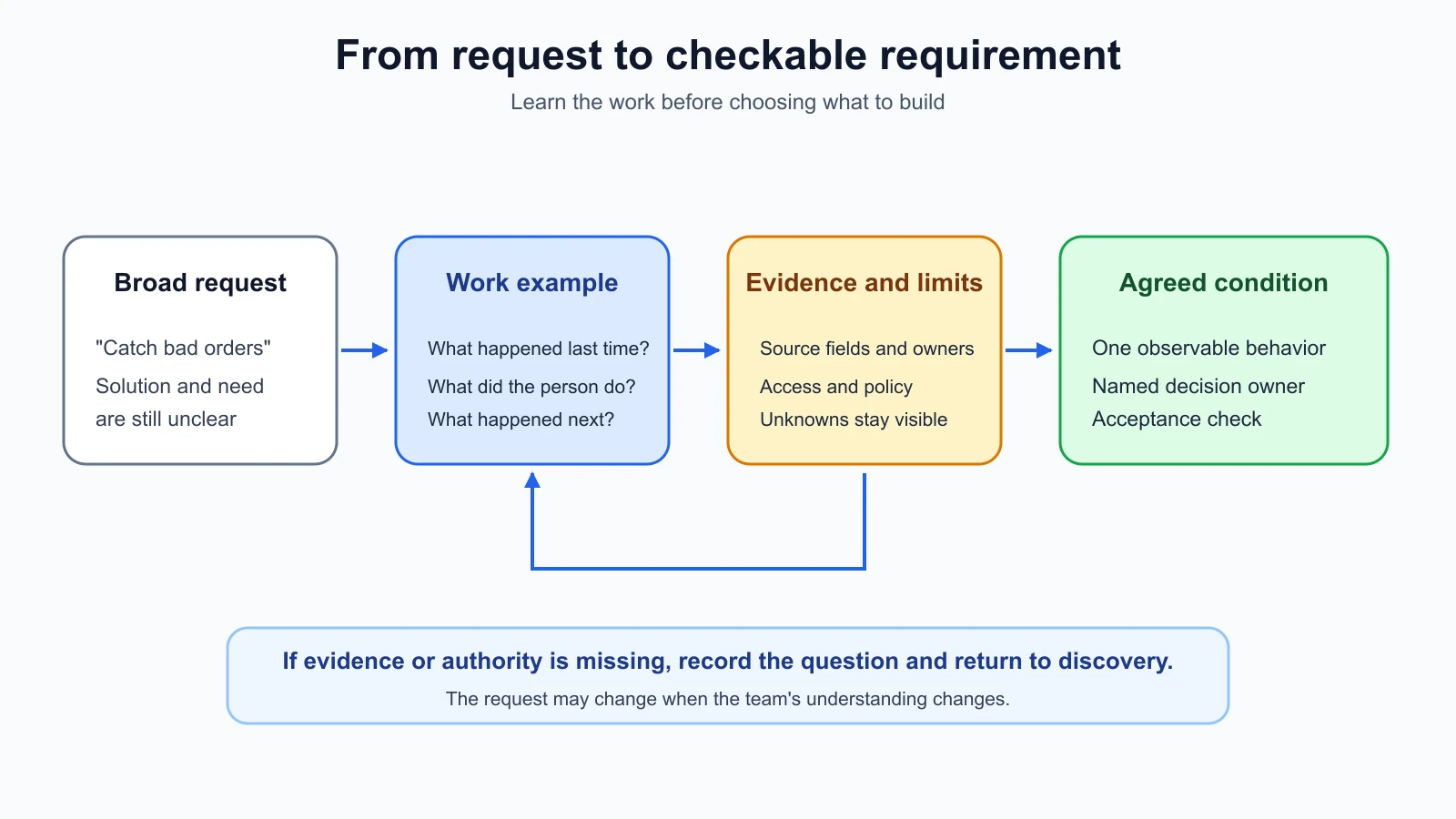
A customer might say, "Can you make the system catch bad orders?" That request names a desired solution in broad terms. It does not yet tell you what makes an order bad, who needs to know, which records the system can inspect, or what should happen after a possible issue is found. Requirements gathering is the work of answering those questions with the people who know the workflow and the systems.
Start with the task behind the request
Ask the person who raised the request to describe the last time the problem happened. A recent example is easier to investigate than a general statement about how work usually goes. Invite them to show the steps they took, if they are allowed to do so and the setting is appropriate. Listen for where they switch tools, check with another person, wait for information, or make a decision.
For the fictional NorthPort example, imagine a dispatcher says they want the system to catch bad orders. Ask them to walk through a recent order they had to stop and review. What first drew their attention to it? Which information did they check? Who else did they involve? What happened after the check? The answer may reveal that the hard part is finding an inconsistency, deciding whether it is meaningful, or getting the right person to resolve it. These are different problems and could call for different changes.
The GOV.UK Service Manual recommends learning what users are trying to do, how they do it now, and what problems they encounter before deciding what to build. Its user research guidance suggests open, neutral questions, listening to real examples, and asking follow-ups when something is unclear. These are useful practices for customer discovery, though each organization has its own research and privacy rules. The AI Product Builders problem definition lesson offers another way to separate a user problem from a proposed feature.
Prepare before the conversation
An interview is a structured conversation used to learn from a person who does or supports the work. Before you schedule one, write down what you need to learn and why you need it now. A goal such as "understand how dispatchers handle order exceptions" can guide questions. "Ask whether they want an AI assistant" steers the conversation toward a particular solution.
Separate a research question from a question you will ask the participant. "How are mismatched order references identified today?" is a research question for the team. You might ask the dispatcher, "Can you show me what you did the last time two order references did not match?" The first helps the team plan. The second invites the participant to describe a specific event.
Invite people with different knowledge of the work. A user can explain the task and the decision they make. A system owner can describe available fields, interfaces, update timing, and access controls. A support or operations person may know what happens when a process fails. A business owner or approver can clarify policy, priorities, and who is allowed to accept a change. One person may cover several roles, but do not assume that a user's answer settles a system or policy decision.
Send a short explanation of the discussion and its purpose. Tell participants what you hope to learn, who will see notes, and whether you plan to record anything. Get the consent required by the customer's process before recording or collecting personal information. If you are unsure whether a data sample can be shared, do not copy it into your notes or tools until the owner confirms the rules.
Prepare a small discussion guide: the research objective, a few opening prompts, follow-up questions, and any task or artifact you want to inspect. Test the questions with a colleague. The GOV.UK guidance on in-depth interviews recommends planning the session, using open and neutral questions, and focusing on examples of what people did. A guide keeps you from forgetting topics while leaving room to follow an unexpected but relevant detail.
Ask about what happened, then follow the evidence
Open with an ordinary question about the person's role or the task. Then ask about a particular event. "Tell me about the last order you had to hold for review" gives the participant room to describe it. Follow up with questions such as "What happened next?", "How did you know?", "Who did you ask?", or "Can you show me where that value came from?"
Avoid questions that suggest an answer. "Would an AI alert help you catch these faster?" assumes the person wants an alert and introduces a technology choice. "What makes you stop and check an order?" asks about the current work. If the participant proposes a feature, record it as a suggestion and ask what they would do with it. Do not convert a suggestion into a confirmed requirement without checking the underlying task and conditions.
Listen for distinctions. "Bad order" might refer to a missing reference, conflicting values, a duplicate, a late update, or a record that requires a policy decision. Ask the participant to define the phrase using examples. If different people use the same words differently, record the difference and find out who owns the decision.
Ask what the person does when the normal path fails. What if a record is incomplete? What if two systems disagree? What if the person who approves a correction is unavailable? What information do they need before acting? These questions help you see the boundary between a tool's responsibility and a human decision.
Take notes that distinguish what you saw or heard from your interpretation. A note might say, "The dispatcher opened the order screen, copied the reference into the dispatch tool, and asked the shift lead about the mismatch." That is an observation from a fictional practice session. "The dispatcher needs an automatic correction" is an interpretation and a proposed solution. Label it as a hypothesis until the right people confirm it.
Do not promise confidentiality unless you know the applicable process. Record only what the project needs, store notes in an approved location, and follow the customer's consent and retention rules. If the customer does not allow observation or recording, ask whether a walkthrough using synthetic or redacted examples is permitted.
Turn the request into a requirement
A requirement states a need or condition the proposed work must satisfy. It should be specific enough that the team can discuss what it means and how to check it. "Make order review easier" expresses a goal, but different people can interpret "easier" in different ways. Ask which part of the task should change and what observable result would count as an improvement.
Separate a requirement from its rationale and its acceptance check. The requirement states the condition. The rationale explains why it matters. The acceptance check describes evidence the team will use to decide whether the condition is met. Keeping these parts separate makes it easier to review a change if the proposed implementation changes.
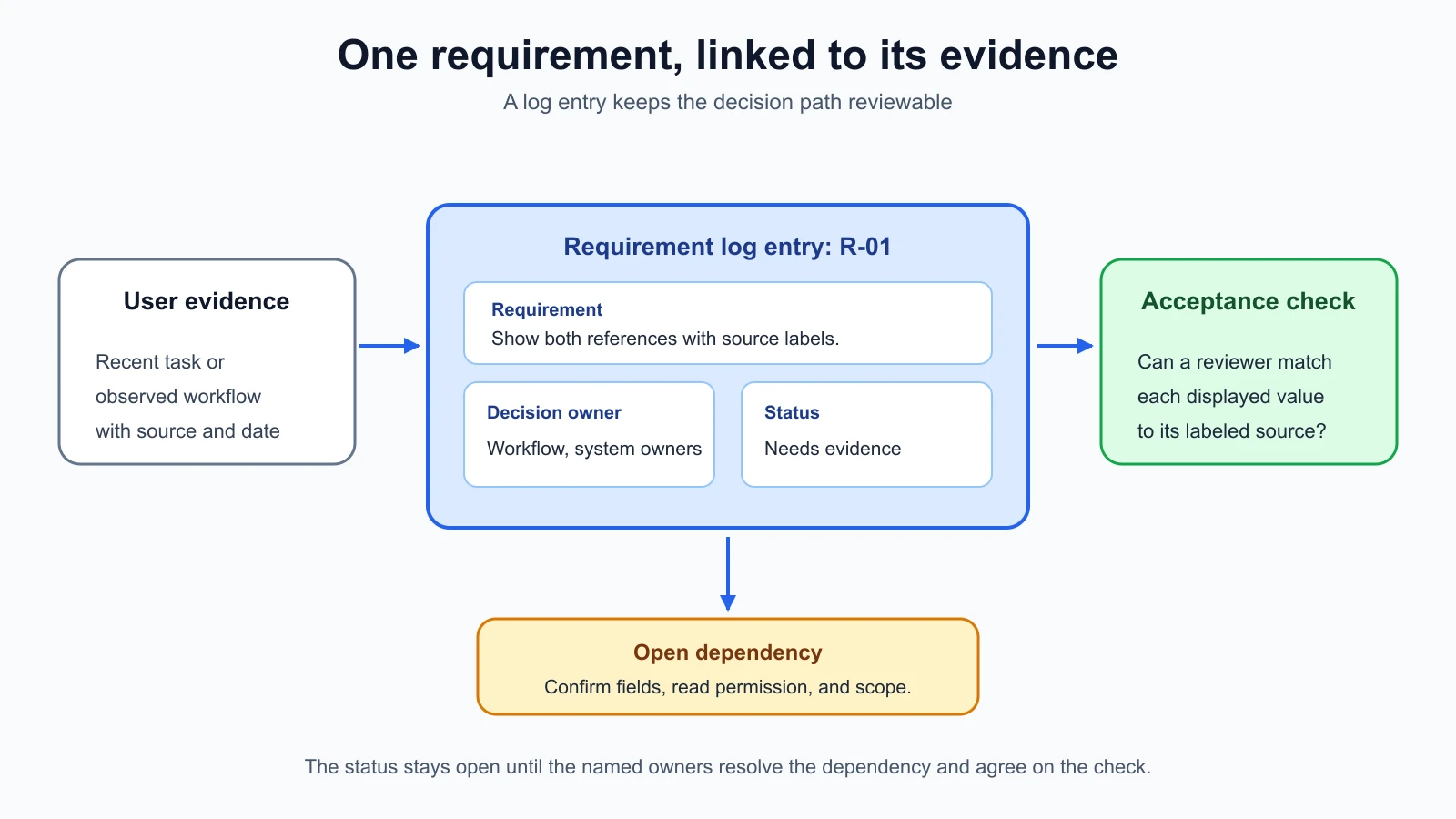
For example, this fictional requirement could be written as: "When a dispatcher opens an order flagged for review, the review view shows the ordering-system reference and the dispatch reference with their source labels." Its rationale might be that the dispatcher needs to compare the values before deciding what to do. Its acceptance check could use a set of agreed synthetic records and confirm that each displayed value matches its labeled source field. This example is not a validated NorthPort requirement. The customer would still need to confirm the fields, the condition for flagging, and the usefulness of the view.
NASA's Systems Engineering Handbook offers a useful engineering reference for writing requirements. It calls for statements that are clear, unambiguous, and verifiable at the level where they are written, and warns against packing multiple thoughts into one requirement. That handbook serves a different engineering context, so use the principle as a writing aid rather than presenting its process as a universal FDE standard.
Keep one requirement focused
A statement such as "The system must quickly find bad orders, notify the right person, and update the source record" contains several separate behaviors. Each one has different evidence and may need a different owner. Split it into smaller statements, then ask whether each one is supported by the conversation and within the agreed scope.
Watch for words that need a definition: "fast," "easy," "accurate," "safe," "complete," and "appropriate." Ask what the person would observe. If someone says "fast," ask which part of the task takes too long and what amount of waiting changes their decision. Do not invent a target time to make the requirement look measurable. Leave it as an open question until the people who own the outcome agree on a useful measure.
Functional requirements describe what a system should do. For example, "show both references on the review screen" describes a behavior. Quality requirements describe a condition such as response time, availability, accessibility, or security. A quality requirement still needs a context and a way to check it. "The view should be secure" is not a check. Ask what data is restricted, who may access it, and which customer policy or system owner can confirm the rule.
An acceptance check asks whether a particular requirement was met. A success measure asks whether the change helped with the wider task. If the proposed view is meant to help dispatchers review mismatches, ask what they need to decide and how the team could tell whether the view supports that decision. The customer should agree on the measure and any baseline before the team reports an improvement. Do not choose a convenient number and present it as a customer outcome.
Constraints limit the solution space. They may involve allowed systems, data access, network boundaries, existing workflows, required approvals, or a delivery deadline. Ask who can confirm each constraint. A user may know that they cannot edit an order, but the application owner may need to explain whether an approved read-only interface exists.
Ask about systems, data, and ownership
Technical questions help you determine whether a useful change can fit the environment. Start with the systems and records involved in the task. Ask which application is the source of each field, how users access it, how often it changes, and who owns the interface. If the answer is unknown, write that down rather than filling in a likely architecture.
For each data field needed by the task, find out what it means, where it comes from, whether it can be missing or duplicated, and who may see it. Ask whether examples can be shared and how they should be redacted. Do not ask for a production export just because it would be convenient for prototyping.
For outages, expired access, or late records, ask the system owner what happens next. Find out whether the proposed work can read data only or needs to write changes. A write action may require different approval and recovery planning from a read-only view. Keep the owner and approval path in the log so a later implementation does not treat an unanswered question as permission.
You can use a short prompt list during a discovery conversation:
- People and task: Who does the work? What triggers it? Who receives the result?
- Current process: What happens first, next, and when something goes wrong?
- Decision: What choice does the person make? Which facts or policies guide it?
- Systems and data: Which systems and fields are involved? Who owns access and meaning?
- Constraints: What must remain unchanged? Which approvals or operating rules apply?
- Success: What would the user be able to do or decide after the change? How will the team check it?
- Unknowns: Which answer is missing, who can provide it, and when should the team revisit it?
Use these prompts as a guide. Follow the participant's story and return to a prompt when the conversation leaves a gap that matters to the requirement.
Keep facts, assumptions, and unknowns separate
A fact in the log should point to evidence: a participant's account, an observed step, a system document, or a decision from an authorized owner. An assumption is an interpretation that has not been confirmed. An unknown is a question the team has not answered yet. These categories stop a polished requirement from making a guess look settled.
For the fictional NorthPort exercise, write "The dispatcher compares the order references before escalating a mismatch" only if that detail came from the scenario or a real observation. Write "We assume the two systems expose matching identifiers" if nobody has confirmed the interface. Write "Can the dispatch view read both source fields through an approved interface?" as an open question. Assign that question to the system owner and give it a review date.
Requirements can change as the team learns. Keep the original source and status so a reviewer can see why a statement changed. If a user corrects your understanding, update the log and note the new evidence. If two stakeholders disagree, keep both views visible and identify the person or group with authority to resolve the policy decision.
Use a requirement log the team can maintain
A requirement log is a shared record of requested conditions, their evidence, owners, checks, and current state. The exact fields depend on the project. The template below is designed for a small FDE engagement and can be copied into a document or issue tracker.
| ID | Requirement or question | Type | Source and evidence | Rationale | Acceptance check | Decision owner | Status | Dependency or open question | Review date |
|---|---|---|---|---|---|---|---|---|---|
| R-01 | Write one focused, observable condition. | User need, functional, quality, constraint, or question | Person, system record, or observation; include a date or reference. | Why the condition matters to the task. | What a reviewer can observe or test. | Person authorized to confirm the rule. | Proposed, needs evidence, confirmed, blocked, in progress, accepted, or deferred. | What must be answered or completed first. | Date to revisit unresolved items. |
Use stable IDs so meeting notes, tickets, and tests can refer to the same item. Keep a status vocabulary small and define it for the team. "Proposed" means the team has recorded a candidate statement. "Needs evidence" means a source or decision is missing. "Confirmed" means the appropriate owner has agreed to the statement. "Blocked" means a named dependency prevents progress. "In progress" means the work has started. "Accepted" means the agreed check passed and the owner accepted the result. "Deferred" means the team chose not to include it now and recorded why.
Here is one fictional example. It is a practice entry, not a statement about an actual NorthPort system or customer decision.
| ID | Requirement or question | Type | Source and evidence | Rationale | Acceptance check | Decision owner | Status | Dependency or open question | Review date |
|---|---|---|---|---|---|---|---|---|---|
| R-01 | For a record opened for review, show the ordering-system reference and dispatch reference with a label for each source. | Functional | Fictional dispatcher walkthrough in this exercise. | The reviewer needs to compare the values before deciding whether to escalate. | On agreed synthetic records, a reviewer can match each displayed value to its labeled source field. | Dispatch workflow owner and source-system owner | Needs evidence | Confirm the field names, read permission, and whether this comparison belongs in the first slice. | Before implementation starts |
The sample status is "Needs evidence" because a plausible sentence does not make an approved requirement. The source owners still need to confirm field meaning and access. The acceptance check also names synthetic records, so the exercise does not imply permission to use real NorthPort data.
Use AI to prepare questions without inventing answers
An AI assistant can help sort your own notes into questions, assumptions, and topics to explore. Its suggestions are prompts for your review. They are not interview evidence and cannot tell you what a customer does unless you provide verified information that the customer has approved you to use.
Give the tool only information you are allowed to share. Use a fictional scenario or sanitized notes when possible. Do not include personal data, credentials, confidential system names, or customer records unless the customer and your organization have approved that use and you understand the tool's data handling rules.
You can use a prompt like this with a fictional request:
1I am preparing discovery questions for a fictional logistics workflow.
2Known request: a dispatcher wants help identifying orders for review.
3Do not invent customer facts, system details, policies, or outcomes.
4Return:
51. questions about the current task and recent examples
62. questions about people, systems, data, and permissions
73. assumptions that need confirmation
84. success conditions the team could discuss
9Label every suggestion as a question or hypothesis.
Review every suggestion before using it. Remove questions that assume an AI solution or imply an answer. Check that each proposed "known fact" came from your input. Then ask the participant in neutral language and record what they actually say, including uncertainty. Do not copy generated language into the requirement log as evidence.
Mistakes beginners make
- Treating the requested feature as the requirement. Ask about the task and the event that led to the request before choosing an implementation.
- Asking leading questions such as "Would an AI alert help?" Start with what the person does today and follow the details they provide.
- Treating one person's answer as approval for system access or policy. Record who owns each decision and confirm it with that person.
- Writing "fast," "easy," or "accurate" without agreeing on an observable check. Ask what the user would notice and who can set the measure.
- Filling every table cell to make the log look complete. Mark unknowns, assign an owner, and return to them.
- Copying sensitive data into notes or an AI tool without approval. Use permitted, minimized, or synthetic examples and follow the customer's process.
Recap and try it yourself
Requirements gathering begins with the task behind a request. Talk with users, system owners, and approvers; ask about recent examples, constraints, data, access, and what a useful result would let someone do. Keep evidence, assumptions, and unknowns distinct. Write focused requirements with a rationale, an owner, and an acceptance check, then track them in a shared log.
Try it: use the fictional NorthPort request, "Make the system catch bad orders." Write five open questions for a dispatcher and three for a system owner. Record one possible requirement, one assumption, and one unanswered question in the log. Mark the requirement "Needs evidence" until the right owner confirms the fields, permissions, and check. If you ask an AI assistant for question ideas, label them as suggestions and verify each one before using it.
Sources
Checked on 5 November 2026. Research and engineering guidance can change; follow the customer's current privacy, consent, and requirements processes.
- Understand users and their needs, GOV.UK Service Manual, for learning about the problem and context before selecting a solution.
- Learning about users and their needs, GOV.UK Service Manual, for researching current tasks, evidence, assumptions, and user language.
- Using in-depth interviews, GOV.UK Service Manual, for planning conversations, open neutral questions, follow-ups, consent, and notes.
- Capturing research questions, GOV.UK Service Manual, for distinguishing what a team needs to learn from questions it asks a participant.
- NASA Systems Engineering Handbook, for clear, unambiguous, and verifiable requirement statements. Its engineering context differs from customer software delivery, so it is used here as a writing reference.