
Forward Deployed Engineer course · lesson 11 of 24
- 1What Is a Forward Deployed Engineer?
- 2A Day in the Life of a Forward Deployed Engineer
- 3FDE Career Paths, Tiers, and Interview Gates
- 4Build Your Forward Deployed Engineer Skill Map
- 5Requirements Gathering with a Customer
- 6Discovery, Scoping, and Sequencing Customer Work
- 7Audit Customer Data Before You Build
- 8Enterprise Workflow, Business Value, and ROI
- 9Choosing an AI Approach for a Customer
- 10Build a Working Prototype Fast
- 11Integration Engineering and the Last Mile
- 12Working Safely with Legacy Systems
- 13Data Pipelines for AI Features
- 14Evals as Acceptance Criteria
- 15Debugging Agent Logic and Observability
- 16Deploying in the Customer's Cloud
- 17Cost, Latency and Inference Choices
- 18Security, Privacy and AI Governance
- 19Stakeholders and Communication
- 20Technical Writing for Handoff
- 21UAT, Go-Live, and Day 2 Operations
- 22Executive Reporting and Proving ROI
- 23The Product Feedback Loop
- 24Capstone: Run an Engagement End to End
After this lesson, you will be able to map an integration boundary, choose what to verify in an API contract, and agree who owns credentials, failures, and changes. You will also get an integration checklist you can use with a customer. NorthPort Freight is fictional. Its systems, endpoints, permissions, and records are examples, not details from a real company.
Last-mile integration is the work of connecting a product to the particular systems, data, and operating rules at a customer site. A working feature can still fail if it cannot obtain approval, interpret a customer-specific response, or recover when a system is unavailable. Make the connection and its ownership visible before relying on it in the workflow.
For NorthPort's fictional dispatch review, suppose the team needs to read order references from an ordering service and compare them with a dispatch service. The systems have different owners. One may be available through an HTTP API, while the other only sends events or requires a customer-managed gateway. The integration work includes finding an approved path between them and deciding what happens when either side changes or stops responding.
Map the boundary before connecting systems
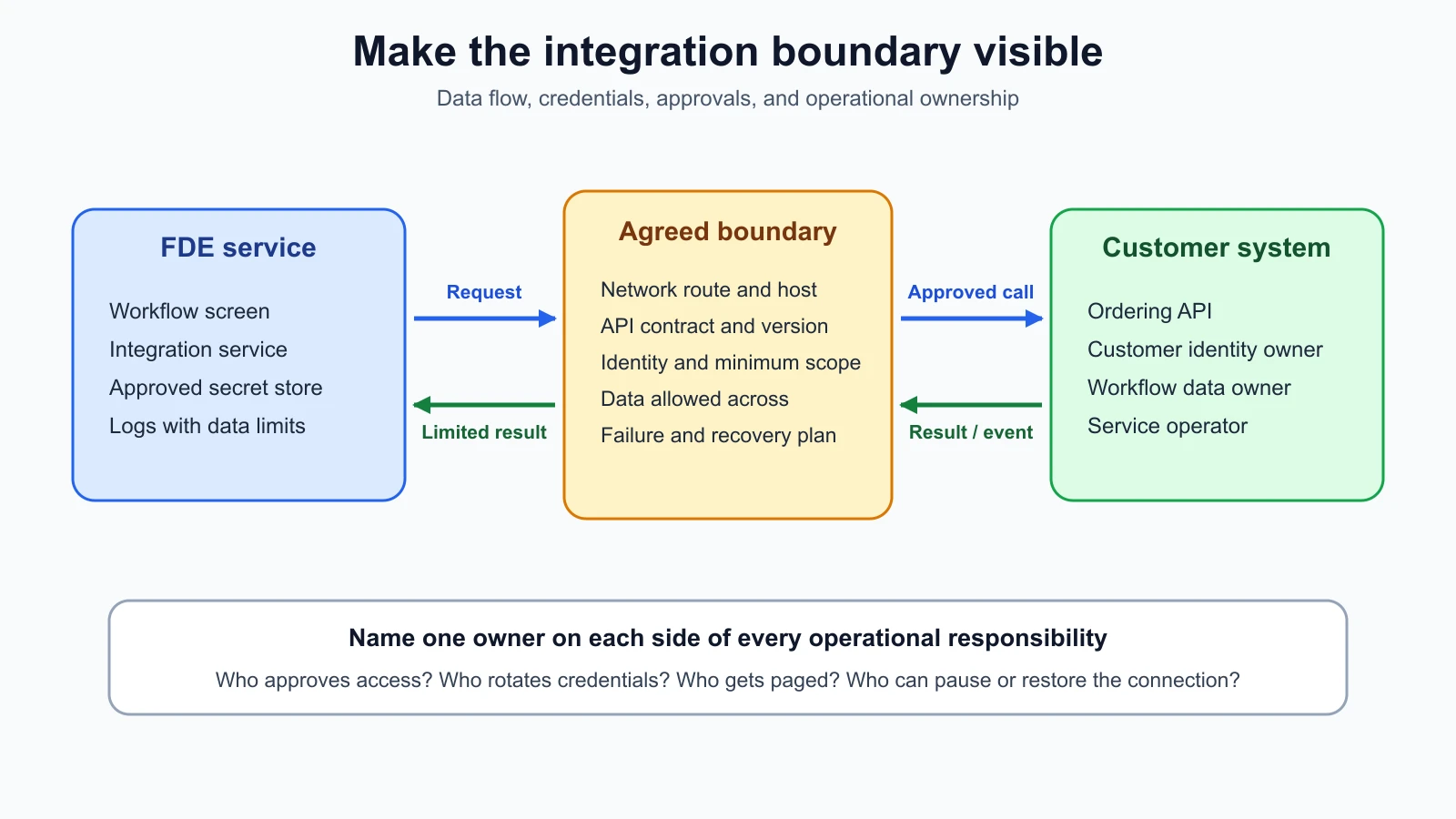
An integration boundary is the point where one system exchanges data or commands with another. Mark the service that your team builds, the customer system, the network path, and the people who approve and operate each side. Draw arrows for each direction of data flow. A read request and a write request have different consequences, even if they use the same endpoint.
Write down what crosses the boundary. Include the fields sent, the response expected, any event payloads, credentials, and error information. Consider metadata such as identifiers, timestamps, and logs too. A service can return personal or confidential data in a field that the feature does not display. Agree on the minimum data needed and how it can be stored, logged, or retained.
In NorthPort, the dispatcher screen can request an order reference from an integration service. The service reads from the ordering API and returns a limited result to the screen. It does not write to the order. The customer's system owner approves the endpoint and access scope. The workflow owner checks that the field matches what dispatchers use. Keep those approvals with their respective owners.
Do not assume a successful local request means the connection is approved. Confirm the environment, network route, data classification, system owner, and intended actions. If you cannot establish those facts, keep the work to synthetic fixtures or a documented interface and leave the live connection out of scope.
Choose the interface the customer supports
An API, or application programming interface, is a defined way for one software system to request data or actions from another. The interface may use request and response calls, event notifications, or both. Follow the customer's existing support model rather than selecting a pattern only because it is familiar.
A REST-style API exposes resources through HTTP requests. HTTP, the Hypertext Transfer Protocol, defines shared request and response behavior such as methods, headers, status codes, and representations. For example, the FDE service may request an order by its identifier and receive a structured response. The customer API documentation should define the actual paths, fields, permissions, and error behavior; the word "REST" does not tell you those details.
A webhook is an HTTP notification sent to a configured receiver when an event occurs. It lets the customer system notify your service that something changed, so your service does not need to poll continuously. For example, an order system might send an event when a reference changes. A webhook creates an inbound boundary: you must verify the sender, validate the payload, handle duplicate deliveries, and acknowledge or reject the delivery according to the provider's contract. GitHub's webhook guidance describes signing payloads with a shared secret and checking the signature before processing. This is a GitHub-specific implementation example; other providers have their own headers and verification rules.
GraphQL is a query language and runtime for requesting data through a typed schema. A client can ask for selected fields, and a mutation is a GraphQL operation that requests a change. The GraphQL learning guide covers schemas, queries, mutations, validation, and response errors. Learn the customer's schema and authorization rules before issuing a query. A narrow query can still return sensitive fields if permissions are too broad.
These interfaces can appear together. The customer's application might expose a REST API for reading orders and send a webhook when a record changes. GraphQL could be used for a separate interface. Ask what is already supported, how it is monitored, and who receives change notices. When an event and a read call both describe an order, decide which system is authoritative if their values differ.
Agree on a contract and version plan
An API contract is the agreement about what a request may contain and what a response or error means. It should name operations, fields, types, required and optional values, authentication, rate limits, pagination, expected errors, and compatibility expectations. A versioned API description can make those details easier for both sides to review.
The OpenAPI Specification defines a language-independent description format for HTTP APIs. The version available when checked on 5 November 2026 is OpenAPI 3.2.1. It can describe endpoints, request and response schemas, security, and server URLs. It cannot prove that a running service matches its description, so compare the contract with sandbox responses and confirm discrepancies with the API owner.
A schema change is a change to the documented shape or meaning of an API request or response. Adding an optional field may be compatible for one client and still break another client that rejects unknown fields. Renaming a field, changing its type, changing an enum, or altering what a status means can change behavior. Ask whether the provider versions by URL, header, date, or another mechanism, how long old versions remain available, and how customers hear about deprecations.
Record more than the happy path. Capture an example request and response, an authorization failure, a missing record, a rate limit response, and a service error. Note which fields can be null, how timestamps and time zones are represented, whether results are paginated, and whether an identifier can be reused. A contract review should end with a contact who can explain a mismatch between the document and the service.
Authenticate with a named owner
Authentication establishes which user, service, or application is making a request. Authorization determines what that identity is allowed to do. A credential is a secret or signed item used to prove an identity, such as an API key or access token. These terms are related, but successful authentication does not grant every permission.
Use the customer's approved method and request only the access needed for the agreed task. An API key may identify an application. OAuth 2.0 is a framework for issuing limited access tokens, often with a user or service granting a defined scope. The IETF's OAuth 2.0 Security Best Current Practice describes current security recommendations and deprecated insecure flows. Follow the customer's identity platform and security owner's instructions rather than inventing a token flow.
Agree who creates, stores, rotates, and revokes each credential. Do not commit secrets to source control, embed them in a browser app, or paste them into an unapproved coding assistant. Keep them in the customer's approved secret store and use a distinct credential for each environment where possible. Set an expiration and a named owner so a prototype credential does not become an undocumented production dependency.
Define where the token is used and what it can do. A read-only integration should not receive write access because it is convenient. If a workflow later needs to update an order, record the new purpose, permissions, audit requirements, and approval before changing the credential or code.
Handle limits, timeouts, and retries deliberately
A rate limit restricts how many requests a client can make in a period. The HTTP status code 429 means the server is reporting too many requests; RFC 6585 says a response may include Retry-After to indicate how long to wait. RFC 9110 defines Retry-After as a delay in seconds or a date. Check the customer's API documentation for its actual quota, headers, and whether limits are shared across teams.
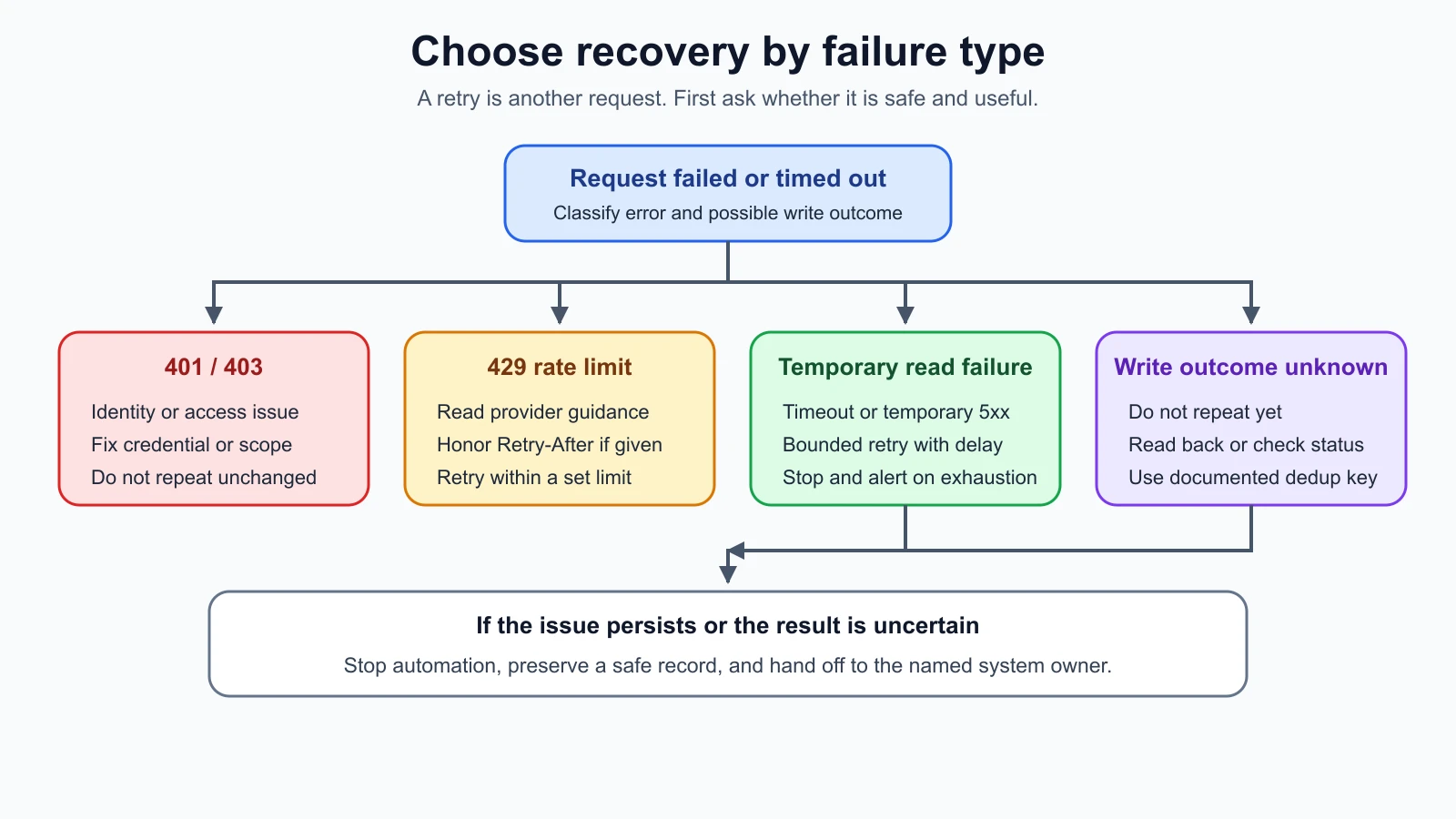
A retry is another attempt after a request fails or times out. Retrying a read may be safe, but repeating a write can create a duplicate action. Idempotency means that repeating the same operation has the same intended effect as doing it once. HTTP defines methods such as PUT as idempotent by intent, while a POST operation may create a new resource each time. The server's actual contract and behavior still matter. Do not assume that a timeout means the customer system did not receive the request.
Before retrying, classify the failure. A 401 response usually indicates that authentication failed; fix the credential or permission rather than sending the same request repeatedly. A 404 may mean the identifier is wrong or the resource is not visible. A 429 may call for a wait using the provider's instructions. A 5xx response may be temporary, but repeated retries can add load while the service is unhealthy. Stop after a bounded number of attempts, record the failure, and use a queue or human handoff if the customer needs the work completed later.
For a write that times out, first determine whether the service supports an idempotency key, a request identifier, or a way to read back the result. A provider may send the same event again. GitHub, for example, uses an X-GitHub-Delivery identifier and keeps it when a delivery is replayed, as its webhook best practices explain. Store the identifier your provider documents and make processing safe to repeat. Do not invent a deduplication key from fields that can legitimately repeat.
A timeout is a failure to receive a response within the caller's wait period. It does not tell you whether the remote operation completed. This uncertainty is especially important for a dispatch hold, payment, or notification. Agree on the recovery path with the system owner before enabling a write. For more implementation detail, see handling errors, retries, and rate limits.
Test the connection and assign ownership
A sandbox is a test environment that is separate from production in some way. It can help you verify request formats and expected responses without changing live records. Check its data, credentials, network access, permissions, and limits. Some sandboxes do not reproduce production configuration or timing. Record the differences and never treat a sandbox result as proof of production behavior.
Use synthetic records or approved test records. Start with read-only requests. Check a valid response, a missing record, an invalid credential, an expired credential, a rate limit, a timeout, and a changed schema. For a webhook, test an invalid signature and a repeated delivery. If a sandbox cannot reproduce a failure, record how the team will safely test or monitor it later.
A handoff at the integration boundary needs named owners. The FDE team may own the connector code and its tests. The customer's API owner controls the service contract, access, and deprecation notice. The security owner approves identities, network paths, and data handling. The workflow owner confirms that the result supports the user's task. The operations owner needs an alert and a recovery procedure. A person can fill more than one role, but each responsibility should have a name.
The customer also needs to know what the integration logs. Record request IDs and error categories where allowed, but avoid logging access tokens, full payloads, or personal information without approval. Choose a support path for a failed request and agree which side can replay or repair it. Assign an owner to every error path so failed requests do not sit in a ticket queue without action.
Use this checklist before a sandbox test or production handoff:
| Area | Questions and evidence | Owner |
|---|---|---|
| Purpose and direction | Which user task needs the connection? Which data or commands cross each way? | |
| Interface | REST, webhook, GraphQL, file exchange, or a combination? Which endpoint or event? | |
| Contract | Where are request, response, event, error, and version details documented? Who confirms changes? | |
| Data | Which fields are required? Are they approved, minimized, and handled under the customer's rules? | |
| Authentication | Which identity and scopes are used? Who creates, stores, rotates, and revokes credentials? | |
| Network and environment | Which hosts and environments are allowed? Does the sandbox differ from production? | |
| Limits and retries | What are the quotas, timeout, retry limit, Retry-After behavior, and write deduplication plan? | |
| Webhook safety | How are signatures checked, duplicate deliveries identified, and failed events replayed? | |
| Testing | Which normal, missing, invalid, rate-limited, timed-out, and changed-schema cases were checked? | |
| Operations | What is logged, what must be excluded, who receives alerts, and who can restore service? | |
| Ownership and exit | Who owns each side of the boundary? What is the rollback or disconnect procedure? |
The MCP server guide describes one protocol for connecting model applications to tools and data. Agree separately with the customer on identity, system ownership, and permissions at this boundary.
Mistakes beginners make
- Treating a successful request as proof that the integration is ready. Verify permissions, data meaning, error behavior, and operational ownership too.
- Reusing a developer's personal token in a shared service. Create an approved service identity with a named owner and limited scope.
- Retrying every failure with the same request. Classify the error and check whether repeating the operation could create a duplicate.
- Assuming a timeout means a write did not happen. Read back the result or use the service's documented idempotency mechanism.
- Trusting a webhook because it reached the endpoint. Verify its signature before processing and use the provider's delivery identifier to handle repeats.
- Assuming a sandbox matches production. Record differences in data, permissions, network, and configuration.
- Leaving both sides of a change without an owner. Name who approves, operates, monitors, and repairs each end of the connection.
- Logging every request and response for debugging. Confirm what may be retained, then exclude credentials and unnecessary customer data.
Recap and try it yourself
An integration connects systems through an agreed boundary. Confirm the interface and contract, use an approved identity with limited permissions, and test the failure paths as well as a normal request. Treat webhooks as untrusted until verified, and treat retries as potentially duplicate work until the API contract says otherwise. Name owners for credentials, changes, alerts, and recovery.
Try it: map the fictional NorthPort dispatch review from the dispatcher screen to the ordering system and back. Choose whether the first connection should be a read request, a webhook, or both, and state why. Fill in the checklist with synthetic data and sandbox assumptions. Mark every unknown that needs a customer owner, especially around write permissions, duplicate events, API changes, and failure recovery.
Sources
Checked on 5 November 2026. The RFCs and specifications define protocol behavior. Provider webhook guidance is one vendor's implementation example; customers may use different headers, retries, and authentication. Confirm the deployed API contract and customer policy before connecting systems.
- RFC 9110: HTTP Semantics, for HTTP methods, status codes, idempotent method semantics, and
Retry-After. - RFC 6585: Additional HTTP Status Codes, for 429 rate limiting and its optional
Retry-Afterguidance. - OpenAPI Specification 3.2.1, for a language-independent description format for HTTP APIs. This was the current version checked on 5 November 2026.
- GraphQL learning guide, for schemas, queries, mutations, validation, and response errors.
- RFC 9700: OAuth 2.0 Security Best Current Practice, for current OAuth security recommendations.
- GitHub webhook signature validation, for one provider's HMAC signature verification pattern.
- GitHub failed webhook delivery guidance and webhook best practices, for its delivery failures, redelivery, signature, and delivery-ID behavior. Confirm each provider's policy separately.