
Forward Deployed Engineer course · lesson 16 of 24
- 1What Is a Forward Deployed Engineer?
- 2A Day in the Life of a Forward Deployed Engineer
- 3FDE Career Paths, Tiers, and Interview Gates
- 4Build Your Forward Deployed Engineer Skill Map
- 5Requirements Gathering with a Customer
- 6Discovery, Scoping, and Sequencing Customer Work
- 7Audit Customer Data Before You Build
- 8Enterprise Workflow, Business Value, and ROI
- 9Choosing an AI Approach for a Customer
- 10Build a Working Prototype Fast
- 11Integration Engineering and the Last Mile
- 12Working Safely with Legacy Systems
- 13Data Pipelines for AI Features
- 14Evals as Acceptance Criteria
- 15Debugging Agent Logic and Observability
- 16Deploying in the Customer's Cloud
- 17Cost, Latency and Inference Choices
- 18Security, Privacy and AI Governance
- 19Stakeholders and Communication
- 20Technical Writing for Handoff
- 21UAT, Go-Live, and Day 2 Operations
- 22Executive Reporting and Proving ROI
- 23The Product Feedback Loop
- 24Capstone: Run an Engagement End to End
After this lesson, you will be able to plan a deployment into a cloud environment the customer controls, ask for the access and approvals it requires, and identify the people who own each boundary. You will compare the account structures used by AWS, Google Cloud, and Azure, then use a deployment readiness checklist for the fictional NorthPort Freight assistant. All NorthPort details are synthetic.
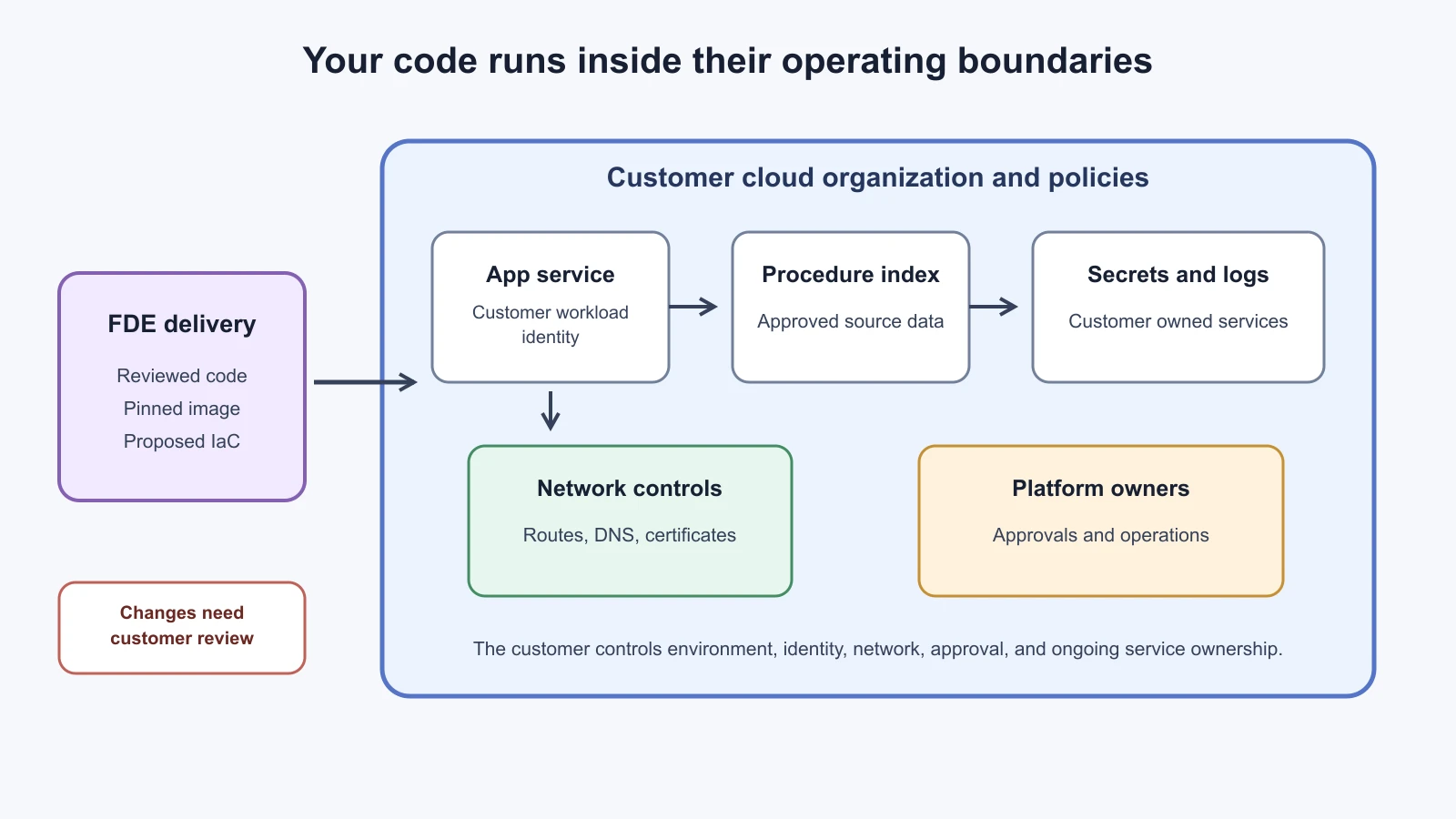
Deploying into a customer's cloud is not just copying a service to a virtual machine. The customer's cloud organization already has rules for who can create resources, how traffic moves, which regions are allowed, where secrets are stored, and who can approve a production change. Your code must fit those rules. A deployment plan that assumes you can create an account, open an internet port, or grant yourself administrator rights can stall before the first build.
The FDE's task is to help the customer move a solution through their controls with a clear record of what will change. The customer remains the authority for their environment. Find the technical owner for identity, network, platform, data, and security decisions. If a control blocks the design, surface it early and offer options with the trade-offs. Do not bypass it by using a personal cloud account or a temporary public endpoint.
Start with the customer's environment
Ask which cloud is in use, where the workload should run, who owns the relevant account or subscription, and which environment is approved for development, staging, and production. Record the region, data classification, expected users, network entry point, dependencies, and change window. A customer may run more than one cloud, and a cloud name alone does not tell you the network path or access policy.
Cloud providers organize resources differently. AWS accounts are resource containers and basic security boundaries. AWS recommends multiple accounts to help isolate workloads and separate costs. Google Cloud organizes resources through organizations, optional folders, and projects. Policies can be inherited down that hierarchy, and projects contain cloud resources. Azure organizes management scopes as management groups, subscriptions, resource groups, and individual resources; settings applied higher in the hierarchy can flow to lower scopes. These are not identical concepts, so do not assume an AWS account maps exactly to a Google Cloud project or an Azure subscription.
The customer should identify the scope where the application belongs. That decision affects billing, policy inheritance, ownership, and access approvals. NorthPort might have a dedicated production project or account for dispatch services, but the customer platform owner must confirm whether that pattern fits their organization. These details are fictional examples. AWS's account overview, Google Cloud's resource hierarchy documentation, and Microsoft's Azure Resource Manager overview describe the respective provider structures.
Build a simple environment map before you provision anything. Include the application, the customer identity provider, model endpoint, retrieval store, source data, secrets service, network boundary, logging destination, and support owner. Draw which direction each connection flows and which party operates the endpoint. A model provider may be outside the customer's cloud even when the application itself runs inside it. That boundary has data-transfer and approval implications that need their own review.
Request access that is narrow and temporary
Identity and access management (IAM) is the system that assigns identities and controls what each identity can do. A human engineer and a deployed workload need different identities. A developer who reviews a plan should not automatically receive permission to change production. A running service should not inherit a person's credentials just because that was the easiest way to test it.
Ask the customer to create or approve a named deployment role for the work. It should allow only the required actions on the intended resources, in the intended environment, for the period the work needs. Use the customer's federated sign-in or other approved identity flow. Agree how access will be logged, reviewed, and revoked. AWS describes least-privilege policies scoped to roles and resources and recommends isolating development and production accounts. Google Cloud recommends granting secret access at the lowest useful scope. Both are examples of the same operational principle: start with the smallest permission set and add access only when a documented need is approved.
For the application at runtime, prefer a workload identity provided by the cloud when the relevant services support it. AWS IAM roles, Google Cloud service accounts, and Azure managed identities are provider-specific mechanisms for a service to identify itself. Their configuration differs, and each identity still needs appropriate authorization. Microsoft's documentation distinguishes a system-assigned managed identity, tied to one Azure resource's lifecycle, from a user-assigned identity that can exist independently and be associated with resources. Choose with the customer platform owner, not by copying a pattern from another cloud.
Separate the build identity from the runtime identity. The build process may need to push an image to a registry. The runtime service may need to read one procedure index and a small number of secrets. Neither identity should receive broad admin permissions by default. The platform or security owner should review the permission list and confirm which account performs each action. Keep a record of the requested permissions and why each is needed.
Do not paste credentials into source files, tickets, chat, shell history, Docker build arguments, or container images. A secret is a credential or value that should be accessible only to authorized identities. Use the customer's approved secret manager and follow their rotation process. AWS's Well-Architected guidance describes roles and temporary credentials for workloads and managed secret storage for application credentials. Google Cloud's Secret Manager guidance recommends applying IAM to the specific secret where possible. Azure Key Vault guidance recommends managed identities for application connections. These product details were checked on 5 November 2026; verify current provider capabilities and customer policies before implementation.
Container builds have a separate secret boundary. If a build must access a private package or repository, Docker documents temporary secret mounts for build steps. It warns that build arguments and environment variables are not suitable for build secrets because values can persist in the final image. At runtime, deliver secrets through the customer's managed mechanism and avoid baking them into the image. Inspect build logs and image layers if a secret was accidentally exposed, then follow the customer's credential rotation and incident process.
Fit the network and data path
Network access is a customer design decision. Ask whether the service should be reachable only from an internal network, through a private endpoint, behind the customer's approved gateway, or through another pattern. Identify inbound callers, outbound dependencies, DNS, certificates, firewall rules, proxy requirements, and any model or data service that lives outside the boundary. Avoid opening a broad public route to get a prototype working. If a dependency requires external access, document the destination, protocol, purpose, and data sent, then have the network owner approve it.
Private networking can affect more than the application endpoint. The service may need to reach identity, container registry, object storage, a model API, logging, and secret management. A private subnet with no approved egress route can make a correctly built application appear broken. Work with the customer's network team to test name resolution, certificates, routes, and access from the actual runtime environment. Do not assume a developer laptop test proves that the production network path works.
Data location and data movement should be explicit. Confirm which data is processed, where it is stored, whether it is written to logs, and whether it leaves the customer's cloud. A feature that retrieves dispatch procedures and sends passages to an external model provider has a different flow from a feature using a model endpoint in the customer's own network. Security, privacy, and legal teams determine what is allowed. The FDE should give them an accurate diagram and specific questions rather than making a compliance claim.
Record the network decisions next to the deployment architecture. Include the approved ingress path, outbound destinations, ports or protocols, private connectivity dependencies, and the owner who can troubleshoot each connection. When an exception expires, who removes it? If the customer requires private DNS or certificate issuance, who provides it and how long does that request take? These details can determine the deployment sequence and should appear in the project plan.
Use infrastructure as code with review
Infrastructure as code (IaC) means defining infrastructure in files that can be reviewed and applied repeatedly. Terraform is one IaC tool that can manage resources through provider plugins. A plan is a proposed set of infrastructure changes; it gives reviewers a chance to inspect additions, updates, and deletions before an apply changes the environment. The customer may use a different tool, such as a provider-native template or an internal platform. Follow the existing standard unless the platform owner agrees to introduce another tool.
Review the proposed changes with the people who own the target resources. Confirm resource names, regions, tags, network exposure, identity permissions, scaling limits, backups, and deletion behavior. A plan that says it will replace a resource can cause downtime or data loss even if Terraform reports no syntax error. Infrastructure changes can also trigger policies, cost allocation, security scans, and approval workflows. Treat a successful local plan as preparation for review, not approval to apply.
Terraform state records resource information and may include sensitive values. HashiCorp's documentation says local state can be a plaintext file and warns that secrets in configuration can be recorded in state and plan files. Keep state out of Git, use the backend approved by the customer, restrict access, and understand that marking a value sensitive can hide it from some display surfaces without necessarily removing it from state. Check the tool version, provider versions, state locking, encryption, backup, and recovery procedure with the platform owner. Do not move customer state into an FDE-controlled workspace for convenience.
Keep the infrastructure changes small and reviewable. Separate a network foundation change from an application deployment when they have different owners or approval paths. Use code review and the customer's CI/CD pipeline when available. If the customer asks for a manual change, record the exact change and update the managed configuration so the declared state does not drift from reality. A drift is a difference between the configuration and the resources that exist. Resolve it with the owner rather than overwriting an undocumented change.
Package the service and decide whether Kubernetes is needed
A container image packages an application with its runtime dependencies so it can be launched consistently on a compatible host. Docker is a common tool for building images, but the customer may use another builder or registry. Pin base images and dependencies according to the customer's policy, scan images through the approved process, label the image with a revision, and keep source and build provenance available. Promote the same tested image between environments when that matches the deployment controls, rather than rebuilding an untracked artifact for production.
Kubernetes is a system for running and managing containers across a cluster of machines. It is useful when the customer already operates a cluster and expects workloads to use its scheduling, service discovery, policy, and rollout mechanisms. It adds cluster-specific configuration, access controls, upgrades, and operational responsibilities. Do not select Kubernetes solely because the workload uses a container. A managed application service or a single container runtime may meet the requirement with fewer moving parts. Ask who patches and monitors the cluster, who owns its namespaces and policies, and how the application will receive configuration and secrets.
Kubernetes Secret objects are not automatically a complete secret-management strategy. Kubernetes documentation notes that Secret objects are stored unencrypted in etcd by default unless encryption at rest is configured, and recommends limiting which identities can read them. The customer cluster operator owns those controls. Ask how secrets enter the cluster, whether they are encrypted at rest, which service accounts can read them, and how they are rotated. Avoid putting secret values in manifests committed to source control.
Follow the approval path
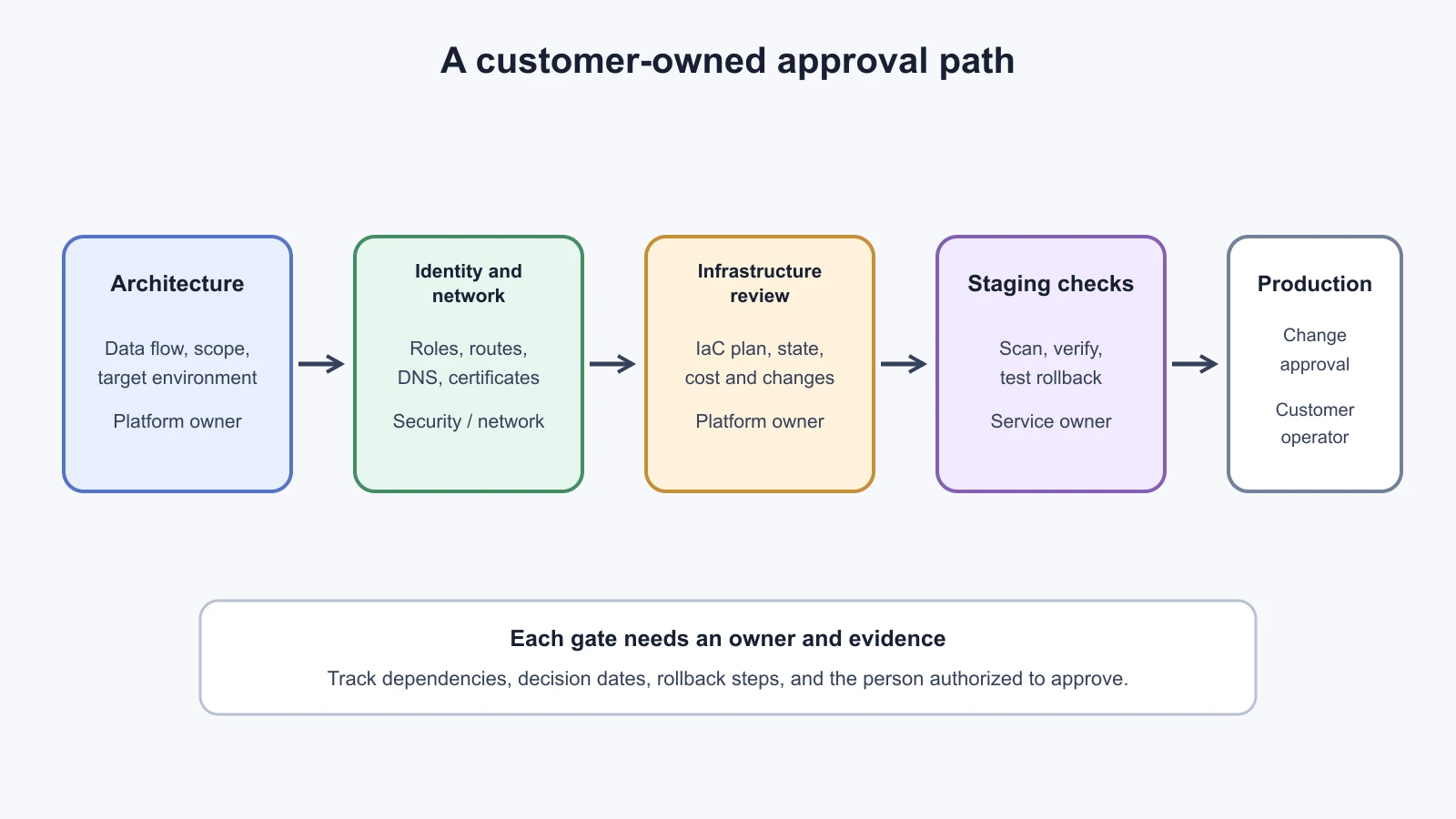
The deployment path should show who reviews each decision and what evidence they need. A typical sequence is: agree the architecture and data path, approve the target environment, establish identities, approve network routes, review infrastructure changes, build and scan an image, deploy to a non-production environment, run verification, review operational readiness, then authorize production. The customer's process may reorder or combine these steps. Map the actual workflow with the owners rather than assuming a universal change board.
Make dependencies visible. A network rule may depend on an approved destination list. A production role may require a security ticket. A private endpoint may need DNS configuration by another group. Track each item with an owner and expected date. If an approval is delayed, explain the impact on the release sequence and offer safe parallel work such as local tests or a deployment rehearsal in an approved sandbox.
Agree a rollback path before a production change. Rollback may mean restoring the previous image, shifting traffic away from the new service, disabling a feature flag, or returning to a manual workflow. Database migrations and external writes can make rollback more complicated. Identify which state changes are reversible and who has authority to stop traffic. The customer operations owner should confirm that the rollback procedure is realistic in their environment.
Deployment readiness checklist
Use this template during planning and again before production. Replace the examples with customer-approved values. Record "not applicable" with a reason, and assign an owner to every open item. A checked box means the named owner has provided evidence, not that the FDE assumes it is complete.
| Area | Readiness question | Evidence or owner |
|---|---|---|
| Target | Which account, project, subscription, environment, and region host the workload? | Customer platform owner confirms scope and ownership. |
| Data | What data enters, leaves, or persists? Which systems are the source of truth? | Approved data-flow diagram and data owner. |
| Identity | Which human and workload identities are used? What is the minimum permission set and expiry? | Role review, named approver, access revocation plan. |
| Secrets | Where are credentials stored and rotated? Are any values in source, build logs, plans, images, or manifests? | Secret manager configuration and scan results. |
| Network | What are the approved ingress and egress paths, DNS names, certificates, and destinations? | Network ticket and connectivity check from target runtime. |
| Infrastructure | Which IaC tool, version, provider versions, backend, state access, and plan review apply? | Reviewed plan, state protection and recovery owner. |
| Image | Which immutable image revision is deployed? How are dependencies and vulnerabilities reviewed? | Registry reference, build provenance, scan and approval record. |
| Runtime | Who owns compute, scaling, health checks, logs, alerts, and platform patches? | Service owner and operational dashboard. |
| Verification | Which smoke tests, acceptance checks, and access tests run in staging and production? | Results with candidate version and approver. |
| Change | What is the production window, communication path, and approval record? | Change owner, window, and customer authorization. |
| Rollback | How will traffic or behavior return to the prior state? What data changes cannot be reversed? | Tested rollback steps and decision owner. |
| Handoff | Who supports the service after launch, and where are runbooks and escalation details? | Named support owner and customer-readable handoff. |
The checklist is not a substitute for a security review. It helps the FDE surface gaps early and route decisions to the right owner. A deployment can be technically healthy while lacking customer authorization, a support plan, or a clear rollback decision. Keep those items visible instead of treating the running process as the finish line.
Mistakes beginners make
Assuming a cloud account is a blank project. Organization policies, inherited roles, network controls, quotas, and billing ownership may already constrain what can be created.
Fix: Ask the customer to name the target scope and owners before preparing infrastructure changes.
Requesting administrator access to avoid permission delays. Broad access may violate the customer's controls and makes it harder to explain which actions the deployment requires.
Fix: Submit a narrow permission list with resource scope, purpose, owner, and expiry. Request additional access through the customer's approval path only when evidence shows it is needed.
Putting credentials in the image or Terraform configuration. A value can persist in image layers, build artifacts, logs, plans, or state even if the application never prints it.
Fix: Use approved identity and secret mechanisms, review build outputs and state handling, and rotate any exposed credential through the customer's process.
Choosing Kubernetes before understanding the service. A cluster brings configuration and operations that may be unnecessary for a small workload.
Fix: Start from the customer's platform standard and operational owners. Use Kubernetes when the customer environment or workload requirements call for it.
Recap and try it yourself
For a customer-cloud deployment, first map the environment and its owners. Scope human and workload identities, agree the network and data paths, protect secrets, review IaC changes and state, and package a traceable image. Use Kubernetes when it fits the customer's platform and operating model. Map approvals and rollback before production, then use the readiness checklist to expose missing owners and evidence.
Try it yourself: sketch a deployment for the fictional NorthPort dispatch assistant. Mark the cloud scope, the customer identity provider, the application, the procedure index, the model endpoint, secrets, logs, and support owner. Draw each network connection and label whether it is inbound or outbound. Then complete the readiness checklist with at least three unanswered questions and assign a fictional customer role to each. Do not invent approval decisions; list what evidence that owner would need to provide.
The AI Agents lesson on deploying AI agents covers application deployment patterns. For AI coding tools used during implementation, see Claude Code's lesson on sandboxing, secrets, and development containers.
Sources
Checked on 5 November 2026. AWS's account overview supports the account as resource container and security boundary; its least-privilege guidance and secrets guidance support scoped roles, environment isolation, temporary credentials, and managed secret storage. Google Cloud's resource hierarchy supports organization, folder, and project structure; Secret Manager IAM guidance supports narrow secret-level permissions. Microsoft Learn's Azure Resource Manager overview supports Azure scopes and inherited settings; its managed identity overview and Key Vault security guidance support identity-based service access and vault access controls. HashiCorp's Terraform sensitive-data guidance supports the warnings about state and plan files. Docker's build secrets documentation supports temporary build-secret mounts. Kubernetes' Secret good practices supports the notes about encryption at rest and limiting access. NorthPort is fictional; no customer environment was accessed.