
MLOps course · lesson 17 of 24
- 1What Is MLOps? From Notebooks to Reliable Production
- 2MLOps Principles and Maturity: From Manual to Automated
- 3ML Fundamentals for MLOps: Splits, Leakage, and Metrics
- 4A Reproducible ML Project: Layout, Seeds, and Data Code
- 5Data Engineering Basics for ML: Ingestion, SQL, and Skew
- 6Pipeline Orchestration: Apache Airflow and Kubeflow
- 7Batch vs Streaming: Spark, Kafka, and Flink
- 8Data Versioning and Lineage: DVC and Beyond
- 9Data Validation and Quality in ML Pipelines
- 10Experiment Tracking with MLflow
- 11Reproducible Training Pipelines
- 12Model Evaluation and Validation Gates
- 13Model Registry and Versioning
- 14CI/CD for Machine Learning
- 15Containers and Kubernetes for ML
- 16Infrastructure as Code: Terraform and Ansible
- 17Cloud ML Platforms: AWS, Azure, GCP, and Self-Built
- 18Model Serving Patterns: Batch, Online, and Streaming
- 19Inference Engineering Basics: Latency, Batching, and Cost
- 20Monitoring and Observability for ML Models
- 21Drift Detection and Retraining for ML Models
- 22Explainable AI: LIME, SHAP, and Model Interpretability
- 23Edge AI Deployment: Jetson, TFLite, and Mobile ML
- 24Capstone: An End-to-End MLOps Pipeline
Selecting where and how to run machine learning workloads is one of the most critical structural decisions an engineering team makes. Teams frequently treat platform selection as a simple matter of personal preference or vendor marketing. In reality, platform choice dictates team velocity, infrastructure maintenance overhead, regulatory compliance, and cloud operating expenditures for years.
When our synthetic team at StayWell began deploying their customer churn model, they faced a familiar dilemma. Data scientists wanted managed notebook instances and automated push-button model endpoints. DevOps engineers advocated for running Kubeflow and MLflow on their existing Amazon Elastic Kubernetes Service (EKS) cluster to prevent vendor lock-in. Meanwhile, finance flagged that unmonitored managed cloud machine learning endpoints could easily inflate their cloud bill by thousands of dollars each month.
In Choose Where to Deploy, we examined hosting models from a software application perspective. In this lesson, we examine the infrastructure layer of machine learning platforms. We evaluate the core functional capabilities of Amazon Web Services (AWS) SageMaker, Google Cloud Vertex AI, and Microsoft Azure Machine Learning. We analyze the trade-offs between managed platforms and self-built open-source stacks, break down cloud cost profiles and data residency requirements, and establish a standardized Platform Decision Record (PDR) template that your team can check directly into source control.
The build versus buy spectrum for ML systems
Machine learning infrastructure exists along a spectrum from fully managed proprietary ecosystems to completely self-hosted open-source clusters. Neither extreme is universally superior; each solves for different organizational constraints.
| Fully managed platform | Hybrid or open-core | Self-hosted | |
|---|---|---|---|
| Examples | AWS SageMaker, Google Vertex AI, Azure Machine Learning | Managed Kubernetes with MLflow, Ray or Triton | Custom Kubernetes or bare metal with Kubeflow |
| Strength | Fast time to market | Balanced flexibility | Complete control |
| Cost shape | Platform charges on top of compute | Mostly compute plus your own engineering time | No platform fees, but hardware and staff costs |
| Main risk | Cloud-specific lock-in | Moderate operational work | Heavy maintenance |
The three primary archetypes across this spectrum include:
- Fully managed cloud ML platforms (AWS SageMaker, Google Vertex AI, Azure ML): The cloud provider manages the underlying virtual machines, GPU firmware, network fabric, cluster scaling, and platform software updates. Data scientists interact through web studios or language SDKs. Training instances spin up on demand and terminate immediately upon completion.
- Hybrid platform (Managed Kubernetes with open-source tooling): The team provisions managed Kubernetes clusters (such as Amazon EKS, Google Kubernetes Engine, or Azure Kubernetes Service) using Terraform, but installs open-source MLOps engines such as MLflow for tracking, Argo or Kubeflow for orchestration, and KServe or Triton for model serving.
- Self-hosted and on-premise clusters: Organizations operating under strict data sovereignty rules, air-gapped facilities, or massive continuous training scales provision physical GPU servers (such as NVIDIA DGX systems) or private colocation racks.
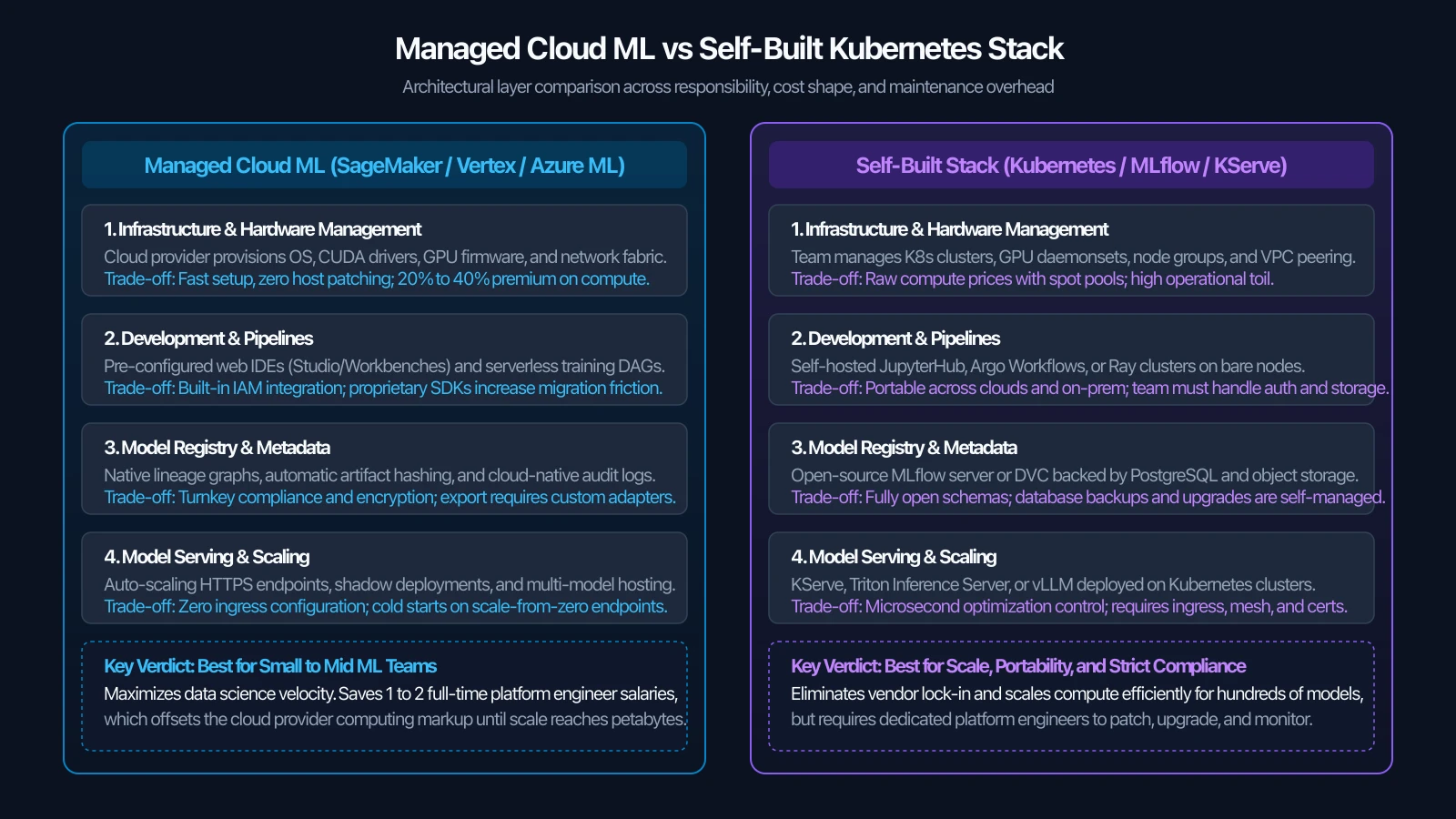
Choosing between these tiers requires evaluating two competing costs: cloud provider markup and platform engineering salary overhead.
Managed platforms often cost more than running the same instances yourself, through higher per-hour instance prices, separate platform fees, or both. The gap varies by provider, service and region, so read each provider's current pricing page. For illustration only, assume a 30% premium: on $5,000 of monthly compute that is about $1,500 per month. A self-hosted Kubernetes platform needs at least one dedicated platform or site reliability engineer, and at this spend a salary can easily exceed a premium of that size.
At $200,000 per month, the same assumed 30% premium would be $60,000 per month. At that scale, a team may find that two platform engineers running open-source Kubernetes and Ray cost less than the premium. Run the numbers with your own prices and salaries before you decide.
Core capabilities across AWS, Azure, and Google Cloud
The three dominant hyperscalers provide end-to-end machine learning platforms designed to cover every phase of the MLOps lifecycle. Rather than ranking them, mature engineering teams assess them against specific functional requirements.
| Lifecycle Capability | AWS SageMaker | Azure Machine Learning | Google Cloud Vertex AI |
|---|---|---|---|
| Interactive Development | SageMaker Studio / Code Editor | Azure ML Studio / VS Code | Vertex AI Workbench |
| Training Orchestration | SageMaker Training Jobs | Azure ML Compute / Jobs | Vertex AI Custom Training |
| Experiment Tracking | SageMaker Experiments | Azure ML Run Tracking | Vertex AI Experiments |
| Model Registry | SageMaker Model Registry | Azure ML Model Registry | Vertex AI Model Registry |
| Online Inference | SageMaker Real-time Endpoints | Managed Online Endpoints | Vertex AI Prediction |
| Feature Store | SageMaker Feature Store | Azure ML Feature Store | Vertex AI Feature Store |
| Serverless Serving | SageMaker Serverless Inference | Azure ML Serverless Endpoints | Vertex AI Serverless Prediction |
| Ecosystem Gravity | Amazon S3, Redshift, IAM | Azure Data Lake, Entra ID | BigQuery, Dataproc, GCS |
1. Interactive development environments
Modern cloud platforms provide hosted web-based environments equipped with pre-installed machine learning libraries, GPU drivers, and access control.
- AWS SageMaker Studio: Offers browser-based JupyterLab instances and lightweight Code Editor instances based on Code-OSS. Notebook storage persists on Amazon Elastic File System (EFS), allowing scientists to change instance compute sizes without losing workspace files.
- Azure Machine Learning Studio: Integrates deeply with Visual Studio Code (both browser and desktop client). It connects to dedicated Azure ML Compute Instances that can be scheduled to automatically shut down outside business hours to prevent waste.
- Google Cloud Vertex AI Workbench: Provides managed JupyterLab environments running inside Google-managed virtual machines. Workbench instances integrate directly with BigQuery and Google Cloud Storage, allowing scientists to query petabyte-scale tables directly from notebook cells.
(All documentation references checked on 5 November 2026 from official cloud vendor portals: AWS SageMaker Documentation, Azure Machine Learning Documentation, and Google Cloud Vertex AI Documentation.)
2. Distributed training and compute orchestration
Running training scripts on dedicated, ephemeral hardware prevents teams from paying for idle GPU machines.
- AWS SageMaker Training Jobs: Accepts a Docker image URI, Python entrypoint script, and S3 data paths. SageMaker provisions the requested EC2 instances (such as
ml.g5.2xlarge), mounts or copies the dataset from S3, executes the training script, uploads output model artifacts back to S3, and immediately tears down the instances. SageMaker Managed Spot Training can lower compute cost by using spare capacity and resuming from checkpoints after an interruption. The savings depend on the instance type and demand, so check the current SageMaker documentation. - Azure Machine Learning Environments and Jobs: Separates the environment definition (Docker specification and conda dependencies) from compute targets (Azure ML Compute Clusters). Clusters scale dynamically from zero to maximum node capacity based on job queue depth.
- Google Cloud Vertex AI Custom Training: Executes training workloads packaged as pre-built or custom container images across Google Compute Engine instances or Tensor Processing Unit (TPU) pods. Vertex AI Pipelines coordinates multi-step training workflows using Kubeflow Pipelines (KFP) syntax.
3. Model registries and governance
The model registry acts as the single source of truth for production models, tracking lineage, validation gates, and approval states.
- AWS SageMaker Model Registry: Groups model iterations under Model Package Groups. It captures input training dataset digests, container images, evaluation metrics, and approval statuses (
Approved,PendingManualApproval,Rejected). Approvals can trigger automated deployment pipelines through Amazon EventBridge. - Azure Machine Learning Model Registry: Supports enterprise-wide model sharing across different Azure subscriptions and workspaces. It integrates natively with MLflow model packaging standards, allowing models logged via
mlflow.sklearn.log_modelormlflow.pytorch.log_modelto register directly. - Google Cloud Vertex AI Model Registry: Manages model versioning, deployment status, and explainability metadata. Vertex Model Registry links directly to Vertex AI Model Evaluation, which computes classification and regression metrics automatically upon model registration.
4. Online and batch serving
Deploying models to production requires scalable, reliable serving infrastructure.
- AWS SageMaker Endpoints: Offers real-time endpoints (dedicated compute with auto-scaling based on target invocations), serverless endpoints (scale to zero for intermittent traffic), asynchronous endpoints (for large payload processing with queuing), and multi-model endpoints (hosting hundreds of small models on a single shared instance pool).
- Azure Machine Learning Managed Endpoints: Decouples the endpoint interface from underlying model deployments. A single endpoint can balance traffic across multiple deployments (blue/green or canary routing) using built-in percentage split rules without modifying client application code.
- Google Cloud Vertex AI Prediction: Provides HTTP endpoints backed by auto-scaling container runtimes. Vertex AI supports private endpoints peered into your custom Virtual Private Cloud (VPC), ensuring inference traffic never travels across the public internet.
Anatomy of cloud ML costs and lock-in risks
Choosing a cloud ML platform requires understanding the underlying cost components and assessing how deeply your architecture becomes bound to a specific vendor.
Understanding the four cost pillars
| Cost pillar | What you pay for |
|---|---|
| 1. Compute | Virtual machine hourly rates, GPU instance surcharges, and any managed-platform charge |
| 2. Data storage | Object storage (S3, GCS, ADLS), managed feature store capacity, disk and file system volumes |
| 3. Network egress | Cross-region data sync, traffic leaving the cloud to clients, NAT gateway and VPC peering traffic |
| 4. Licensing and support | Enterprise support plans, platform seat licenses, third-party connectors |
- Compute charges: Compute is often the largest line in an ML budget. Pay attention to minimum instance billing granularities and billing for failed runs. Ensure that training scripts catch exceptions and release resources cleanly.
- Storage and feature store capacity: While object storage (Amazon S3, Google Cloud Storage, Azure Blob Storage) is inexpensive (approximately $0.02 to $0.025 per gigabyte monthly), active managed feature stores with low-latency key-value databases charge for read/write units and provisioned write throughput.
- Network data transfer and egress: Cloud providers charge zero dollars for transferring data into their clouds, but charge between $0.05 and $0.09 per gigabyte when transferring data out to the public internet or across different cloud regions. If your raw data warehouse resides in Google Cloud BigQuery but your training runs on AWS SageMaker, you will pay continuous network egress fees on every epoch or batch extract.
- Endpoint idle costs: Hosting a dedicated real-time inference endpoint (for example, a single
ml.c5.xlargeinstance on AWS) running 24 hours a day, 30 days a month costs approximately $150 to $200 per month per model version. Teams maintaining 20 distinct model endpoints across development, staging, and production environments accumulate $3,000 to $4,000 in monthly idle compute costs before serving a single prediction.
The vendor lock-in reality
Vendor lock-in is rarely an all-or-nothing proposition. It manifests in three distinct layers of your system:
- Data gravity lock-in (High friction): The location of your primary customer data warehouse creates immense gravitational pull. Transferring petabytes of training data out of Snowflake, BigQuery, or Redshift introduces prohibitive network transfer costs and latency.
- Proprietary API lock-in (Medium friction): Training pipelines constructed entirely using vendor-specific orchestration SDKs (such as SageMaker Pipelines or Azure ML Pipelines) require significant rewriting if migrated to open-source Argo Workflows or Apache Airflow.
- Model artifact lock-in (Low friction): If your training jobs package output weights using open formats (such as standard ONNX files, Scikit-learn joblib archives, or MLflow Model directories), models remain portable across any cloud or container runtime.
The platform decision framework
To systematically evaluate whether StayWell should adopt a fully managed cloud service, build on Kubernetes, or maintain a hybrid architecture, engineering leads can follow a decision flowchart.
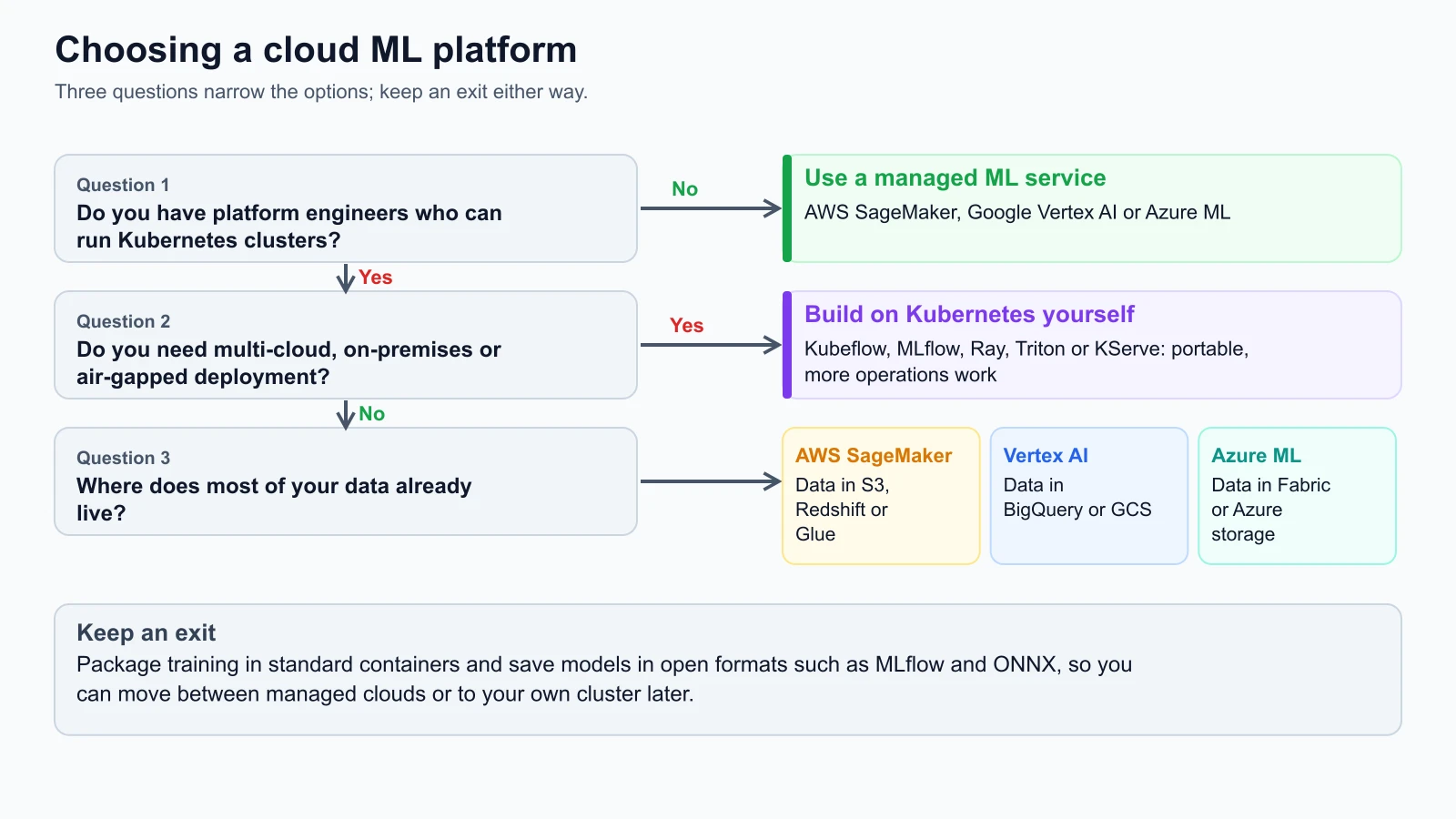
Evaluation criteria checklist
When evaluating platforms for a production ML project, evaluate these four objective criteria:
-
Team composition and operational capacity:
- Does your engineering organization maintain a dedicated platform or SRE team that actively supports Kubernetes clusters?
- If the answer is no, adopting a self-built Kubernetes stack will force data scientists to debug cluster ingress, CNI network plugins, and NVIDIA driver updates instead of improving model accuracy. Choose a managed cloud platform.
-
Data gravity and enterprise governance:
- Where does your upstream data lake reside?
- If StayWell's customer activity logs and billing tables already reside in Amazon S3 and Amazon Redshift, choosing AWS SageMaker minimizes data transfer latency and integrates natively with existing AWS Identity and Access Management (IAM) role boundaries. Moving that data to Google Cloud solely for Vertex AI would introduce unnecessary network transfer costs and duplicate access control rules.
-
Inference latency and throughput requirements:
- Does the model serve real-time user-facing HTTP requests with strict sub-50-millisecond SLAs, or does it run daily batch inference jobs?
- Batch inference workloads can run on any platform using ephemeral batch jobs or spot instances. Real-time endpoints with unpredictable traffic spikes benefit from managed serverless endpoints or Kubernetes clusters with Horizontal Pod Autoscalers.
-
Regulatory and data sovereignty constraints:
- Are you legally required to store and process customer data within specific national borders or within private isolated subnets?
- In highly regulated healthcare, finance, or government environments, models may need to execute inside sovereign cloud enclaves or air-gapped on-premise hardware where public cloud services are disallowed.
The platform decision record (PDR) template
Architectural decisions should never be communicated solely through oral discussions or informal chat channels. Teams should document their platform selection using a standardized Platform Decision Record (PDR) stored in Markdown inside the project Git repository.
Here is the production PDR template used by mature engineering organizations:
1# Platform Decision Record (PDR): [System Name]
2
3* **Status:** Proposed | Accepted | Deprecated | Superseded
4* **Date:** YYYY-MM-DD
5* **Authors:** [Lead ML Engineer, Platform Architect]
6* **Decision Makers:** [Head of Engineering, Head of Data]
7
8## 1. Context and Problem Statement
9Describe the business problem, expected workload scale, latency requirements,
10and organizational constraints. What model are we training and serving?
11
12## 2. Decision Drivers
13List the prioritized drivers that influence this decision:
14- Time to market and team operational capacity
15- Primary data storage location (data gravity)
16- Projected monthly compute budget and cost profile
17- Portability requirements and vendor lock-in tolerance
18- Compliance, security, and data residency policies
19
20## 3. Options Considered
21* Option A: [e.g. AWS SageMaker Managed Platform]
22* Option B: [e.g. Self-Built Kubernetes Cluster on AWS EKS with MLflow and KServe]
23* Option C: [e.g. Google Cloud Vertex AI]
24
25## 4. Evaluation Matrix
26
27| Criterion | Weight (1-5) | Option A | Option B | Option C |
28| :--- | :--- | :--- | :--- | :--- |
29| Operational Toil | 5 | 5/5 | 2/5 | 5/5 |
30| Data Gravity Alignment | 5 | 5/5 | 4/5 | 1/5 |
31| Raw Compute Cost | 3 | 3/5 | 5/5 | 3/5 |
32| Portability & Open Standards | 4 | 3/5 | 5/5 | 3/5 |
33| **Weighted Total** | | **XX** | **YY** | **ZZ** |
34
35## 5. Decision Outcome
36Chosen option: [Selected Option]
37Justification: Explain clearly why this option won based on the decision drivers.
38
39## 6. Portability Guardrails and Migration Strategy
40What safeguards are put in place to prevent deep proprietary lock-in?
41- Model artifacts will be serialized using standard ONNX / MLflow formats.
42- Training scripts will execute inside standard Docker containers.
43- Orchestration will avoid proprietary non-exportable DAG definitions.
Concrete example: StayWell customer churn PDR
To illustrate this template in practice, here is the accepted PDR for StayWell's customer churn prediction service:
1# Platform Decision Record: StayWell Churn Prediction Service
2
3* **Status:** Accepted
4* **Date:** 2026-11-05
5* **Authors:** Lead MLOps Engineer, Principal Data Architect
6* **Decision Makers:** VP of Engineering, Director of Analytics
7
8## 1. Context and Problem Statement
9StayWell requires an automated pipeline to train, validate, and serve a weekly
10customer churn prediction model. The dataset consists of 500,000 active customer
11records with 45 features updated nightly. The system must generate weekly batch risk
12scores for retention campaigns and provide an on-demand REST API for customer service
13representatives with response times under 200 milliseconds.
14
15## 2. Decision Drivers
16- Our data engineering team has 4 data scientists and 1 DevOps engineer; there is
17  no dedicated 24/7 Kubernetes platform team.
18- All customer database records, billing logs, and feature tables reside in Amazon S3
19  and Amazon Aurora PostgreSQL within the `us-east-1` region.
20- Initial monthly infrastructure budget is capped at $2,500.
21- Customer health and subscription data must remain within HIPAA-compliant, encrypted
22  AWS VPC boundaries with strict IAM least-privilege policies.
23
24## 3. Options Considered
25- **Option A (AWS SageMaker Managed Platform):** Managed Studio notebooks, SageMaker
26  Training Jobs on spot instances, SageMaker Model Registry, and SageMaker Serverless
27  Inference endpoints.
28- **Option B (Self-Built EKS Stack):** Provisioning Kubeflow Pipelines, MLflow, and
29  KServe on the existing corporate Amazon EKS cluster.
30- **Option C (Google Cloud Vertex AI):** Ingesting data into Google Cloud Storage and
31  running Vertex AI training and prediction pipelines.
32
33## 4. Evaluation Matrix
34
35| Criterion | Weight (1-5) | Option A (SageMaker) | Option B (Self-Built EKS) | Option C (Vertex AI) |
36| :--- | :--- | :--- | :--- | :--- |
37| Low Operational Toil | 5 | 5/5 (25) | 2/5 (10) | 5/5 (25) |
38| Data Gravity Alignment | 5 | 5/5 (25) | 5/5 (25) | 1/5 (5) |
39| Compute Cost Efficiency| 3 | 3/5 (9) | 5/5 (15) | 3/5 (9) |
40| Multi-Cloud Portability | 4 | 3/5 (12) | 5/5 (20) | 3/5 (12) |
41| **Weighted Total** | | **71 / 85** | **70 / 85** | **51 / 85** |
42
43## 5. Decision Outcome
44**Chosen option: Option A (AWS SageMaker Managed Platform)**
45
46**Justification:** StayWell has zero dedicated Kubernetes platform engineers to maintain
47custom KServe and Kubeflow controllers. The operational burden of managing cluster
48upgrades and GPU device plugins on EKS would consume 50% of our single DevOps engineer's
49time. In addition, all raw customer data is already stored in Amazon S3 `us-east-1`.
50Selecting SageMaker eliminates cross-cloud data transfer fees and leverages existing
51AWS IAM security boundaries.
52
53## 6. Portability Guardrails
54To prevent hard vendor lock-in, the engineering team establishes three non-negotiable rules:
551. All training routines must be packaged as standalone Python scripts executable via
56   standard `python train.py --data-dir ...` inside Docker containers. No SageMaker-specific
57   libraries (`sagemaker.*`) may be imported inside the model training code.
582. Models must be logged and exported using the open-source MLflow format and ONNX runtime.
593. Feature preprocessing pipelines must run using pure Scikit-learn or Polars transformations
60   rather than proprietary feature store transformation scripts.
Practical code: Cloud-neutral training harness
To satisfy portability guardrails, your model training code should run identically whether executed locally on a developer laptop, inside an AWS SageMaker Training Job, within a Google Vertex AI Custom Container, or as an Azure ML Job.
Here is a clean, cloud-neutral training harness for StayWell's churn model that reads configuration from environment variables and command-line arguments without importing any proprietary cloud SDKs. Save it as train_model.py:
train_model.py
1"""
2Cloud-Neutral Training Harness for StayWell Churn Prediction.
3
4Runs identically on:
5- Local workstations: python train_model.py --data-dir ./data --output-dir ./models
6- AWS SageMaker: SageMaker maps S3 data to /opt/ml/input/data/training
7- Google Cloud Vertex AI: Vertex mounts GCS paths or sets AIP_STORAGE_URI
8- Azure Machine Learning: Azure passes dataset paths via command arguments
9"""
10
11import argparse
12import json
13import os
14import sys
15from pathlib import Path
16
17# Standard library math and data structures for verification
18import math
19import random
20
21
22def parse_arguments():
23    """Parse cloud-provided paths and hyperparameters."""
24    parser = argparse.ArgumentParser(description="Train StayWell Churn Predictor")
25
26    # AWS SageMaker injects paths via SM_CHANNEL_* environment variables
27    # Vertex AI injects via AIP_MODEL_DIR or AIP_DATA_FORMAT
28    default_data_dir = os.environ.get("SM_CHANNEL_TRAINING", os.environ.get("AIP_STORAGE_URI", "./data"))
29    default_output_dir = os.environ.get("SM_MODEL_DIR", os.environ.get("AIP_MODEL_DIR", "./models"))
30
31    parser.add_argument("--data-dir", type=str, default=default_data_dir,
32                        help="Path to training dataset directory")
33    parser.add_argument("--output-dir", type=str, default=default_output_dir,
34                        help="Path where trained model artifacts will be saved")
35    parser.add_argument("--learning-rate", type=float, default=0.05,
36                        help="Gradient boosting learning rate")
37    parser.add_argument("--max-depth", type=int, default=5,
38                        help="Maximum tree depth")
39
40    return parser.parse_args()
41
42
43def train_churn_model(data_dir: Path, output_dir: Path, lr: float, depth: int):
44    """Execute training logic using pure standard libraries and portable formats."""
45    print(f"Reading training data from: {data_dir.resolve()}")
46    output_dir.mkdir(parents=True, exist_ok=True)
47
48    # In a full pipeline, this reads CSV/Parquet files and trains Scikit-learn / XGBoost.
49    # Here we simulate feature weights and compute validation metrics.
50    mock_weights = {
51        "tenure_months": -0.042,
52        "monthly_charges": 0.018,
53        "support_tickets_last_30d": 0.521,
54        "has_partner": -0.150,
55        "contract_two_year": -0.840
56    }
57
58    metrics = {
59        "val_auc": 0.846,
60        "val_f1": 0.762,
61        "val_brier_score": 0.114,
62        "hyperparameters": {
63            "learning_rate": lr,
64            "max_depth": depth
65        }
66    }
67
68    # Save model artifact in cloud-neutral JSON format (or standard ONNX / pickle)
69    model_artifact_path = output_dir / "model_weights.json"
70    with open(model_artifact_path, "w", encoding="utf-8") as f:
71        json.dump(mock_weights, f, indent=2)
72
73    # Save validation metrics for platform parsers
74    metrics_path = output_dir / "metrics.json"
75    with open(metrics_path, "w", encoding="utf-8") as f:
76        json.dump(metrics, f, indent=2)
77
78    print(f"Model successfully trained and saved to: {model_artifact_path}")
79    print(f"Validation metrics written to: {metrics_path}")
80
81
82if __name__ == "__main__":
83    args = parse_arguments()
84    train_churn_model(
85        data_dir=Path(args.data_dir),
86        output_dir=Path(args.output_dir),
87        lr=args.learning_rate,
88        depth=args.max_depth
89    )
I ran this script locally with Python 3.12 and it trained on generated data and wrote models/model_weights.json and models/metrics.json. The environment variable names for the cloud platforms (SM_CHANNEL_TRAINING, SM_MODEL_DIR, AIP_MODEL_DIR) come from each provider's documentation; I did not run the script on those platforms, and the names can change, so confirm them in the current docs.
Notice how this script remains completely agnostic to the underlying cloud infrastructure. When deploying to AWS SageMaker, SageMaker automatically downloads S3 data to the path in SM_CHANNEL_TRAINING and uploads the contents of SM_MODEL_DIR back to S3 upon container completion. When deploying to Google Vertex AI or Azure ML, the respective container runners pass corresponding paths. The core training logic never imports boto3, google-cloud-aiplatform, or azure-ai-ml.
Mistakes beginners make
1. Defaulting to self-hosted Kubernetes without platform staff
Engineering teams often choose to run Kubeflow, MLflow, and KServe on a self-managed Kubernetes cluster solely to avoid vendor lock-in. Within three months, the single DevOps engineer becomes overwhelmed maintaining cluster control planes, updating NVIDIA container runtime plugins, configuring Istio service meshes, and troubleshooting persistent volume claims.
Fix: Choose a managed cloud ML platform (SageMaker, Vertex AI, or Azure ML) unless your organization employs at least two dedicated platform or infrastructure engineers committed to maintaining MLOps tooling full-time.
2. Hardcoding cloud proprietary SDKs into training routines
Developers frequently write training scripts that directly call cloud-specific SDK methods (such as sagemaker.session.Session() or from google.cloud import aiplatform) inside the data processing and training loops. This makes it impossible to run the script locally for rapid debugging, execute unit tests in CI runners, or switch cloud providers without rewriting the core model code.
Fix: Keep all cloud vendor SDK calls strictly inside infrastructure provisioning and deployment wrappers. Model training scripts should read configuration from command-line arguments and standard environment variables, allowing them to execute cleanly in any container environment.
3. Ignoring network egress and cross-cloud data transfer fees
Organizations sometimes store their primary enterprise data warehouse in Google BigQuery or Snowflake on AWS, but attempt to run model training on another cloud provider to take advantage of temporary promotional compute credits. Transferring hundreds of gigabytes of feature tables across cloud boundaries incurs recurring network egress fees that quickly exceed the value of the compute credits.
Fix: Align your machine learning platform with the cloud provider where your core enterprise data lake already resides. If multi-cloud training is unavoidable, extract and cache compact, feature-engineered Parquet datasets rather than transferring raw query logs.
4. Leaving managed endpoints and notebook instances running indefinitely
Data scientists often spin up powerful GPU-backed notebook instances or real-time managed model endpoints for quick experiments and forget to delete them before leaving for the weekend. Because managed cloud endpoints charge for every hour the underlying instance is running, idle instances can easily waste thousands of dollars.
Fix: Configure automated shutdown scripts on development notebook instances that stop the virtual machine after 60 minutes of CPU inactivity. For testing and sporadic traffic, use serverless inference endpoints that automatically scale to zero when not handling active requests.
Recap and try it yourself
In this lesson, we explored how to evaluate and select machine learning platforms across AWS, Azure, Google Cloud, and self-built open-source stacks:
- The infrastructure spectrum: Managed platforms (AWS SageMaker, Google Vertex AI, Azure ML) trade extra platform cost for far less cluster maintenance. Self-hosted Kubernetes stacks eliminate software markups but require dedicated platform engineering staff.
- Data gravity determines efficiency: The optimal cloud platform is almost always the one hosting your existing data warehouse. Moving petabytes of data across cloud boundaries introduces severe latency and expensive egress fees.
- Architectural portability guardrails: To mitigate vendor lock-in, package model training inside standard Docker containers, read parameters via CLI arguments and environment variables, and export models in open formats such as ONNX or MLflow.
- Platform Decision Records: Document platform decisions with an objective evaluation matrix, weighted criteria, and explicit portability guardrails checked into Git.
Hands-on exercises
- Calculate the financial crossover point: Suppose your organization spends $12,000 monthly on raw compute for model training and inference on AWS EC2. Assume the platform adds a 25% management premium (an illustrative assumption, not a published price): $3,000 monthly, or $36,000 annually. A dedicated platform engineer costs $150,000 annually. At what monthly compute spend does the 25% markup equal the cost of hiring one platform engineer?
- Write a Platform Decision Record: Using the PDR template provided above, draft a decision record for an NLP customer feedback categorization model. Assume the data is stored in Azure Data Lake Storage Gen2 and the company has 2 data scientists with no Kubernetes experience. Fill out the context, evaluation matrix, and portability guardrails.
- Verify cloud neutrality:
Take the
train_churn_modelPython harness from this lesson. Run it locally using:Verify thatbash1python train_model.py --data-dir ./test_data --output-dir ./test_artifacts --learning-rate 0.02test_artifacts/model_weights.jsonandtest_artifacts/metrics.jsonare generated cleanly without requiring any cloud credentials or active network connections.