
MLOps course · lesson 15 of 24
- 1What Is MLOps? From Notebooks to Reliable Production
- 2MLOps Principles and Maturity: From Manual to Automated
- 3ML Fundamentals for MLOps: Splits, Leakage, and Metrics
- 4A Reproducible ML Project: Layout, Seeds, and Data Code
- 5Data Engineering Basics for ML: Ingestion, SQL, and Skew
- 6Pipeline Orchestration: Apache Airflow and Kubeflow
- 7Batch vs Streaming: Spark, Kafka, and Flink
- 8Data Versioning and Lineage: DVC and Beyond
- 9Data Validation and Quality in ML Pipelines
- 10Experiment Tracking with MLflow
- 11Reproducible Training Pipelines
- 12Model Evaluation and Validation Gates
- 13Model Registry and Versioning
- 14CI/CD for Machine Learning
- 15Containers and Kubernetes for ML
- 16Infrastructure as Code: Terraform and Ansible
- 17Cloud ML Platforms: AWS, Azure, GCP, and Self-Built
- 18Model Serving Patterns: Batch, Online, and Streaming
- 19Inference Engineering Basics: Latency, Batching, and Cost
- 20Monitoring and Observability for ML Models
- 21Drift Detection and Retraining for ML Models
- 22Explainable AI: LIME, SHAP, and Model Interpretability
- 23Edge AI Deployment: Jetson, TFLite, and Mobile ML
- 24Capstone: An End-to-End MLOps Pipeline
In development environments, running a model serving script feels straightforward. You activate a Python virtual environment, install dependencies from a requirements file, and run uvicorn main:app --port 8000. On your local laptop, predictions return in two milliseconds.
When that same model is copied to an uncontained virtual machine in production, things fall apart. The production Linux server has a different version of the GNU C library (glibc), OpenMP shared libraries clash between NumPy and scikit-learn, and a background system update silently modifies a system package. Within days, memory usage balloons until the operating system kernel kills the Python process.
Machine learning models require deterministic execution environments. They bundle numerical libraries, compiled C and Fortran binaries, hardware acceleration drivers, and serialized weight arrays. The established industry standard for packaging and scaling these complex dependencies is containerization with Docker and orchestration with Kubernetes.
In this lesson, you will learn how to package machine learning pipelines into optimized, secure container images. You will explore multi-stage builds, liveness and readiness probe mechanics, GPU hardware pass-through, essential Kubernetes workload objects, and a practical decision framework for identifying when you do not need Kubernetes at all.
Why Python virtual environments fail in production
Python virtual environments (venv or conda) isolate Python packages within a single operating system. However, they do not isolate the operating system itself.
Production machine learning workloads depend heavily on low-level system binaries that reside outside Python site-packages:
- Dynamic C-extensions and BLAS libraries: Scientific libraries like NumPy, SciPy, and XGBoost link against system-level Linear Algebra packages (such as OpenBLAS, Intel MKL, or Apple Accelerate). Running the same wheel on Ubuntu 20.04 versus Debian 12 can alter floating-point rounding or fail with missing shared library symbols (
libgomp.so.1: cannot open shared object file). - Configuration drift across servers: If an inference service scales across four virtual instances, maintaining identical system libraries, file permissions, and environment variables across all four machines requires brittle configuration scripts.
- Security vulnerabilities: Running Python processes directly on host operating systems risks granting excessive privileges. Containers allow stripping all root capabilities and executing inference under a locked, unprivileged system user.
Containerization solves these issues by packaging the complete user-space operating system, Python interpreter, system dependencies, model artifacts, and application server into an immutable, portable image.
Anatomy of an optimized ML container
A naive Docker container for machine learning is often several gigabytes in size. Beginners frequently start from an unoptimized base image, install heavy build tools, leave cached package archives in temporary folders, and bake massive model files directly into image layers.
A five-gigabyte container image takes several minutes to download across network interfaces. During sudden traffic spikes when autoscalers attempt to spin up new pods, slow download times lead to server timeouts and degraded user experiences.
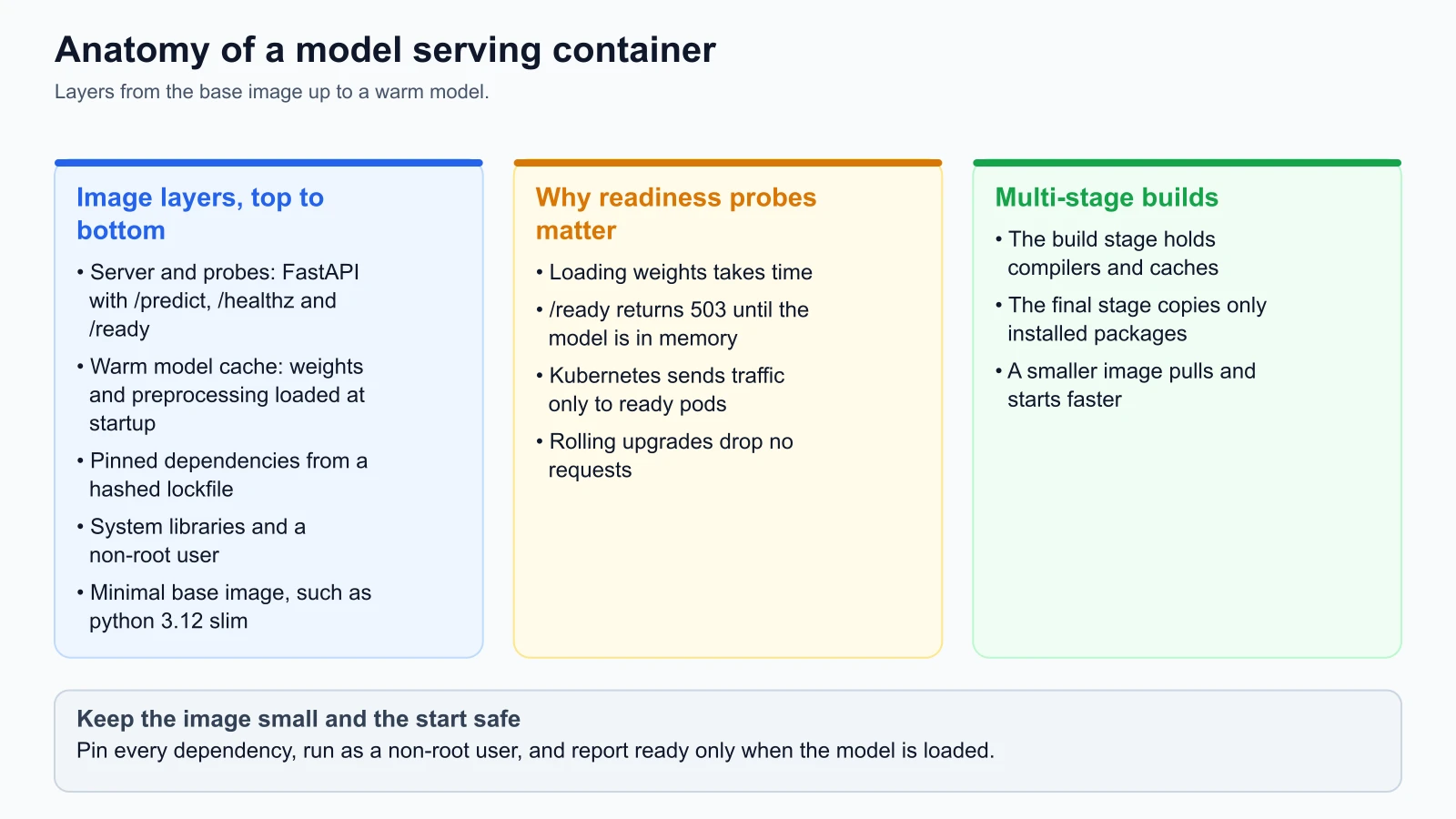
A production-grade model serving container implements five clean architectural layers:
Layer 1: Minimal base image
Avoid full operating system distributions like ubuntu:latest (which include package managers, text editors, and unnecessary background utilities). Use minimal slim images like python:3.12-slim-bookworm. Minimal images reduce vulnerabilities and drop base image sizes below one hundred megabytes.
Layer 2: System dependencies and non-root user
Install only runtime system libraries (such as libgomp1 for OpenMP parallel processing in gradient boosted decision trees). Create a dedicated non-root user (for example, USER mluser with UID 10001) and drop administrative root capabilities.
Layer 3: Locked Python dependencies
Copy requirements.txt and install wheels with pip cache disabled (pip install --no-cache-dir). Ensure packages are locked with exact patch versions and cryptographic hashes to prevent unexpected upstream dependency updates.
Layer 4: Warm model artifact cache
Pre-load model weights and preprocessing transformers into memory during container startup rather than on the first incoming user request. A cold start that loads a 500 MB model on the first request causes the initial user to experience a multi-second latency spike or HTTP gateway timeout.
Layer 5: Application server and health probes
Expose the inference API using high-performance ASGI servers like Uvicorn running FastAPI. Expose dedicated endpoints for health monitoring:
/healthz: Liveness probe indicating the server process is alive./ready: Readiness probe indicating model weights are fully loaded into RAM and ready to score traffic.
The critical role of readiness probes
In standard web applications, a container is ready to receive traffic almost immediately after the web framework initializes. In machine learning serving, framework initialization and model loading are decoupled:
- The FastAPI web process binds to port 8000 in two hundred milliseconds.
- The application begins deserializing the model pipeline, allocating tensors, and pre-warming caches. This step takes between two and twenty seconds depending on model size.
If Kubernetes routes incoming user requests to the pod as soon as port 8000 opens, initial requests fail with internal server errors because the model variable is still None.
The solution is the Readiness Probe:
1# FastAPI health and readiness endpoints for StayWell churn serving
2# Reference: FastAPI and Kubernetes Probes Documentation (from the docs, not run)
3from fastapi import FastAPI, Response, status
4
5app = FastAPI(title="StayWell Churn Prediction Service")
6model_pipeline = None
7
8@app.on_event("startup")
9def load_model_artifacts():
10    global model_pipeline
11    # Load model bundle into memory
12    model_pipeline = load_staywell_bundle("artifacts/model_bundle.json")
13
14@app.get("/healthz")
15def liveness_check():
16    """Liveness probe: verifies the web process is running."""
17    return {"status": "alive"}
18
19@app.get("/ready")
20def readiness_check(response: Response):
21    """Readiness probe: returns 200 only when model weights are fully loaded."""
22    if model_pipeline is None or not model_pipeline.is_fitted:
23        response.status_code = status.HTTP_503_SERVICE_UNAVAILABLE
24        return {"status": "loading_model"}
25    return {"status": "ready"}
Kubernetes withholds traffic until /ready returns HTTP 200. During rolling upgrades, old pods continue serving traffic until new pods confirm their models are warm, ensuring zero dropped requests.
GPU containers at a glance
For tabular models like StayWell's customer churn classifier, CPU inference is fast, inexpensive, and simple. For deep learning models (such as computer vision or transformer embeddings), inference requires GPU acceleration.
Containers do not have native access to host GPU hardware by default. Accessing physical GPUs from inside a container requires:
- NVIDIA Host Drivers: Installed on the physical host operating system.
- NVIDIA Container Toolkit: The official NVIDIA Container Toolkit Documentation (verified on 4 November 2026) explains how the NVIDIA Container Toolkit exposes GPU hardware to container runtimes (such as containerd or Docker).
- Container GPU Flags: In Docker, GPU access is passed using
--gpus all. In Kubernetes, pods request GPU devices declaratively in resource specifications:
1# Kubernetes declarative GPU resource request
2resources:
3  limits:
4    nvidia.com/gpu: 1
The Kubernetes scheduler identifies worker nodes with available GPU hardware, attaches the device to the container, and mounts necessary CUDA driver libraries automatically.
Kubernetes objects for machine learning serving
When scaling inference services to handle thousands of requests per second, Kubernetes coordinates container replicas across physical server clusters.
The official Kubernetes Documentation (verified on 4 November 2026) defines its core workload abstractions.
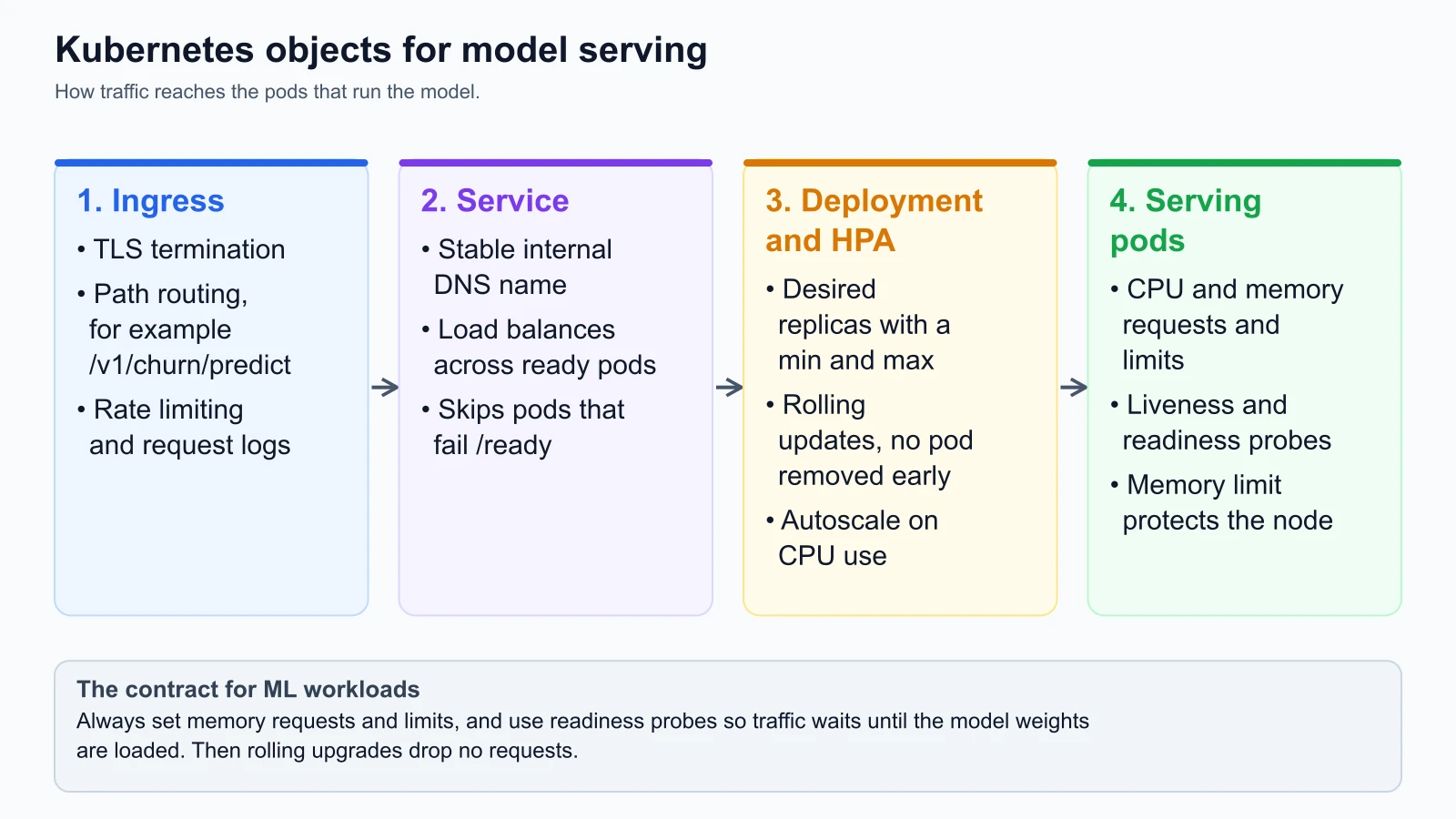
For machine learning serving, five Kubernetes objects form the core architecture:
1. Ingress
The Ingress controller acts as the perimeter API gateway. It manages external HTTPS traffic, terminates TLS certificates, enforces rate limits, and routes specific URL paths (such as /v1/churn/predict) to the internal cluster service.
2. Service
Pods in Kubernetes are ephemeral; they are created, destroyed, and assigned new IP addresses dynamically. A Service provides a stable, persistent internal DNS name (churn-service.default.svc.cluster.local) and acts as a Layer 4 load balancer, distributing incoming prediction requests evenly across healthy pod replicas. The Service automatically excludes any pod that fails its /ready probe.
3. Deployment and ReplicaSet
The Deployment object defines the desired state of your serving application. It specifies which container image to run, how many replicas to maintain (for example, three instances), and what update strategy to execute.
Deployments enable Zero-Downtime Rolling Updates:
- When you update the container image to
v2.4.0, the Deployment spins up a new pod replica. - It waits until the new pod's readiness probe returns HTTP 200.
- Only then does it terminate one instance of the old
v2.3.0pod. - This sequence repeats until all replicas are upgraded, guaranteeing uninterrupted version transitions.
4. Pods and resource management
A Pod is the smallest deployable unit in Kubernetes, wrapping one or more containers. In machine learning, configuring explicit Resource Requests and Limits inside the pod specification is mandatory:
1resources:
2  requests:
3    cpu: "500m"      # Half a CPU core guaranteed
4    memory: "512Mi"  # 512 MB memory guaranteed
5  limits:
6    cpu: "1000m"     # Capped at 1 full CPU core
7 memory: "1Gi" # Capped at 1 GB memory- Requests: Used by the Kubernetes scheduler to find a node with sufficient capacity. If a node does not have 512 MB of unallocated RAM, the pod is not placed there.
- Limits: Prevent runaway memory leaks from destabilizing other services. If a model inference worker exceeds its memory limit (1 GB), the Linux kernel terminates the container with an
OOMKilled(Out of Memory) signal, and Kubernetes immediately restarts it in isolation.
5. Horizontal Pod Autoscaler (HPA)
Prediction traffic fluctuates throughout the day. In the StayWell application, user bookings peak between 18:00 and 21:00 UTC. Running twenty pod replicas around the clock wastes thousands of dollars in cloud spend.
The Horizontal Pod Autoscaler (HPA) continuously monitors metrics (such as CPU utilization or request concurrency) and scales the number of running pod replicas dynamically between defined minimum and maximum thresholds:
1apiVersion: autoscaling/v2
2kind: HorizontalPodAutoscaler
3metadata:
4  name: staywell-churn-hpa
5spec:
6  scaleTargetRef:
7    apiVersion: apps/v1
8    kind: Deployment
9    name: staywell-churn-deployment
10  minReplicas: 2
11  maxReplicas: 10
12  metrics:
13    - type: Resource
14      resource:
15        name: cpu
16        target:
17          type: Utilization
18          averageUtilization: 70
When average CPU utilization surpasses 70%, the HPA adds replicas. When evening traffic subsides, the HPA gracefully scales the deployment back to two pods.
When you do not need Kubernetes
Kubernetes is a powerful orchestration engine, but it carries immense operational complexity. Managing cluster upgrades, control planes, network overlays, ingress controllers, and storage drivers requires dedicated platform engineering talent.
For many production machine learning workloads, Kubernetes is unnecessary operational overhead.
Consider the single-node and managed serverless alternatives:
1. Single-node virtual machines with Docker Compose
If your model service handles moderate traffic (such as fewer than one hundred requests per second) and fits comfortably on a single server, deploying a virtual instance (like an AWS EC2 c6i.xlarge) running Docker Compose behind an automated reverse proxy (such as Caddy or Nginx) provides:
- Instant deployment in seconds
- Predictable costs without control plane fees
- Zero cluster networking debugging
- Simple log inspection via
docker compose logs
2. Managed serverless containers (AWS ECS Fargate, Google Cloud Run)
If you require automatic scaling and high availability across multiple availability zones, but do not want to manage Kubernetes nodes:
- Google Cloud Run: Scales containers automatically from zero to hundreds of instances based on incoming HTTP request volume. You pay strictly per millisecond of execution time.
- AWS ECS with Fargate: Runs container tasks on managed serverless compute without managing underlying EC2 virtual machines.
Use this decision rule: adopt Kubernetes only when your organization already maintains a centralized Kubernetes cluster for its core engineering stack, or when you require complex custom scheduling, multi-node distributed training, and fine-grained GPU cluster sharing.
Operational template: production Dockerfile and Kubernetes manifests
Here are the complete production manifests used by StayWell for containerizing and deploying the customer churn prediction service.
Multi-stage production Dockerfile
1# Multi-stage production Dockerfile for StayWell churn prediction service
2# Reference: Docker Best Practices (from the docs, not run)
3
4# ---------------------------------------------
5# Stage 1: Build environment for compiling dependencies
6# ---------------------------------------------
7FROM python:3.12-slim-bookworm AS builder
8
9WORKDIR /build
10
11# Install compilation tools needed for C-extensions
12RUN apt-get update && apt-get install -y --no-install-recommends \
13 build-essential \
14 && rm -rf /var/lib/apt/lists/*
15
16COPY requirements.txt .
17RUN pip install --upgrade pip && \
18 pip wheel --no-cache-dir --no-deps --wheel-dir /build/wheels -r requirements.txt
19
20# ---------------------------------------------
21# Stage 2: Final minimal runtime environment
22# ---------------------------------------------
23FROM python:3.12-slim-bookworm AS runtime
24
25WORKDIR /app
26
27# Install minimal OpenMP runtime for GBDT inference
28RUN apt-get update && apt-get install -y --no-install-recommends \
29 libgomp1 \
30 && rm -rf /var/lib/apt/lists/*
31
32# Install pre-compiled wheels from builder stage
33COPY /build/wheels /wheels
34RUN pip install --no-cache-dir /wheels/* && rm -rf /wheels
35
36# Create secure non-root user
37RUN groupadd -g 10001 mlgroup && \
38 useradd -u 10001 -g mlgroup -s /bin/bash -m mluser
39
40# Copy application code and model artifacts
41COPY src/ ./src/
42COPY artifacts/ ./artifacts/
43
44USER mluser
45
46EXPOSE 8000
47
48# Run Uvicorn server with 2 worker processes
49CMD ["uvicorn", "src.serving_api:app", "--host", "0.0.0.0", "--port", "8000", "--workers", "2"]Production Kubernetes deployment.yaml
1# Kubernetes deployment manifest for StayWell churn inference service
2# Reference: Kubernetes Workload Documentation (from the docs, not run)
3apiVersion: apps/v1
4kind: Deployment
5metadata:
6  name: staywell-churn-deployment
7  labels:
8    app: staywell-churn
9    tier: inference
10spec:
11  replicas: 2
12  strategy:
13    type: RollingUpdate
14    rollingUpdate:
15      maxSurge: 1
16      maxUnavailable: 0
17  selector:
18    matchLabels:
19      app: staywell-churn
20  template:
21    metadata:
22      labels:
23        app: staywell-churn
24    spec:
25      containers:
26        - name: inference-engine
27          image: staywell-registry.internal/staywell-churn-serving:v2.4.0
28          imagePullPolicy: IfNotPresent
29          ports:
30            - containerPort: 8000
31          resources:
32            requests:
33              cpu: "500m"
34              memory: "512Mi"
35            limits:
36              cpu: "1000m"
37              memory: "1Gi"
38          livenessProbe:
39            httpGet:
40              path: /healthz
41              port: 8000
42            initialDelaySeconds: 5
43            periodSeconds: 10
44            failureThreshold: 3
45          readinessProbe:
46            httpGet:
47              path: /ready
48              port: 8000
49            initialDelaySeconds: 5
50            periodSeconds: 5
51            failureThreshold: 2
Mistakes beginners make
1. Running container processes as root
Developers often omit user definitions in Dockerfiles, defaulting execution to root. If an unhandled vulnerability in a Python library allows remote code execution, an attacker gains root privileges inside the container, increasing the risk of container escape and host compromise.
Fix: Always define a dedicated non-root user (such as useradd -u 10001 -g mlgroup mluser) and invoke USER mluser before starting the application server.
2. Omitting readiness probes during model loading
Deploying an inference container without a readiness probe causes Kubernetes to route live prediction requests to the pod the instant port 8000 binds. During the two to ten seconds while the model weights are loading into memory, incoming user requests crash with internal server errors.
Fix: Implement a dedicated /ready probe that returns HTTP 200 strictly after model weights and preprocessing transformers are completely deserialized and verified in RAM.
3. Deploying without memory limits in Kubernetes
Omitting memory limits from container specifications allows a memory-leaking Python process to consume all available physical RAM on a worker node. The Linux kernel's out-of-memory killer then steps in, killing arbitrary adjacent containers and destabilizing entire server nodes.
Fix: Always define explicit resources.limits.memory ceilings. Configure container memory limits with a 30% buffer above normal peak inference consumption, ensuring memory leaks terminate the offending pod in isolation without impacting other node workloads.
4. Adopting Kubernetes before business scale demands it
Teams often spend months provisioning EKS clusters, configuring Istio service meshes, and managing Helm charts for models that receive fewer than ten requests per minute. The operational tax drains engineering momentum away from improving model accuracy and data pipelines.
Fix: Start with managed container platforms (such as Google Cloud Run or AWS ECS Fargate) or simple Docker Compose servers. Graduate to Kubernetes only when traffic scale, custom GPU scheduling, or multi-team cluster sharing genuinely requires it.
Recap and try it yourself
In this lesson, you explored how containers and Kubernetes scale machine learning deployments:
- Containers provide immutable, reproducible execution environments that isolate operating systems, C-extensions, and Python libraries.
- Optimized Dockerfiles use multi-stage builds and slim base images to cut container size, often from gigabytes to a few hundred megabytes.
- Readiness probes prevent dropped requests by withholding live traffic until model weights are fully loaded into memory.
- Kubernetes orchestrates model serving through Ingress (traffic routing), Services (internal load balancing), Deployments (zero-downtime rolling updates), Pods (resource limits), and HPAs (autoscaling).
- Single-node servers and managed serverless containers (Cloud Run, ECS Fargate) often provide the smarter, low-maintenance choice when traffic does not justify Kubernetes overhead.
Try it yourself
To gain hands-on experience containerizing machine learning models on your local machine:
- Write a minimal serving script: Using FastAPI, write a five-line Python script that exposes a
/readyendpoint and a/predictendpoint scoring a mock classification probability. - Build a slim Docker image: Write a Dockerfile based on
python:3.12-slim-bookworm. Build the image withdocker build -t ml-serving-test:v1 .and check its size withdocker images. - Verify readiness probe behavior: Launch the container with
docker run -p 8000:8000 ml-serving-test:v1. In another terminal, querycurl -i http://localhost:8000/readyto verify that the probe returns HTTP 200. - Test resource constraints: Run the container with a memory ceiling using
docker run -m 256m --memory-swap 256m -p 8000:8000 ml-serving-test:v1. Confirm that your serving process runs smoothly within its allocated memory envelope.