
MLOps course · lesson 14 of 24
- 1What Is MLOps? From Notebooks to Reliable Production
- 2MLOps Principles and Maturity: From Manual to Automated
- 3ML Fundamentals for MLOps: Splits, Leakage, and Metrics
- 4A Reproducible ML Project: Layout, Seeds, and Data Code
- 5Data Engineering Basics for ML: Ingestion, SQL, and Skew
- 6Pipeline Orchestration: Apache Airflow and Kubeflow
- 7Batch vs Streaming: Spark, Kafka, and Flink
- 8Data Versioning and Lineage: DVC and Beyond
- 9Data Validation and Quality in ML Pipelines
- 10Experiment Tracking with MLflow
- 11Reproducible Training Pipelines
- 12Model Evaluation and Validation Gates
- 13Model Registry and Versioning
- 14CI/CD for Machine Learning
- 15Containers and Kubernetes for ML
- 16Infrastructure as Code: Terraform and Ansible
- 17Cloud ML Platforms: AWS, Azure, GCP, and Self-Built
- 18Model Serving Patterns: Batch, Online, and Streaming
- 19Inference Engineering Basics: Latency, Batching, and Cost
- 20Monitoring and Observability for ML Models
- 21Drift Detection and Retraining for ML Models
- 22Explainable AI: LIME, SHAP, and Model Interpretability
- 23Edge AI Deployment: Jetson, TFLite, and Mobile ML
- 24Capstone: An End-to-End MLOps Pipeline
In traditional software engineering, Continuous Integration and Continuous Delivery (CI/CD) pipelines automate the journey from source code commit to production release. Every pull request triggers unit tests, static code analysis, and artifact compilation. When code merges to the main branch, automated pipelines package container images and deploy them to staging or production clusters.
In machine learning, standard CI/CD is only one-third of the puzzle. Code is only one of three moving parts:
- Code changes: An engineer alters feature transformations, modifies hyperparameters, or upgrades the base algorithm.
- Data changes: Upstream transactional databases continuously generate new records, changing customer behavior distributions.
- Model decay: Even if code and data ingestion remain completely stable, external real-world shifts cause predictive accuracy to degrade over time.
Deploying machine learning requires expanding traditional CI/CD into a three-loop architecture: Continuous Integration (CI), Continuous Training (CT), and Continuous Delivery (CD).
In this lesson, you will learn how to design end-to-end automation pipelines for machine learning. You will explore what to test across code, data, and models, examine how tools like Continuous Machine Learning (CML) generate visual pull request reports, analyze the four distinct triggers of continuous retraining, and inspect a complete production GitHub Actions workflow.
The three-loop architecture: CI, CT, and CD
A production MLOps system coordinates three distinct automated loops that operate on different time scales and triggers:
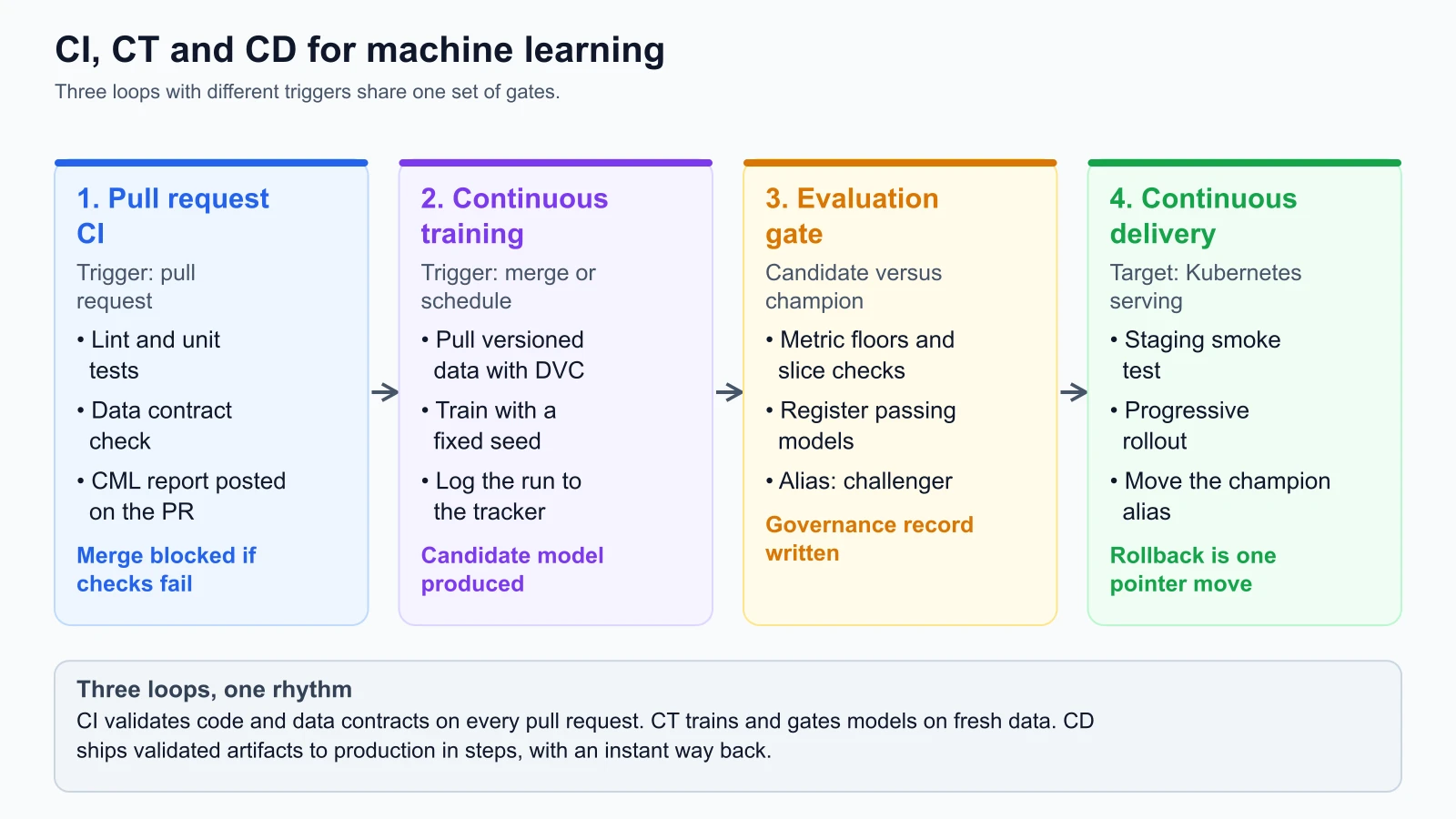
1. Continuous Integration (CI)
The CI loop validates developer source code and data contracts before code can merge into the repository:
- Trigger: Opening or updating a Pull Request on a feature branch.
- Actions: Linting code, enforcing static typing, running unit tests on data transformers, and executing integration tests against small synthetic data fixtures.
- Output: A green test pass and an automated model evaluation report posted directly to the pull request for peer review.
2. Continuous Training (CT)
The CT loop automates model retraining, validation, and registration:
- Trigger: Merging code to the main branch, a scheduled cron timer, fresh batch data landing in the data lake, or an automated data drift alert.
- Actions: Pulling full-scale training datasets using DVC or object storage hashes, training the atomic pipeline with pinned seeds, logging runs to MLflow, and running automated evaluation gates.
- Output: A registered, versioned model artifact tagged as a candidate in the Model Registry.
3. Continuous Delivery (CD)
The CD loop safely delivers validated models to live serving infrastructure:
- Trigger: A candidate model passing the evaluation gate and receiving governance sign-off.
- Actions: Deploying model artifacts to staging serving pods, routing shadow traffic, evaluating live latency SLAs, and progressively shifting production traffic.
- Output: Shifting the
@championpointer in the model registry to complete promotion with zero downtime.
What to test across the three dimensions
In our earlier lessons on change management and continuous integration and GitHub Actions automation, we examined how automated runners test deterministic backend code. In machine learning, testing expands across three distinct dimensions:
1. Testing code
Testing ML code follows standard software engineering best practices:
- Style and linting: Automated formatters (such as Ruff or Black) enforce PEP 8 consistency.
- Type checking: Static type checkers (such as Mypy) verify parameter annotations across transformers and estimators.
- Unit testing: Testing that data processing functions handle edge cases (empty strings, unexpected categories, negative numbers, extreme floats) without throwing unhandled exceptions.
- Pipeline determinism tests: Verifying that running
fit()twice with the identical seed produces bit-for-bit identical weights and probabilities.
2. Testing data
Data tests act as perimeter quality gates before training compute is allocated:
- Schema assertions: Verifying that expected columns exist and match expected primitive types.
- Data contract limits: Enforcing null fraction thresholds, primary key uniqueness, and numerical range boundaries (such as
monthly_spend >= 0.0). - Class balance checks: Confirming that target label frequencies (such as StayWell churn rates) fall within historical operating envelopes (8% to 35%).
- Data drift checks: Running two-sample Kolmogorov-Smirnov tests or Population Stability Index calculations to detect sudden distributional shifts between current ingestion batches and training baselines.
3. Testing models
Model tests evaluate algorithmic quality and operational readiness:
- Absolute threshold tests: Verifying that candidate ROC AUC, Precision, and Recall exceed baseline operational floors.
- Champion non-regression tests: Proving that the candidate matches or outperforms the incumbent production model overall.
- Slice-level fairness tests: Ensuring accuracy improvements on dominant population cohorts do not come at the expense of high-value or vulnerable sub-populations.
- Probability calibration tests: Asserting that the candidate's Brier score falls below predefined calibration ceilings.
- Inference latency benchmarks: Measuring that p95 scoring latency on a batch of one thousand records remains comfortably below live API service level agreements (for example, under 5.0 milliseconds).
Visual feedback in pull requests: Continuous Machine Learning (CML)
When a software engineer reviews a pull request, they inspect code diffs. When a data scientist reviews an ML pull request, inspecting code diffs is insufficient: changing two lines of hyperparameter tuning logic can dramatically alter model performance.
Continuous Machine Learning (CML) is an open-source project created by Iterative that brings automated model evaluation reports directly into GitHub Pull Requests and GitLab Merge Requests.
The official CML Documentation (verified on 4 November 2026) explains how CML runs inside standard CI runners. During a pull request workflow, CML:
- Executes a training and evaluation script on a lightweight validation dataset.
- Generates evaluation metrics tables and diagnostic plots (ROC curves, confusion matrices, feature importance charts).
- Formats the results into standard GitHub Flavored Markdown.
- Uses the
cml comment createcommand to post the report directly into the pull request discussion thread.
1<!-- Example CML Pull Request Comment generated automatically by CI -->
2## Model Evaluation Summary (Candidate vs Champion)
3
4| Metric | Champion (v2.3) | Candidate (PR #142) | Delta | Status |
5| :--- | :--- | :--- | :--- | :--- |
6| **ROC AUC (Overall)** | 0.824 | 0.851 | +0.027 | PASSED |
7| **Precision @ 10% Recall** | 0.690 | 0.742 | +0.052 | PASSED |
8| **Brier Score (Calibration)** | 0.094 | 0.091 | -0.003 | PASSED |
9| **VIP Segment AUC** | 0.862 | 0.864 | +0.002 | PASSED |
10| **p95 Latency (ms)** | 1.1 ms | 1.8 ms | +0.7 ms | PASSED (< 5ms) |
11
12### Diagnostic Visualizations
13
14
15*Automated Gate Status: APPROVED FOR STAGING*This automated feedback eliminates guesswork during code reviews. Reviewers can visually inspect whether an algorithmic modification improved performance without pulling code or executing notebooks locally.
The four triggers of continuous retraining
A common mistake among early-stage teams is assuming that model training should only occur when an engineer pushes code to Git. In production MLOps, training jobs are executed across four distinct operational triggers:
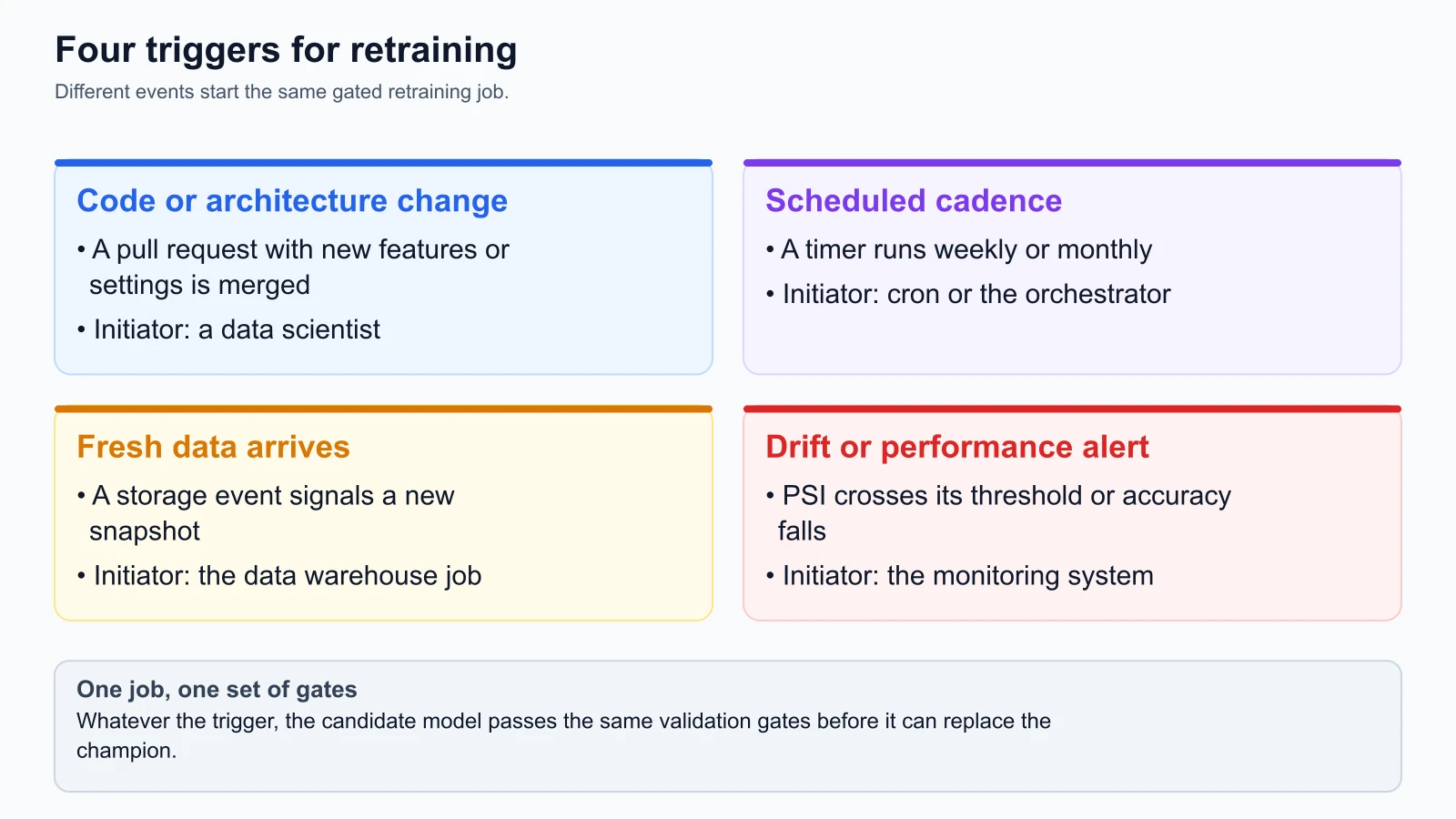
Trigger 1: Code and architecture changes
When an engineer merges a pull request to the main branch that introduces new feature engineering functions, modifies model architectures, or updates hyperparameter grids, CI/CD triggers a full-scale retraining job on durable cluster compute.
Trigger 2: Scheduled calendar cadence
Consumer behavior evolves continuously. For subscription services like StayWell, seasonality (holiday travel, summer vacations, annual renewal dates) alters churn patterns. A weekly or monthly cron schedule (for example, every Sunday at 02:00 UTC) triggers automated retraining on the latest ninety-day rolling window to keep model weights synchronized with temporal dynamics.
Trigger 3: Event-driven fresh data arrival
In enterprise data architectures, raw telemetry and transaction data are transformed by nightly batch ETL jobs in Snowflake, BigQuery, or Databricks. When the data warehouse completes its daily feature aggregation and registers a new DVC data hash, it emits a webhook or storage event (such as an AWS EventBridge message) that kicks off model retraining automatically.
Trigger 4: Observability and performance drift alerts
When monitoring systems detect that live prediction accuracy has decayed, or that incoming production feature distributions have drifted significantly from the training baseline (for example, Population Stability Index exceeds 0.25), monitoring tools trigger an automated retraining job to adapt the model to the new operational reality.
CI/CD engine comparison: GitHub Actions, GitLab CI, and Jenkins
While GitHub Actions has become the standard for modern cloud-native teams, other automation engines are widely deployed across enterprise platforms:
GitHub Actions
The official GitHub Actions Documentation (verified on 4 November 2026) describes its event-driven automation platform built directly into GitHub repositories:
- Matrix Builds: Easily test pipeline code across multiple Python versions (3.10, 3.11, 3.12) simultaneously.
- Self-Hosted Runners: Run heavy training jobs on custom cloud virtual machines equipped with GPUs, while keeping orchestration logic inside GitHub.
- Artifact Caching: Built-in actions (
actions/cache) cache pip wheels, DVC local caches, and intermediate datasets, reducing pipeline execution times.
GitLab CI/CD
The official GitLab CI/CD Documentation (verified on 4 November 2026) highlights its deeply integrated single-application approach:
- Configured through a single root
.gitlab-ci.ymlfile. - Strong support for Kubernetes-native execution via GitLab Runner on internal clusters.
- Native integration with GitLab Package Registry and container registries, ideal for organizations operating under strict on-premises data governance.
Jenkins
Jenkins remains the backbone of many enterprise financial institutions and legacy infrastructure setups:
- Highly customizable through declarative Jenkinsfiles and an extensive plugin ecosystem.
- Designed for complex multi-branch pipelines executing across hybrid on-premises server farms.
- Requires dedicated infrastructure maintenance and administrative overhead compared to modern managed platforms.
Operational template: complete production GitHub Actions workflow
Here is an example GitHub Actions workflow for StayWell that automates testing, CML reporting, model training, evaluation gating, and registry promotion. On 5 November 2026 I checked the action version tags against each repository's latest release (checkout 7.0, setup-python 7.1, configure-aws-credentials 6.3, setup-cml 2.1). I did not run the workflow, because it only runs on GitHub with your own secrets. In a real repository, pin each action to a full commit SHA and let a tool such as Dependabot propose updates.
1# StayWell MLOps Continuous Integration and Continuous Training Pipeline
2# File: .github/workflows/mlops_pipeline.yml
3# Triggers: Pull requests, pushes to main, and weekly scheduled cron
4
5name: StayWell MLOps CI/CT
6
7on:
8  push:
9    branches: [main]
10  pull_request:
11    branches: [main]
12  schedule:
13    # Run weekly retraining every Sunday at 02:00 UTC
14    - cron: "0 2 * * 0"
15  workflow_dispatch:
16
17concurrency:
18  group: ${{ github.workflow }}-${{ github.ref }}
19  cancel-in-progress: true
20
21jobs:
22  # ==========================================
23  # STAGE 1: Code and Data Quality Verification
24  # ==========================================
25  test-and-validate:
26    name: Code Quality & Data Contracts
27    runs-on: ubuntu-latest
28    steps:
29      - name: Check out source code
30        uses: actions/checkout@v7
31
32      - name: Set up Python 3.12
33        uses: actions/setup-python@v7
34        with:
35          python-version: "3.12"
36          cache: "pip"
37
38      - name: Install dependencies
39        run: |
40          python -m pip install --upgrade pip
41          pip install ruff mypy pytest
42
43      - name: Lint and format check
44        run: |
45          ruff check src/
46          ruff format --check src/
47
48      - name: Static type checking
49        run: |
50          mypy src/ --ignore-missing-imports
51
52      - name: Run pipeline unit tests
53        run: |
54          pytest tests/unit/ -v
55
56      - name: Verify data contract on validation sample
57        run: |
58          python -m src.validate_data --contract configs/data_contract.yaml --sample data/sample.csv
59
60  # ==========================================
61  # STAGE 2: Pull Request Model Evaluation (CML)
62  # ==========================================
63  pr-model-evaluation:
64    name: Pull Request Evaluation Report
65    needs: test-and-validate
66    if: github.event_name == 'pull_request'
67    runs-on: ubuntu-latest
68    permissions:
69      contents: write
70      pull-requests: write
71    steps:
72      - name: Check out source code
73        uses: actions/checkout@v7
74
75      - name: Set up Python 3.12
76        uses: actions/setup-python@v7
77        with:
78          python-version: "3.12"
79
80      - name: Set up CML
81        uses: iterative/setup-cml@v2
82
83      - name: Train and evaluate candidate on PR fixture
84        run: |
85          python -m src.train_pipeline --config configs/pr_test_config.yaml
86          python -m src.evaluate_candidate --output report.md
87
88      - name: Post CML report to Pull Request
89        env:
90          REPO_TOKEN: ${{ secrets.GITHUB_TOKEN }}
91        run: |
92          cml comment create report.md
93
94  # ==========================================
95  # STAGE 3: Full Retraining & Registry Promotion
96  # ==========================================
97  continuous-training:
98    name: Full Retraining & Promotion Gate
99    needs: test-and-validate
100    if: github.ref == 'refs/heads/main' || github.event_name == 'schedule'
101    runs-on: ubuntu-latest
102    steps:
103      - name: Check out source code
104        uses: actions/checkout@v7
105
106      - name: Set up Python 3.12
107        uses: actions/setup-python@v7
108        with:
109          python-version: "3.12"
110
111      - name: Configure AWS credentials
112        uses: aws-actions/configure-aws-credentials@v6
113        with:
114          aws-access-key-id: ${{ secrets.AWS_ACCESS_KEY_ID }}
115          aws-secret-access-key: ${{ secrets.AWS_SECRET_ACCESS_KEY }}
116          aws-region: us-east-1
117
118      - name: Pull full dataset via DVC
119        run: |
120          pip install dvc[s3]
121          dvc pull data/features.parquet.dvc
122
123      - name: Execute production training pipeline
124        id: training_step
125        run: |
126          python -m src.train_pipeline --config configs/production_config.yaml --out artifacts/model_bundle.json
127
128      - name: Execute automated evaluation gate
129        id: gate_step
130        run: |
131          python -m src.evaluation_gate --candidate artifacts/model_bundle.json --policy configs/gate_policy.yaml
132
133      - name: Register candidate in Model Registry
134        if: steps.gate_step.outcome == 'success'
135        run: |
136          python -m src.model_registry register \
137            --model staywell-churn \
138            --bundle artifacts/model_bundle.json \
139            --gate-token ${{ steps.gate_step.outputs.token }} \
140            --alias challenger
This workflow ensures that no model code is merged without passing unit and data contract tests, that reviewers see visual performance metrics inside PR discussions, and that main branch merges automatically train, gate, and register production-ready candidate models.
Mistakes beginners make
1. Training heavy models inside pull request CI runners
Running a ten-hour GPU training job on every commit pushed to a feature branch creates massive runner bottlenecks and surges cloud bills. Pull request CI should be fast, giving developers feedback in under five minutes.
Fix: Use small, synthetic data fixtures (such as one thousand records) for pull request CI to verify code execution, pipeline serialization, and data contract compliance. Reserve full-scale retraining on complete historical datasets for main branch merges or scheduled nightly runs.
2. Silently deploying retrained models without evaluation gates
Many teams configure their CI pipeline to automatically deploy whatever model artifact is generated at the end of a training run. If an upstream data anomaly or bad split reduces accuracy, the broken model immediately replaces the healthy production champion.
Fix: Insert an automated evaluation gate between training and deployment. Require the candidate model to prove statistical non-regression across both global metrics and critical sub-population slices before allowing the registry to shift the production alias.
3. Forgetting to lock dataset hashes in training triggers
Triggering automated retraining on a schedule without recording the cryptographic content hash of the input dataset creates un-auditable models. If an inquiry arises months later, reproducing the exact model is impossible because the underlying data lake has since received updates.
Fix: Integrate data versioning (such as DVC or object storage content hashes) into your CI workflow. Ensure the retraining step records the exact input dataset hash into the model metadata during registry registration.
4. Overlooking post-deployment smoke tests
A model may pass offline evaluation gates but fail when loaded into live serving containers due to missing system libraries, incompatible C-extensions, or memory limits.
Fix: Implement an automated staging smoke test in your CD pipeline. Deploy the candidate model to an isolated staging pod and fire fifty real-world JSON test payloads through the REST API. Assert that every request returns an HTTP 200 status code within the latency SLA before shifting live production traffic.
Recap and try it yourself
In this lesson, you explored how to design and automate CI/CD pipelines for machine learning:
- Production MLOps expands traditional CI/CD into a three-loop architecture: Continuous Integration (code tests), Continuous Training (automated model fitting), and Continuous Delivery (progressive deployment).
- Automated ML pipelines must test three distinct dimensions: code quality, data contracts, and model non-regression.
- Continuous Machine Learning (CML) generates visual evaluation summaries and diagnostic charts directly within pull request discussions.
- Continuous retraining is executed across four distinct operational triggers: code changes, calendar schedules, fresh data arrivals, and observability drift alerts.
- A production GitHub Actions workflow coordinates linting, data contract validation, CML reporting, full-scale training, evaluation gating, and model registry registration.
Try it yourself
To practice designing CI/CD workflows for machine learning on your machine:
- Create a local workflow: In a Git repository, create
.github/workflows/ml_ci.ymland configure it to run Python unit tests on every pull request. - Add a data validation step: Integrate the
data_validator.pyscript from data validation and quality into your workflow. Have the CI job generate a synthetic invalid record and verify that the workflow fails as expected. - Simulate a CML comment: Write a Python script that reads model evaluation metrics, formats them into a GitHub Flavored Markdown table, and saves the output to
report.md. - Trigger a workflow dispatch: Add
workflow_dispatchto your GitHub Actions configuration and test triggering an ad-hoc model retraining run manually from the GitHub Actions web interface.