
AI Red Teaming course · lesson 3 of 26
- 1What Is AI Red Teaming?
- 2Ethics, Authorization, and Rules of Engagement
- 3AI and Machine Learning Basics for Red Teamers
- 4Security Principles and AI Threat Modeling
- 5Build a Safe AI Red Team Test Lab
- 6Jailbreaks and Safety Filter Bypasses
- 7Prompt Injection: Direct and Indirect
- 8Code Injection and Tool Abuse
- 9System Prompt and Data Leakage
- 10Countermeasures for Prompt Attacks
- 11Data Poisoning and Backdoors
- 12Adversarial Examples
- 13Model Extraction and Weight Theft
- 14Model Inversion and Privacy Leaks
- 15Model Manipulation and the AI Supply Chain
- 16AI Infrastructure, Deserialization, and Remote Code Execution
- 17API Authentication and Authorization
- 18Black, Grey, and White Box Testing
- 19Manual, Automated, and Continuous AI Testing
- 20AI Red Teaming Tools, Frameworks, and Datasets
- 21Write Your Own AI Security Test Harness
- 22Report AI Security Findings and Track Fixes
- 23Defense in Depth for AI Systems
- 24Red Teaming LLM Applications and Agents
- 25Disclosure, Law, Careers, and What's Next
- 26Capstone: Red Team a Practice App
After this lesson, you will be able to describe how data, training, model weights, prompts, and application code fit together in an AI product. You will also be able to distinguish several common machine learning approaches and identify the parts of a system a red team may need to examine. You do not need to train a model to test an AI application. You do need enough vocabulary to ask where its behavior comes from and which component should be checked.
Artificial intelligence and machine learning
Artificial intelligence, or AI, is a broad name for computer systems that perform tasks such as making predictions, generating content, recognizing patterns, or choosing actions. Machine learning, or ML, is one way to build AI: software is trained on data so it can learn patterns that help it produce an output for new inputs. A system can also combine machine learning with ordinary software rules, databases, and human decisions.
A model is the learned part of a machine learning system that maps an input to an output. For instance, a ticket classifier might receive a short message and return a category such as “billing” or “account access.” The model does not usually operate alone. A larger application decides what input to send, what output to show, and whether any additional action follows.
It helps to keep three things separate:
- The model contains the learned structure and values that produce predictions or generated content.
- The application provides the interface, prepares inputs, connects other services, applies rules, and presents results.
- The operating context includes the users, data, permissions, devices, policies, and work processes around the application.
An issue can arise in any of these parts or in how they connect. If a chatbot displays an answer that includes a private ticket, the cause might involve the model's response, the retrieval system that supplied a document, the application's access check, or a combination. Red teaming needs a system view so a test result can be traced to the right boundary.
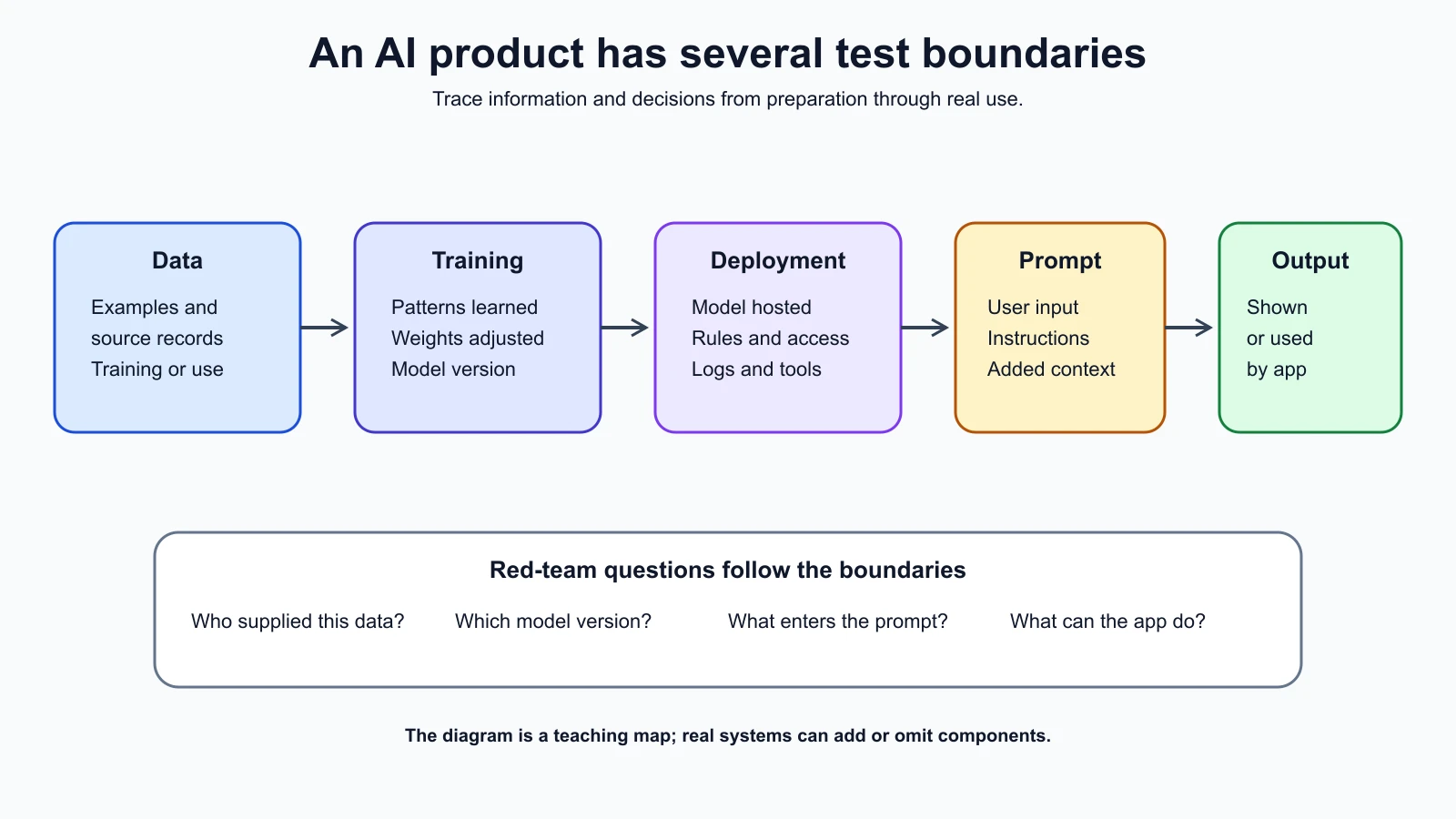
Data, features, labels, and examples
Data is the information used to train, evaluate, or run a system. It may be text, images, audio, measurements, categories, or records from a business process. A dataset is an organized collection of examples. A single example could be one support message, one image, or one row in a table.
Some traditional machine learning systems use features, which are selected or computed properties of an example. In a ticket classifier, features might include the words in the message, the time it arrived, or a category selected by the user. A label is the answer associated with an example, such as the ticket category assigned by a support specialist. Features are the information used to predict; labels are the known answers used to teach or check the model in a supervised task.
Not every model uses a neat table of hand-selected features. Neural networks can learn useful representations from raw or transformed inputs. A language model may process text as tokens, which are units such as whole words, parts of words, or punctuation. The red-team lesson is broader than a particular data format: ask what information enters the system, where it came from, who can provide it, and which later components receive it.
Data can appear at different points in the system's life. Training data influences what the model learns. Evaluation data is used to measure behavior before or after deployment. Runtime input is the information the application supplies when someone uses it. Retrieved content may be added to a request at runtime. Logs may store inputs and outputs after a request. These categories can overlap, but they have different access and retention rules. A test that is safe with synthetic training examples could still expose real user data if it inspects production logs.
Three ways models learn
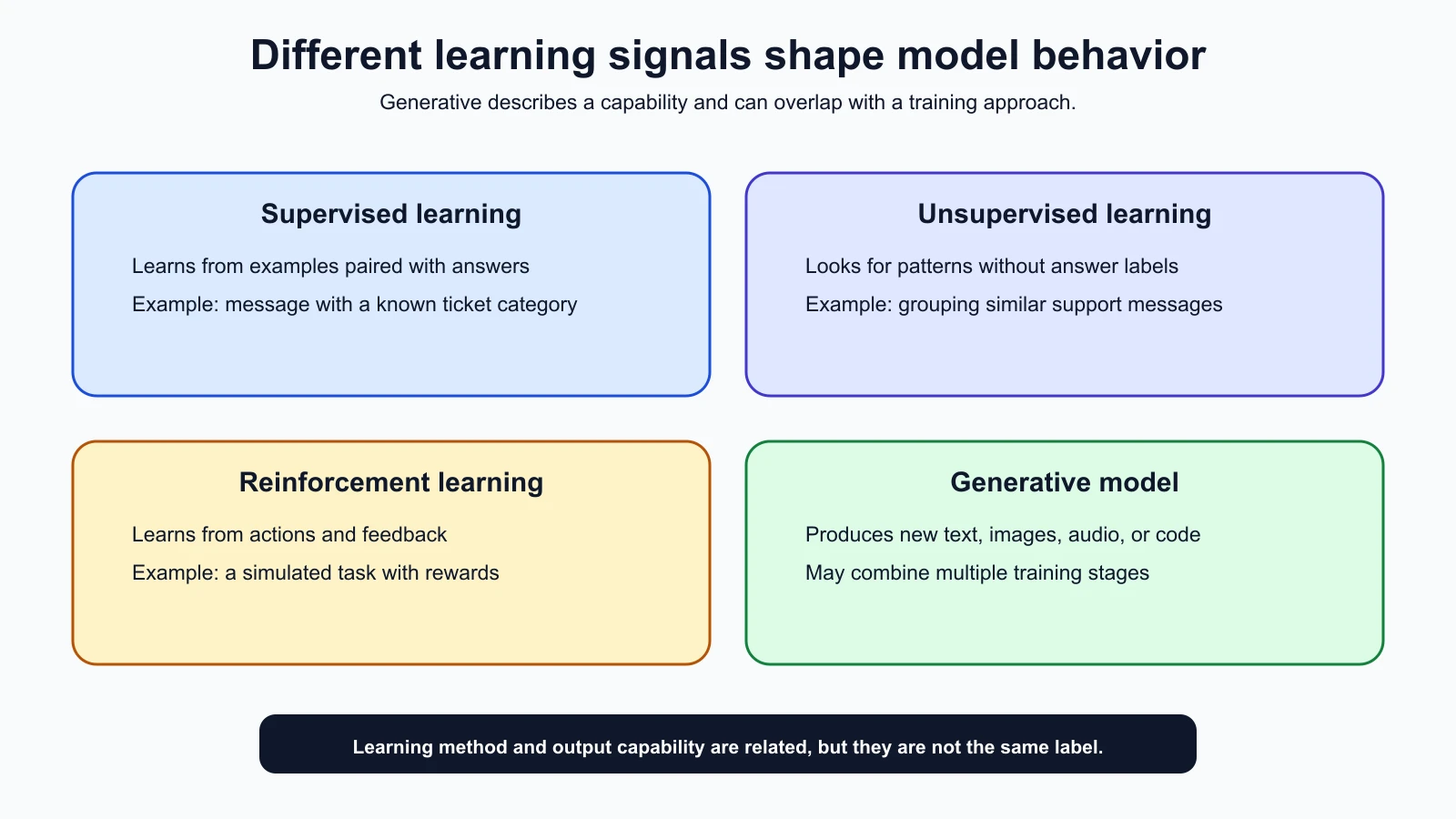
The learning approach describes how examples or feedback are used during training. It does not tell you everything about a deployed system, and real products may combine approaches.
Supervised learning
Supervised learning uses examples that include the desired answer, called a label. A model studies pairs such as a support message and its assigned category, then learns a pattern for predicting categories on new messages. If the historical labels are wrong, incomplete, or reflect a biased process, the model may learn an unreliable pattern. For a red team, this makes data origin and label quality relevant questions, not just details for the training team.
Unsupervised learning
Unsupervised learning looks for patterns in data that has no supplied answer label. One common method groups similar examples into clusters. A system might group support messages by similarity, after which a person decides what each group represents. The model can find a pattern without knowing whether that pattern is useful, fair, or appropriate for a particular decision. A test should distinguish “the system found a grouping” from “the grouping is a valid conclusion about people.”
Reinforcement learning
Reinforcement learning trains a system by letting it take actions in an environment and receive rewards or penalties. The learner tries to choose actions that result in more reward over time. A simple example is a simulated game in which a program receives points for reaching a goal and loses points for a poor move.
The reward is a simplified signal, not a complete statement of human intent. If the goal is defined poorly, a system can learn behavior that earns reward while missing the outcome people actually want. In a real application, a team should understand what feedback shaped the behavior and what limits remain around actions. This course will treat these ideas at a conceptual level; you will not need to train a reinforcement learning system for the practice lab.
Generative models
A generative model produces new content, such as text, images, audio, or code. It learns patterns from examples and uses them to create an output for a new input. Generative AI is not a mutually exclusive fourth training recipe beside supervised, unsupervised, and reinforcement learning. A generative model may be pretrained with one approach and later adjusted with other data or feedback.
This distinction helps avoid a common confusion: “generative” describes the kind of output a system can create, while “supervised,” “unsupervised,” and “reinforcement” describe learning approaches. A particular product may use several stages of learning and additional software after the model generates an answer.
Neural networks and large language models
A neural network is a family of machine learning models made from layers of connected calculations. During training, the network adjusts numerical values so its outputs better match the training objective. The name is inspired by biological neurons, but a software neural network is a mathematical system, not a digital copy of a human brain.
An artificial neural network can learn complex relationships from examples. A deep neural network has many processing layers. Modern language models commonly use a neural network architecture called a Transformer, which helps process relationships among pieces of a sequence. You do not need to understand its equations to test an application. It is useful to know that the model's response is produced from learned numerical patterns and the current input, rather than by consulting a guaranteed database of verified facts.
A large language model, or LLM, is a language model with many learned parameters that can process and generate text. A parameter is a numerical value adjusted during training. The collection of model parameters is often called the weights. Weights are part of the model; they are different from the user's prompt, the documents retrieved for a request, and the application code that controls tool access.
Many LLMs generate text a piece at a time by estimating likely next tokens from the context they have received. A token is a unit used by the model's text-processing system; it may be a word, a word fragment, or punctuation. The model's prediction is not the same as looking up a fact in an authoritative source. An answer can sound confident and still be incomplete or wrong. The application may reduce this risk with retrieval, checks, or human review, but those additions need their own testing.
“Large” is a relative description, not a guarantee of accuracy, safety, or usefulness. More parameters do not by themselves mean the model will follow a policy, protect private data, or behave correctly in every context. Those properties depend on training, inputs, application controls, tools, and how people use the product.
Training and inference
Training is the process of adjusting a model using data or feedback so it can perform a task. Training may happen before a product is released, and a provider or organization may later train or tune another version. A deployed application does not necessarily learn from each conversation. Some systems do update from user feedback or new data, but whether that happens is a design and policy choice that should be verified for the system being tested.
Inference is using a trained model to produce an output from an input. When a user submits a message to a chatbot, the service typically prepares a request, sends it to a model, receives a result, and then handles that result. The model may be hosted by the product team or by a provider. A red-team test of inference is not the same as changing the model's training data.
Fine-tuning is additional training that adjusts an already trained model using a more focused dataset or task. It can change how a model responds, but it does not automatically add a reliable security boundary or guarantee that the model will only use approved information. Fine-tuning, prompt instructions, retrieval, and access controls solve different problems and can have different failure modes.
The distinction between training and inference matters for authorization and evidence. A test input sent to a hosted model may be processed under the provider's service and data terms. A test against a local model may use a different model version and different safeguards. A prompt sent to a production feature may be logged or affect later user-visible behavior. Confirm the environment and data handling before testing, as described in the lesson on authorization and rules of engagement.
Where the data, weights, and prompt live
The same word “input” can refer to different things, so map the path rather than assuming everything is inside the model.
Training data is used during learning. It may be collected, licensed, generated, filtered, or labeled by different parties. The model weights retain learned numerical patterns from training, but they are not a normal, human-readable copy of the original dataset. Questions about training data access are different from tests of what a deployed application returns.
Model weights are stored wherever the model is hosted. An application using a provider API may never have access to those weights. A team running an open model may store them in a file or model repository. The relevant security questions include who can download or replace the model, which version the application loads, and whether the deployed system matches the approved source.
A prompt is the content supplied to a generative model for a particular request. It can include instructions, the user's message, examples, and other context selected by the application. Some applications add retrieved documents or conversation history. A prompt is runtime input; it is not the same thing as training data or model weights. A system prompt is an application-provided instruction intended to shape behavior across requests. It is not a dependable place to store a secret, because a model may reveal or misuse text it receives. OWASP includes system prompt leakage among the risks covered in its 2026 guidance for LLM applications.
The prompt is one interface for influencing a generative model, but it is not the only one. The user interface may accept text or files. A retrieval component may select documents. An API may accept structured fields. A tool may provide information or take an action. The application may post-process the model's response. Each boundary can affect what the system sees and does.
Prompt engineering is the practice of designing and refining inputs and instructions to get more useful model outputs. It can improve clarity and consistency, but a well-written prompt is not an access-control mechanism. A secure application should enforce permissions in ordinary code and services, even if the model is instructed to respect them. For deeper prompt design, see What Is Prompt Engineering? and the AI Agents lesson on how LLMs work for agent builders.
Trace a request through an AI application
Consider the fictional HelpDesk Bot introduced earlier. A user asks why a ticket is delayed. The application authenticates the user, retrieves permitted support articles, builds a prompt, sends it to a model, receives a response, checks how it should be displayed, and may offer a simulated ticket action. The model is only one component in this path.
For each step, ask a plain question:
| Component | Question for a tester |
|---|---|
| User interface | What inputs or files can a user submit? |
| Identity and access | Which records is this user allowed to see? |
| Retrieval | Which documents can be added to the model's context? |
| Prompt assembly | Which instructions and data are sent together? |
| Model service | Which model and version receives the request? |
| Output handling | Is the response checked before it is displayed or used? |
| Tools and integrations | Can the application cause an action, and who authorizes it? |
| Logs and feedback | What is retained, who can access it, and does it affect later behavior? |
The table does not describe a required architecture. Small products may omit some components, and larger systems may have several of each. It is a way to make hidden dependencies visible. A system diagram can show that a file upload goes to storage before a retrieval service processes it, or that a model response is passed to another program. The details determine which tests are relevant.
The attack surface is the set of places where a person, input, service, or component can interact with a system in a way that may affect its behavior. For an AI application, the attack surface may include the prompt box, uploaded files, retrieved content, model API, tool calls, account permissions, and logs. Identifying those boundaries helps a tester ask focused questions. It does not authorize testing them; authorization and the agreed scope still apply.
What this foundation lets a red team ask
You can now separate several questions that are easy to blend together:
- Is the concern about the training data, the deployed model, or the application's runtime input?
- Does the model generate a response, or does the surrounding application take an action based on that response?
- Which records enter the request, and which user or service chose them?
- Is the behavior controlled by learned patterns, explicit application rules, or both?
- Does a result come from a hosted provider, a local model, a retrieval service, or an additional processing step?
- What evidence would show that the behavior occurred in the approved environment?
These questions keep a finding precise. “The AI leaked data” is too broad to guide a fix. A more useful report might say which account made the request, which component supplied the record, what the application displayed, and whether the event can be reproduced with synthetic data in the approved lab. Later lessons will cover threat modeling and test design so you can turn these observations into a complete assessment.
Mistakes beginners make
- Treating the model and product as the same thing. Trace inputs and outputs through the application, tools, and data services.
- Calling all training “AI learning” without asking what data or feedback was used. Identify the learning approach and the source of its examples.
- Assuming a model remembers every training example exactly. Weights encode learned numerical patterns; their behavior is different from a searchable record store.
- Treating a prompt as a security control. Use application-enforced permissions for access decisions, then test whether the model follows its intended role.
- Assuming a single test input represents all use. Record the model and application versions, context, and limits of the test.
Recap and try it yourself
Machine learning uses data to train models that make predictions or generate content. Supervised learning uses labeled examples, unsupervised learning looks for patterns without supplied labels, and reinforcement learning uses action and feedback. Generative models create new content; many LLMs process text as tokens and generate likely continuations. Training adjusts model behavior, while inference uses a trained model on an input. In an AI product, data, weights, prompts, application code, and tools are separate parts that interact.
Try it: draw a simple request path for a fictional AI feature you know. Include the user input, any data source, the model, the output, and any action the application can take. Put a question beside each boundary about who controls it or what data crosses it. Do not test a live system. In the next lesson, you will use these building blocks to identify assets, threats, and risks in an AI system.
Sources checked on 5 November 2026: Google for Developers, What Is Machine Learning?; Google for Developers, Supervised Learning; Google for Developers, Neural Networks; Google for Developers, LLMs and Transformers; NIST AI Risk Management Framework 1.0; OWASP GenAI Top 10 for LLM Applications 2026. Google’s crash course is used for introductory definitions; the HelpDesk Bot and all example behavior are fictional.