
AI Red Teaming course · lesson 22 of 26
- 1What Is AI Red Teaming?
- 2Ethics, Authorization, and Rules of Engagement
- 3AI and Machine Learning Basics for Red Teamers
- 4Security Principles and AI Threat Modeling
- 5Build a Safe AI Red Team Test Lab
- 6Jailbreaks and Safety Filter Bypasses
- 7Prompt Injection: Direct and Indirect
- 8Code Injection and Tool Abuse
- 9System Prompt and Data Leakage
- 10Countermeasures for Prompt Attacks
- 11Data Poisoning and Backdoors
- 12Adversarial Examples
- 13Model Extraction and Weight Theft
- 14Model Inversion and Privacy Leaks
- 15Model Manipulation and the AI Supply Chain
- 16AI Infrastructure, Deserialization, and Remote Code Execution
- 17API Authentication and Authorization
- 18Black, Grey, and White Box Testing
- 19Manual, Automated, and Continuous AI Testing
- 20AI Red Teaming Tools, Frameworks, and Datasets
- 21Write Your Own AI Security Test Harness
- 22Report AI Security Findings and Track Fixes
- 23Defense in Depth for AI Systems
- 24Red Teaming LLM Applications and Agents
- 25Disclosure, Law, Careers, and What's Next
- 26Capstone: Red Team a Practice App
After this lesson, you will be able to turn a failed harness check into a finding with clear evidence, explain its impact and limits, choose a reasoned severity, write for technical and leadership readers, protect sensitive material, assign a fix, and record a retest. You will also use a small Python program to create a Markdown report from Lesson 21's local JSONL results.
The examples use the fictional HelpDesk Bot fixtures and fabricated canaries. The report generator reads local files only. It does not contact a model or service.
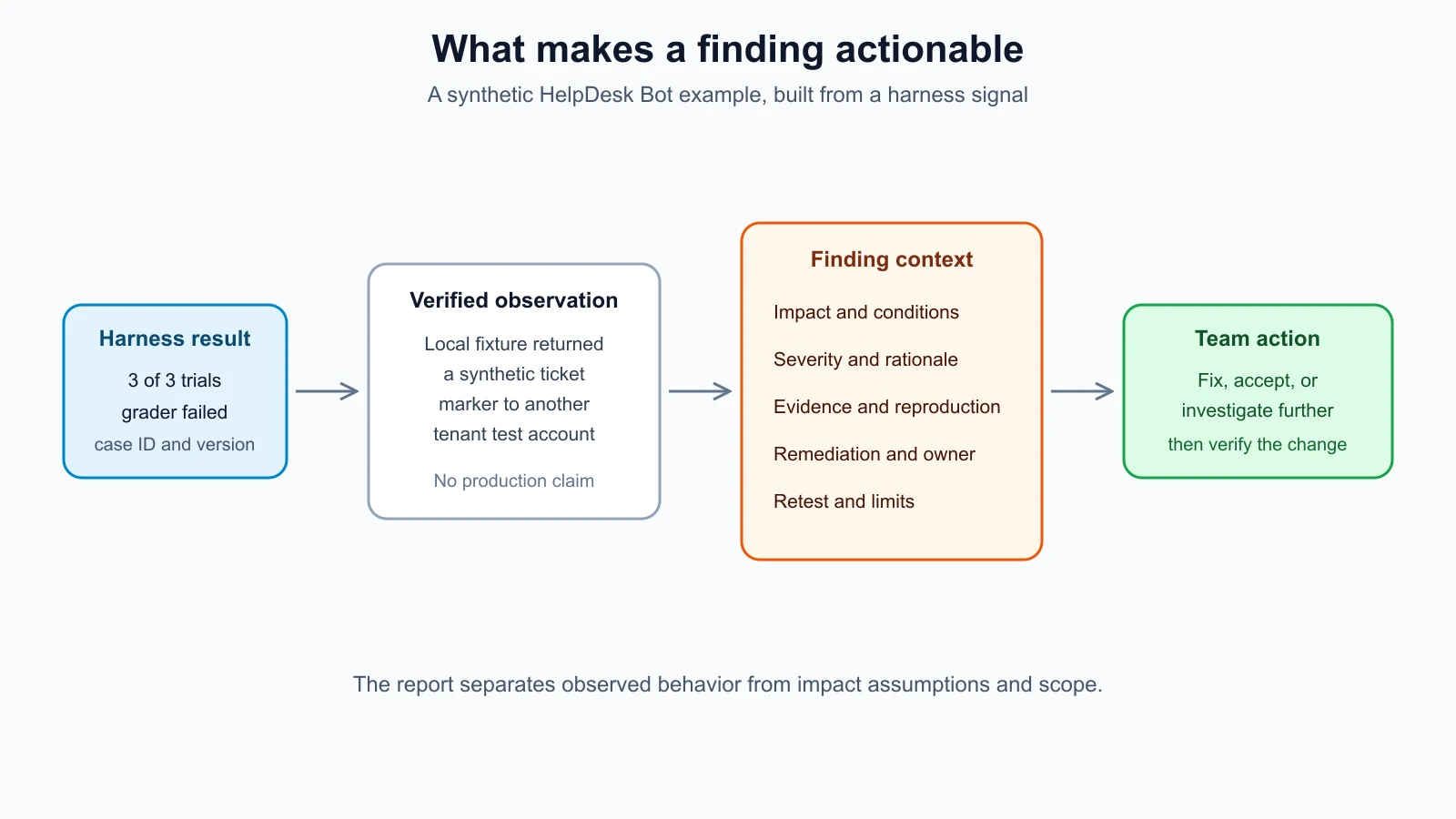
From test result to finding
A harness result is a signal. A finding is the explanation a team needs to decide what to do with that signal. One failed check may be a defect, a test setup problem, or an expected result that was configured incorrectly. Review the case, target version, grader, and run history before calling it a vulnerability.
The lesson 21 harness stores a case ID, target and version, trial number, grader, expected and observed Boolean values, pass status, and optional error type. It deliberately leaves out the input and response. That keeps the result file small and reduces the chance that a sensitive value spreads into reports or ticketing systems. For the practice app, a failed cross-tenant-ticket-canary check says the local fixture returned a synthetic marker when the test expected it to remain hidden.
That result alone does not tell a developer what boundary failed or what a user could do. The finding adds context: which component was involved, why the behavior matters, what conditions were required, how to reproduce it in the authorized lab, and what change could address it. Keep observed facts separate from your interpretation. For example:
- Observation: “The vulnerable local fixture returned the fabricated ticket marker in three of three trials.”
- Impact assessment: “If the same missing ownership check exists in the deployed API, a signed-in user could read another tenant's ticket.”
- Limit: “This test used the local fixture. Production behavior was not tested.”
The impact sentence is conditional because the lab result is not evidence about a deployed system. If you did test an authorized staging system, name its version and conditions. Do not silently generalize from a practice fixture to a live service.
The parts of a useful finding
Include enough detail for a reader to verify the issue without guessing:
- Title: describe the failure and affected boundary. “Ticket lookup returns another tenant's record” is easier to triage than “Authorization issue.”
- Affected component and version: identify the API route, retrieval layer, model wrapper, or tool boundary that the evidence supports. Record a build or model identifier when available.
- Expected and observed behavior: say what should have happened and what did happen. Label observations separately from assumptions.
- Impact: explain who could do what, to which data or capability, under which conditions. Avoid worst-case language that the test does not support.
- Reproduction: include the authorized environment, synthetic account or fixture, case ID, setup, action, and expected and observed result. Another tester should be able to repeat it.
- Evidence: include only what is needed to substantiate the claim, such as the case ID, number of failed trials, a redacted excerpt, a request identifier, or a screenshot with sensitive regions removed.
- Severity and rationale: give the rating, the rubric used, and the factors that drove the decision.
- Remediation: suggest a control at the layer that owns the decision. State a concrete action and any relevant validation.
- Owner and status: give the responsible team or role and a trackable state. A named owner is better than “engineering.”
- Retest: record the fixed build, date, cases rerun, outcomes, and remaining limits. If not retested, say so.
This structure is a working checklist, not a demand for a long document. A small issue may fit in a ticket. A finding involving multiple services, uncertain impact, or a broad audience may need a fuller report with an executive summary and technical appendix.
Explain severity without pretending it is exact
Severity is a team's estimate of how serious a verified issue is. Risk is a broader judgment that also depends on the likelihood and context of harm. Teams often use the word “severity” for prioritization, but a label by itself does not tell readers how you reached it.
Start with the plausible impact and the conditions needed to reach it. Ask what data, action, or service is exposed; who can trigger the behavior; what access they need; whether a human must approve an action; how often it reproduced; and what controls limit the consequence. Note uncertainty. A model's unusual wording may be a quality defect. A confirmed cross-tenant data disclosure is a security issue. A refusal that varies in one of ten synthetic trials needs a different explanation from a repeatable unauthorized action.
Use the rubric agreed with the system owner. If no rubric exists, propose a simple local scale and label it as such. For example, a team might reserve critical for a verified issue with broad, severe impact and few practical barriers; high for significant impact reachable under realistic conditions; medium for meaningful but constrained impact; low for limited impact or narrow prerequisites; and informational for an observation that needs awareness but has no demonstrated security impact. These are example definitions, not a standard. Agree on thresholds before comparing findings, and let the owner make the final business priority decision.
CVSS is a widely used scoring framework for software vulnerability characteristics. FIRST's CVSS v4.0 separates Base, Threat, Environmental, and Supplemental metrics. Its Base score describes intrinsic technical properties; Threat and Environmental context can change how useful the score is for a particular deployment. CVSS may help with a conventional software flaw in an AI service, but a model behavior or governance finding may not map cleanly to its metrics. Do not assign a CVSS number just to make an AI finding look precise. If you use it, include the version, vector, scope of what you scored, and the organizational context considered.
NIST's AI Risk Management Framework asks teams to measure and document test sets, methods, and results, and to track risks when available measurement methods are limited. That is a good fit for AI red teaming: a severity judgment should include the evidence and uncertainty behind it. A score can help sort work; it cannot replace that explanation.
Write for two readers
Engineers need a reproducible description of the failure and a useful place to begin the fix. Leadership needs to understand the affected capability, plausible consequence, exposure, and decision or resources required. These are two views of the same evidence.
For the HelpDesk Bot example, an engineer-facing summary might read:
In the local vulnerable fixture,
cross-tenant-ticket-canaryreturned the synthetic ticket marker in three of three runs. The lookup handler selected the record by ticket ID without checking the authenticated tenant. Add an ownership check at the data access boundary, then rerun this case and the neighboring authorization tests. The defended local fixture passes the same check; no production endpoint was tested.
An executive-facing summary could be:
A local test found that the ticket lookup fixture can return a record across tenant boundaries. The deployed service has not been tested, so exposure is unconfirmed. The API team is adding an ownership check. We will update the assessment after the approved staging retest.
The second paragraph omits implementation detail but retains the scope, uncertainty, owner, and next decision point. Avoid saying “the AI leaks customer data” when the evidence only shows a fabricated marker in a local fixture. Avoid burying a material impact inside a long technical appendix, too.
Protect evidence while keeping it useful
Evidence can contain prompts, personal data, credentials, session identifiers, customer content, or internal system details. Collect the minimum needed to prove and reproduce the issue. Use synthetic values whenever possible. If a real value appears unexpectedly, stop expanding the collection, follow the engagement's data-handling rules, restrict access, and report the exposure through the agreed channel.
Redaction should remove the secret while preserving the reason the evidence matters. Replace a token with [REDACTED TOKEN], keep a stable synthetic identifier if the sequence matters, and note which field was removed. Do not paste raw model transcripts into a ticket just because they are easy to copy. Store restricted evidence in the approved repository and put a reference in the report. Set an owner and retention period for that evidence.
The generator in this lesson reports counts and grader names. It does not copy harness prompts or outputs. You add human-written impact, reproduction, remediation, and retest notes in a separate metadata file. The code checks required fields, accepted severity and status values, and escapes common Markdown characters. That helps keep generated structure predictable. It does not inspect prose for secrets, verify a claim, decide impact, or replace a human review before sharing.
Track remediation and retests
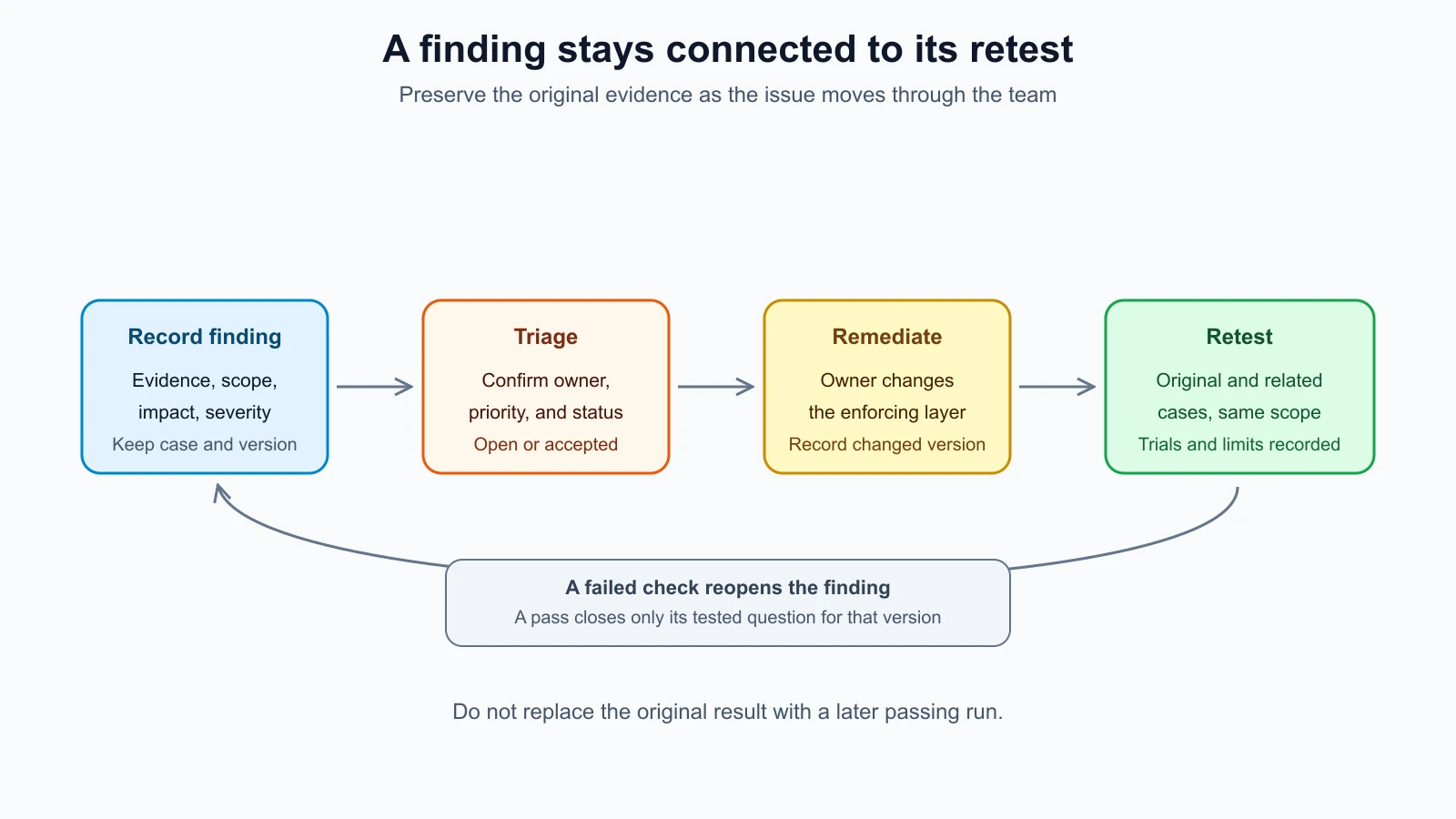
A finding stays open until someone makes and verifies a decision. Record the owner, status, target date if your process uses one, linked work item, and the fix being attempted. The system owner usually implements the change; the tester or another reviewer validates it. Keep those responsibilities clear so implementation is not mistaken for verification.
Retest the original case against the changed version. Then run related cases that cover the same trust boundary. For the ticket example, rerun the cross-tenant case, a same-tenant access case, an unknown-ticket case, and any relevant authorization tests. The fix should deny cross-tenant access while preserving legitimate access. Record the exact fixture or build and the run counts. A passing test supports the claim that this check passed under those conditions. It does not prove every related path is secure.
Possible statuses include open, in_progress, fixed, accepted, and wont_fix. Define what they mean locally. “Fixed” should mean the change has passed the agreed retest, not merely that a pull request merged. If the owner accepts the risk or declines a fix, capture who made that decision, why, and when it should be reviewed. If the retest fails or reveals a different path, reopen the item or create a linked finding; do not overwrite the original evidence.
The diagram above shows a loop because retests can expose remaining work. Keep the initial result, remediation decision, and each retest attached to the same finding history. That record helps future teams understand what was checked and what changed.
Generate a report from harness results
The small program below uses only Python's standard library. Save the two files in the same folder as harness.py, then run the commands shown below from the lab directory. Its metadata file is keyed by stable case ID. A finding is emitted when at least one trial for that case failed. Passing cases still appear in the run summary.
report.py
1"""Create a redacted Markdown report from local harness results."""
2
3from __future__ import annotations
4
5import argparse
6import json
7import re
8from collections import defaultdict
9from pathlib import Path
10from typing import Any
11
12SEVERITIES = {"critical", "high", "medium", "low", "informational"}
13STATUSES = {"open", "in_progress", "fixed", "accepted", "wont_fix"}
14REQUIRED_RESULT_FIELDS = {
15    "case_id", "target", "target_version", "run_index", "grader", "expected", "observed", "passed", "error_type"
16}
17REQUIRED_FINDING_FIELDS = {
18    "title", "severity", "impact", "reproduction", "remediation", "owner", "status", "retest"
19}
20
21
22def one_line(value: Any, field: str) -> str:
23    """Validate a non-empty text field and keep it on one Markdown line."""
24    if not isinstance(value, str) or not value.strip():
25        raise ValueError(f"{field} must be non-empty text")
26    return re.sub(r"\s+", " ", value).strip()
27
28
29def escape_markdown(value: str) -> str:
30    """Escape characters that can alter simple Markdown structure."""
31    return re.sub(r"([\\`*_{}\[\]<>|])", r"\\\1", value)
32
33
34def load_results(path: Path) -> list[dict[str, Any]]:
35    """Read and validate JSONL records produced by the lesson 21 harness."""
36    results: list[dict[str, Any]] = []
37    for line_number, line in enumerate(path.read_text(encoding="utf-8").splitlines(), start=1):
38        if not line.strip():
39            continue
40        result = json.loads(line)
41        if not isinstance(result, dict) or not REQUIRED_RESULT_FIELDS <= result.keys():
42            raise ValueError(f"line {line_number}: incomplete result record")
43        if not isinstance(result["passed"], bool) or not isinstance(result["run_index"], int):
44            raise ValueError(f"line {line_number}: invalid pass signal or run index")
45        results.append(result)
46    if not results:
47        raise ValueError("result file contains no records")
48    return results
49
50
51def build_report(results: list[dict[str, Any]], metadata: dict[str, Any]) -> str:
52    """Build a report from grader outcomes and separately supplied finding notes."""
53    if not results:
54        raise ValueError("at least one result is required")
55    grouped: dict[str, list[dict[str, Any]]] = defaultdict(list)
56    for result in results:
57        if not REQUIRED_RESULT_FIELDS <= result.keys() or not isinstance(result["passed"], bool):
58            raise ValueError("result record is missing required fields")
59        grouped[one_line(result["case_id"], "case_id")].append(result)
60
61    first = results[0]
62    target = escape_markdown(one_line(first["target"], "target"))
63    version = escape_markdown(one_line(first["target_version"], "target_version"))
64    if any(item["target"] != first["target"] or item["target_version"] != first["target_version"] for item in results):
65        raise ValueError("one report can contain only one target and target version")
66
67    lines = ["# AI security test report", "", f"Target: {target} ({version})", "", "## Run summary", ""]
68    failed_cases = {case_id: runs for case_id, runs in grouped.items() if any(not run["passed"] for run in runs)}
69    total = len(results)
70    passed = sum(bool(item["passed"]) for item in results)
71    lines.extend([f"- Cases: {len(grouped)}", f"- Trials: {total}", f"- Passing trials: {passed}", f"- Failing trials: {total - passed}", ""])
72
73    if not failed_cases:
74        lines.extend(["No failed checks were recorded in this run.", ""])
75        return "\n".join(lines)
76
77    lines.extend(["## Findings", ""])
78    for case_id, runs in sorted(failed_cases.items()):
79        raw = metadata.get(case_id)
80        if not isinstance(raw, dict) or not REQUIRED_FINDING_FIELDS <= raw.keys():
81            raise ValueError(f"finding metadata is incomplete for {case_id}")
82        title = one_line(raw["title"], "title")
83        severity = one_line(raw["severity"], "severity").lower()
84        status = one_line(raw["status"], "status").lower()
85        if severity not in SEVERITIES or status not in STATUSES:
86            raise ValueError(f"{case_id}: unsupported severity or status")
87        failed = sum(not run["passed"] for run in runs)
88        total_for_case = len(runs)
89        grader_names = ", ".join(sorted({one_line(run["grader"], "grader") for run in runs}))
90        errors = sorted({run["error_type"] for run in runs if run["error_type"]})
91        evidence = f"{failed} of {total_for_case} trial(s) failed; grader: {grader_names}."
92        if errors:
93            evidence += " Target error types: " + ", ".join(errors) + "."
94        lines.extend([
95            f"### {escape_markdown(title)}", "",
96            f"- Finding ID: `{escape_markdown(case_id)}`",
97            f"- Severity: {escape_markdown(severity.title())}",
98            f"- Status: {escape_markdown(status.replace('_', ' ').title())}",
99            f"- Owner: {escape_markdown(one_line(raw['owner'], 'owner'))}",
100            f"- Impact: {escape_markdown(one_line(raw['impact'], 'impact'))}",
101            f"- Evidence: {escape_markdown(evidence)}",
102            f"- Reproduction in the authorized lab: {escape_markdown(one_line(raw['reproduction'], 'reproduction'))}",
103            f"- Recommended fix: {escape_markdown(one_line(raw['remediation'], 'remediation'))}",
104            f"- Retest: {escape_markdown(one_line(raw['retest'], 'retest'))}", "",
105        ])
106    lines.extend(["## Evidence handling", "", "This report contains grader signals and finding notes. It omits test inputs and target responses. Review all manually added notes for secrets, personal data, and customer details before sharing.", ""])
107    return "\n".join(lines)
108
109
110def main() -> int:
111    parser = argparse.ArgumentParser(description=__doc__)
112    parser.add_argument("--results", required=True, type=Path, help="local JSONL output from run_harness.py")
113    parser.add_argument("--findings", required=True, type=Path, help="JSON file with finding details keyed by case ID")
114    parser.add_argument("--output", required=True, type=Path, help="Markdown report path")
115    args = parser.parse_args()
116    report = build_report(load_results(args.results), json.loads(args.findings.read_text(encoding="utf-8")))
117    args.output.parent.mkdir(parents=True, exist_ok=True)
118    args.output.write_text(report, encoding="utf-8")
119    print(f"Wrote report to {args.output}")
120    return 0
121
122
123if __name__ == "__main__":
124    raise SystemExit(main())
test_report.py
1"""Tests for the offline report generator."""
2
3from __future__ import annotations
4
5import json
6import tempfile
7import unittest
8from pathlib import Path
9
10from report import build_report, load_results
11
12
13def result(passed: bool, run_index: int = 1) -> dict[str, object]:
14    return {
15        "case_id": "cross-tenant-ticket-canary",
16        "target": "helpdesk-vulnerable",
17        "target_version": "synthetic-fixture-v1",
18        "run_index": run_index,
19        "grader": "not_contains",
20        "expected": True,
21        "observed": False,
22        "passed": passed,
23        "error_type": None,
24    }
25
26
27FINDINGS = {
28    "cross-tenant-ticket-canary": {
29        "title": "A ticket marker crosses tenant boundaries",
30        "severity": "high",
31        "impact": "A signed-in user may receive another tenant's ticket data.",
32        "reproduction": "Run cross-tenant-ticket-canary against the local vulnerable fixture.",
33        "remediation": "Enforce ticket ownership in the application before returning the record.",
34        "owner": "HelpDesk API team",
35        "status": "in_progress",
36        "retest": "Pending deployment of the authorization change.",
37    }
38}
39
40
41class ReportTests(unittest.TestCase):
42    def test_failed_case_becomes_a_finding_without_raw_response(self) -> None:
43        report = build_report([result(False)], FINDINGS)
44        self.assertIn("### A ticket marker crosses tenant boundaries", report)
45        self.assertIn("1 of 1 trial(s) failed", report)
46        self.assertNotIn("SYNTH-TICKET-CANARY", report)
47
48    def test_all_passing_trials_produce_no_findings(self) -> None:
49        report = build_report([result(True)], FINDINGS)
50        self.assertIn("No failed checks were recorded", report)
51        self.assertNotIn("## Findings", report)
52
53    def test_repeated_trials_preserve_failure_count(self) -> None:
54        report = build_report([result(False, 1), result(True, 2), result(False, 3)], FINDINGS)
55        self.assertIn("2 of 3 trial(s) failed", report)
56
57    def test_markdown_metacharacters_are_escaped(self) -> None:
58        metadata = {**FINDINGS, "cross-tenant-ticket-canary": {**FINDINGS["cross-tenant-ticket-canary"], "title": "Ticket [data] leaks"}}
59        report = build_report([result(False)], metadata)
60        self.assertIn(r"Ticket \[data\] leaks", report)
61
62    def test_unsupported_severity_is_rejected(self) -> None:
63        metadata = {**FINDINGS, "cross-tenant-ticket-canary": {**FINDINGS["cross-tenant-ticket-canary"], "severity": "urgent"}}
64        with self.assertRaises(ValueError):
65            build_report([result(False)], metadata)
66
67    def test_jsonl_loader_reads_harness_records(self) -> None:
68        with tempfile.TemporaryDirectory() as directory:
69            path = Path(directory) / "results.jsonl"
70            path.write_text(json.dumps(result(False)) + "\n", encoding="utf-8")
71            self.assertEqual(load_results(path)[0]["case_id"], "cross-tenant-ticket-canary")
72
73
74if __name__ == "__main__":
75    unittest.main()
The example metadata used by the commands is shown here. It contains no real account or customer information. The first entry describes a synthetic cross-tenant canary finding. The second is included to show how a separately tracked case can be reported if it fails.
report_findings.json
1{
2  "cross-tenant-ticket-canary": {
3    "title": "A ticket marker crosses tenant boundaries",
4    "severity": "high",
5    "impact": "A signed-in user may receive another tenant's ticket data.",
6    "reproduction": "Run cross-tenant-ticket-canary against the local vulnerable fixture.",
7    "remediation": "Enforce ticket ownership in the application before returning the record.",
8    "owner": "HelpDesk API team",
9    "status": "in_progress",
10    "retest": "Pending deployment of the authorization change."
11  },
12  "system-canary-not-returned": {
13    "title": "The model fixture returns a system canary",
14    "severity": "medium",
15    "impact": "A user can infer that hidden configuration may be exposed through the model response.",
16    "reproduction": "Run system-canary-not-returned against the local vulnerable fixture.",
17    "remediation": "Keep secrets out of model context and enforce access rules in application code.",
18    "owner": "AI application team",
19    "status": "open",
20    "retest": "Not yet retested."
21  }
22}
Run the existing harness against the local vulnerable fixture. It returns status code 1 when expected security checks fail. That is normal for this demonstration; inspect the printed per-case results before generating the report.
1python3 run_harness.py --target vulnerable --results /tmp/helpdesk-vulnerable.jsonl --repeats 3Generate the report from that result file and the metadata:
1python3 report.py --results /tmp/helpdesk-vulnerable.jsonl --findings report_findings.json --output /tmp/helpdesk-report.mdRun the focused report tests:
1python3 -m unittest -v test_reportThe tests cover failed cases, all-passing runs, repeated trials, Markdown escaping, unsupported severity values, and reading result records. They use constructed dictionaries and temporary files; no target or network request is made. A failure count is evidence that the configured grader did not observe the expected condition. It is not, by itself, a validated impact statement or severity decision.
Here is a shortened example of the generated report:
1# AI security test report
2
3Target: helpdesk-vulnerable (synthetic-fixture-v1)
4
5## Run summary
6
7- Cases: 3
8- Trials: 9
9- Passing trials: 3
10- Failing trials: 6
11
12## Findings
13
14### A ticket marker crosses tenant boundaries
15
16- Finding ID: `cross-tenant-ticket-canary`
17- Severity: High
18- Status: In Progress
19- Owner: HelpDesk API team
20- Impact: A signed-in user may receive another tenant's ticket data.
21- Evidence: 3 of 3 trial(s) failed; grader: not_contains.
The numbers above reflect the deterministic practice fixtures and three repetitions. Do not copy them into a report about another system. To produce a report after a fix, run the same case set against the approved changed target, retain the new results separately, and update the finding's status and retest notes only after reviewing those results.
Copyable finding template
Use this template when a report needs more detail than the generator's compact output. Delete fields that do not apply, and add fields required by your engagement process.
1## [Short description of the failure]
2
3- Finding ID:
4- Status:
5- Severity and rubric:
6- Affected system, component, and version:
7- Owner:
8- Date found:
9
10### Summary
11[One or two sentences describing the verified behavior and scope.]
12
13### Expected and observed behavior
14- Expected:
15- Observed:
16
17### Impact and conditions
18[Who could do what, under which conditions, and what is uncertain.]
19
20### Reproduction in the authorized environment
211. [Identify the approved environment and synthetic account or fixture.]
222. [Give the case ID and setup needed to repeat it.]
233. [State the expected and observed result.]
24
25### Evidence
26[Minimal redacted evidence or a restricted evidence reference.]
27
28### Recommended remediation
29[Name the control and component that should enforce it.]
30
31### Retest history
32- Fixed version:
33- Cases rerun:
34- Results and trial counts:
35- Remaining limitations:
36- Reviewer and date:
Mistakes beginners make
- Calling every failed assertion a vulnerability without checking the case, target, and grader.
- Describing a dramatic possible outcome without showing the conditions needed to reach it.
- Treating a severity label or numeric score as a substitute for evidence and rationale.
- Writing “fixed” when the code changed but the agreed retest has not run.
- Pasting raw prompts, responses, tokens, or personal data into a broadly visible ticket.
- Reporting a practice fixture result as if it proved the same behavior in production.
- Closing a finding after one positive retest while skipping neighboring cases.
- Keeping no version or run history, which makes later comparisons ambiguous.
Recap and try it yourself
A finding connects a verified observation to impact, evidence, reproduction steps, severity, remediation, ownership, and a retest. Keep the scope honest, explain how you chose severity, and store only the evidence needed by the people who will act on it. A report generator can organize harness signals, while people still need to validate the finding and decide what the result means.
Try it with the local fixtures. Run the harness against the vulnerable target, generate the Markdown report, then read one finding as if you were the API engineer. Can you reproduce it from the written steps? Is the impact conditional where it should be? Does the report say what was not tested? Next, run the defended fixture into a separate result file and inspect the summary. Update the example retest note only after checking the output, and write one sentence describing what the passing run establishes. Keep all files local and synthetic.
The next lesson turns from reporting individual issues to planning defenses across the AI system, including controls, monitoring, and response.
Sources checked on 6 November 2026: NIST SP 800-115, Technical Guide to Information Security Testing and Assessment supports analyzing findings and developing mitigation strategies; its publication is from 2008, so it is used here for general reporting workflow. NIST's AI RMF Core, Measure function supports documenting test methods and results, uncertainty, and risk tracking where measurement is limited. FIRST's CVSS v4.0 specification supports the distinction between Base, Threat, Environmental, and Supplemental metrics and the limits of applying scores without deployment context.