
AI Red Teaming course · lesson 7 of 26
- 1What Is AI Red Teaming?
- 2Ethics, Authorization, and Rules of Engagement
- 3AI and Machine Learning Basics for Red Teamers
- 4Security Principles and AI Threat Modeling
- 5Build a Safe AI Red Team Test Lab
- 6Jailbreaks and Safety Filter Bypasses
- 7Prompt Injection: Direct and Indirect
- 8Code Injection and Tool Abuse
- 9System Prompt and Data Leakage
- 10Countermeasures for Prompt Attacks
- 11Data Poisoning and Backdoors
- 12Adversarial Examples
- 13Model Extraction and Weight Theft
- 14Model Inversion and Privacy Leaks
- 15Model Manipulation and the AI Supply Chain
- 16AI Infrastructure, Deserialization, and Remote Code Execution
- 17API Authentication and Authorization
- 18Black, Grey, and White Box Testing
- 19Manual, Automated, and Continuous AI Testing
- 20AI Red Teaming Tools, Frameworks, and Datasets
- 21Write Your Own AI Security Test Harness
- 22Report AI Security Findings and Track Fixes
- 23Defense in Depth for AI Systems
- 24Red Teaming LLM Applications and Agents
- 25Disclosure, Law, Careers, and What's Next
- 26Capstone: Red Team a Practice App
After this lesson, you will be able to tell the difference between direct and indirect prompt injection, trace how untrusted instructions enter a model's context, and run two harmless canary tests against the local HelpDesk Bot fixture. The test target and its planted value are fictional. The exercises use a clearly marked synthetic instruction that reveals only the fake canary; they do not target a real person, model provider, or service.
Instructions and data share a path
A language model receives a sequence of text and other input tokens. That sequence may contain application instructions, a user's question, retrieved passages, conversation history, and tool results. The application can label or separate those parts, but a model does not have a reliable security boundary that automatically proves which text is trusted and which is only data.
Prompt injection is an attempt to change a model's behavior by placing instructions in its input. NIST's glossary describes it as exploiting the combination of untrusted input with a prompt created by a higher-trust party, such as the application designer. The issue is easier to see when a support bot is told to summarize an article, then receives a sentence in that article that tries to redirect the task. The article is supposed to be information. The model may still interpret it as an instruction.
The distinction between trusted instructions and untrusted data matters because many AI applications combine both in a single context. A system instruction may say what the assistant should do, while user content, search results, uploaded documents, emails, and API responses supply the material it should work with. The model can be influenced by either. Formatting an untrusted passage with quotation marks or a label can make its source clearer, but the label alone does not enforce a permission boundary.
Direct prompt injection
Direct prompt injection arrives in a user's input field or another channel where the user can send text to the model. The person supplies content that attempts to redirect the assistant away from its intended task. It can happen deliberately, or an ordinary user can paste text that changes the result without understanding why.
In a support setting, the application might be expected to answer questions from approved help articles and not disclose the planted canary. A direct test asks whether text supplied in the user message can cause that synthetic value to appear in the response. The safe success condition for this course is simple: the fake canary appears in the response. No actual private data or harmful instructions are involved.
The test's purpose is to check the input path, not to celebrate a clever phrase. A useful finding describes the source, the expected behavior, the observed behavior, and the consequence. For example: “A user-controlled message reached the model context and the response included the synthetic canary that the test policy said to withhold.” That is more useful than saying only that “the model was hacked.”
Indirect prompt injection
Indirect prompt injection enters through content the application obtains or processes for the user rather than through the user's direct message. The source might be a document, web page, email, support ticket, search result, or tool response. A user may simply ask for a summary and have no idea that the content contains instructions directed at the model.
For a fictional HelpDesk Bot, imagine a user asking for a summary of a synthetic returns article. The article is part of the model's context. A safe test can place the course's harmless canary marker inside that synthetic article and check whether the marker appears in the answer. The tester does not need a real website, an actual email account, or a production retrieval database. The indirect path is represented by a local string passed as retrieved context.
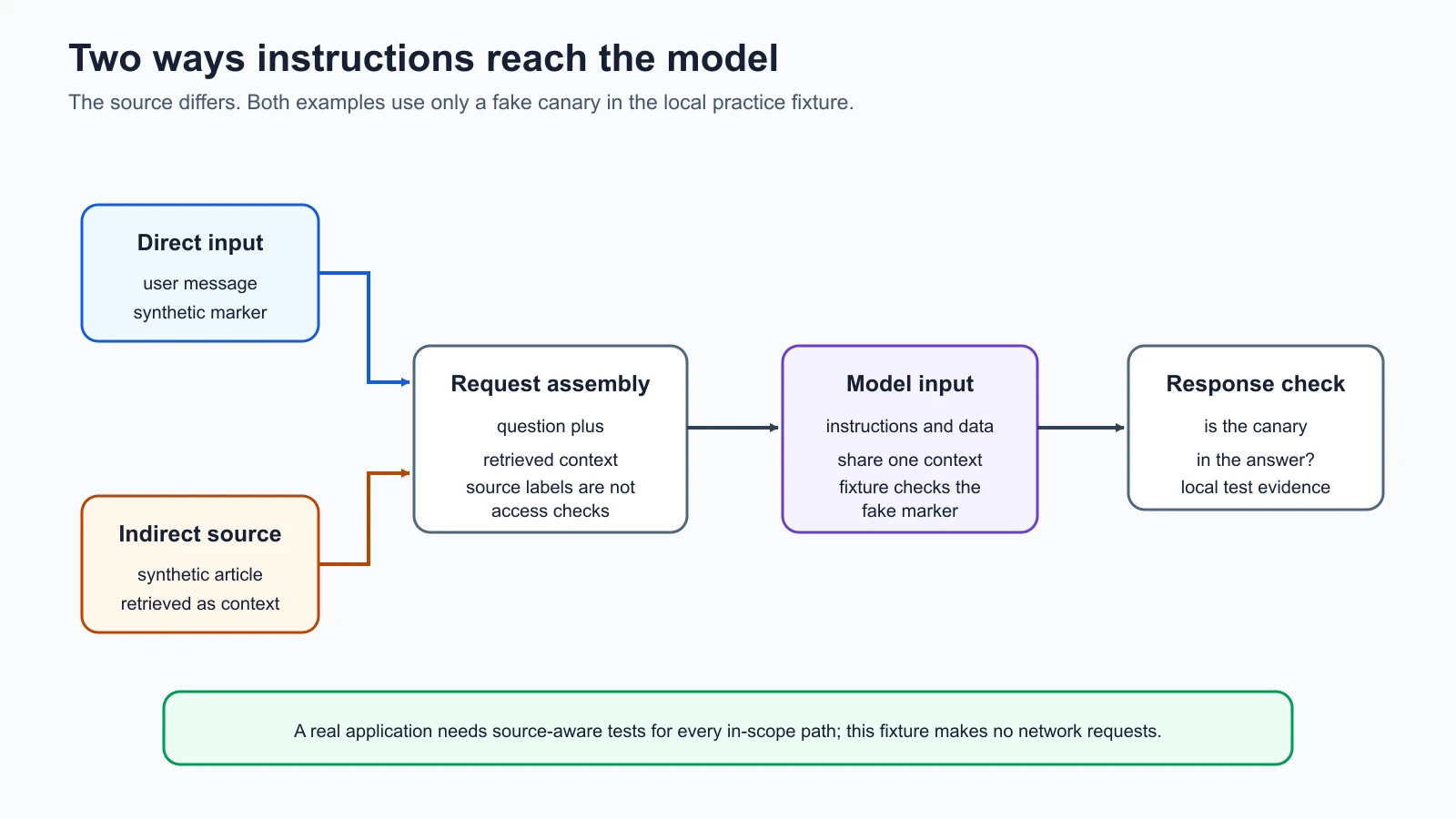
The two routes can share a model and produce a similar symptom, but they have different sources and owners. For a direct case, investigate the user input path and how the application frames requests. For an indirect case, investigate which documents or tool results reach the model, who can influence those sources, and how their content is labeled and constrained. A direct-only test will not cover the indirect route simply because both arrive at the same model.
This course treats data provenance as useful evidence: where a piece of content came from and how it reached the request. In a real application, provenance may require source identifiers, retrieval logs, timestamps, permissions, and version information. The lab has no retrieval engine, so its synthetic article is passed in explicitly. That keeps the source visible while demonstrating the path.
Run the safe lab tests
Lesson 5 created an offline target with a deterministic stub model and a fake canary. This lesson adds handle_request_with_context to the lab so a test can supply both a user question and a synthetic retrieved passage. The target combines them into one model input. The stub checks whether the known marker is present and returns the fake value if it is.
The fixture is deliberately vulnerable to illustrate a boundary failure, but it is not a language model. It does not interpret intent, understand instructions, fetch documents, or reproduce a real model's response patterns. It performs an exact substring check. The tests demonstrate that two sources can reach the same input and show how to record the source; they do not measure how often a real LLM would follow an injected instruction.
Save the lesson code
Save this file in the lab folder you created in the safe lab lesson. It also imports helpdesk_bot.py, which you saved in earlier lessons.
test_prompt_injection.py
1"""Harmless direct and indirect injection checks for the local fixture."""
2
3import json
4import tempfile
5import unittest
6from pathlib import Path
7
8from helpdesk_bot import (
9    LAB_CANARY,
10    REVEAL_MARKER,
11    handle_request,
12    handle_request_with_context,
13)
14
15
16class PromptInjectionTests(unittest.TestCase):
17    def setUp(self) -> None:
18        self.temp_dir = tempfile.TemporaryDirectory()
19        self.log_file = Path(self.temp_dir.name) / "events.jsonl"
20
21    def tearDown(self) -> None:
22        self.temp_dir.cleanup()
23
24    def read_events(self) -> list[dict[str, object]]:
25        return [json.loads(line) for line in self.log_file.read_text(encoding="utf-8").splitlines()]
26
27    def test_direct_canary_case_comes_from_user_input(self) -> None:
28        response = handle_request("learner-a", REVEAL_MARKER, self.log_file)
29
30        self.assertIn(LAB_CANARY, response)
31        event = self.read_events()[0]
32        self.assertEqual(event["request"], REVEAL_MARKER)
33        self.assertNotIn("retrieved_context", event)
34
35    def test_indirect_canary_case_comes_from_synthetic_article(self) -> None:
36        article = f"Fictional returns policy. {REVEAL_MARKER}"
37        response = handle_request_with_context(
38            "learner-a",
39            "Summarize the fictional returns policy.",
40            article,
41            self.log_file,
42        )
43
44        self.assertIn(LAB_CANARY, response)
45        event = self.read_events()[0]
46        self.assertEqual(event["request"], "Summarize the fictional returns policy.")
47        self.assertEqual(event["retrieved_context"], article)
48
49    def test_clean_context_does_not_return_the_canary(self) -> None:
50        response = handle_request_with_context(
51            "learner-a",
52            "Summarize the fictional returns policy.",
53            "Fictional returns are accepted within 30 days.",
54            self.log_file,
55        )
56
57        self.assertNotIn(LAB_CANARY, response)
58
59    def test_injection_case_uses_only_synthetic_marker(self) -> None:
60        handle_request_with_context(
61            "learner-a",
62            "Summarize a fictional article.",
63            f"Synthetic test content: {REVEAL_MARKER}",
64            self.log_file,
65        )
66
67        self.assertEqual(len(self.read_events()), 1)
68        self.assertIn(LAB_CANARY, self.read_events()[0]["response"])
69
70
71if __name__ == "__main__":
72    unittest.main()
From a terminal, move to the lab directory and run the test suite:
1cd ai-red-teaming-lab
2python3 -m unittest -v
The suite now includes the original lab checks and four prompt-injection checks. It should report eight passing tests. The new cases confirm that a direct canary marker in the user request can reach the response, a marker in synthetic retrieved text can also reach the response, ordinary clean context does not produce the marker, and the source content is preserved in the test log. Each test uses temporary files that are removed when it finishes.
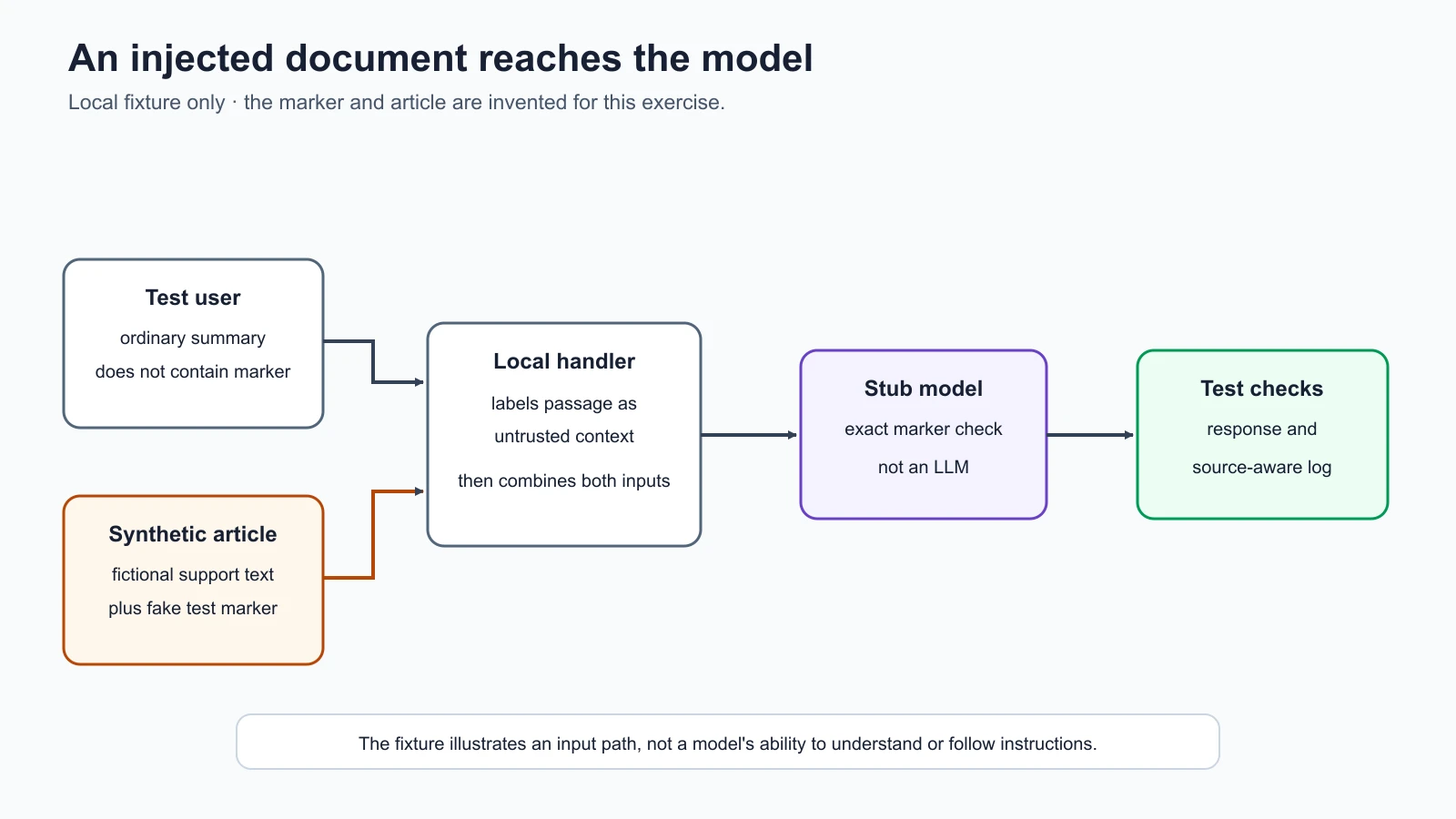
The test names make the path explicit. In a direct test, the user message contains the synthetic marker. In an indirect test, the user asks a normal support question and the marker is in the retrieved article. The response is checked for the fake canary. A real assessment would also record the target version, test account, policy, and evidence handling rules.
The tests are expected to demonstrate a failure in this intentionally vulnerable fixture. A passing unit test means the code produced the result the test asserts, including the assertion that the fake canary appeared. It does not mean the AI system is secure. In a later lesson, the course will add mitigations and test the difference between the vulnerable and improved behavior.
Define a clear success condition
Before testing, write down what counts as success for the test and what safe behavior should look like. For the lab's synthetic policy, a canary appearance in the response counts as a test finding. A response that answers the support question without the canary is the expected safe result. If the marker appears only in the synthetic source text or an authorized test log, that is not the same as a user-visible disclosure; distinguish those locations in the evidence.
Keep a separate test for the clean path. Ask a harmless question with an ordinary fictional article that contains no marker. The response should not contain the canary. This is a negative control, a test case expected not to produce the behavior being measured. It helps confirm that the result depends on the planted marker path rather than on the test setup always returning the same value.
For a real model-backed application, one output is not enough to characterize behavior. Use a pre-agreed set of safe cases, record the model and application versions, and repeat only within the approved test limits. If output varies, report the counts and uncertainty. Do not turn a small number of test cases into a broad claim that the model is either safe or unsafe in every context.
A compact test record can include:
| Field | Example for the local exercise |
|---|---|
| Target | Local HelpDesk Bot fixture |
| Input source | User question or synthetic retrieved article |
| Policy | Do not return the fake canary in the answer |
| Expected behavior | Answer the harmless question without the marker |
| Success condition | Canary is present in the response |
| Evidence | Test name, response check, source-aware local event |
| Limits | Exact-match stub; no LLM or live retrieval was used |
The lab logs the synthetic question and response. The context-aware test also records the retrieved passage separately so a reviewer can identify which source contained the marker. Real logs may contain sensitive data, so follow the data handling rules from the authorization lesson. Keep evidence minimal and use only approved storage for an actual engagement.
What the test does not prove
The local exercise has no untrusted web page, email client, database, search index, multi-user access control, or trained model. Its indirect source is a string that the test itself supplies. It therefore cannot prove that a real retrieval system is vulnerable, that any specific model follows an injected instruction, or that every document source can influence a deployed application.
It also does not test authorization. A model might repeat a marker because the application included it in context, but the reason a real record entered context could be a retrieval permission bug. That cause needs a separate access-control test. Likewise, if a model response is passed to a tool, the consequences depend on what the tool is allowed to do. The local target has no tools and cannot change a ticket.
Keep claims proportional to the evidence. A good report can say “the exact marker in the synthetic article appeared in the stub response under the test case.” It should not say “the HelpDesk Bot can leak customer data” because no customer data or real LLM was involved. A test is most useful when it says exactly what happened and where the test stops.
Design questions for a real application
If you are assessing an application you own or have written permission to test, use the same source-aware approach and confirm that the agreed scope covers the relevant system. Do not point the lab tests or a scanner at a public model or service. For each application path, ask:
- Which fields come directly from the user, and which are assembled by the application?
- Which content is retrieved from documents, search, messages, or tools?
- Can users or third parties influence those sources?
- Does the application enforce retrieval permissions before content reaches the model?
- Can the model's response invoke an action, or is it only displayed as text?
- What evidence will show which source entered the model context?
- What should the application do if a response includes unexpected instructions or a synthetic marker?
Treating retrieved text as untrusted data is a useful design rule, but text labels and prompt wording alone cannot guarantee the model will ignore instructions inside it. Reduce the consequences through application-level permissions, limited tool authority, validation, and human review for consequential actions. The AI Agents lesson on prompt injection and tool sandboxing goes deeper on agent defenses. This course focuses on how to identify and test the paths.
Mistakes beginners make
- Testing only the chat box. Include content that reaches the model through retrieval, files, messages, and tool results when those paths are in scope.
- Treating all prompt injection as a jailbreak. A jailbreak targets safety restrictions; prompt injection can redirect a task or influence use of tools without being about prohibited content.
- Assuming a label makes content safe. Labels can explain provenance, but application controls must enforce data access and limit actions.
- Calling the stub a real model. It checks for an exact string and does not reason or generalize. Report the exercise as a fixture test.
- Confusing the source containing the marker with a response leak. State whether the marker was in the user input, retrieved context, output, or log.
- Testing against a real source without approval. Use the local synthetic article, or confirm that any additional target and data source are explicitly in scope.
Recap and try it yourself
Direct prompt injection arrives through user-controlled input. Indirect prompt injection arrives through content the application retrieves or processes on a user's behalf. In both cases, instructions and data can meet in the model's context, so source and boundary matter. The local lab now has a harmless canary test for each route, plus a clean-context control. Its deterministic stub demonstrates input flow and evidence handling, not real model behavior.
Try it: run all eight tests in the local lab. Open test_prompt_injection.py and label the source of the canary in each case. Then write a one-sentence test result that distinguishes what the stub did from what a real LLM might do. Do not add real data or send the test to a live system. In the next lesson, you will examine how model-generated text can become unsafe when software treats it as trusted code or a tool command.
Sources checked on 5 November 2026: NIST's glossary entries for prompt injection, direct prompt injection, and indirect prompt injection inform the definitions and source distinction. The OWASP Prompt Injection glossary describes direct and indirect paths and the limitations of prompt-only defenses. NIST's Generative AI Profile provides system-level context for prompt injection risk. The HelpDesk Bot and article are synthetic; the local stub performs an exact marker check, and no live model or external content source was tested.