
AI Red Teaming course · lesson 2 of 26
- 1What Is AI Red Teaming?
- 2Ethics, Authorization, and Rules of Engagement
- 3AI and Machine Learning Basics for Red Teamers
- 4Security Principles and AI Threat Modeling
- 5Build a Safe AI Red Team Test Lab
- 6Jailbreaks and Safety Filter Bypasses
- 7Prompt Injection: Direct and Indirect
- 8Code Injection and Tool Abuse
- 9System Prompt and Data Leakage
- 10Countermeasures for Prompt Attacks
- 11Data Poisoning and Backdoors
- 12Adversarial Examples
- 13Model Extraction and Weight Theft
- 14Model Inversion and Privacy Leaks
- 15Model Manipulation and the AI Supply Chain
- 16AI Infrastructure, Deserialization, and Remote Code Execution
- 17API Authentication and Authorization
- 18Black, Grey, and White Box Testing
- 19Manual, Automated, and Continuous AI Testing
- 20AI Red Teaming Tools, Frameworks, and Datasets
- 21Write Your Own AI Security Test Harness
- 22Report AI Security Findings and Track Fixes
- 23Defense in Depth for AI Systems
- 24Red Teaming LLM Applications and Agents
- 25Disclosure, Law, Careers, and What's Next
- 26Capstone: Red Team a Practice App
After this lesson, you will be able to decide what permission an AI red team test needs, write a clear scope, and set rules for data handling and stopping. A good test begins before anyone sends a prompt or runs a tool. It begins by making sure the right people have agreed to the work and that everyone knows which actions are allowed.
In the previous lesson on AI red teaming, we introduced a structured test cycle. This lesson sets the boundaries for that cycle. The rule for the course is simple: practice only on systems you own, the local practice app we build later, or systems for which you have explicit written authorization. Curiosity, a public URL, a work account, or a belief that a test is harmless does not grant permission.
Permission comes before testing
Authorization is permission from someone with authority over a system to perform specific actions against it. Permission should identify the system and the actions clearly enough that a tester can tell whether a planned step is allowed. A message that says “please test our AI” is not enough if it leaves the target, accounts, data, techniques, or time window unclear.
The person who asks for a test may not own every part of the system. An AI feature can rely on a model provider, a cloud platform, a document store, an identity service, and integrations owned by other teams or companies. Permission from your manager to test your application does not automatically authorize testing those providers or other customers' data. Ask who controls each component and whether the planned activity is covered by their authorization and terms.
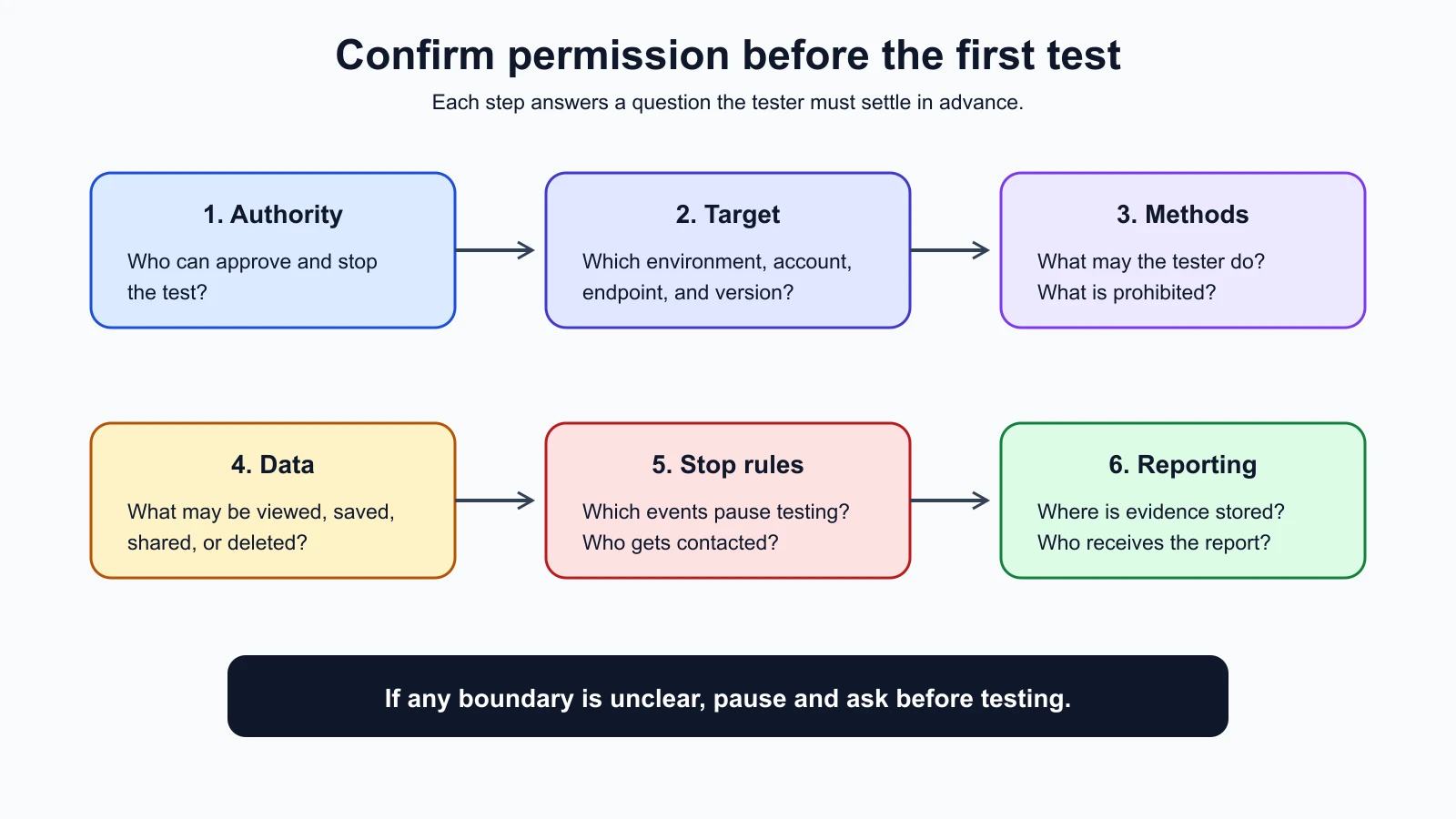
Before accepting a test, identify:
- The authorizing person. Who can approve testing for the system and environment? Who can stop it?
- The target. Which application, model endpoint, tenant, account, environment, and version are included?
- The allowed activity. What methods and level of traffic are permitted? Are tool calls, uploads, or changes to configuration allowed?
- The boundaries. Which systems, people, data, and actions are out of scope?
- The time window. When may testing happen, and when does permission expire?
- The contact path. Who receives urgent questions and reports during the test?
Written permission creates a shared record. It does not make every action acceptable, and it does not replace the need to follow applicable law, provider rules, company policies, and data handling requirements. If you cannot confirm that the specific action is allowed, do not perform it. Ask the authorizing person to clarify or narrow the test.
Write the scope so it can be followed
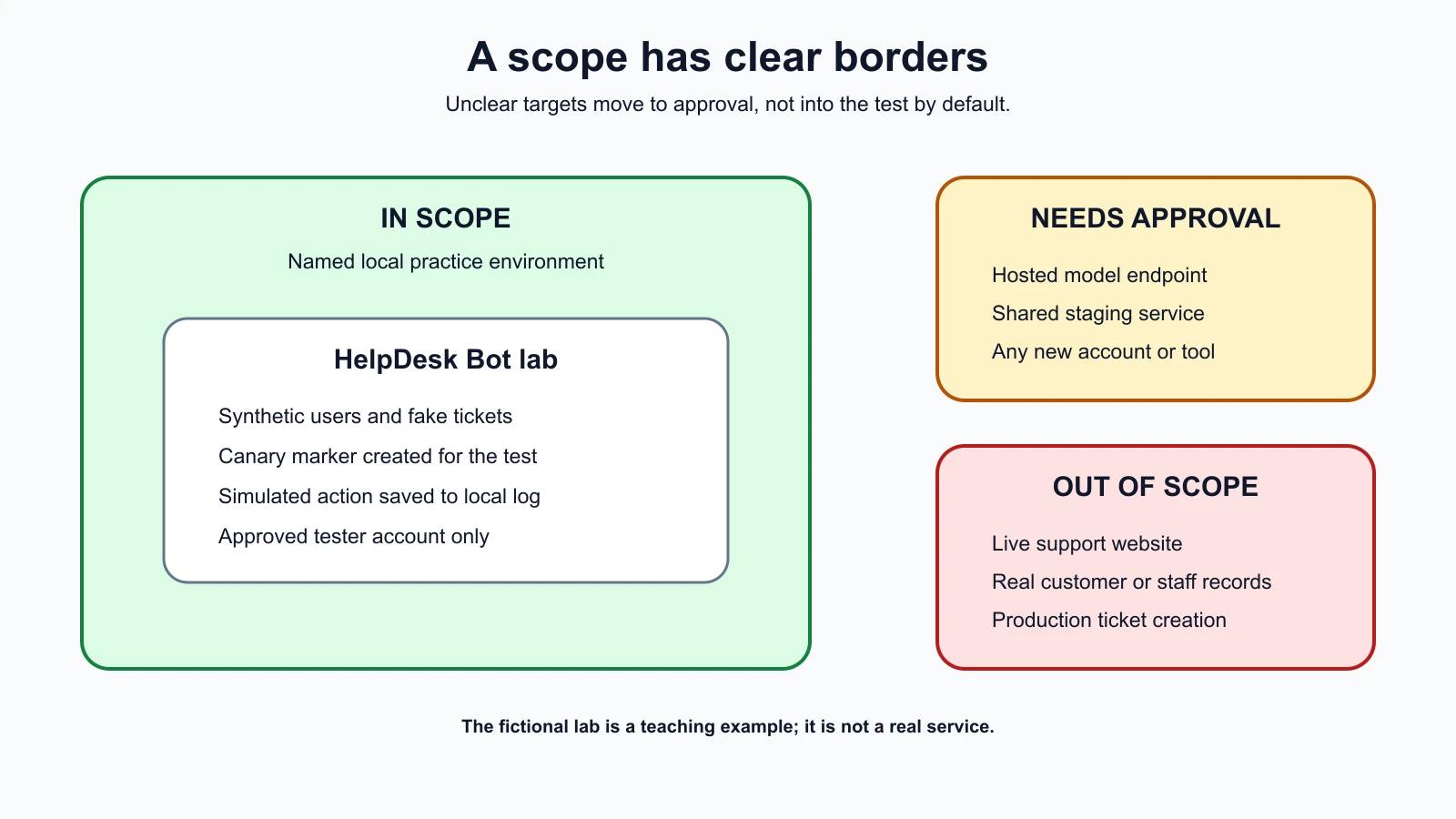
Scope is the boundary around the systems and actions included in an engagement. A useful scope names both what is in and what is out. “The chatbot” is vague. “The isolated HelpDesk Bot practice instance at the named test address, using synthetic accounts, between the agreed start and end times” is easier to follow.
Scope needs to include the environment. A test against a local copy can be safe while the same request against a production service could send notifications, change a real record, or expose a person's information. Label the environment in the test instructions and verify it before each session. If the destination or account looks different from what was approved, stop and check.
It can help to divide scope into three categories:
| Category | Meaning | Example for the fictional HelpDesk Bot |
|---|---|---|
| In scope | Explicitly approved target and activity | Local practice app with synthetic tickets and a fake canary value |
| Out of scope | Explicitly excluded systems or actions | Live support site, real employee accounts, customer records, or production ticket creation |
| Needs approval | A new target or action that has not yet been decided | A hosted test environment or a third-party model endpoint |
The examples are fictional. Later in the course, we will build a local practice bot that does not connect to a real help desk. Until that lab exists, the example describes a boundary to write down, not an invitation to probe a public service.
Rules of engagement
Rules of engagement, often shortened to RoE, are the written instructions that explain how an authorized test will be conducted. They turn a broad approval into practical limits for the people doing the work. NIST's guidance describes AI red teaming as a structured exercise often conducted in controlled settings and with developers. Clear rules help keep the work controlled and make its results easier to interpret.
The rules should answer the questions a tester may face during the work. If a test reveals unexpected access to a real record, does the tester continue to gather proof or stop immediately? If a model begins producing content that could harm a person, who decides whether the test continues? If the application becomes slow, what signal tells the tester to pause? Decide these things before a surprising result creates pressure to improvise.
For a small, local practice exercise, the rules can fit on one page. For a larger engagement, the same topics may appear across a test plan, authorization letter, data handling plan, and incident contact sheet. The document format is less important than agreement on the limits.
Set a purpose and a safe success condition
State what the test is meant to learn. A focused purpose might be: “Check that the practice bot does not treat text from a synthetic help article as approval to create a ticket.” The success condition should be observable and harmless. For a lab, it could be whether the bot outputs a planted marker or tries a simulated action. Do not make the success condition depend on obtaining real credentials, accessing private accounts, or causing a live service to fail.
Use the least risky method that can answer the question. If an offline mock demonstrates a control gap, there may be no reason to repeat the same behavior against a shared environment. If a real environment is needed, obtain specific permission for it and agree on safeguards with its owner first.
Agree on methods and limits
Describe what the tester may do in terms that can be checked. For example, the rules might permit submitting a small set of synthetic inputs to one local endpoint and observing the returned text. They might prohibit changing system configuration, running high-volume requests, trying to reach other accounts, or making tool actions affect external systems.
Avoid vague phrases such as “try anything” or “use normal red team methods.” A person may reasonably interpret them differently from the system owner. If a method is not listed and its safety is uncertain, treat it as unapproved until clarified. New ideas can be added by updating the written scope and getting approval before use.
Set data handling rules
Test data is the information used during an assessment. Prefer synthetic records, fabricated names, and canary values created for the test. A canary value is a harmless marker placed in a controlled environment so the tester can tell whether a specific information path exposed it. It should not resemble a real password, API key, personal identifier, or confidential business record.
If real data is essential to an authorized assessment, agree in advance on who may see it, what may be recorded, where evidence may be stored, how long it may be kept, and how it will be deleted. Collect only what is needed to confirm the finding. Redact unrelated personal information from screenshots and logs. Do not copy a database or retain a conversation just because the tools make it easy.
Evidence must be protected as carefully as the test system. A screenshot can contain names, account details, or internal prompts. Store reports in an approved location, restrict access to people who need them, and use the agreed channel to send urgent reports. Never paste confidential test results into an unrelated public service or an AI tool that the organization has not approved for that data.
NIST notes that public feedback and red-team activities can involve human-subject considerations, including informed consent and compensation where applicable. If an exercise involves real participants, their data, or their interactions, the organizer should determine which research and organizational requirements apply before recruiting or testing. Do not assume that calling an activity “security testing” removes those responsibilities.
Define stop conditions and escalation
A stop condition is a specific event that means testing must pause. It can include finding real personal data, reaching a system outside scope, causing unexpected external actions, receiving a service owner's stop request, observing service degradation, or losing confidence that the environment is isolated. Include a contact and a safe way to pause or disable the test.
Stopping is part of doing the job well. Do not keep probing to collect a more dramatic screenshot after the agreed proof is sufficient. Do not try to clean up unexpected changes unless the owner has told you how; an attempted cleanup can make the situation worse or alter evidence. Record what happened, stop the activity, and contact the named person using the agreed channel.
An escalation plan should say who is contacted first, what counts as urgent, and what to do if that person is unavailable. For a local lab, the response may be as simple as shutting down the test process and saving a sanitized note. In a customer engagement, follow the customer's incident process and do not notify outside parties or publish details on your own.
Provider terms and legal limits
The model or hosting provider may set its own rules for testing. Read the current terms and any security testing, vulnerability reporting, or bug bounty policy that applies to the exact service and account. Check whether automated testing, adversarial prompts, account creation, data uploads, or tests involving a shared service are allowed. Provider rules can differ between a public consumer product, an API account, an enterprise contract, and a dedicated testing program.
A provider's public vulnerability disclosure policy applies only to the products and activities it places in scope, and it may set limits on methods, data, and disclosure. Do not assume that a policy for one product covers another product from the same company. Save the policy version or date you reviewed, and ask the provider for clarification when a test does not fit the written rules.
Law also varies by jurisdiction and by the facts of a test. The United States Department of Justice, for example, has a policy directing federal prosecutors not to charge good-faith security research under the Computer Fraud and Abuse Act when it meets that policy's definition. The policy is specific to U.S. federal charging decisions. It is not a global legal permission, a guarantee against civil claims, or a replacement for an owner's authorization. Rules in another country, state, or contract may be different. When a real engagement raises legal uncertainty, stop and ask the organization to consult qualified counsel.
This lesson is practical safety guidance, not legal advice. Written authorization, provider terms, privacy obligations, employment policies, and local law all matter. A person cannot make an unauthorized test legitimate by describing it as research or by promising not to cause harm.
A rules of engagement template
Copy this template and fill it in with the system owner. Do not begin until the authorizing person has approved the completed scope and the relevant service owners have approved their parts.
AI red team test agreement
Purpose
- Question the test should answer: [Describe one behavior or risk.]
- Intended use of the result: [Fix, deployment decision, regression test, or other purpose.]
Authorization
- Authorizing person and role: [Name and authority over this system.]
- Test lead and team members: [Names or approved identities.]
- Approval record and date: [Link or record identifier.]
- Permission start and expiry: [Date, time, and time zone.]
Systems and accounts
- In-scope product, environment, endpoint, and version: [Be specific.]
- In-scope accounts and permissions: [List test accounts only.]
- Third-party services and owner approvals: [List each dependency and its approval status.]
- Out-of-scope systems, users, data, and environments: [List exclusions explicitly.]
Allowed and prohibited activity
- Allowed test methods and request limits: [State what may be done and how often.]
- Prohibited actions: [For example, no production changes, real user data access, or denial-of-service testing.]
- Changes or tool actions allowed: [State whether actions are simulated, read-only, or explicitly approved.]
- How scope changes are requested and approved: [Name the approver and required written record.]
Data and evidence
- Synthetic or approved data sources: [Describe the data.]
- Sensitive data rules: [What may be viewed, recorded, redacted, and shared?]
- Evidence storage, access, retention, and deletion: [Use the organization's approved process.]
- Report recipients and disclosure restrictions: [List recipients and timing.]
Safety and stop conditions
- Stop conditions: [List observable events that pause testing.]
- Immediate stop method: [Command, contact, or other safe action.]
- Primary and backup escalation contacts: [Names and approved channels.]
- Service impact thresholds: [What signal requires a pause?]
Sign-off
- System owner: [Name, role, approval, date.]
- Security or privacy owner, where required: [Name, role, approval, date.]
- Test lead: [Name, approval, date.]
This is a course template, not a contract or a universal legal form. Adapt it with the people responsible for the system, privacy, security, and legal requirements. If the organization already has an approved process, use that process and make sure the test details fit it.
Worked example: preparing a HelpDesk Bot exercise
For the fictional HelpDesk Bot, the test lead wants to check whether an article can cause the bot to create a ticket without the required confirmation. The team first identifies the lab as a local practice app, not the company's real support website. It uses a synthetic article, a fake ticket record, and a simulated ticket tool that writes only to a local test log.
The authorizing person is the owner of the practice app. The written scope includes the local instance and named test account. It excludes production, external model endpoints, other accounts, real employee or customer data, and any service not controlled by the lab owner. The test may submit a small set of inputs and inspect local output and logs. It may not send email, create a real ticket, change configuration, or run a high-volume test.
The group agrees that any unexpected network connection, appearance of real data, or attempt to access a non-test account is a stop condition. The test lead will pause the app and notify the owner. Evidence will contain the synthetic input, the relevant output, the app version, and the local log line. The team will omit unrelated information and store the report in the project folder with access limited to the reviewers.
If someone suggests using a hosted model to make the test more realistic, that changes the scope. The team must check the provider terms, data handling settings, and whether the account owner permits the test. They may instead keep the stub model in place. The important decision is not which model is more realistic; it is whether the proposed environment and data handling are authorized and safe for the question.
Nothing in this example has been run against a real service. The local practice target will be created in a later lesson. Until then, the example shows how to make a planned test bounded before it begins.
Mistakes beginners make
- Assuming a company account means permission to test every connected service. Confirm the owner and approval for each environment and dependency.
- Treating a broad invitation as a complete scope. Write down the target, actions, time window, data rules, and exclusions.
- Using real records because they are convenient. Create synthetic data or canary values unless real data is specifically approved and protected.
- Continuing after an unexpected result. Follow the stop condition, preserve only the approved evidence, and contact the named owner.
- Assuming a disclosure policy or research label is blanket permission. Read the policy for the exact service and get direct approval for anything it does not cover.
Recap and try it yourself
Authorization is specific permission from someone with authority over the system. Rules of engagement make that permission actionable by naming the target, approved methods, prohibited actions, data handling, stop conditions, and contacts. Provider terms and local law still apply, and a security research label is not blanket permission.
Try it: use a fictional AI assistant and fill out the purpose, in-scope target, one out-of-scope target, allowed method, data rule, and one stop condition in the template above. Ask someone else to read it and point out any step they could interpret two different ways. Do not test a real system as part of this exercise. In the next lesson, you will learn enough about AI and machine learning to understand where a test can enter the system.
Sources checked on 5 November 2026: NIST Generative AI Profile, pre-deployment testing and red teaming; CISA guide and sample vulnerability disclosure policy, which is written for election administrators; U.S. Department of Justice policy on good-faith security research under the CFAA. The DOJ policy is specific to federal charging decisions in the United States; this lesson does not interpret its application to a reader's situation.