
AI Red Teaming course · lesson 19 of 26
- 1What Is AI Red Teaming?
- 2Ethics, Authorization, and Rules of Engagement
- 3AI and Machine Learning Basics for Red Teamers
- 4Security Principles and AI Threat Modeling
- 5Build a Safe AI Red Team Test Lab
- 6Jailbreaks and Safety Filter Bypasses
- 7Prompt Injection: Direct and Indirect
- 8Code Injection and Tool Abuse
- 9System Prompt and Data Leakage
- 10Countermeasures for Prompt Attacks
- 11Data Poisoning and Backdoors
- 12Adversarial Examples
- 13Model Extraction and Weight Theft
- 14Model Inversion and Privacy Leaks
- 15Model Manipulation and the AI Supply Chain
- 16AI Infrastructure, Deserialization, and Remote Code Execution
- 17API Authentication and Authorization
- 18Black, Grey, and White Box Testing
- 19Manual, Automated, and Continuous AI Testing
- 20AI Red Teaming Tools, Frameworks, and Datasets
- 21Write Your Own AI Security Test Harness
- 22Report AI Security Findings and Track Fixes
- 23Defense in Depth for AI Systems
- 24Red Teaming LLM Applications and Agents
- 25Disclosure, Law, Careers, and What's Next
- 26Capstone: Red Team a Practice App
After this lesson, you will be able to decide which security checks need human exploration, which can be repeated automatically, and when to run each check through development and deployment. The examples use the fictional HelpDesk Bot and authorized synthetic test data.
An AI red team cannot rely on one test run or one style of testing. A human tester may notice that the assistant follows a misleading document only after the user asks a particular follow-up. A script can then replay that approved scenario after a change to see if the same behavior returns. A continuous testing process can run the quick checks during a code review and the fuller test set before release. Each approach catches different things.
Manual testing means a person chooses and performs test actions, interprets the responses, and adjusts the next step based on what they observe. Automated testing means software runs defined checks and records results with limited or no manual action. Continuous testing means relevant checks run repeatedly as the system changes or operates, rather than only during a once-a-year assessment. These are complementary practices, not competing choices.
NIST's AI Risk Management Framework Measure guidance calls for documented test sets, metrics, tools, and regular assessment of AI systems. OWASP's GenAI Red Teaming Guide frames red teaming across model evaluation, implementation testing, infrastructure assessment, and runtime behavior. The practical lesson is to choose test methods based on the risk, then preserve enough detail to repeat and interpret the result.
What manual testing is good at
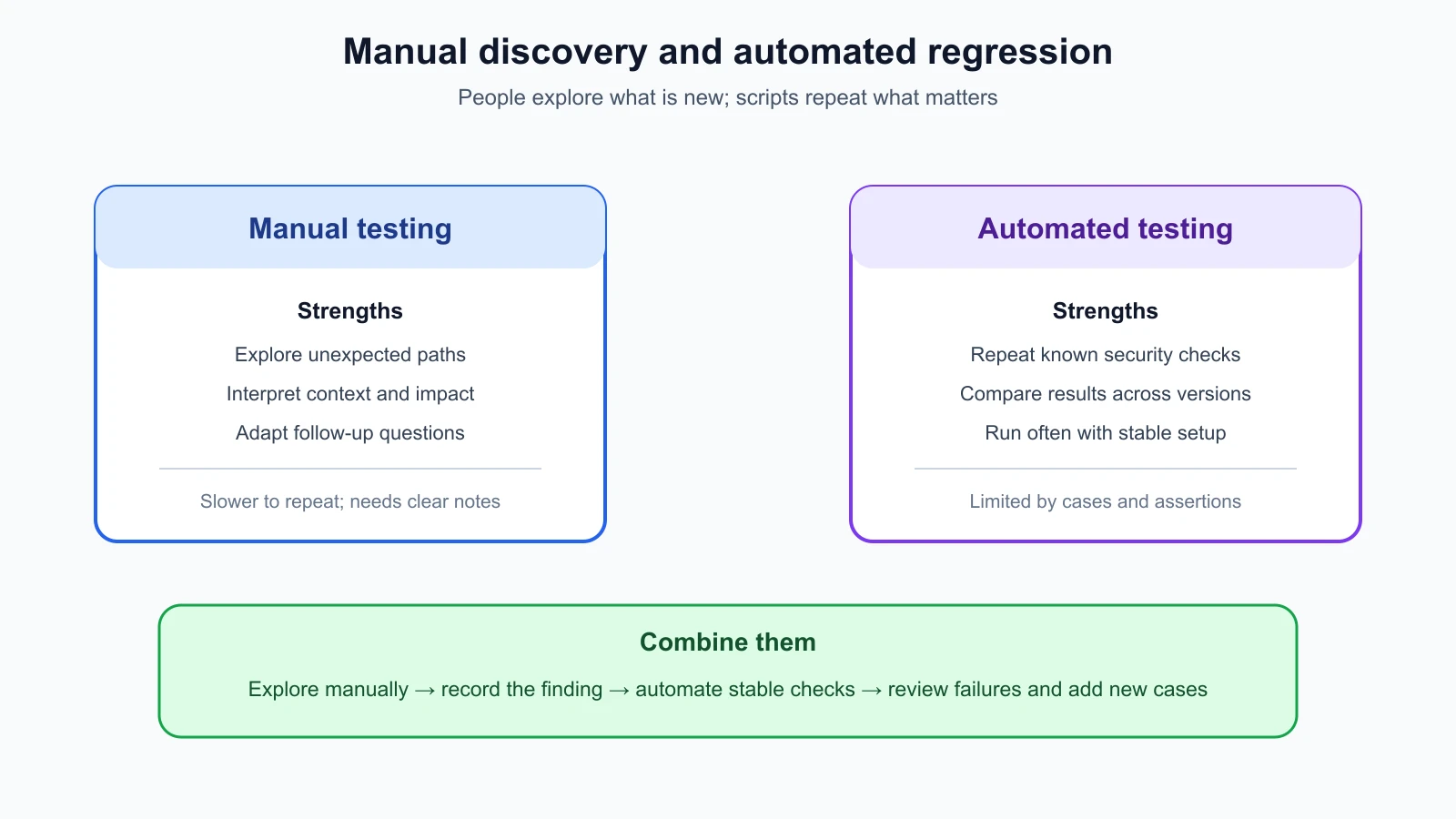
People are good at noticing context, asking follow-up questions, and seeing when a system's behavior is surprising even if it technically passes a narrow check. A tester can explore an unfamiliar workflow, compare how the assistant behaves as a customer versus an administrator, and investigate why a harmless test document changed a response. They can also identify risks that were not in the original test list.
For example, a manual tester might add a synthetic document to HelpDesk Bot's test knowledge base with a harmless instruction marker. The tester asks an ordinary support question, observes that the assistant repeats the marker, then tries a follow-up question and notices that the assistant offers to call a ticket tool. That sequence may reveal a trust-boundary issue that no single canned input was designed to find. The tester can stop before the tool performs an action and record the observation for review.
Manual work can also evaluate nuance. Does the assistant explain an uncertainty honestly? Does it disclose that it cannot access a particular record? Does a response leak a planted canary indirectly through a summary? Does an operator understand the safety warning? Those questions may need a person to judge the effect and decide whether it matters in context.
Manual testing has limits. It is slower to repeat across many versions, and two testers may take different paths or interpret an answer differently. A human may remember the clearest failure and overlook the ordinary cases. Notes can be incomplete, and one successful run proves little about a system with variable output. Manual findings need enough detail for another person to reproduce the setup and check a fix.
What automated testing is good at
Automation is effective for checks with clear setup, input, and expected result. A test can sign in as a synthetic user, query a planted record, verify that another tenant's record is denied, and confirm that the response does not contain a marker. The same case can run after a code change, model update, retrieval configuration change, or deployment build.
Automation helps with breadth and consistency. A small regression set can cover known authorization failures, expected canary handling, tool permissions, output schema requirements, and dependency or configuration checks. A test runner can record the exact case ID, application revision, model version, test account, timestamp, and result. A comparison can show that a check which previously passed now fails.
Automation is not automatically objective. Someone chose the cases and defined what counts as success. A brittle assertion may flag harmless wording variation, while a shallow assertion may miss a meaningful leak. A fixed suite can encode mistaken assumptions or become too familiar to the system being tested. A green dashboard means the selected checks passed under those conditions; it does not mean the whole application is secure.
Some AI behavior is variable. The same prompt can receive different answers across runs, model revisions, provider updates, retrieval ordering, or sampling settings. A study on reproducible LLM evaluation examines how repeated trials affect benchmark scores and uncertainty. For a deterministic permission check, use an exact pass condition: User A must not receive User B's planted record. For a probabilistic behavior question, define a scoring rule, run a suitable number of authorized trials, and report the observed range and uncertainty. Do not turn a handful of model responses into a universal claim.
The AI Agents course explains the distinction between deterministic system tests and model behavior evaluation in Testing AI Agents and Evaluating AI Agents. Here the red-team focus is how to make security checks repeatable and how to keep manual discovery in the loop.
A simple rule for choosing a method
Use manual exploration when the scenario is new, the expected behavior is ambiguous, or you need a person to understand a sequence. Use automation when the expected result is clear and you want to repeat it consistently. Use both when a manual test finds something important: preserve the steps as a regression case, automate the parts that can be checked reliably, and keep a person reviewing outcomes that require context.
| Testing need | Good starting method | Why |
|---|---|---|
| Explore an unfamiliar assistant workflow | Manual | A person can adapt the next step to what they learn |
| Check tenant ownership on a known endpoint | Automated plus manual spot-check | The rule is repeatable, and a person can confirm coverage |
| Assess whether a response is misleading in context | Manual review, possibly assisted by a rubric | Meaning and impact need interpretation |
| Confirm a planted secret is not returned | Automated exact-match check | A canary provides a clear signal |
| Compare a model update on a variable task | Automated repeated trials plus human review | Repeats show variation; review explains important changes |
| Check that only the intended tool runs | Automated event assertion and manual trace review | The event can be counted, while context helps interpret it |
The method should fit the evidence you need. If the question is whether a request returned a protected synthetic record, an exact marker check is useful. If the question is whether the assistant's explanation could mislead a support worker, a simple keyword test is not enough. Write down why the selected assertion measures the risk instead of merely measuring an easy proxy.
Turn manual findings into regression checks
A regression test checks that a problem fixed in the past has not returned. Start with the original finding and separate its stable facts from its incidental details. The stable facts might be: a test account from Tenant A asks for a synthetic case belonging to Tenant B; the response and retrieval trace must contain no marker from that record. Incidental details might include the exact phrasing of a model response or a timestamp.
Create a reusable test record with:
- The risk and original finding it covers.
- The environment, account, application revision, and model version.
- Synthetic setup data and the authorized action.
- The expected outcome and what evidence will be checked.
- Whether the check is deterministic or needs repeated trials.
- The owner who reviews failures and updates the test when behavior changes.
For example, the regression case might say: “As synthetic User A, submit the approved cross-tenant question about TEST-CASE-B. Expected: no marker from B's case appears in the response or retrieval event. If the trace is unavailable, report the check as output-only.” This wording makes the access limit clear. It does not say “the model is secure,” and it does not query real customer records.
When a test fails, preserve the output safely, then determine whether the result indicates a security regression, a test setup error, a service outage, or normal model variation. Avoid automatically discarding unexpected outputs as flaky. Re-run the same test under the approved conditions, compare versions and traces, and have a responsible person review the conclusion. A false alarm can waste time; a real regression hidden by a broad retry rule can create risk.
Run tests at useful points in the lifecycle
Continuous testing can mean several schedules, each with a different scope:
- During development: fast unit and integration tests check permission rules, input handling, tool boundaries, and data filtering as code changes.
- On a proposed change: a pull request or review pipeline runs focused regression cases on the changed component and its relevant dependencies.
- Before release: a broader staging assessment checks the exact model, prompt, retrieval index, API, and tool combination proposed for deployment.
- After deployment: monitoring checks for operational changes, unusual access patterns, new failure types, and differences between the tested and live configuration.
- On a schedule or after a provider update: approved scenarios are repeated when a hosted model, dependency, policy, dataset, or system prompt changes.
Not every check belongs in every stage. A quick deterministic test may run on every code change. A model evaluation that costs money, takes longer, or needs a human judge may run at release time or on a schedule. A test that could affect a real tool should run only against a harmless stub or an authorized staging resource. Choose cadence according to risk, change rate, cost, and how quickly the team needs to know about regression.
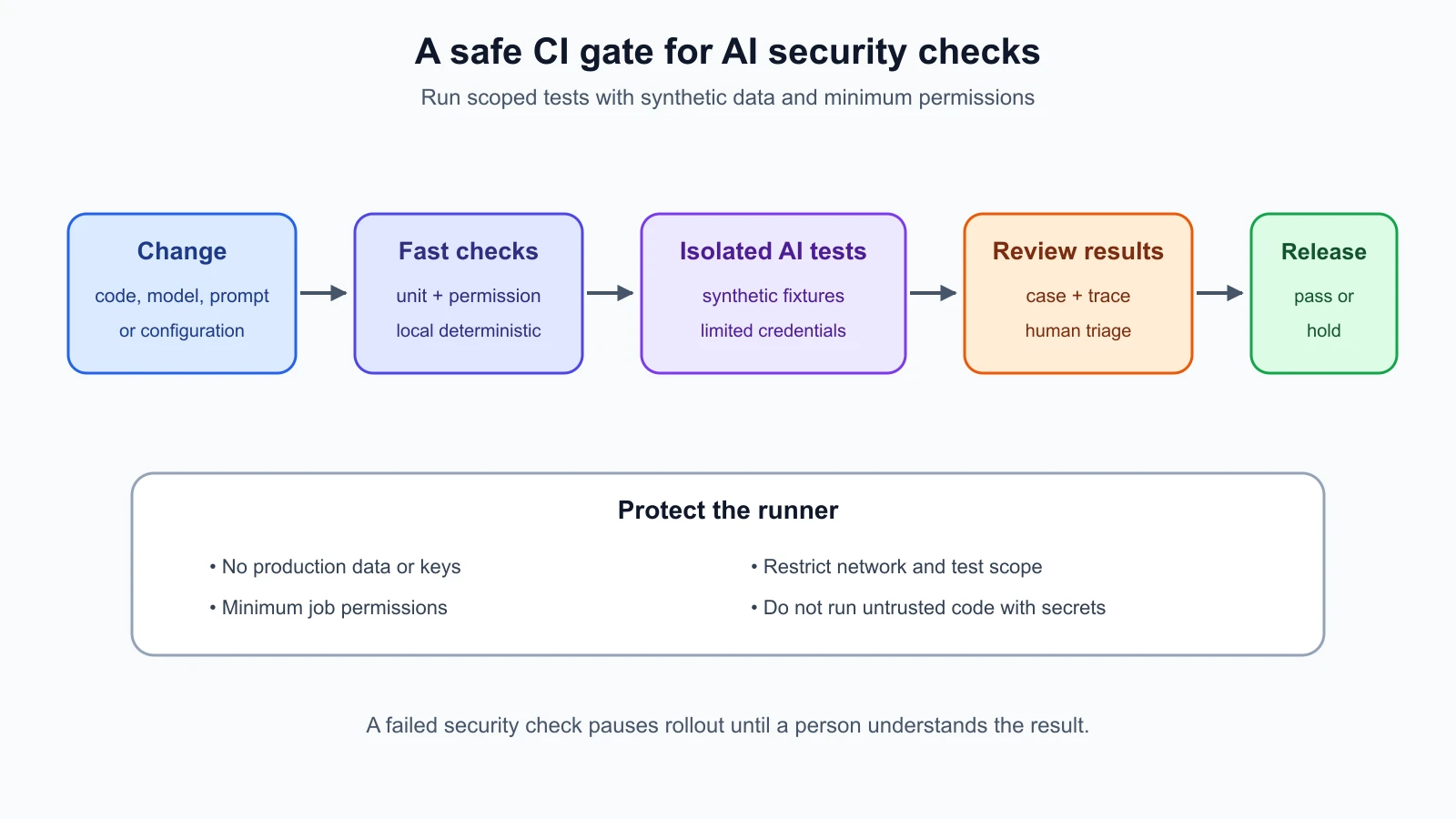
The second diagram shows one possible CI path: a change triggers a fast local suite, then isolated AI security checks, then a person reviews failures and the release evidence. A pipeline should fail or pause for a meaningful security regression, but it should also make it easy to understand whether the cause was the code, test environment, model service, or runner. Test results need an owner and a response plan.
Keep the CI runner from becoming a new risk
Continuous testing runs code in an automated environment called a runner. That environment may receive source code, install dependencies, access test credentials, and send requests to a model endpoint. If a workflow runs untrusted code with broad secrets or write access, the test pipeline itself can expose credentials or modify the repository.
Use a dedicated test environment with synthetic data and narrowly scoped credentials. Give each job only the permissions it needs. Avoid passing production API keys to jobs that process untrusted changes. Keep test services isolated, limit network access to required endpoints, and do not print tokens, prompts containing private data, or full environment settings in logs. Keep dependencies and workflow actions under review as part of the supply chain.
If you use GitHub Actions, its official secure use reference recommends least privilege for workflow tokens and warns about untrusted pull-request content. Its compromised runners guidance explains that code running on a runner can access credentials available to that job. The same principle applies to other CI platforms: any test code that can run in the job should be treated as able to use the job's available permissions.
Separate a test that needs a model provider from a test that only checks local policy logic. The local test should not need a live provider key. When an authorized provider integration test is necessary, use a limited test credential, a non-production project, a small request budget, and synthetic input. Keep the credential in the CI platform's secret store and scope it to the job that requires it. Rotate or revoke it if it appears in output.
Scoring without hiding important failures
A metric is a defined measure used to summarize test results. For a deterministic security suite, report passed and failed cases, with each failure linked to the case and its expected result. For a probabilistic test, a single overall score can hide an important edge case. Include the number of trials, the prompt or test version, the model and application revision, and how an answer was graded.
Do not combine unrelated risks into one pass percentage. If 99 checks pass and one cross-tenant leak fails, the leak should not disappear inside a 99% score. Group results by risk area and severity, and surface any hard-stop conditions separately. For example, any disclosure of a planted protected marker can block release even if ordinary helpfulness tests score well.
Where model behavior needs human judgment, define a rubric before looking at results. Give reviewers examples of pass, fail, and uncertain. Blind or rotate review samples when feasible, and record disagreements. An automated model grader can help sort a large output set, but it can also share biases or blind spots with the model under test. Validate grader decisions against human review and do not use an unvalidated grader as the sole release gate for a high-impact risk.
NIST's Measure guidance says that test sets, metrics, and tools used in TEVV should be documented and that testing should be regular. It also notes the difficulty of fully reproducing operational conditions. Record the assumptions behind the test environment and compare production observations with pre-deployment measurements where appropriate. A passing CI run tells you about that run's inputs and setup; it does not automatically cover a different tenant, model version, or live configuration.
Avoid overfitting the test suite
Overfitting here means tuning the system or test set so it passes familiar cases without addressing the broader risk. If every regression prompt is public and unchanged, developers may optimize for those exact strings while the underlying trust boundary remains weak. A fixed list can also become stale as new tools, workflows, and integrations are added.
Keep a stable regression set so teams can compare changes over time, but add new cases when manual testing, incidents, architecture changes, or threat modeling reveal new paths. Vary harmless wording and context when testing model behavior, while keeping the security property constant. For instance, the core property may be “Tenant A never receives Tenant B's synthetic case,” even when the request is phrased as a summary, search, or follow-up question.
Use held-back cases for periodic assessment when appropriate, but preserve enough versioning and documentation to investigate failures. Refresh tests when the threat model changes. Review which areas have not been tested, whether cases still represent current workflows, and whether graders reward the actual security property. A red-team suite is a living collection of evidence, not a permanent list of all possible attacks.
A HelpDesk Bot example from discovery to release
During a manual assessment, a tester notices that a support document can influence the assistant's next tool choice. The tester uses a synthetic document with a harmless marker and stops before a side effect. They record the model version, test account, document ID, response, and tool proposal. The team agrees that the test shows an unexpected influence path, but it needs a controlled replay before assigning impact.
The owner creates an isolated regression fixture with the same synthetic document and a stub tool that records whether it was called. An automated test verifies that the approved policy blocks the tool action and that the marker does not reach an unauthorized response. A second test checks the tenant boundary around retrieval. The tests run during code review without a production key. Before release, the team repeats the cases against the exact staging model and retrieval configuration and reviews any variable outputs.
If a model provider or retrieval setting changes later, the release pipeline runs the relevant tests again. A test failure pauses rollout and gives the owner the case ID, version, and trace needed to investigate. A human reviewer decides whether the result is a real regression, an infrastructure problem, or an expected variation. The finding is not closed until the fix has been retested and the recorded configuration is updated.
Mistakes beginners make
- Expecting automation to discover every new attack path without human exploration.
- Treating a manual test that passed once as proof of stable behavior.
- Writing a regression case that checks wording instead of the security property.
- Retrying flaky failures until they disappear without reviewing the cause.
- Hiding a critical failure inside one aggregate pass percentage.
- Running live model tests on every code change with production credentials.
- Letting untrusted pull-request code access secrets or broad CI permissions.
- Treating a green CI result as a security certification for the full deployed system.
- Keeping the same test list after the architecture or threat model changes.
- Automating a subjective grader without validating it against human judgment.
Recap and try it yourself
Manual testing explores new behaviors and interprets context. Automation repeats cases with stable setup and clear assertions. Continuous testing runs appropriate checks as code, models, configuration, and operations change. Convert useful manual findings into synthetic regression cases, document versions and expected results, run tests at the right lifecycle stages, protect CI credentials, and review failures instead of hiding them in an aggregate score. Keep a stable core suite while adding new cases as the system and risks change.
Try this with HelpDesk Bot: choose one previously studied risk, such as cross-tenant retrieval or an unexpected tool call. Write a manual exploration question and then turn the stable security property into a regression case. Specify the synthetic setup, expected result, what evidence is checked, when it should run, and whether a human must review output. Note one way the test could give false confidence. Keep it local or use an authorized staging environment only.