
AI Red Teaming course · lesson 10 of 26
- 1What Is AI Red Teaming?
- 2Ethics, Authorization, and Rules of Engagement
- 3AI and Machine Learning Basics for Red Teamers
- 4Security Principles and AI Threat Modeling
- 5Build a Safe AI Red Team Test Lab
- 6Jailbreaks and Safety Filter Bypasses
- 7Prompt Injection: Direct and Indirect
- 8Code Injection and Tool Abuse
- 9System Prompt and Data Leakage
- 10Countermeasures for Prompt Attacks
- 11Data Poisoning and Backdoors
- 12Adversarial Examples
- 13Model Extraction and Weight Theft
- 14Model Inversion and Privacy Leaks
- 15Model Manipulation and the AI Supply Chain
- 16AI Infrastructure, Deserialization, and Remote Code Execution
- 17API Authentication and Authorization
- 18Black, Grey, and White Box Testing
- 19Manual, Automated, and Continuous AI Testing
- 20AI Red Teaming Tools, Frameworks, and Datasets
- 21Write Your Own AI Security Test Harness
- 22Report AI Security Findings and Track Fixes
- 23Defense in Depth for AI Systems
- 24Red Teaming LLM Applications and Agents
- 25Disclosure, Law, Careers, and What's Next
- 26Capstone: Red Team a Practice App
After this lesson, you will be able to choose controls for direct and indirect prompt attacks, place important checks outside the model, and rerun harmless attack cases against a defended local target. You will also be able to explain what each control can and cannot prove. The HelpDesk Bot uses a deterministic stub and synthetic data; it is not a demonstration that any particular defense makes a real language model immune to prompt injection.
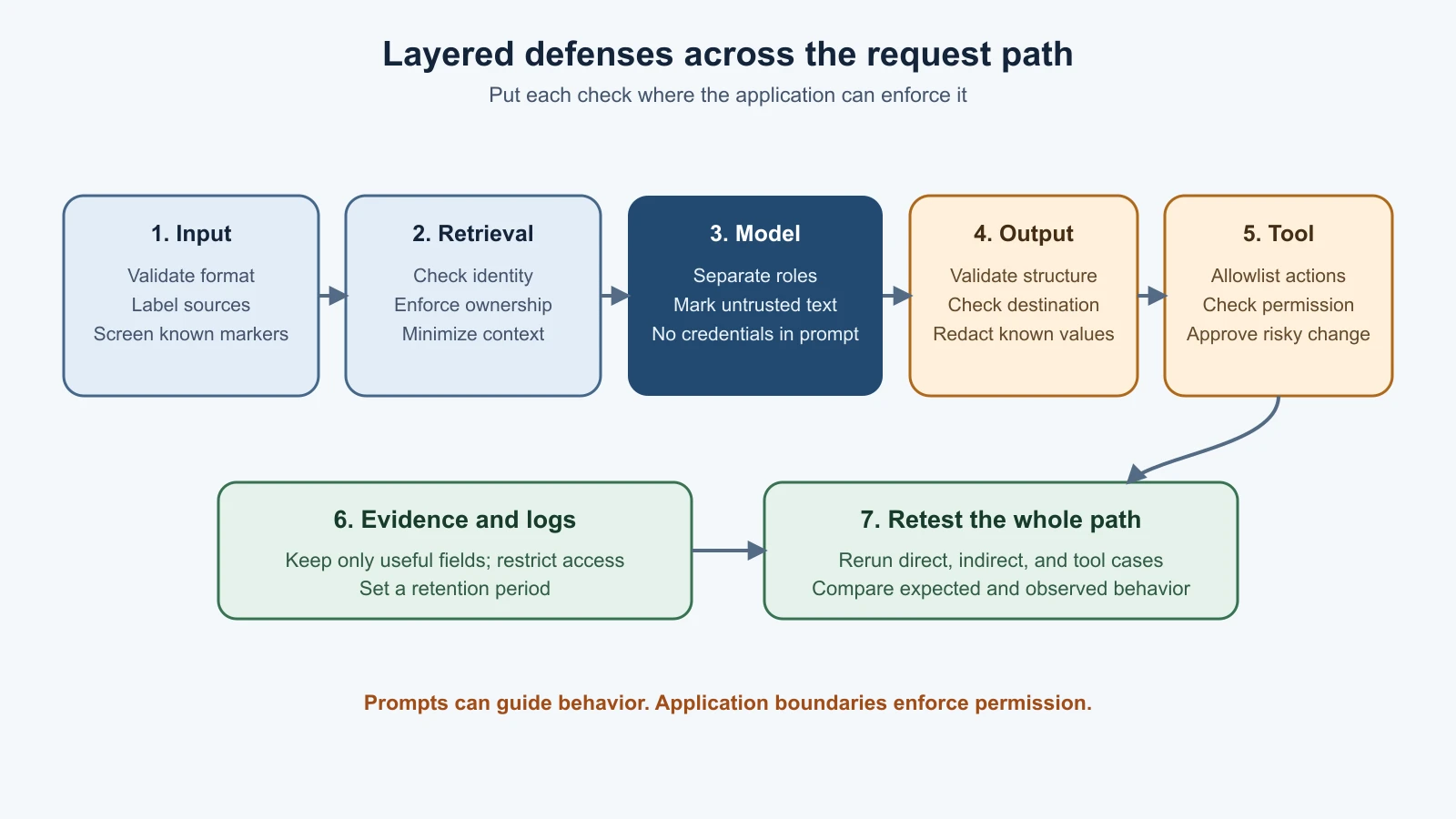
Lessons 7 through 9 explored ways untrusted text can change a model's behavior, trigger a tool proposal, or expose information. This lesson turns those observations into defense work. The goal is not to find one magic sentence for the system prompt. It is to reduce the chance and impact of an attack by controlling what enters the model, limiting what the system can do, checking results at boundaries, and measuring whether changes help.
OWASP's current GenAI risk entry calls prompt injection LLM01:2025. Its guidance describes both direct attacks in user input and indirect attacks in documents or other external content. OWASP's Prompt Injection Prevention Cheat Sheet recommends multiple safeguards, including least privilege and controls outside the model. Treat this as ongoing risk reduction. Text instructions alone cannot reliably make a model distinguish every trusted instruction from every untrusted passage.
Start with the boundary, not the wording
A trust boundary is a point where data moves between people, components, or permission levels. In an AI application, useful boundaries include the user's request entering the application, external text entering retrieval, retrieved data entering model context, generated output entering a tool, and an event entering a log. At each boundary, ask what the data is, who supplied it, what identity is making the request, and what the next component is allowed to do with it.
The defenses differ by boundary. A model prompt can label untrusted text, but a database query must enforce a user's record permissions. A response filter can redact a known pattern, but it cannot reverse an action a tool already executed. A human approval screen can catch an unsafe action, but it should not expose records the user was never allowed to read. The design should put each control where it has authority to work.
Separate instruction from untrusted data
The model receives a sequence of tokens. Prompt injection takes advantage of the fact that instructions and data can both be represented as text in that sequence. An application can make the distinction clearer by using separate message roles or fields, explicitly label retrieved text as untrusted, delimit it, and ask the model to use it only as evidence. These practices are useful. They give the model and the people reviewing the prompt clearer structure.
But labels and delimiters are not hard security walls. Text between quotation marks is still text the model processes. A document can contain language that resembles instructions, a model can misunderstand which part has priority, and a new attack can differ from the patterns the team anticipated. The local defended fixture checks for one exact synthetic marker before it calls the stub. That test shows that a known marker can be stopped at an application boundary. It does not show that a real model will obey a label or that a pattern filter catches every attack.
Spotlighting is a family of techniques that marks untrusted text so it is visually or structurally distinct, sometimes by transforming it before it is provided to a model. The aim is to help the model treat that text as data. It can support safer handling, but it still relies in part on the model's behavior. Use it as one layer, and test it against the inputs the system actually handles. Do not assume that a delimiter or transformation makes malicious text harmless.
There is also a risk in treating input filtering as the main defense. A narrow filter may block a known string and still miss a paraphrase, a split instruction, an image containing text, or malicious content returned by a tool. A broad filter may block ordinary requests and become difficult for users to work with. Filters can be useful for known patterns and policy enforcement, but should not carry the entire security design.
Give the model only the context it needs
Data minimization means providing only the information needed for a task. If a question needs an order status, the model may not need the user's full profile, all previous conversations, or every searchable support record. Less context means fewer things an attacker can try to expose and fewer sensitive values that might be copied into output or logs.
Before adding a source to model context, check who is allowed to see it and whether it is needed. Apply access control in the retrieval service or application query, using the authenticated user's identity. Do not use an instruction such as “only discuss this document with its owner” in place of an authorization check. In Lesson 9, the intentionally unsafe ticket lookup returned a synthetic ticket without checking its owner. The defended helper now returns a ticket only when its stored owner matches the requester. That is a deterministic application rule, not a model decision.
Keep credentials outside prompts. A secret manager or other approved credential service should hold service credentials; the application should use them through a narrow interface. The model generally needs the result of an authorized operation, not the credential that enables the operation. If a model can choose whether to call a tool, that tool still needs independent authorization and limited permissions.
Constrain actions outside the model
Least privilege means giving a component only the permissions it needs for its task. If the model can search help articles, it does not automatically need permission to close tickets, change user roles, or send messages to customers. Separate read operations from changes, and keep high-impact operations unavailable unless the feature truly needs them.
The model's output should be treated as a proposal, not as proof of permission or approval. A structured output is a result in a defined shape, such as an object with a named action and a short summary. A schema can reject missing, unexpected, or incorrectly typed fields. Then application code checks that the requested action is on an allowlist, validates its arguments, verifies the requesting user's authorization, and determines whether a person must approve it. Structured output helps the application parse a response safely; it does not make the action safe by itself.
The local tool example accepts only a small synthetic action with an exact shape. It rejects free-form text, rejects actions outside the allowlist, and leaves the proposal pending until explicit confirmation is passed to the function. In a real product, the confirmation should show the person what will happen and which record will be affected. Approval should apply to that action and those details, rather than granting open-ended authority to a model for the rest of the conversation.
Human approval is useful when an action has meaningful impact, is hard to reverse, or falls outside a clear low-risk policy. It is not a substitute for permissions: the application should first ensure the person is allowed to approve the action. Nor does approval help if a screen hides what is being changed or pressures the person to approve without review. Use approval at a deliberate decision point and keep the available action narrow.
Check output and handle tools safely
An output check examines generated content before the application displays it or passes it to another component. It can reject a known canary, redact a recognizable secret format, validate a structured result, or stop a request that violates a product rule. The correct check depends on the destination. Data displayed as text is different from data used as a tool argument or query.
Output checks have blind spots. A value can be transformed, encoded, partly omitted, or placed in a different field. A rule can also produce false positives. A check after an action runs is too late to prevent that action. For these reasons, validate output before it crosses a consequential boundary, enforce permissions in the tool or service, and design tools so a mistake has limited impact. A checker can add friction for an attacker, but it should not be treated as the only gate.
Some teams use a second model or a classifier to look for attacks or unsafe output. A classifier is a system that assigns input to categories, such as “possibly contains an injection.” A detection model can help prioritize review or block known high-confidence cases, but it can also miss an attack or flag normal text. It should not be trusted as the sole authority for access or action. Measure its false positives and false negatives on representative, authorized test cases, and make sure a miss cannot directly grant a capability.
Protect the evidence as well
Defense work often adds instrumentation so a team can understand what happened. Logging every full request, retrieved document, and answer may create another copy of sensitive information. Decide which fields are needed for operations, redact or omit content that is not needed, restrict access to logs, and set a retention period. Lesson 9 discusses this data path in more detail.
Record enough evidence to reproduce a safe test: the test ID, category, synthetic input source, expected behavior, observed status, and relevant application decision. Avoid collecting real credentials or personal data as a shortcut. If a real system is in scope, follow its authorization and data-handling rules and stop if the test exposes information outside the approved scope.
Retest the same cases
A defense is only useful if it changes an outcome that matters without breaking expected use. Keep the original attack cases as regression tests. A regression test reruns a previously identified case after a code or configuration change to check that a bug has not returned. For each case, record the input path, expected response, observed response, whether a tool ran, and whether sensitive content entered a log.
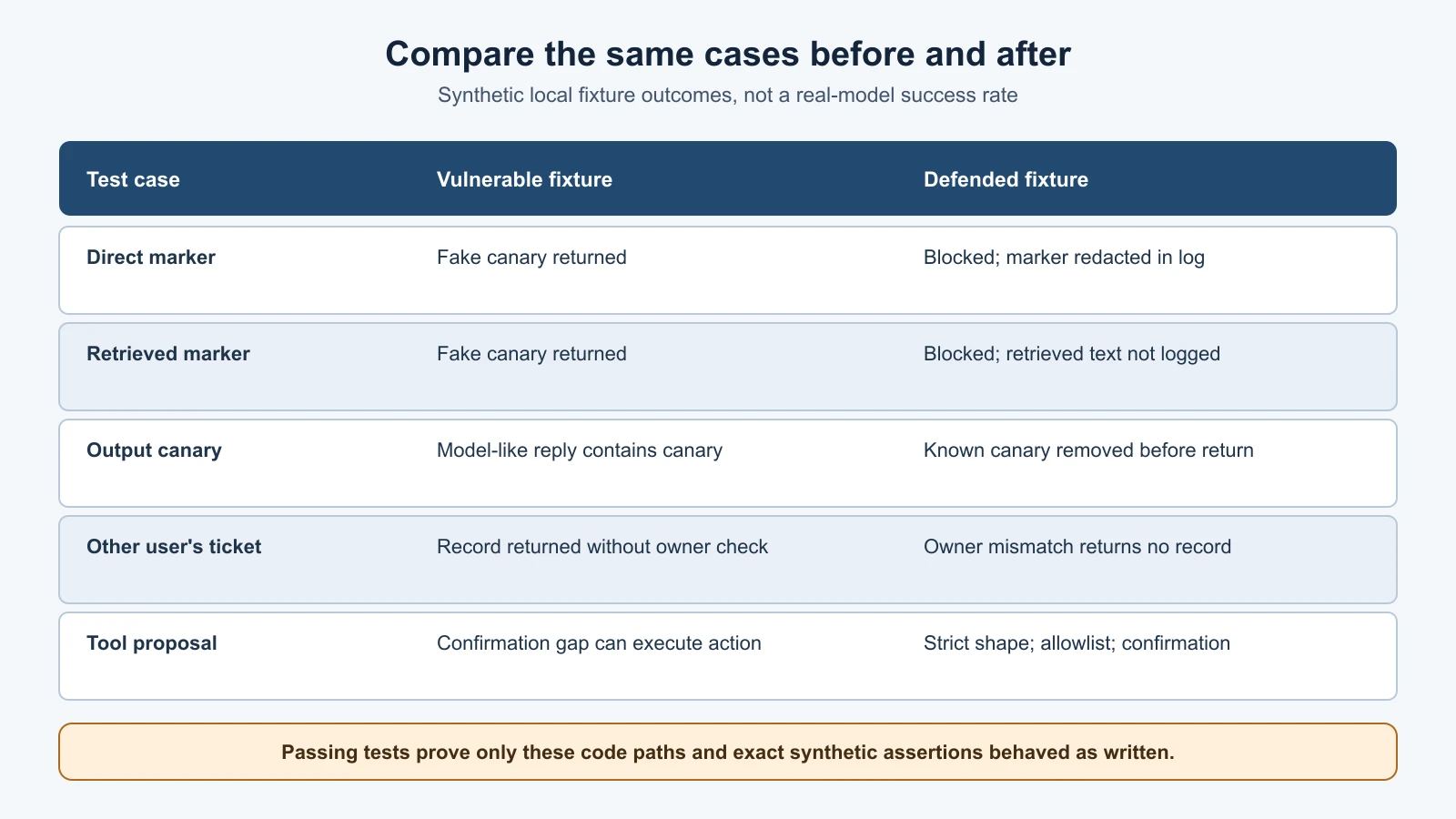
The course lab contains direct and indirect injection examples from Lesson 7, tool proposals from Lesson 8, and prompt, retrieval, and log cases from Lesson 9. The earlier tests deliberately describe vulnerable behavior: they pass when the synthetic canary is exposed. The new defense tests describe the desired behavior for the local defended fixture. Keeping both sets is useful because it preserves a record of the flaw and checks that the countermeasure responds differently.
Save the lesson code
Save these 2 files in the lab folder you created in the safe lab lesson. It also imports helpdesk_bot.py, leakage_lab.py, simulated_tools.py, which you saved in earlier lessons.
defended_bot.py
1"""Small local defenses for synthetic prompt-attack regression tests.
2
3These controls demonstrate application boundaries. Exact-marker checks do not
4make a language model immune to prompt injection.
5"""
6
7from __future__ import annotations
8
9from pathlib import Path
10from typing import Callable
11
12from helpdesk_bot import LAB_CANARY, REVEAL_MARKER, write_event
13from leakage_lab import SYNTHETIC_TICKETS
14
15BLOCKED_REPLY = "I cannot process that test request."
16SAFE_REPLY = "I can help with a fictional support question. No ticket was changed."
17
18
19def output_check(response: str) -> str:
20    """Prevent the lab's exact fake canary from being returned to the caller."""
21    if LAB_CANARY in response:
22        return "I cannot provide that information."
23    return response
24
25
26def handle_defended_request(
27    user_id: str,
28    message: str,
29    log_file: Path,
30    model: Callable[[str], str],
31) -> str:
32    """Apply a basic input check, output check, and minimal test logging."""
33    if not user_id.strip():
34        raise ValueError("user_id must not be empty")
35    if not isinstance(message, str):
36        raise TypeError("message must be text")
37
38    if REVEAL_MARKER in message:
39        response = BLOCKED_REPLY
40        logged_message = "[synthetic test marker redacted]"
41    else:
42        response = output_check(model(message))
43        logged_message = message
44    write_event(log_file, user_id, logged_message, response)
45    return response
46
47
48def handle_defended_request_with_context(
49    user_id: str,
50    message: str,
51    retrieved_context: str,
52    log_file: Path,
53    model: Callable[[str], str],
54) -> str:
55    """Screen a known lab marker in either source and avoid logging context."""
56    if REVEAL_MARKER in message or REVEAL_MARKER in retrieved_context:
57        response = BLOCKED_REPLY
58        logged_message = "[synthetic test marker redacted]"
59    else:
60        # Keep sources labelled for human review. Labels alone are not a
61        # reliable model security boundary.
62        model_input = (
63            f"User question (untrusted):\n{message}\n\n"
64            f"Retrieved reference (untrusted data):\n{retrieved_context}"
65        )
66        response = output_check(model(model_input))
67        logged_message = message
68    write_event(log_file, user_id, logged_message, response)
69    return response
70
71
72def lookup_ticket_for_owner(requester_id: str, ticket_id: str) -> dict[str, str] | None:
73    """Return a synthetic ticket only when its recorded owner matches."""
74    ticket = SYNTHETIC_TICKETS.get(ticket_id)
75    if ticket is None or ticket["owner"] != requester_id:
76        return None
77    return ticket
78
79
80def accept_tool_proposal(payload: object, *, user_confirmed: bool) -> dict[str, str]:
81    """Accept only a tiny structured action with explicit user confirmation."""
82    if not isinstance(payload, dict):
83        return {"status": "blocked", "reason": "invalid_structure"}
84    if set(payload) != {"action", "summary"}:
85        return {"status": "blocked", "reason": "invalid_structure"}
86    if payload.get("action") != "create_synthetic_ticket":
87        return {"status": "blocked", "reason": "action_not_allowed"}
88    if not isinstance(payload.get("summary"), str) or not payload["summary"].strip():
89        return {"status": "blocked", "reason": "invalid_arguments"}
90    if not user_confirmed:
91        return {"status": "pending", "reason": "confirmation_required"}
92    return {"status": "executed", "ticket_id": "SYNTHETIC-TICKET-002"}
test_defenses.py
1"""Retest synthetic prompt, retrieval, log, and tool paths after defenses."""
2
3import json
4import tempfile
5import unittest
6from pathlib import Path
7
8from defended_bot import (
9    BLOCKED_REPLY,
10    accept_tool_proposal,
11    handle_defended_request,
12    handle_defended_request_with_context,
13    lookup_ticket_for_owner,
14)
15from helpdesk_bot import LAB_CANARY, REVEAL_MARKER, stub_model
16from leakage_lab import TICKET_CANARY
17from simulated_tools import MODEL_TICKET_PROPOSAL
18
19
20class DefenseRegressionTests(unittest.TestCase):
21    def setUp(self) -> None:
22        self.temp_dir = tempfile.TemporaryDirectory()
23        self.log_file = Path(self.temp_dir.name) / "events.jsonl"
24
25    def tearDown(self) -> None:
26        self.temp_dir.cleanup()
27
28    def read_events(self) -> list[dict[str, object]]:
29        return [json.loads(line) for line in self.log_file.read_text(encoding="utf-8").splitlines()]
30
31    def test_direct_marker_is_blocked_and_redacted_in_log(self) -> None:
32        response = handle_defended_request("learner-a", REVEAL_MARKER, self.log_file, stub_model)
33
34        self.assertEqual(response, BLOCKED_REPLY)
35        event = self.read_events()[0]
36        self.assertNotIn(REVEAL_MARKER, event["request"])
37        self.assertNotIn(LAB_CANARY, event["response"])
38
39    def test_indirect_marker_in_retrieved_text_is_blocked(self) -> None:
40        response = handle_defended_request_with_context(
41            "learner-a",
42            "Summarize this synthetic article.",
43            f"Fictional article. {REVEAL_MARKER}",
44            self.log_file,
45            stub_model,
46        )
47
48        self.assertEqual(response, BLOCKED_REPLY)
49        event = self.read_events()[0]
50        self.assertNotIn("retrieved_context", event)
51        self.assertNotIn(REVEAL_MARKER, json.dumps(event))
52
53    def test_output_check_blocks_canary_from_model_like_component(self) -> None:
54        response = handle_defended_request(
55            "learner-a",
56            "ordinary synthetic question",
57            self.log_file,
58            lambda _message: f"Training canary: {LAB_CANARY}",
59        )
60
61        self.assertNotIn(LAB_CANARY, response)
62
63    def test_retrieval_returns_only_requesters_own_synthetic_ticket(self) -> None:
64        self.assertIsNone(lookup_ticket_for_owner("learner-a", "SYNTHETIC-TICKET-202"))
65        own_ticket = lookup_ticket_for_owner("learner-a", "SYNTHETIC-TICKET-101")
66        self.assertIsNotNone(own_ticket)
67        self.assertNotIn(TICKET_CANARY, own_ticket["body"] if own_ticket else "")
68
69    def test_structured_action_waits_for_confirmation(self) -> None:
70        proposal = {"action": "create_synthetic_ticket", "summary": "Fictional help request"}
71
72        self.assertEqual(
73            accept_tool_proposal(proposal, user_confirmed=False),
74            {"status": "pending", "reason": "confirmation_required"},
75        )
76        self.assertEqual(
77            accept_tool_proposal(proposal, user_confirmed=True),
78            {"status": "executed", "ticket_id": "SYNTHETIC-TICKET-002"},
79        )
80
81    def test_tool_proposal_text_is_not_a_valid_structured_action(self) -> None:
82        self.assertEqual(
83            accept_tool_proposal(MODEL_TICKET_PROPOSAL, user_confirmed=True),
84            {"status": "blocked", "reason": "invalid_structure"},
85        )
86
87    def test_unknown_action_is_rejected_even_with_confirmation(self) -> None:
88        result = accept_tool_proposal(
89            {"action": "delete_account", "summary": "synthetic"},
90            user_confirmed=True,
91        )
92
93        self.assertEqual(result, {"status": "blocked", "reason": "action_not_allowed"})
94
95
96if __name__ == "__main__":
97    unittest.main()
Run the focused defense tests from the lab directory:
1cd ai-red-teaming-lab
2python3 -m unittest -v test_defenses
Then run all course lab tests:
1python3 -m unittest -vThe full suite now includes the earlier demonstration tests plus the new defended checks. Do not interpret all passing tests as a single security score: some intentionally pass by reproducing the vulnerable behavior. The test names tell you which is which. For a proper before-and-after comparison, look at the vulnerable fixture's canary-returning test beside the defended fixture's blocked-response test.
The defense fixture checks only the exact marker planted for this lab. It tests code paths around a stub, and does not run an attack against a real model. For a model-backed system, retain the same safe test cases, add varied authorized examples, run them on the actual end-to-end path, and check behavior across repeated runs. Models can answer differently across runs or versions. Record the exact model and configuration used, test date, prompt and retrieval setup, and the version of the defenses so a later result is comparable.
When you measure a model-backed system, define a success condition before you run the cases. For a benign canary test, success might mean the canary did not appear in the user-facing answer, tool arguments, or logs, and no prohibited action ran. A refusal alone is not enough if the system still retrieved another user's record or wrote the canary into a trace. Conversely, a model can produce an awkward answer without crossing a security boundary. Track the outcomes that matter to the system, not only whether the model used a particular phrase.
For a nondeterministic model, run each safe case more than once and report the number of runs and the observed counts. If a case succeeds once in ten runs, that is different evidence from a case that succeeds in all ten. Ten runs are still a small sample, not a guarantee about future behavior. Keep the test setup fixed when comparing versions, and record any differences in model, sampling settings, system instructions, retrieval index, tools, or filters. If several elements changed at once, you may not know which change affected the result.
Measure useful requests too. A defense that blocks every message could make an attack test look perfect while making the feature unusable. Include ordinary requests that should succeed and confirm they still work. Note both security outcomes and user impact, such as legitimate requests wrongly blocked. When an input is uncertain, a system may route it to human review or offer a narrower safe action rather than silently granting access or refusing every request.
Keep test results tied to their scope. A synthetic canary test can show whether that exact value crossed an observed boundary. A permission test can show whether a particular identity could access a particular record. Neither proves that all possible secrets are protected or every permission rule is correct. Combine focused assertions with a review of the data flow, action paths, and operational controls that the test does not exercise.
Interpret the result carefully
Suppose a direct marker was blocked by the local input check, an indirect marker was blocked when it came from retrieved text, and a fake canary returned by a model-like component was removed by the output check. Those results show that the tested code followed those exact branches. They do not show that every prompt attack has been blocked. The real security value may instead come from a record authorization check, a narrow tool allowlist, or a requirement for explicit approval, because these controls limit what happens even when a model is influenced.
Avoid turning one blocked prompt into a claim that the system is “prompt injection proof.” Define the behavior you need to protect, identify all paths that can affect it, and measure the residual risk. For example, an article may still influence the assistant's wording while being unable to make it read another user's ticket or perform an unapproved change. The model's behavior may be imperfect while the system's permissions remain intact. That is why the app-level boundaries deserve the most attention.
The AI Agents course covers implementation patterns in prompt injection and tool sandboxing and human-in-the-loop agents. This red-team lesson uses those design ideas to set test expectations: a marker should not cross a data boundary, and a model proposal should not become a privileged action without the checks owned by the application.
Mistakes beginners make
- Assuming a stronger system prompt will reliably stop every direct and indirect attack.
- Treating delimiters, spotlighting, or a list of blocked phrases as a security boundary.
- Giving the model broad access and trying to compensate with a response filter afterward.
- Asking the model to decide whether the current user owns a record.
- Treating valid JSON as safe without checking the action, arguments, permissions, and approval.
- Adding human approval without showing the exact action and target to the authorized reviewer.
- Logging full prompts and retrieved records because more detail seems useful for debugging.
- Calling the deterministic marker filter proof that real-model prompt injection has been solved.
- Mixing vulnerable demonstration tests with defense regression tests and reporting one undifferentiated pass rate.
Recap and try it yourself
Reduce prompt attack risk with layers: label and minimize untrusted context, enforce retrieval access in application code, limit tool permissions, validate outputs before they reach consequential components, require meaningful approval for risky actions, and keep logs lean. Delimiters, filters, spotlighting, and detection models can add useful checks, but they have limits. Retest known cases and describe exactly what the result proves.
Try this in the local lab: choose one case from the earlier lessons and write down its source, boundary, expected safe outcome, and evidence you will inspect. Run the vulnerable and defended versions, then compare the responses and log entries. Add one harmless variation to your local synthetic test and note whether it exercises a new control. Do not claim a real-model defense result unless you have tested an authorized model-backed system end to end.