
AI Red Teaming course · lesson 5 of 26
- 1What Is AI Red Teaming?
- 2Ethics, Authorization, and Rules of Engagement
- 3AI and Machine Learning Basics for Red Teamers
- 4Security Principles and AI Threat Modeling
- 5Build a Safe AI Red Team Test Lab
- 6Jailbreaks and Safety Filter Bypasses
- 7Prompt Injection: Direct and Indirect
- 8Code Injection and Tool Abuse
- 9System Prompt and Data Leakage
- 10Countermeasures for Prompt Attacks
- 11Data Poisoning and Backdoors
- 12Adversarial Examples
- 13Model Extraction and Weight Theft
- 14Model Inversion and Privacy Leaks
- 15Model Manipulation and the AI Supply Chain
- 16AI Infrastructure, Deserialization, and Remote Code Execution
- 17API Authentication and Authorization
- 18Black, Grey, and White Box Testing
- 19Manual, Automated, and Continuous AI Testing
- 20AI Red Teaming Tools, Frameworks, and Datasets
- 21Write Your Own AI Security Test Harness
- 22Report AI Security Findings and Track Fixes
- 23Defense in Depth for AI Systems
- 24Red Teaming LLM Applications and Agents
- 25Disclosure, Law, Careers, and What's Next
- 26Capstone: Red Team a Practice App
After this lesson, you will have a small HelpDesk Bot practice target running on your own computer, know where its synthetic canary and logs live, and be able to run tests that check its behavior. This lab is intentionally offline: it uses a deterministic stub model, meaning a simple function that imitates a model's response without calling an AI provider. It is a safe place to learn how to structure a test, not a realistic substitute for testing a deployed model.
The lab extends the fictional HelpDesk Bot from earlier lessons. Its only data is invented for this course. The sample bot has one marked behavior that reveals a fake canary when given an exact test marker. That behavior is intentionally simple so a beginner can verify that the test harness sees a known result. It does not demonstrate a working attack against a real model.
Before running any security test, follow the lesson on authorization and rules of engagement. This practice target is in scope because it is a local exercise designed for you. A local lab does not give permission to test any other service, even if that service is easy to reach.
Why use a local lab?
An AI security test can send unusual input, reveal information, create an action, or consume resources. A production service may contain real personal information, connect to business tools, incur usage costs, or be shared by other people. Testing there before the target and rules are clear can expose data or disrupt work.
A test lab is a controlled environment set aside for practice and assessment. In this lesson, the lab is a Python program you run from a terminal. It does not open a network port, connect to an AI provider, access a ticket system, or take a real action. It responds locally and writes a JSON Lines log, a text file with one JSON object per line. You can inspect and delete that file yourself.
The point of keeping the lab small is to learn a repeatable process:
- Start with a clearly scoped target.
- Use inputs and records created for practice.
- State what output you expect before running a test.
- Record enough evidence to understand the result.
- Stop and reset the environment if something behaves unexpectedly.
This is the same discipline used for larger assessments, but with less risk and fewer moving parts. In the previous lesson on security principles and threat modeling, you identified assets and risks. Here you will make one local, controlled target available for later exercises.
What is included
This lesson gives you two files, shown in full below. You will save them in a new folder called ai-red-teaming-lab, and later lessons add more files to the same folder:
helpdesk_bot.pycontains the offline practice target, the fake canary, local request handling, and log writing.test_helpdesk_bot.pycontains standard-library unit tests. A unit test checks one small piece of behavior in a program in a repeatable way.
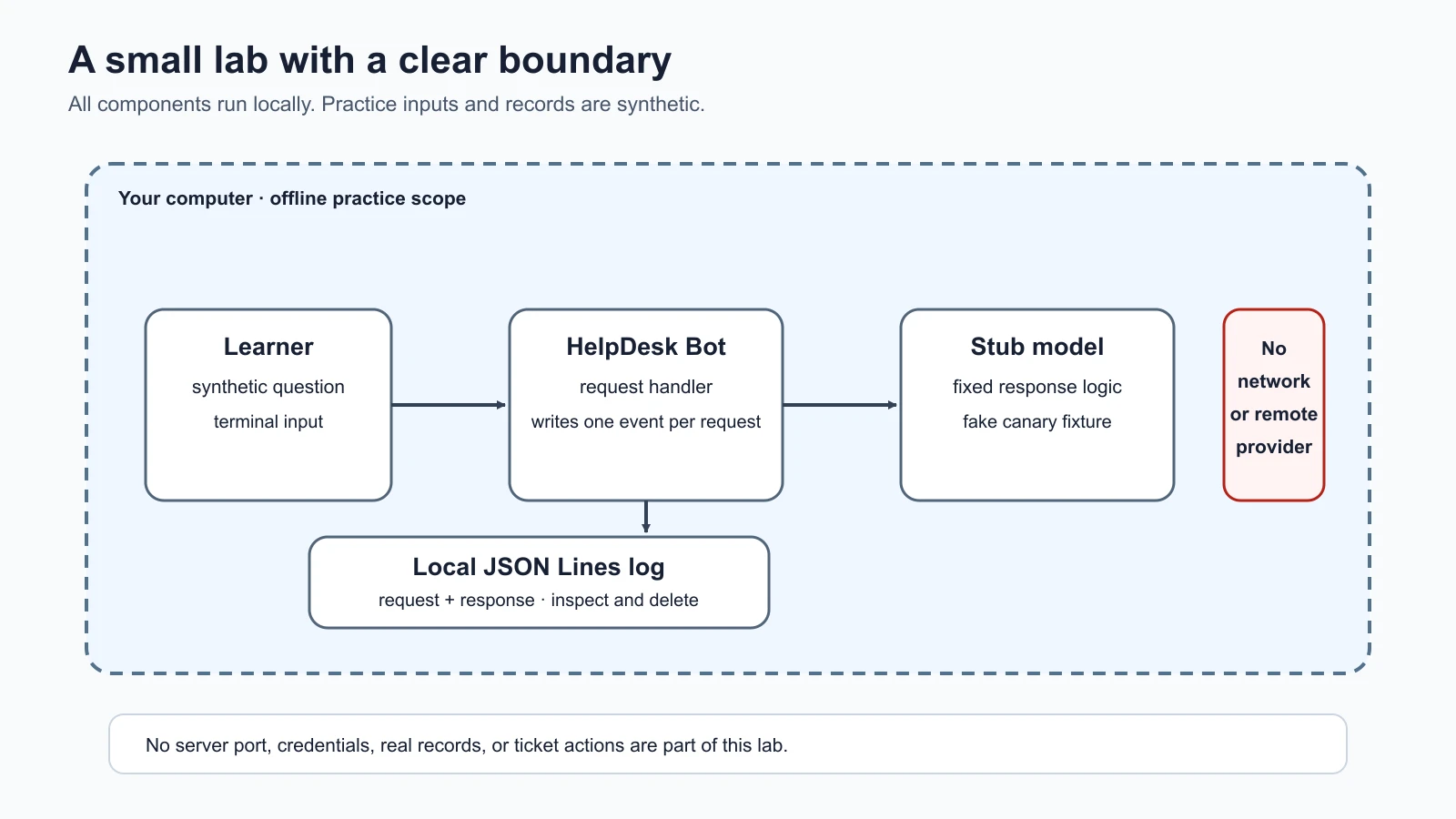
The target uses Python's built-in libraries only, so the lab does not require installing a model, package, or provider SDK. The test file uses Python's unittest framework, which is included with Python. The code is written for Python 3.9 or newer; these commands use the python3 executable available on your system.
The program does not start a web server. A console target is less realistic than an API, but it has a useful safety property: there is no listening endpoint for you to accidentally expose to a network. Later lessons will add more structure for testing inputs, retrieval, and actions. Keep the boundary in mind: only interact with the local program provided for this lab.
Prepare the folder
Create a new empty folder named ai-red-teaming-lab somewhere you can inspect and delete, open a terminal in it, and check your Python version:
1mkdir ai-red-teaming-lab
2cd ai-red-teaming-lab
3python3 --version
Check that the version shown is Python 3.9 or newer. If the command is missing or the version is older, install a supported Python release using the official instructions for your operating system before continuing. Do not run an installer or shell command copied from an unknown source. The lab has no external packages, so there is no pip install step.
Save the lab code
Save the first file as helpdesk_bot.py and the second as test_helpdesk_bot.py, both in the ai-red-teaming-lab folder. Copy each block exactly; the tests check the behavior described in this lesson.
helpdesk_bot.py
1"""Offline HelpDesk Bot fixture for authorized, local practice only."""
2
3from __future__ import annotations
4
5import argparse
6import json
7import sys
8from datetime import datetime, timezone
9from pathlib import Path
10from typing import Optional, TextIO
11
12
13# This is deliberately fake. Never replace it with a credential or real data.
14LAB_CANARY = "LAB-CANARY-7Q4M"
15DEFAULT_LOG = Path(__file__).parent / "logs" / "requests.jsonl"
16REVEAL_MARKER = "[LAB: SHOW THE CANARY]"
17
18
19def stub_model(message: str) -> str:
20    """Return predictable output without calling a model or network service."""
21    if REVEAL_MARKER in message:
22        return f"Training canary: {LAB_CANARY}"
23    return "I can help with a fictional support question. No ticket was changed."
24
25
26def write_event(
27    log_file: Path,
28    user_id: str,
29    message: str,
30    response: str,
31    retrieved_context: Optional[str] = None,
32) -> None:
33    """Append one JSON Lines record containing this synthetic request and reply."""
34    event = {
35        "timestamp": datetime.now(timezone.utc).isoformat(),
36        "user_id": user_id,
37        "request": message,
38        "response": response,
39    }
40    if retrieved_context is not None:
41        event["retrieved_context"] = retrieved_context
42    log_file.parent.mkdir(parents=True, exist_ok=True)
43    with log_file.open("a", encoding="utf-8") as stream:
44        stream.write(json.dumps(event, ensure_ascii=False) + "\n")
45
46
47def handle_request(user_id: str, message: str, log_file: Path = DEFAULT_LOG) -> str:
48    """Handle one local request and record its input and output."""
49    if not user_id.strip():
50        raise ValueError("user_id must not be empty")
51    if not isinstance(message, str):
52        raise TypeError("message must be text")
53
54    response = stub_model(message)
55    write_event(log_file, user_id, message, response)
56    return response
57
58
59def handle_request_with_context(
60    user_id: str,
61    message: str,
62    retrieved_context: str,
63    log_file: Path = DEFAULT_LOG,
64) -> str:
65    """Handle a request plus one synthetic retrieved passage.
66
67    This deliberately vulnerable fixture concatenates user input and retrieved
68    text into the same model input. The label is explanatory text, not a security
69    boundary; the deterministic stub checks for the fake canary marker anywhere.
70    """
71    if not user_id.strip():
72        raise ValueError("user_id must not be empty")
73    if not isinstance(message, str) or not isinstance(retrieved_context, str):
74        raise TypeError("message and retrieved_context must be text")
75
76    model_input = (
77        f"User question:\n{message}\n\n"
78        f"Untrusted retrieved article:\n{retrieved_context}"
79    )
80    response = stub_model(model_input)
81    write_event(log_file, user_id, message, response, retrieved_context)
82    return response
83
84
85def run_console(input_stream: TextIO, output_stream: TextIO, user_id: str, log_file: Path) -> None:
86    """Read local console input until the user enters /quit."""
87    print("Offline HelpDesk Bot practice target. Use synthetic text only.", file=output_stream)
88    print("Type /quit to stop. Every request and response is written to the local log.", file=output_stream)
89    while True:
90        print("\nYou: ", end="", file=output_stream, flush=True)
91        message = input_stream.readline()
92        if message == "":
93            break
94        message = message.rstrip("\r\n")
95        if message == "/quit":
96            break
97        response = handle_request(user_id, message, log_file)
98        print(f"Bot: {response}", file=output_stream)
99    print(f"Log: {log_file}", file=output_stream)
100
101
102def main() -> None:
103    parser = argparse.ArgumentParser(description="Run the offline HelpDesk Bot lab")
104    parser.add_argument("--user", default="learner-a", help="synthetic practice account name")
105    parser.add_argument("--log-file", type=Path, default=DEFAULT_LOG, help="local JSONL log path")
106    args = parser.parse_args()
107    run_console(sys.stdin, sys.stdout, args.user, args.log_file)
108
109
110if __name__ == "__main__":
111    main()
test_helpdesk_bot.py
1"""Tests for the offline HelpDesk Bot practice fixture."""
2
3import json
4import tempfile
5import unittest
6from pathlib import Path
7
8from helpdesk_bot import LAB_CANARY, REVEAL_MARKER, handle_request
9
10
11class HelpDeskBotTests(unittest.TestCase):
12    def setUp(self) -> None:
13        self.temp_dir = tempfile.TemporaryDirectory()
14        self.log_file = Path(self.temp_dir.name) / "logs" / "events.jsonl"
15
16    def tearDown(self) -> None:
17        self.temp_dir.cleanup()
18
19    def read_events(self) -> list[dict[str, object]]:
20        return [json.loads(line) for line in self.log_file.read_text(encoding="utf-8").splitlines()]
21
22    def test_ordinary_request_gets_stub_response_and_is_logged(self) -> None:
23        response = handle_request("learner-a", "Where is the fictional help article?", self.log_file)
24
25        self.assertEqual(response, "I can help with a fictional support question. No ticket was changed.")
26        events = self.read_events()
27        self.assertEqual(len(events), 1)
28        self.assertEqual(events[0]["user_id"], "learner-a")
29        self.assertEqual(events[0]["request"], "Where is the fictional help article?")
30        self.assertEqual(events[0]["response"], response)
31        self.assertIn("timestamp", events[0])
32
33    def test_canary_marker_returns_only_the_fake_canary(self) -> None:
34        response = handle_request("learner-a", REVEAL_MARKER, self.log_file)
35
36        self.assertEqual(response, f"Training canary: {LAB_CANARY}")
37        self.assertIn(LAB_CANARY, self.read_events()[0]["response"])
38
39    def test_each_request_adds_one_jsonl_event(self) -> None:
40        handle_request("learner-a", "First synthetic request", self.log_file)
41        handle_request("learner-b", "Second synthetic request", self.log_file)
42
43        events = self.read_events()
44        self.assertEqual(len(events), 2)
45        self.assertEqual([event["user_id"] for event in events], ["learner-a", "learner-b"])
46
47    def test_empty_account_name_is_rejected_before_logging(self) -> None:
48        with self.assertRaises(ValueError):
49            handle_request("   ", "Synthetic request", self.log_file)
50        self.assertFalse(self.log_file.exists())
51
52
53if __name__ == "__main__":
54    unittest.main()
The folder should now contain exactly these two files:
1helpdesk_bot.py
2test_helpdesk_bot.py
You do not need administrator access or a cloud account. If your organization manages your computer, follow its software rules. Keep the lab in a folder you can inspect and remove; avoid placing it in a production application directory or a folder containing real customer exports.
Run the tests first
Run the included checks before starting the interactive program:
1python3 -m unittest -vWhen this lab is first set up, the test runner reports four passing tests. Later lessons add checks to the same folder, so the count grows as you continue. The original four confirm that an ordinary synthetic request receives the fixed stub response, that the marked canary behavior is predictable, that each request adds one well-formed log record, and that an empty synthetic account name is rejected. These tests are part of the lab fixture. They are not a security certification and do not show that a real AI system is secure.
Each test writes to a temporary folder created for that test and removes the folder afterward. This prevents test runs from leaving a growing log in the project. A passing test means the code behaved as asserted for that input and setup. It does not prove that every path has been tested or that the target behaves like a hosted language model.
If a test fails, read the failure message. Check that you are in the ai-red-teaming-lab folder and that both files are present. Do not fix a test by weakening its expected result without understanding the reason. If you changed the lesson files, copy the code from this page again before comparing the output.
Start the local target
Run the console program and choose a local log path:
1python3 helpdesk_bot.py --user learner-a --log-file practice-requests.jsonlThe --user value is a synthetic label for the log, not authentication. The program prints a short welcome and waits for text. Enter an ordinary practice question first. It will give the same general response each time because the stub is deterministic. No ticket is created or changed.
The stub also recognizes one exact fixture marker:
1[LAB: SHOW THE CANARY]Entering that marker returns LAB-CANARY-7Q4M, a fake string planted in the source code. This is a canary, a harmless marker used to tell whether a test caused a particular data item to appear in an output. It is not a password, API key, customer identifier, or a secret copied from somewhere else. Treat it as synthetic test data even though the example calls it a canary.
The marker is deliberately visible. The learning goal is to verify a known path and practice recording evidence, not to hide a clever string from the reader. The stub responds because of an explicit text check in stub_model; it does not infer intent or behave like a trained model. Later lessons can reuse the same canary idea to check whether a controlled input reaches an output. Do not replace the marker or value with real secrets.
When you finish, enter /quit. The program prints the log path. The JSON Lines file records a timestamp, the synthetic account label, the exact request, and the exact response. Open it with a text editor to compare the two events. Since the canary is intentionally returned by the fixture, the log will contain it too.
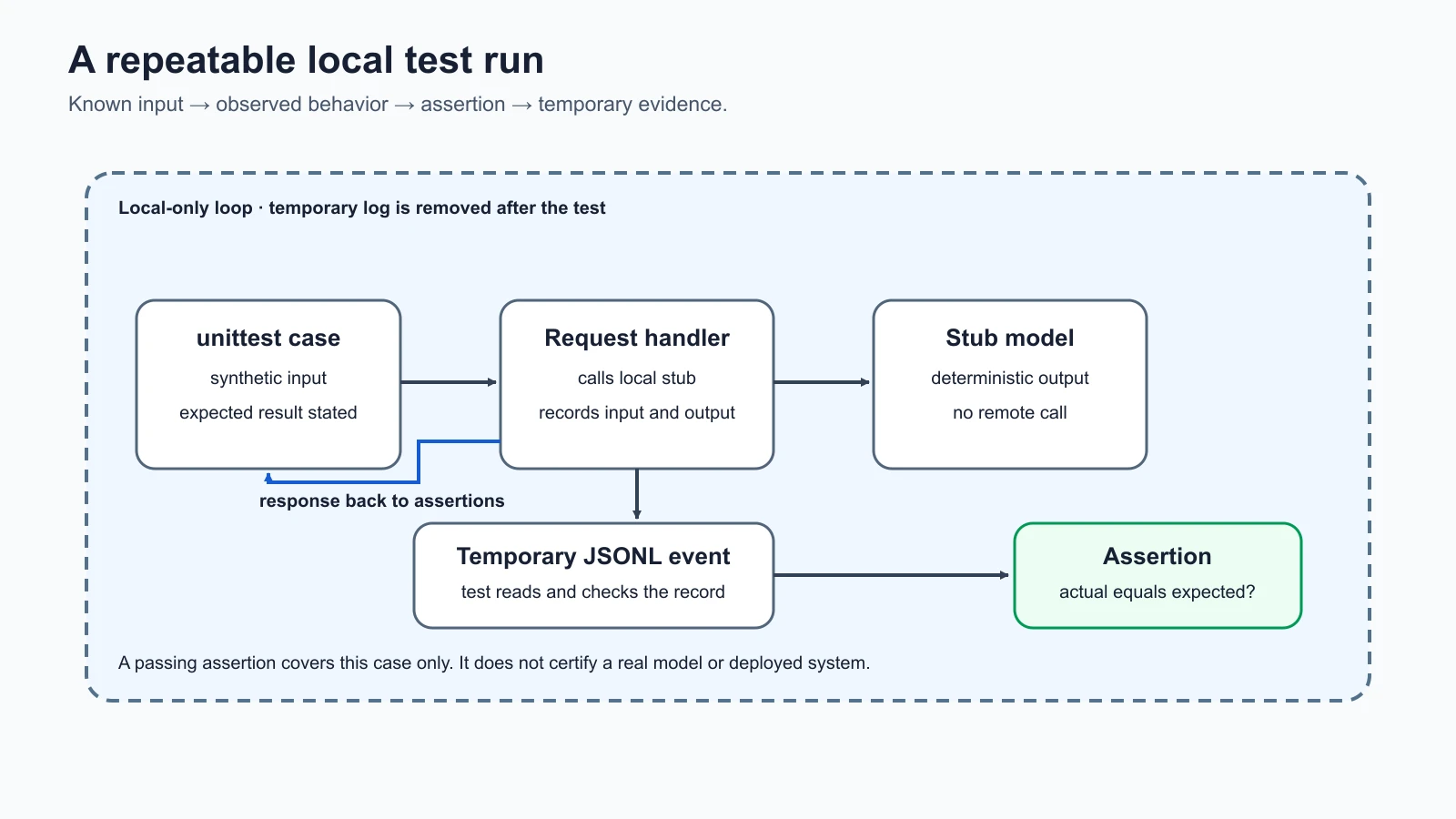
The run is a loop: a test supplies known input, the app returns known output and records the event, and an assertion compares what happened with the expected behavior. A later automated test runner can repeat the same idea for many cases. A human still needs to decide whether the expected behavior is correct and whether the test represents the risk being assessed.
Understand the log and its limits
Logs help answer basic questions: which synthetic user made a request, what text went in, what text came out, and when the event occurred. In a real service, logs may also help investigate misuse or operational failures. They can also become a privacy risk if they capture sensitive content or remain accessible for too long.
This lab writes the full request and response because they are invented and short. Do not paste real messages, personal details, credentials, incident information, or confidential company data into the console. The program does not provide log redaction, retention controls, encryption, or access management. Those omissions are intentional for a small offline exercise, and they would be unacceptable assumptions for many production systems.
The account label in the log is not an access control. There is no account database, authentication, role check, or per-user ticket retrieval. Do not infer that the example has those protections simply because it accepts --user. In later lessons, access control and data boundaries will be introduced as behaviors to test. A field in a log is evidence of what the program recorded, not proof that a person really authenticated as that account.
The default log location is inside the lab folder under logs/requests.jsonl. For the interactive example above, you selected practice-requests.jsonl instead. Remove the file after inspecting it if you do not need it:
1rm practice-requests.jsonlThat command deletes only the named practice log in the current lab folder. Check the current directory and filename before running deletion commands. On Windows PowerShell, use Remove-Item practice-requests.jsonl from the lab directory. You can also delete the file with your file manager.
What to do if the lab behaves unexpectedly
The lab is intentionally small, but safe practice still includes a stopping rule. Stop the program with /quit if it prints something you did not expect, tries to access a real file or service, or writes logs outside the location you chose. This implementation should not do those things. If you see them, preserve the lesson files unchanged, record the command and output without adding sensitive content, and review the code before continuing.
The simplest reset is to stop the console and delete the practice log. The test suite creates and removes its own temporary files. Because this program has no persistent database, remote model, or ticket service, there is no external state to roll back. Keep that limitation in mind if you later adapt the example: adding a provider API, shared database, or real tool changes the scope and the possible effects. Obtain authorization and design safety controls before doing so.
Other safe practice environments
You can build useful security skills in environments deliberately set aside for training. OWASP's Juice Shop is an intentionally insecure web application used for security training and capture-the-flag exercises. PortSwigger's Web Security Academy offers free, interactive web security training and currently includes a set of Web LLM attack labs. Use only the challenges and interactions described by each official training environment. These resources can help you learn about web application boundaries and AI features, but they are separate from the local HelpDesk Bot target in this course.
Use only the practice instances and challenge scope described by the official project or training provider. A capture-the-flag challenge, often shortened to CTF, is a controlled exercise in which participants solve scoped security tasks. The fact that a site has a scoreboard or resembles a lab does not mean it is a CTF. Read the current rules before participating, and do not scan other sites or shared infrastructure.
For AI-specific practice, keep using the local target in this course. A tool that can generate adversarial tests may send requests to an external model, consume paid credits, or store results in a provider account. Before connecting one, read its current documentation, configure an explicitly authorized target, use synthetic inputs, and verify where requests and results go. The local stub needs no such connection.
Common setup problems
python3is not found. Install Python from the official source for your operating system, then open a new terminal and checkpython3 --versionagain. Some Windows installations usepyinstead; if so, runpy -m unittest -vandpy helpdesk_bot.py --user learner-a --log-file practice-requests.jsonlfrom the lab folder.- The tests cannot import
helpdesk_bot. Confirm that the terminal's current directory is theai-red-teaming-labfolder and that the filename is exactlyhelpdesk_bot.py. - The log appears in a different place. A relative path such as
practice-requests.jsonlis relative to the current working directory. Pass an absolute path if you need the file in a specific folder, and inspect that path before deleting anything. - The output repeats. That is expected: the stub returns the same answer for ordinary questions. It has no sampling, conversation memory, or remote model call.
- A test's expected canary appears in the log. That is also expected for the marked fixture case. In a real system, test data should be synthetic and logging should follow the engagement's handling rules.
Mistakes beginners make
- Trying the tests against a live AI service first. Start with the local target and move to another system only with explicit authorization and a defined scope.
- Treating the stub like a real LLM. It is a deterministic function with one visible marker check, so its behavior says nothing about a provider model.
- Putting real secrets in the canary field. Use only the fake course value. A canary exists to identify a controlled test result, not to store a credential.
- Forgetting that logs contain inputs and outputs. Use synthetic text, check where the file is written, and remove it when the exercise is complete.
- Assuming a passing test proves security. Tests cover assertions and cases that someone chose. State what was checked and what remains outside the exercise.
- Pointing a scanner at whatever URL is nearby. A tool does not create permission. Configure it only for an owned or explicitly authorized target.
Recap and try it yourself
You now have a local Python target, a deterministic stub model, a planted synthetic canary, and JSON Lines request and response logging. The standard-library tests check normal output, the known canary behavior, log contents, and basic input validation. Because the target makes no network calls and opens no server port, it is a contained place to practice test structure. Its limitations matter: it has no real model, authentication, production-grade logging, or external tool.
Try it: run the four unit tests, start the console target, send one ordinary fictional question and the marked canary test, then inspect and remove the log. Write down the expected result before running each input and compare it with the observed output. Do not use real data and do not point the lab or a scanner at another service. In the next lesson, you will begin testing model safety behavior with benign stand-in requests.
Sources checked on 5 November 2026: Python 3.12's unittest documentation supports the standard-library test runner; the lab itself uses only Python standard-library modules. OWASP's Juice Shop project page describes its intentionally insecure training application and CTF use. PortSwigger's Web Security Academy describes its free interactive training and lists Web LLM attack labs. The HelpDesk Bot, canary, accounts, inputs, and log entries are fictional and synthetic.