
AI Red Teaming course · lesson 16 of 26
- 1What Is AI Red Teaming?
- 2Ethics, Authorization, and Rules of Engagement
- 3AI and Machine Learning Basics for Red Teamers
- 4Security Principles and AI Threat Modeling
- 5Build a Safe AI Red Team Test Lab
- 6Jailbreaks and Safety Filter Bypasses
- 7Prompt Injection: Direct and Indirect
- 8Code Injection and Tool Abuse
- 9System Prompt and Data Leakage
- 10Countermeasures for Prompt Attacks
- 11Data Poisoning and Backdoors
- 12Adversarial Examples
- 13Model Extraction and Weight Theft
- 14Model Inversion and Privacy Leaks
- 15Model Manipulation and the AI Supply Chain
- 16AI Infrastructure, Deserialization, and Remote Code Execution
- 17API Authentication and Authorization
- 18Black, Grey, and White Box Testing
- 19Manual, Automated, and Continuous AI Testing
- 20AI Red Teaming Tools, Frameworks, and Datasets
- 21Write Your Own AI Security Test Harness
- 22Report AI Security Findings and Track Fixes
- 23Defense in Depth for AI Systems
- 24Red Teaming LLM Applications and Agents
- 25Disclosure, Law, Careers, and What's Next
- 26Capstone: Red Team a Practice App
After this lesson, you will be able to trace how a model file moves from storage into a running service, explain why some file formats can execute code during loading, and identify infrastructure checks that reduce risk. The only demonstration creates and loads a value you wrote yourself; it prints a harmless marker and does not contact a network or run a downloaded model.
An AI application has servers, files, credentials, libraries, networks, notebooks, and deployment settings around its model. A weakness in any of these can expose data or let someone run code with the permissions of the service. Remote code execution, often shortened to RCE, means that an attacker can cause a program to run code on a system from a distance. An unsafe file load can create a similar result locally if the application loads a crafted file.
The key red-team question is not “can I make a file?” It is “which authorized component accepts this file, what does the loader do with it, and what permissions does that process have?” The answer determines the safe test. In a real assessment, get written authorization, use a dedicated test environment, and do not load untrusted artifacts on a workstation or production server.
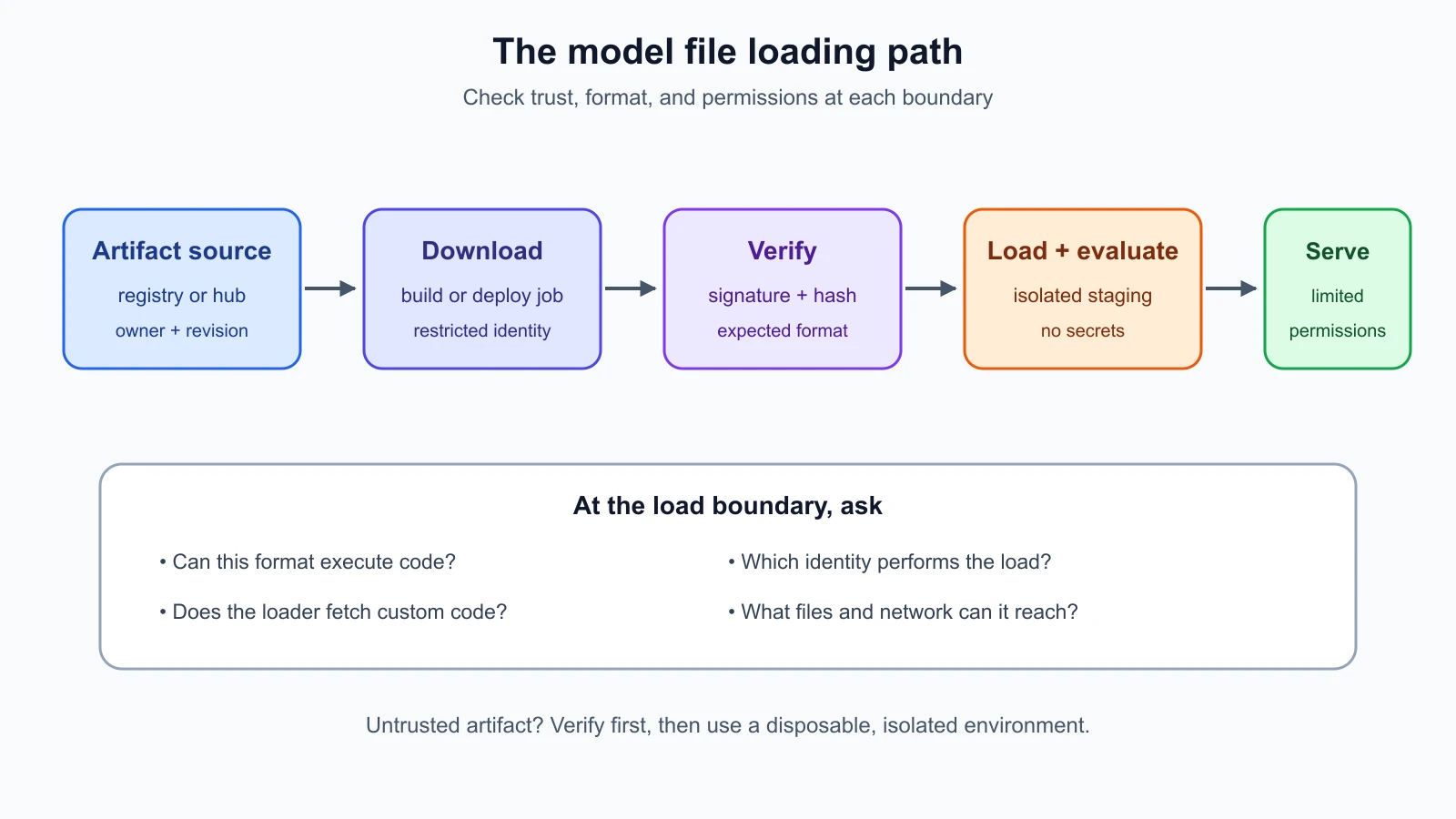
Follow the model loading path
A model may start in an artifact registry or a model hub. A build or deployment process downloads it, checks its revision and origin, and places it in storage. A loader reads the weights, configuration, tokenizer, and sometimes custom code. The application then serves requests through a model server, notebook, API, or agent. Data may flow between the serving process, a retrieval store, tools, logs, and other services.
Every arrow in that path is a trust boundary. A file could be replaced between review and use. A loader could fetch extra code. A notebook may hold a cloud credential. A model server might listen on an interface that makes it reachable beyond the intended private network. A container may mount host files or run with permissions the model service does not need. The diagram traces the artifact path so that the team can ask what is trusted at each transition.
Start by listing the file formats and components the loader accepts. Identify whether loading can execute code, whether it fetches files dynamically, and whether remote custom code is enabled. Pin the model revision and use checksums or signatures verified against a trusted source. Lesson 15 explains model provenance and intake in more detail; here the focus is the execution environment that handles the artifact.
Why deserialization can execute code
Serialization turns data or objects into a format that can be stored or transferred. Deserialization reads that representation and turns it back into data or objects. Some formats describe only data. Others can instruct the runtime to import or call functions as part of reconstructing an object. In the latter case, loading is not just reading bytes; it can cause operations to run.
Python's official pickle documentation warns that pickle is not secure and says to unpickle only data you trust. A crafted pickle can execute arbitrary code during loading. That risk matters in AI because some model checkpoints and training artifacts have historically used pickle-based formats. The extension name is not a reliable safety check. Treat an artifact as untrusted until its origin and format are known.
For weights, use a data-oriented format such as safetensors when the model and toolchain support it. A restricted loader mode may also reject pickle files. These options reduce the code-execution risk associated with general object deserialization, but do not prove that the weights are safe, correct, or privacy-preserving. Configuration, custom code, dependencies, and runtime behavior still need review.
Do not try a downloaded or unknown model file just to “see what happens.” Even a file that appears to contain model weights can invoke behavior during load. Scanners can help find suspicious structure, but a clean scan is not a guarantee. Prefer known artifacts, verify the expected revision, choose a safer format, and load only in a properly isolated environment when you have a justified need.
A harmless local marker demonstration
The following example creates an object in the same script and loads the bytes it just created. Its only effect is printing a local marker. It does not read a downloaded file, call a shell, access the network, or modify the machine. This demonstrates the basic idea that a reconstruction hook can run during deserialization; it is not an example for examining unknown files.
1import pickle
2
3
4class LocalMarker:
5    def __reduce__(self):
6        return (print, ("LOCAL_MARKER: deserialization called print",))
7
8
9payload = pickle.dumps(LocalMarker())
10print("Before loading the object")
11pickle.loads(payload)
12print("After loading the object")
The marker appears between the two surrounding messages because the example's own class tells pickle to call print while recreating the object. A maliciously crafted artifact could try to invoke a dangerous operation instead. The example shows why the loader is a security boundary; it does not produce a working payload for a real service.
For a classroom demonstration, run only this self-contained snippet inside a disposable environment with no credentials, no mounted project folders, and no network access. A disposable virtual machine provides stronger isolation than a container for untrusted code. If using a container, do not mount the host filesystem, pass secrets, expose the Docker socket, run as privileged, or use a host network. Remove the environment after the exercise. Never substitute a model download or third-party pickle file into this example. For a deeper developer workflow discussion, see Sandboxing, Secrets, and Dev Containers.
Test the file-loading boundary safely
For an authorized review, begin with configuration and inventory rather than executing a suspicious artifact. Ask which model files are expected, which formats the loader accepts, whether remote code can run, which identity performs the load, where the artifact was obtained, and whether the exact revision was verified. Review build and runtime logs for unplanned downloads or conversion steps.
If a dynamic test is needed, use a lab that is separate from production and contains no secrets or personal data. The environment should have an unprivileged user, a disposable filesystem, no host mounts, no cloud credentials, and network access disabled unless the test explicitly requires a controlled endpoint. Place resource limits on CPU, memory, and execution time. Snapshot the environment beforehand and discard it afterward. Do not execute unknown artifacts on a developer laptop, shared notebook, or host that has access to production systems.
The success criterion should be a safe observation, such as confirming that the approved loader refuses a disallowed format or that a policy blocks remote code. Do not attempt to demonstrate impact by stealing a credential, opening a shell, changing host files, or reaching another service. Record the file identity, loader version, relevant configuration, and result. If unexpected code execution is observed, stop the test and follow the agreed incident or escalation process.
Model servers, notebooks, and API exposure
Model servers and notebooks are software services, and they need the same careful exposure review as other infrastructure. A development notebook may permit arbitrary code execution by design. If it is reachable from an untrusted network or protected only by a weak shared password, it can become a path to datasets, model files, or cloud credentials. Do not leave notebooks exposed for convenience; shut them down when not needed, use strong identity controls, and keep them behind a restricted access path.
Check which network interfaces a model server binds to and which routes it exposes. A service intended for internal use should not be reachable from the public internet without a deliberate architecture and controls. Authentication and authorization belong at the API boundary; lesson 17 covers those controls. Avoid debug endpoints that return environment information, file paths, prompts, or stack traces. Disable unused routes and services.
Test network reachability from the approved vantage points: the public edge, the application network, the model host, and any allowed administration path. Confirm that only the necessary clients can connect, and that the service cannot reach unrelated internal systems. A deployment diagram and firewall or network policy can be compared against actual configuration. A port being open is not by itself proof of a vulnerability, but an unexpected exposure needs an owner and a reason.
Secrets and permissions
An AI service may need credentials to read a model registry, retrieve documents, or call a tool. Those credentials should be scoped to the specific operation and environment. Do not place keys in model repositories, notebook cells, container images, source code, or prompts. Use a managed secret store or another approved delivery method, restrict access, and rotate credentials after a suspected exposure.
Give the model-serving process only the permissions it needs. It typically does not need administrator access, a writable host filesystem, access to every customer record, or credentials to deploy other services. Separate the identity used to download or build an artifact from the identity used at inference time. This limits the effect of a compromise in one stage.
Logs should capture enough context to investigate service behavior without storing full prompts, private documents, or secrets by default. Restrict access and retention. Do not print secrets or raw environment configuration into error messages. Lesson 9 covers leakage through prompts, retrieval, and logs; the infrastructure review checks where those values are stored and which processes can read them.
Containers help when configured carefully
A container packages a program with its dependencies while using the host operating system's kernel. Containers can make deployments repeatable and add useful isolation, but they are not the same as a separate physical machine. Docker's security documentation describes namespaces, capabilities, daemon access, and the risks of shared host paths. Rootless mode can reduce the impact of some runtime compromises by running the daemon and containers without root privileges.
Prefer a non-root user, a read-only root filesystem where practical, a small set of capabilities, and explicit resource limits. Avoid privileged containers, host network mode, host process visibility, broad host-path mounts, and access to the container runtime socket. Keep secrets outside the image and provide only the required secret to the specific service. Scan and update base images, pin dependencies, and rebuild when fixes are available.
Network segmentation restricts which systems can talk to which other systems. For example, the model service might need access to a retrieval service and a telemetry collector, but not to the deployment control plane or unrelated customer databases. OWASP's Kubernetes Security Cheat Sheet recommends restricting network communication and limiting workload permissions. Verify that the cluster's network plugin enforces the policies you configure; writing a policy object is not proof that traffic is blocked.
NIST's SP 800-190 Application Container Security Guide gives a container-specific view of risks in images, registries, orchestration, and runtime. It is guidance to help organize a review, not a guarantee that a particular container is secure. The exact controls depend on the platform and threat model. Check the deployment configuration and confirm the controls actually take effect.
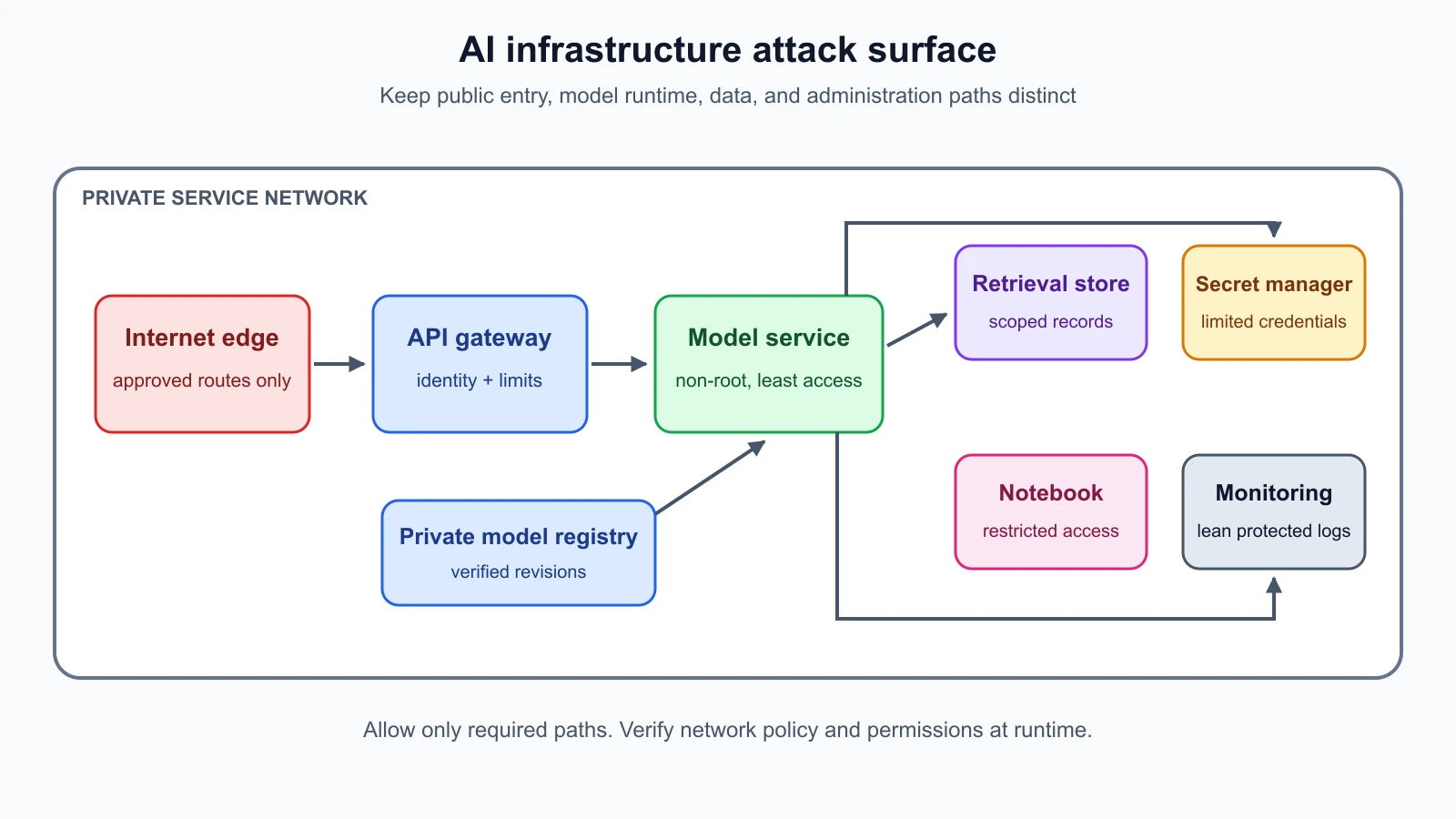
A practical review of HelpDesk Bot
Consider the fictional HelpDesk Bot deployment. The team finds that a staging notebook and the model API share a network segment. The notebook has a mounted folder containing test data, while the model container runs as root and can access a broad registry token. The team has not found evidence of exploitation. It has found permissions and boundaries that make a mistake or compromise more consequential.
The red team records the configuration, checks the written scope, and asks the platform owner to confirm the intended design. The team does not try to read the registry token or access other systems. It recommends separating the notebook from the serving network, restricting the model identity to read only the approved artifact, removing unnecessary mounts, and running the container as a non-root user. It also asks the owner to verify that the API requires the intended authentication and that network policy blocks unrelated paths.
After the owner applies changes, the team retests only the agreed paths. The notebook should no longer reach the serving API unless explicitly allowed. The model service should reach only its required registry, retrieval, and monitoring endpoints. The deployment should reject the wrong artifact format according to the selected loader configuration, and logs should show the model revision that was actually loaded. The result is evidence that these controls work under the test conditions, not proof that every infrastructure weakness is gone.
Build a repeatable infrastructure checklist
For each AI deployment, record the artifact source and revision, file formats, loader and framework versions, custom code setting, registry and storage permissions, server routes, notebook exposure, service identity, secrets source, container image and configuration, network paths, logging behavior, and patch owner. Compare the record whenever a model or infrastructure update changes. Track unresolved gaps with an owner and due date.
Prioritize issues by likely impact and reachability. An untrusted pickle loaded by a process with production credentials is a different risk from a known data-only file loaded in an isolated environment. An internal test notebook with strong access controls differs from a public notebook with no authentication. Document assumptions and test from the perspective relevant to the agreed scope.
Do not confuse a vulnerability scan with a complete review. Scanners can identify known package issues or suspicious file properties, but they may miss new vulnerabilities, configuration errors, exposed interfaces, or application-specific trust problems. Combine inventory, configuration review, controlled tests, and owner interviews. Retest after changes and keep the evidence focused on the control under review.
Mistakes beginners make
- Loading an unknown model artifact on a workstation to see whether it works.
- Assuming a
.binor.ptextension tells you whether a file is safe. - Treating a container as a full virtual machine with no host relationship.
- Running model servers or notebooks on public interfaces for convenience.
- Giving a model process broad registry, cloud, filesystem, or database access.
- Mounting the host filesystem or Docker socket into a container without a clear need.
- Assuming a configured network policy is enforced without checking the network plugin.
- Keeping API keys in notebook files, images, repositories, prompts, or logs.
- Treating a clean scanner result as proof that a model package is harmless.
- Testing impact by reaching real secrets or unrelated systems instead of observing a safe control result.
Recap and try it yourself
Model loading can cross from data handling into code execution, especially with formats such as pickle. Verify the artifact and use safer data formats where possible. If dynamic review is necessary, keep it in a disposable, isolated environment without credentials, host mounts, or unnecessary network access. Review notebooks and model servers for exposure, give processes limited permissions, protect secrets, harden containers, and segment networks. Record the exact configuration and retest approved controls after changes.
Try this tabletop exercise with a fictional deployment: draw the path from model registry to serving API. Mark where files are downloaded, verified, loaded, and evaluated. Add the notebook, secret store, retrieval service, logs, and network boundaries. For each process, list the one permission it needs and one permission it should not have. Then write three safe checks you could perform with the system owner. Do not download or load a model file for this exercise.