
AI Red Teaming course · lesson 4 of 26
- 1What Is AI Red Teaming?
- 2Ethics, Authorization, and Rules of Engagement
- 3AI and Machine Learning Basics for Red Teamers
- 4Security Principles and AI Threat Modeling
- 5Build a Safe AI Red Team Test Lab
- 6Jailbreaks and Safety Filter Bypasses
- 7Prompt Injection: Direct and Indirect
- 8Code Injection and Tool Abuse
- 9System Prompt and Data Leakage
- 10Countermeasures for Prompt Attacks
- 11Data Poisoning and Backdoors
- 12Adversarial Examples
- 13Model Extraction and Weight Theft
- 14Model Inversion and Privacy Leaks
- 15Model Manipulation and the AI Supply Chain
- 16AI Infrastructure, Deserialization, and Remote Code Execution
- 17API Authentication and Authorization
- 18Black, Grey, and White Box Testing
- 19Manual, Automated, and Continuous AI Testing
- 20AI Red Teaming Tools, Frameworks, and Datasets
- 21Write Your Own AI Security Test Harness
- 22Report AI Security Findings and Track Fixes
- 23Defense in Depth for AI Systems
- 24Red Teaming LLM Applications and Agents
- 25Disclosure, Law, Careers, and What's Next
- 26Capstone: Red Team a Practice App
After this lesson, you will be able to sketch a threat model for an AI application, identify the information and functions it should protect, and turn possible weaknesses into questions that can be tested safely. We will use the fictional HelpDesk Bot from earlier lessons. Its architecture and scenarios are teaching examples, not evidence from a real product.
Threat modeling is a structured way to ask what a system does, what matters to protect, how it could be affected, and which safeguards or tests deserve attention. It helps a team make its assumptions visible before choosing tests. A threat model is not a guarantee that every weakness has been found, and it does not replace the written authorization and scope described in the lesson on ethics and rules of engagement.
Start with confidentiality, integrity, and availability
The CIA triad is a simple way to group three core security goals: confidentiality, integrity, and availability. These ideas apply to the whole AI product, including its data, prompts, model, accounts, tools, and supporting services.
- Confidentiality means information is available only to people and systems that are allowed to see it. In HelpDesk Bot, a user's private ticket should not appear in another user's answer or in a log accessible to an unauthorized person.
- Integrity means information and system behavior remain accurate and are changed only through approved actions. A help article, model configuration, prompt, or access rule should not be silently altered by someone who lacks permission.
- Availability means authorized users can use a system when they need it. The bot should remain usable for support staff and customers within the service's expected operating limits.
The triad is a starting point, not a complete account of AI risk. A system can be available and still give misleading advice. It can protect private records yet treat users unfairly. In an AI product, quality, safety, privacy, fairness, and security can affect one another. The triad gives a team a common first set of questions; it does not say which question matters most in a particular service.
Think about each goal across the system. Confidentiality includes prompts, retrieved documents, model inputs and outputs, and logs. Integrity includes training or retrieval data, model files, application code, policy settings, and tool actions. Availability includes the user interface, model endpoint, databases, queues, and external services that the application depends on. A control for one part may not protect another. Hiding a prompt from a user, for example, does not prevent the application from retrieving a ticket the user is not allowed to see.
Name the things the system needs to protect
An asset is something of value that the system or its users need to protect. Assets are not limited to files or servers. A useful inventory includes information, capabilities, and trust relationships.
For a fictional HelpDesk Bot, assets could include:
- Ticket text, customer contact details, and support history.
- Help articles and internal procedures used to answer questions.
- User accounts, roles, and the rules that decide which records each role may access.
- The model, its version, and the instructions assembled for each request.
- A ticket-creation action that can change a support workflow.
- Service capacity, so people can submit and receive support requests.
- Logs used to investigate problems, including any sensitive content they retain.
Inventory does not mean every item is equally sensitive. A public help article and a private ticket have different confidentiality needs. A simulated ticket action and an action that changes a live customer account have different consequences. For each asset, write down who owns it, who may use it, where it is stored or processed, and what would happen if it were exposed, changed, or unavailable. If the answer is unknown, mark the assumption instead of filling the gap with a guess.
An asset can also be an assurance the product makes to a user: “you will only see your own tickets” or “the bot will ask before creating a ticket.” Those promises are useful to include because they describe the behavior people rely on. A tester can later ask what evidence would show that the promise holds across the intended cases.
Map components, entry points, and boundaries
An entry point is a place where a user, service, or input can reach the system. A web form is an entry point, as is an API endpoint or a document-import process. The attack surface is the collection of those reachable places and connections that could affect system behavior. Mapping them helps a team see where to ask questions; it does not grant permission to test any of them.
A trust boundary is a point where information or control passes between components with different permissions or assumptions. For example, a user's message crosses into the application, a retrieved document crosses into the model's context, and a model-generated suggestion may cross into a ticket tool. A boundary deserves attention because one component may not be able to verify the assumptions made by another.
Here is a simplified, fictional HelpDesk Bot flow:
- A user submits a question through the support interface.
- An identity service confirms the account and role.
- A retrieval service selects help articles or ticket details the user may access.
- The application combines the question and selected context into a request for the model.
- The application displays the model's response and may offer a ticket-creation action after confirmation.
- A logging service stores selected event details for support and investigation.
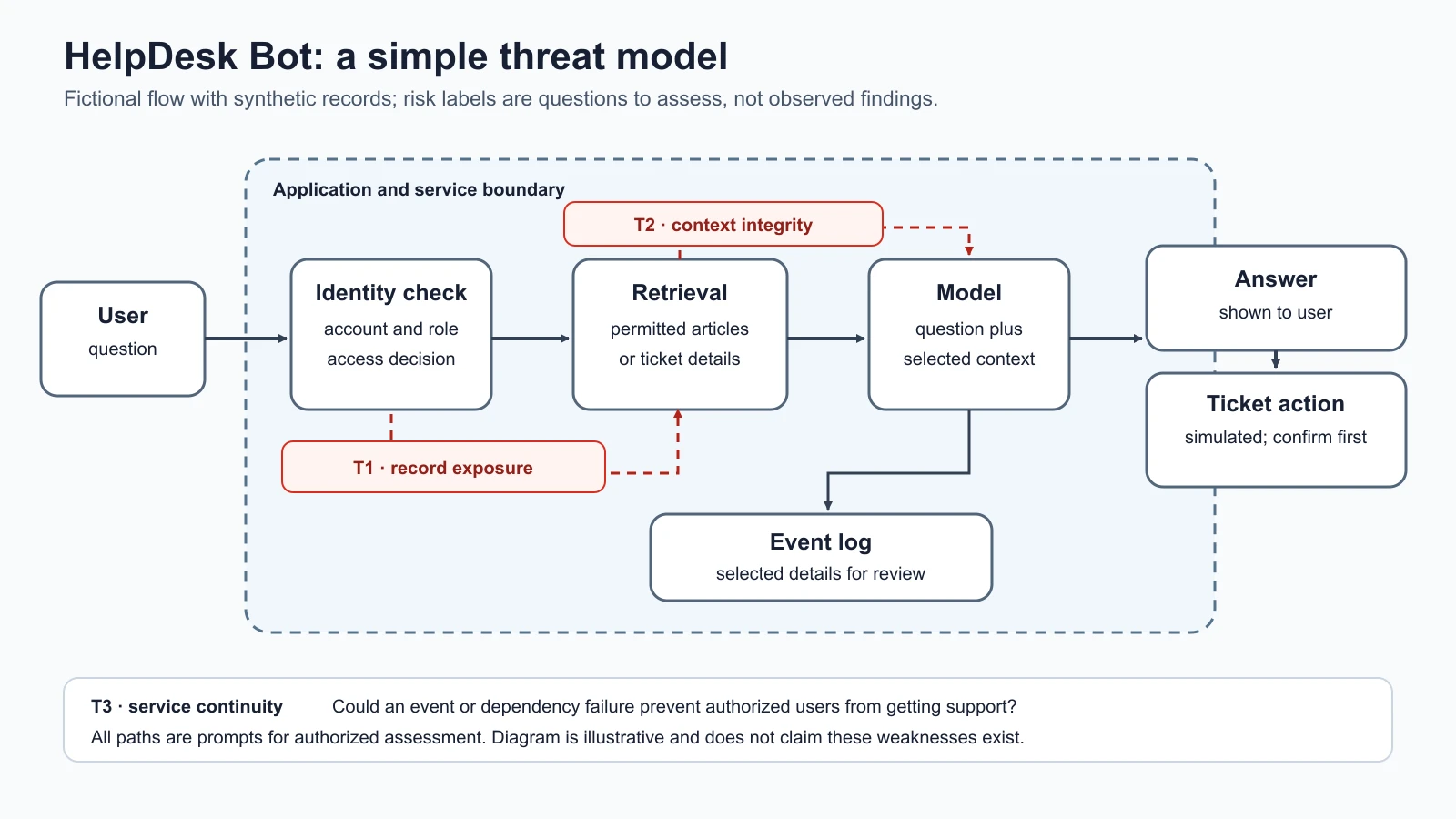
This diagram leaves out deployment infrastructure, administrators, provider services, and many operational details. That is deliberate: a first model should be readable and useful. Add components when you learn they exist and when they change the analysis. If the model provider stores requests, for example, provider-side processing and retention become relevant assets and boundaries. Do not assume that an architecture diagram is complete just because it looks tidy.
The labels T1, T2, and T3 are possible risk scenarios, not instructions for carrying them out. T1 asks whether someone could receive a record outside their access. T2 asks whether untrusted or outdated context could affect an answer or change approved content. T3 asks whether service capacity could be reduced enough to disrupt intended users. Each is a question to investigate in an authorized environment with synthetic data where possible.
Identify actors and scenarios
A threat actor is a person or group whose actions could contribute to harm. Some actors are malicious, but a threat model should also consider mistakes, compromised accounts, and system failures. An employee may select the wrong document. A user may misunderstand what an AI answer can promise. A third-party service may return unexpected content. These cases can matter even when nobody intends harm.
A threat is a potential cause of harm to an asset. A vulnerability is a weakness in a design, implementation, configuration, process, or control that could help a threat cause harm. For example, “a user sees another user's ticket” describes an unwanted outcome; “the retrieval service does not check the user's role for each ticket” is a possible weakness that might explain it. The distinction helps a team move from a broad concern to a cause it can examine.
Write scenarios in ordinary language. A useful scenario states who or what is involved, what asset may be affected, the condition that would allow it, and the consequence. For example:
If a retrieval request is not consistently restricted to the signed-in user's permissions, a user might receive another person's ticket details in an answer. This could expose private information and reduce trust in the support service.
This wording does not claim the weakness exists. It records a hypothesis for the model. A follow-up question might be: “In the approved local lab, does a synthetic account ever receive a ticket assigned only to another synthetic account?” The expected behavior is that it does not. The evidence should record the environment, test account roles, relevant request identifier, observed output, and result without including real customer data.
Consider different sources of risk without turning the exercise into a list of villains:
- A user may supply confusing or misleading content, intentionally or by accident.
- A staff member may misconfigure a role or select the wrong document collection.
- A service account may have more access than the feature needs.
- A dependency or provider may change behavior, availability, or data handling.
- An attacker may try to exploit an exposed feature or compromised account.
- A system failure may duplicate, omit, or delay an action.
The point is not to predict exactly who will act. It is to understand what can go wrong, which conditions matter, and what harm could follow.
Estimate likelihood and impact
Risk is a way to prioritize uncertainty about harmful outcomes. A common teaching shorthand is:
risk ≈ likelihood × impact
Likelihood is how plausible a scenario is in the system's actual context. Consider whether the feature is exposed, what access or knowledge is needed, how often the relevant condition occurs, and which safeguards already exist. Impact is the extent of harm if the scenario happens. Consider people affected, sensitivity of the data, disruption to work, recovery effort, and business or safety consequences.
The multiplication sign is a useful reminder to consider both dimensions, not a universal calculation rule. Teams may use a numeric formula, a qualitative scale, or a formal method required by their organization. Do not pretend that “medium” has a precise mathematical meaning if the scale has not been defined. State the assumptions and reasons behind a rating so a reviewer can challenge them.
The grid below is a deliberately simple teaching aid. “Review” means the team should examine the scenario and decide what evidence or control is needed. “Prioritize” means it deserves earlier attention under this example scale. A high-impact scenario can deserve attention even when likelihood is uncertain. The labels are not a substitute for organizational severity criteria.
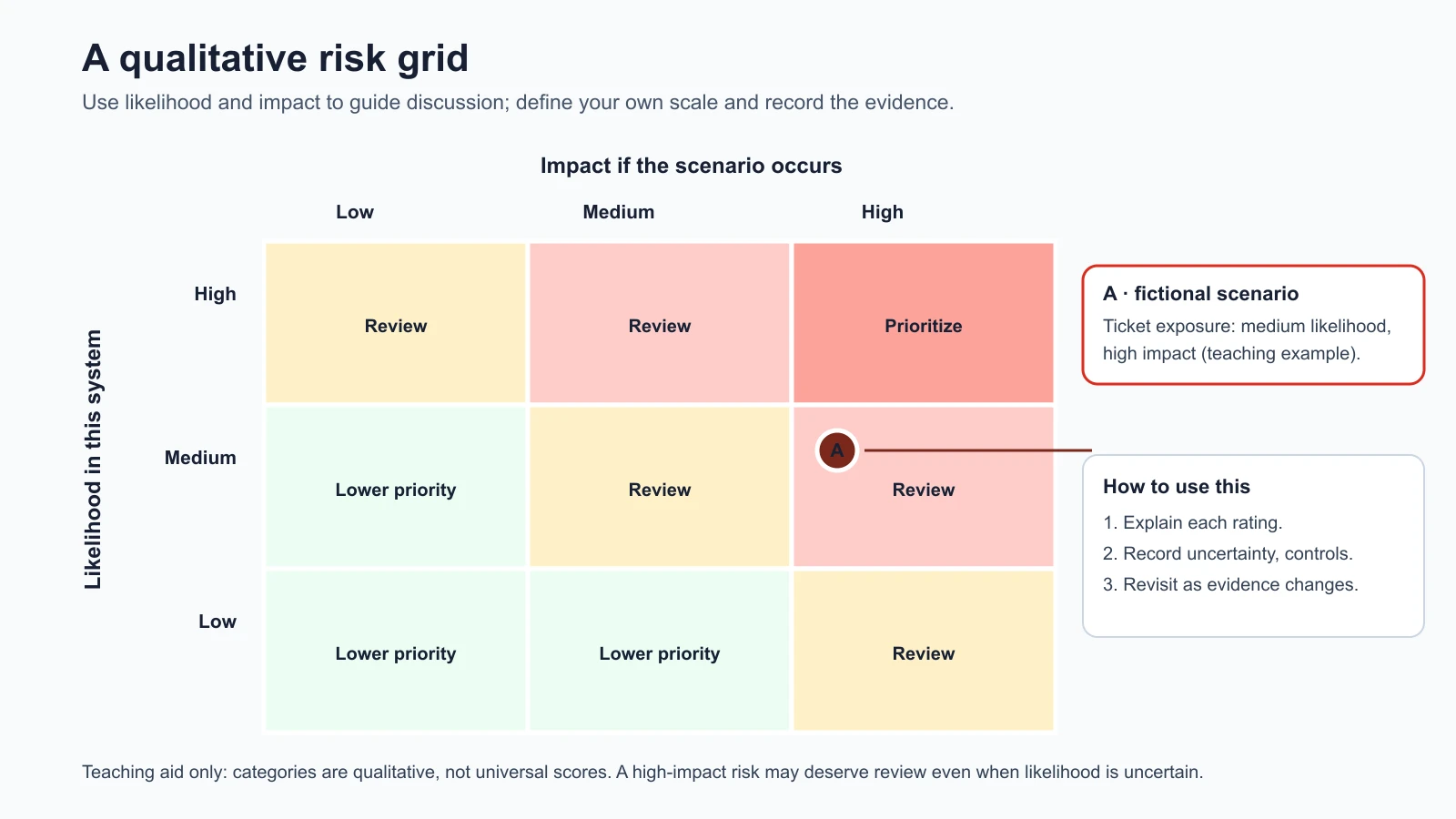
For the ticket exposure scenario, impact may be high if the records contain sensitive details or many people could be affected. Likelihood depends on the actual access checks, system exposure, and available safeguards. In the fictional example, we mark likelihood as medium and impact as high to show how the grid works. That is not an assessment of any real product. In a real review, the team would gather evidence before assigning values and would revise the estimate as controls or system design change.
Risk is also not the same as a vulnerability count. A system with many low-impact weaknesses may have a different priority from one flaw that could expose highly sensitive information. A vulnerability assessment is a systematic effort to identify and evaluate weaknesses in a defined system. Threat modeling helps decide what to examine; assessment gathers evidence about whether weaknesses exist and how serious they are. A red-team test can contribute evidence, but it is limited by its scope, environment, test cases, and time. A clean test result does not prove that the system has no vulnerabilities.
Turn a threat model into test questions
A useful threat model leads to a manageable set of questions. For each scenario, record:
- Asset and goal: What must stay confidential, accurate, or available?
- Component and boundary: Where does information or authority cross from one part of the system to another?
- Scenario: What could happen, and under what conditions?
- Existing safeguards: Which code, process, or human check should prevent it?
- Evidence needed: What observation would confirm or disconfirm the concern?
- Safe test: Can the question be answered in a local lab with synthetic accounts and data?
For example, if the concern is that a generated answer could create a ticket without approval, first identify the tool's authority and the confirmation rule. Then make a harmless test question for the authorized practice target: does the simulated action remain pending until the user confirms? Capture the application state and tool event. Do not invoke a real ticketing system unless that environment and action are explicitly included in the authorization.
This approach keeps a test tied to a security goal. “Try lots of prompts” is not a clear test plan. “Verify that the simulated ticket tool requires confirmation for every action and cannot access a record outside its role” names the behavior, scope, and expected result. Later lessons will cover specific prompt attacks and tool abuse in the local practice app.
Use OWASP and MITRE ATLAS as references
Frameworks provide shared language and examples. They can help you check whether your threat model overlooked a familiar risk, but they do not decide what is relevant to a particular application.
The OWASP GenAI Top 10 for LLM Applications 2026 describes common risk categories for generative AI applications. Its categories include prompt injection, sensitive information disclosure, excessive agency, data and model poisoning, unbounded consumption, and weaknesses in retrieval and embeddings. The HelpDesk Bot scenarios can be compared with those categories: an unintended ticket disclosure is close to sensitive information disclosure; an action taken with more authority than needed is close to excessive agency; and service capacity concerns may relate to unbounded consumption. These are illustrative comparisons, not severity ratings or proof that a particular vulnerability exists.
MITRE ATLAS is a knowledge base of tactics and techniques associated with attacks on AI-enabled systems. It can help a team consider how adversarial activity may affect AI components and can support consistent descriptions in a report. Use the current ATLAS material as a reference when a scenario has an AI-specific element. Do not force a match just to fill a field; a useful mapping explains why the reference applies, and an unmapped concern can still be real.
When mapping a finding, preserve the exact scenario and evidence first. Then add a framework reference that fits the behavior. Record the framework name and version or access date because categories and guidance can change. OWASP and ATLAS are complementary indexes, not substitutes for system diagrams, authorization, or an evidence-based assessment. A category name cannot tell you whether a control works in your application.
A reusable threat model template
Copy this starter template into a planning document. Keep it proportionate to the system. A small, low-impact feature may need only a short diagram and a handful of scenarios; a system handling sensitive records or actions may need deeper review with its security and product owners.
1System and purpose:
2Assessment owner and date:
3Scope and environment:
4Authorization reference:
5
6Components and data flow:
7Assets and security goals (confidentiality, integrity, availability):
8Users, operators, services, and other actors:
9Entry points:
10Trust boundaries and permissions:
11
12Scenario ID and description:
13Affected asset and possible harm:
14Preconditions and possible weakness:
15Existing safeguards and evidence:
16Likelihood rationale:
17Impact rationale:
18Priority and uncertainty:
19Safe test question and expected behavior:
20Evidence to collect and data-handling limits:
21Owner, mitigation, and retest status:
22
23Framework references (name, version/date, reason for mapping):
24Assumptions and open questions:
The template asks for an authorization reference because threat modeling does not itself authorize testing. It also asks for uncertainty and evidence so a reader can tell the difference between an observed weakness and a plausible scenario. Keep collected evidence minimal and follow the agreed data-handling rules. If a test reveals real sensitive information outside scope, stop and follow the reporting and escalation process agreed in advance.
Mistakes beginners make
- Drawing only the model. Include the application, identity checks, data sources, tools, logs, and provider connections that affect behavior.
- Calling every bad outcome a vulnerability. Record the possible outcome first, then investigate whether a weakness or missing control enables it.
- Treating a risk score as an objective fact. Explain the scale, evidence, and assumptions behind likelihood and impact.
- Mapping every issue to a framework category. Use OWASP and MITRE ATLAS when they clarify the scenario; leave a mapping blank when it does not fit.
- Confusing a threat model with authorization or proof. Get permission before testing, and report what the assessment did and did not cover.
- Ignoring non-malicious causes. Include mistakes, misconfiguration, provider changes, and ordinary failure alongside deliberate abuse.
Recap and try it yourself
Confidentiality, integrity, and availability give you three foundational security goals. A threat model names valuable assets, maps components and trust boundaries, considers who or what could cause harm, and records plausible scenarios. Risk combines likelihood and impact as a prioritization aid, while a vulnerability assessment gathers evidence about weaknesses in a defined scope. OWASP's current GenAI categories and MITRE ATLAS can add shared language, but the system's actual design and evidence remain central.
Try it: draw a small data-flow diagram for a fictional AI support assistant. Mark the user's input, identity check, data source, model, output, any action, and logs. Write one confidentiality scenario, one integrity scenario, and one availability scenario. For each, identify a safe test question using synthetic data and state what result would count as evidence. Do not send test traffic to a live system. In the next lesson, you will build a local lab where later exercises can be run with controlled inputs and repeatable evidence.
Sources checked on 5 November 2026: NIST's AI Risk Management Framework 1.0, AI RMF Playbook, and categorize step inform the security-goal and risk-management framing; the grid and template here are teaching aids. The OWASP GenAI Top 10 for LLM Applications 2026 and MITRE ATLAS are referenced as evolving risk taxonomies and knowledge bases. HelpDesk Bot, its design, and every scenario are fictional; no live system was assessed.