
AI Red Teaming course · lesson 18 of 26
- 1What Is AI Red Teaming?
- 2Ethics, Authorization, and Rules of Engagement
- 3AI and Machine Learning Basics for Red Teamers
- 4Security Principles and AI Threat Modeling
- 5Build a Safe AI Red Team Test Lab
- 6Jailbreaks and Safety Filter Bypasses
- 7Prompt Injection: Direct and Indirect
- 8Code Injection and Tool Abuse
- 9System Prompt and Data Leakage
- 10Countermeasures for Prompt Attacks
- 11Data Poisoning and Backdoors
- 12Adversarial Examples
- 13Model Extraction and Weight Theft
- 14Model Inversion and Privacy Leaks
- 15Model Manipulation and the AI Supply Chain
- 16AI Infrastructure, Deserialization, and Remote Code Execution
- 17API Authentication and Authorization
- 18Black, Grey, and White Box Testing
- 19Manual, Automated, and Continuous AI Testing
- 20AI Red Teaming Tools, Frameworks, and Datasets
- 21Write Your Own AI Security Test Harness
- 22Report AI Security Findings and Track Fixes
- 23Defense in Depth for AI Systems
- 24Red Teaming LLM Applications and Agents
- 25Disclosure, Law, Careers, and What's Next
- 26Capstone: Red Team a Practice App
After this lesson, you will be able to choose a testing approach based on the access your team has, explain what each approach can and cannot show, and turn a threat model into a scoped test plan with useful evidence. The examples use a fictional HelpDesk Bot and assume that testing is authorized in writing.
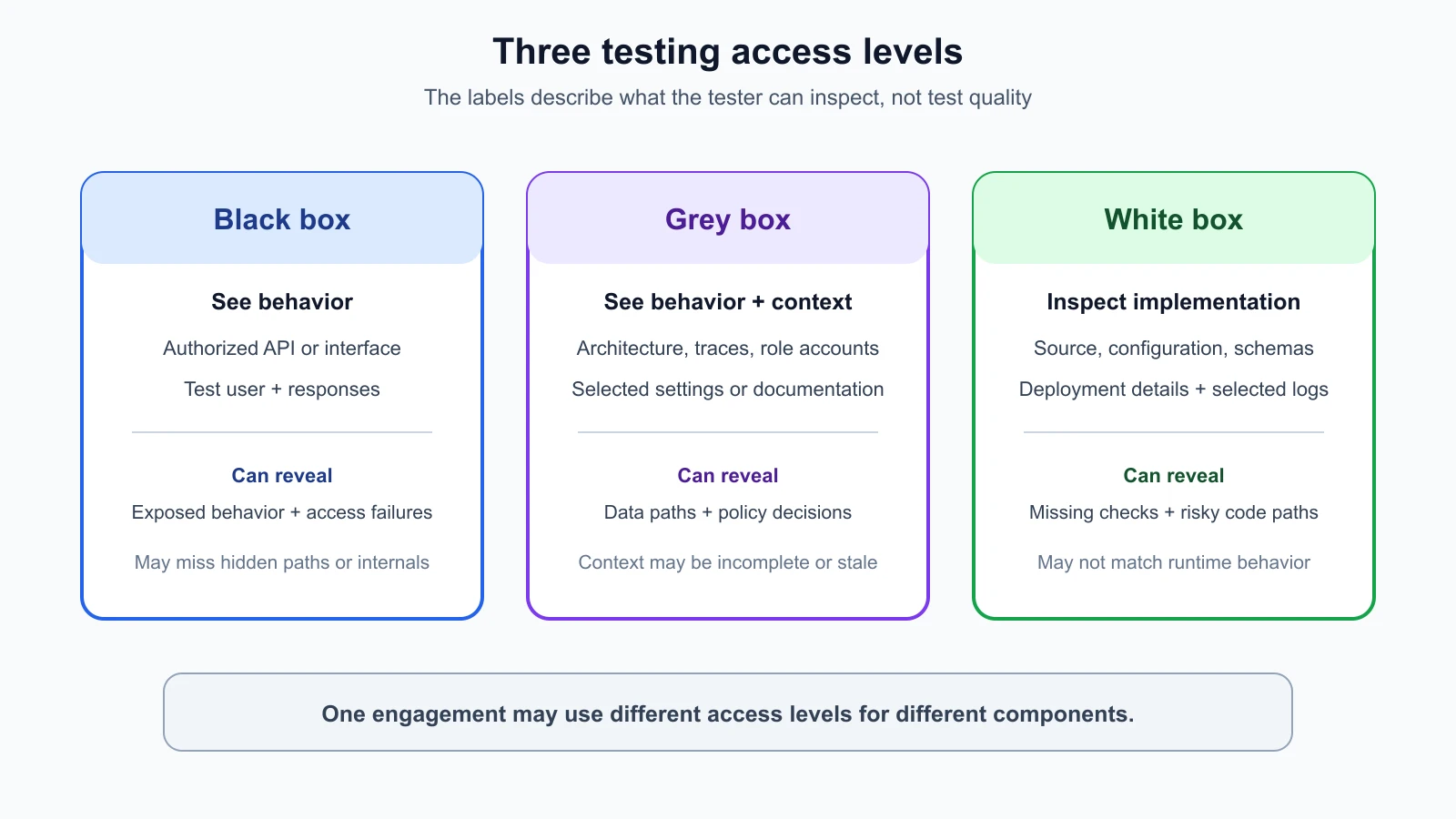
Before a red team tests an AI system, the team needs to know what it is allowed to see and do. One engagement may provide only a public API and a test account. Another may include architecture documents, a staging deployment, and sample traces. A third may include source code and model configuration. These setups are commonly called black-box, grey-box, and white-box testing.
The names describe how much information the tester has about the system's internal structure and implementation. They do not describe the quality of the team, the seriousness of the test, or how safe the system is. A black-box test can find important behavior problems that appear at the user boundary. A white-box review can identify a missing permission check that a limited external test did not reach. Combining views often produces a clearer assessment.
NIST defines black-box testing as a method that assumes no knowledge of the assessment object's internal structure and implementation details. OWASP's Web Security Testing Guide describes application security tests as including white-box testing, such as source code analysis, and black-box testing, such as penetration testing. Grey-box testing sits between the two and is described in this lesson without a single standard definition. NIST's AI Risk Management Framework calls for test, evaluation, verification, and validation work to produce evidence about system behavior; its Measure guidance recommends documenting test sets, metrics, and tools. For AI red teaming, the access level is one part of the method. The risk question, scope, data, and evidence standard matter just as much.
Black-box testing: observe the system from outside
In a black-box test, the red team has little or no information about internal implementation. The team may have a published API description, an authorized test account, and a defined set of endpoints, but not source code, infrastructure diagrams, model configuration, or internal logs. The tester observes requests and responses through the access the engagement provides.
This view is useful because it resembles what a user or an external attacker can observe. It can reveal that an endpoint accepts an unexpected request, that a user sees another test tenant's data, that an AI assistant follows an unsafe instruction from an approved test document, or that a public service returns sensitive error details. It tests the experience at the boundary where the system interacts with callers.
Black-box work also has limits. If an endpoint is not discoverable, a route is hidden behind a workflow, or a security check fails only in a background process, the tester may never reach it. An observed response may not reveal which service, policy, or model produced it. A test that receives the expected answer cannot prove that the implementation contains no alternate path or hidden weakness. The team should record what was actually in scope and accessible.
For HelpDesk Bot, a black-box tester might receive an API URL, two synthetic user accounts, and a list of allowed requests. The tester can ask each account to summarize its own planted support ticket and verify that the other test account's ticket is denied. The tester can observe the response and any authorized client-visible error. Without a trace or source access, however, the tester may not know whether the retrieval filter excluded the other ticket before it reached the model or whether the model simply chose not to repeat it.
Grey-box testing: add selected context
In a grey-box test, the red team receives partial internal information. That might include an architecture diagram, API schema, test credentials for different roles, a data-flow description, a deployment diagram, sample logs, model settings, or a limited code review. The team still tests the running system, but it can use the extra context to choose paths more deliberately.
Grey-box access often suits AI systems because their behavior depends on several connected parts. A tester who knows that HelpDesk Bot retrieves documents from a vector index can plan to compare the retrieved document IDs with the user's tenant. A description of available tools helps the tester ask whether each tool has a separate permission check. A model and prompt version help the team reproduce results after an update.
Partial access improves focus, but the documents might be incomplete or out of date. A staging environment may differ from production. Logs may not include every request path. A test account might have a different role from the one described. Treat provided information as a starting point, then confirm important details against the actual test environment where the rules allow.
For the same HelpDesk Bot test, grey-box access might add a retrieval trace containing synthetic document IDs, an authorization policy summary, and the staging API schema. The tester can ask User A about User B's planted ticket, then review whether that document was retrieved. If the answer does not leak the content but the trace shows the unauthorized document entered model context, the team has evidence of a control failure that an output-only view could miss.
White-box testing: inspect implementation details
In a white-box test, the red team can inspect internal details such as source code, configurations, data schemas, model settings, deployment manifests, or selected logs. The exact access varies by engagement. White-box does not necessarily mean that every model weight, training record, or cloud account is available. State which components and versions were provided.
Implementation access can help the tester trace a data path, locate a missing check, understand how roles are derived, inspect whether a cache key includes tenant identity, and see which model or tool receives a field. A review may identify a check that depends on a client-supplied tenant_id, a retrieval query without a tenant filter, or an administrative route that lacks a function-level permission test. The team can then verify the suspected issue against the authorized staging behavior.
White-box access also has limitations. Code review does not prove that the reviewed version is the one running. A correct policy in one code path may be bypassed by a different route or deployment setting. Complex model behavior cannot be fully inferred from source inspection alone, and a correct-looking prompt or configuration does not establish that the runtime enforces it. Pair implementation review with runtime evidence and confirm the tested revision.
In a white-box HelpDesk Bot review, the owner might provide the API handler, retrieval query, policy configuration, model version, and deployment commit. The tester follows the request from identity validation through retrieval and response construction. If the retrieval code filters by tenant but the cache lookup does not, the team has a concrete hypothesis to test in staging with synthetic cases. The finding should distinguish the code observation from the runtime result.
Access is a spectrum, not three sealed boxes
Real engagements often sit between the labels. A tester may have source for the API gateway but only black-box access to a hosted model. A provider may supply model documentation but not weights or server logs. A team may share a threat model and a staging account while withholding production data. Calling the engagement “grey-box” is less useful than listing the exact information, identities, systems, and actions available.
Access level can vary across components. One AI system may include a public client, a private API, a vendor model endpoint, a retrieval database, and internal plugins. You might have white-box access to the application code, grey-box access to the retrieval service, and black-box access to the provider. Record those boundaries. Do not let access to one component imply permission to test another provider or customer environment.
Access also does not replace authorization. Source code access does not authorize testing production. A test account does not authorize reading real customer records. A system owner may grant access to a staging database while prohibiting destructive operations. Keep the rules of engagement explicit, and revisit them if the test plan changes.
Choose access based on the question
Start with the risk you need to assess, not with a preference for a particular box label. If the question is “Can a user of this service retrieve another synthetic tenant's ticket?”, black-box access with two test accounts may provide a direct answer. If the question is “Does the retrieved document enter model context before the answer is filtered?”, a trace or grey-box access is useful. If the question is “Which function constructs this query, and where is the tenant check applied?”, white-box review may be needed.
The following comparison can help you plan. It is a guide, not a guarantee that every test will fit neatly into one category.
| Access setup | Typical information | Strong fit | Common blind spot |
|---|---|---|---|
| Black box | Authorized endpoint, public documentation, test user, observable outputs | External behavior, reachable access failures, error handling, workflow issues | Hidden routes, internal data flow, code paths not reached |
| Grey box | Selected architecture, role accounts, API schema, logs or traces, version details | Following data and tool paths, choosing targeted tests, correlating behavior with components | Missing or stale documentation, incomplete observability |
| White box | Relevant source, configuration, schemas, deployment details, selected logs | Finding missing checks, unsafe defaults, cache or policy logic gaps | Runtime differences, hosted components outside access, behavior not reproduced |
For the AI-specific case, a useful question is what evidence is required. A visible answer can establish what the endpoint returned to the test user. A retrieval trace can show what data was made available to the model. Source code can show where a filter is intended to run. Configuration and deployment records can connect the reviewed logic to the running release. No single artifact answers all of those questions.
Turn the threat model into test cases
A threat model is a structured description of the system, important assets, trust boundaries, likely threats, and controls. Lesson 4 introduced the method. Use it to identify which questions each access level can answer and which evidence you need. Do not create an arbitrary pile of tests just because an interface or repository is available.
For HelpDesk Bot, a simple test plan could include these questions:
- Can each synthetic user read their own planted ticket and only their own ticket?
- Can an approved test document containing a harmless instruction marker influence the assistant's response or tool use?
- Does the model receive only documents the current user is authorized to see?
- Does the support lookup tool check the user's permission for each ticket?
- Does a model update change the result of a previously passing access or prompt-injection test?
- Can the tester identify the model version and relevant policy decision for a recorded test request?
Map each question to an access level, an approved account or artifact, the expected result, and the evidence needed. The second diagram shows that mapping process. If the access provided cannot answer a question, mark it as untested or partially tested. Do not silently replace missing evidence with an assumption.
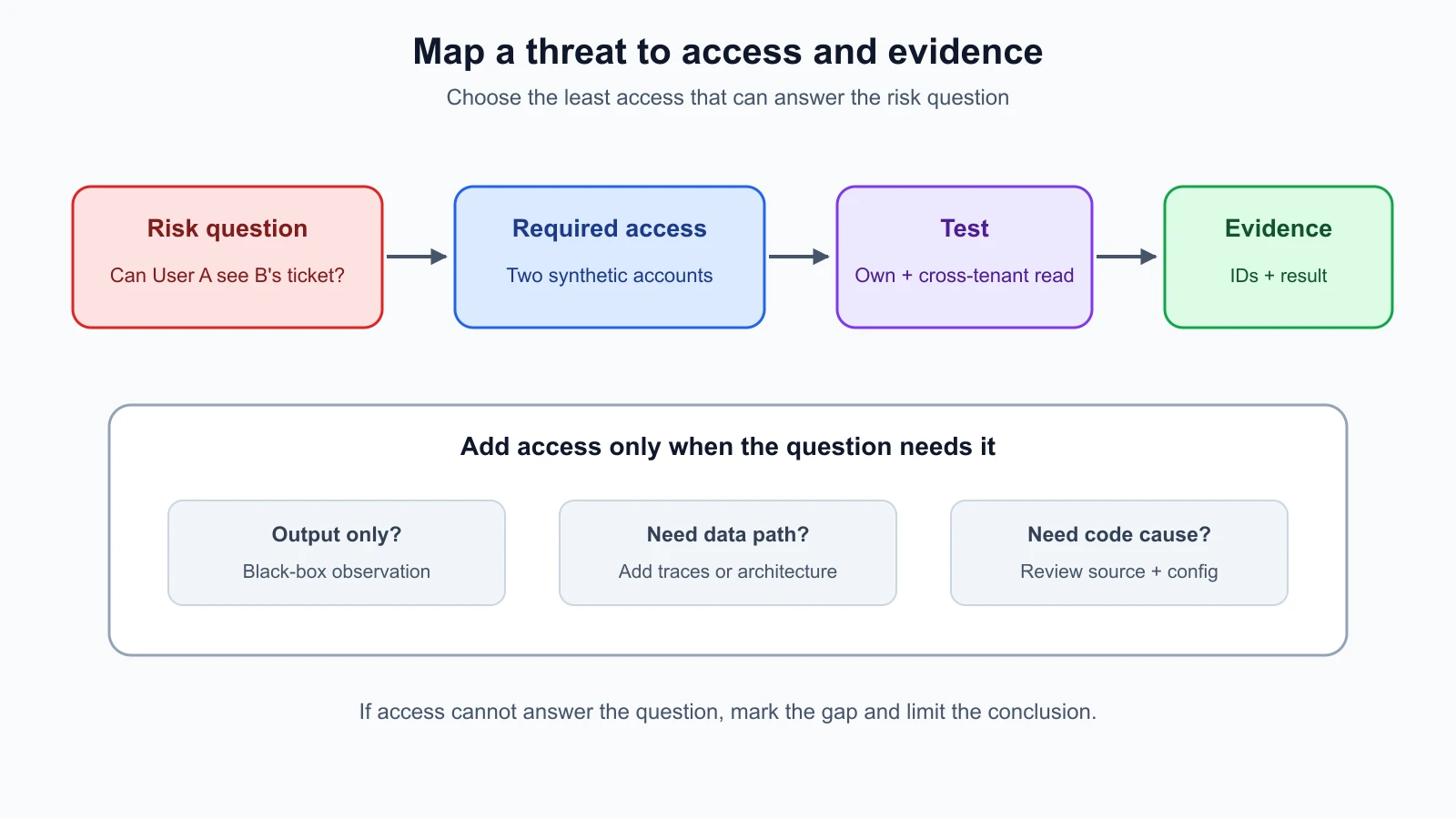
The plan should define scope and stopping conditions before active requests are sent. Name the exact environment and endpoints, allowed test identities, synthetic records, time window, permitted request rate, prohibited actions, and escalation contact. If a response appears to contain real personal data, stop the test and notify the owner. Lesson 2 covers the authorization and rules-of-engagement foundations for these decisions.
Build a test matrix, not a shopping list
A test matrix connects a threat or control to a test, access requirement, expected result, and evidence. It makes coverage gaps visible. For example:
| Risk question | Minimum access | Test idea | Evidence to keep |
|---|---|---|---|
| Cross-tenant retrieval | Two synthetic test accounts and records | Ask each account about the other account's planted ticket | Request ID, test account, synthetic ticket ID, result; trace if available |
| Tool permission bypass | Test account and approved tool contract | Request a harmless read action on an in-scope test record | Tool name, identity, allowed/denied result, decision log |
| Prompt-injection path | Approved local target and marker policy | Place a benign marker instruction in a test document and observe handling | Document ID, model version, response, tool trace if allowed |
| Unreviewed configuration change | Version details and before/after test access | Compare the same regression cases on two approved revisions | Revision IDs, exact inputs, outcomes, variance |
The minimum access column prevents overclaiming. If you only have a public response, you can report the observed response but cannot claim to have verified the internal retrieval filter. If you have source but did not run the service, you can report a code concern but not say the behavior was reproduced. If the model is stochastic, repeat a safe test enough to describe variation, and document the number of trials rather than selecting one notable response.
Scope your evidence to the test question. A useful record usually includes the test case ID, date and time, environment, account or role, component revision, action, expected result, observed result, and a request or trace identifier. Keep prompts and outputs only when necessary and permitted. Use synthetic content, redact secrets, and avoid storing unrelated customer information.
Example: one risk, three views
Suppose the threat model says a customer might receive a support ticket from another tenant. In a black-box run, the tester uses User A and a known synthetic User B ticket ID through the documented chat or lookup endpoint. If the response includes the planted marker from B's ticket, the boundary has failed at the observable interface. If the response is denied, the test shows the denial for that request and account pair; it does not prove every route is correct.
With grey-box access, the team can add a trace showing document IDs returned by retrieval. The same denied response may still be a problem if User B's document was inserted into model context. The trace refines the finding and points toward the retrieval policy. With white-box access, the team can inspect the query builder and determine whether the authorization filter is applied before retrieval, whether a cache path bypasses it, and whether the deployed revision matches the reviewed code.
The three views are complementary. The external result describes user impact, the trace explains an internal data path, and source review helps identify a code location. The report should state which views were available and which conclusions each supports. A coherent finding is stronger when it connects observed behavior with the relevant control without claiming more than the evidence proves.
Time and access tradeoffs
Black-box testing may require more time to discover workflows and infer which requests matter, but it can be performed with less internal disclosure. Grey-box context can focus testing and improve interpretation, though it requires the owner to prepare accurate documentation and traces. White-box review may find implementation issues efficiently, but it can require repository access, build context, and coordination with engineers. The best choice depends on the objective, risk, time, system maturity, and what the owner can safely share.
If time is limited, prioritize high-impact trust boundaries and actions. For an AI support app, that might mean tenant separation, sensitive-data handling, tool permissions, model loading, and exposed management surfaces. A short test with a clear question and valid evidence can be more useful than broad scanning with no defined success criteria. Note what was not tested and why.
You can also use a layered engagement. Begin with the user-facing interface to understand normal behavior. Use an architecture overview and a few approved traces to investigate high-risk paths. Review selected source or policy logic where the evidence suggests a deeper question. This resembles a practical progression from external behavior to internal explanation while keeping the work tied to authorization and scope.
Keep conclusions tied to the evidence
Avoid statements such as “the model is secure” after a small set of black-box prompts. A precise statement gives the environment, access level, version, test cases, and observed result. For example: “Using two synthetic test accounts against staging revision R, the black-box check denied direct access to the other account's planted ticket through the chat endpoint. Retrieval traces were not available, so the test did not determine whether unauthorized material entered model context.”
Similarly, source review does not prove exploitation. Say “the inspected retrieval query did not include a tenant filter; runtime testing confirmed that the cross-tenant fixture appeared in the trace” if both observations were made. If only the code was reviewed, report that and request a focused runtime test. Separating observation from inference helps owners reproduce the issue and select a fix.
NIST's AI RMF Measure guidance emphasizes documenting the test sets, metrics, and tools used during TEVV. For a red-team exercise, also document the access setup and system version. A different access package may produce different evidence, so future readers should be able to see what the team could and could not inspect.
Mistakes beginners make
- Treating black-box as a low-quality test and white-box as automatically complete.
- Calling an engagement grey-box without listing what information and accounts were provided.
- Assuming source review proves the reviewed code is deployed.
- Assuming a safe-looking model response proves internal retrieval excluded unauthorized data.
- Testing beyond the allowed accounts, endpoints, environments, or request volume.
- Failing to map a test to a threat model, expected result, or evidence requirement.
- Reporting an inference as an observed fact.
- Forgetting hosted models, plugins, caches, or data stores when access varies by component.
- Claiming broad security coverage after testing only one path or model version.
- Keeping real prompts or customer records when synthetic evidence would answer the question.
Recap and try it yourself
Black-box testing observes a system from its exposed boundary. Grey-box testing adds selected internal context. White-box testing can inspect implementation details. Each approach has blind spots, and one AI system can have different access levels across its components. Start with a risk question, match it to the access and evidence required, set scope and stopping conditions, and record exactly what was tested. Combine external behavior, traces, and implementation review when the engagement allows, and keep every conclusion within what the evidence supports.
Try the fictional HelpDesk Bot exercise: choose one risk from the test matrix and write a one-page test plan with the objective, access level, approved environment, test identity, synthetic input, expected result, evidence, and stopping condition. Then name one question that your chosen access level cannot answer. Do not test a real API or inspect a repository unless the owner has explicitly authorized it.