
AI Red Teaming course · lesson 20 of 26
- 1What Is AI Red Teaming?
- 2Ethics, Authorization, and Rules of Engagement
- 3AI and Machine Learning Basics for Red Teamers
- 4Security Principles and AI Threat Modeling
- 5Build a Safe AI Red Team Test Lab
- 6Jailbreaks and Safety Filter Bypasses
- 7Prompt Injection: Direct and Indirect
- 8Code Injection and Tool Abuse
- 9System Prompt and Data Leakage
- 10Countermeasures for Prompt Attacks
- 11Data Poisoning and Backdoors
- 12Adversarial Examples
- 13Model Extraction and Weight Theft
- 14Model Inversion and Privacy Leaks
- 15Model Manipulation and the AI Supply Chain
- 16AI Infrastructure, Deserialization, and Remote Code Execution
- 17API Authentication and Authorization
- 18Black, Grey, and White Box Testing
- 19Manual, Automated, and Continuous AI Testing
- 20AI Red Teaming Tools, Frameworks, and Datasets
- 21Write Your Own AI Security Test Harness
- 22Report AI Security Findings and Track Fixes
- 23Defense in Depth for AI Systems
- 24Red Teaming LLM Applications and Agents
- 25Disclosure, Law, Careers, and What's Next
- 26Capstone: Red Team a Practice App
After this lesson, you will be able to match common AI red-teaming tools to a testing question, choose or build a dataset that fits the risk, and explain what monitoring can and cannot tell you. The examples use an authorized local or staging target, synthetic records, and harmless test goals.
An AI red team tool can help generate test inputs, send them to a model or application, score responses, collect traces, or compare results across versions. Some tools focus on a single part of that process. Others provide components that you assemble into a workflow. None can decide your authorization scope, understand every business consequence, or certify that the system is secure.
The right starting point is the question. Are you checking whether a prompt template leaks a planted canary? Comparing the response of two model versions? Testing a retrieval boundary between synthetic tenants? Exploring adversarial changes to an image classifier? Watching a production service for an unusual error rate? Each question needs different access, data, evidence, and tooling.
This lesson compares tools by purpose rather than ranking them. Project features, supported providers, installation needs, and terms can change, so check the tool's current official documentation and release notes before adopting it. A red-team runner may send prompts to the target and may also use a separate service to generate or grade tests. Confirm those data paths before using any real or sensitive content.
Start with the testing task
Before choosing a tool, define what is in scope and what a useful result looks like. A small task statement might be: “On the local HelpDesk Bot fixture, verify that a synthetic User A cannot receive the planted ticket belonging to synthetic User B, and save the response and retrieval trace.” This says what system is tested, which boundary matters, what test data is permitted, and what evidence the team needs.
Then identify the component under test. A standalone model may be available as an API or local checkpoint. An application may wrap the model with a prompt, retrieval, user accounts, and tools. A classical classifier may accept image or tabular inputs. A monitoring system observes a running service but may not generate adversarial tests. A tool that is useful for one layer may not inspect another.
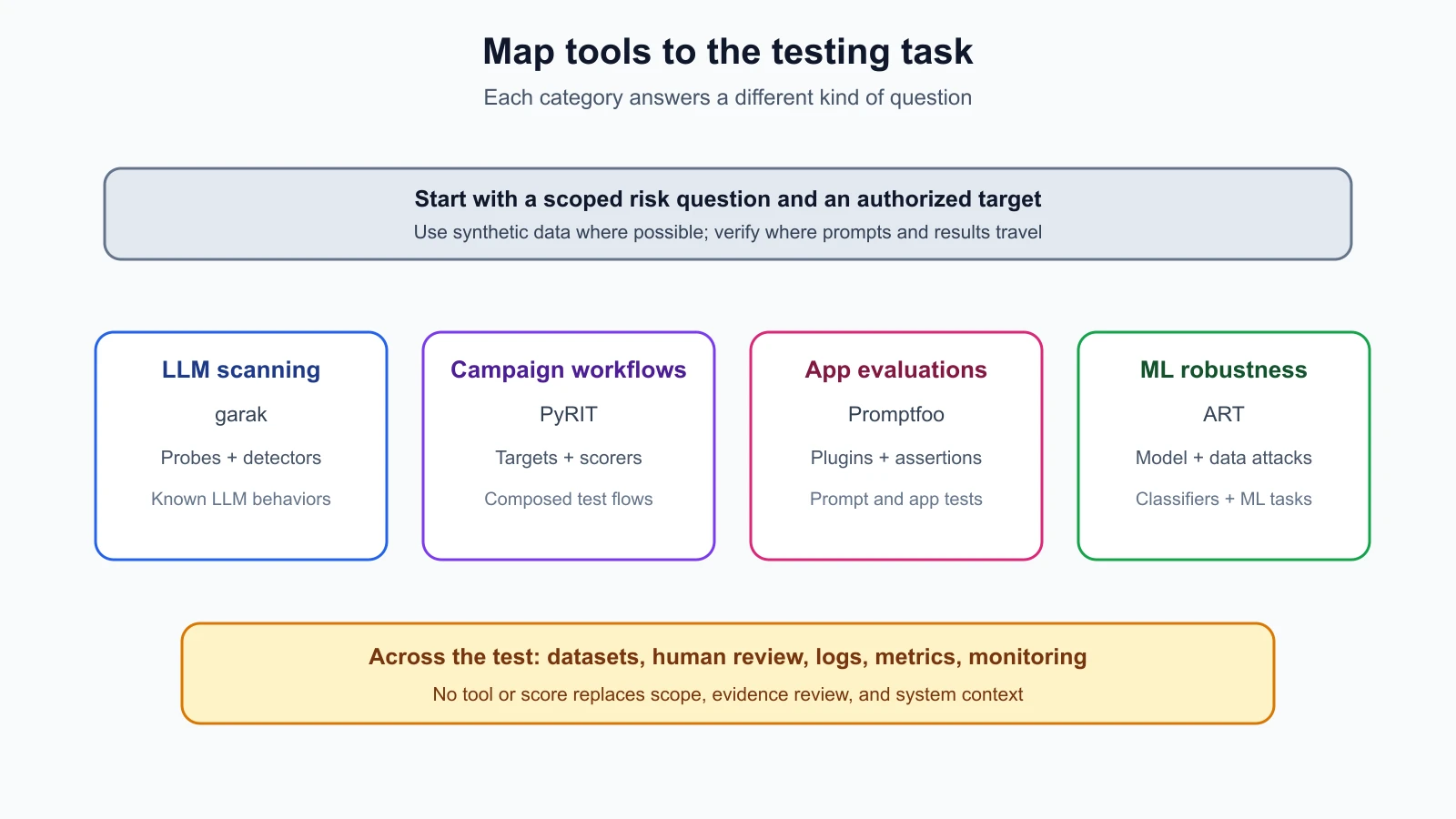
The diagram maps broad tasks to tool types. It is a guide for planning, not a claim that a particular product covers every box. Read each tool's documentation, check which inputs it supports, and run a small approved trial on a fixture before trusting it in a larger assessment.
LLM vulnerability scanners: garak
garak describes itself as an LLM vulnerability scanner. Its documentation organizes testing around generators that communicate with a target, probes that run test interactions, detectors that judge outputs, and evaluators that summarize results. The tool's official feature documentation describes probes for risks such as prompt injection, data leakage, guardrail bypass, and other unwanted model behavior.
That design can be useful when you want to run a structured set of checks against a text-generating model or a supported integration, then inspect which inputs and outputs a detector flagged. A scanner gives you breadth and repeatability. It can help find cases worth a closer human review, especially when you need to check several known risk families on the same approved target.
A scan result is not the same as a verified vulnerability. A detector may produce a false positive or miss an indirect effect. A model may behave differently on a full application than through a direct model adapter. If the application has user roles, retrieval, tools, or multi-turn state, confirm that the chosen target adapter exercises those parts. The garak reference documentation describes the framework's own abstractions; consult the user guide and target-specific instructions for the version you plan to run.
Treat the test prompts and target responses as assessment evidence. They may include private application content if your target returns it. Use a local fixture or synthetic data, review where logs are written, and keep only the evidence needed for the authorized report. Begin with a narrow set of probes and a harmless canary objective rather than launching every test family against an unknown endpoint.
Red-teaming workflows: PyRIT
Microsoft's PyRIT documentation describes components for building generative AI red-team workflows. It includes seeds and datasets, scenarios, attack techniques, executors, converters, targets, and scorers. A seed is an initial test idea or input. A target is the model or application under test. A scorer evaluates evidence, while a converter changes a test input's form for an approved evaluation.
PyRIT can be useful when a team needs to compose a workflow from reusable pieces, coordinate multi-step tests, connect to different targets, or score a defined objective. It provides more of a framework for constructing campaigns than a single one-size-fits-all scan. Teams can define scenarios around the system they own and keep track of how test inputs and responses relate to one another.
Framework flexibility has a cost: you need to understand and validate the components you combine. A scenario's scorer may be too broad, a target may not preserve state the way the application does, and a dataset may not match the intended policy. Check the data storage and persistence behavior for the selected workflow. Store only approved prompts, outputs, and traces; do not let a convenient database become an unreviewed archive of customer content.
Some PyRIT techniques and examples are designed for adversarial testing. Configure campaigns for the authorized scope and benign objectives in this course. Use a local practice target, synthetic test content, and stub tools when possible. If the assessment depends on an external model or provider, confirm written authorization, request limits, and data-handling terms before running it.
Evaluation and application testing: Promptfoo
Promptfoo's documentation describes a local-first evaluation tool for comparing model or prompt outputs, applying assertions, generating red-team tests, and integrating checks with CI. Its red-team system separates plugins, which generate tests for risk areas, from strategies, which determine how inputs are delivered, and targets, which are the model or application being tested. Its configuration docs explain how these pieces are selected and combined.
This structure can help application teams turn requirements into repeatable checks. For example, the team may want to compare two prompt versions against synthetic support questions, verify a response assertion, and run a small approved red-team check against a staging endpoint. It can also fit a workflow where test results should be reviewed after a change, as described in Manual, Automated, and Continuous AI Testing.
Read the data-flow details closely. Promptfoo's docs state that the runner can be local while provider calls still go to configured model services; its red-team generation and grading may use a separate provider, and some workflows can use remote generation. The configured target is also reachable from the machine running the test. That means a local command does not automatically mean all processing is local or that any reachable endpoint is in scope. Configure only approved targets, inspect whether generation or grading uses external services, use synthetic inputs, and set limits on concurrency and spend.
Test assertions and graders need review. An exact assertion is useful for checking whether a fabricated canary appears in output. A rubric or model-based judge may help review less deterministic answers, but it can misclassify results. Inspect the underlying cases and flagged outputs, tune the grading criteria on examples, and have a person review decisions that could affect a release or a security finding.
Adversarial robustness testing: ART
The Adversarial Robustness Toolbox is a Python library for machine-learning security. Its documentation groups capabilities around evasion, poisoning, extraction, and inference threats, with support for different ML frameworks, tasks, and data types. This can fit an assessment where you have an authorized model or classifier and need to evaluate how its predictions respond to adversarial input changes or other ML-specific conditions.
ART is most relevant to the model and data security topics covered earlier, such as the classifier-focused examples in Adversarial Examples. It is not a general substitute for testing an LLM application's API permissions, retrieval filters, agent tool authorization, or CI configuration. Select an estimator, threat assumption, input constraints, and metric that match the model under review. An attack result against a toy classifier does not transfer to a hosted chatbot or a different model.
The library includes both attack and defense capabilities, but using a defense implementation does not by itself establish robustness. Define the threat model, evaluate on held-out or otherwise appropriate test data, and review what the selected metric measures. Use synthetic or approved data and keep any adversarial inputs within the local or authorized environment.
Evaluation platforms and custom test harnesses
Some teams use general evaluation platforms, prompt testing frameworks, or a small custom harness instead of a dedicated red-team scanner. A custom harness can be a good fit when the important rules are specific to the product: ticket ownership, which support tools can be called, whether a planted string appears, or whether the answer includes a required disclaimer. Lesson 21 builds a small test harness for this course's practice target.
An evaluation tool generally needs a target, a test set, and a way to judge results. A deterministic check might compare an output with a fixed canary or assert a permission decision. A semantic check might apply a rubric or involve human review. Record which kind is used. Do not label all evaluation results as security findings: a quality score can identify behavior to inspect, but a security claim needs a defined risk and appropriate evidence.
Before adopting a platform, check how it handles prompts, outputs, traces, credentials, and model provider calls. Look at its local and remote processing modes, retention settings, access controls, export format, and license or service terms. Run a pilot with synthetic data and confirm that the resulting report contains enough information to reproduce a finding without retaining unnecessary sensitive content.
Choosing benchmark and attack datasets
A dataset is a collection of examples or records used for testing. In red teaming, it could be a list of prompts, conversations, images, model inputs and outputs, expected decisions, or labeled examples. Datasets are not all interchangeable. A broad benchmark can measure a known category, a seed set can start a campaign, and a regression set can preserve cases that previously exposed a product-specific failure.
Choose a dataset based on the security question and the system's intended use. Ask:
- Coverage: Which risk or behavior does the set measure? Which important risks are absent?
- Context: Does it reflect the application's users, languages, data paths, tools, and access levels?
- Provenance: Who created the examples, how were they collected, and what transformations were applied?
- Labels: Who decided the expected result, and is there guidance for ambiguous cases?
- Rights and handling: What license, consent, privacy, and retention terms apply?
- Safety: Could examples cause harmful content, real actions, or unwanted external calls if run against the target?
- Versioning: Can you identify which dataset revision and scoring rules produced a result?
Do not assume a public dataset is representative simply because it is large or popular. A benchmark may target one model class, language, policy, or lab setting. It may contain old examples that a system has already seen, or labels that do not match your organization's rules. If the dataset itself is public and fixed, a system can appear to improve on it without becoming more robust to novel cases. Keep a stable subset for comparisons and add reviewed, product-specific synthetic cases over time.
The NIST Adversarial Machine Learning taxonomy can help name the kind of risk a test addresses, but it is a taxonomy, not a ready-made set of prompts. OWASP and tool plugins can help organize coverage categories; those categories are still not proof that every implementation path has been tested. A dataset is evidence about the examples it contains, under the conditions it was run.
For HelpDesk Bot, a safe starter collection might contain synthetic ticket IDs, two fictional tenants, harmless prompt-injection markers, expected tool allow or deny outcomes, and a few boundary cases for empty or oversized requests. Each record can say what risk it covers, which identity runs it, the expected behavior, the grader, and the test revision. Never use a real customer's prompt or document as a test example when a synthetic record can express the same control question.
Monitoring and observability tools
Red-team tools focus on planned tests. Monitoring and observability help a team understand what a running system is doing over time. Logs record selected events, metrics summarize measurements such as error or denial rates, and traces show how a request moved through services. For an AI system, useful signals may include model or prompt version, tool decisions, retrieval metadata, latency, failure codes, and usage volume.
Monitoring can reveal a change after deployment, such as a sudden rise in denied tool calls, an unusual cost spike, or a new error pattern. It can also provide traces that help explain a controlled test result. It does not prove that an untested attack path is safe, and a quiet dashboard does not establish that no one has accessed data improperly. Instrumentation reflects what the team chose to log and measure.
Protect telemetry. Prompts, model outputs, retrieved documents, and trace attributes may contain personal or confidential information. Minimize collection, redact where practical, restrict access, set retention, and use synthetic data in test traces. The AI Agents course's Observability and Tracing covers tracing practices for agent systems; this lesson focuses on how red teams can use authorized traces as evidence.
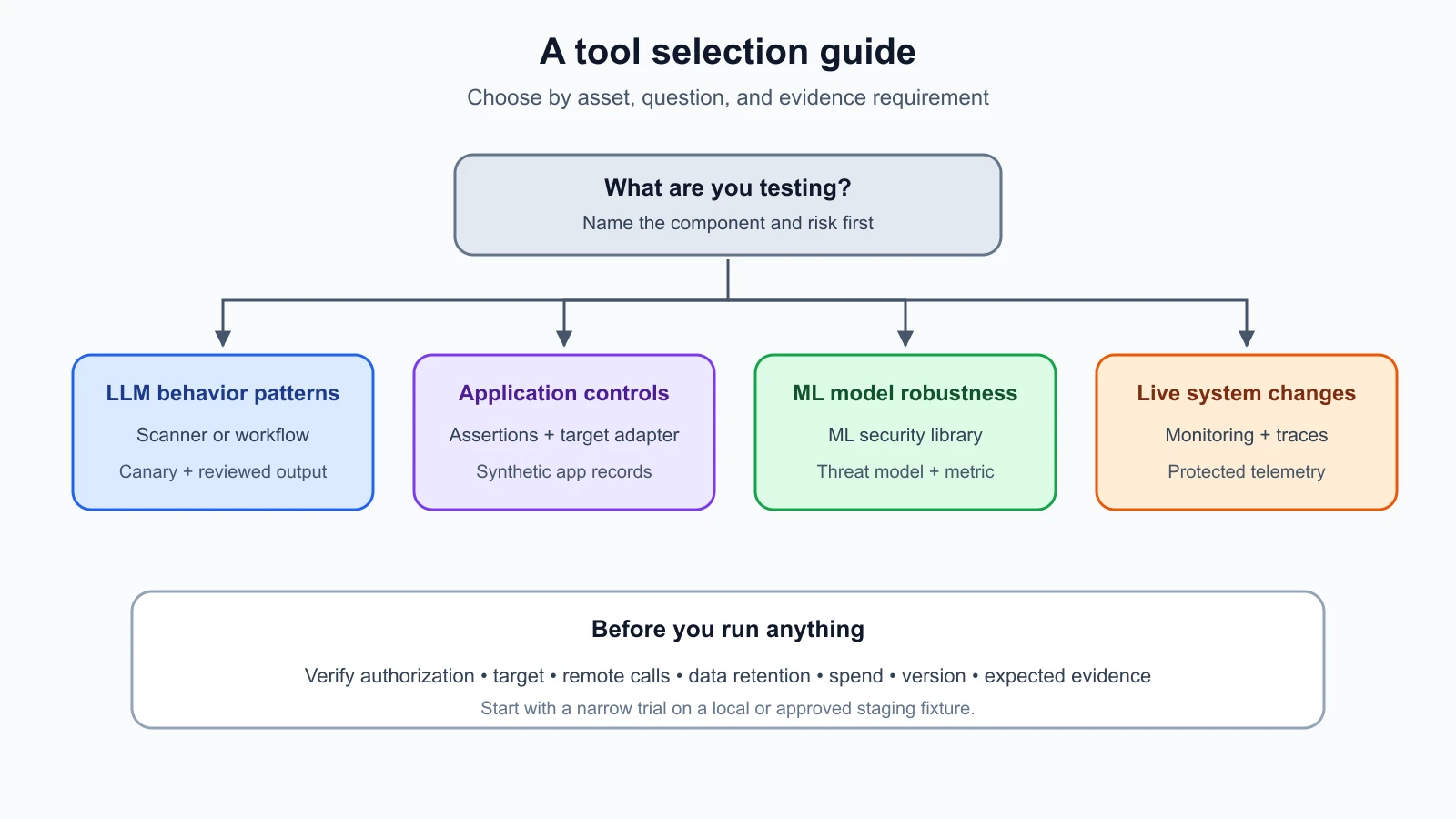
A tool selection guide
Use the second diagram as a decision aid. It starts from the asset and question, then points to a suitable tool type, data, and evidence. The tool names are examples, not endorsements or a required stack.
| If your question is… | Start by considering… | Check before use |
|---|---|---|
| Does a text model show known LLM failure patterns? | garak or a similar scanner | Target adapter, probe scope, detector behavior, logs |
| How can we compose a multi-step GenAI red-team campaign? | PyRIT or another workflow framework | State handling, scorer assumptions, data persistence |
| Do application prompts and controls meet our test assertions? | Promptfoo or a comparable evaluation platform | Target scope, remote generation/grading, data flow, CI permissions |
| How does an authorized classifier respond to adversarial inputs? | ART or a similar ML robustness library | Model compatibility, threat assumptions, metric validity |
| What changed in the live system after release? | Monitoring, tracing, and existing security telemetry | Sensitive fields, retention, access, alert coverage |
No tool removes the need to read the official documentation for its current version. Check the supported model and application interfaces, external services used, test content generated, result storage, and the command or configuration that limits scope. Start with a small trial on a local fixture. Expand only after confirming that the test behaves as intended and that the data stays within approved boundaries.
A safe HelpDesk Bot workflow
Imagine the team wants to assess whether the assistant follows instructions embedded in support documents and whether a user can retrieve another tenant's ticket. It begins with a threat model, selects a local HelpDesk Bot fixture, and creates synthetic records for Tenant A and Tenant B. The team decides which tests have deterministic outcomes and which require human judgment.
For the tenant boundary, a small custom assertion can check that User A does not receive the marker planted in Tenant B's record. The same check can run with the fixture's retrieval trace to see whether the record reached model context. For the document instruction question, a tester first explores manually with a harmless marker and a stub tool. If a stable scenario is found, the team adds it to its regression set and uses an approved evaluation framework or harness to replay it.
The team reviews which model receives any generated probes and whether a third-party service performs generation or grading. It uses no production credentials and does not send real support conversations. The resulting report records the target version, test data revision, tool configuration, grader, and failures. A person reviews flagged outputs and confirms whether a test observed an actual security property or only a variation in wording.
This workflow uses tools to scale and document selected checks while keeping human judgment around scope, interpretation, and impact. The tool's score is a measurement from one configuration and run. It is not a claim that HelpDesk Bot is secure in every deployment or against every possible input.
Mistakes beginners make
- Choosing a tool because it is popular instead of matching it to a defined risk question.
- Treating a scanner's score as a security certification or complete coverage measure.
- Running a broad scan against an endpoint simply because it is reachable from the test machine.
- Forgetting that attack generation or grading may call a remote model or service.
- Sending real customer prompts or documents to a tool without checking data handling.
- Using a benchmark whose labels or context do not match the application being tested.
- Assuming an observability dashboard proves the absence of a vulnerability.
- Trusting a model-based grader without checking false positives and false negatives.
- Ignoring tool versions, configuration, target adapters, and dataset revisions in the report.
- Keeping more prompts, outputs, and traces than the assessment needs.
Recap and try it yourself
Choose a tool by the question and system layer. garak provides LLM vulnerability scanning, PyRIT provides components for custom red-team workflows, Promptfoo supports prompt and application evaluations with red-team generation, and ART focuses on machine-learning robustness. Evaluation platforms, datasets, and monitoring serve different roles. Check current documentation, scope, data flow, scoring, version, and permissions before use. Use synthetic data and authorized targets, review automated findings, and treat every score as evidence about the cases and conditions tested.
Try this planning exercise: choose one HelpDesk Bot risk, such as a cross-tenant retrieval check or an unexpected tool action. Name the target component, the tool type you would consider, the synthetic dataset you need, what the tool will send or store, and the evidence a person should review. Write one limitation of the resulting score. Do not run the tool against a real endpoint without written authorization.