
AI Red Teaming course · lesson 15 of 26
- 1What Is AI Red Teaming?
- 2Ethics, Authorization, and Rules of Engagement
- 3AI and Machine Learning Basics for Red Teamers
- 4Security Principles and AI Threat Modeling
- 5Build a Safe AI Red Team Test Lab
- 6Jailbreaks and Safety Filter Bypasses
- 7Prompt Injection: Direct and Indirect
- 8Code Injection and Tool Abuse
- 9System Prompt and Data Leakage
- 10Countermeasures for Prompt Attacks
- 11Data Poisoning and Backdoors
- 12Adversarial Examples
- 13Model Extraction and Weight Theft
- 14Model Inversion and Privacy Leaks
- 15Model Manipulation and the AI Supply Chain
- 16AI Infrastructure, Deserialization, and Remote Code Execution
- 17API Authentication and Authorization
- 18Black, Grey, and White Box Testing
- 19Manual, Automated, and Continuous AI Testing
- 20AI Red Teaming Tools, Frameworks, and Datasets
- 21Write Your Own AI Security Test Harness
- 22Report AI Security Findings and Track Fixes
- 23Defense in Depth for AI Systems
- 24Red Teaming LLM Applications and Agents
- 25Disclosure, Law, Careers, and What's Next
- 26Capstone: Red Team a Practice App
After this lesson, you will be able to map the parts that contribute to an AI model, describe how a model or adapter can be changed, and use an intake checklist before accepting a model or dependency. The examples use a fictional HelpDesk Bot and focus on safe review and verification.
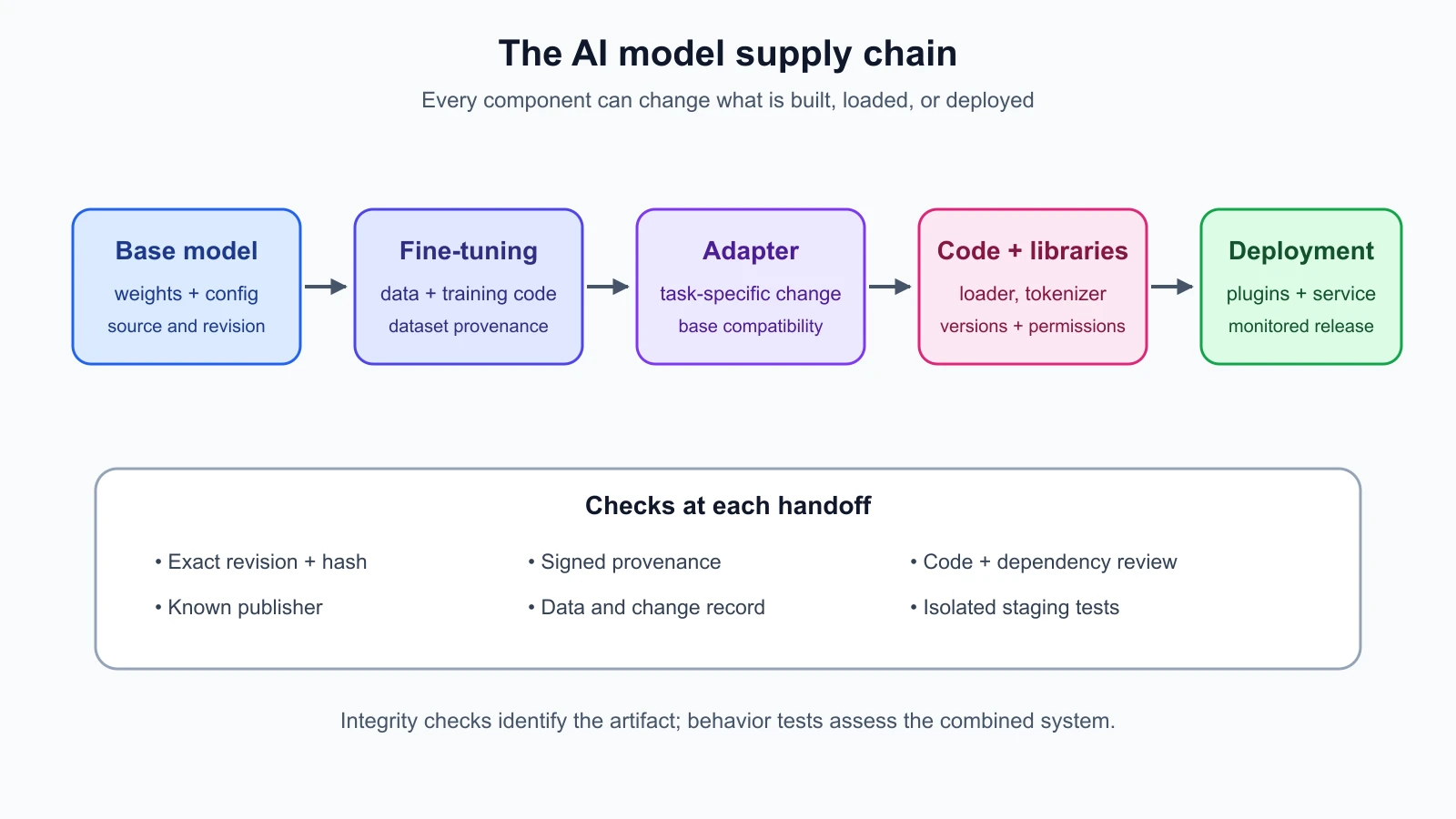
An AI model is rarely a single file from a single source. A deployed system may combine a base model, fine-tuned weights, adapters, tokenizer files, configuration, custom code, libraries, plugins, and data used to build or evaluate it. Each part can arrive through a different path and be maintained by a different person or organization. If one part is changed, mislabeled, or simply poorly documented, the system you evaluate may not be the system you expected to install.
This is a supply-chain problem. The AI supply chain is the path through which models, data, code, tools, and updates are created, distributed, reviewed, and deployed. Provenance means information about where an artifact came from and how it changed. Integrity means confidence that the artifact has not been altered since a known point. These checks help answer “what did we receive?” They do not alone answer “does it behave safely?” Both questions matter.
NIST's AI Risk Management Framework includes third-party software, data, and supply-chain issues in its governance outcomes. Its Generative AI Profile also discusses data provenance and risks across the AI value chain. For a red team, the practical task is to identify the components and changes that could affect behavior, then test the system at the boundary where those components are accepted.
What can be manipulated?
Model manipulation is a broad description for changes that alter a model or its behavior in ways the owner did not intend or approve. A change can be malicious, accidental, or introduced by a process that nobody reviewed carefully. The phrase does not imply that every unexpected answer means someone tampered with the model. Behavior can change because of an update, a different prompt, new data, a configuration change, or normal variation. A good investigation compares versions and records how the system was built.
A base model can be replaced with a different artifact that uses a familiar name. Fine-tuning can introduce unwanted behavior if its data is low quality, contaminated, or not approved. An adapter is a smaller set of learned parameters used with a base model to change its behavior without distributing a full new copy. Adapters are convenient, but they are still executable system inputs in the broader sense: their source, compatibility, and effects need review. A malicious or simply unreviewed adapter might shift responses, add a hidden trigger behavior, or change how the model handles a task.
The surrounding files matter too. A model repository may contain custom loading code, configuration, tokenizers, templates, or scripts. A dependency may be compromised or may change behavior after an update. A plugin can receive prompts or call external services. A dataset can contain examples that bias the fine-tuning process or encode a trigger. A model card may describe intended use and known limits, but it is documentation, not proof that the file matches the description or that the model meets the claims.
For example, suppose the fictional HelpDesk Bot team plans to update its support model. The proposed package includes a base model, a support adapter, a tokenizer, a custom loader, and three updated libraries. A repository name looks familiar, but the adapter has no stated source and the custom loader requests permission to run remote code. The package may be benign, but the team does not yet have enough evidence to approve it. The correct next step is to hold the update, ask the owner for the missing provenance, and evaluate the package in an isolated staging process if it passes initial review.
Trace the components and their owners
Start with an inventory. Record the model identifier and exact revision, the artifact files, adapter or fine-tune version, tokenizer and configuration, framework and library versions, custom code, plugins, and any data or process that changed the model. Include the person or team responsible for each item. If the system calls an external model service, record the provider, endpoint or deployment identifier, documented version, and the team's ability to learn about provider-side updates.
An inventory is useful only when it distinguishes a stable reference from a label. A branch called main, a tag called latest, or a display name such as “Support Assistant v2” may point to different content over time. A pinned revision identifies a specific immutable commit or release. Pinning helps reproduce an evaluation and makes a changed artifact visible. It does not certify the code or weights as safe; it makes the object you reviewed more precise.
For each component, ask what it can affect. Weights and adapters can affect predictions. A tokenizer can change how text is split and represented. Configuration can change model structure or generation behavior. Custom code can run during loading or inference. Libraries can interpret files and implement model operations. Plugins and retrieval connectors can expose data or enable actions. A dependency list should include versions and source locations, not merely names.
The diagram gives one way to think about the chain. Teams may use different packaging and deployment systems, so adapt the boxes to the system under review. Do not let the diagram create false confidence: some paths are managed by a vendor, and some information may not be available. Record those gaps as limitations and ask whether the remaining uncertainty fits the system's risk tolerance.
Use an intake checklist
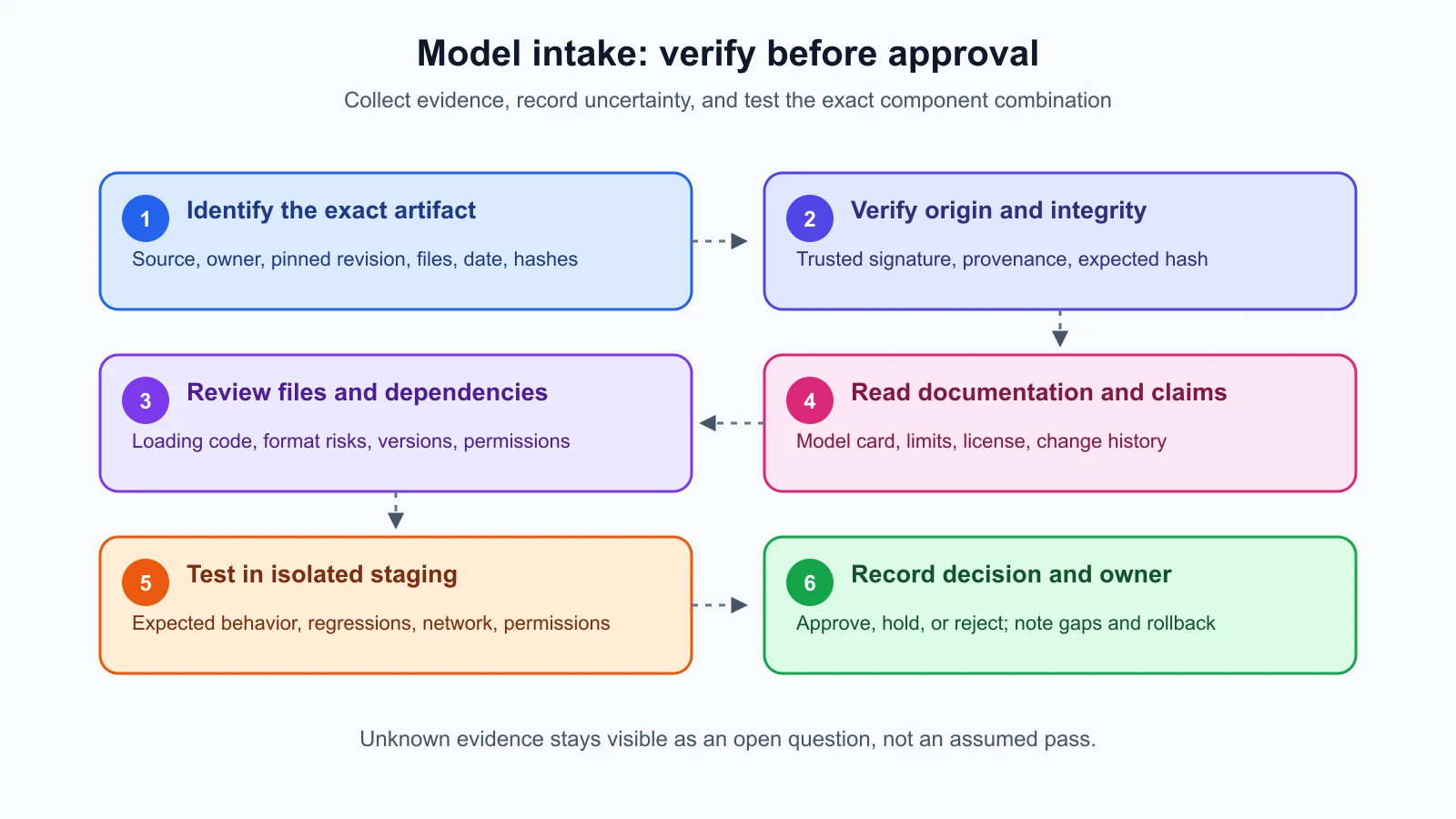
Before a model, adapter, plugin, or library is approved, assign an owner to answer the checklist in the second diagram. “Unknown” is a valid recorded answer, but it is not the same as “verified.” The reviewer should know what evidence supports each answer and who accepted any remaining risk.
1. Identify the exact artifact
Write down the source, owner, revision, download location, date received, and files expected in the package. Record cryptographic hashes for the exact files. A cryptographic hash is a fixed-length value calculated from file contents; a changed file produces a different hash with very high probability. Compare the received file's hash with one obtained through a trusted channel. A hash detects a mismatch only when the expected hash itself comes from a trustworthy source.
Do not rely on the filename or a repository's popularity. A familiar name can be reused, and popular projects can still contain vulnerable or unwanted components. Pin the specific revision your team reviewed and store the reference in the build record so another person can reproduce the intake decision.
2. Check origin and provenance
Ask who created the artifact, who published it, whether the publisher is authorized to distribute it, and how it was built or modified. Look for a signed release, a verified commit, or a provenance record that links source materials and build steps to the artifact. Signing is a cryptographic way for a key holder to attest to a message or artifact. Verification can show that the artifact matches a signature made by a particular key, if the team has independently established that the key belongs to the expected publisher.
A signature does not mean that the signer is trustworthy, that the artifact is harmless, or that the signer reviewed every risk. It helps establish origin and detect alteration after signing. Treat the trust in the signing key as a separate question. A build provenance statement also depends on the identity of its issuer and the reliability of the process it describes.
3. Review code and file formats
Find out whether the package contains code that runs during installation, loading, conversion, or inference. Review what it does and which permissions it requests. Avoid enabling remote custom code just to make a model load unless the code has been reviewed and the need is understood. If the files use a serialization format capable of executing code during deserialization, treat loading as running untrusted code.
For Python, the standard pickle format can invoke code when data is loaded. Hugging Face's security guidance for pickle files warns about this behavior and explains that repository scanning is not a complete guarantee. Where supported by the toolchain, prefer a data-only weights format such as safetensors, which is designed to store tensors without pickle's general object-execution behavior. A safer format reduces one class of loading risk; it does not prove the weights are honest, the configuration is appropriate, or the whole package is harmless.
If a legacy artifact must be converted, do that in a disposable, isolated environment with no credentials, limited network access, and no access to sensitive files. Review the resulting artifacts, record the conversion tool and version, and compute new hashes. Isolation limits damage if something goes wrong; it is not a reason to skip source review.
4. Check dependencies and access
Review dependency names, versions, sources, and update policy. Check whether a package is maintained, whether its declared source matches the installed source, and whether the build pulled additional components. Lock dependency versions for the evaluation and deployment build. Avoid installing optional packages or plugins that the system does not need. Give build and inference processes only the permissions they require.
This review should include credentials and network access. A model loader should not need a broad cloud token just to read weights. A plugin should not receive all user data if it needs only a small field. Use separate test credentials in staging, and ensure secrets are not embedded in model repositories, notebooks, or logs. Lesson 16 covers runtime isolation and infrastructure protections in more depth.
5. Read documentation, then test behavior
Read the model card, license, intended-use statement, known limitations, training or fine-tuning description, evaluation details, and update history. Check whether documentation names the exact revision under review. Missing documentation is a signal to investigate, but polished documentation is not an independent security assessment. A model card is a useful source of claims and context, not a certificate.
Run the component first in a controlled staging environment with synthetic or approved test data. Verify that it loads as expected, that the service makes only the expected network calls, and that the basic task behavior matches the team's acceptance criteria. Then run the existing regression and red-team tests, including relevant canary tests, privacy checks, and tool-permission checks. Compare results with the currently deployed version. Record new failures and unexpected changes for review before rollout.
Fine-tuning deserves its own comparison. Keep the base revision, adapter revision, fine-tuning data description, training code, and evaluation set in the change record. Test the adapter both with ordinary examples and with the security cases that matter to the application. A fine-tune can improve a task while weakening refusal behavior, changing data handling, or altering tool use. Do not assume the base model's previous review covers the combined model.
Integrity is not behavior
An integrity check answers whether an artifact matches the expected bytes or came through a known signing process. A behavior test asks what the resulting system does. Neither replaces the other. A perfectly signed artifact may contain a vulnerability or undesirable behavior. An unsigned artifact may be harmless, but the team has less evidence about its origin. A comprehensive intake combines both kinds of evidence with a decision about residual uncertainty.
This distinction also helps make findings precise. “The update's adapter hash did not match the reviewed release” is a verifiable integrity finding. “The model is malicious” requires evidence of intent or behavior that the test may not establish. “The model card says the package was trained on approved data” reports a claim, not verification of the training set. Separate observed facts, vendor statements, and team assumptions in your notes.
Model behavior can vary between runs, and a finite set of tests cannot prove the absence of a hidden behavior. Use tests tied to the application's risks, repeat tests when outputs are stochastic, and review changes in access, dependencies, and data. If an unexpected trigger-like response appears, preserve the minimal safe evidence, stop further probing if it might expose sensitive data or cause external actions, and follow the engagement's escalation process.
Fine-tuning and adapter review
Fine-tuning changes a model using additional examples or an optimization process. The added examples may be carefully curated, weakly labeled, synthetic, or collected from feedback. Each choice can affect the result. A supply-chain review should ask who selected the data, whether its use was approved, how it was filtered, and what evaluations were run. Where the data cannot be inspected, record what assurance the provider offers and what uncertainty remains.
An adapter may be distributed separately from its base model. Confirm that it is intended for the exact base revision and the expected task. Combining an adapter with another base version can produce unexpected output even without tampering. Record the combination as a new system version and rerun appropriate tests. If an adapter is removed or replaced, verify that the deployed system no longer loads an old copy from a cache or alternate path.
Treat plugins and model-hub repositories as external dependencies. Review release history, maintainers, permissions, and declared code. Check whether the component can reach the network or access local files. Use a separate staging environment to observe behavior, but remember that a test environment may not reveal every conditional action or dormant behavior. The purpose is to collect evidence and reduce risk, not to claim certainty from one successful load.
A practical decision for HelpDesk Bot
Return to the proposed fictional update: the adapter source is unclear and its loader requests remote code. The intake reviewer records the artifact identifiers and hashes, asks the supplier to identify the adapter author and provide a fixed revision, and requests an explanation of the custom loader. The team does not enable the loader in production to find out what it does. If the supplier provides reviewable source and the update remains justified, an engineer can examine it and run it in an isolated staging environment without production credentials.
Suppose the source review shows that the loader only registers the model architecture, and the adapter is signed by an established internal build key. Those facts improve provenance, but they do not finish approval. The team still verifies the signature against its trusted key, pins the exact base and adapter revisions, checks dependencies, runs behavior tests, and compares the results against the current HelpDesk Bot. If the adapter changes output in an unexpected way, release pauses until the team understands the difference or rejects the update.
If the supplier cannot provide the missing information, the team records the gap and decides whether the component is necessary. It may choose an alternative with clearer provenance or keep the current version. This is a risk decision, not a verdict that the unverified package is malicious. A written decision gives the owner a chance to revisit the choice when better evidence becomes available.
Keep the record useful
An intake record should make the decision reproducible without preserving unnecessary sensitive information. Include the component names and pinned revisions, hashes, signature or provenance checks performed, dependency lock information, source review notes, test environment, behavior-test results, exceptions, approving owner, and date. Note the deployed combination, not just the base model name.
Define when a new review is required. A changed weight file, adapter, tokenizer, loader, plugin permission, dependency version, provider model revision, or fine-tuning dataset can change the risk. Updates should trigger the relevant checks before rollout. Maintain a rollback path to a previously reviewed version, and monitor for behavior changes after deployment. Lesson 19 discusses continuous testing; the supply-chain record gives those tests a stable version to compare.
The NIST AI RMF is a voluntary risk-management framework, not a certification that a system is secure. Its supply-chain outcomes can help teams organize governance questions, while the intake checklist here translates those questions into evidence to collect for a particular model update. Use controls proportionate to impact and document where a vendor or closed service limits what you can verify.
Mistakes beginners make
- Trusting a model because the repository is popular or its name resembles a known release.
- Treating a hash as proof of safety when the expected hash came from the same untrusted channel.
- Assuming a valid signature means the signer reviewed the artifact or guarantees its behavior.
- Enabling remote code or loading an unfamiliar serialized file on a workstation with credentials.
- Treating a data-only weight format as proof that the model or the rest of the package is safe.
- Reviewing the base model but forgetting the adapter, tokenizer, custom loader, plugins, or dependencies.
- Assuming a model card verifies the training data or the artifact's actual behavior.
- Testing a fine-tuned model only on ordinary task examples and skipping security regressions.
- Calling an unexplained behavior malicious before collecting evidence about version and configuration changes.
- Recording only the model's display name, making it impossible to reproduce which combination was tested.
Recap and try it yourself
An AI system depends on more than its base weights. Adapters, data, tokenizers, configuration, custom code, dependencies, and plugins all contribute to what runs. Map the chain, identify owners, pin exact revisions, compare hashes from trusted sources, verify signatures against trusted keys, review code and formats, and test the combined system in staging. Integrity checks establish identity or detect changes; behavior tests look for unwanted effects. Documentation and model cards provide context but do not replace verification. Record unknowns as unknowns and make an explicit risk decision before deployment.
Try this with the fictional HelpDesk Bot: write a one-page intake record for a proposed base model plus adapter, tokenizer, and one plugin. For each item, list its source, exact version, owner, what evidence you would request, and the behavior test you would run. Mark any missing evidence and decide whether you would approve, hold, or reject the update. Do not download or execute an unknown model package for this exercise.