
Prompt Engineering course · lesson 13 of 26
- 1What Is Prompt Engineering? A Practical Beginner's Guide
- 2How a Model Reads Your Prompt: Tokens and Context
- 3Choosing a Model and Reading Its Documentation
- 4Controlling Model Output: Sampling and Limits
- 5Your First Prompt Workflow: Test One Change at a Time
- 6Be Clear and Direct: Give the Model a Usable Task
- 7System, Role, and Context Prompts: Give Instructions Their Place
- 8Zero-Shot, One-Shot, and Few-Shot Prompting
- 9Structure Prompts with Delimiters, Tags, and Templates
- 10Structured Output: Get Answers You Can Parse and Check
- 11Prompting with Long Documents and Large Context
- 12Prompt Recipes for Ten Common Jobs
- 13Chain-of-Thought Prompts and Thinking Models
- 14Step-Back Prompting and Prompt Chaining
- 15Self-Consistency, Tree of Thoughts, and ReAct
- 16Self-Evaluation and Reliability Checks
- 17Define Success and Build Test Cases
- 18Compare Prompts with Graders
- 19Debug a Failing Prompt
- 20Automatic Prompt Engineering
- 21Version and Document Your Prompts
- 22Hallucinations and Grounding
- 23Bias and Debiasing Prompts
- 24Prompt Injection and Safe Prompting
- 25Prompts in Production
- 26Capstone: Build and Test a Prompt Library
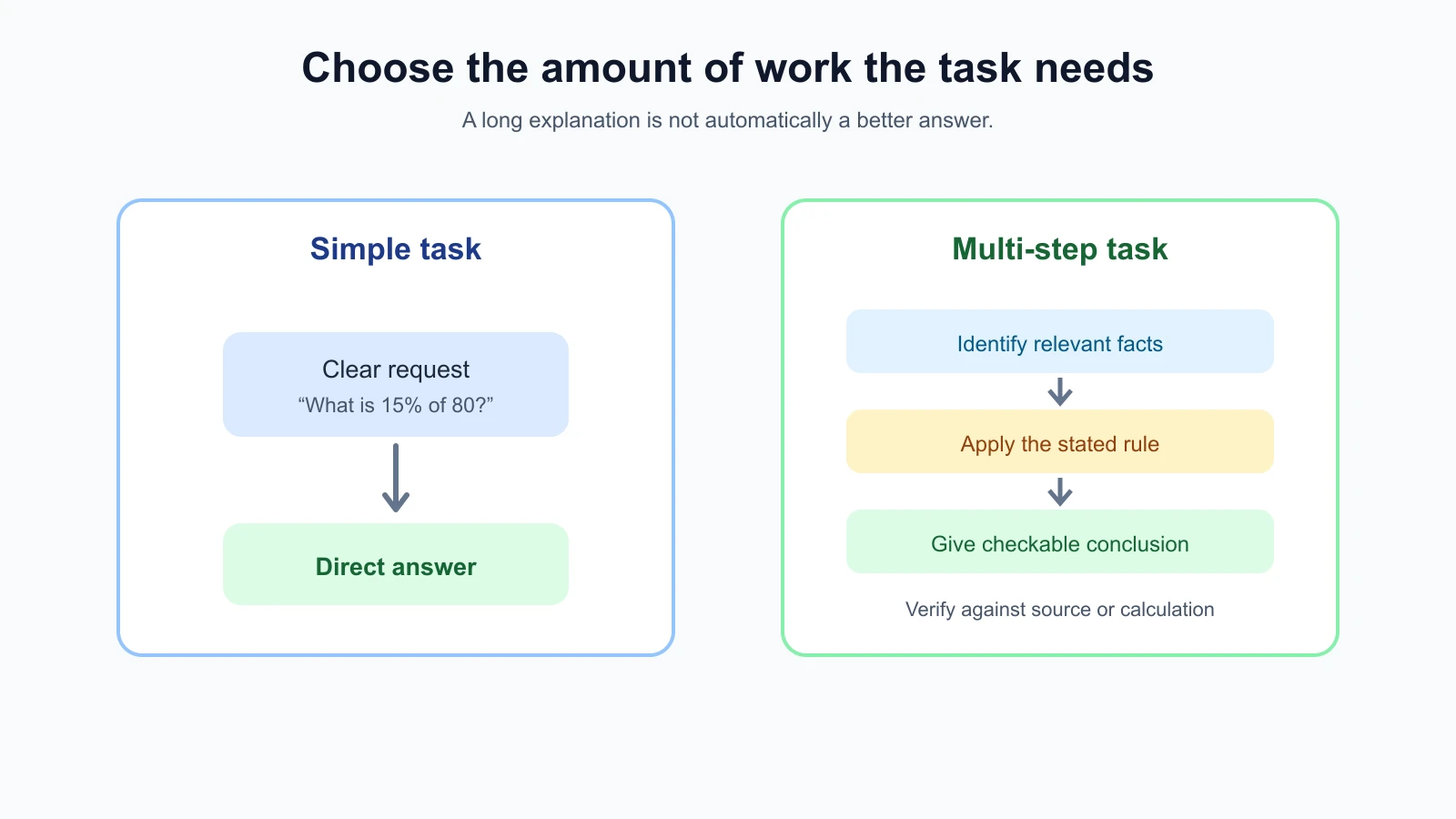
A direct question is often the best prompt. “What is 15% of 80?” does not need a long set of instructions. A problem with several conditions may benefit from being broken into smaller parts, or from a model that can spend more effort before answering.
This lesson introduces chain-of-thought (CoT) prompting, a technique that asks a model to work through intermediate steps before giving an answer. It also explains how this differs from using a model with built-in reasoning or “thinking” capabilities. The important practical question is not whether an answer contains a long explanation. It is whether the method improves results you can check.
What chain-of-thought prompting means
A chain of thought is a sequence of intermediate statements that leads from a question toward an answer. In a prompt, this might be requested with a phrase such as “break the problem into steps” or demonstrated through examples that show intermediate work before the final result.
The original 2022 Chain-of-Thought Prompting paper studied few-shot examples that included reasoning steps before answers. Its abstract reports improved performance on arithmetic, commonsense, and symbolic reasoning tasks across the large models it evaluated. This was an important research result, but it does not mean every current model or task benefits from asking for a visible step-by-step explanation.
The results depend on the model, task, examples, and evaluation. The paper found its benefits on sufficiently large models; it also noted that some one-step problems saw little improvement. Use the research as a reason to test decomposition on tasks that need it, not as a rule to add “think step by step” to every prompt.
Ask for useful steps, not ritual
For a multi-condition problem, a useful prompt might tell the model to identify relevant facts, apply a stated rule, and give a concise answer. Those instructions make the work easier to review. The steps should fit the task rather than act as a ritual.
For example, a travel reimbursement question might involve a policy limit, a receipt amount, and a date rule. You could ask the model to list the policy clauses and values it used, calculate the eligible amount, and state any missing detail. If the answer looks wrong, you have specific items to check.
A broad instruction such as “Think step by step about everything” may add unnecessary text. It can also encourage a long explanation without making the result more accurate. Specify the work product that helps: “Show the formula and substituted values,” “List the two policy clauses that apply,” or “State which assumption would change the answer.” These outputs are observable and can be checked.
For tasks where a clear, concise result is enough, ask for that result directly. If you need an explanation for a person, request a short rationale based on evidence, not a transcript of hidden internal reasoning.
A written explanation is not a proof
A model can produce a plausible explanation that contains an error or does not faithfully describe how it arrived at its answer. The explanation and conclusion are both generated text. A smooth sequence of steps does not establish that the steps are correct or complete.
Research has documented this limitation. The paper Language Models Don’t Always Say What They Think found cases where chain-of-thought explanations sounded plausible yet failed to reveal how a biased prompt detail influenced the answer. The tested models and tasks in any paper have limits, but the lesson is practical: treat a rationale as something to examine, not as an audit trail you can automatically trust.
For a calculation, verify the inputs and arithmetic independently. For a source-based answer, ask for the passage and check that it supports the conclusion. For a code suggestion, run appropriate checks. For a consequential decision, use domain review and safeguards. An explanation can help you find what to inspect; it cannot replace verification.
What reasoning or thinking models add
Some providers offer models designed or tuned to spend additional computation on complex tasks. Product documentation may call them reasoning models or describe a thinking capability. They may include controls such as reasoning effort, thinking level, or a thinking budget. These terms and controls vary by provider, model, API, and date.
The model may do more internal work without displaying every step. Some APIs expose no reasoning text, while others may provide a summary or specific thinking blocks under documented conditions. A visible summary is not necessarily the full internal process. Check the current model guide before assuming that a prompt phrase or setting works the same way across products.
OpenAI’s reasoning guidance says to give reasoning models the task, constraints, and desired output, and treats effort as a tuning control. Its best-practices guide advises against chain-of-thought prompts for models that already reason internally. Anthropic’s thinking documentation says the thinking text available in its API is a summary, not raw chain of thought, and notes that requests for internal reasoning in the response text may be refused by some current models. Google’s Gemini thinking guide documents model-specific thinking controls. This guidance was checked on 4 November 2026; model behavior and parameters change, so consult the current reference for your endpoint.
For a reasoning model, start with the task, constraints, and answer format. Do not add an old “think step by step” instruction just because it helped another model. If the output is weak, check the input, task definition, model documentation, and evaluation results before changing effort settings.
When step-by-step prompting may help
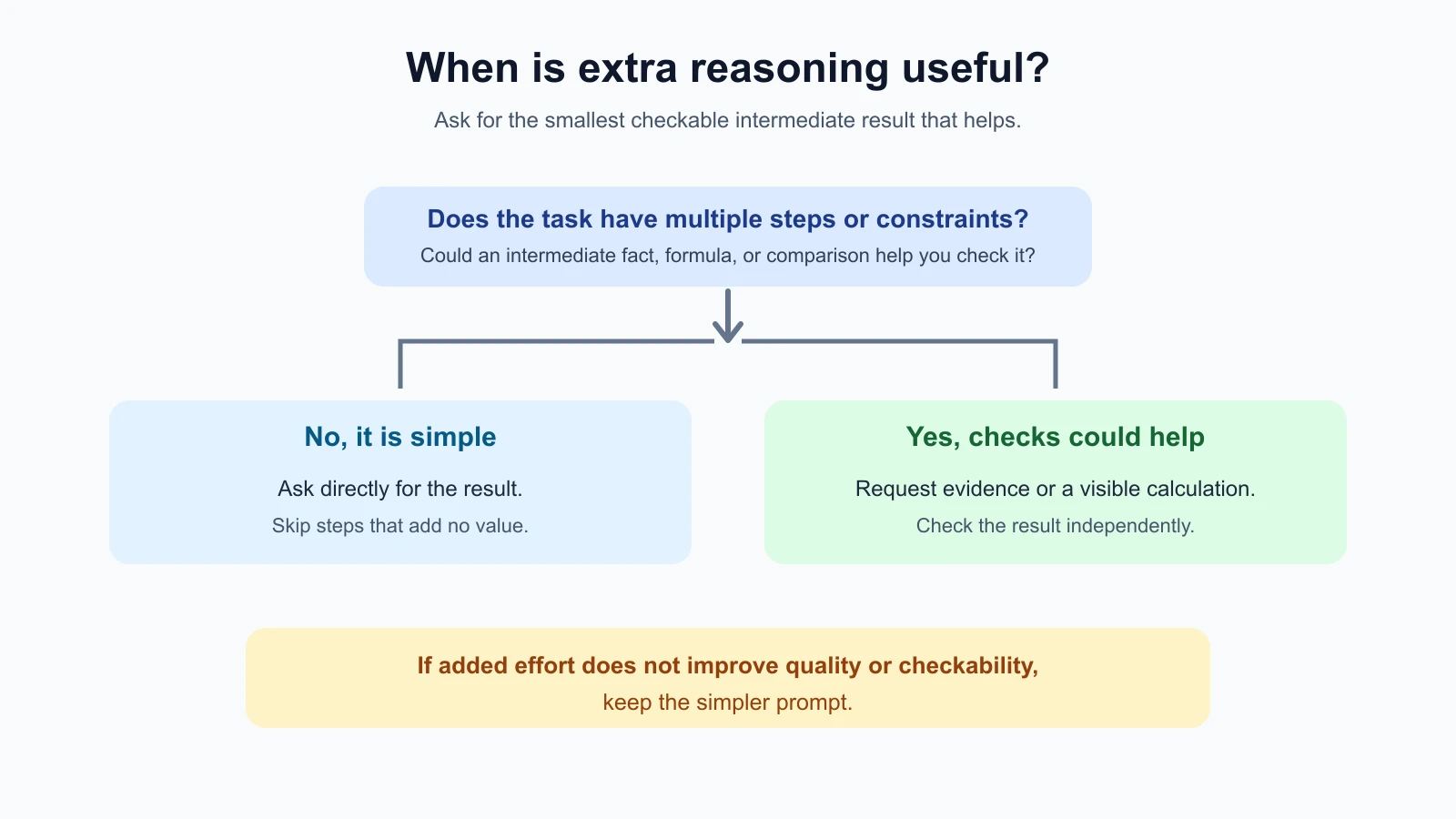
Consider asking for a structured explanation or intermediate result when the task has multiple dependent steps, several constraints, or an answer that must be tied to supplied evidence. Examples include comparing options against a rubric, calculating a total from several line items, or extracting facts from a long policy before answering a question.
You may not need chain-of-thought wording for these tasks. A list of source facts, a visible formula, a short comparison table, or a few named checks may be more useful. In a workflow with tools, a model can also call a calculator, search a source, or run code, then report the tool result. The AI Agents lesson on ReAct and chain of thought explains how tool actions and reasoning fit together.
A direct answer may be better for a routine lookup, a simple rewrite, a translation, or a task where a short result is all you need. More generated text can cost time and tokens, and it gives you more material to review. If a step-by-step explanation does not improve accuracy, clarity, or checkability, remove it.
A careful way to test it
Use the prompt comparison habit from your first prompt workflow: define success, keep inputs consistent, and change one thing at a time.
- Choose a task that sometimes fails or has several steps.
- Write the direct prompt and define what a correct answer must contain.
- Add one useful intermediate output, such as a formula, source quote, or comparison criterion.
- Test both versions on the same representative inputs, including a boundary case.
- Check correctness and usefulness, not the length or confidence of the explanation.
- Keep the simpler version if the added steps do not help.
If you use a model with a thinking control, treat the setting as another variable. Check whether the model supports it, start with the provider’s recommended setting, and change one supported control at a time. Compare quality alongside latency and cost. More effort may help a difficult task, but it is not a substitute for a clear request or missing information.
Do not measure success by whether the model describes an impressive number of steps. Look at the answer’s accuracy, relevant evidence, error rate on edge cases, and whether a person can verify the claims. If the result requires an external fact, use a current source. If it requires exact arithmetic, use a calculator or code where appropriate.
When you compare the direct and the reasoned prompt, record three numbers for each: how many checks passed, how long a reply took, and how much it cost. A reasoned prompt that passes one more case out of ten but takes three times as long may still be the right choice for an analysis a person reads once a day, and the wrong choice for a classifier that runs thousands of times an hour. Write down which constraint matters before you look at the results, so the decision follows your requirements and not the answer that happens to look more thorough. The lesson on comparing prompts with graders shows how to keep that comparison fair.
A worked example: compare two delivery options
Suppose you need to compare two delivery plans for a workshop. Plan A costs $48 and arrives Wednesday. Plan B costs $39 and arrives Friday. The workshop is Thursday, so arriving after Wednesday is too late.
A direct prompt could be:
1Which delivery plan meets the Thursday deadline? State the plan and its cost.
2Plans: A costs $48 and arrives Wednesday. B costs $39 and arrives Friday.
A more explicit, checkable prompt could be:
1Compare each plan with the Thursday deadline.
2For each plan, state whether it arrives by Wednesday and list its cost.
3Then recommend the lowest-cost plan that meets the deadline.
4If neither plan qualifies, say so.
5
6Plan A: $48, arrives Wednesday.
7Plan B: $39, arrives Friday.
8Deadline: Thursday.
The second prompt exposes the criterion and asks for intermediate facts the reader can inspect. It does not need a long narrated reasoning trace. Both prompt and answer here are illustrative; no live model run was made. A person can verify the recommendation against the dates and prices directly.
If the model recommends Plan B because it costs less, the problem is not solved by asking it to “think harder.” The prompt must make the deadline a hard constraint, and the answer must be checked against that constraint. A visible comparison helps find the missed condition.
Mistakes beginners make
- Adding “think step by step” to every request. Simple tasks may not benefit from extra generated steps.
- Assuming a written rationale is faithful. Check key facts and calculations independently.
- Confusing more text with more accuracy. Judge the result using task-specific checks.
- Asking a reasoning model to reveal every internal thought. Follow its provider’s documentation and request useful evidence or a concise explanation instead.
- Changing model, prompt, and effort at the same time. Compare one change at a time to learn what helped.
- Treating effort as a quality guarantee. More computation can cost time and still produce errors.
- Forgetting tools and external checks. Use calculators, source documents, code, or human review when the task calls for them.
- Keeping an elaborate prompt that does not improve results. Prefer the simplest tested prompt that meets your criteria.
Recap and try it yourself
Chain-of-thought prompting asks for intermediate steps, and research has shown improvements on some multi-step tasks. The benefit is not universal. A reasoning model may do internal work without returning a raw trace, and visible explanations can be incomplete or unfaithful. Ask for checkable outputs such as calculations, evidence, or criteria. Compare against a direct prompt, and keep the simpler version if added steps do not help.
Try it: choose a low-stakes task with two or more constraints. Write a direct prompt and a second version that asks for one useful intermediate result. Test both on the same three examples, check the final answer independently, and compare quality, length, and time. In the next lesson, we will explore step-back prompting and prompt chaining.