
Prompt Engineering course · lesson 3 of 26
- 1What Is Prompt Engineering? A Practical Beginner's Guide
- 2How a Model Reads Your Prompt: Tokens and Context
- 3Choosing a Model and Reading Its Documentation
- 4Controlling Model Output: Sampling and Limits
- 5Your First Prompt Workflow: Test One Change at a Time
- 6Be Clear and Direct: Give the Model a Usable Task
- 7System, Role, and Context Prompts: Give Instructions Their Place
- 8Zero-Shot, One-Shot, and Few-Shot Prompting
- 9Structure Prompts with Delimiters, Tags, and Templates
- 10Structured Output: Get Answers You Can Parse and Check
- 11Prompting with Long Documents and Large Context
- 12Prompt Recipes for Ten Common Jobs
- 13Chain-of-Thought Prompts and Thinking Models
- 14Step-Back Prompting and Prompt Chaining
- 15Self-Consistency, Tree of Thoughts, and ReAct
- 16Self-Evaluation and Reliability Checks
- 17Define Success and Build Test Cases
- 18Compare Prompts with Graders
- 19Debug a Failing Prompt
- 20Automatic Prompt Engineering
- 21Version and Document Your Prompts
- 22Hallucinations and Grounding
- 23Bias and Debiasing Prompts
- 24Prompt Injection and Safe Prompting
- 25Prompts in Production
- 26Capstone: Build and Test a Prompt Library
By the end of this lesson, you will be able to make a short list of models for a task, compare them with the same examples, and find the details that matter in each provider’s documentation. You do not need to know every model name. The catalogs change often, so this lesson teaches a selection process you can repeat.
In How a Model Reads Your Prompt, we saw that a language model generates text from the tokens and context it receives. Different models were trained and configured in different ways, so the same prompt may not produce the same quality, format, or level of detail on each one. Choosing a model is part of prompt work because the model affects what your prompt can achieve.
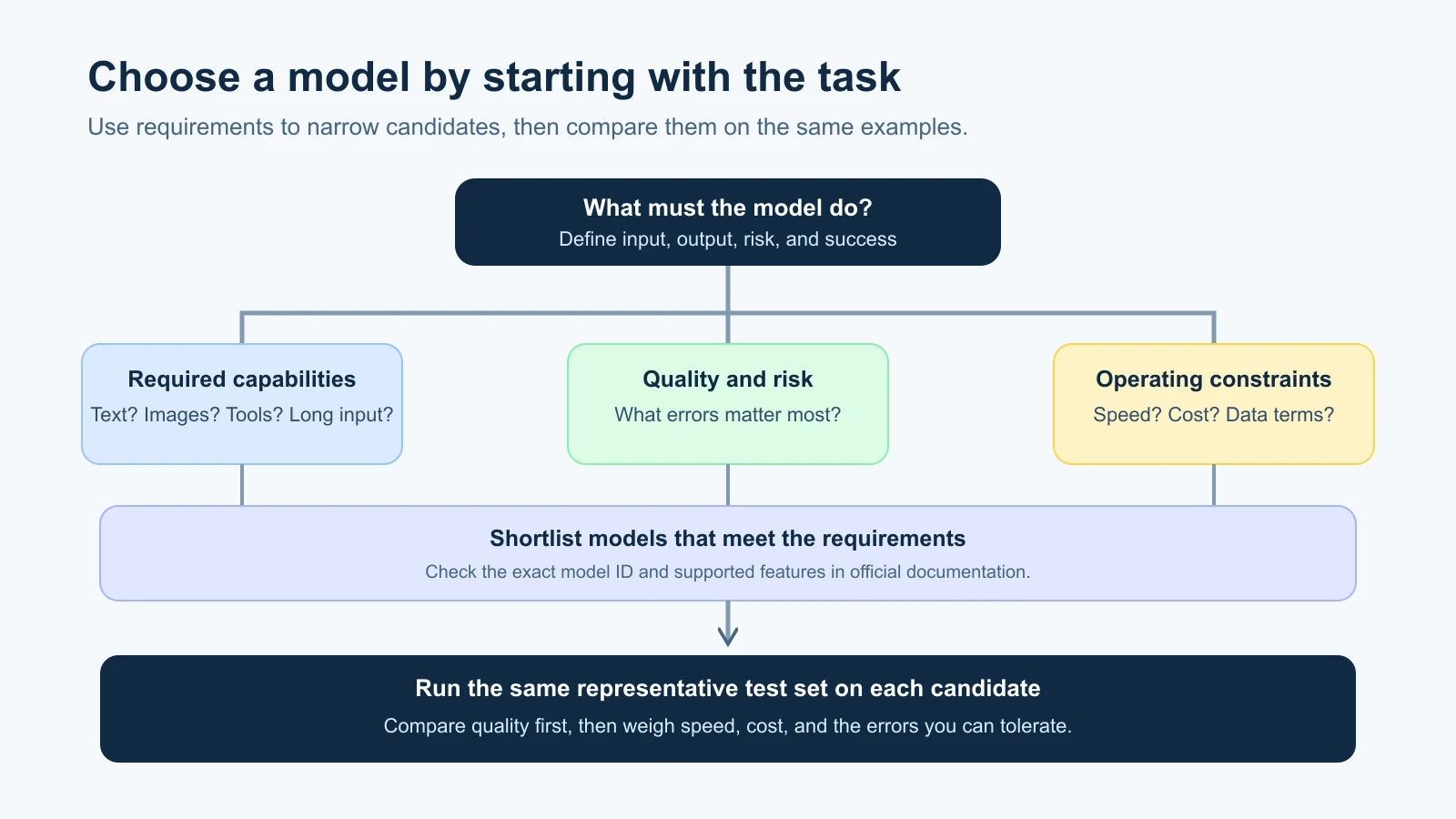
Start with the job
Before looking at a model catalog, write down what the model needs to do. A vague goal such as “help our team” is hard to compare. A task such as “label each incoming support message as billing, delivery, account, or other, then quote the phrase that supports the label” gives you something to test.
Describe the inputs the model will receive and the answer you need back. Does it need to read plain text, images, audio, or long documents? Will it answer a person, extract fields for software, or call tools? How much delay can users tolerate? What happens when it gives an incorrect answer? These questions narrow the search before the names and benchmark charts start to blur together.
Then decide what a successful result looks like. For the support-label task, you might require the right category, a quote that actually appears in the message, and an “unclear” result when the message does not provide enough evidence. Include ordinary messages and awkward cases: mixed requests, typos, short notes, and messages that do not fit any category. You will need those examples to compare models fairly.
What the model families tell you
Providers group related models into families. A family name can suggest a broad design or product line, but each provider names and organizes its models differently. “Fast,” “reasoning,” “mini,” “flash,” or “pro” are labels to investigate, not a shared technical standard across companies.
As of 4 November 2026, examples in the providers’ public materials include:
| Provider | Model family examples | What to inspect in the current catalog |
|---|---|---|
| Anthropic | Claude, including Opus, Sonnet, Haiku, Fable, and Mythos lines | Model IDs, lifecycle, supported features, limits, and availability by platform |
| OpenAI | GPT models, including current GPT-6 and GPT-5.6 listings | Model-specific capabilities, API support, reasoning controls, and deprecation status |
| Gemini, in Pro, Flash, and Flash-Lite lines (for example Gemini 3.6 Flash and Gemini 3.5 Flash-Lite) | Stable or preview status, modality, endpoints, and supported settings | |
| Meta | Open-weight Llama models, and the Muse family (for example Muse Spark) on Meta’s current developer site | License, downloadable weights, deployment needs, modalities, and context limits |
| xAI | Grok, including the 4.x versions such as Grok 4.7 | Current API model ID, capabilities, available tools, and model-card details |
These names are examples, not a ranked list or endorsement. The APIs and app products may offer different models, and providers can add, rename, deprecate, or retire them. For a current choice, check the provider pages directly: Anthropic’s model overview, OpenAI’s model catalog, Google’s Gemini model list, Meta’s developer site, and xAI’s model documentation.
The catalog is a starting point. A family name does not tell you how a particular model handles your prompt, whether your account can access it, or whether your application can call it through the platform you plan to use. Some offerings are previews. Some are available only through a particular account, cloud, or license. Check the exact model and service you intend to run.
Compare the trade-offs that matter to you
There is no single “best” model for every task. You are choosing among trade-offs, and your priorities depend on the application.
- Quality on your task: Does it meet your success criteria on normal and difficult examples?
- Speed: Does it respond quickly enough for the person or process waiting for it?
- Cost: What will the expected input and output use cost at your volume? Check current rates and billing details instead of comparing a model label.
- Input and output types: Can it handle the text, images, audio, or structured output your task needs?
- Limits and tools: Does it support the context size, output length, and tool use you need?
- Deployment and control: Can you use the API, region, hosting method, license, and data controls your project requires?
Some models are marketed for lower latency or high-volume work. Others are positioned for more demanding reasoning or long, multi-step tasks. Treat those descriptions as clues for what to test. A model advertised for reasoning still needs to pass your reasoning examples; a fast model still needs to be accurate enough for the task.
The word reasoning in a product description may refer to a model trained to spend more computation on difficult requests, or to an optional setting that changes how much effort it uses. Details vary. Read the model’s own guide before assuming that “reasoning model” has one consistent meaning across providers. We will explore generation settings in Controlling the output: sampling and limits.
A fair model comparison
Suppose your team wants to sort incoming support messages. You have narrowed the list to two models: a smaller, faster option and a more capable option from the same or different provider. The names alone do not tell you which one will classify your messages better.
Make a small test set from messages your team is allowed to use. Remove personal information if it is not needed. For every message, write down the correct category and the evidence phrase. Include a few messages with two issues or no clear category. These are your expected results, sometimes called labels or ground truth.
Give each model the same instructions, the same test messages, and the same output requirements. Keep settings the same where the APIs allow it. Record the actual model ID, date, and settings, because names like “latest” can point to a changed version later. Then compare each output with your expected results. Count category mistakes, unsupported quotes, malformed responses, and cases where the model should have returned “unclear.”
Do not treat a tiny test set as proof. It is a first screen that can reveal obvious differences and help you decide what to test next. If the task is important or used often, add more examples that reflect real inputs and review difficult results with a person who understands the work. A more capable model may justify its extra cost if it avoids mistakes that matter. A cheaper model may be enough if it passes the requirements and a reliable check catches the remaining errors.
The workflow should continue after launch. Keep a set of examples that represents the task, and rerun it when you change the prompt, model, API, or application. In later lessons, we will build this comparison into a small prompt lab.
Read a model page like a checklist
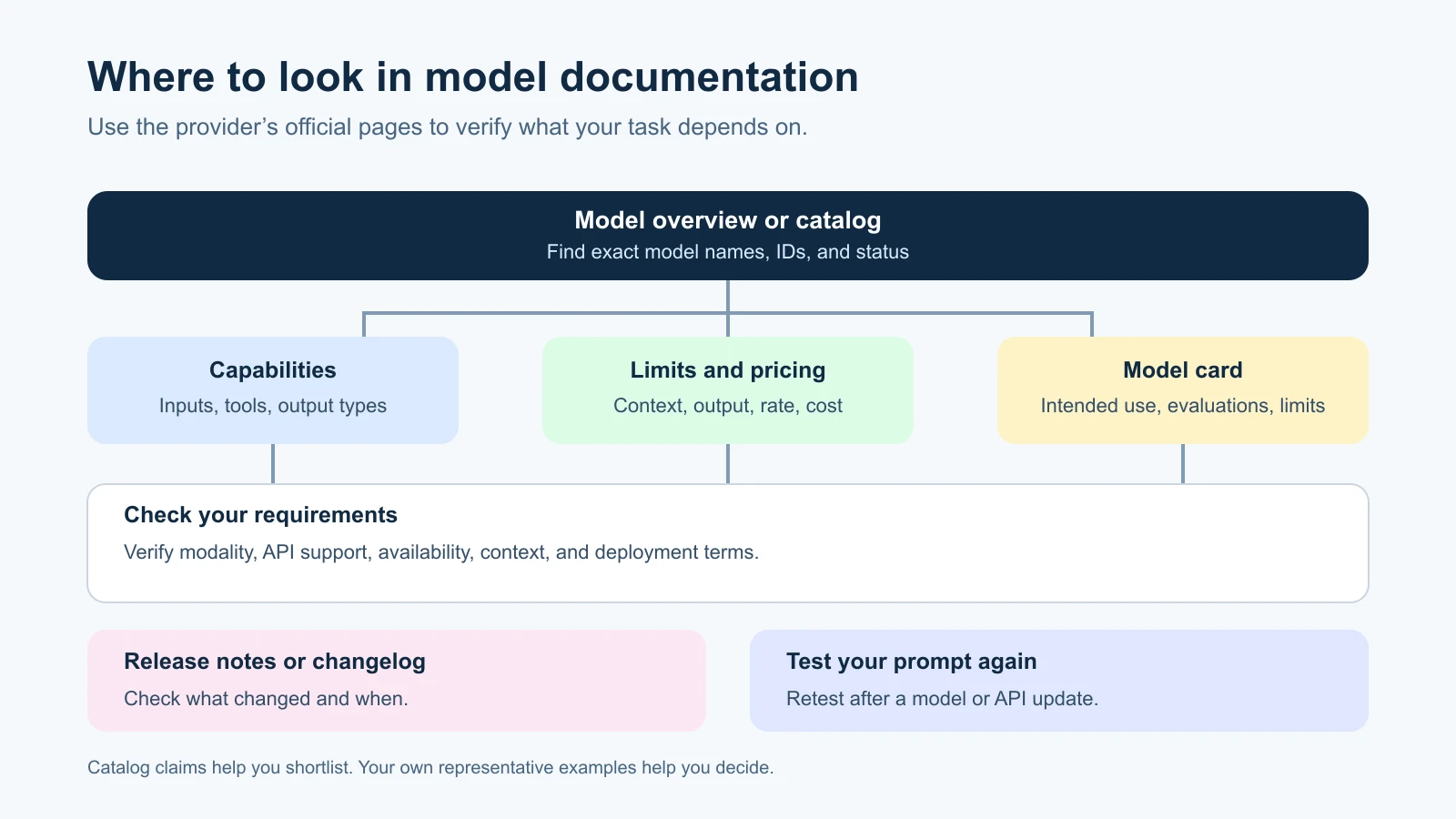
When a model looks promising, open its official model page and answer a few questions before writing around its capabilities:
- What is the exact model ID? A display name, an API ID, and a version alias may differ. Find the identifier your code or product must select.
- Is it stable, preview, deprecated, or retired? Preview behavior may change. A deprecated model may remain available temporarily but should not be the default for a new integration.
- What inputs and outputs does it support? Check for text, images, audio, video, structured output, and any restrictions that matter to your task.
- What limits apply? Look for the context window, maximum output, file sizes, rate limits, and any other limits relevant to your request.
- Which controls and tools work? Settings, function calls, web search, computer use, and other features may only work with certain models or API endpoints.
- What are the cost and latency implications? Prices can differ between input and output, cached and uncached tokens, batch and standard requests, or service tiers. Use the provider’s current pricing page for estimates.
- What data and deployment terms apply? Check where requests are processed, retention and privacy options, regional availability, licenses, and whether self-hosting is possible.
You do not need every answer for every experiment. For a classroom prompt exercise, you may only need the product, model, and basic limits. For an application that handles customer records, the data terms and deployment options are part of the model choice.
Model cards and changelogs
A model card is a document that describes a model, its intended uses, evaluations, limitations, and sometimes its development or safety information. It is useful when you need more context than a short catalog description provides. The format and detail are not identical across providers, and some publish more information than others.
Read the parts that affect your decision. Look for what the model is designed to do, the kinds of input it accepts, known limits, how evaluation results were produced, and any license or usage restrictions. A benchmark score is evidence about one evaluation setup. It does not predict exactly how the model will perform on your data. Compare the benchmark’s task and conditions with your own.
A changelog or release note records changes to a model, API, or product. Check it when you see a new model name, when the same prompt starts behaving differently, or before upgrading a production integration. A model may gain features, change its defaults, move from preview to stable, or be scheduled for retirement. Keep a dated note of the version you tested and the result you observed.
Some providers offer a fixed snapshot ID that points to a particular model version. Others encourage an alias that tracks the latest version. A snapshot can make behavior easier to reproduce, while an alias can help you receive provider updates without changing the identifier. Neither choice removes the need to retest. Follow the provider’s model versioning guidance and the stability needs of your application.
Why prompts can behave differently across models
A prompt is interpreted by the model and API that receive it. Models can differ in how they follow instructions, handle examples, use a context window, process images, support reasoning settings, or produce structured output. Even if two providers accept similar message formats, their model behavior and API features may differ.
This means a prompt that worked well on one model may need changes on another. Do not assume the reason in advance. Run the same representative cases on both models, inspect where they differ, and change one part of the prompt at a time. The model-specific prompting guides are useful for learning supported techniques, but your own evaluation tells you whether those techniques suit your task.
If the output has to be valid JSON, for example, one API may provide a schema-constrained mode while another relies on a different feature or prompt pattern. If you need a visual input, confirm that the selected model and endpoint accept it. If your prompt relies on current facts, check whether the application needs search or retrieval. Verify each requirement in the documentation and then test it in the actual environment.
Mistakes beginners make
- Picking from a leaderboard alone. A benchmark may test a different task, data set, or setup. Run examples that represent your work.
- Treating family labels as universal categories. “Flash,” “mini,” “reasoning,” and similar names do not mean the same thing across providers.
- Using a model ID without checking its lifecycle. Previews and aliases can change. Confirm the exact identifier and status.
- Comparing models with different prompts or settings. Keep the comparison fair so the results tell you something about the models.
- Assuming an old prompt still fits after a model update. Re-run your examples after changing the model, prompt, API, or settings.
Recap and try it yourself
Choose a model by starting with the task, defining success, and comparing candidates on the same examples. Use official documentation to confirm the exact model ID, available features, limits, lifecycle, price, and deployment terms. Model cards and changelogs add context about intended use, evaluation, limitations, and version changes. Recheck these details because model catalogs change.
Try it: pick one task you do with an AI assistant. Write three checks for a successful response, then find two candidate models in their official catalogs. Record each exact model name, one feature you need, and one limitation or question from its documentation. In the next lesson, we will look at sampling and output limits.